It is essential to be familiar with the environment where you have initial access to a compromised machine during a red team engagement. Therefore, performing reconnaissance and enumeration is a significant part, and the primary goal is to gather as much information as possible to be used in the next stage. 在红队参与期间,您必须熟悉您可以初始访问受感染计算机的环境。因此,执行侦察和枚举是重要的一部分,主要目标是收集尽可能多的信息以用于下一阶段。
With an initial foothold established, the post-exploitation process begins! 随着初步立足点的建立,开发后的过程开始了!
This room introduces commonly-used concepts, technologies, and security products that we need to be aware of. 本会议室介绍了我们需要注意的常用概念、技术和安全产品。
In this room, the assumption is that we have already gained access to the machine, and we are ready to expand our knowledge more about the environment by performing enumerating for the following: 在这个房间里,假设我们已经获得了对机器的访问权限,并且我们准备通过执行以下列举来扩展我们对环境的更多了解:
Network infrastrucutre 网络基础设施
Active Directory Environment Active Directory 环境
Users and Groups 用户和组
Host-based security solutions 基于主机的安全解决方案
Network-based security solutions 基于网络的安全解决方案
Applications and services 应用和服务
Answer the questions below 回答以下问题
Let’s start learning! 让我们开始学习吧!
Deploy the VM
In order to follow along with the task content and apply what is given in this room, you need to start the attached machine by using the green Start Machine button in this task, and wait a few minutes for it to boot up. To access the attached machine, you can either use the split in browser view or connect through the RDP. 为了遵循任务内容并应用此房间中给出的内容,您需要使用此任务中的绿色“启动计算机”按钮启动连接的计算机,并等待几分钟以使其启动。要访问连接的计算机,您可以使用浏览器视图中的拆分或通过 RDP 进行连接。
If you prefer to connect via RDP, make sure you deploy the AttackBox or connect to theVPN 如果希望通过 RDP 进行连接,请确保部署 AttackBox 或连接到 VPN.
Use the following credentials: kkidd:Pass123321@ 使用以下凭据:kkidd:Pass123321@
Terminal 终端
1
user@machine$ xfreerdp /v:10.10.11.90 /u:kkidd
Answer the questions below 回答以下问题
Let’s discuss the common network infrastructure in the next task! 让我们在下一个任务中讨论常见的网络基础设施!
Network Infrastructure
Once arriving onto an unknown network, our first goal is to identify where we are and what we can get to. During the red team engagement, we need to understand what target system we are dealing with, what service the machine provides, what kind of network we are in. Thus, the enumeration of the compromised machine after getting initial access is the key to answering these questions. This task will discuss the common types of networks we may face during the engagement. 一旦到达一个未知的网络,我们的首要目标是确定我们在哪里以及我们可以到达什么。在红队参与期间,我们需要了解我们正在处理的目标系统,机器提供什么服务,我们处于什么样的网络中。因此,在获得初始访问权限后对受感染计算机的枚举是回答这些问题的关键。这项任务将讨论我们在参与过程中可能面临的常见网络类型。
Network segmentation is an extra layer of network security divided into multiple subnets. It is used to improve the security and management of the network. For example, it is used for preventing unauthorized access to corporate most valuable assets such as customer data, financial records, etc. 网络分段是划分为多个子网的额外网络安全层。它用于提高网络的安全性和管理。例如,它用于防止未经授权访问公司最有价值的资产,例如客户数据、财务记录等。
The Virtual Local Area Networks (VLANs) is a network technique used in network segmentation to control networking issues, such as broadcasting issues in the local network, and improve security. Hosts within the VLAN can only communicate with other hosts in the same VLAN network. 虚拟局域网 (VLAN) 是一种用于网络分段的网络技术,用于控制网络问题(例如本地网络中的广播问题)并提高安全性。VLAN 中的主机只能与同一 VLAN 网络中的其他主机通信。
If you want to learn more about network fundamentals, we suggest trying the following TryHackMe module: Network Fundamentals↗ 如果您想了解有关网络基础知识的更多信息,我们建议您尝试以下 TryHackMe 模块:网络基础知识.
Internal Networks 内部网络
Internal Networks are subnetworks that are segmented and separated based on the importance of the internal device or the importance of the accessibility of its data. The main purpose of the internal network(s) is to share information, faster and easier communications, collaboration tools, operational systems, and network services within an organization. In a corporate network, the network administrators intend to use network segmentation for various reasons, including controlling network traffic, optimizing network performance, and improving security posture. 内部网络是根据内部设备的重要性或其数据可访问性的重要性进行分段和分离的子网。内部网络的主要目的是在组织内共享信息、更快、更轻松的通信、协作工具、操作系统和网络服务。在企业网络中,网络管理员出于各种原因打算使用网络分段,包括控制网络流量、优化网络性能和改善安全状况。
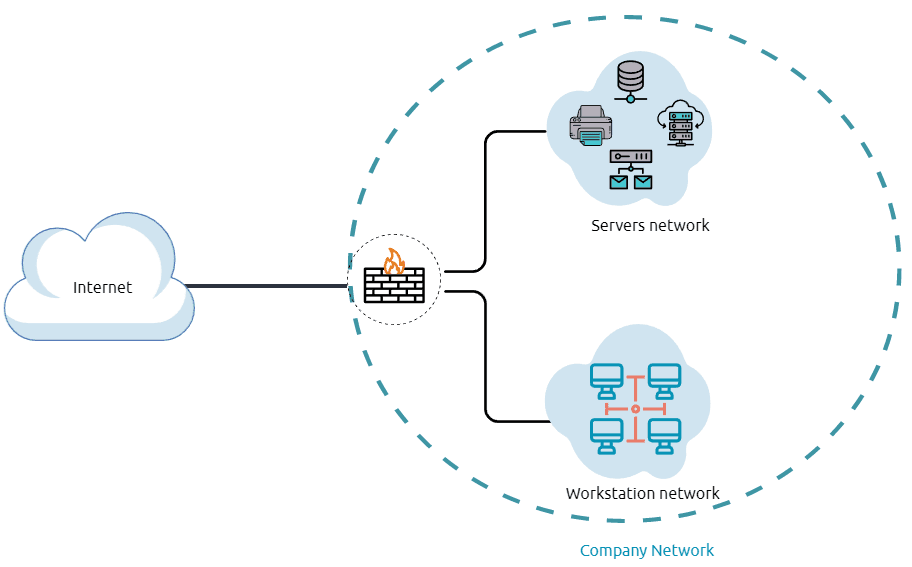
The previous diagram is an example of the simple concept of network segmentation as the network is divided into two networks. The first one is for employee workstations and personal devices. The second is for private and internal network devices that provide internal services such as DNS, internal web, email services, etc. 上图是网络分段的简单概念示例,因为网络分为两个网络。第一个是用于员工工作站和个人设备。第二种是提供内部服务的专用和内部网络设备,如DNS、内部Web、电子邮件服务等。
A Demilitarized Zone (DMZ) 非军事区 (DMZ)
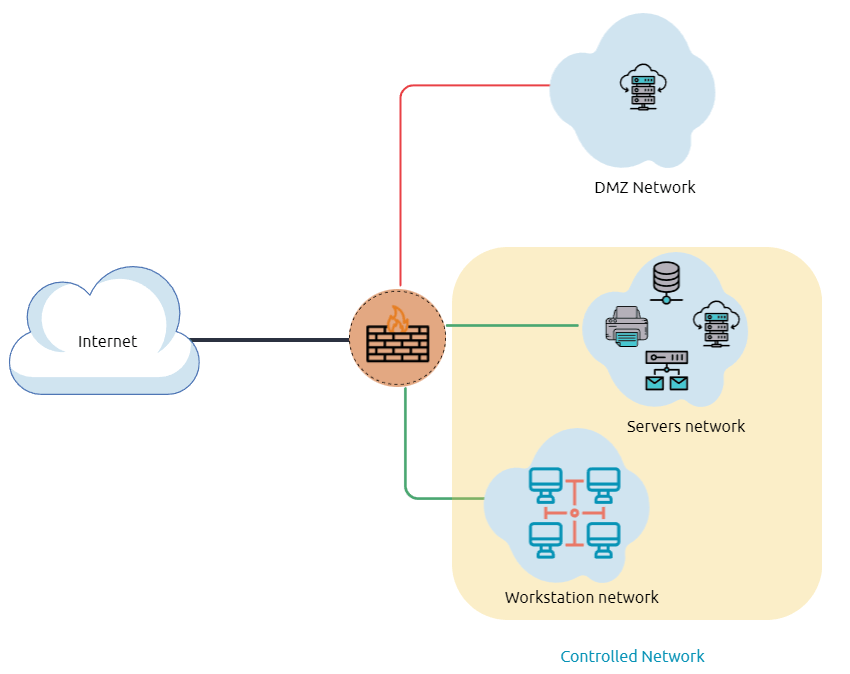
A DMZ Network is an edge network that protects and adds an extra security layer to a corporation’s internal local-area network from untrusted traffic. A common design for DMZ is a subnetwork that sits between the public internet and internal networks. DMZ 网络是一种边缘网络,可保护公司内部局域网并添加额外的安全层,使其免受不受信任的流量的影响。DMZ 的常见设计是位于公共 Internet 和内部网络之间的子网。
Designing a network within the company depends on its requirements and need. For example, suppose a company provides public services such as a website, DNS, FTP, Proxy, VPN, etc. In that case, they may design a DMZ network to isolate and enable access control on the public network traffic, untrusted traffic. 在公司内部设计网络取决于其要求和需求。例如,假设一家公司提供公共服务,例如网站、DNS、FTP、代理、VPN 等。在这种情况下,他们可能会设计一个 DMZ 网络来隔离和启用对公共网络流量(不受信任流量)的访问控制。
In the previous diagram, we represent the network traffic to the DMZ network in red color, which is untrusted ( comes directly from the internet). The green network traffic between the internal network is the controlled traffic that may go through one or more than one network security device(s). 在上图中,我们用红色表示到 DMZ 网络的网络流量,这是不受信任的(直接来自 Internet)。内部网络之间的绿色网络流量是可能通过一个或多个网络安全设备的受控流量。
Enumerating the system and the internal network is the discovering stage, which allows the attacker to learn about the system and the internal network. Based on the gained information, we use it to process lateral movement or privilege escalation to gain more privilege on the system or the AD environment. 枚举系统和内部网络是发现阶段,它允许攻击者了解系统和内部网络。根据获得的信息,我们使用它来处理横向移动或权限提升,以获得在系统或AD环境中的更多权限。
Network Enumeration 网络枚举
There are various things to check related to networking aspects such as TCP and UDP ports and established connections, routing tables, ARP tables, etc. 有各种与网络方面相关的内容需要检查,例如 TCP 和 UDP 端口以及已建立的连接、路由表、ARP 表等。
Let’s start checking the target machine’s TCP and UDP open ports. This can be done using the netstat command as shown below. 让我们开始检查目标计算机的 TCP 和 UDP 打开端口。这可以使用 netstat 命令完成,如下所示。
Command Prompt 命令提示符
The output reveals the open ports as well as the established connections. Next, let’s list the ARP table, which contains the IP address and the physical address of the computers that communicated with the target machines within the network. This could be helpful to see the communications within the network to scan the other machines for open ports and vulnerabilities. 输出显示打开的端口以及已建立的连接。接下来,让我们列出 ARP 表,该表包含与网络中的目标计算机通信的计算机的 IP 地址和物理地址。这可能有助于查看网络内的通信,以扫描其他计算机以查找打开的端口和漏洞。
Command Prompt 命令提示符
Internal Network Services 内部网络服务
It provides private and internal network communication access for internal network devices. An example of network services is an internal DNS, web servers, custom applications, etc. It is important to note that the internal network services are not accessible outside the network. However, once we have initial access to one of the networks that access these network services, they will be reachable and available for communications. 它为内部网络设备提供专用和内部网络通信访问。网络服务的一个示例是内部 DNS、Web 服务器、自定义应用程序等。需要注意的是,内部网络服务无法在网络外部访问。但是,一旦我们初始访问了访问这些网络服务的网络之一,它们就可以访问并可用于通信。
We will discuss more Windows applications and services in Task 9, including DNS and custom web applications. 我们将在任务 9 中讨论更多 Windows 应用程序和服务,包括 DNS 和自定义 Web 应用程序。
1
PS C:\Users\thm> netstat -na
2
3
Active Connections
4
5
Proto Local Address Foreign Address State
6
TCP 0.0.0.0:80 0.0.0.0:0 LISTENING
7
TCP 0.0.0.0:88 0.0.0.0:0 LISTENING
8
TCP 0.0.0.0:135 0.0.0.0:0 LISTENING
9
TCP 0.0.0.0:389 0.0.0.0:0 LISTENING
1
PS C:\Users\thm> arp -a
2
3
Interface: 10.10.141.51 --- 0xa
4
Internet Address Physical Address Type
5
10.10.0.1 02-c8-85-b5-5a-aa dynamic
6
10.10.255.255 ff-ff-ff-ff-ff-ff static
Answer the questions below 回答以下问题
Read the above! 阅读上面的内容!
Active Directory (AD) 环境
What is the Active Directory (AD) environment? 什么是 Active Directory (AD) 环境?
It is a Windows-based directory service that stores and provides data objects to the internal network environment. It allows for centralized management of authentication and authorization. The AD contains essential information about the network and the environment, including users, computers, printers, etc. For example, AD might have users’ details such as job title, phone number, address, passwords, groups, permission, etc. 它是一种基于 Windows 的目录服务,用于存储数据对象并将其提供给内部网络环境。它允许集中管理身份验证和授权。AD 包含有关网络和环境的基本信息,包括用户、计算机、打印机等。例如,AD 可能具有用户的详细信息,例如职位、电话号码、地址、密码、组、权限等。
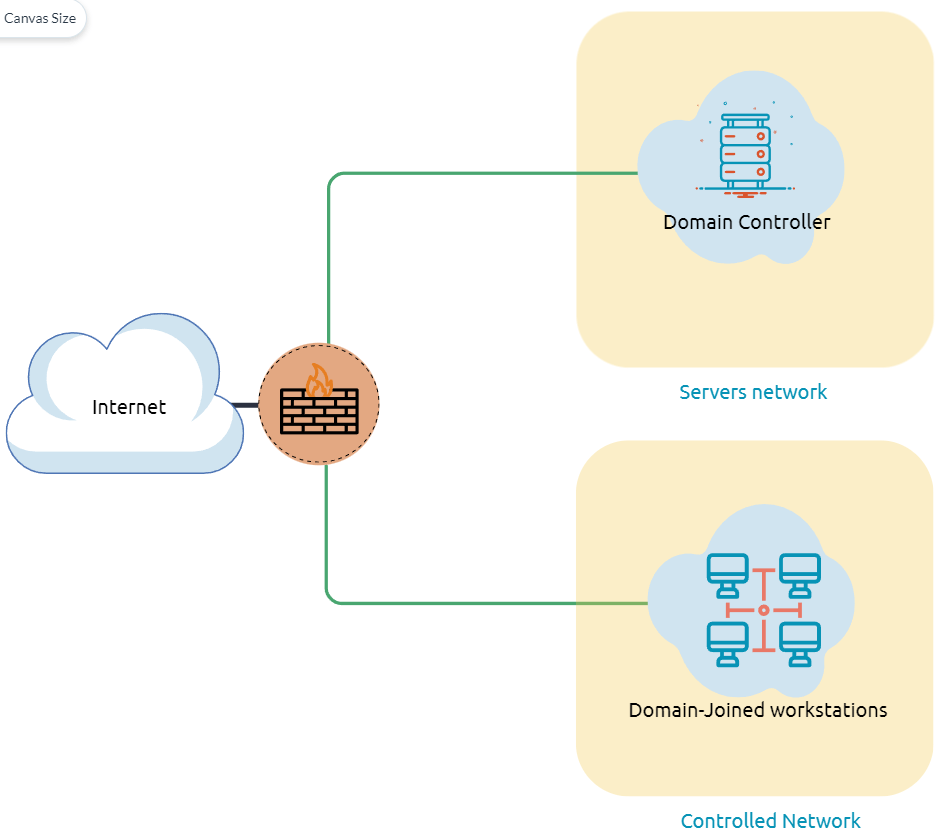
The diagram is one possible example of how Active Directory can be designed. The AD controller is placed in a subnet for servers (shown above as server network), and then the AD clients are on a separate network where they can join the domain and use the AD services via the firewall. 该图是 Active Directory 设计方法的一个可能示例。AD 控制器放置在服务器的子网中(如上所示为服务器网络),然后 AD 客户端位于单独的网络上,它们可以在其中加入域并通过防火墙使用 AD 服务。
The following is a list of Active Directory components that we need to be familiar with: 以下是我们需要熟悉的 Active Directory 组件列表:
Domain Controllers 域控制器
Organizational Units 组织单位
AD objects AD 对象
AD Domains AD 域
Forest 森林
AD Service Accounts: Built-in local users, Domain users, Managed service accounts AD 服务帐户:内置本地用户、域用户、托管服务帐户
Domain Administrators 域管理员
A Domain Controller is a Windows server that provides Active Directory services and controls the entire domain. It is a form of centralized user management that provides encryption of user data as well as controlling access to a network, including users, groups, policies, and computers. It also enables resource access and sharing. These are all reasons why attackers target a domain controller in a domain because it contains a lot of high-value information. 域控制器是提供 Active Directory 服务并控制整个域的 Windows 服务器。它是一种集中式用户管理形式,可提供用户数据加密以及控制对网络(包括用户、组、策略和计算机)的访问。它还支持资源访问和共享。这些都是攻击者以域中的域控制器为目标的原因,因为它包含大量高价值信息。
Organizational Units (OU’s) are containers within the AD domain with a hierarchical structure. 组织单位 (OU) 是 AD 域中具有分层结构的容器。
**Active Directory Objects **can be a single user or a group, or a hardware component, such as a computer or printer. Each domain holds a database that contains object identity information that creates an AD environment, including: Active Directory 对象可以是单个用户或组,也可以是硬件组件,如计算机或打印机。每个域都包含一个数据库,其中包含创建 AD 环境的对象标识信息,包括:
Users - A security principal that is allowed to authenticate to machines in the domain 用户 - 允许对域中的计算机进行身份验证的安全主体
Computers - A special type of user accounts 计算机 - 一种特殊类型的用户帐户
GPOs - Collections of policies that are applied to other AD objects GPO - 应用于其他 AD 对象的策略集合
AD** **domains are a collection of Microsoft components within an AD network. AD 域是 AD 网络中 Microsoft 组件的集合。
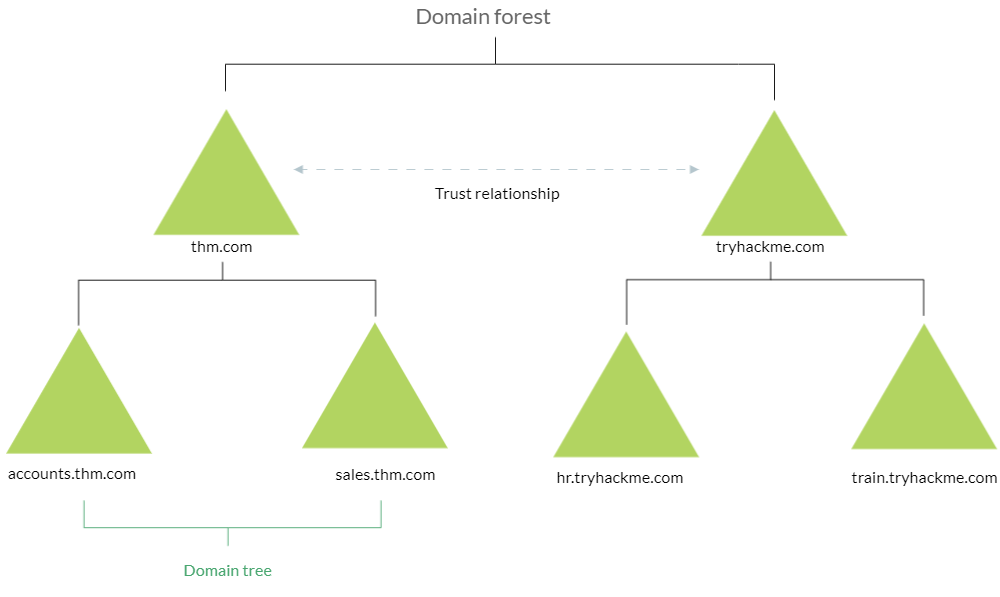
AD** **Forest is a collection of domains that trust each other. AD Forest 是相互信任的域的集合。
For more information about the basics of Active Directory, we suggest trying the following TryHackMe room: Active Directory Basics↗ 有关 Active Directory 基础知识的详细信息,建议尝试以下 TryHackMe 聊天室: Active Directory 基础知识.
_ _
Once Initial Access has been achieved, finding an AD environment in a corporate network is significant as the Active Directory environment provides a lot of information to joined users about the environment. As a red teamer, we take advantage of this by enumerating the AD environment and gaining access to various details, which can then be used in the lateral movement stage. 实现初始访问后,在企业网络中查找 AD 环境非常重要,因为 Active Directory 环境会向加入的用户提供有关环境的大量信息。作为红队成员,我们通过枚举 AD 环境并访问各种细节来利用这一点,然后可以在横向移动阶段使用这些细节。
Answer the questions below 回答以下问题
In order to check whether the Windows machine is part of the AD environment or not, one way, we can use the command prompt systeminfo command. The output of the systeminfo provides information about the machine, including the operating system name and version, hostname, and other hardware information as well as the AD domain. 为了检查 Windows 机器是否是 AD 环境的一部分,一种方法是,我们可以使用命令提示符 systeminfo 命令。systeminfo 的输出提供有关计算机的信息,包括操作系统名称和版本、主机名和其他硬件信息以及 AD 域。
Powershell Powershell的
1
PS C:\Users\thm> systeminfo | findstr Domain
2
OS Configuration: Primary Domain Controller
3
Domain: thmdomain.com
From the above output, we can see that the computer name is an AD with thmdomain.com as a domain name which confirms that it is a part of the AD environment. 从上面的输出中,我们可以看到计算机名称是一个 AD,thmdomain.com 作为域名,这证实了它是 AD 环境的一部分。
Note that if we get WORKGROUP in the domain section, then it means that this machine is part of a local workgroup. 请注意,如果我们在域部分获得 WORKGROUP,则意味着此计算机是本地工作组的一部分。
Before going any further, ensure the attached machine is deployed and try what we discussed.** Is the attached machine part of the AD environment? (Y|N)** 在继续之前,请确保已部署连接的计算机并尝试我们讨论的内容。连接的计算机是 AD 环境的一部分吗?(Y|N)
Y
If it is part of an AD environment, what is the domain name of the AD? 如果是AD环境的一部分,AD的域名是什么?
thmredteam.com
Users and Groups Management
In this task, we will learn more about users and groups, especially within the Active Directory. Gathering information about the compromised machine is essential that could be used in the next stage. Account discovery is the first step once we have gained initial access to the compromised machine to understand what we have and what other accounts are in the system. 在此任务中,我们将了解有关用户和组的详细信息,尤其是在 Active Directory 中。收集有关受感染计算机的信息至关重要,这些信息可以在下一阶段使用。一旦我们获得了对受感染机器的初始访问权限,以了解我们拥有的内容以及系统中的其他帐户,帐户发现是第一步。
An Active Directory environment contains various accounts with the necessary permissions, access, and roles for different purposes. Common Active Directory service accounts include built-in local user accounts, domain user accounts, managed service accounts, and virtual accounts. Active Directory 环境包含各种帐户,这些帐户具有用于不同目的的必要权限、访问权限和角色。常见的 Active Directory 服务帐户包括内置本地用户帐户、域用户帐户、托管服务帐户和虚拟帐户。
The built-in local users’ accounts are used to manage the system locally, which is not part of the AD environment. 内置本地用户账号用于在本地管理系统,不属于AD环境。
Domain user accounts with access to an active directory environment can use the AD services (managed by AD). 有权访问 Active Directory 环境的域用户帐户可以使用 AD 服务(由 AD 管理)。
AD managed service accounts are limited domain user account with higher privileges to manage AD services. AD 托管服务帐户是受限域用户帐户,具有更高的权限来管理 AD 服务。
Domain Administrators are user accounts that can manage information in an Active Directory environment, including AD configurations, users, groups, permissions, roles, services, etc. One of the red team goals in engagement is to hunt for information that leads to a domain administrator having complete control over the AD environment. 域管理员是可以在 Active Directory 环境中管理信息的用户帐户,包括 AD 配置、用户、组、权限、角色、服务等。参与的红队目标之一是寻找信息,使域管理员能够完全控制 AD 环境。
The following are Active Directory Administrators accounts: 以下是 Active Directory 管理员帐户:
BUILTIN\Administrator 内置\管理员
Local admin access on a domain controller 域控制器上的本地管理员访问权限
Domain Admins 域管理员
Administrative access to all resources in the domain 对域中所有资源的管理访问权限
Enterprise Admins 企业管理员
Available only in the forest root 仅在林根中可用
Schema Admins 架构管理员
Capable of modifying domain/forest; useful for red teamers 能够修改域/林;对红队队员有用
Server Operators 服务器操作员
Can manage domain servers 可以管理域服务器
Account Operators 账户运营商
Can manage users that are not in privileged groups 可以管理不在特权组中的用户
Now that we learn about various account types within the AD environment. Let’s enumerate the Windows machine that we have access to during the initial access stage. As a current user, we have specific permissions to view or manage things within the machine and the AD environment. 现在,我们了解了 AD 环境中的各种帐户类型。让我们枚举在初始访问阶段有权访问的 Windows 计算机。作为当前用户,我们拥有查看或管理机器和 AD 环境中事物的特定权限。
Active Directory (AD) Enum Active Directory (AD) 枚举
Now, enumerating in the AD environment requires different tools and techniques. Once we confirm that the machine is part of the AD environment, we can start hunting for any variable info that may be used later. In this stage, we are using PowerShell to enumerate for users and groups. 现在,在 AD 环境中枚举需要不同的工具和技术。一旦我们确认机器是 AD 环境的一部分,我们就可以开始寻找以后可能使用的任何变量信息。在此阶段,我们将使用 PowerShell 枚举用户和组。
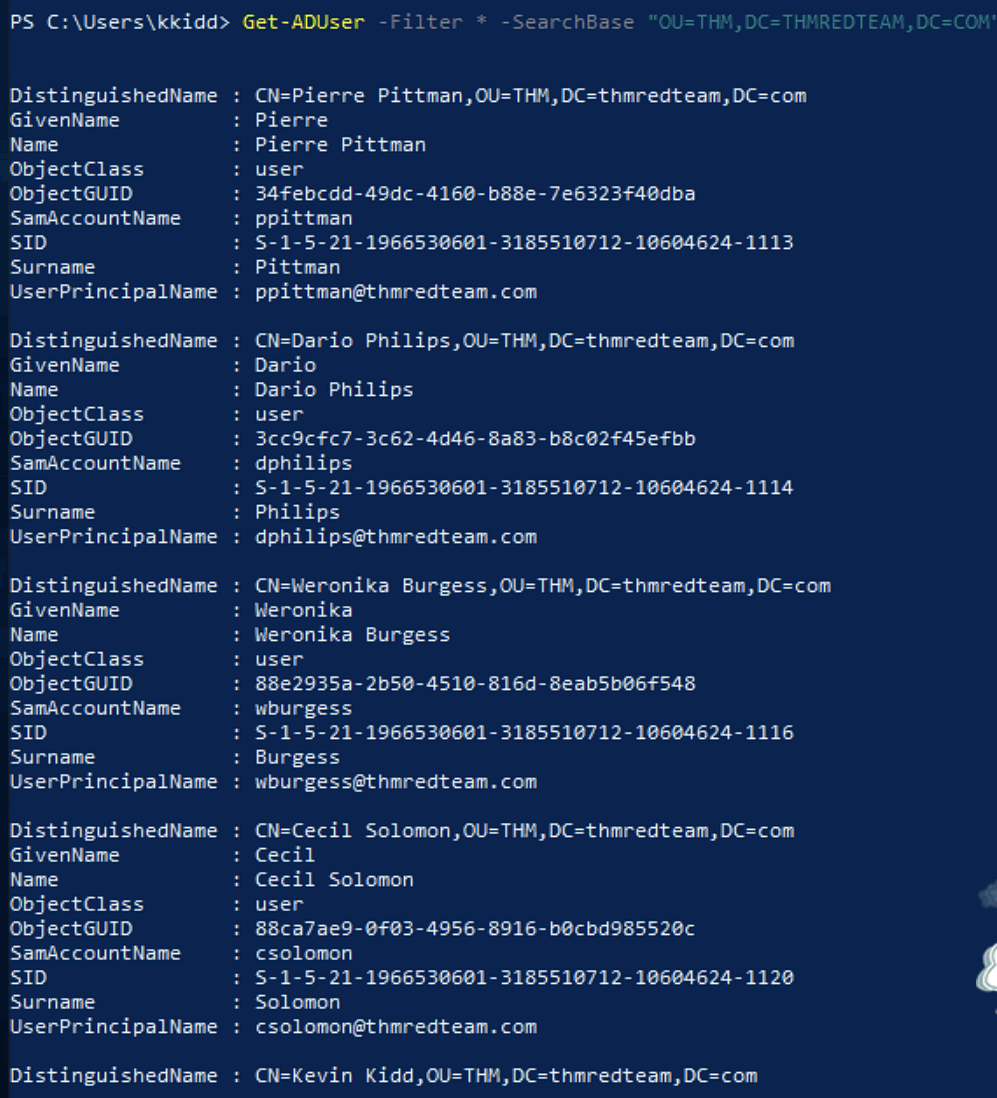
The following PowerShell command is to get all active directory user accounts. Note that we need to use -Filter argument. 以下 PowerShell 命令用于获取所有 Active Directory 用户帐户。请注意,我们需要使用 -Filter 参数。
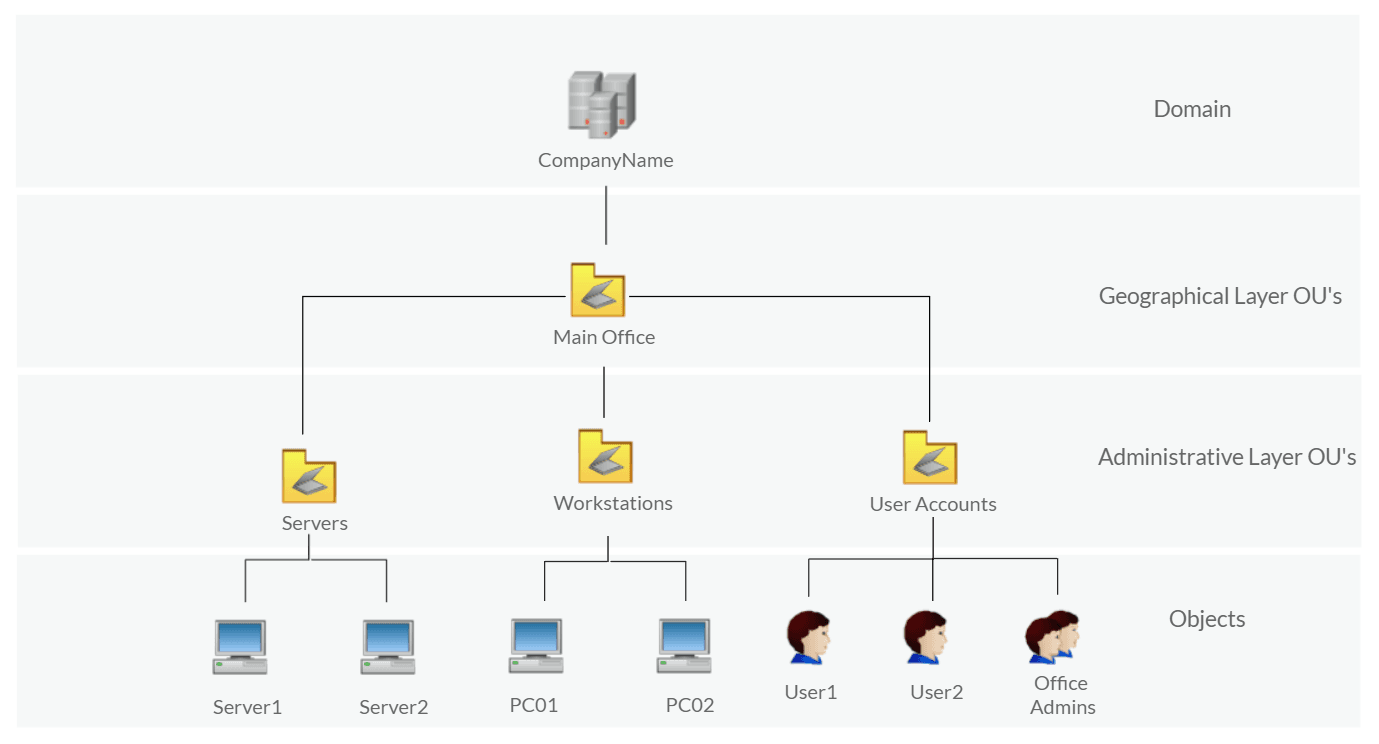
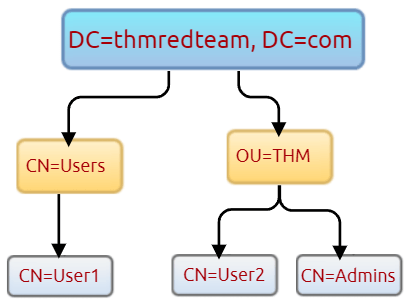
We can also use the LDAP hierarchical tree structure↗ to find a user within the AD environment. The Distinguished Name (DN) is a collection of comma-separated key and value pairs used to identify unique records within the directory. The DN consists of Domain Component (DC), OrganizationalUnitName (OU), Common Name (CN), and others. The following “CN=User1,CN=Users,DC=thmredteam,DC=com” is an example of DN, which can be visualized as follow: 我们还可以使用 LDAP 分层树结构在 AD 环境中查找用户。可分辨名称 (DN) 是逗号分隔的键和值对的集合,用于标识目录中的唯一记录。DN 由域组件 (DC)、OrganizationalUnitName (OU)、公用名 (CN) 等组成。以下“CN=User1,CN=Users,DC=thmredteam,DC=com”是DN的一个示例,可以可视化如下:
Using the SearchBase option, we specify a specific Common-Name CN in the active directory. For example, we can specify to list any user(s) that part of Users 使用 SearchBase 选项,我们在 Active Directory 中指定特定的公用名 CN。例如,我们可以指定列出用户部分的任何用户.
Note that the result may contain more than one user depending on the configuration of the CN. Try the command to find all users within the THM OU and answer question 1 below. 请注意,结果可能包含多个用户,具体取决于 CN 的配置。尝试使用该命令查找 THM OU 中的所有用户,并回答下面的问题 1。
Answer the questions below 回答以下问题
Use the Get-ADUser -Filter * -SearchBase command to list the available user accounts within THM OU in the thmredteam.com domain. How many users are available? 使用 Get-ADUser -Filter * -SearchBase 命令列出 thmredteam.com 域中 THM OU 中的可用用户帐户。有多少用户可用?
Before performing further actions, we need to obtain general knowledge about the security solutions in place. Remember, it is important to enumerate antivirus and security detection methods on an endpoint in order to stay as undetected as possible and reduce the chance of getting caught. 在执行进一步操作之前,我们需要获得有关现有安全解决方案的一般知识。请记住,在终结点上枚举防病毒和安全检测方法非常重要,以便尽可能不被发现并减少被捕获的机会。
This task will discuss the common security solution used in corporate networks, divided into Host and Network security solutions. 此任务将讨论企业网络中使用的常见安全解决方案,分为主机和网络安全解决方案。
Host Security Solutions 主机安全解决方案
It is a set of software applications used to monitor and detect abnormal and malicious activities within the host, including: 它是一组用于监视和检测主机内异常和恶意活动的软件应用程序,包括:
Antivirus software 防病毒软件
Microsoft Windows Defender
Host-based Firewall 基于主机的防火墙
Security Event Logging and Monitoring 安全事件记录和监控
Host-based Intrusion Detection System (HIDS)/ Host-based Intrusion Prevention System (HIPS) 基于主机的入侵检测系统(HIDS)/基于主机的入侵防御系统(HIPS)
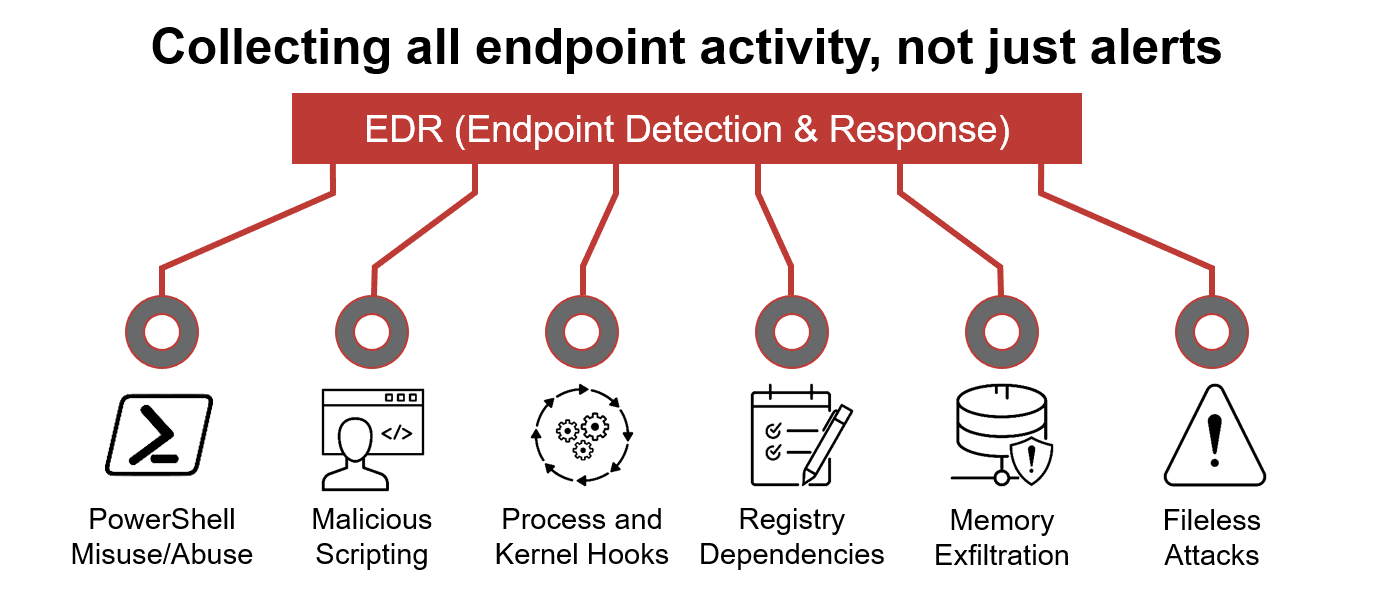
Endpoint Detection and Response (EDR) 端点检测和响应 (EDR)
Let’s go more detail through the host-based security solutions that we may encounter during the red team engagement. 让我们更详细地了解我们在红队参与期间可能遇到的基于主机的安全解决方案。
Antivirus Software (AV) 防病毒软件 (AV)
Antivirus software also known as anti-malware, is mainly used to monitor, detect, and prevent malicious software from being executed within the host. Most antivirus software applications use well-known features, including Background scanning, Full system scans, Virus definitions. In the background scanning, the antivirus software works in real-time and scans all open and used files in the background. The full system scan is essential when you first install the antivirus. The most interesting part is the virus definitions, where antivirus software replies to the pre-defined virus. That’s why antivirus software needs to update from time to time. 防病毒软件也称为反恶意软件,主要用于监视、检测和防止恶意软件在主机内执行。大多数防病毒软件应用程序都使用众所周知的功能,包括后台扫描、完整系统扫描、病毒定义。在后台扫描中,防病毒软件实时工作,并在后台扫描所有打开和使用的文件。首次安装防病毒软件时,完整的系统扫描是必不可少的。最有趣的部分是病毒定义,其中防病毒软件会回复预定义的病毒。这就是为什么防病毒软件需要不时更新的原因。
There are various detection techniques that the antivirus uses, including 防病毒软件使用多种检测技术,包括
Signature-based detection 基于签名的检测
Heuristic-based detection 基于启发式的检测
Behavior-based detection 基于行为的检测
Signature-based detection is one of the common and traditional techniques used in antivirus software to identify malicious files. Often, researchers or users submit their infected files into an antivirus engine platform for further analysis by AV vendors, and if it confirms as malicious, then the signature gets registered in their database. The antivirus software compares the scanned file with a database of known signatures for possible attacks and malware on the client-side. If we have a match, then it considers a threat. 基于签名的检测是防病毒软件中用于识别恶意文件的常用和传统技术之一。通常,研究人员或用户将受感染的文件提交到防病毒引擎平台中,供 AV 供应商进一步分析,如果确认为恶意文件,则签名将注册到他们的数据库中。防病毒软件将扫描的文件与已知签名数据库进行比较,以发现客户端上可能的攻击和恶意软件。如果我们有匹配项,那么它就会被视为威胁。
Heuristic-based detection uses machine learning to decide whether we have the malicious file or not. It scans and statically analyses in real-time in order to find suspicious properties in the application’s code or check whether it uses uncommon Windows or system APIs. It does not rely on the signature-based attack in making the decisions, or sometimes it does. This depends on the implementation of the antivirus software. 基于启发式的检测使用机器学习来确定我们是否拥有恶意文件。它实时扫描和静态分析,以查找应用程序代码中的可疑属性或检查它是否使用不常见的 Windows 或系统 API。它不依赖于基于签名的攻击来做出决策,或者有时确实如此。这取决于防病毒软件的实施。
Finally, Behavior-based detection relies on monitoring and examining the execution of applications to find abnormal behaviors and uncommon activities, such as creating/updating values in registry keys, killing/creating processes, etc. 最后,基于行为的检测依赖于监视和检查应用程序的执行,以发现异常行为和不常见的活动,例如创建/更新注册表项中的值、终止/创建进程等。
As a red teamer, it is essential to be aware of whether antivirus exists or not. It prevents us from doing what we are attempting to do. We can enumerate AV software using Windows built-in tools, such as wmic 作为红队成员,必须了解防病毒软件是否存在。它阻止我们做我们试图做的事情。我们可以使用 Windows 内置工具(例如 wmic)枚举 AV 软件.
PowerShellPowerShell的
This also can be done using PowerShell, which gives the same result. 这也可以使用 PowerShell 来完成,它给出相同的结果。
PowerShellPowerShell的
As a result, there is a third-party antivirus (Bitdefender Antivirus) and Windows Defender installed on the computer. **Note **that Windows servers may not have SecurityCenter2 namespace, which may not work on the attached VM. Instead, it works for Windows workstations! 因此,计算机上安装了第三方防病毒软件(Bitdefender Antivirus)和Windows Defender。请注意,Windows 服务器可能没有 SecurityCenter2 命名空间,这可能在附加的 VM 上不起作用。相反,它适用于 Windows 工作站!
Microsoft Windows Defender
Microsoft Windows Defender is a pre-installed antivirus security tool that runs on endpoints. It uses various algorithms in the detection, including machine learning, big-data analysis, in-depth threat resistance research, and Microsoft cloud infrastructure in protection against malware and viruses. MS Defender works in three protection modes: Active, Passive, Disable modes. Microsoft Windows Defender是在端点上运行的预安装的防病毒安全工具。它在检测中使用各种算法,包括机器学习、大数据分析、深入的威胁防御研究以及 Microsoft 云基础结构来抵御恶意软件和病毒。MS Defender在三种保护模式下工作:主动、被动、禁用模式。
Active mode is used where the MS Defender runs as the primary antivirus software on the machine where provides protection and remediation. Passive** mode is run when a 3rd party antivirus software is installed. Therefore, it works as secondary antivirus software where it scans files and detects threats but does not provide remediation. Finally, Disable **mode is when the MS Defender is disabled or uninstalled from the system. 当MS Defender作为提供保护和修正的计算机上的主要防病毒软件运行时,使用主动模式。安装第三方防病毒软件时,将运行被动模式。因此,它用作辅助防病毒软件,扫描文件并检测威胁,但不提供补救措施。最后,禁用模式是指从系统中禁用或卸载MS Defender。
We can use the following PowerShell command to check the service state of Windows Defender: 我们可以使用以下 PowerShell 命令来检查 Windows Defender 的服务状态:
PowerShellPowerShell的
Next, we can start using the Get-MpComputerStatus cmdlet to get the current Windows Defender status. However, it provides the current status of security solution elements, including Anti-Spyware, Antivirus, LoavProtection, Real-time protection, etc. We can use select to specify what we need for as follows, 接下来,我们可以开始使用 Get-MpComputerStatus cmdlet 获取当前的 Windows Defender 状态。但是,它提供了安全解决方案元素的当前状态,包括反间谍软件、防病毒、LoavProtection、实时保护等。我们可以使用 select 来指定我们需要的内容,如下所示:
PowerShellPowerShell的
As a result, MpComputerStatus highlights whether Windows Defender is enabled or not. 因此,MpComputerStatus 突出显示是否启用了 Windows Defender。
Host-based** ****Firewall**: It is a security tool installed and run on a host machine that can prevent and block attacker or red teamers’ attack attempts. Thus, it is essential to enumerate and gather details about the firewall and its rules within the machine we have initial access to. 3.基于主机的防火墙:它是在主机上安装和运行的安全工具,可以防止和阻止攻击者或红队的攻击尝试。因此,必须枚举和收集有关我们最初可以访问的计算机中的防火墙及其规则的详细信息。
The main purpose of the host-based firewall is to control the inbound and outbound traffic that goes through the device’s interface. It protects the host from untrusted devices that are on the same network. A modern host-based firewall uses multiple levels of analyzing traffic, including packet analysis, while establishing the connection. 基于主机的防火墙的主要目的是控制通过设备接口的入站和出站流量。它可以保护主机免受同一网络上不受信任的设备的侵害。现代基于主机的防火墙在建立连接时使用多个级别的流量分析,包括数据包分析。
A firewall acts as control access at the network layer. It is capable of allowing and denying network packets. For example, a firewall can be configured to block ICMP packets sent through the ping command from other machines in the same network. Next-generation firewalls also can inspect other OSI layers, such as application layers. Therefore, it can detect and block SQL injection and other application-layer attacks. 防火墙充当网络层的控制访问。它能够允许和拒绝网络数据包。例如,可以将防火墙配置为阻止通过ping命令从同一网络中的其他计算机发送的ICMP数据包。下一代防火墙还可以检查其他 OSI 层,例如应用层。因此,它可以检测并阻止SQL注入和其他应用层攻击。
PowerShellPowerShell的
If we have admin privileges on the current user we logged in with, then we try to disable one or more than one firewall profile using the Set-NetFirewallProfile cmdlet 如果我们对登录的当前用户具有管理员权限,则尝试使用 Set-NetFirewallProfile cmdlet 禁用一个或多个防火墙配置文件.
PowerShellPowerShell的
PowerShellPowerShell的
During the red team engagement, we have no clue what the firewall blocks. However, we can take advantage of some PowerShell cmdlets such as Test-NetConnection and TcpClient. Assume we know that a firewall is in place, and we need to test inbound connection without extra tools, then we can do the following: 在红队交战期间,我们不知道防火墙阻止了什么。但是,我们可以利用一些 PowerShell cmdlet,例如 Test-NetConnection 和 TcpClient。假设我们知道防火墙已经到位,并且我们需要在没有额外工具的情况下测试入站连接,那么我们可以执行以下操作:
PowerShellPowerShell的
As a result, we can confirm the inbound connection on port 80 is open and allowed in the firewall. Note that we can also test for remote targets in the same network or domain names by specifying in the -ComputerName argument for the Test-NetConnection. 因此,我们可以确认端口 80 上的入站连接已打开并允许在防火墙中。请注意,我们还可以通过在 Test-NetConnection 的 -ComputerName 参数中指定来测试相同网络或域名中的远程目标。
Using PowerShell cmdlets such Get-MpThreat can provide us with threats details that have been detected using MS Defender. Run it and answer the following: What is the file name that causes this alert to record? 使用 PowerShell cmdlet(如 Get-MpThreat)可以为我们提供使用 MS Defender 检测到的威胁详细信息。运行它并回答以下问题:导致记录此警报的文件名是什么?
Enumerate the firewall rules of the attached Windows machine. What is the port that is allowed under the THM-Connection rule? 枚举附加的 Windows 计算机的防火墙规则。THM-Connection 规则允许的端口是什么?
In this task, we will keep discussing host security solutions. 在此任务中,我们将继续讨论主机安全解决方案。
Security Event Logging and Monitoring 安全事件记录和监控
By default, Operating systems log various activity events in the system using log files. The event logging feature is available to the IT system and network administrators to monitor and analyze important events, whether on the host or the network side. In cooperating networks, security teams utilize the logging event technique to track and investigate security incidents. 默认情况下,操作系统使用日志文件记录系统中的各种活动事件。事件记录功能可供 IT 系统和网络管理员使用,以监控和分析主机端或网络端的重要事件。在协作网络中,安全团队利用日志记录事件技术来跟踪和调查安全事件。
There are various categories where the Windows operating system logs event information, including the application, system, security, services, etc. In addition, security and network devices store event information into log files to allow the system administrators to get an insight into what is going on. Windows 操作系统记录事件信息的类别有很多,包括应用程序、系统、安全性、服务等。此外,安全和网络设备将事件信息存储到日志文件中,以便系统管理员深入了解正在发生的事情。
We can get a list of available event logs on the local machine using the Get-EventLog cmdlet. 我们可以使用 Get-EventLog cmdlet 获取本地计算机上可用事件日志的列表。
PowerShellPowerShell的
1
PS C:\Users\thm> Get-EventLog -List
2
3
Max(K) Retain OverflowAction Entries Log
4
------ ------ -------------- ------- ---
5
512 7 OverwriteOlder 59 Active Directory Web Services
6
20,480 0 OverwriteAsNeeded 512 Application
7
512 0 OverwriteAsNeeded 170 Directory Service
8
102,400 0 OverwriteAsNeeded 67 DNS Server
9
20,480 0 OverwriteAsNeeded 4,345 System
10
15,360 0 OverwriteAsNeeded 1,692 Windows PowerShell
Sometimes, the list of available event logs gives you an insight into what applications and services are installed on the machine! For example, we can see that the local machine has Active Directory, DNS server, etc. For more information about the Get-EventLog cmdlet with examples, visit the Microsoft documents website↗. 有时,可用事件日志列表可让您深入了解计算机上安装了哪些应用程序和服务!例如,我们可以看到本地机器有Active Directory、DNS服务器等。有关带有示例的 Get-EventLog cmdlet 的详细信息,请访问 Microsoft 文档网站。
In corporate networks, log agent software is installed on clients to collect and gather logs from different sensors to analyze and monitor activities within the network. We will discuss them more in the Network Security Solution task. 在企业网络中,客户端上安装了日志代理软件,用于收集和收集来自不同传感器的日志,以分析和监控网络内的活动。我们将在网络安全解决方案任务中详细讨论它们。
System Monitor (Sysmon) 系统监视器 (Sysmon)
Windows System Monitor sysmon is a service and device driver. It is one of the Microsoft Sysinternals suites. The sysmon tool is not an essential tool (not installed by default), but it starts gathering and logging events once installed. These logs indicators can significantly help system administrators and blue teamers to track and investigate malicious activity and help with general troubleshooting. Windows 系统监视器 sysmon 是一种服务和设备驱动程序。它是 Microsoft Sysinternals 套件之一。sysmon 工具不是必需的工具(默认情况下未安装),但它在安装后开始收集和记录事件。这些日志指示器可以显著帮助系统管理员和蓝队成员跟踪和调查恶意活动,并帮助进行一般故障排除。
One of the great features of the sysmon tool is that it can log many important events, and you can also create your own rule(s) and configuration to monitor: sysmon 工具的一大特点是它可以记录许多重要事件,您还可以创建自己的规则和配置来监控:
Process creation and termination 进程创建和终止
Network connections 网络连接
Modification on file 对文件的修改
Remote threats 远程威胁
Process and memory access 进程和内存访问
and many others 还有很多其他的
For learning more about sysmon, visit the Windows document page here↗. 有关 sysmon 的更多信息,请访问此处的 Windows 文档页面。
As a red teamer, one of the primary goals is to stay undetectable, so it is essential to be aware of these tools and avoid causing generating and alerting events. The following are some of the tricks that can be used to detect whether the sysmon is available in the victim machine or not. 作为红队成员,主要目标之一是保持不被检测,因此必须了解这些工具并避免导致生成和警报事件。以下是一些可用于检测 sysmon 在受害计算机中是否可用的技巧。
We can look for a process or service that has been named “Sysmon” within the current process or services as follows, 我们可以在当前进程或服务中查找名为“Sysmon”的进程或服务,如下所示:
All these commands confirm if the sysmon tool is installed. Once we detect it, we can try to find the sysmon configuration file if we have readable permission to understand what system administrators are monitoring. 所有这些命令都确认是否安装了 sysmon 工具。一旦我们检测到它,如果我们具有可读权限来了解系统管理员正在监视的内容,我们可以尝试找到 sysmon 配置文件。
For more detail about the Windows sysmon tool and how to utilize it within endpoints, we suggest trying the TryHackMe room: Sysmon↗. 有关 Windows sysmon 工具以及如何在端点中使用它的更多详细信息,我们建议尝试 TryHackMe 聊天室:Sysmon。
Host-based Intrusion Detection/Prevention System (HIDS/HIPS) 基于主机的入侵检测/防御系统 (HIDS/HIPS)
HIDS** **stands for Host-based Intrusion Detection System. It is software that has the ability to monitor and detect abnormal and malicious activities in a host. The primary purpose of HIDS is to detect suspicious activities and not to prevent them. There are two methods that the host-based or network intrusion detection system works, including: HIDS 代表基于主机的入侵检测系统。它是能够监视和检测主机中的异常和恶意活动的软件。HIDS 的主要目的是检测可疑活动,而不是阻止它们。基于主机或网络入侵检测系统有两种工作方式,包括:
Signature-based IDS - it looks at checksums and message authentication. 基于签名的 IDS - 它查看校验和和消息身份验证。
Anomaly-based IDS looks for unexpected activities, including abnormal bandwidth usage, protocols, and ports. 基于异常的 IDS 会查找意外活动,包括异常带宽使用、协议和端口。
Host-based Intrusion Prevention Systems (HIPS) secure the operating system activities of the device where they are installed. It is a detection and prevention solution against well-known attacks and abnormal behaviours. HIPS can audit the host’s log files, monitor processes, and protect system resources. HIPS combines many product features such as antivirus, behaviour analysis, network, application firewall, etc. 基于主机的入侵防御系统 (HIPS) 可保护安装它们的设备的操作系统活动。它是一种针对众所周知的攻击和异常行为的检测和预防解决方案。HIPS 可以审核主机的日志文件、监控进程并保护系统资源。HIPS结合了许多产品功能,如防病毒、行为分析、网络、应用程序防火墙等。
There is also a network-based IDS/IPS, which we will be covering in the next task. 还有一个基于网络的 IDS/IPS,我们将在下一个任务中介绍。
Endpoint Detection and Response (EDR) 端点检测和响应 (EDR)
It is also known as Endpoint Detection and Threat Response (EDTR). The EDR is a cybersecurity solution that defends against malware and other threats. EDRs can look for malicious files, monitor endpoint, system, and network events, and record them in a database for further analysis, detection, and investigation. EDRs are the next generation of antivirus and detect malicious activities on the host in real-time. 它也称为端点检测和威胁响应 (EDTR)。EDR 是一种网络安全解决方案,可防御恶意软件和其他威胁。EDR 可以查找恶意文件,监控端点、系统和网络事件,并将其记录在数据库中,以便进一步分析、检测和调查。EDR 是下一代防病毒软件,可实时检测主机上的恶意活动。
EDR analyze system data and behavior for making section threats, including EDR 分析系统数据和行为以制造部分威胁,包括
Malware, including viruses, trojans, adware, keyloggers 恶意软件,包括病毒、特洛伊木马、广告软件、键盘记录器
Exploit chains 漏洞利用链
Ransomware 勒索软件
Below are some common EDR software for endpoints 以下是一些常见的端点EDR软件
Cylance 西兰斯
Crowdstrike 众殴
Symantec 赛门铁克
SentinelOne 哨兵一号
Many others 还有很多其他的
Even though an attacker successfully delivered their payload and bypassed EDR in receiving reverse shell, EDR is still running and monitors the system. It may block us from doing something else if it flags an alert. 即使攻击者成功交付了有效负载并在接收反向 shell 时绕过了 EDR,EDR 仍在运行并监视系统。如果它标记警报,它可能会阻止我们执行其他操作。
We can use scripts for enumerating security products within the machine, such as Invoke-EDRChecker↗ and SharpEDRChecker↗. They check for commonly used Antivirus, EDR, logging monitor products by checking file metadata, processes, DLL loaded into current processes, Services, and drivers, directories. 我们可以使用脚本来枚举计算机中的安全产品,例如 Invoke-EDRChecker 和 SharpEDRChecker。他们通过检查加载到当前进程、服务和驱动程序目录中的文件元数据、进程、DLL 来检查常用的防病毒、EDR、日志记录监视器产品。
Network Security Solutions
This task will discuss network security solutions commonly seen and used in enterprises networks. 本任务将讨论企业网络中常见和使用的网络安全解决方案。
Network Security Solutions 网络安全解决方案
Network security solutions could be software or hardware appliances used to monitor, detect and prevent malicious activities within the network. It focuses on protecting clients and devices connected to the cooperation network. The network security solution includes but is not limited to: 网络安全解决方案可以是用于监控、检测和防止网络内恶意活动的软件或硬件设备。它侧重于保护连接到合作网络的客户端和设备。网络安全解决方案包括但不限于:
Network Firewall 网络防火墙
SIEM暹罗
IDS/IPS IDS/IPS认证
Network Firewall 网络防火墙
A firewall is the first checkpoint for untrusted traffic that arrives at a network. The firewall filters the untrusted traffic before passing it into the network based on rules and policies. In addition, Firewalls can be used to separate networks from external traffic sources, internal traffic sources, or even specific applications. Nowadays, firewall products are built-in network routers or other security products that provide various security features. The following are some firewall types that enterprises may use. 防火墙是到达网络的不受信任流量的第一个检查点。防火墙会根据规则和策略将不受信任的流量传递到网络之前对其进行过滤。此外,防火墙可用于将网络与外部流量源、内部流量源甚至特定应用程序分开。如今,防火墙产品是内置网络路由器或其他提供各种安全功能的安全产品。以下是企业可能使用的一些防火墙类型。
Packet-filtering firewalls 数据包过滤防火墙
Proxy firewalls 代理防火墙
NAT firewalls NAT 防火墙
Web application firewalls Web 应用程序防火墙
Security Information and Event Management (SIEM) 安全信息和事件管理 (SIEM)
SIEM combines Security Information Management (SIM) and Security Event Management (SEM) to monitor and analyze events and track and log data in real-time. SIEM helps system administrators and blue teamers to monitor and track potential security threats and vulnerabilities before causing damage to an organization. SIEM 结合了安全信息管理 (SIM) 和安全事件管理 (SEM) 来监控和分析事件,并实时跟踪和记录数据。SIEM 可帮助系统管理员和蓝队成员在对组织造成损害之前监控和跟踪潜在的安全威胁和漏洞。
SIEM solutions work as log data aggregation center, where it collects log files from sensors and perform functions on the gathered data to identify and detect security threats or attacks. The following are some of the functions that a SIEM may offer: SIEM 解决方案充当日志数据聚合中心,从传感器收集日志文件,并对收集的数据执行功能,以识别和检测安全威胁或攻击。以下是 SIEM 可能提供的一些功能:
Log management: It captures and gathers data for the entire enterprise network in real-time. 日志管理:实时捕获和收集整个企业网络的数据。
Event analytics: It applies advanced analytics to detect abnormal patterns or behaviors, available in the dashboard with charts and statistics. 事件分析:它应用高级分析来检测异常模式或行为,可在仪表板中使用图表和统计信息。
Incident monitoring and security alerts: It monitors the entire network, including connected users, devices, applications, etcetera, and as soon as attacks are detected, it alerts administrators immediately to take appropriate action to mitigate. 事件监控和安全警报:它监控整个网络,包括连接的用户、设备、应用程序等,一旦检测到攻击,它会立即提醒管理员采取适当的措施来缓解。
Compliance management and reporting: It generates real-time reports at any time. 合规管理和报告:随时生成实时报告。
SIEM is capable of detecting advanced and unknown threats using integrated threat intelligence and AI technologies, including Insider threats, security vulnerabilities, phishing attacks, Web attacks, DDoS attacks, data exfiltration, etc. SIEM 能够使用集成的威胁情报和 AI 技术检测高级和未知威胁,包括内部威胁、安全漏洞、网络钓鱼攻击、Web 攻击、DDoS 攻击、数据泄露等。
The following are some of the SIEM products that are commonly seen in many enterprises: 以下是许多企业中常见的一些 SIEM 产品:
Intrusion Detection System and Intrusion Prevention System (NIDS/NIPS) 入侵检测系统和入侵防御系统(NIDS/NIPS)
Network-based IDS/IPS have a similar concept to the host-based IDS/IPS. The main difference is that the network-based products focus on the security of a network instead of a host. The network-based solution will be based on sensors and agents distributed in the network devices and hosts to collect data. IDS and IPS are both detection and monitoring cybersecurity solutions that an enterprise uses to secure its internal systems. They both read network packets looking for abnormal behaviors and known threats pre-loaded into a previous database. The significant difference between both solutions is that the IDS requires human interaction or 3rd party software to analyze the data to take action. The IPS is a control system that accepts or rejects packets based on policies and rules. 基于网络的 IDS/IPS 与基于主机的 IDS/IPS 具有类似的概念。主要区别在于,基于网络的产品侧重于网络而不是主机的安全性。基于网络的解决方案将基于分布在网络设备和主机中的传感器和代理来收集数据。IDS 和 IPS 都是检测和监控网络安全解决方案,企业使用它们来保护其内部系统。它们都读取网络数据包,寻找预加载到先前数据库中的异常行为和已知威胁。这两种解决方案之间的显着区别在于,IDS需要人工交互或第三方软件来分析数据以采取行动。IPS 是一种控制系统,它根据策略和规则接受或拒绝数据包。
The following are common enterprise IDS/IPS products 以下是常见的企业 IDS/IPS 产品
For more information about IDS/IPS, visit the reference link↗. 有关 IDS/IPS 的更多信息,请访问参考链接。
Applications and Services
This task will expand our knowledge needed to learn more about the system. We discussed account discovery and security products within the system in previous tasks. We will continue learning more about the system, including: 这项任务将扩展我们了解该系统所需的知识。在之前的任务中,我们讨论了系统内的帐户发现和安全产品。我们将继续了解有关该系统的更多信息,包括:
Installed applications 已安装的应用程序
Services and processes 服务和流程
Sharing files and printers 共享文件和打印机
Internal services: DNS and local web applications 内部服务:DNS 和本地 Web 应用程序
It is necessary to understand what the system provides in order to get the benefit of the information. 有必要了解系统提供的内容,以便从信息中受益。
Installed Applications 已安装的应用程序
First, we start enumerating the system for installed applications by checking the application’s name and version. As a red teamer, this information will benefit us. We may find vulnerable software installed to exploit and escalate our system privileges. Also, we may find some information, such as plain-text credentials, is left on the system that belongs to other systems or services. 首先,我们通过检查应用程序的名称和版本来开始枚举已安装应用程序的系统。作为红队队员,这些信息将使我们受益。我们可能会发现安装了易受攻击的软件来利用和提升我们的系统权限。此外,我们可能会发现一些信息(例如纯文本凭据)保留在属于其他系统或服务的系统上。
We will be using the wmic Windows command to list all installed applications and their version. 我们将使用 wmic Windows 命令列出所有已安装的应用程序及其版本。
PowerShellPowerShell的
Another interesting thing is to look for particular text strings, hidden directories, backup files. Then we can use the PowerShell cmdlets, Get-ChildItem, as follow: 另一件有趣的事情是查找特定的文本字符串、隐藏目录、备份文件。然后,我们可以使用 PowerShell cmdlet Get-ChildItem,如下所示:
PowerShellPowerShell的
Services and Process 服务和流程
Windows services enable the system administrator to create long-running executable applications in our own Windows sessions. Sometimes Windows services have misconfiguration permissions, which escalates the current user access level of permissions. Therefore, we must look at running services and perform services and processes reconnaissance. For more details, you can read about process discovery on AttackMITRE↗. Windows 服务使系统管理员能够在我们自己的 Windows 会话中创建长时间运行的可执行应用程序。有时,Windows 服务具有错误配置的权限,这会提升当前用户访问权限级别。因此,我们必须查看正在运行的服务并执行服务和进程侦察。有关更多详细信息,您可以阅读有关 Attack MITRE 上的进程发现的信息。
Process discovery is an enumeration step to understand what the system provides. The red team should get information and details about running services and processes on a system. We need to understand as much as possible about our targets. This information could help us understand common software running on other systems in the network. For example, the compromised system may have a custom client application used for internal purposes. Custom internally developed software is the most common root cause of escalation vectors. Thus, it is worth digging more to get details about the current process. 进程发现是了解系统提供的内容的枚举步骤。红队应获取有关在系统上运行服务和进程的信息和详细信息。我们需要尽可能多地了解我们的目标。这些信息可以帮助我们了解在网络中其他系统上运行的常见软件。例如,受感染的系统可能具有用于内部目的的自定义客户端应用程序。自定义内部开发的软件是升级向量的最常见根本原因。因此,值得深入挖掘以获取有关当前过程的详细信息。
For more details about core Windows processes from the blue team perspective, check out the TryHackMe room: Core Windows Process↗. 有关从蓝队角度进行的核心 Windows 进程的更多详细信息,请查看 TryHackMe 会议室:核心 Windows 进程。
Sharing files and Printers 共享文件和打印机
Sharing files and network resources is commonly used in personal and enterprise environments. System administrators misconfigure access permissions, and they may have useful information about other accounts and systems. For more information on printer hacking, we suggest trying out the following TryHackMe room: Printer Hacking 101↗. 共享文件和网络资源通常用于个人和企业环境。系统管理员错误地配置了访问权限,他们可能拥有有关其他帐户和系统的有用信息。有关打印机黑客攻击的更多信息,我们建议您尝试以下 TryHackMe 房间:打印机黑客攻击 101。
Internal services: DNS, local web applications, etc 内部服务:DNS、本地 Web 应用程序等
Internal network services are another source of information to expand our knowledge about other systems and the entire environment. To get more details about network services that are used for external and internal network services, we suggest trying out the following rooms: Network Service↗, Network Service2↗. 内部网络服务是扩展我们对其他系统和整个环境的了解的另一个信息来源。要获取有关用于外部和内部网络服务的网络服务的更多详细信息,我们建议您尝试以下房间:网络服务、网络服务2。
The following are some of the internal services that are commonly used that we are interested in: 以下是我们感兴趣的一些常用内部服务:
DNS Services DNS 服务
Email Services 电子邮件服务
Network File Share 网络文件共享
Web application Web 应用程序
Database service 数据库服务
1
PS C:\Users\thm> wmic product get name,version
2
Name Version
3
Microsoft Visual C++ 2019 X64 Minimum Runtime - 14.28.29910 14.28.29910
4
AWS Tools for Windows 3.15.1248
5
Amazon SSM Agent 3.0.529.0
6
aws-cfn-bootstrap 2.0.5
7
AWS PV Drivers 8.3.4
8
Microsoft Visual C++ 2019 X64 Additional Runtime - 14.28.29910 14.28.29910
Let’s try listing the running services using the Windows command prompt net start to check if there are any interesting running services. 让我们尝试使用 Windows 命令提示符 net start 列出正在运行的服务,以检查是否有任何有趣的正在运行的服务。
1
PS C:\Users\thm> net start
2
These Windows services are started:
3
4
Active Directory Web Services
5
Amazon SSM Agent
6
Application Host Helper Service
7
Cryptographic Services
8
DCOM Server Process Launcher
9
DFS Namespace
10
DFS Replication
11
DHCP Client
12
Diagnostic Policy Service
13
THM Demo
14
DNS Client
We can see a service with the name THM Demo which we want to know more about. 我们可以看到一个名为 THM Demo 的服务,我们想了解更多。
Now let’s look for the exact service name, which we need to find more information. 现在让我们寻找确切的服务名称,我们需要找到更多信息。
1
PS C:\Users\thm> wmic service where "name like 'THM Demo'" get Name,PathName
2
Name PathName
3
THM Service c:\Windows\thm-demo.exe
We find the file name and its path; now let’s find more details using the Get-Process cmdlet. 我们找到文件名及其路径;现在,让我们使用 Get-Process cmdlet 查找更多详细信息。
1
PS C:\Users\thm> Get-Process -Name thm-demo
2
3
Handles NPM(K) PM(K) WS(K) CPU(s) Id SI ProcessName
Once we find its process ID, let’s check if providing a network service by listing the listening ports within the system. 找到它的进程 ID 后,让我们通过列出系统内的侦听端口来检查是否提供网络服务。
Finally, we can see it is listening on port 8080. Now try to apply what we discussed and find the port number for THM Service. What is the port number? 最后,我们可以看到它正在侦听端口 8080。现在尝试应用我们讨论的内容并找到 THM 服务的端口号。端口号是什么?
PS C:\Users\kkidd> Get-Process -Name thm-service
Handles NPM(K) PM(K) WS(K) CPU(s) Id SI ProcessName
Visit the localhost on the port you found in Question #1. What is the flag? 访问您在问题 #1 中找到的端口上的 localhost。什么是旗帜?
访问即可
THM{S3rv1cs_1s_3numerat37ed}
We mentioned that DNS service is a commonly used protocol in any active directory environment and network. The attached machine provides DNS services for AD. Let’s enumerate the DNS by performing a zone transfer DNS and see if we can list all records. 我们提到,DNS服务是任何Active Directory环境和网络中常用的协议。连接的计算机为 AD 提供 DNS 服务。让我们通过执行区域传输 DNS 来枚举 DNS,看看是否可以列出所有记录。
We will perform DNS zone transfer using the Microsoft tool is nslookup.exe 我们将使用Microsoft工具执行DNS区域传输nslookup.exe.
PowerShell PowerShell的
1
PS C:\Users\thm> nslookup.exe
2
Default Server: UnKnown
3
Address: ::1
Once we execute it, we provide the DNS server that we need to ask, which in this case is the target machine 一旦我们执行它,我们就会提供我们需要询问的DNS服务器,在本例中,它是目标计算机
NSlookup NS查找
1
> server 10.10.125.185
2
Default Server: [10.10.125.185]
3
Address: 10.10.125.185
Now let’s try the DNS zone transfer on the domain we find in the AD environment. 现在,让我们尝试在AD环境中找到的域上进行DNS区域传输。
NSlookup NS查找
1
> ls -d thmredteam.com
2
[[10.10.125.185]]
3
thmredteam.com. SOA ad.thmredteam.com hostmaster.thmredteam.com. (732 900 600 86400 3600)
4
thmredteam.com. A 10.10.125.185
5
thmredteam.com. NS ad.thmredteam.com
6
***
7
ad A 10.10.125.185
The previous output is an example of successfully performing the DNS zone transfer. 前面的输出是成功执行 DNS 区域传输的示例。
Now enumerate the domain name of the domain controller, thmredteam.com, using the nslookup.exe, and perform a DNS zone transfer. What is the flag for one of the records? 现在,使用nslookup.exe枚举域控制器 thmredteam.com 的域名,并执行 DNS 区域传输。其中一条记录的标志是什么?