
Introduction
This room focuses on post-exploitation enumeration. In other words, we assume that we have successfully gained some form of access to a system. Moreover, we may have carried out privilege escalation; in other words, we might have administrator or root privileges on the target system. Some of the techniques and tools discussed in this room would still provide helpful output even with an unprivileged account, i.e., not root or administrator.
本会议室重点介绍开发后的枚举。换句话说,我们假设我们已经成功地获得了对系统的某种形式的访问。此外,我们可能已经进行了特权升级;换句话说,我们可能在目标系统上拥有管理员或root权限。本会议室中讨论的一些技术和工具仍将提供有用的输出,即使使用非特权帐户,即不是root或管理员。
If you are interested in privilege escalation, you can check the Windows Privilege Escalation↗ room and the LinuxPrivEsc↗ room. Moreover, there are two handy scripts, WinPEAS↗ and LinPEAS↗ for MS Windows and Linux privilege escalation respectively.
如果您对权限提升感兴趣,可以查看 Windows 权限提升室和 Linux PrivEsc 室。此外,还有两个方便的脚本,WinPEAS 和 LinPEAS,分别用于 MS Windows 和 Linux 权限提升。
Our purpose is to collect more information that will aid us in gaining more access to the target network. For example, we might find the login credentials to grant access to another system. We focus on tools commonly available on standard systems to collect more information about the target. Being part of the system, such tools look innocuous and cause the least amount of “noise”.
我们的目的是收集更多信息,以帮助我们获得对目标网络的更多访问。例如,我们可能会找到登录凭据以授予对另一个系统的访问权限。我们专注于标准系统上常用的工具,以收集有关目标的更多信息。作为系统的一部分,这些工具看起来无害,并且产生的“噪音”最少。
We assume you have access to a command-line interface on the target, such as bash on a Linux system or cmd.exe on an MS Windows system. Starting with one type of shell on a Linux system, it is usually easy to switch to another one. Similarly, starting from cmd.exe, you can switch to PowerShell if available. We just issued the command powershell.exe to start the PowerShell interactive command line in the terminal below.
我们假设您可以访问目标上的命令行界面,例如 bash 在 Linux 系统或 cmd.exe MS Windows 系统上。从 Linux 系统上的一种类型的 shell 开始,通常很容易切换到另一种类型的 shell。同样,从 cmd.exe 开始,可以切换到 PowerShell(如果可用)。我们刚刚发出了命令 powershell.exe ,以在下面的终端中启动 PowerShell 交互式命令行。
user@TryHackMe$ Microsoft Windows [Version 10.0.17763.2928](c) 2018 Microsoft Corporation. All rights reserved.
strategos@RED-WIN-ENUM C:\Users\strategos>powershell.exeWindows PowerShellCopyright (C) Microsoft Corporation. All rights reserved.
PS C:\Users\strategos>This room is organized as follows:
这个房间的组织方式如下:
- Purpose of enumeration 枚举目的
- Linux enumeration with commonly-installed tools: System, users, networking, and running services
使用常用安装的工具的 Linux 枚举:系统、用户、网络和运行服务 - MS Windows enumeration with built-in tools: System, users, networking, and running services
使用内置工具的 MS Windows 枚举:系统、用户、网络和运行服务 - Examples of additional tools: Seatbelt
其他工具示例:安全带
Although it is not strictly necessary, we advise completing The Lay of the Land↗ room before going through this one.
虽然这不是绝对必要的,但我们建议在完成这个房间之前完成 The Lay of the Land 房间。
Answer the questions below
回答以下问题
What command would you use to start the PowerShell interactive command line?
你会使用什么命令来启动 PowerShell 交互式命令行?
powershell.exe
Purpose

When you gain a “shell” on the target system, you usually have very basic knowledge of the system. If it is a server, you already know which service you have exploited; however, you don’t necessarily know other details, such as usernames or network shares. Consequently, the shell will look like a “dark room” where you have an incomplete and vague knowledge of what’s around you. In this sense, enumeration helps you build a more complete and accurate picture.
当你在目标系统上获得一个“外壳”时,你通常对系统有非常基本的了解。如果是服务器,您已经知道您利用了哪个服务;但是,您不一定知道其他详细信息,例如用户名或网络共享。因此,外壳看起来像一个“暗室”,你对周围的事物有一个不完整和模糊的了解。从这个意义上说,枚举可以帮助您构建更完整、更准确的图片。
The purpose behind post-exploitation enumeration is to gather as much information about the system and its network. The exploited system might be a company desktop/laptop or a server. We aim to collect the information that would allow us to pivot to other systems on the network or to loot the current system. Some of the information we are interested in gathering include:
利用后枚举的目的是收集尽可能多的有关系统及其网络的信息。被利用的系统可能是公司台式机/笔记本电脑或服务器。我们的目标是收集信息,使我们能够转向网络上的其他系统或掠夺当前系统。我们有兴趣收集的一些信息包括:
- Users and groups 用户和组
- Hostnames 主机名
- Routing tables 路由表
- Network shares 网络共享
- Network services 网络服务
- Applications and banners
应用程序和横幅 - Firewall configurations 防火墙配置
- Service settings and audit configurations
服务设置和审核配置 - SNMP and DNS details SNMP 和 DNS 详细信息
- Hunting for credentials (saved on web browsers or client applications)
搜寻凭据(保存在 Web 浏览器或客户端应用程序上)
There is no way to list everything we might stumble upon. For instance, we might find SSH keys that might grant us access to other systems. In SSH key-based authentication, we generate an SSH key pair (public and private keys); the public key is installed on a server. Consequently, the server would trust any system that can prove knowledge of the related private key.
没有办法列出我们可能偶然发现的一切。例如,我们可能会找到可能授予我们访问其他系统的 SSH 密钥。在基于 SSH 密钥的身份验证中,我们生成一个 SSH 密钥对(公钥和私钥);公钥安装在服务器上。因此,服务器将信任任何可以证明知道相关私钥的系统。
Furthermore, we might stumble upon sensitive data saved among the user’s documents or desktop directories. Think that someone might keep a passwords.txt or passwords.xlsx instead of a proper password manager. Source code might also contain keys and passwords left lurking around, especially if the source code is not intended to be made public.
此外,我们可能会偶然发现保存在用户文档或桌面目录中的敏感数据。认为有人可能会保留一个 passwords.txt 或 passwords.xlsx 而不是一个适当的密码管理器。源代码还可能包含潜伏在周围的密钥和密码,尤其是在源代码不打算公开的情况下。
Answer the questions below
回答以下问题
In SSH key-based authentication, which key does the client need?
在基于 SSH 密钥的身份验证中,客户端需要哪个密钥?
private keys
Linux Enumeration

This task focuses on enumerating a Linux machine after accessing a shell, such as bash. Although some commands provide information on more than one area, we tried to group the commands into four categories depending on the information we expect to acquire.
此任务侧重于在访问 shell 后枚举 Linux 计算机,例如 bash .尽管某些命令提供了多个区域的信息,但我们尝试根据预期获取的信息将命令分为四类。
- System 系统
- Users 用户
- Networking 联网
- Running Services 运行服务
We recommend that you click “Start AttackBox” and “Start Machine” so that you can experiment and answer the questions at the end of this task.
建议您单击“启动 AttackBox”和“启动机器”,以便您可以在此任务结束时进行实验并回答问题。
System 系统
On a Linux system, we can get more information about the Linux distribution and release version by searching for files or links that end with -release in /etc/. Running ls /etc/*-release helps us find such files. Let’s see what things look like on a CentOS Linux.
在 Linux 系统上,我们可以通过搜索以 -release 结尾 /etc/ 的文件或链接来获取有关 Linux 发行版和发行版的更多信息。运行 ls /etc/*-release 可以帮助我们找到此类文件。让我们看看在 CentOS Linux 上的情况。
Terminal 终端
Let’s try on a Fedora system.
让我们试试 Fedora 系统。
Terminal 终端
We can find the system’s name using the command hostname.
我们可以使用以下命令 hostname 找到系统的名称。
Terminal 终端
Various files on a system can provide plenty of useful information. In particular, consider the following /etc/passwd, /etc/group, and /etc/shadow. Any user can read the files passwd and group. However, the shadow password file requires root privileges as it contains the hashed passwords. If you manage to break the hashes, you will know the user’s original password.
系统上的各种文件可以提供大量有用的信息。具体而言,请考虑以下 /etc/passwd 、 /etc/group 和 /etc/shadow 。任何用户都可以读取文件 passwd 和 group .但是, shadow 密码文件需要 root 权限,因为它包含哈希密码。如果您设法破解哈希值,您将知道用户的原始密码。
Terminal 终端
Similarly, various directories can reveal information about users and might contain sensitive files; one is the mail directories found at /var/mail/.
同样,各种目录可能会泄露有关用户的信息,并且可能包含敏感文件;一种是在 中找到的 /var/mail/ 邮件目录。
Terminal 终端
To find the installed applications you can consider listing the files in /usr/bin/ and /sbin/:
要查找已安装的应用程序,您可以考虑在 /usr/bin/ 和 /sbin/ 中列出文件:
- ls -lh /usr/bin/
- ls -lh /sbin/
On an RPM-based Linux system, you can get a list of all installed packages using rpm -qa. The -qa indicates that we want to query all packages.
在基于 RPM 的 Linux 系统上,您可以使用 rpm -qa 获取所有已安装软件包的列表。表示 -qa 我们要查询所有包。
On a Debian-based Linux system, you can get the list of installed packages using dpkg -l. The output below is obtained from an Ubuntu server.
在基于 Debian 的 Linux 系统上,您可以使用 dpkg -l 获取已安装软件包的列表。下面的输出是从 Ubuntu 服务器获取的。
Terminal 终端
Users 用户
Files such as /etc/passwd reveal the usernames; however, various commands can provide more information and insights about other users on the system and their whereabouts.
文件,例如 /etc/passwd 显示用户名;但是,各种命令可以提供有关系统上其他用户及其行踪的更多信息和见解。
You can show who is logged in using who.
您可以使用 显示谁登录 who 了 。
Terminal 终端
We can see that the user root is logged in to the system directly, while the users jane and peter are connected over the network, and we can see their IP addresses.
我们可以看到用户 root 直接登录到系统,而用户 jane 和 peter 是通过网络连接的,我们可以看到他们的IP地址。
Note that who should not be confused with whoami which prints your effective user id.
请注意, who 不应将其与 whoami 打印有效用户 ID 的打印机混淆。
Terminal 终端
To take things to the next level, you can use w, which shows who is logged in and what they are doing. Based on the terminal output below, peter is editing notes.txt and jane is the one running w in this example.
要将事情提升到一个新的水平,您可以使用 w ,它显示谁登录了以及他们在做什么。基于下面的终端输出, peter 正在编辑 notes.txt , jane 并且是此示例中运行 w 的那个。
Terminal 终端
To print the real and effective user and group IDS, you can issue the command id (for ID).
要打印真实有效的用户和组 ID,您可以发出命令 id (用于 ID)。
Terminal 终端
Do you want to know who has been using the system recently? last displays a listing of the last logged-in users; moreover, we can see who logged out and how much they stayed connected. In the output below, the user randa remained logged in for almost 17 hours, while the user michael logged out after four minutes.
您想知道最近谁在使用该系统吗? last 显示上次登录用户的列表;此外,我们可以看到谁注销了他们保持了多少连接。在下面的输出中,用户 randa 保持登录状态近 17 小时,而用户 michael 在 4 分钟后注销。
Terminal 终端
Finally, it is worth mentioning that sudo -l lists the allowed command for the invoking user on the current system.
最后,值得一提的是, sudo -l 它列出了当前系统上调用用户允许的命令。
Networking 联网
The IP addresses can be shown using ip address show (which can be shortened to ip a s) or with the older command ifconfig -a (its package is no longer maintained.) The terminal output below shows the network interface ens33 with the IP address 10.20.30.129 and subnet mask 255.255.255.0 as it is 24.
可以使用 ip address show (可以缩写为 ip a s )或旧命令 ifconfig -a (不再维护其包)显示 IP 地址。下面的终端输出显示了具有 IP 地址 10.20.30.129 和子网掩码 255.255.255.0 的网络接口 24****ens33 。
Terminal 终端
The DNS servers can be found in the /etc/resolv.conf. Consider the following terminal output for a system that uses DHCP for its network configurations. The DNS, i.e. nameserver, is set to 10.20.30.2.
DNS 服务器可以在 中找到。 /etc/resolv.conf 对于使用 DHCP 进行网络配置的系统,请考虑以下终端输出。DNS(即名称服务器)设置为 10.20.30.2 。
Terminal 终端
netstat is a useful command for learning about network connections, routing tables, and interface statistics. We explain some of its many options in the table below.
netstat 是用于了解网络连接、路由表和接口统计信息的有用命令。我们在下表中解释了它的许多选项中的一些。
| Option | Description |
|---|---|
| -a | show both listening and non-listening sockets 同时显示侦听和非侦听套接字 |
| -l | show only listening sockets 仅显示侦听套接字 |
| -n | show numeric output instead of resolving the IP address and port number 显示数字输出,而不是解析 IP 地址和端口号 |
| -t | TCP |
| -u | UDP |
| -x | UNIX UNIX 的 |
| -p | Show the PID and name of the program to which the socket belongs 显示套接字所属程序的 PID 和名称 |
You can use any combination that suits your needs. For instance, netstat -plt will return Programs Listening on_ _TCP sockets. As we can see in the terminal output below, sshd is listening on the SSH port, while master is listening on the SMTP port on both IPv4 and IPv6 addresses. Note that to get all PID (process ID) and program names, you need to run netstat as root or use sudo netstat.
您可以使用适合您需求的任何组合。例如, netstat -plt 将返回 Programs Listening on TCP 套接字。正如我们在下面的终端输出中看到的那样, sshd 正在侦听 SSH 端口,同时 master 侦听 IPv4 和 IPv6 地址上的 SMTP 端口。请注意,要获取所有 PID(进程 ID)和程序名称,您需要以 root 身份运行 netstat 或使用 sudo netstat .
Terminal 终端
netstat -atupn will show All TCP and_ _UDP listening and established connections and the program names with addresses and ports in numeric format.
netstat -atupn 将以数字格式显示所有 TCP 和 UDP 侦听和已建立的连接以及带有地址和端口的程序名称。
Terminal 终端
One might think that using nmap before gaining access to the target machine would have provided a comparable result. However, this is not entirely true. Nmap needs to generate a relatively large number of packets to check for open ports, which can trigger intrusion detection and prevention systems. Furthermore, firewalls across the route can drop certain packets and hinder the scan, resulting in incomplete Nmap results.
有人可能会认为,在访问目标计算机之前使用 nmap 会提供类似的结果。然而,这并不完全正确。Nmap 需要生成相对大量的报文来检查开放端口,这可能会触发入侵检测和防御系统。此外,路由上的防火墙可能会丢弃某些数据包并阻碍扫描,从而导致 Nmap 结果不完整。
lsof stands for List Open Files. If we want to display only Internet and network connections, we can use lsof -i. The terminal output below shows IPv4 and IPv6 listening services and ongoing connections. The user peter is connected to the server rpm-red-enum.thm on the ssh port. Note that to get the complete list of matching programs, you need to run lsof as root or use sudo lsof.
lsof 代表列出打开的文件。如果我们只想显示 Internet 和网络连接,我们可以使用 lsof -i .下面的终端输出显示了 IPv4 和 IPv6 侦听服务以及正在进行的连接。用户 peter 已连接到 ssh 端口上的服务器 rpm-red-enum.thm 。请注意,要获取匹配程序的完整列表,您需要以 root 身份运行 lsof 或使用 sudo lsof .
Terminal 终端
Because the list can get quite lengthy, you can further filter the output by specifying the ports you are interested in, such as SMTP port 25. By running lsof -i :25, we limit the output to those related to port 25, as shown in the terminal output below. The server is listening on port 25 on both IPv4 and IPv6 addresses.
由于列表可能会很长,因此可以通过指定感兴趣的端口(如 SMTP 端口 25)来进一步筛选输出。通过运行 lsof -i :25 ,我们将输出限制为与端口 25 相关的输出,如下面的终端输出所示。服务器正在侦听 IPv4 和 IPv6 地址上的端口 25。
Terminal 终端
Running Services 运行服务
Getting a snapshot of the running processes can provide many insights. ps lets you discover the running processes and plenty of information about them.
获取正在运行的进程的快照可以提供许多见解。 ps 让您发现正在运行的进程以及有关它们的大量信息。
You can list every process on the system using ps -e, where -e selects all processes. For more information about the process, you can add -f for full-format and**-l** for long format. Experiment with ps -e, ps -ef, and ps -el.
您可以使用 ps -e 列出系统上的每个进程,其中 -e 选择所有进程。有关该过程的详细信息,您可以添加 -f 全格式和 -l 长格式。试验 ps -e 、 ps -ef 和 ps -el 。
You can get comparable output and see all the processes using BSD syntax: ps ax or ps aux. Note that a and x are necessary when using BSD syntax as they lift the “only yourself” and “must have a tty” restrictions; in other words, it becomes possible to display all processes. The u is for details about the user that has the process.
您可以获得可比较的输出,并使用 BSD 语法查看所有进程: ps ax 或 ps aux .请注意,在使用 BSD 语法时, a 和 x 是必要的,因为它们取消了“只有你自己”和“必须有一个 tty”的限制;换句话说,可以显示所有进程。用于 u 有关具有该进程的用户的详细信息。
| Option | Description |
|---|---|
| -e | all processes 所有流程 |
| -f | full-format listing 完整格式列表 |
| -j | jobs format 作业格式 |
| -l | long format 长格式 |
| -u | user-oriented format 面向用户的格式 |
For more “visual” output, you can issue ps axjf to print a process tree. The f stands for “forest”, and it creates an ASCII art process hierarchy as shown in the terminal output below.
要获得更多“可视化”输出,您可以发出 ps axjf 打印流程树的问题。它 f 代表“森林”,它创建一个 ASCII 艺术过程层次结构,如下面的终端输出所示。
Terminal 终端
To summarize, remember to use ps -ef or ps aux to get a list of all the running processes. Consider piping the output via grep to display output lines with certain words. The terminal output below shows the lines with peter in them.
总而言之,请记住使用 ps -ef 或 ps aux 获取所有正在运行的进程的列表。考虑通过管道连接输出 via grep 以显示带有某些单词的输出行。下面的终端输出显示了其中的 peter 行。
Terminal 终端
Start the attached Linux machine if you have not done so already, as you need it to answer the questions below. You can log in to it using SSH: ssh user@MACHINE_IP, where the login credentials are:
如果您尚未启动连接的 Linux 计算机,因为您需要它来回答以下问题。您可以使用 SSH: ssh user@MACHINE_IP 登录到它,其中登录凭据为:
- Username: user 用户名: user
- Password: THM6877 密码: THM6877
user@TryHackMe$ ls /etc/*-release/etc/centos-release /etc/os-release /etc/redhat-release /etc/system-release$ cat /etc/os-releaseNAME="CentOS Linux"VERSION="7 (Core)"[...]user@TryHackMe$ ls /etc/*-release/etc/fedora-release@ /etc/os-release@ /etc/redhat-release@ /etc/system-release@$ cat /etc/os-releaseNAME="Fedora Linux"VERSION="36 (Workstation Edition)"[...]user@TryHackMe$ hostnamerpm-red-enum.thmuser@TryHackMe$ cat /etc/passwdroot:x:0:0:root:/root:/bin/bash[...]michael:x:1001:1001::/home/michael:/bin/bashpeter:x:1002:1002::/home/peter:/bin/bashjane:x:1003:1003::/home/jane:/bin/bashranda:x:1004:1004::/home/randa:/bin/bash
$ cat /etc/grouproot:x:0:[...]michael:x:1001:peter:x:1002:jane:x:1003:randa:x:1004:
$ sudo cat /etc/shadowroot:$6$pZlRFi09$qqgNBS.00qtcUF9x0yHetjJbXsw0PAwQabpCilmAB47ye3OzmmJVfV6DxBYyUoWBHtTXPU0kQEVUQfPtZPO3C.:19131:0:99999:7:::[...]michael:$6$GADCGz6m$g.ROJGcSX/910DEipiPjU6clo6Z6/uBZ9Fvg3IaqsVnMA.UZtebTgGHpRU4NZFXTffjKPvOAgPKbtb2nQrVU70:19130:0:99999:7:::peter:$6$RN4fdNxf$wvgzdlrIVYBJjKe3s2eqlIQhvMrtwAWBsjuxL5xMVaIw4nL9pCshJlrMu2iyj/NAryBmItFbhYAVznqRcFWIz1:19130:0:99999:7:::jane:$6$Ees6f7QM$TL8D8yFXVXtIOY9sKjMqJ7BoHK1EHEeqM5dojTaqO52V6CPiGq2W6XjljOGx/08rSo4QXsBtLUC3PmewpeZ/Q0:19130:0:99999:7:::randa:$6$dYsVoPyy$WR43vaETwoWooZvR03AZGPPKxjrGQ4jTb0uAHDy2GqGEOZyXvrQNH10tGlLIHac7EZGV8hSIfuXP0SnwVmnZn0:19130:0:99999:7:::user@TryHackMe$ ls -lh /var/mail/total 4.0K-rw-rw----. 1 jane mail 0 May 18 14:15 jane-rw-rw----. 1 michael mail 0 May 18 14:13 michael-rw-rw----. 1 peter mail 0 May 18 14:14 peter-rw-rw----. 1 randa mail 0 May 18 14:15 randa-rw-------. 1 root mail 639 May 19 07:37 rootuser@TryHackMe$ dpkg -lDesired=Unknown/Install/Remove/Purge/Hold| Status=Not/Inst/Conf-files/Unpacked/halF-conf/Half-inst/trig-aWait/Trig-pend|/ Err?=(none)/Reinst-required (Status,Err: uppercase=bad)||/ Name Version Architecture Description+++-=====================================-==================================-============-===============================================================================ii accountsservice 0.6.55-0ubuntu12~20.04.5 amd64 query and manipulate user account informationii adduser 3.118ubuntu2 all add and remove users and groupsii alsa-topology-conf 1.2.2-1 all ALSA topology configuration filesii alsa-ucm-conf 1.2.2-1ubuntu0.13 all ALSA Use Case Manager configuration filesii amd64-microcode 3.20191218.1ubuntu1 amd64 Processor microcode firmware for AMD CPUs[... ]ii zlib1g-dev:amd64 1:1.2.11.dfsg-2ubuntu1.3 amd64 compression library - developmentuser@TryHackMe$ whoroot tty1 2022-05-18 13:24jane pts/0 2022-05-19 07:17 (10.20.30.105)peter pts/1 2022-05-19 07:13 (10.20.30.113)user@TryHackMe$ whoamijaneuser@TryHackMe$ w 07:18:43 up 18:05, 3 users, load average: 0.00, 0.01, 0.05USER TTY FROM LOGIN@ IDLE JCPU PCPU WHATroot tty1 Wed13 17:52m 0.00s 0.00s less -sjane pts/0 10.20.30.105 07:17 3.00s 0.01s 0.00s wpeter pts/1 10.20.30.113 07:13 5:23 0.00s 0.00s vi notes.txtuser@TryHackMe$ iduid=1003(jane) gid=1003(jane) groups=1003(jane) context=unconfined_u:unconfined_r:unconfined_t:s0-s0:c0.c1023user@TryHackMe$ lastjane pts/0 10.20.30.105 Thu May 19 07:17 still logged inpeter pts/1 10.20.30.113 Thu May 19 07:13 still logged inmichael pts/0 10.20.30.1 Thu May 19 05:12 - 05:17 (00:04)randa pts/1 10.20.30.107 Wed May 18 14:18 - 07:08 (16:49)root tty1 Wed May 18 13:24 still logged in[...]user@TryHackMe$ ip a s1: lo: <LOOPBACK,UP,LOWER_UP> mtu 65536 qdisc noqueue state UNKNOWN group default qlen 1000 link/loopback 00:00:00:00:00:00 brd 00:00:00:00:00:00 inet 127.0.0.1/8 scope host lo valid_lft forever preferred_lft forever inet6 ::1/128 scope host valid_lft forever preferred_lft forever2: ens33: <BROADCAST,MULTICAST,UP,LOWER_UP> mtu 1500 qdisc pfifo_fast state UP group default qlen 1000 link/ether 00:0c:29:a2:0e:7e brd ff:ff:ff:ff:ff:ff inet 10.20.30.129/24 brd 10.20.30.255 scope global noprefixroute dynamic ens33 valid_lft 1580sec preferred_lft 1580sec inet6 fe80::761a:b360:78:26cd/64 scope link noprefixroute valid_lft forever preferred_lft foreveruser@TryHackMe$ cat /etc/resolv.conf# Generated by NetworkManagersearch localdomain thmnameserver 10.20.30.2user@TryHackMe$ sudo netstat -pltActive Internet connections (only servers)Proto Recv-Q Send-Q Local Address Foreign Address State PID/Program nametcp 0 0 0.0.0.0:ssh 0.0.0.0:* LISTEN 978/sshdtcp 0 0 localhost:smtp 0.0.0.0:* LISTEN 1141/mastertcp6 0 0 [::]:ssh [::]:* LISTEN 978/sshdtcp6 0 0 localhost:smtp [::]:* LISTEN 1141/masteruser@TryHackMe$ sudo netstat -atupnActive Internet connections (servers and established)Proto Recv-Q Send-Q Local Address Foreign Address State PID/Program nametcp 0 0 0.0.0.0:22 0.0.0.0:* LISTEN 978/sshdtcp 0 0 127.0.0.1:25 0.0.0.0:* LISTEN 1141/mastertcp 0 0 10.20.30.129:22 10.20.30.113:38822 ESTABLISHED 5665/sshd: peter [ptcp 0 0 10.20.30.129:22 10.20.30.105:38826 ESTABLISHED 5723/sshd: jane [prtcp6 0 0 :::22 :::* LISTEN 978/sshdtcp6 0 0 ::1:25 :::* LISTEN 1141/masterudp 0 0 127.0.0.1:323 0.0.0.0:* 640/chronydudp 0 0 0.0.0.0:68 0.0.0.0:* 5638/dhclientudp6 0 0 ::1:323 :::* 640/chronyduser@TryHackMe$ sudo lsof -iCOMMAND PID USER FD TYPE DEVICE SIZE/OFF NODE NAMEchronyd 640 chrony 5u IPv4 16945 0t0 UDP localhost:323chronyd 640 chrony 6u IPv6 16946 0t0 UDP localhost:323sshd 978 root 3u IPv4 20035 0t0 TCP *:ssh (LISTEN)sshd 978 root 4u IPv6 20058 0t0 TCP *:ssh (LISTEN)master 1141 root 13u IPv4 20665 0t0 TCP localhost:smtp (LISTEN)master 1141 root 14u IPv6 20666 0t0 TCP localhost:smtp (LISTEN)dhclient 5638 root 6u IPv4 47458 0t0 UDP *:bootpcsshd 5693 peter 3u IPv4 47594 0t0 TCP rpm-red-enum.thm:ssh->10.20.30.113:38822 (ESTABLISHED)[...]user@TryHackMe$ sudo lsof -i :25COMMAND PID USER FD TYPE DEVICE SIZE/OFF NODE NAMEmaster 1141 root 13u IPv4 20665 0t0 TCP localhost:smtp (LISTEN)master 1141 root 14u IPv6 20666 0t0 TCP localhost:smtp (LISTEN)user@TryHackMe$ ps axf PID TTY STAT TIME COMMAND 2 ? S 0:00 [kthreadd] 4 ? S< 0:00 \_ [kworker/0:0H] 5 ? S 0:01 \_ [kworker/u256:0][...] 978 ? Ss 0:00 /usr/sbin/sshd -D 5665 ? Ss 0:00 \_ sshd: peter [priv] 5693 ? S 0:00 | \_ sshd: peter@pts/1 5694 pts/1 Ss 0:00 | \_ -bash 5713 pts/1 S+ 0:00 | \_ vi notes.txt 5723 ? Ss 0:00 \_ sshd: jane [priv] 5727 ? S 0:00 \_ sshd: jane@pts/0 5728 pts/0 Ss 0:00 \_ -bash 7080 pts/0 R+ 0:00 \_ ps axf 979 ? Ssl 0:12 /usr/bin/python2 -Es /usr/sbin/tuned -l -P 981 ? Ssl 0:07 /usr/sbin/rsyslogd -n 1141 ? Ss 0:00 /usr/libexec/postfix/master -w 1147 ? S 0:00 \_ qmgr -l -t unix -u 6991 ? S 0:00 \_ pickup -l -t unix -u 1371 ? Ss 0:00 login -- root 1376 tty1 Ss 0:00 \_ -bash 1411 tty1 S+ 0:00 \_ man man 1420 tty1 S+ 0:00 \_ less -s[...]user@TryHackMe$ ps -ef | grep peterroot 5665 978 0 07:11 ? 00:00:00 sshd: peter [priv]peter 5693 5665 0 07:13 ? 00:00:00 sshd: peter@pts/1peter 5694 5693 0 07:13 pts/1 00:00:00 -bashpeter 5713 5694 0 07:13 pts/1 00:00:00 vi notes.txtAnswer the questions below
回答以下问题
What is the name of the Linux distribution used in the VM?
VM 中使用的 Linux 发行版的名称是什么?
ubuntu
What is its version number?
它的版本号是什么?
20.04.4
What is the name of the user who last logged in to the system?
上次登录系统的用户的名称是什么?
randa
What is the highest listening TCP port number?
最高侦听 TCP 端口号是多少?
sudo netstat -atlpn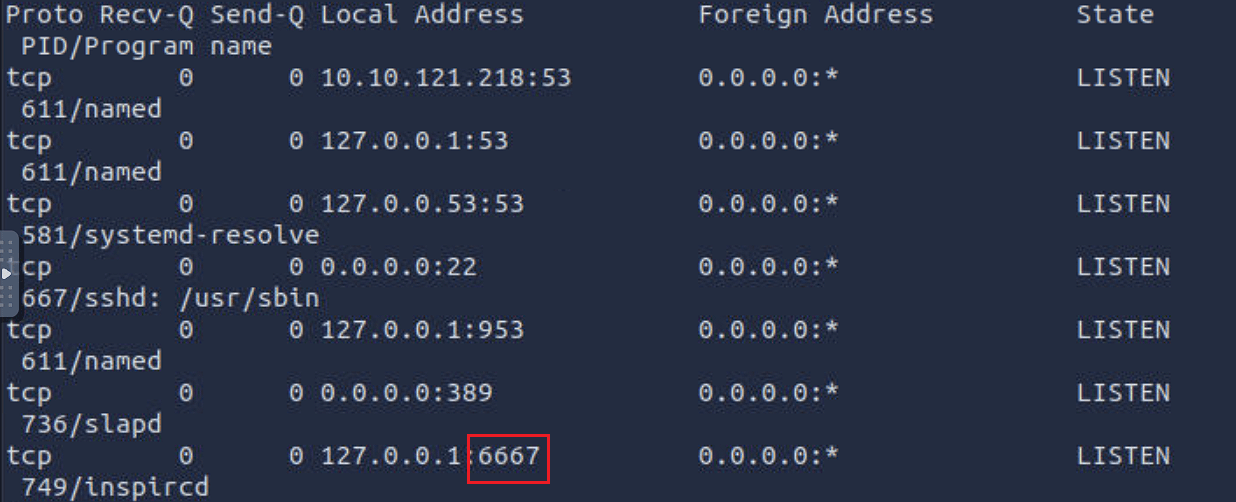
6667
What is the program name of the service listening on it?
侦听它的服务的程序名称是什么?
inspircd
There is a script running in the background. Its name starts with THM. What is the name of the script?
有一个脚本在后台运行。它的名称以 THM 开头。脚本的名称是什么?
ps -ef | grep THM
Windows Enumeration

In this task, we assume you have access to cmd on a Microsoft Windows host. You might have gained this access by exploiting a vulnerability and getting a shell or a reverse shell. You may also have installed a backdoor or set up an SSH server on a system you exploited. In all cases, the commands below require cmd to run.
在此任务中,我们假定您有权 cmd 访问 Microsoft Windows 主机。您可能已通过利用漏洞并获取 shell 或反向 shell 获得了此访问权限。您可能还在利用的系统上安装了后门程序或设置了 SSH 服务器。在所有情况下,都需要运行以下 cmd 命令。
In this task, we focus on enumerating an MS Windows host. For enumerating MS Active directory, you are encouraged to check the Enumerating Active Directory↗ room. If you are interested in a privilege escalation on an MS Windows host, we recommend the Windows Privesc 2.0↗ room.
在此任务中,我们重点枚举 MS Windows 主机。要枚举 MS Active Directory,建议您选中枚举 Active Directory 房间。如果您对 MS Windows 主机上的权限升级感兴趣,我们建议使用 Windows Privesc 2.0 协作室。
We recommend that you click “Start AttackBox” and “Start Machine” so that you can experiment and answer the questions at the end of this task.
建议您单击“启动 AttackBox”和“启动机器”,以便您可以在此任务结束时进行实验并回答问题。
System 系统
One command that can give us detailed information about the system, such as its build number and installed patches, would be systeminfo. In the example below, we can see which hotfixes have been installed.
可以向我们提供有关系统的详细信息(例如其内部版本号和已安装的补丁)的一个命令是 systeminfo 。在下面的示例中,我们可以看到安装了哪些修补程序。
Terminal 终端
C:\>systeminfo
Host Name: WIN-SERVER-CLIOS Name: Microsoft Windows Server 2022 StandardOS Version: 10.0.20348 N/A Build 20348OS Manufacturer: Microsoft Corporation[...]Hotfix(s): 3 Hotfix(s) Installed. [01]: KB5013630 [02]: KB5013944 [03]: KB5012673Network Card(s): 1 NIC(s) Installed. [01]: Intel(R) 82574L Gigabit Network Connection[...]You can check installed updates using wmic qfe get Caption,Description. This information will give you an idea of how quickly systems are being patched and updated.
您可以使用 检查已安装的 wmic qfe get Caption,Description 更新。此信息将使您了解系统修补和更新的速度。
Terminal 终端
You can check the installed and started Windows services using net start. Expect to get a long list; the output below has been snipped.
您可以使用 检查已安装和启动的 net start Windows 服务。期待得到一个长长的名单;下面的输出已被截取。
Terminal 终端
If you are only interested in installed apps, you can issue wmic product get name,version,vendor. If you run this command on the attached virtual machine, you will get something similar to the following output.
如果您只对已安装的应用程序感兴趣,则可以发出 wmic product get name,version,vendor .如果在连接的虚拟机上运行此命令,则会获得类似于以下输出的内容。
Terminal 终端
Users 用户
To know who you are, you can run whoami; moreover, to know what you are capable of, i.e., your privileges, you can use whoami /priv. An example is shown in the terminal output below.
要知道你是谁,你可以跑 whoami ;此外,要了解您的能力,即您的特权,您可以使用 whoami /priv .下面的终端输出中显示了一个示例。
Terminal 终端
Moreover, you can use whoami /groups to know which groups you belong to. The terminal output below shows that this user belongs to the NT AUTHORITY\Local account and member of Administrators group among other groups.
此外,您可以使用 whoami /groups 它来了解您属于哪些组。下面的终端输出显示此用户属于 NT AUTHORITY\Local account and member of Administrators group 其他组。
Terminal 终端
You can view users by running net user.
您可以通过运行 net user 来查看用户。
Terminal 终端
You can discover the available groups using net group if the system is a Windows Domain Controller or net localgroup otherwise, as shown in the terminal below.
您可以使用 net group 系统是 Windows 域控制器还是 net localgroup 其他方式来发现可用的组,如下面的终端所示。
Terminal 终端
You can list the users that belong to the local administrators’ group using the command net localgroup administrators.
您可以使用命令 net localgroup administrators 列出属于本地管理员组的用户。
Terminal 终端
Use net accounts to see the local settings on a machine; moreover, you can use net accounts /domain if the machine belongs to a domain. This command helps learn about password policy, such as minimum password length, maximum password age, and lockout duration.
用于 net accounts 查看计算机上的本地设置;此外,如果计算机属于域,则可以使用 net accounts /domain 。此命令有助于了解密码策略,例如最小密码长度、最长密码期限和锁定持续时间。
Networking 联网
You can use the ipconfig command to learn about your system network configuration. If you want to know all network-related settings, you can use ipconfig /all. The terminal output below shows the output when using ipconfig. For instance, we could have used ipconfig /all if we wanted to learn the DNS servers.
您可以使用该 ipconfig 命令了解您的系统网络配置。如果您想了解所有与网络相关的设置,可以使用 ipconfig /all .下面的终端输出显示了使用 ipconfig 时的输出。例如, ipconfig /all 如果我们想学习DNS服务器,我们可以使用。
Terminal 终端
On MS Windows, we can use netstat to get various information, such as which ports the system is listening on, which connections are active, and who is using them. In this example, we use the options -a to display all listening ports and active connections. The -b lets us find the binary involved in the connection, while -n is used to avoid resolving IP addresses and port numbers. Finally, -o display the process ID (PID).
在 MS Windows 上,我们可以用来 netstat 获取各种信息,例如系统正在侦听哪些端口、哪些连接处于活动状态以及谁在使用它们。在此示例中,我们使用这些选项 -a 来显示所有侦听端口和活动连接。这 -b 让我们可以找到连接中涉及的二进制文件,而 -n 用于避免解析 IP 地址和端口号。最后, -o 显示进程 ID (PID)。
In the partial output shown below, we can see that netstat -abno showed that the server is listening on TCP ports 22, 135, 445 and 3389. The processessshd.exe, RpcSs, and TermService are on ports 22, 135, and 3389, respectively. Moreover, we can see two established connections to the SSH server as indicated by the state ESTABLISHED.
在下面显示的部分输出中,我们可以看到 netstat -abno 服务器正在侦听 TCP 端口 22、135、445 和 3389。进程 sshd.exe 、 RpcSs 和 TermService 分别位于端口 22 、 135 和 3389 上。此外,我们可以看到两个已建立的与 SSH 服务器的连接,如 状态 ESTABLISHED 所示。
Terminal 终端
You might think that you can get an identical result by port scanning the target system; however, this is inaccurate for two reasons. A firewall might be blocking the scanning host from reaching specific network ports. Moreover, port scanning a system generates a considerable amount of traffic, unlike netstat, which makes zero noise.
您可能认为通过端口扫描目标系统可以获得相同的结果;但是,由于两个原因,这是不准确的。防火墙可能阻止扫描主机访问特定网络端口。此外,端口扫描系统会产生相当大的流量,这与零噪音不同 netstat 。
Finally, it is worth mentioning that using arp -a helps you discover other systems on the same LAN that recently communicated with your system. ARP stands for Address Resolution Protocol; arp -a shows the current ARP entries, i.e., the physical addresses of the systems on the same LAN that communicated with your system. An example output is shown below. This indicates that these IP addresses have communicated somehow with our system; the communication can be an attempt to connect or even a simple ping. Note that 10.10.255.255 does not represent a system as it is the subnet broadcast address.
最后,值得一提的是,使用 arp -a 可以帮助您发现最近与您的系统通信的同一局域网上的其他系统。ARP 代表地址解析协议; arp -a 显示当前 ARP 条目,即与您的系统通信的同一 LAN 上的系统的物理地址。下面显示了一个示例输出。这表明这些 IP 地址已以某种方式与我们的系统进行通信;通信可以是连接的尝试,甚至是简单的ping。请注意,这并不 10.10.255.255 代表系统,因为它是子网广播地址。
Terminal 终端
Start the attached MS Windows Server if you have not done so already, as you need it to answer the questions below. You can connect to the MS Windows VM via SSH from the AttackBox, for example, using ssh user@10.10.121.218 where the login credentials are:
如果您尚未启动附加的 MS Windows Server,因为您需要它来回答以下问题。例如,您可以从 AttackBox 通过 SSH 连接到 MS Windows VM,使用 ssh user@10.10.121.218 登录凭据所在的位置:
- Username: user 用户名: user
- Password: THM3388
C:\>wmic qfe get Caption,DescriptionCaption Descriptionhttp://support.microsoft.com/?kbid=5013630 Updatehttps://support.microsoft.com/help/5013944 Security Update UpdateC:\>net startThese Windows services are started:
Base Filtering Engine Certificate Propagation Client License Service (ClipSVC) COM+ Event System Connected User Experiences and Telemetry CoreMessaging Cryptographic Services DCOM Server Process Launcher DHCP Client DNS Client[...] Windows Time Windows Update WinHTTP Web Proxy Auto-Discovery Service Workstation
The command completed successfully.C:\>wmic product get name,version,vendorName Vendor VersionMicrosoft Visual C++ 2019 X64 Minimum Runtime - 14.28.29910 Microsoft Corporation 14.28.29910[...]Microsoft Visual C++ 2019 X64 Additional Runtime - 14.28.29910 Microsoft Corporation 14.28.29910C:\>whoamiwin-server-cli\strategos
> whoami /priv
PRIVILEGES INFORMATION----------------------
Privilege Name Description State========================================= ================================================================== =======SeIncreaseQuotaPrivilege Adjust memory quotas for a process EnabledSeSecurityPrivilege Manage auditing and security log EnabledSeTakeOwnershipPrivilege Take ownership of files or other objects Enabled[...]C:\>whoami /groups
GROUP INFORMATION-----------------
Group Name Type SID Attributes============================================================= ================ ============ ===============================================================Everyone Well-known group S-1-1-0 Mandatory group, Enabled by default, Enabled groupNT AUTHORITY\Local account and member of Administrators group Well-known group S-1-5-114 Mandatory group, Enabled by default, Enabled groupBUILTIN\Administrators Alias S-1-5-32-544 Mandatory group, Enabled by default, Enabled group, Group owner[...]C:\>net user
User accounts for \\WIN-SERVER-CLI
-------------------------------------------------------------------------------Administrator DefaultAccount Guestmichael peter strategosWDAGUtilityAccountThe command completed successfully.C:\>net localgroup
Aliases for \\WIN-SERVER-CLI
-------------------------------------------------------------------------------*Access Control Assistance Operators*Administrators*Backup Operators*Certificate Service DCOM Access*Cryptographic Operators*Device Owners[...]C:\>net localgroup administratorsAlias name administratorsComment Administrators have complete and unrestricted access to the computer/domain
Members
-------------------------------------------------------------------------------AdministratormichaelpeterstrategosThe command completed successfully.C:\>ipconfig
Windows IP Configuration
Ethernet adapter Ethernet0:
Connection-specific DNS Suffix . : localdomain Link-local IPv6 Address . . . . . : fe80::3dc5:78ef:1274:a740%5 IPv4 Address. . . . . . . . . . . : 10.20.30.130 Subnet Mask . . . . . . . . . . . : 255.255.255.0 Default Gateway . . . . . . . . . : 10.20.30.2C:\>netstat -abno
Active Connections
Proto Local Address Foreign Address State PID TCP 0.0.0.0:22 0.0.0.0:0 LISTENING 2016 [sshd.exe] TCP 0.0.0.0:135 0.0.0.0:0 LISTENING 924 RpcSs [svchost.exe] TCP 0.0.0.0:445 0.0.0.0:0 LISTENING 4 Can not obtain ownership information TCP 0.0.0.0:3389 0.0.0.0:0 LISTENING 416 TermService [svchost.exe][...] TCP 10.20.30.130:22 10.20.30.1:39956 ESTABLISHED 2016 [sshd.exe] TCP 10.20.30.130:22 10.20.30.1:39964 ESTABLISHED 2016 [sshd.exe][...]C:\>arp -a
Interface: 10.10.204.175 --- 0x4 Internet Address Physical Address Type 10.10.0.1 02-c8-85-b5-5a-aa dynamic 10.10.16.117 02-f2-42-76-fc-ef dynamic 10.10.122.196 02-48-58-7b-92-e5 dynamic 10.10.146.13 02-36-c1-4d-05-f9 dynamic 10.10.161.4 02-a8-58-98-1a-d3 dynamic 10.10.217.222 02-68-10-dd-be-8d dynamic 10.10.255.255 ff-ff-ff-ff-ff-ff staticAnswer the questions below
回答以下问题
What is the full OS Name?
完整的操作系统名称是什么?
Microsoft Windows Server 2019 Datacenter
What is the OS Version?
什么是操作系统版本?
10.0.17763
How many hotfixes are installed on this MS Windows Server?
此 MS Windows Server 上安装了多少个修补程序?
30
What is the lowest TCP port number listening on the system?
侦听系统上的最低 TCP 端口号是多少?
22
What is the name of the program listening on that port?
侦听该端口的程序的名称是什么?
sshd.exe
DNS, SMB, and SNMP
As we cover enumeration, it is a good idea to touch on DNS, SMB, and SNMP.
当我们介绍枚举时,最好介绍一下 DNS、SMB 和 SNMP。
DNS
We are all familiar with Domain Name System (DNS) queries where we can look up A, AAAA, CName, and TXT records, among others. If you want to brush up on your DNS knowledge, we suggest you visit the DNSin Detail↗ room. If we can get a “copy” of all the records that a DNS server is responsible for answering, we might discover hosts we didn’t know existed.
我们都熟悉域名系统 (DNS) 查询,我们可以在其中查找 A、AAAA、CName 和 TXT 记录等。如果您想复习DNS知识,我们建议您访问DNS详细信息房间。如果我们可以获得DNS服务器负责应答的所有记录的“副本”,我们可能会发现我们不知道存在的主机。
One easy way to try DNS zone transfer is via the dig command. If you want to learn more about dig and similar commands, we suggest checking the Passive Reconnaissance↗ room. Depending on the DNS server configuration, DNS zone transfer might be restricted. If it is not restricted, it should be achievable using dig -t AXFR DOMAIN_NAME @DNS_SERVER. The -t AXFR indicates that we are requesting a zone transfer, while @ precedes the DNS_SERVER that we want to query regarding the records related to the specified DOMAIN_NAME.
尝试DNS区域传输的一种简单方法是通过 dig 命令。如果您想了解有关和类似命令的更多信息 dig ,我们建议您查看被动侦察室。根据 DNS 服务器配置,DNS 区域传输可能会受到限制。如果它不受限制,它应该可以使用 dig -t AXFR DOMAIN_NAME @DNS_SERVER 来实现。表示 -t AXFR 我们正在请求区域传输,而 @ 在 DNS_SERVER 要查询与指定 DOMAIN_NAME .
SMB
Server Message Block (SMB) is a communication protocol that provides shared access to files and printers. We can check shared folders using net share. Here is an example of the output. We can see that C:\Internal Files is shared under the name Internal.
服务器消息块 (SMB) 是一种通信协议,提供对文件和打印机的共享访问。我们可以使用 net share .下面是输出的示例。我们可以看到它 C:\Internal Files 以 Internal 的名义共享。
Terminal 终端
user@TryHackMe$ net share
Share name Resource Remark
-------------------------------------------------------------------------------C$ C:\ Default shareIPC$ Remote IPCADMIN$ C:\Windows Remote AdminInternal C:\Internal Files Internal DocumentsUsers C:\UsersThe command completed successfully.SNMP SNMP的
Simple Network Management Protocol (SNMP) was designed to help collect information about different devices on the network. It lets you know about various network events, from a server with a faulty disk to a printer out of ink. Consequently, SNMP can hold a trove of information for the attacker. One simple tool to query servers related to SNMP is snmpcheck. You can find it on the AttackBox at the /opt/snmpcheck/ directory; the syntax is quite simple: /opt/snmpcheck/snmpcheck.rb 10.10.8.89 -c COMMUNITY_STRING.
简单网络管理协议 (SNMP) 旨在帮助收集有关网络上不同设备的信息。它可以让您了解各种网络事件,从磁盘故障的服务器到墨水不足的打印机。因此,SNMP可以为攻击者保存大量信息。查询与SNMP相关的服务器的一个简单工具是 snmpcheck 。您可以在 AttackBox /opt/snmpcheck/ 目录中找到它;语法很简单: /opt/snmpcheck/snmpcheck.rb 10.10.8.89 -c COMMUNITY_STRING .
If you would like to install snmpcheck on your local Linux box, consider the following commands.
如果要在本地 Linux 机器上安装 snmpcheck ,请考虑以下命令。
Terminal 终端
Ensure that you are running the MS Windows Server machine from Task 4 and answer the following questions.
确保您从任务 4 运行 MS Windows Server 计算机并回答以下问题。
git clone https://gitlab.com/kalilinux/packages/snmpcheck.gitcd snmpcheck/gem install snmpchmod +x snmpcheck-1.9.rbAnswer the questions below
回答以下问题
Knowing that the domain name on the MS Windows Server of IP 10.10.8.89 is redteam.thm, use dig to carry out a domain transfer. What is the flag that you get in the records?
知道 MS Windows Server 上的域名 10.10.8.89 是 redteam.thm ,用于 dig 进行域名转移。您在记录中得到的标志是什么?
dig -t AXFR redteam.thm @10.10.198.117
THM{DNS_ZONE}
What is the name of the share available over SMB protocol and starts with THM?
通过 SMB 协议可用且以 ? 开头的 THM 共享的名称是什么?
#在Windows目标机器上执行以下命令(此处需要在攻击机上使用ssh登录到目标机器)net shareTHM{829738}
Knowing that the community string used by the SNMP service is public, use snmpcheck to collect information about the MS Windows Server of IP 10.10.198.117. What is the location specified?
知道SNMP服务使用的社区字符串是 public ,用于 snmpcheck 收集有关IP 10.10.198.117 的MS Windows Server的信息。指定的位置是什么?
假设我们已经知道当前系统中的SNMP服务使用的community string是public,我们现在将使用snmpcheck来收集Windows Server机器的有关信息:
#在攻击机上执行以下命令,可能需要先安装snmpcheck#/opt/snmpcheck/snmpcheck.rb MACHINE_IP -c COMMUNITY_STRING/opt/snmpcheck/snmpcheck.rb 10.10.1.133 -c public #指定目标机器ip地址
#或者使用snmpwalk -v2c -c public 10.10.1.133
#还可以使用msf中的 auxiliary/scanner/snmp/snmp_enum 模块